
MCP Manager MCP server
Commit Oct 26, 2026Manages MCP server inventories and automatically synchronizes configurations across multiple AI clients like Claude Code and VS Code.
Also known as oh-codes/mcp-manager
- Stars
- 0
- Tools
- —
- Downloads, 30 days
- —
- Latest version
- —
- Last commit
- Oct 26, 2026
- License
- MIT
What is MCP Manager MCP?
MCP Manager manages MCP server inventories and automatically synchronizes configurations across multiple AI clients like Claude Code and VS Code.
Summary generated from the project's README
About MCP Manager MCP server
Windows developers can centralize their MCP server management through a single local inventory instead of manually updating individual configurations for every AI client. This tool acts as a central source of truth, automatically translating your server list into the specific formats required by clients like Claude Code, VS Code, opencode, and Unsloth Studio. By using a plugin system, it ensures that each client receives only the specific servers you designate, which helps conserve context when using smaller local models.
The manager operates as a native Windows application that runs in the system tray and communicates via 127.0.0.1. It includes a concierge feature that monitors host programs like Chrome or ComfyUI. If an AI client requests a tool that requires a stopped service, the manager automatically starts the necessary program before forwarding the request. This setup uses a web dashboard at port 5000 for easy configuration of your services and inventory without needing to edit complex JSON files manually.
What you can do with it
- 1Synchronize multiple AI clientsDistribute a unified list of MCP servers to various tools like VS Code and Claude Code simultaneously.
- 2Automate service startupEnsure required host applications are running before an AI agent attempts to use their tools.
- 3Optimize local model contextRestrict specific servers to certain clients to prevent overwhelming small models with unnecessary tools.
- 4Import existing configurationsScan your current AI client settings to build a new centralized inventory without losing data.
Written from the project's README. Every use case is checked against a quote from it.
Configuration
DCC_MCP_GATEWAY_PORT
| Name | Description | |
|---|---|---|
| DCC_MCP_GATEWAY_PORT | — |
README
View on GitHubMCP Manager
A local, native, Docker-free tool that owns three jobs which are really one:
- Declare an MCP server once — in one inventory, not in four clients' configs.
- Write it into each client's own format. Claude Code, opencode, VS Code, AJEAN, Antigravity, Unsloth Studio … each is different. A plugin per client translates; adding a client means adding a file.
- Start what it needs, when it is needed. The manager is the transport, so a request that finds ComfyUI or Chrome stopped starts it first, then forwards.
Everything runs on the host, in the tray. Nothing listens on the network — only 127.0.0.1.
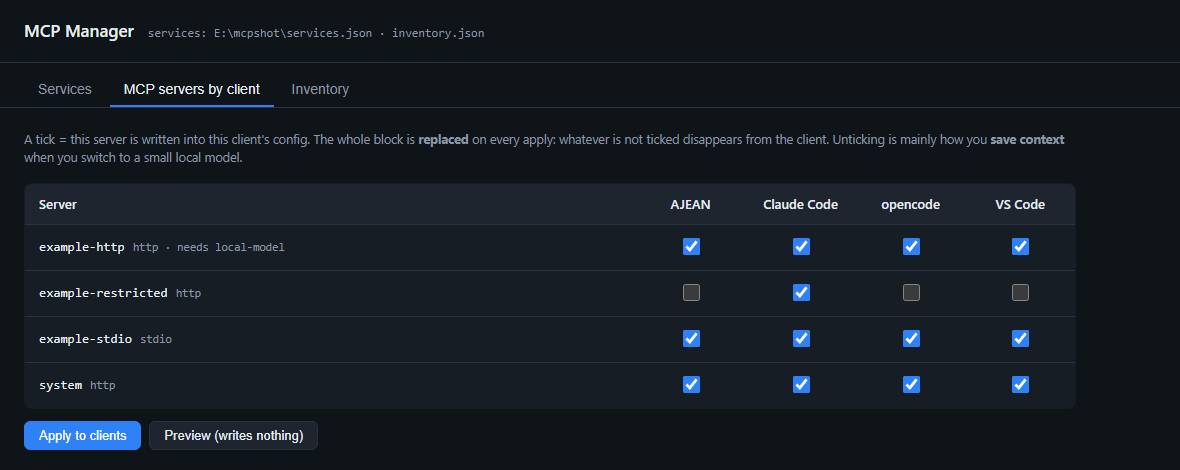
The matrix is the point. A tick means that server is written into that client's config; the whole
block is replaced on every apply, so unticking is how you take a server away. example-restricted
above is given to Claude Code only — that is how you save context on a small local model.
                 ┌──────────────┐
   inventory.json│   MANAGER    │  services.json
   (MCP servers) │  :5000 web   │  (host programs)
        │        │  /mcp proxy  │        │
        │        └──────┬───────┘        │
        │               │                │
   plugins/*.json ──────┤                └── probe / start / stop
   (one per client)     │
        │               │
   ┌────▼────┐  ┌───────▼──┐  ┌────────┐  ┌───────┐  ┌─────────┐
   │ Claude  │  │ opencode │  │ VS Code│  │ AJEAN │  │ Unsloth │
   └─────────┘  └──────────┘  └────────┘  └───────┘  └─────────┘
Quick start
go build -o mcp-manager.exe .
go build -o mcp-manager-tray.exe -ldflags "-H=windowsgui" .

mcp-manager-tray.exe            # tray icon; brings up the web UI on 127.0.0.1:5000
Then right-click the tray icon → Open the dashboard
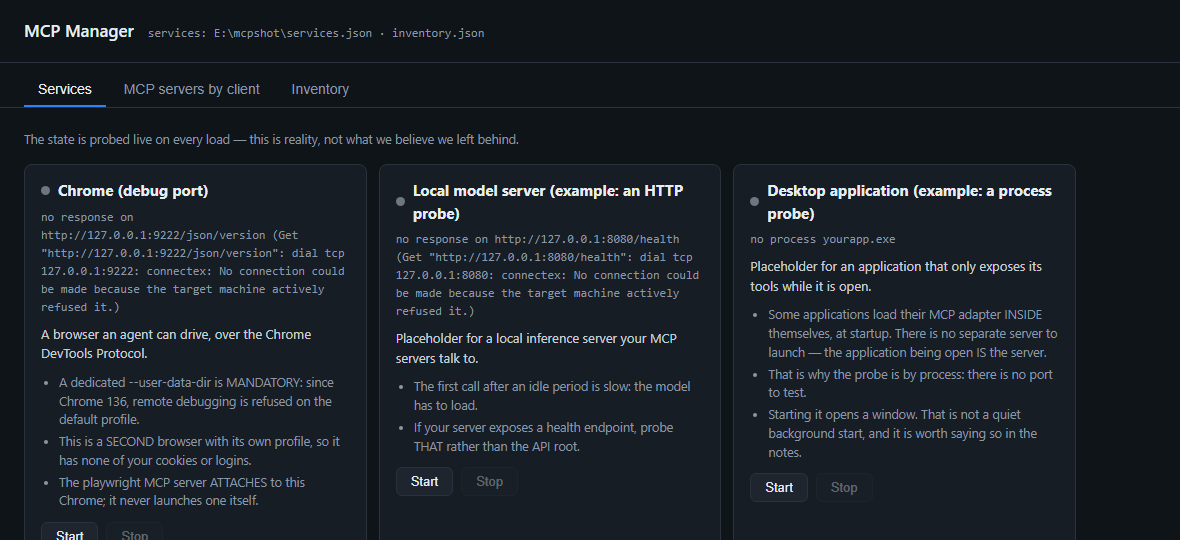
Services are the host programs the MCP servers depend on. The state shown is probed at the moment you load the page — reality, not what we believe we left behind.
First run
There is no services.json or inventory.json in this repository, and that is deliberate: both
describe one machine — your ComfyUI path, your Blender, your browser profile. They are a map of
a computer, useless to anyone else.
Instead the repository ships services.example.json and inventory.example.json, and on first
launch the manager copies them into place and starts. You get a running program with three
placeholder services and four placeholder servers to edit, rather than an error about a file you
have never heard of.
services.json     ← copied from services.example.json   (yours; git-ignored)
inventory.json    ← copied from inventory.example.json  (yours; git-ignored)
Edit them, or edit the inventory from the web UI. Neither is ever committed.
Windows only. The manager starts and stops native programs, drives the tray, and speaks to the Chrome DevTools Protocol — it is built for Windows and does not pretend otherwise.
mcp-manager.exe list           # the host programs and their live state
mcp-manager.exe start <id>     # start one, wait for its probe
mcp-manager.exe apply          # DRY RUN — shows exactly what would be written, changes nothing
mcp-manager.exe apply --write  # writes it, after a timestamped backup
mcp-manager.exe import         # DRY RUN — the servers your clients already have, that the inventory lacks
mcp-manager.exe import --write # adds them to inventory.json, after a timestamped backup
apply without --write is the one to reach for first: it prints the exact JSON block per client
(or the exact HTTP calls, for a client configured over an API) and touches nothing.
import is its mirror, for the other direction. A first apply replaces each client's MCP block with
the inventory, so anything you had configured before the manager existed would be lost — import
reads what your clients already hold and offers it as inventory entries. It recognises the manager's
own entries (the proxy base and everything routed through it) and skips them, so you only ever see
genuinely foreign servers. A name that already exists in the inventory is reported and never
overwritten: the inventory is the source of truth. Add --write to add the new ones; fill in each
server's why afterwards — that field is the first thing an agent reads, and a client's config has
nowhere to keep it.
The two files that matter
Both live next to the executable — resolved absolutely, because a process started by a shortcut, WMI or the Task Scheduler does not have the app folder as its working directory.
Both are yours, not the repository's. The .example.json twins are what gets committed; the
manager copies them on first run and you edit the real ones.
services.json — the HOST programs
How to probe, start and stop each one, plus why it exists and its traps. The engine knows no service in particular; it only reads this file.
{
  "id": "chrome-cdp",
  "label": "Chrome (debug port)",
  "why": "The VISIBLE browser that agents drive.",
  "notes": ["A dedicated --user-data-dir is MANDATORY: since Chrome 136 remote debugging is refused on the default profile."],
  "requires": [],
  "start": { "exe": "C:\\Program Files\\Google\\Chrome\\Application\\chrome.exe", "args": ["--remote-debugging-port=5003"] },
  "stop":  { "process": "chrome.exe", "only_if_cmdline_matches": "chrome-cdp" },
  "probe": { "http": "http://127.0.0.1:5003/json/version" }
}
only_if_cmdline_matches is why stopping "the debug Chrome" does not close your own browser.
Edit the file and press Re-read files in the UI — no restart.
start.env adds extra environment variables to the program the manager launches. It exists for
programs that take a setting only from the environment and have no flag for it — declare it
here rather than in a shell profile, or the setting depends on whichever shell happened to start
the manager and the same manifest behaves differently depending on who launched it. The child still
inherits the manager's own environment (PATH included); these are additions, never a replacement.
"start": { "exe": "…\\blender.exe", "env": { "DCC_MCP_GATEWAY_PORT": "5004" } }
inventory.json — the MCP SERVERS
{
  "servers": {
    "vision": {
      "transport": "http",                 // "stdio" | "http"
      "url": "http://127.0.0.1:5002/mcp",
      "why": "Analyses a local image.",
      "notes": ["The first call after an idle period reloads the engine: 20–30 s."],
      "needs_service": "vision",           // tie-in to the concierge
      "clients": ["claude-code"]           // optional; ABSENT = all clients
    }
  }
}
clients is the whole point of the matrix: absent = everyone, [] = nobody, a list = only
those. The distinction is load-bearing — without it, "uncheck everything for this client" would
be read back as "everyone", exactly the opposite.
The rule that governs everything
Only an incoming request may start a service. Never a timer, never a startup.
Enforced in code, not by convention (ensureUpstream(ctx, mayStart bool) — a real tool call passes
true, the connection pre-heat passes false). An earlier version got this wrong, and merely
launching the manager started ComfyUI — nine processes — and Chrome.
What the proxy forwards
/mcp/<name> is meant to be protocol-equivalent to a direct connection: the same
initialize.instructions, tools/list, prompts/list, resources/list,
resources/templates/list, and the same prompts/get / resources/read results. The tool list
and the rest of the feature set are cached on disk (cache/<name>.tools.json,
cache/<name>.features.json).
It does not forward completions, logging, resource subscriptions, sampling, elicitation
or */list_changed notifications. Roots are the one deliberate exception, and only in the
direction that matters: on a call, the proxy reads the calling session's workspace
(roots/list) and hands that single file: URI to the upstream before it connects — so a
server like playwright writes its output into the caller's project instead of the manager's
working directory. A caller that declares no roots changes nothing. See
PROXY_CONFORMANCE.md for the invariant, the incident that exposed it,
and the exact list.
Where to read what
| File | For |
|---|---|
| API.md | the HTTP API, the MCP surface, the CLI, and the /mcp/<name> proxy |
| PROXY_CONFORMANCE.md | the proxy's conformance invariant — read before changing proxy.go or adding an MCP primitive |
| PLUGINS.md | the plugin format, every field, both writers, and how to add a client |
| INSTRUCTIONS.md | the canonical behavioural rules for every harness — synced by apply, served at /api/instructions, shown on the Instructions tab |
| PLAN.md | the plan and the running log — what was built, what broke, what was measured |
services.json / inventory.json |
both carry a $comment block documenting their own fields |
Gotchas, learned the hard way
- VS Code's
settings.jsonis JSONC — it contains//comments, soencoding/jsonrefuses it. Never point a plugin at it. The live file is%APPDATA%\Code\User\mcp.json. - opencode reads two merged files.
opencode.jsonis owned by OpenChamber and gets rewritten; the durable config islimits.json. A server removed fromlimits.jsonsurvives if it is also inopencode.json. opencode mcp listlies — it reported "No MCP servers configured" while the running server demonstrably had three connected. Trust the log, not that subcommand.- An HTTP probe can call a half-booted app "stopped." ComfyUI mid-launch has live processes and
nothing listening yet.
stoptherefore has a process arm too, and says so when it uses it: "stopped — 9 remaining processes eliminated (the probe already said it was "stopped")". ~/.claude.jsonis live state Claude Code writes to itself. If it ever rewrites that block, re-runmanager apply --write.- Never write a client's database directly. bbolt locks exclusively; if the client is running,
at best you block and at worst you corrupt it. Use its API — that is what
writer: "api"is for. - An application may not host its own MCP adapter. Blender loads
dcc-mcp-blenderinside itself, so opening Blender is opening the server and a process probe is the honest probe. ComfyUI does not: its adapter is a separate program that starts the shared gateway, so ComfyUI being up on 8188 says nothing about the endpoint on 5004. Wired by analogy, this fails as a refused connection on the endpoint's port — which reads like a broken endpoint, not a program nobody started. Two defences exist now:mcp-manager doctorwarns on the shape (it cannot tell the two apart, so it will not call it an error), andcold-ledger.jsonrecords whether the manager has ever brought that endpoint up. If it says never, the wiring has not been proven, however green it looks.
Not done yet
- Secrets. The inventory should never hold one — it should name an environment variable. Note
that VS Code has a stronger mechanism than
${env}: a top-levelinputsarray withpromptStringpassword: true, referenced as${input:id}, so the value never reaches a file. We already preserveinputsby writing only theserverskey. Not designed yet.
- Importing servers back from the clients. Today the direction is one-way: we tell them. This is real detection — reading what a client already has — as opposed to scanning the machine and guessing a config format, which I would argue against.
- Plugins view in the UI (see the descriptors; add a client from the page).
- Launch at logon via a scheduled task in the user's session — never a Windows service (session 0 has no desktop, so it could not open Chrome or ComfyUI).
MCP Manager MCP questions
Does this work on Linux or macOS?
No, this tool is built specifically for Windows and does not pretend otherwise.
How does the manager handle existing MCP server configurations?
You can use the import command to read servers your clients already have and add them to your central inventory without overwriting existing entries.
Will the manager start programs automatically on startup?
No, the manager follows a strict rule where only an incoming request can start a service, never a timer or startup process.
Is it safe to use with Docker?
The tool is designed to be a native, Docker-free solution that runs directly on your host machine.