
Tests MCP servers by simulating client interactions, validating tool schemas, and detecting breaking changes or protocol violations.
Also known as niksa90/toolmenu
- Stars
- 0
- Tools
- —
- Downloads, 30 days
- —
- Latest version
- 0.28.0
- Last commit
- Nov 15, 2026
- License
- MIT
What is toolmenu MCP?
toolmenu tests MCP servers by simulating client interactions, validating tool schemas, and detecting breaking changes or protocol violations.
Summary generated from the project's README
About toolmenu MCP server
Developers building Model Context Protocol servers can use toolmenu to simulate how real clients and agents interact with their tools. It validates tool schemas, checks protocol compliance, and identifies breaking changes that might cause an agent to lose access to tools or incur unexpected costs. By running without an LLM, it provides consistent, repeatable results that fit directly into continuous integration workflows.
The utility works with servers written in any language, connecting via stdio or HTTP. Users can run commands like snapshot to create a baseline menu or session to play through specific interaction scenarios. It specifically detects issues like tool lists that change mid-conversation, OAuth discovery errors, or tool counts that exceed client limits like the 128-tool cap in VS Code. It is designed to catch subtle regressions, such as a patch release making a previously optional parameter required.
What you can do with it
- 1Detecting breaking schema changesVerify if a new release introduces required parameters or narrowed types that will break existing client connections.
- 2Validating client compatibilityCheck if your server provides more tools than a specific client can handle.
- 3Preventing prompt cache missesEnsure your tool descriptions and lists remain stable so that client prompt caching remains effective.
- 4Automating regression testing in CIUse a baseline snapshot to automatically comment on pull requests when tool menus change.
Written from the project's README. Every use case is checked against a quote from it.
How to install toolmenu MCP
Formats verified 10 Nov 2026Add to CursorAdd to GooseInstall toolmenu MCP in Claude Code
$ claude mcp add toolmenu -- npx -y toolmenuInstall toolmenu MCP in Cursor
~/.cursor/mcp.json
{
  "mcpServers": {
    "toolmenu": {
      "command": "npx",
      "args": [
        "-y",
        "toolmenu"
      ]
    }
  }
}Install toolmenu MCP in VS Code
.vscode/mcp.json
{
  "servers": {
    "toolmenu": {
      "type": "stdio",
      "command": "npx",
      "args": [
        "-y",
        "toolmenu"
      ]
    }
  }
}Install toolmenu MCP in VS Code CLI
$ code --add-mcp '{"name":"toolmenu","type":"stdio","command":"npx","args":["-y","toolmenu"]}'Install toolmenu MCP in Claude Desktop
claude_desktop_config.json
{
  "mcpServers": {
    "toolmenu": {
      "command": "npx",
      "args": [
        "-y",
        "toolmenu"
      ]
    }
  }
}Install toolmenu MCP in Codex
$ codex mcp add toolmenu -- npx -y toolmenuInstall toolmenu MCP in Codex config.toml
~/.codex/config.toml
[mcp_servers.toolmenu]
command = "npx"
args = ["-y", "toolmenu"]
Install toolmenu MCP in Gemini CLI
$ gemini mcp add -s user toolmenu npx -- -y toolmenuInstall toolmenu MCP in Gemini settings.json
~/.gemini/settings.json
{
  "mcpServers": {
    "toolmenu": {
      "command": "npx",
      "args": [
        "-y",
        "toolmenu"
      ]
    }
  }
}Automated checks
Ran Nov 14, 2026Full report →Passed our automated checks. That is not a security audit: read the code and give the server the narrowest access it needs. How checks work

- Source repository linked and reachableniksa90/toolmenu is public and reachablegithub.com/niksa90/toolmenu ↗Pass
- Package names this repository as its sourcetoolmenu names niksa90/toolmenu as sourcenpmjs.com/package/toolmenu ↗Pass
- Build provenance (Sigstore attestation)Sigstore attestation for toolmenunpmjs.com/package/toolmenu/v/0.28.0#provenance ↗Pass
- Open source license (OSI)MITspdx.org/licenses/MIT.html ↗Pass
- Commit or release in the last yearLast commit or release 2026-11-13github.com/niksa90/toolmenu ↗Pass
- OpenSSF ScorecardNot checked
- Package name not close to a popular packageNo popular package one edit away from toolmenuPass
- No critical advisory in the package or its dependenciesthe package checked; no critical advisoryosv.dev ↗Pass
- No hidden instructions to the model0 tool descriptions and the README read; no override phrases, credential paths or hidden charactersPass
- Destructive tools are labelledNot checked
- Remote endpoint answers the MCP handshakeNot checked
README
View on GitHub







License
MIT
An MCP server can pass its own tests and still fail in the client. The client's SDK rejects a tool list the server's own test client accepted. A default built from the clock makes every listing different, so no prompt cache ever matches. A patch release makes a parameter required. None of it shows until someone's agent has fewer tools, or a bigger bill, and no error to explain it.
toolmenu does what a client does, in order, and checks each step against the spec, the tool's own schemas and each client's documented limits:
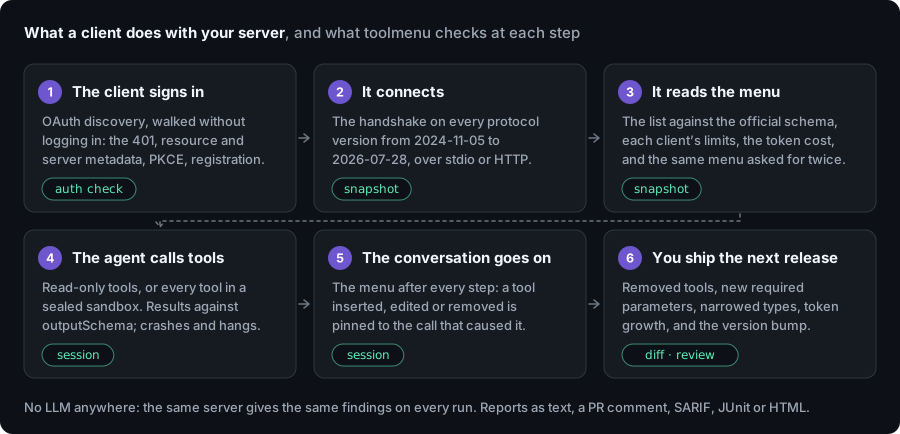
No LLM is involved, so the same server gives the same findings on every run and it fits in CI. It doesn't tell you whether an agent picks the right tool; that takes evals with a model (what it can't catch).
npx toolmenu snapshot -- node dist/server.js      # or: npx toolmenu snapshot https://example.com/mcp
npx toolmenu init -- node dist/server.js          # CI: a baseline, a workflow, a comment on every PR
Needs Node 22 or later. Your server can be in any language: toolmenu starts it (stdio) or connects to it (HTTP).
Contents: What it catches · A finding · In CI · Commands · Tested on real servers · What it can't catch · Docs
What it catches
Each row is something a run on real servers found (docs/FINDINGS.md has the versions and how to reproduce each).
| What goes wrong | Seen on | |
|---|---|---|
| Lists and results a client rejects | The official SDK client validates tools/list and every result. One bad schema and it drops the whole list; an answer that breaks the tool's own outputSchema becomes an error |
12 of 1,089 registry servers: 8 lose every tool, 4 lose answers |
| A menu that never matches twice | A default built from the clock, an order from a hash set, a container ID in a description. Every listing or every restart is a new menu, so cached prompts miss | PayPal (list_transactions dates), mcp-atlassian, Desktop Commander |
| A menu that changes mid-conversation | Most clients put tools first in the prompt, so a tool added by an "unlock" call means the conversation after it is processed again. 2026-07-28 rules per-connection menus out | One unlock re-processed 40–57K cached tokens in the author's own logs |
| Releases that break callers | Removed tools, new required parameters, narrowed types, a tool that became destructive, with the version bump the change needs | The official filesystem server made move_file destructive in a calendar release; Exa removed tools in patch releases |
| Sign-in a strict client can't finish | OAuth discovery that differs from the RFCs: a resource that isn't the server's URL, metadata that isn't there, PKCE not advertised |
12 of 79 vendor endpoints that answer 401 name a parent or slash-variant resource |
| Tools one client can't use | More tools than the client sends, names its API refuses or rewrites, descriptions cut before the instruction that matters | 6 servers in Docker's catalog list more than VS Code's 128 a request |
| Tokens spent on nothing | Unused $defs, the same schema block repeated across tools, growth per release |
Notion's server: the same 9 unused $defs in all 24 tools, 72% of its menu |
It also has heuristics for what agents misread (a parameter called just id, writes
with no annotations, two tools fighting over one word). Those are marked as guesses and
are never errors. Every rule is in docs/RULES.md.
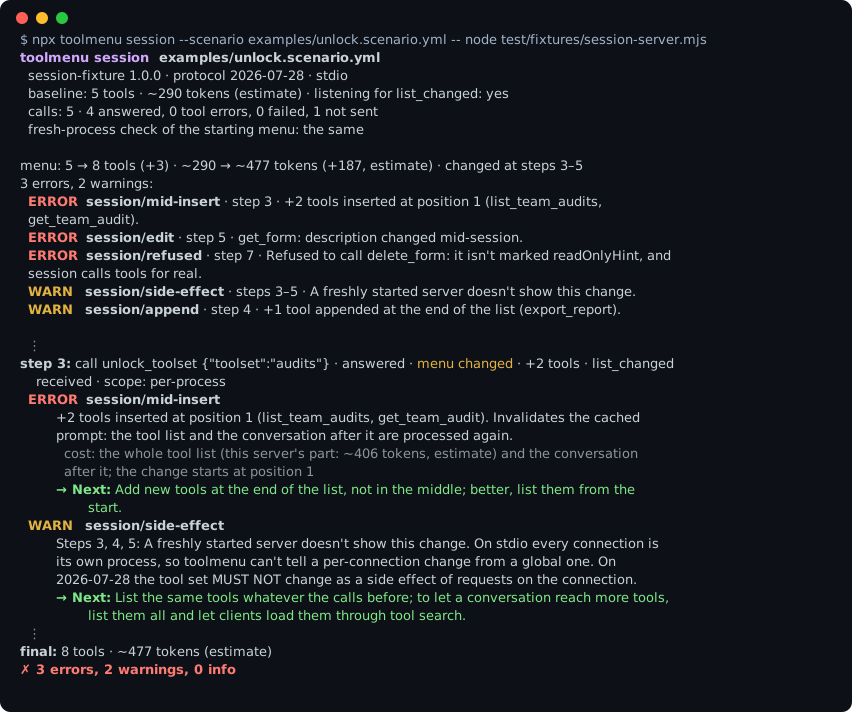
What a finding looks like
A server whose unlock_toolset tool adds two tools to the menu mid-conversation, run
with toolmenu session:
step 3: call unlock_toolset {"toolset":"audits"} · answered · menu changed · +2 tools · list_changed received
  ERROR  session/mid-insert
         +2 tools inserted at position 1 (list_team_audits, get_team_audit). Invalidates the cached prompt:
         the tool list and the conversation after it are processed again.
           cost: the whole tool list (this server's part: ~406 tokens, estimate) and the conversation after it
         → Next: Add new tools at the end of the list, not in the middle; better, list them from the start.
  WARN   session/unlock-coverage · unsure
         unlock_toolset looks like it unlocks tools, and the run got through 1 of its 2 toolset values. […]
           not unlocked: "reports"
         → Next: Unlock every value: session --init puts each one in the starter.
Every finding has the same parts: a level (ERROR, WARN, INFO; --fail-on
decides which fail the run), a rule id you can look up (toolmenu explain session/mid-insert) or turn off in the config, where it happened (the step, the
tool, the parameter path), what toolmenu saw, and a → Next: step.
How much to trust a finding depends on what it rests on, and the rule id's prefix says which:
| Rule family | What it rests on |
|---|---|
spec/, apps/, lists/schema |
The protocol: the official JSON schema for the server's version (pinned in schemas/), a MUST/SHOULD in the spec, or the MCP Apps extension |
diff/ |
Two menus compared. A breaking change is one where a call that passed validation before now fails it |
session/, menu/, lists/variance, auth/, catalog/ |
Behaviour toolmenu observed: the menu changing after a step, between two calls, between two processes or connections, or served to a bad credential. The finding names the step or the call |
naming/, ids/, description/, write/, search/ |
How agents read the menu: names, words, descriptions. Tuned on real servers, but heuristics |
A finding marked · unsure, in any family, rests on names and words rather than on
something toolmenu saw happen (above: "looks like it unlocks tools"). It says what was
seen, not what it means. No LLM is involved anywhere: the same server gives the same
findings on every run.
In CI: one PR comment
npx toolmenu init -- <your server command> snapshots the server into menu.json (the
baseline) and writes this workflow for your project (Node, Python, Go or Rust). Commit
both. Credentials you pass go into the workflow as ${{ secrets.… }}, never as text.
# .github/workflows/toolmenu.yml
on: pull_request
permissions:
  contents: read
  pull-requests: write
jobs:
  toolmenu:
    runs-on: ubuntu-latest
    steps:
      - uses: actions/checkout@v7
      - uses: actions/setup-node@v7
        with: { node-version: 22 }
      - run: npm ci && npm run build
      - uses: niksa90/toolmenu@v0.28.0
        with:
          command: node dist/server.js
          baseline: menu.json          # your committed snapshot
          scenario: scenario.yml       # optional: run a session too
Every pull request then gets one comment that updates on each push. It leads with a
verdict (can this menu replace the baseline as it is?), then the breaking changes, the
token change, the version bump the change needs, and anything session caught:
That's toolmenu review --format markdown on two real releases of the official
filesystem server. The same findings go to GitHub code scanning (SARIF), to GitLab,
Jenkins and others as JUnit, or into one offline HTML page:
Inputs, servers behind auth, forks and gate: review are in
docs/github-action.md; SARIF, JUnit, HTML and the badge in
docs/ci.md.
Commands
| Command | What it does | |
|---|---|---|
snapshot |
Connects, lists the menu, checks it (the spec, a second process, your client's limits, token cost) and writes menu.json |
docs |
session |
Plays a scenario, or builds one with --auto: calls tools, checks every result, and lists the menu after each step. Read-only tools unless you allow writes; --call-everything calls every tool, for a server in a sandbox |
docs |
diff |
Compares two menu files: breaking, minor, notice; token change; the semver bump | docs |
review |
Should the new menu replace the baseline? One verdict and an exit code | docs |
auth check |
Walks an HTTP server's OAuth discovery as a spec-following client does, without logging in | docs |
auth login |
Signs in to a server behind OAuth once, in a browser; snapshot and session then use that login |
docs |
scan |
snapshot on every server in a client config (Claude Desktop, .mcp.json, Cursor, VS Code), side by side |
docs |
history |
Installs a package's published versions one by one and diffs them. Runs third-party code: use a container | docs |
init |
Writes the baseline and the CI workflow | above |
mcp |
toolmenu as an MCP server and a Claude Code plugin, so the agent building your server can check it while it works | docs |
explain <rule> |
What a rule checks, its default level and how to change it | RULES |
--client <name> checks the menu for one client, from that client's own docs: Claude
Code, the Claude API, OpenAI, Codex, VS Code (Copilot Chat), Copilot cloud agent and code
review, Gemini CLI, the Gemini API or Antigravity (docs). A client
that doesn't document a limit doesn't get one: Cursor's and Windsurf's aren't checked.
session calls tools for real. Without allow_writes: true it refuses any tool not
marked readOnlyHint: true, and --call-everything is refused over HTTP, because a
hosted server's tools act on someone's real account.
Everything is also exported as a library, with types (docs). All protocol versions from 2024-11-05 to 2026-07-28 are supported, through the official TypeScript SDK; the table in docs/PROTOCOLS.md is written by a test that runs each one.
Tested on real servers
Rules are checked against public MCP servers before they ship, and a rule that changes
a finding on one has to say why in the changelog. The run on 2026-11-09
is the baseline for a weekly one (bench/scripts/weekly.sh),
which compares each week with the last:
| Panel | Servers | What ran |
|---|---|---|
| Registry stdio servers (npm), pinned versions | 1,089 | snapshot, session --auto, and every tool called in a container with no network and no credentials: 15,550 of 16,518 tools |
| Docker's MCP catalog, at the digests it pins | 237 | The same: 4,117 of 4,237 tools called (41 servers didn't list tools) |
| Servers vendors publish to run locally (GitHub, AWS Labs, Microsoft, PayPal, Stripe, Notion, HashiCorp, Grafana…) | 98 | The same, with dummy credentials: 2,213 of 2,292 tools called (20 didn't list tools) |
| Hosted servers: 109 vendor endpoints and a seeded 2,000 from the registry | 2,109 | snapshot, a read-only session --auto of at most 10 calls, auth check on each that answers 401 |
Read those numbers for what they are. Most servers pass most checks: about 1 in 90 of the registry's stdio servers fails in the official SDK client. A sealed container with made-up input shows whether a tool crashes, hangs or breaks its own schema, not whether it does its job: more than half of the calls there came back as a readable tool error, the right answer to made-up input or a dummy key. Hosted servers got a few read-only calls each.
The reference server, @modelcontextprotocol/server-everything, gets no false finding,
and a clean fixture server must get none from any command; the test suite fails if one
appears. What the runs found, including what toolmenu itself got wrong and how it was
fixed, is in docs/FINDINGS.md. The corpora, the scripts and the
datasets are in bench/.
What it can't catch
toolmenu sees what the server sends. Plenty of agent failures happen elsewhere:
- Whether the agent picks the right tool. That needs evals with a model. toolmenu
stays deterministic on purpose;
routes.ymlpins keyword routing, which is as far as it goes. - What the client does with the menu. Clients merge several servers, sort, filter
and cut. A stable server menu is necessary for cache hits, not sufficient. The
--clientprofiles cover what each client documents, and nothing it doesn't. - A feature with no tools. If the agent reaches for something your menu doesn't have, no menu check sees the gap.
- Whether a tool does its job. A call that answers is checked against the schema it declares, not against what it should have done.
- Security. It isn't a security scanner or a full conformance suite.
Token counts are estimates (o200k_base) of what the model reads: each tool's name,
description and input schema. Vendors tokenize, cache and bill differently.
Docs
- snapshot: rules, where the tokens go,
routes.yml, the config file,scan - session: scenarios,
--init,--auto,--call-everything, every session rule - diff, review, catalogs, history: how changes are classified, the verdicts, operations behind a search tool
- clients: what each
--clientprofile checks, and its sources - usage: HTTP and OAuth, proxies, the MCP server and plugin, the library, every option
- the GitHub Action and other CI output
- RULES, PROTOCOLS, FINDINGS, SPEC, CHANGELOG
About
Built by Nikša Perović while running a 115-tool MCP server and watching agents trip over its menu. It started as a check for menus that change at the wrong time (the story, and where it was wrong) and grew into a client-side test for the whole server as real servers kept failing in other places.
Found a false positive, or a failure toolmenu should catch?
Open an issue with the menu (a
menu.json is enough) and what you expected.
toolmenu MCP questions
How do I add toolmenu MCP to Claude Code?
Run claude mcp add toolmenu -- npx -y toolmenu in your terminal. Add --scope user to make it available in every project.
How do I add toolmenu MCP to Cursor?
Open ~/.cursor/mcp.json and add the server under mcpServers, using the Cursor config shown in the install section above.
Does toolmenu use an LLM for testing?
No, toolmenu does not use an LLM, ensuring that the same server produces the same findings on every run and making it suitable for CI environments.
What kind of errors can toolmenu catch?
It can detect tool lists that clients reject due to bad schemas, menus that change mid-conversation, breaking releases, and OAuth discovery issues.
Can I use toolmenu with servers written in different languages?
Yes, your server can be in any language as long as toolmenu can start it via stdio or connect to it via HTTP.
How does toolmenu integrate with CI/CD?
You can use the toolmenu GitHub Action to create a baseline snapshot and receive a single PR comment that summarizes breaking changes and token costs.