
Plancia MCP server
Commit Nov 9, 2026Organizes Claude Code and Codex sessions into a unified dashboard with project maps, task tracking, and spoken daily recaps.
Also known as nerln/plancia
- Stars
- 0
- Tools
- —
- Downloads, 30 days
- —
- Latest version
- —
- Last commit
- Nov 9, 2026
- License
- GPL-3.0
What is Plancia MCP?
Plancia organizes Claude Code and Codex sessions into a unified dashboard with project maps, task tracking, and spoken daily recaps.
Summary generated from the project's README
About Plancia MCP server
Organizing Claude Code and Codex sessions into a unified dashboard is what Plancia enables for developers working with AI agents. It aggregates data from local files, including Claude memory, GitHub commits, and local git branches, to create a visual project map where notes appear as nodes and connections are shown as ribbons. This tool helps users track what to do next by providing a single row per project and a spoken daily recap to summarize progress.
Users can run this locally on macOS, Windows, or Linux using Python 3.9+ and their existing Claude or Codex subscriptions. On macOS, it provides a native SwiftUI app with Liquid Glass materials, while Windows and Linux users access a browser-based dashboard. The system is local-first with no telemetry or external accounts required. It includes a specialized MCP server protected by a sentinel process to ensure that database writes are not duplicated if a crash occurs during a task.
What you can do with it
- 1Summarize daily progressAn AI client can provide a spoken recap of the day to highlight important tasks.
- 2Resume interrupted coding sessionsA user can quickly reopen a specific conversation that generated a pending task.
- 3Sync Claude Code with project contextDevelopers can use the briefing skill to link their current working folder to a specific project context.
Written from the project's README. Every use case is checked against a quote from it.
Automated checks
Ran Nov 15, 2026Full report →Not verified yet. A server needs a score of 80, no serious finding, and enough data for us to check. How checks work · What to fix for more points

- Source repository linked and reachablenerln/plancia is public and reachablegithub.com/nerln/plancia ↗Pass
- Package names this repository as its sourceNot checked
- Build provenance (Sigstore attestation)Not checked
- Open source license (OSI)GPL-3.0spdx.org/licenses/GPL-3.0.html ↗Pass
- Commit or release in the last yearLast commit or release 2026-11-09github.com/nerln/plancia ↗Pass
- OpenSSF ScorecardNot checked
- Package name not close to a popular packageNot checked
- No critical advisory in the package or its dependenciesNot checked
- No hidden instructions to the model0 tool descriptions and the README read; no override phrases, credential paths or hidden charactersPass
- Destructive tools are labelledNot checked
- Remote endpoint answers the MCP handshakeNot checked
README
View on GitHubPlancia

Claude Code and Codex already write down everything they do, in files on your disk. Nothing reads them together. Plancia does: one row per project tells you what to do next, Resume reopens the conversation that wrote the task, and a spoken recap of the day closes with what is worth doing. The rest stays folded, one click away.
Website: plancia.
Local-first: no telemetry, no account, no server of ours. The only thing that
goes out is the work you explicitly hand to an agent, and it goes through the
claude or codex command already on your machine, under your own
subscription. No dependencies to install: Python 3 and its standard library,
Swift for the app.
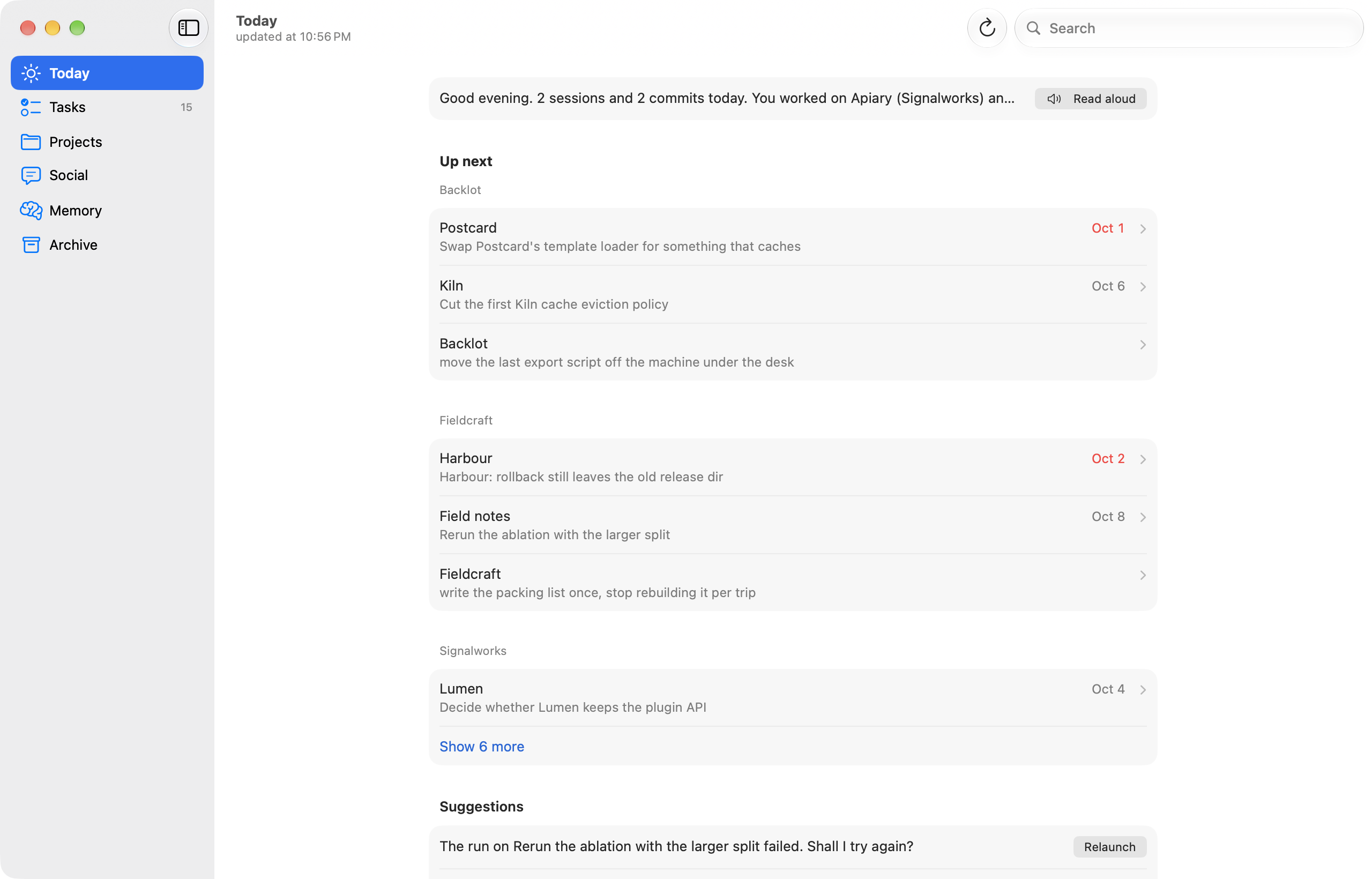
Every screenshot in this README is the app running on the demonstration archive
(tools/demo-data.py), never on anyone's real data.
The Mac app
Plancia 2.0 is a native SwiftUI app for macOS 26 or later: the system controls and the Liquid Glass materials, a sidebar with six sections, the system search field in the toolbar and an inspector on the right. No logo, no web page inside a window.
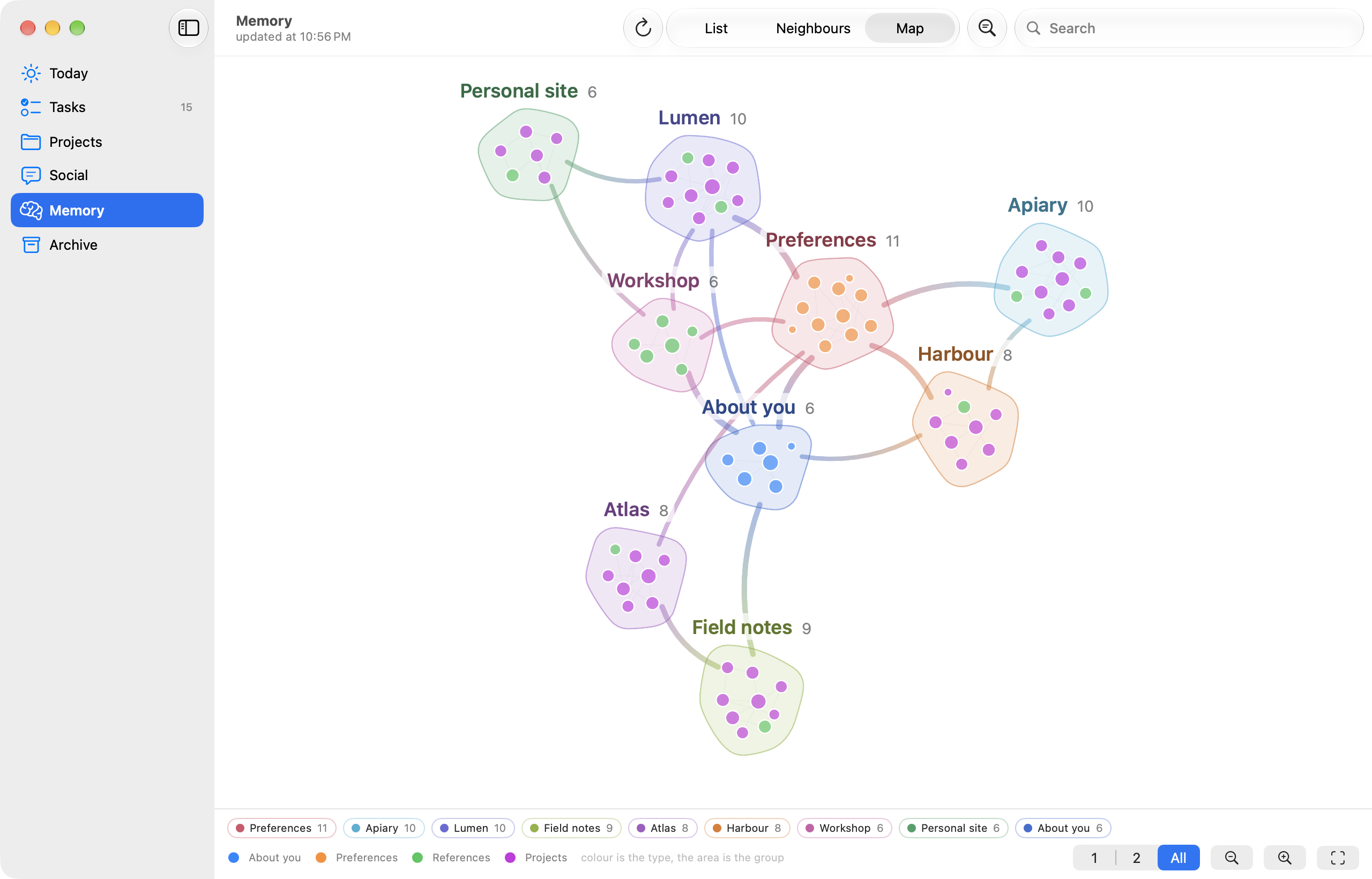
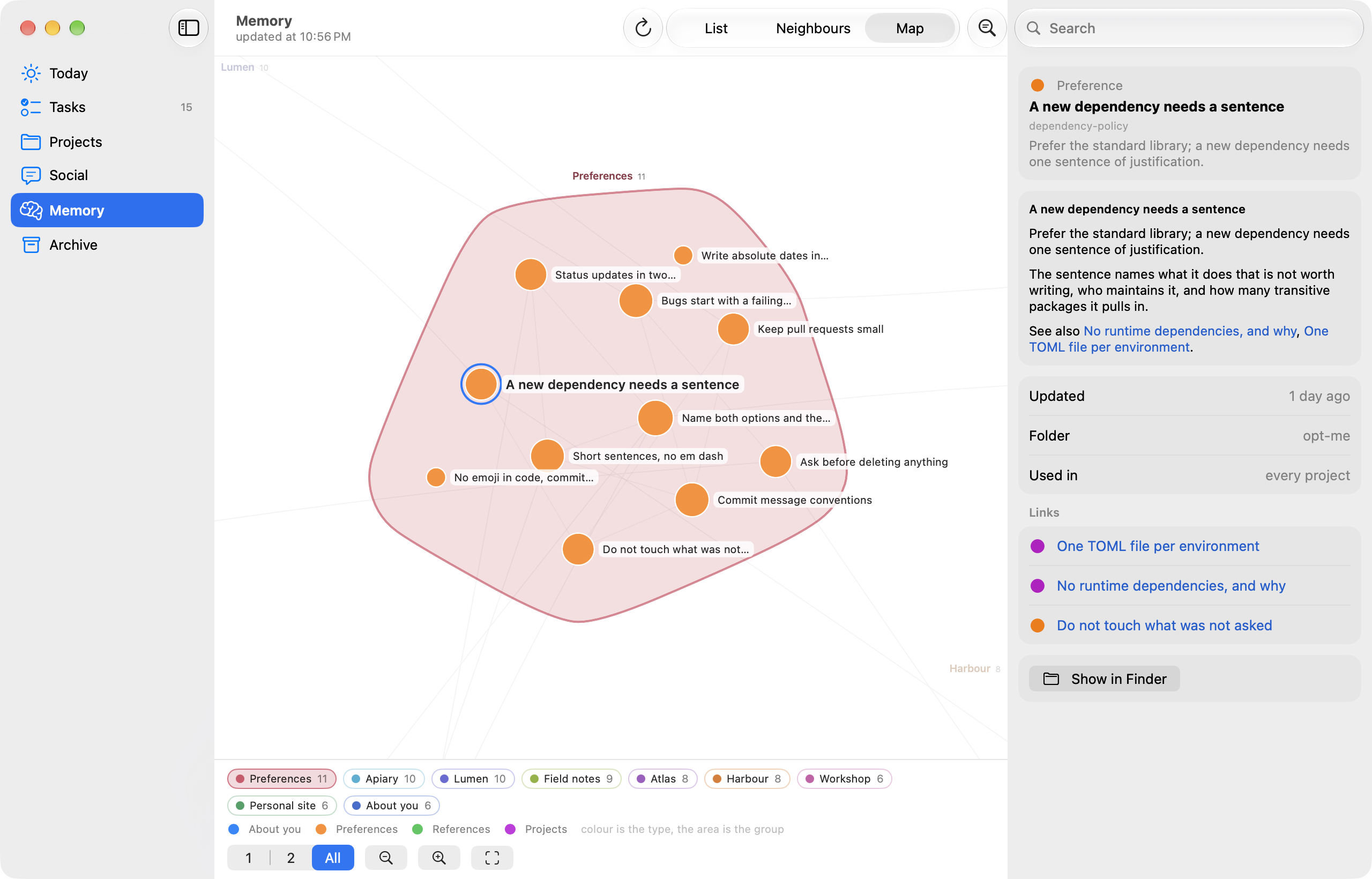
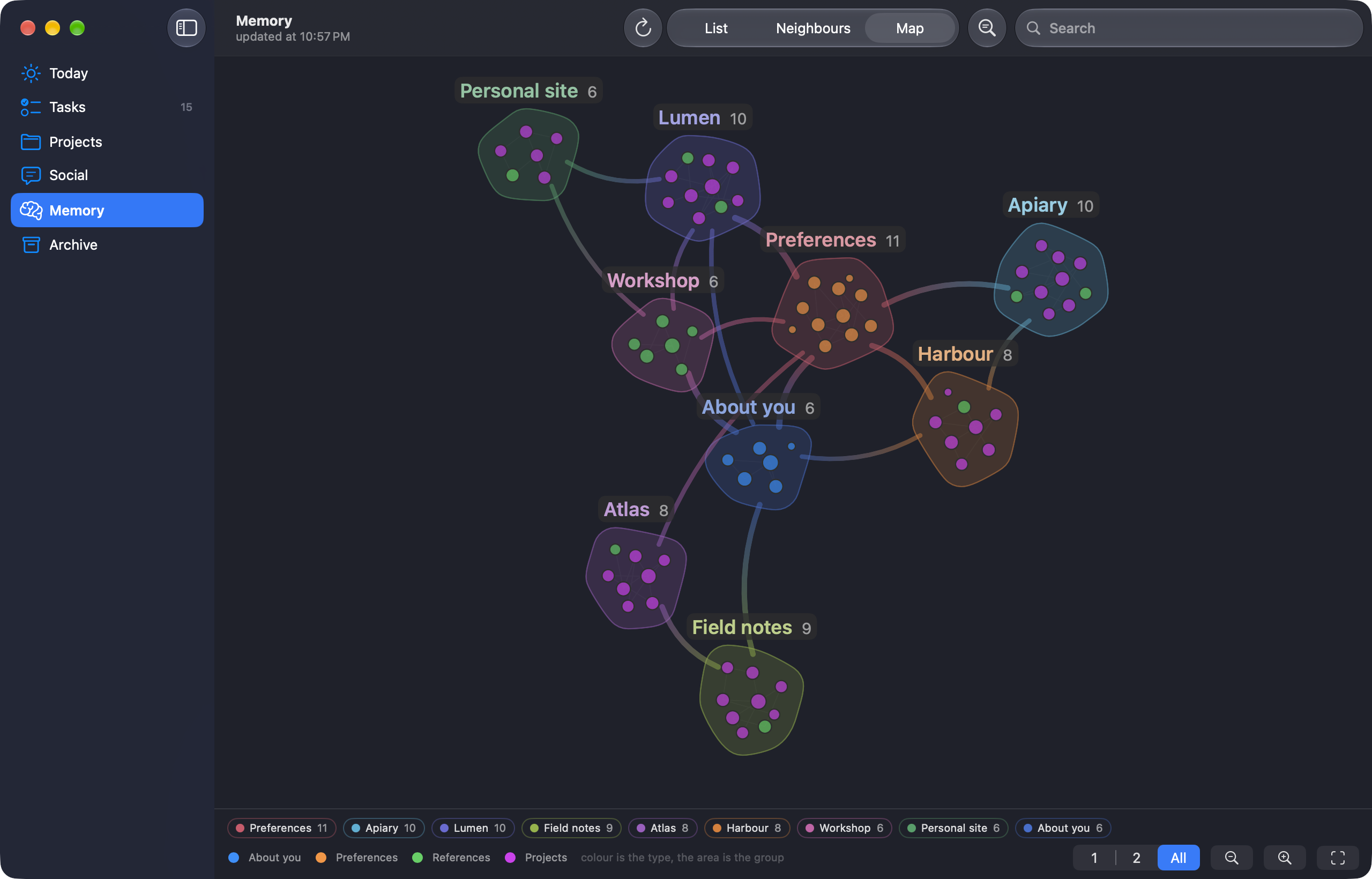
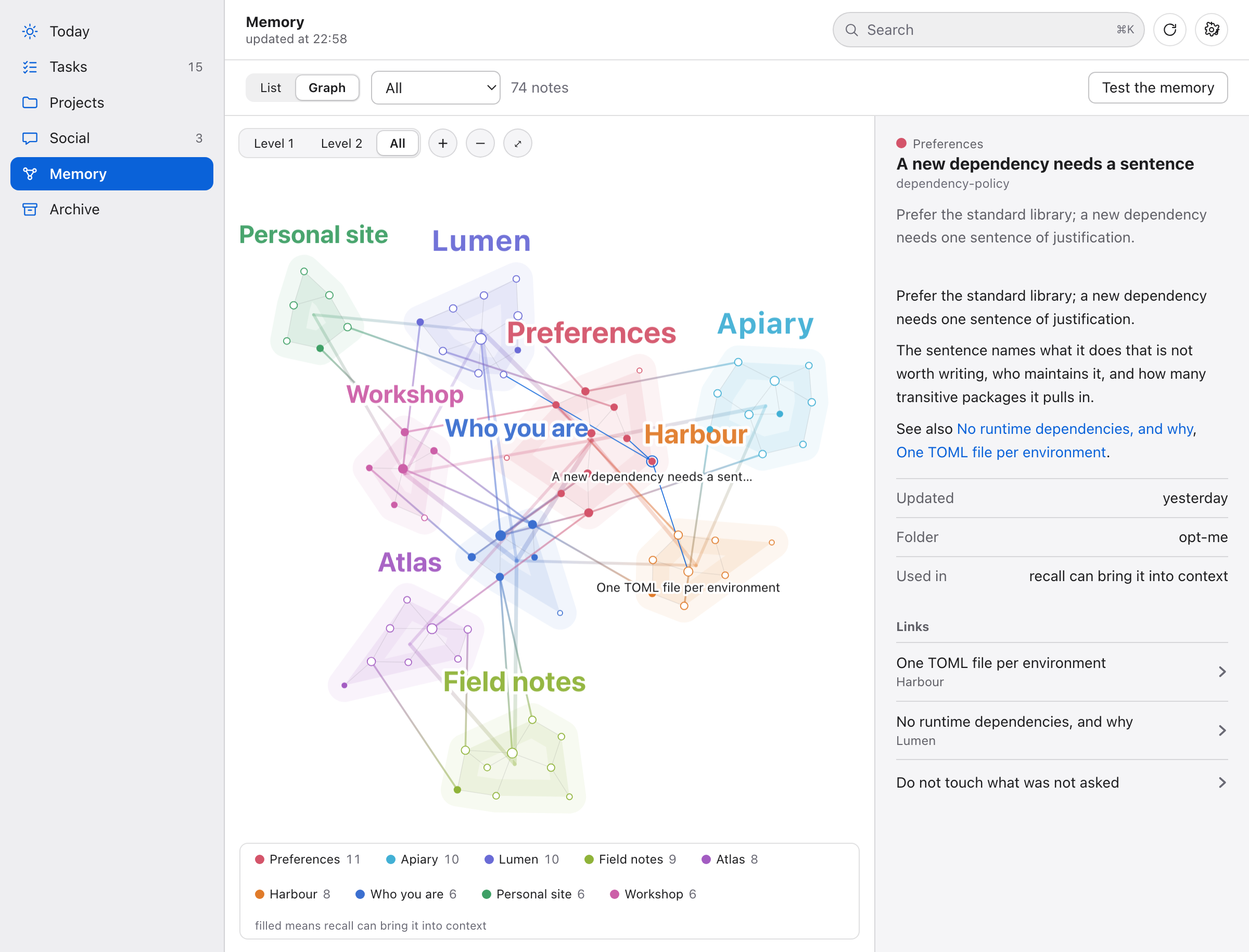
Memory as a map. Every note is a node, coloured by kind, and every project (or kind of note, for the ones that belong to none) is an island with its name on the edge. The links between islands are drawn as ribbons, so you see at a glance which projects share what you know. Hover lights a note and its neighbours, drag a node and its island follows, pinch or scroll to zoom. The physics runs off the main thread and stops by itself when the picture is still.
Zoom in and the nodes carry a short human title instead of their file name:
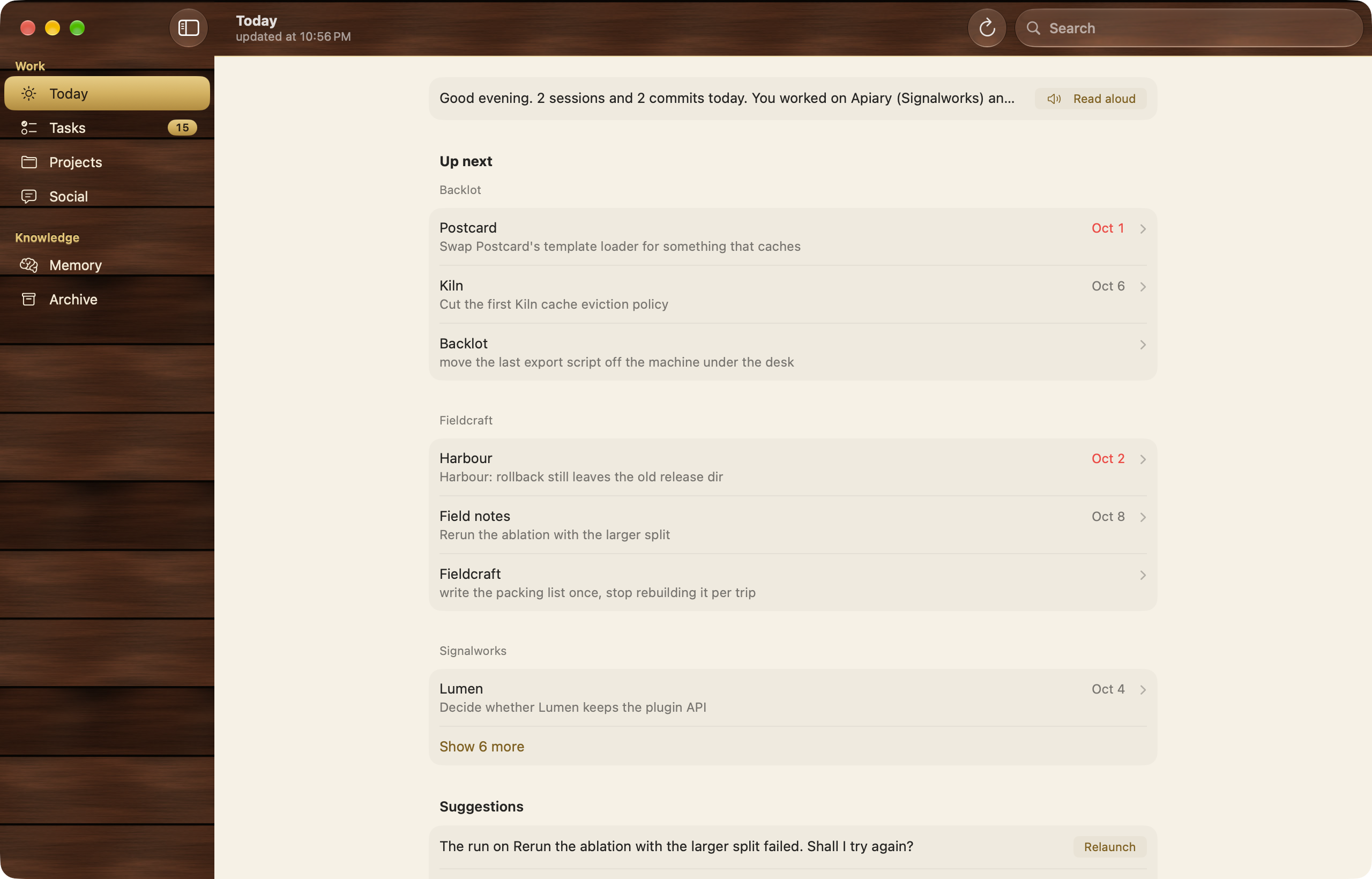
Wood. Settings has a Style: System, or Wood, a modern take on the skeuomorphic dashboard of the app icon. Mahogany boards in the sidebar and under the toolbar, solid brass for the selection, warm paper for the content. Controls and glass stay the system's.
Light and dark, and text size on ⌘+, ⌘- and ⌘0:
The sections have their own pictures further down: Search, Jarvis, All tasks and Projects.
What it reads
| source | where | what it gets |
|---|---|---|
| Claude Code sessions | ~/.claude/projects/**/*.jsonl |
date, project, opening prompt, turns, tools, tokens |
| Claude memory | ~/.claude/projects/*/memory/*.md |
project descriptions, [[wiki]] links |
| skills, plugins, routines | ~/.claude/skills, plugins, scheduled-tasks |
what your Claude Code can do |
| GitHub | gh repo list, recent commits |
repos, commits, real material for posts |
| local git | your code roots | branch, uncommitted changes |
| Codex sessions and goals | ~/.codex/sessions, goals_1.sqlite |
the same, plus what Codex is stuck on |
| Claude Code task lists | ~/.claude/tasks/<session>/*.json |
what is open right now, per session |
| session hooks | SessionStart, SessionEnd |
which sessions are open right now |
Sources are never modified. Plancia reads them and stays out of the way.
See docs/NOVITA.md for what changed recently and why.
Install
The Claude Code plugin
One line connects Claude Code to Plancia:
claude plugin marketplace add nerln/plancia && claude plugin install plancia@plancia
Inside Claude Code the same is /plugin marketplace add nerln/plancia and then
/plugin install plancia@plancia. New sessions pick it up. The archive is
~/.plancia/plancia.db, created on first use. The plugin needs Python 3.9+ as
python3, on macOS or Linux; on Windows plancia install (below) stays the way in.
What it brings:
- The MCP server, behind a sentinel. Claude Code talks to a small process
that never touches the database. The real server runs behind it: if it crashes
or hangs, the sentinel starts a new one at the next call and repeats a read
that was cut off. A write that was cut off comes back as an error that says to
check before retrying, so a task is never written twice. Restarts go to
~/.plancia/sentinella-mcp.log. - The briefing when a session starts, plus one line of warning only when something is wrong: the archive cannot be read, the dashboard stopped (on macOS it is restarted), the server fell over more than once in the last hour.
- The
planciaandriepilogoskills. /plancia:briefing [project]links the folder you are working in, and the session, to its project, then gives that project's briefing. For a folder Plancia has never seen it lists the likely projects (from the git remote, then from the words of the path) and links nothing until one is picked. A container such as~/devis never linked./plancia:doctorreads the archive, starts the MCP server once and times it, reads the sentinel's log, and repairs what it can.
Coming from plancia install: run /plancia:doctor. It finds the old
registrations (the plancia server in ~/.claude.json, the hooks in
settings.json) and, once you say yes, removes them and keeps a dated copy of
each file. If you work on Plancia itself, set codice in
~/.plancia/config.json to the path of your checkout and the plugin runs that
code, the same the dashboard runs.
Dashboard, Mac app and project map
git clone https://github.com/nerln/plancia.git ~/dev/plancia
cd ~/dev/plancia
./bin/plancia install      # command, MCP server, hooks, skills, autostart
./bin/plancia init         # builds your project map from repos, folders, memory
./mac/build.sh --install   # builds Plancia.app into /Applications (macOS 26 or later)
With the plugin installed, plancia install is only needed for the plancia
command and the dashboard autostart. plancia uninstall puts everything back.
Your data stays in ~/.plancia/.
Skills for Claude Code
Two skills, plancia and riepilogo, tell Claude Code when to read from
Plancia and when to write back. The plugin carries them, and plancia install
puts them in ~/.claude/skills/. The English text, with triggers in English
and Italian, is in skills/, where you can read it or copy it
by hand. Those two skills are MIT licensed; the rest of this repository is GPL-3.0.
Windows and Linux
macOS comes first: that is where the native app lives. The rest of Plancia is Python and a local web server, so it also runs on Windows and Linux, with the dashboard in your browser. You need Python 3.9+ and Claude Code or Codex.
Windows (PowerShell):
git clone https://github.com/nerln/plancia.git $HOME/plancia
cd $HOME/plancia
python bin/plancia install       # command, MCP server, hooks, skills, autostart
python bin/plancia init          # builds your project map
python bin/plancia serve --open  # the dashboard, in your browser
Linux:
git clone https://github.com/nerln/plancia.git ~/dev/plancia
cd ~/dev/plancia
python3 bin/plancia install
python3 bin/plancia init
python3 bin/plancia serve --open
install also writes a plancia command. On Windows it is a plancia.cmd shim
in %LOCALAPPDATA%\Plancia\bin, and it tells you to add that folder to your PATH
if it is not there yet; bin/plancia.cmd does the same job from inside a clone.
On Linux it is a link in ~/.local/bin. plancia uninstall puts everything back.
If python is not on your PATH (the python.org installer does not add it by
default, and python can be the Microsoft Store stub), use py -3 bin/plancia install instead. pip install is not a supported route yet: the package does not carry the
dashboard files or the bin/ scripts, so use the clone.
What works the same: the dashboard, the plancia_* MCP tools in Claude Code and
Codex, the session hooks and the memory recall, the skills, search, the recap,
Resume (it opens a terminal in the right folder), and starting the server at every
login.
What each system uses underneath:
| macOS | Windows | Linux | |
|---|---|---|---|
| start at login, daily recap | launchd | Task Scheduler, or the Startup folder if that is refused | systemd --user, or ~/.config/autostart |
| Resume opens | Terminal | Windows Terminal, else a new console window | the first of x-terminal-emulator, gnome-terminal, konsole, xterm |
| clipboard | pbcopy |
clip |
wl-copy, xclip or xsel |
| spoken recap | say |
the built-in speech synthesizer | espeak-ng (or espeak) and an audio player |
| notification | osascript |
PowerShell balloon | notify-send, if installed |
On Windows and Linux there is no native app: open http://127.0.0.1:7773 in Chrome or Edge and choose Install Plancia. It gets its own window and icon, and it still opens with the server off, showing the last state it saw. Safari on macOS does the same with Add to Dock.
What does not exist outside macOS: the native app, its menu bar item, the
plancia:// URL actions and the hands-free voice panel. plancia jarvis "..."
from a terminal still works. If a piece is missing on your machine the rest
carries on: no notification tool means no notification, and no clipboard tool
means nothing is copied. With no speech engine, plancia say, plancia voice prova, plancia recap --speak, plancia ask --speak and plancia jarvis --speak
say so and what to install, the MCP speak
action answers letto: false with the reason, and plancia doctor reports the
voice as missing. The dashboard keeps working too: the recap, "Ask" and Jarvis
answer with the text and a voce: null field plus a nota_voce explaining that
there is no speech engine, and only the playback is skipped ("Listen" shows
that note instead of a generic error). Outside macOS the voice engine is reported by
its real name (System.Speech, espeak-ng) and the voice list comes from it. On Windows,
Resume needs Windows Terminal for a lost task when claude is a .cmd file (an
npm install): its multi-line prompt cannot be handed to cmd.exe safely, and
Resume says so instead of opening a broken command. On Windows the server starts at login but is not restarted after a crash, and
its errors are not logged (launchd on macOS and systemd on Linux do restart it).
A second plancia serve while the login one is running says so (and with --open
opens the browser on it) instead of failing on the busy port. plancia esporta --apri
opens the file with the system's own opener (open -R, os.startfile, xdg-open).
Folders that hold projects without being one (an external disk, another projects
folder) go in config.json under contenitori, a list of paths, next to the ones
Plancia recognises by itself (~/dev, ~/Siti, the Google Drive folders). On macOS
that includes the disks you used to add by hand: an external disk is a container
only if it is listed there ("contenitori": ["/Volumes/Disco/dev"]), and
plancia doctor prints the containers in use. Start at login and the daily recap
never load launchd, Task Scheduler or systemd jobs from a throwaway environment: if
the process HOME is not the user's real home (or PLANCIA_HOME points outside it)
the files are written but not loaded ("file scritti, non caricati (HOME di prova)").
PLANCIA_AUTOSTART_FORZA=1 forces the commands, for a machine where they are stubs.
The commands Plancia builds for each system are covered by the suite, but Windows and
Linux have had far less real use than macOS: plancia doctor tells you what is
connected.
The dashboard in the browser
The same data in a browser, on any system with Python: python3 bin/plancia serve --open
(python bin/plancia serve --open on Windows). It follows the Mac app: system fonts, six
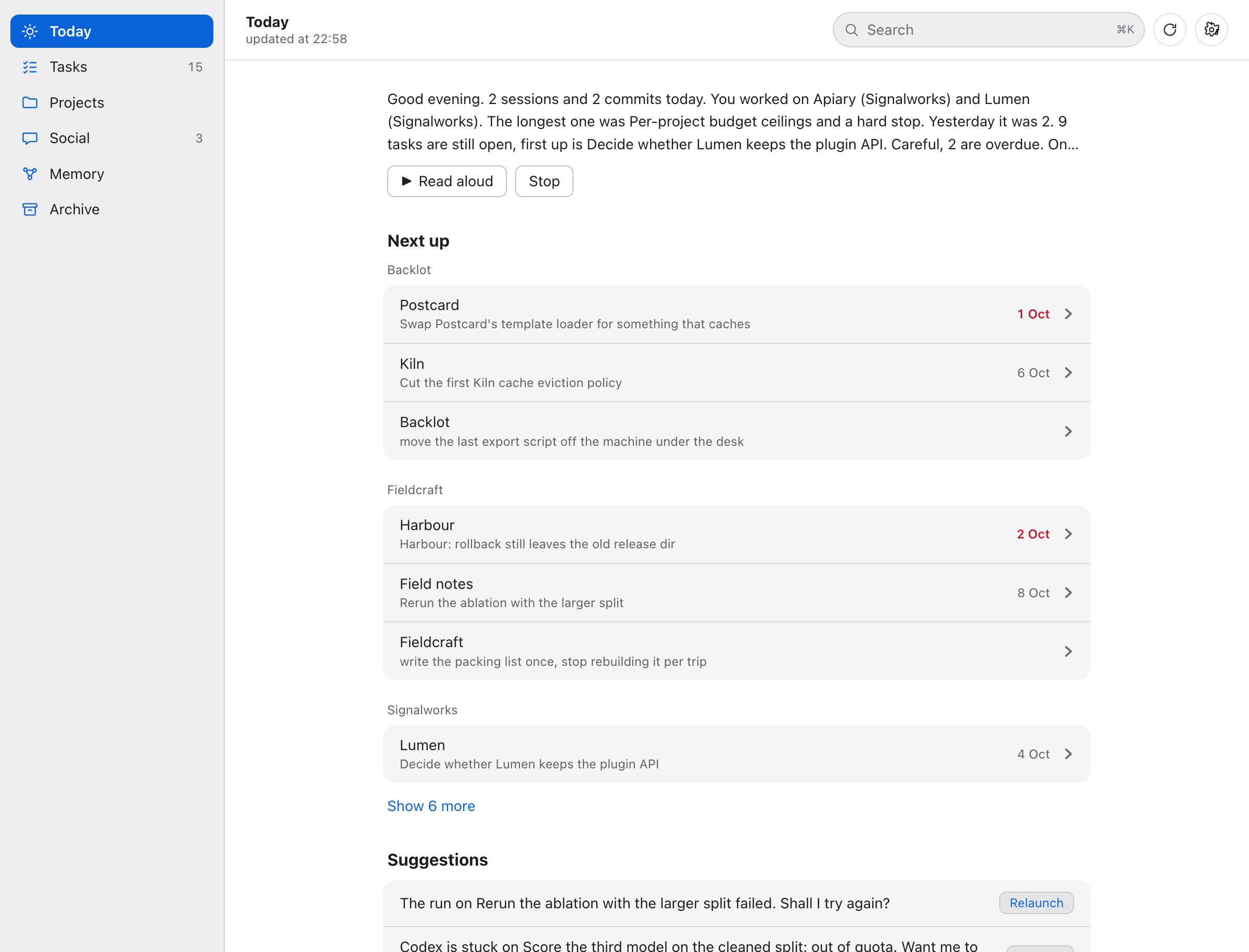
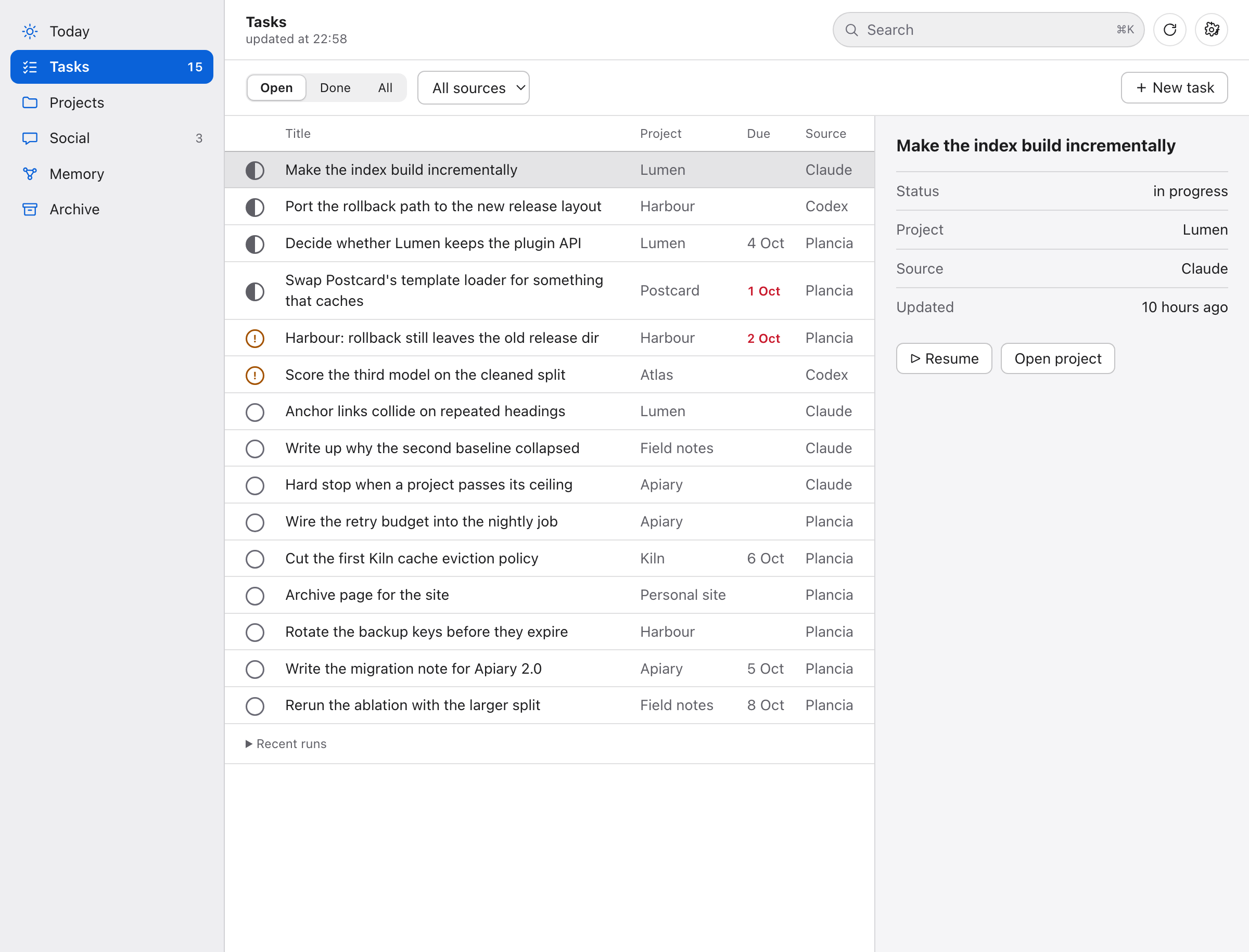
sections in a sidebar, Today as one reading column, Tasks as a table with a detail panel,
Memory with a physics graph on canvas, search in the top field. It installs as a web app
from the browser menu. This is what Windows and Linux use, and a Mac that cannot run the
2.0 app.
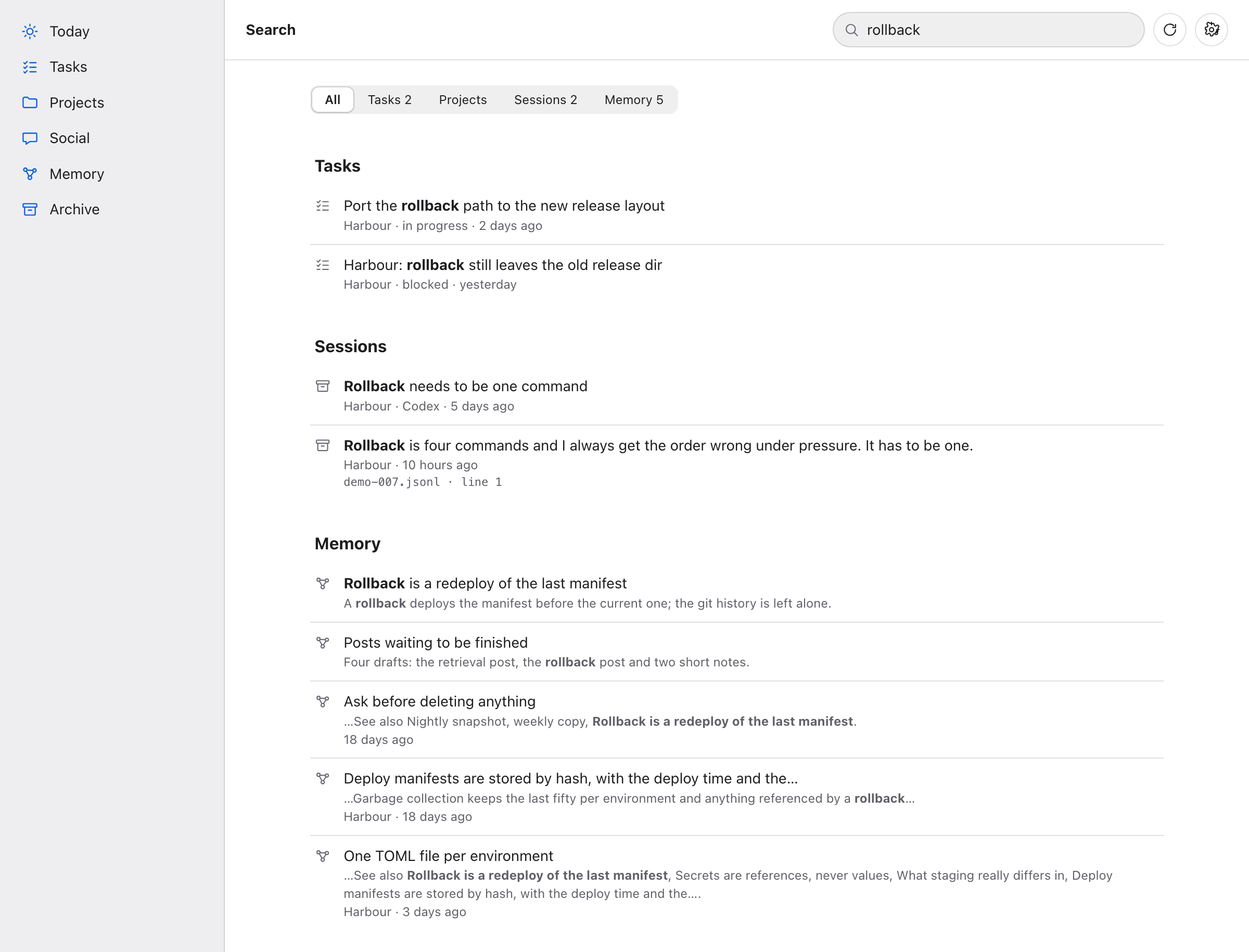
The three ways in
The app. A native SwiftUI window (2.0, macOS 26 or later): a sidebar with
Today, Tasks, Projects, Social, Memory and Archive, the system search field,
an inspector on the right for whatever you select, and Settings for language,
appearance and style. Style is System (the standard macOS look) or Wood, a warm
skeuomorphic one with mahogany boards in the sidebar and brass for the selection,
drawn from the app icon. Text size follows ⌘+, ⌘- and ⌘0 (seven steps, 85% to
125%). Memory has a third mode, Map: every note as a node in a physics graph you
can drag, with levels 1, 2 and All and a smooth zoom, running off the main thread.
Plus a menu bar item and the voice panel. It supervises the backend, so there is
nothing to start by hand. On macOS 13 to 15 the 1.1.0
app is the last one that runs; the dashboard in the browser works everywhere. plancia://recap,
plancia://jarvis, plancia://ask?q=…, plancia://open?view=projects and
plancia://pdf are
URL actions you can bind to a system shortcut, Raycast or Shortcuts.
Claude Code and Codex. Seven plancia_* MCP tools in every session of both, a
SessionStart hook that hands Claude your current state as opening context, and
two skills that tell it when to read from Plancia and when to write back. Seven
and not twenty: the six that get used stay exposed, the rest sit behind one
plancia tool you call with azione. Tool schemas are paid for in every single
request of a session, so the surface is the bill. Measured: 1195 tokens per
Claude Code session and 1020 per Codex session, down from 2870 and 2196.
The terminal. plancia recap --speak, plancia ask "what did I ship this week?", plancia task add, plancia cerca "a phrase you remember",
plancia projects.
Search: inside what was said
Transcripts are the largest thing you own and the hardest to get back into. A session title tells you nothing six weeks later; the sentence you are trying to find is somewhere in the middle of a conversation.
Plancia keeps an FTS5 index over the prose of every turn, yours and the agent's,
from Claude Code and Codex. Tool results stay out on purpose: they are most of
the bytes and almost never the thing you remember. On this machine that is 13,000
turns from 1,287 transcripts, 20 MB indexed out of 979 MB on disk, rebuilt from
scratch in 5 seconds and kept current incrementally, which costs one stat per
unchanged file.
Every hit comes back verbatim with the file and the line it came from, so you reopen the moment instead of reading a summary of it.
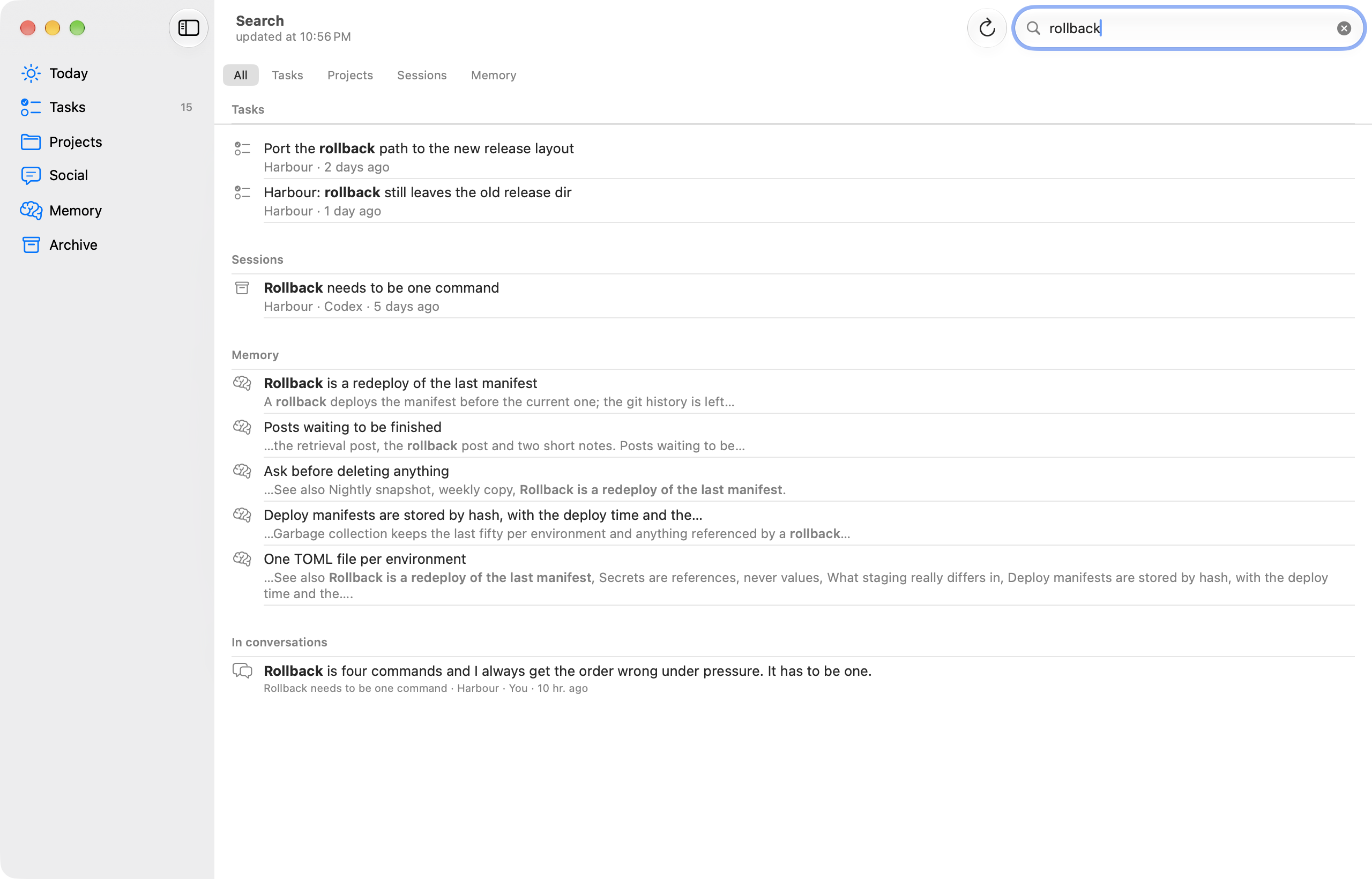
plancia cerca "the blending denominator"
plancia cerca "cookies" --project molo
In the dashboard, / opens search from any view; chips above the results count
the hits per project across the whole index, not just the page. In Claude Code
and Codex it is plancia_search.
What a session actually worked on
A session used to land in the project of the folder it was opened from. That
works for Codex, which is opened inside the project. It does not work for Claude
Code: measured on this machine, 199 sessions out of 587 were opened from the
Drive root, from ~/dev or from the home folder, places you work on everything
from.
Plancia now also looks at what the session touched: the files in its tool_use
blocks and the absolute paths inside Bash commands, counted per project folder.
If the folder it was opened from says nothing, the most touched folder wins; if
that folder is already a project, it is kept unless 70 percent of the paths are
somewhere else. Every row carries the inferred folder and the reason, so the
attribution can be checked instead of trusted.
plancia sessioni                         # the catalogue, by project
plancia sessioni --progetto molo --giorni 30
plancia sync --riattribuisci             # recompute the whole archive
A tilde at the end of a row, and the "inferred from paths" note in the
dashboard, mark the sessions attributed this way. Plancia's own internal calls
and throwaway sessions stay out of the way: --tutte shows them.
The daily recap
Plancia collects the day from real data, sessions and commits and tasks opened and closed and posts and what each project is waiting on, and turns it into something written to be heard: short sentences, no lists, no markdown, no file paths read out loud.
Two engines for the text. The template one is deterministic, costs nothing and
always works. The other passes the same data to Claude Code in headless mode
(claude -p) and gets a better told version in about eight seconds. If Claude
does not answer in time, the template takes over and you never notice.
Two kinds of voice. A local neural one when it answers: Kokoro (not installed by default, see Jarvis below), then Pocket, then Voicebox if its backend is up, which is how you get your own cloned voice. Otherwise the macOS system voices, which are always there, need no setup and start instantly. The system voices handle Italian, English, Spanish, French, German and Portuguese; each neural engine covers the languages its own voices do.
plancia recap --speak            # today, out loud
plancia recap --lang en          # in English
plancia ask "where did I leave the transcription pipeline?" --speak
plancia daily on 08:45           # every morning, as a notification
plancia daily on 08:45 --voce    # every morning, out loud
Asking a question goes through Claude Code with your Plancia context attached, so the answer is grounded in what actually happened, not in a guess.
It ends with a decision
The recap does not stop at the facts. Plancia looks for signals in the data and turns them into proposals, each with an action already prepared: a failed run to retry, a Codex goal out of quota, files uncommitted since yesterday, an approved post that never went out, a project whose declared next step has gone stale. Proposals only ever come from signals, never from a model's hunch, so a quiet day gives you a short recap instead of an invented suggestion. Say "do it", or "the second one", and it runs.
Next up
One row per active project, on Today, next to the recap: its first open task,
or its declared next step when nothing is open, grouped by area, sorted by
deadline and then by last activity. Up to seven rows show per group; the rest
sit behind an "N more". It needs the area map from plancia riordina to
group by anything but a flat list.
Jarvis
⌥Space anywhere opens a glass panel and turns the microphone on. A waveform follows
your voice while it listens, the answer scrolls in as it arrives, and it starts
speaking with the first sentence, not when the whole answer is done.
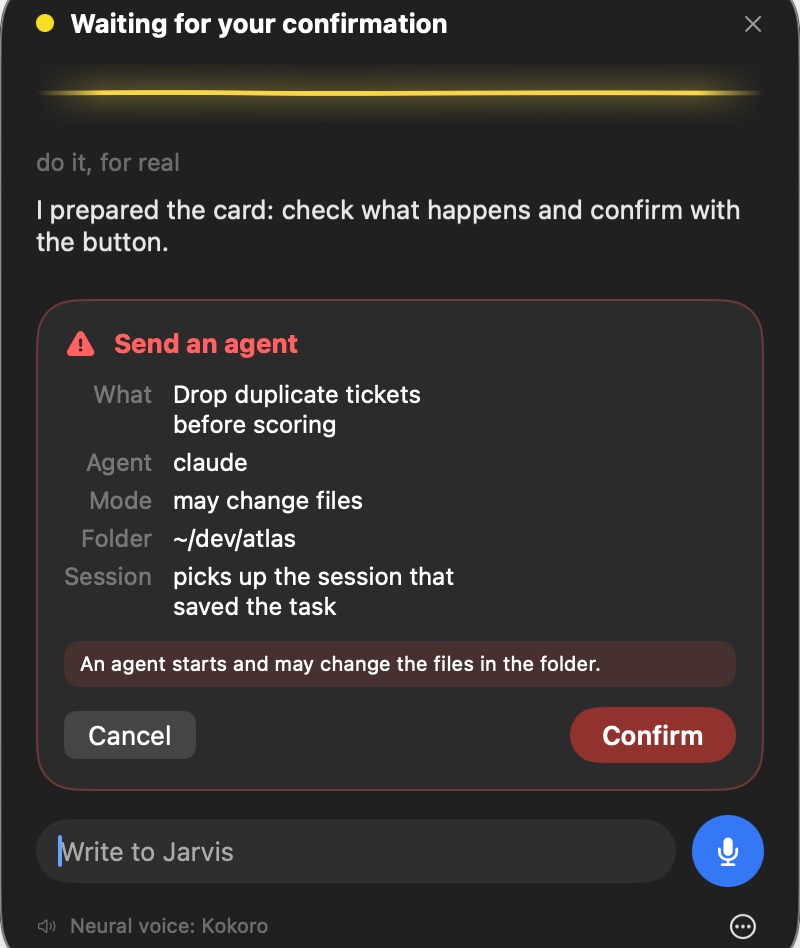
Jarvis reads, and proposes. The model behind the panel is read-only: the tools that write are denied by name, not just left off a list. Phrases like "note a task", "I did that", "archive Atlas", "do it" or "resume task 4" never run on their own. Each one becomes a card that says exactly what would happen (which agent, in which folder, whether it may edit files, which session it picks up) and nothing happens until you press Confirm on the card. Saying "yes" out loud does not confirm. Esc or Cancel throw the card away, and so does closing the panel. The only things that happen without a card are opening a view and changing how fast it speaks.
The microphone opens only when you ask, with the shortcut or the microphone button, and you can see it: an orange dot and "Microphone on" in the panel, next to the system's own indicator. Recognition runs on the Mac. If dictation for your language is not installed for on-device use, it says so and you type; audio never goes to a server. It closes by itself after each sentence and reopens only if you turn on "Continuous conversation" in the panel menu. Esc or Stop ends everything at once.
The voice is a neural one when there is one: Kokoro first, then Pocket, then Voicebox, all running locally, sentence by sentence, so the second sentence is being made while the first plays (the first sentence is cut at its commas, so the sound starts sooner). Without one it uses the enhanced or premium voices installed on the Mac and says so at the bottom of the panel. It never uses the basic robotic voice: with none installed it stays text-only and tells you where to download one.
Kokoro is not installed by default. plancia voce installa builds a Python
environment under <PLANCIA_HOME>/voce, tells you it will download about 354 MB of
model files, and asks before doing it. It then runs as one warm background process of
roughly 450 to 700 MB (about 1 GB for a moment on a long sentence) that starts when
Jarvis opens and quits after 5 minutes of silence; if it dies or is too slow, the
next engine speaks and the panel footer says so. The voice per language is
voce_kokoro in config.json (defaults: if_sara for Italian, af_heart for
English, ef_dora for Spanish; im_nicola is a male Italian one). plancia voce prova says which engine Jarvis would use and why, without playing anything. Tried on
macOS only.
The text field at the bottom covers the case where the microphone is unavailable.
plancia jarvis "remind me to write the migration note" # shows the card, asks [y/N]
The terminal and the dashboard (Windows and Linux) use the same rules. There is one
Jarvis, read-only: the old second one, which kept a model with the write tools open
and ran what you typed, is gone. plancia jarvis prints the card and asks you to
confirm at the keyboard; without a real terminal (a script, a pipe, another agent
calling it) it never confirms. On the dashboard the card shows up with Confirm and
Cancel, and the Relaunch button goes through it too.
Claude Code has had voice input since March 2026: you hold the spacebar and dictate. It is input only, and by design there is no hands-free mode. This is the other half: it speaks back, and it can act once you confirm.
Plancia MCP questions
Does Plancia require an account or collect telemetry?
No, it is local-first with no telemetry and no account required.
How do I install the Claude Code plugin?
You can install it using the command: claude plugin marketplace add nerln/plancia && claude plugin install plancia@plancia.
Is there a native app for Windows and Linux?
No, the native SwiftUI app is for macOS only; Windows and Linux users use a local web server dashboard in their browser.