
Compiles AI coding session transcripts into a searchable, interlinked local wiki for agents to retrieve past decisions and solutions.
Also known as necroz/sessionwiki
- Stars
- 1
- Tools
- 15
- Downloads, 30 days
- 1,088
- Latest version
- 2.3.0
- Last commit
- Nov 13, 2026
- License
- MIT
What is sessionwiki MCP?
sessionwiki compiles AI coding session transcripts into a searchable, interlinked local wiki for agents to retrieve past decisions and solutions. It exposes 15 tools, such as wiki_query, wiki_search, wiki_list_sources.
Summary generated from the project's README
About sessionwiki MCP server
sessionwiki transforms fragmented AI coding transcripts into a structured, searchable local wiki. It collects history from various agents including Claude Code, Cursor, Copilot, ZCode, and OpenCode, organizing them by project, model, and date. This tool is designed for developers who want to maintain a persistent knowledge base of past decisions, reasoning, and technical solutions discovered during coding sessions.
The system operates locally and uses LLM synthesis to generate summaries and interlinked project pages. You can configure synthesis backends using Ollama for local processing or any OpenAI-compatible server like vLLM or LM Studio. It includes built-in safety features such as redacting usernames and secret patterns during the ingestion process.
Through its MCP server, agents can interact with this knowledge base using 15 specific tools. These tools allow an AI client to perform ranked searches via wiki_query, read specific pages, or list available sources. This setup enables your current coding agent to retrieve context from previous work before attempting to solve a problem again.
What you can do with it
- 1Retrieve past technical decisionsAsk your AI agent to search the wiki to find how a specific bug was resolved in a previous session.
- 2Automate session documentationUse hooks to automatically sync and summarize coding transcripts into a readable wiki format.
- 3Provide context to new promptsInject recent project history into an agent's prompt to improve its understanding of the current task.
- 4Analyze coding activity trendsView a visual dashboard showing token usage and a heatmap of your coding activity over time.
Written from the project's README. Every use case is checked against a quote from it.
How to install sessionwiki MCP
Formats verified 10 Nov 2026Add to CursorAdd to GooseInstall sessionwiki MCP in Claude Code
$ claude mcp add --env 'SESSIONWIKI_HOME=<SESSIONWIKI_HOME>' sessionwiki -- uvx sessionwiki mcpInstall sessionwiki MCP in Cursor
~/.cursor/mcp.json
{
  "mcpServers": {
    "sessionwiki": {
      "command": "uvx",
      "args": [
        "sessionwiki",
        "mcp"
      ],
      "env": {
        "SESSIONWIKI_HOME": "<SESSIONWIKI_HOME>"
      }
    }
  }
}Install sessionwiki MCP in VS Code
.vscode/mcp.json
{
  "servers": {
    "sessionwiki": {
      "type": "stdio",
      "command": "uvx",
      "args": [
        "sessionwiki",
        "mcp"
      ],
      "env": {
        "SESSIONWIKI_HOME": "<SESSIONWIKI_HOME>"
      }
    }
  }
}Install sessionwiki MCP in VS Code CLI
$ code --add-mcp '{"name":"sessionwiki","type":"stdio","command":"uvx","args":["sessionwiki","mcp"],"env":{"SESSIONWIKI_HOME":"<SESSIONWIKI_HOME>"}}'Install sessionwiki MCP in Claude Desktop
claude_desktop_config.json
{
  "mcpServers": {
    "sessionwiki": {
      "command": "uvx",
      "args": [
        "sessionwiki",
        "mcp"
      ],
      "env": {
        "SESSIONWIKI_HOME": "<SESSIONWIKI_HOME>"
      }
    }
  }
}Install sessionwiki MCP in Codex
$ codex mcp add sessionwiki --env 'SESSIONWIKI_HOME=<SESSIONWIKI_HOME>' -- uvx sessionwiki mcpInstall sessionwiki MCP in Codex config.toml
~/.codex/config.toml
[mcp_servers.sessionwiki]
command = "uvx"
args = ["sessionwiki", "mcp"]

[mcp_servers.sessionwiki.env]
SESSIONWIKI_HOME = "<SESSIONWIKI_HOME>"
Install sessionwiki MCP in Gemini CLI
$ gemini mcp add -s user -e 'SESSIONWIKI_HOME=<SESSIONWIKI_HOME>' sessionwiki uvx -- sessionwiki mcpInstall sessionwiki MCP in Gemini settings.json
~/.gemini/settings.json
{
  "mcpServers": {
    "sessionwiki": {
      "command": "uvx",
      "args": [
        "sessionwiki",
        "mcp"
      ],
      "env": {
        "SESSIONWIKI_HOME": "<SESSIONWIKI_HOME>"
      }
    }
  }
}Started by HostedMCP on 16 Nov 2026
We ran this command for sessionwiki 2.3.0 in an isolated container with no network and no keys. It answered and listed 15 tools.
sessionwiki MCP tools 15
Read from the server with tools/listwiki_queryRead-onlyStart here for questions about the user's past work ('what did I decide about X'), in any language: session pages keep the user's original request. Ranks wiki/ pages by keyword matches, rare words weighted higher (no LLM, no embeddings). Service pages are skipped; project hubs rank below sessions. Pages sharing a tool or topic name with two or more top hits rank too, marked 'via <name>'. If no wiki page matches, falls back to raw transcripts (see include_raw). Returns up to max_pages paths, each with a status line (type, lifecycle, confidence, date, sources; raw hits marked not yet in wiki) and a ~400-character snippet, plus the start of overview.md (index.md when nothing matches). max_pages clamps to 1-50. Optional filters: project and type match frontmatter exactly; tag equals one whole tag, ignoring case; lifecycle takes comma-separated states; date_from/date_to are YYYY-MM-DD, invalid dates ignored. Filters apply to both layers. Open a full page with wiki_read_page; use wiki_search for exact wording.
wiki_searchRead-onlyFind exact text: a case-insensitive substring match, line by line, over wiki/ pages, plus raw session transcripts in raw/sessions/ when include_raw=true. term is literal: regex and glob characters have no special meaning. Returns JSON {term, matches: [{path, line, text}], truncated, scan_incomplete, files_scanned, files_total, skipped_oversize_files}. The scan stops at 200 matches (truncated), skips files over 4 MiB and reads at most 256 MiB per call (scan_incomplete). Read-only. Use wiki_query instead for ranked, question-style lookup; open a hit with wiki_read_page.
wiki_list_sourcesRead-onlyList raw session transcripts in raw/sessions/ (one markdown file per agent session), sorted by path, oldest first. Returns a JSON array of {path, project, date, filename, size_bytes}; project and date come from each file's frontmatter, so either can be empty. project is a case-sensitive substring match; omit it to list every session, and an unknown value returns an empty array. Read-only. Use it to see which sessions exist for a project, then open one with wiki_read_page. To find sessions by content, use wiki_search with include_raw=true instead.
wiki_read_pageRead-onlyReturn the full text of one file, unmodified and not truncated. path is relative to the sessionwiki folder and uses '/' separators; absolute paths and '..' escapes are rejected, and symlinks are resolved before the allowlist check. The file must be under wiki/, raw/, docs/, examples/ or site/ (or be README.md, CHANGELOG.md, CONTRIBUTING.md or LICENSE at the root). Returns an error if the path is outside that set, does not exist, is not a file, or is not valid UTF-8. Reads the whole file with no size cap, so very large files are returned in full. Get paths from wiki_query, wiki_search or wiki_list_sources.
wiki_lintRead-onlyCheck the link structure of wiki/: find orphan pages (no inbound [[wikilinks]]; index, overview and log are exempt) and broken [[wikilinks]] that point to no page. Returns JSON {total_pages, orphan_count, orphans, broken_link_count, broken_links}; the counts cover every page, while each list stops at 50 items. Read-only: it reports and changes nothing. Use it after wiki_sync or before publishing; use wiki_lifecycle or wiki_confidence to review page quality.
wiki_syncActionConvert new agent sessions (Claude Code, Codex, Cursor, ZCode, OpenCode, ...) from their local session stores into markdown under raw/sessions/. Dry run by default: it only reports what would change. It writes only when both dry_run=false and confirm=true are set; ask the user before that. A real run adds new files and never overwrites existing ones, so repeating it is safe. It may also rebuild site/. There is no project or date filter: every new session is imported. Returns the converter's stdout and stderr as one text block, last 256 KB, with a truncation marker; fails after 120 s. Use it when wiki_list_sources lacks recent sessions.
wiki_exportRead-onlyReturn one generated export file from site/ as text, to load the whole wiki at once: 'llms-txt' (short llms.txt index), 'llms-full-txt' (all pages flattened), 'jsonld' (schema.org graph), 'sitemap' (sitemap.xml), 'rss' (feed of recent pages), 'manifest' (build manifest.json), or 'list' (JSON list of the export files that exist, with sizes). Output is plain text, except 'list' which is JSON, and is cut at 200 KB; for a larger file, read it from site/ with wiki_read_page. Read-only. Fails if the file is missing; run `sessionwiki build` first. For specific facts wiki_query is cheaper.
wiki_confidenceRead-onlyList wiki pages whose frontmatter confidence (0.0-1.0) is between min_confidence and max_confidence. Pages without a confidence value, or with a value that is not a number, are skipped. Values are compared as given and not clamped; min_confidence greater than max_confidence returns an empty list. Returns plain text: the match count, then up to 50 lines of 'score path - title', lowest score first, ending with '... and N more' when the list is cut. Read-only. Use max_confidence=0.5 to find weak pages to recheck; use wiki_dashboard for the overall distribution.
wiki_lifecycleRead-onlyList wiki pages whose frontmatter lifecycle equals state (draft, reviewed, verified, stale or archived). Returns plain text: the match count, then up to 50 lines of 'last_updated path - title', newest first, ending with '... and N more' when the list is cut. There is no paging parameter; the count tells you how many pages remain. Read-only. Use 'stale' or 'draft' to find pages to update; use wiki_dashboard to see how many pages are in each state.
wiki_dashboardRead-onlyOverview of the whole wiki in one call: total page count, pages per type (source, entity, concept, ...), pages per lifecycle state, and how many pages have high (>=0.8), medium, low (<0.5) or no confidence. Returns plain-text Markdown. Read-only, no parameters. No cache: every call re-reads wiki/ from disk, so the numbers are current and the cost grows with the wiki. Call it first to see the wiki's size and health, then use wiki_lifecycle or wiki_confidence for the page lists.
wiki_entity_searchRead-onlyFind entity pages (people, orgs, tools, libraries, APIs, projects, concepts): wiki pages with type: entity. name matches a case-insensitive substring of the title or path; entity_type matches exactly; when both are given both must match; with neither, every entity is listed. A name with no match returns a zero count, not an error. Returns plain text: the count, then up to 50 lines of '[type] path - title', sorted by title. Read-only. Use wiki_query for free-text questions and wiki_category_browse for tags.
wiki_category_browseRead-onlyBrowse the wiki by tag (the 'tags' frontmatter field; 'category' here means tag). Tag names are lowercased and matched exactly. Without tag: lists tags used by at least min_count pages, most used first, up to 100. The count line reports every tag that passes min_count; when more than 100 qualify, only the first 100 are shown. With tag: lists up to 50 pages with that tag as 'path - title' (min_count is ignored). Returns plain text. Read-only. Use wiki_entity_search for named things and wiki_query for free-text questions.
Show all 15 toolsShow fewer tools
wiki_write_pageActionCreate or replace one Markdown page under wiki/. content is the whole page and must start with frontmatter that has title and type; it is capped at 1 MiB. The tool sets origin: agent and last_updated (today) in it; content with confidence also gets confidence_measured (today) and confidence_pages (wiki page count). mode='create' (default) fails if the page exists; mode='replace' overwrites it. Refused for paths outside wiki/, non-.md files, paths with a hidden segment or symlink, wiki/archive/, system pages (index, log, overview, ...) and pages with origin: human. Without confirm=true it writes nothing and returns a preview. Ask the user before confirm=true. A real write is atomic and adds a line to wiki/log.md. Returns JSON {path, action, written, old_bytes, new_bytes}. Put new facts for review under wiki/candidates/. Use wiki_update_frontmatter to change only tags or fields, and wiki_archive_page instead of deleting.
wiki_update_frontmatterActionChange frontmatter fields of one existing page under wiki/; the body is kept byte for byte. fields may set title, type, tags (a list that replaces the old one), lifecycle (draft, reviewed, verified, stale, archived) and confidence (0.0-1.0); other keys are refused. add_tags and remove_tags change the tag list without replacing it. A call with no fields, add_tags or remove_tags is an error. last_updated is set to today; setting confidence also stamps confidence_measured (today) and confidence_pages (wiki page count). Refused for system pages and pages with origin: human. Without confirm=true it writes nothing and returns the old and new value of each field. Ask the user before confirm=true. Returns JSON {path, changes: {field: [old, new]}, written}. Use wiki_write_page to change the body and wiki_archive_page to retire a page.
wiki_archive_pageActionRetire one page under wiki/ without deleting it: set lifecycle: archived, archived_reason and last_updated in its frontmatter. The file stays where it is, so links keep working, and wiki_update_frontmatter with lifecycle: reviewed restores it. reason is required, at most 200 characters and one line; a longer or multiline value is an error, not truncated. An already archived page returns written=false with a note. Refused for system pages and pages with origin: human. Without confirm=true it writes nothing and returns a preview. Ask the user before confirm=true. Returns JSON {path, previous_lifecycle, written}. Use wiki_lifecycle with state 'archived' to list archived pages.
Configuration
SESSIONWIKI_HOMERequiredFolder with raw/ and wiki/. Run `sessionwiki sync` there first.
Automated checks
Ran Nov 14, 2026Full report →Passed our automated checks. That is not a security audit: read the code and give the server the narrowest access it needs. How checks work · What to fix for more points

- Source repository linked and reachablenecroz/sessionwiki is public and reachablegithub.com/necroz/sessionwiki ↗Pass
- Package names this repository as its sourcesessionwiki names https://github.com/Pratiyush/llm-wiki as its sourcepypi.org/project/sessionwiki/ ↗Finding
- Build provenance (Sigstore attestation)Sigstore attestation for sessionwikipypi.org/project/sessionwiki/ ↗Pass
- Open source license (OSI)MITspdx.org/licenses/MIT.html ↗Pass
- Commit or release in the last yearLast commit or release 2026-11-13github.com/necroz/sessionwiki ↗Pass
- OpenSSF ScorecardNot checked
- Package name not close to a popular packageNo popular package one edit away from sessionwikiPass
- No critical advisory in the package or its dependenciesthe package checked; no critical advisoryosv.dev ↗Pass
- No hidden instructions to the model0 tool descriptions and the README read; no override phrases, credential paths or hidden charactersPass
- Destructive tools are labelledNot checked
- Remote endpoint answers the MCP handshakeNot checked
README
View on GitHubsessionwiki
Your AI coding sessions, compiled into a searchable, interlinked wiki — from Claude Code, Codex CLI, Cursor, Gemini CLI, Copilot, ZCode and OpenCode. Local-first, with LLM synthesis, a session graph, and an MCP server so your agents can look up what you already solved.





👉 Live demo: necroz.github.io/sessionwiki
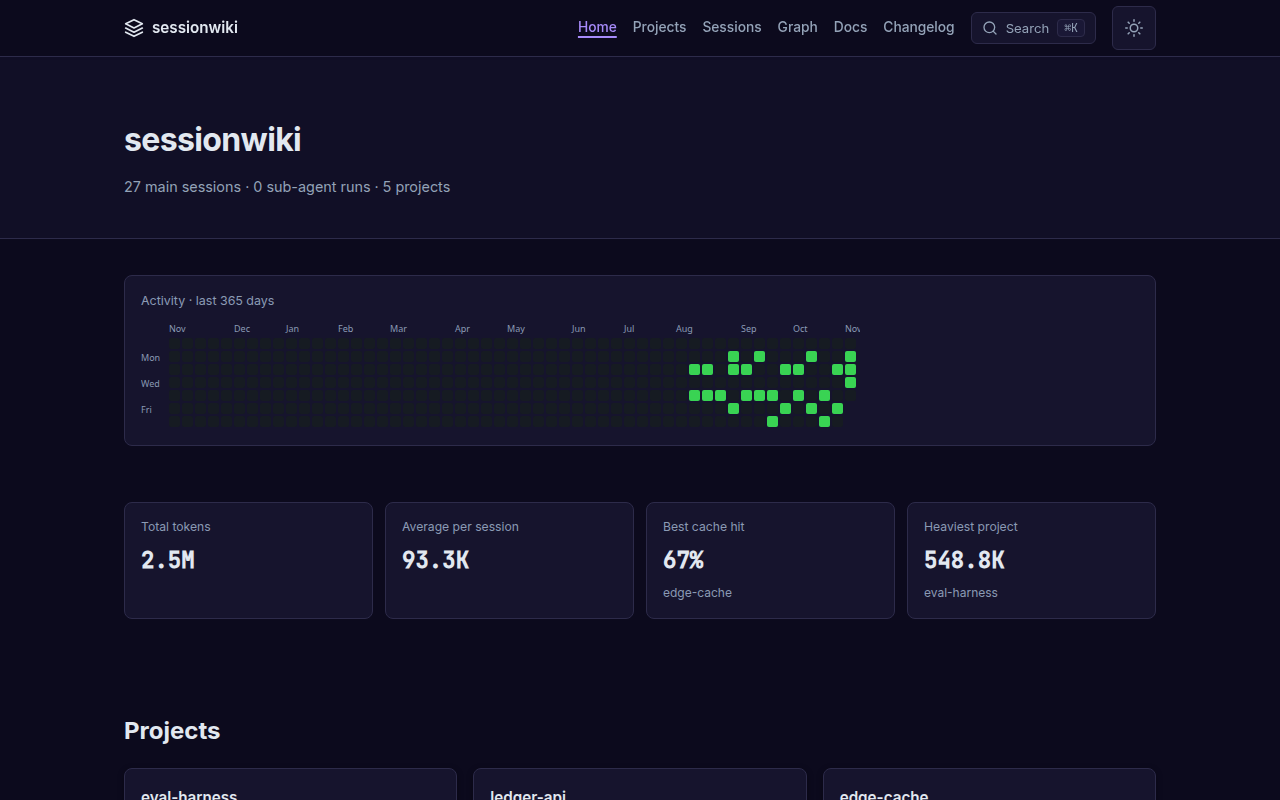
27 synthetic sessions across five projects and seven agents (Aug–Nov 2026) — no personal data. Rebuilt from examples/demo-sessions/ on every push to master.
Why
Every agent you work with writes a full transcript to disk: the plan, the dead ends, the fix, the reasoning behind it. Hundreds of them, in five different formats, and you never look at them again.
sessionwiki turns that history into a knowledge base:
- One place for every agent. Claude Code, Codex CLI, Cursor, Gemini CLI, Copilot, ZCode and OpenCode sessions land in the same wiki, tagged by agent, project, model and date.
- Always current. Hooks, an OpenCode plugin and nightly timers keep it in sync without you running anything.
- Readable. LLM synthesis writes a summary page per session; low-signal sessions are folded into cluster pages instead of cluttering the wiki.
- Usable by your agents. A built-in MCP server lets Claude Code, ZCode or any MCP client search past decisions before redoing them.
- Yours. Everything runs locally; transcripts are redacted on the way in, and
sessionwiki auditchecks the output before you publish anything.
Highlights
| 10 sources | Built in: Claude Code, Codex CLI, ZCode, OpenCode. Opt-in: Cursor, Gemini CLI, Copilot Chat, Copilot CLI, ChatGPT export, Obsidian — each with its own agent badge |
| Autosync | Claude Code Stop hook, ZCode Stop hook + nightly systemd / launchd / Task Scheduler job, OpenCode session.idle plugin |
| Synthesis backends | Ollama, any OpenAI-compatible server (vLLM, SGLang, LM Studio, LiteLLM, hosted), agent-delegate, extractive (no model), offline dummy |
| Signal over noise | Low-signal session coalescing, wikilink cleanup, concurrency control, cost --estimate |
| Static site | 365-day heatmap, token and cache stats, filterable sessions table, session pages with highlighted code, project pages with topics, session ↔ project graph, ⌘K search, dark mode |
| MCP server | 15 tools: query, search, read, list sources, lint, sync, exports, dashboard, write/edit/archive pages (with a confirm step)… |
| AI exports | llms.txt, llms-full.txt, JSON-LD graph, per-page .txt / .json, sitemap, RSS |
| Safe by default | Redaction of usernames and 17 secret patterns, read-only database exports, OS file locks and atomic state writes, doctor and audit |
Screenshots
All screenshots come from the live demo and are regenerated with scripts/regen_docs_screenshots.py.
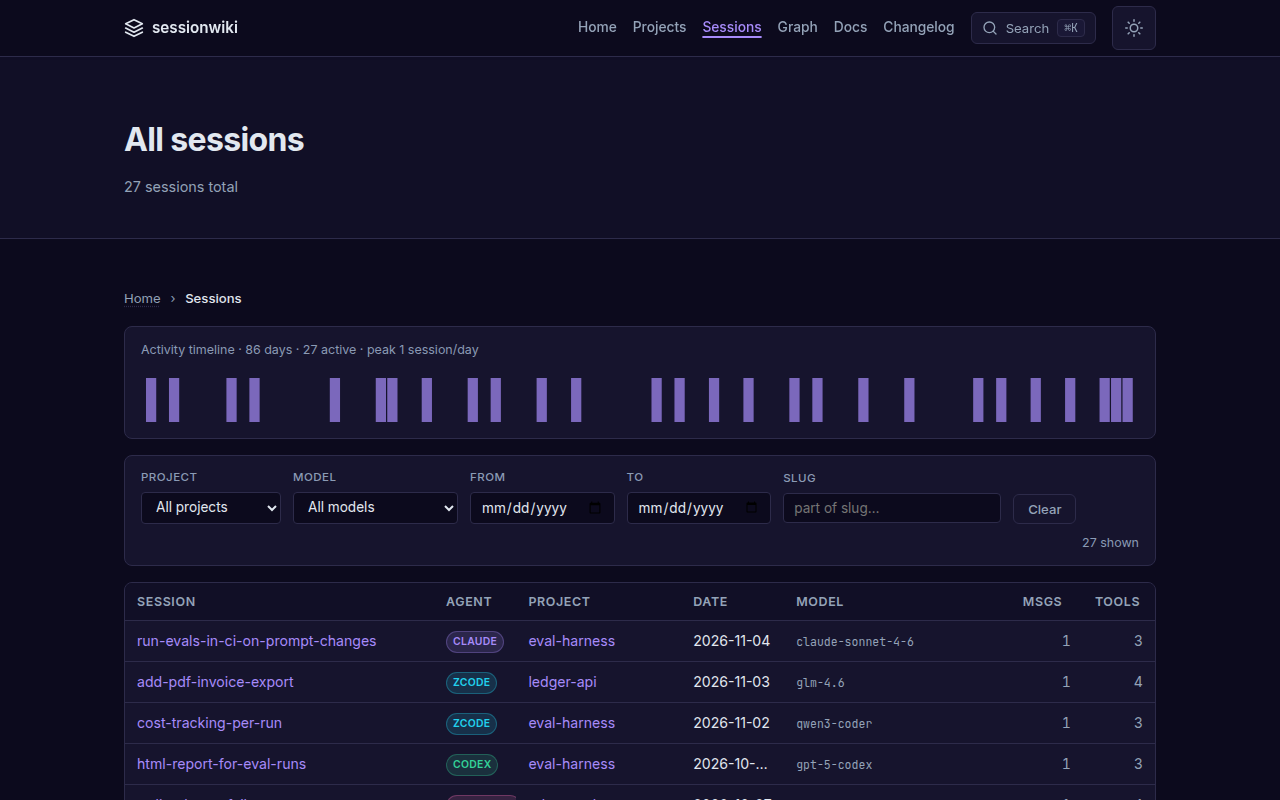
Every session, every agent — filter by project, model and date; each row carries its agent badge.
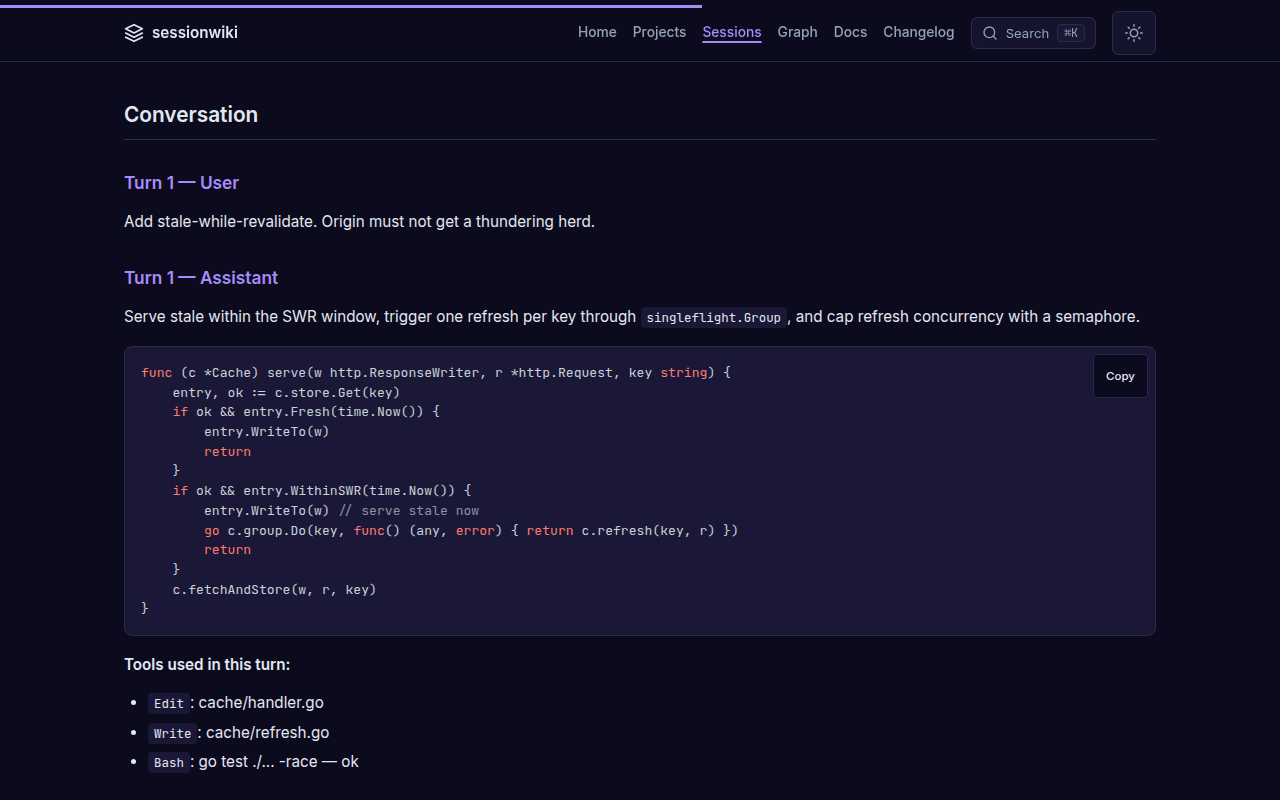
Session pages — the summary, the conversation, highlighted code and the tools that ran, plus token and cache usage.
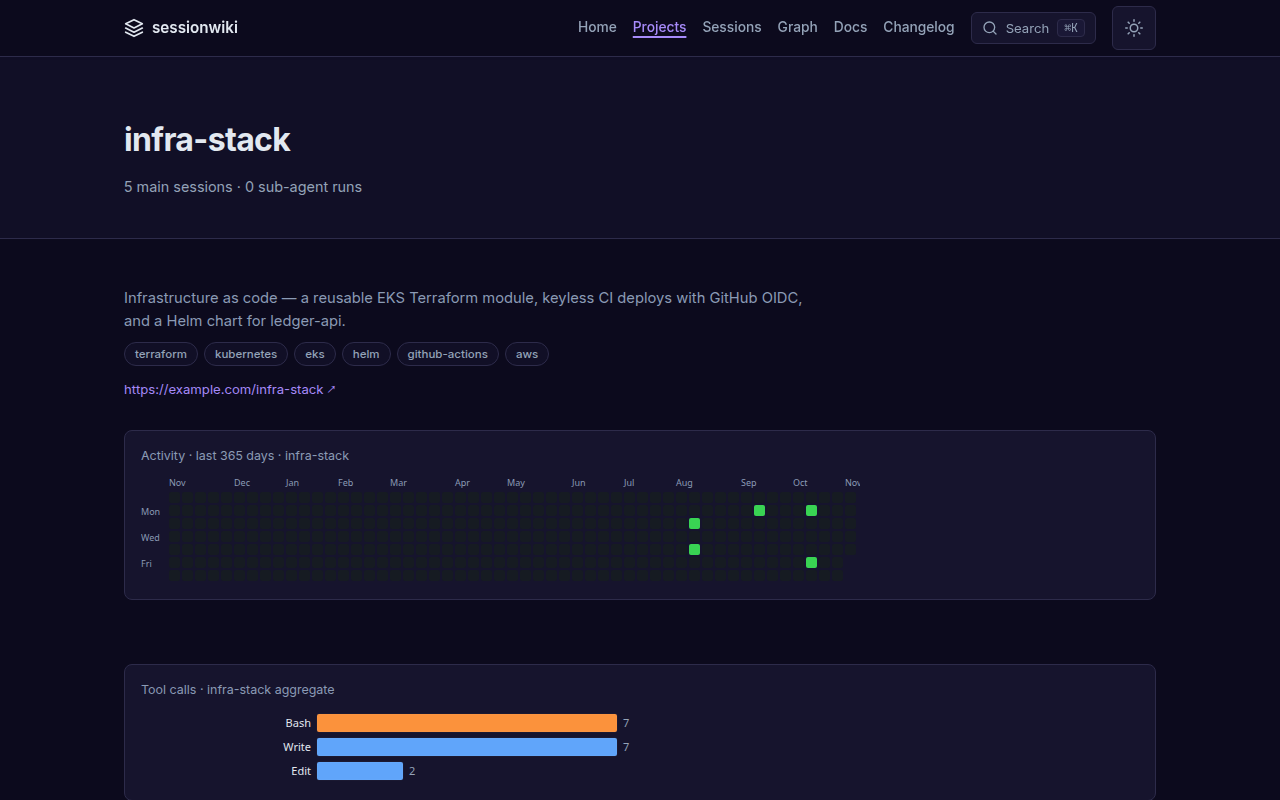
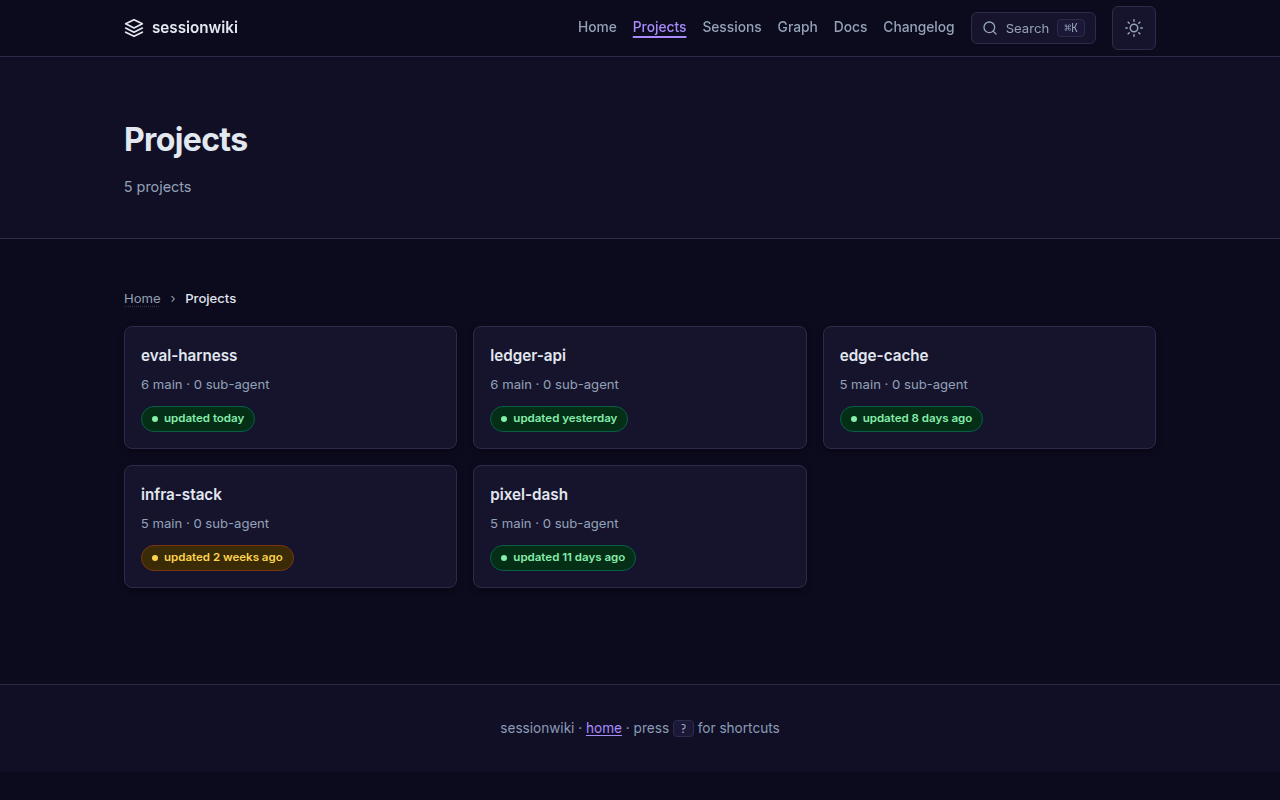
Projects — topics, description, activity and tool usage per project, with freshness badges on the index.
 |
 |
|---|
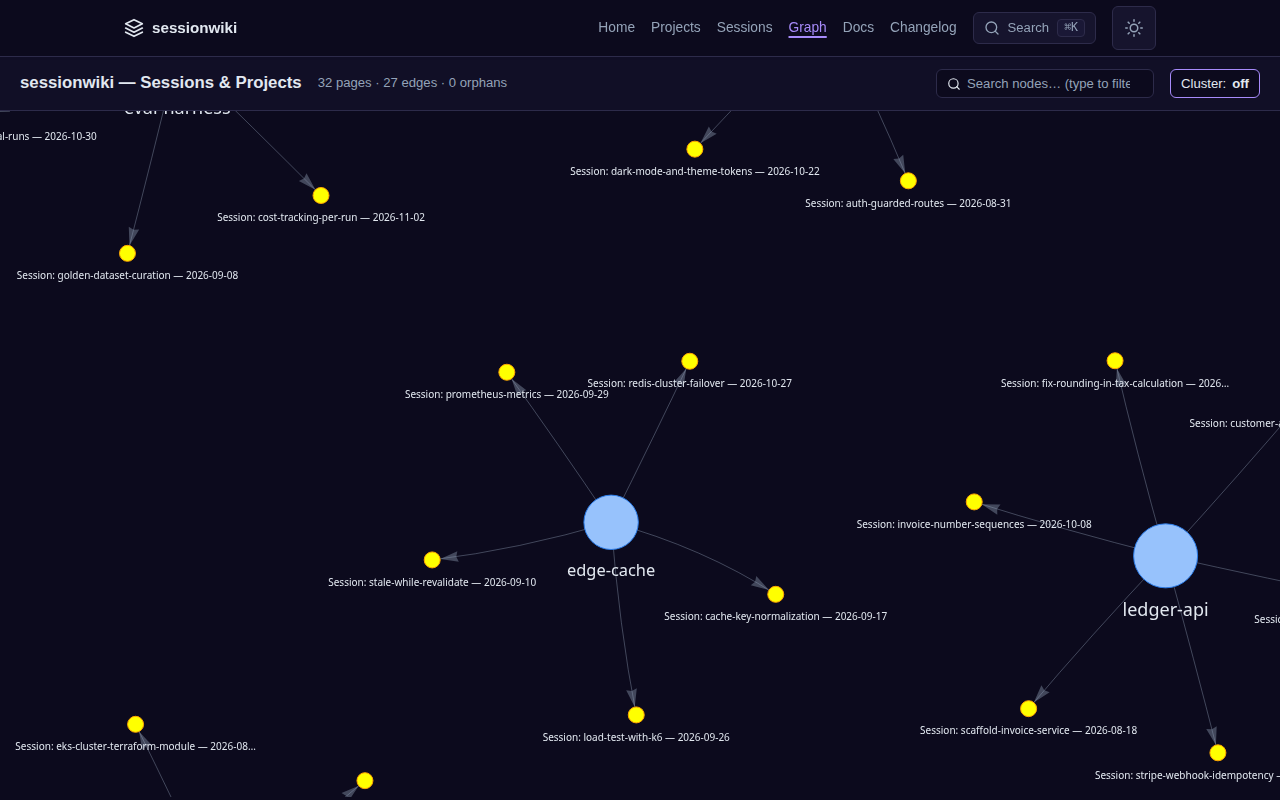
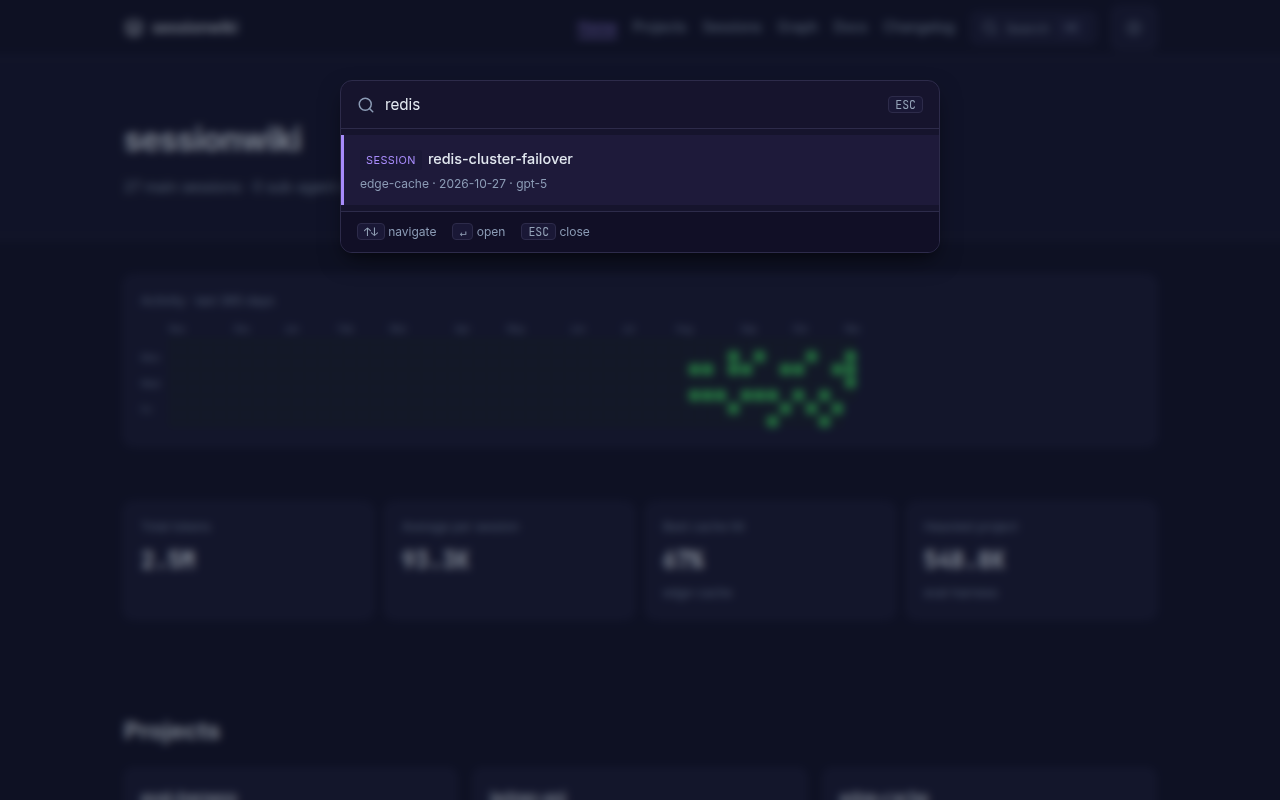
Graph and search — sessions grouped around their projects; ⌘K searches every page instantly.
 |
 |
|---|
Quick start
git clone https://github.com/necroz/sessionwiki.git
cd sessionwiki
./setup.sh                 # Windows: setup.bat — creates .venv, detects your agents
./sync.sh                  # convert new sessions into raw/
./build.sh && ./serve.sh   # build the site and open http://127.0.0.1:8765
setup creates a checkout-local .venv, installs the package, scaffolds raw/, wiki/, site/, enables the adapters for the agents it finds and runs sessionwiki doctor. The wrapper scripts use the venv automatically; for the CLI, activate it (source .venv/bin/activate) or call .venv/bin/sessionwiki.
Or install the published package — pick one:
uv tool install sessionwiki          # uv: CLI in its own isolated environment
uvx sessionwiki --help               # uv: run without installing
pip install sessionwiki              # pip, inside a virtualenv
pip install 'sessionwiki[graph]'     # + graphify graph engine (also works with uv tool install)
Docker — serve a site you have built (image ghcr.io/necroz/sessionwiki, see Docker deployment for docker compose and running CLI commands in the container):
docker run --rm -p 8765:8765 -v "$PWD/site:/wiki/site:ro" ghcr.io/necroz/sessionwiki
A step-by-step walkthrough with screenshots lives in the setup guide.
Connect your agents
Claude Code, Codex CLI, Cursor, Gemini CLI, Copilot — read straight from their session folders on sessionwiki sync. To sync after every Claude Code reply, add a Stop hook to ~/.claude/settings.json:
{
  "hooks": {
    "Stop": [{ "hooks": [{ "type": "command",
      "command": "cd /path/to/sessionwiki && .venv/bin/python -m sessionwiki sync --no-auto-build >/dev/null 2>&1 &" }] }]
  }
}
Parallel hook runs are safe: sync and synthesize take an OS file lock and write their state atomically.
To add related past work to every prompt, opt in to a UserPromptSubmit hook — it is off unless SESSIONWIKI_PROMPT_RECALL=1 is set. It injects up to three related pages plus up to three approved lessons (wiki/lessons/, lifecycle reviewed or verified); draft lessons never reach the prompt:
{
  "hooks": {
    "UserPromptSubmit": [{ "hooks": [{ "type": "command", "timeout": 10,
      "command": "cd /path/to/sessionwiki && SESSIONWIKI_PROMPT_RECALL=1 .venv/bin/python -m sessionwiki recall --prompt-hook" }] }]
  }
}
Cost: two wiki scans per prompt (pages, then lessons). A single scan measured a median of 170 ms with three pages returned, 140 ms when nothing matches (before lessons landed).
ZCode keeps sessions in SQLite. sessionwiki exports them read-only and installs the hook and a nightly job for you:
sessionwiki zcode install --dry-run   # show what will be written
sessionwiki zcode install             # Stop + SessionStart hooks, systemd / launchd / Task Scheduler
OpenCode (V2, opencode.db) gets a server plugin that runs autosync when a session goes idle:
sessionwiki opencode install --dry-run
sessionwiki opencode install          # honours $XDG_CONFIG_HOME
Hook-triggered runs skip instead of queueing when a cycle is already running; scheduled runs wait and catch up. Details: ZCODE.md, docs/adapters/opencode.md, and sessionwiki adapters for the full list.
LLM synthesis
sync fills raw/ with redacted transcripts. synthesize turns them into wiki pages: a summary per session, project pages, cross-links. Point it at any backend in config.local.json:
{
  "synthesis": {
    "backend": "openai",
    "base_url": "http://127.0.0.1:8000/v1",
    "model": "qwen3-coder",
    "max_concurrency": 8,
    "coalesce_low_signal": true
  }
}
sessionwiki synthesize --estimate     # what it will cost before you run it
sessionwiki synthesize                # new sessions only; idempotent
sessionwiki all --with-synth          # synthesize → build → graph → export → lint
Backends: ollama (local), openai (any OpenAI-compatible /v1: vLLM, SGLang, LM Studio, LiteLLM, hosted APIs), agent-delegate (let your coding agent write the pages), extractive (no model and no network: a useful page from the transcript itself), dummy (offline stubs). sessionwiki warns when a non-loopback base_url would send transcripts off your machine. See docs/modes/api/.
Ask your wiki from your agents (MCP)
Claude Code plugin — the MCP server, a skill that tells the agent when to search the wiki, and a SessionStart hook that puts the project's recent sessions into context. It asks for your sessionwiki folder on install:
/plugin marketplace add necroz/sessionwiki
/plugin install sessionwiki@sessionwiki
Any MCP client — run the published package with uvx, and point SESSIONWIKI_HOME at the folder that holds raw/ and wiki/ (run sessionwiki sync there first):
{
  "mcpServers": {
    "sessionwiki": {
      "command": "uvx",
      "args": ["sessionwiki", "mcp"],
      "env": { "SESSIONWIKI_HOME": "/path/to/your/sessionwiki" }
    }
  }
}
From a source checkout, use "command": "/path/to/sessionwiki/.venv/bin/sessionwiki" with "args": ["mcp"]; the checkout is the data root, so no env is needed.
Add it to Claude Code, Claude Desktop, ZCode or any MCP client. Tools include wiki_query (ranked search over wiki pages in any language, falling back to raw transcripts), wiki_search (exact text, optionally over raw transcripts), wiki_read_page, wiki_list_sources, wiki_lint, wiki_sync, wiki_export, wiki_dashboard and more — 15 in total, stdio transport, no SDK dependency, path-traversal guarded.
CLI reference
sessionwiki init                    # scaffold raw/ wiki/ site/
sessionwiki sync                    # export ZCode/OpenCode + convert transcripts to markdown
sessionwiki synthesize              # LLM summaries into wiki/ (--estimate, --coalesce-only, --force)
sessionwiki build                   # static site + AI exports
sessionwiki serve                   # local server on 127.0.0.1:8765
sessionwiki all                     # build → graph → export → lint (add --with-synth)
sessionwiki query "<question>"      # ask the wiki a question from the terminal
sessionwiki graph                   # session/project and wikilink graph
sessionwiki lint                    # wiki lint rules
sessionwiki export                  # llms.txt, JSON-LD, sitemap, RSS, …
sessionwiki candidates              # review candidate pages
sessionwiki adapters                # available adapters and their state
sessionwiki doctor                  # check Python, deps, config, agent paths
sessionwiki audit                   # scan raw/ wiki/ site/ for usernames and secrets
sessionwiki zcode                   # export · autosync · install
sessionwiki opencode                # export · autosync · install
sessionwiki mcp                     # MCP server on stdio
sessionwiki recall                  # a project's recent sessions, for a SessionStart hook
sessionwiki version
Every subcommand has --help. Full reference: docs/reference/cli.md.
Configuration
Settings are layered; later files win:
examples/sessions_config.json  →  config.json  →  config.local.json
   (shared defaults)              (gitignored)      (gitignored, machine-local)
Put machine-specific values — synthesis backend and keys, redaction patterns, project roots, adapter toggles — in config.local.json. Reference: docs/configuration-reference.md. Use .llmwikiignore to exclude projects or sessions.
How it works
 Claude Code · Codex · Cursor · Gemini · Copilot       ZCode · OpenCode (SQLite)
              │ JSONL                                          │ read-only export
              └──────────────────────┬─────────────────────────┘
                                     ▼
                       sync  →  raw/sessions/*.md          redacted, immutable
                                     │
                       synthesize    ▼
                                  wiki/                    sources · projects · entities · concepts
                                     │
                    ┌────────────────┼──────────────────┐
                    ▼                ▼                  ▼
                 build → site/   MCP server        exports (llms.txt, JSON-LD)
Three layers, following Karpathy's LLM Wiki pattern: raw/ is the immutable source of truth, wiki/ is maintained by the LLM, site/ is generated. Your raw/ and wiki/ are gitignored — your data never enters the repository.
Privacy
- Transcripts are redacted on conversion: your username, home paths and 17 kinds of keys and tokens, plus your own patterns.
- ZCode and OpenCode databases are opened read-only.
- Nothing leaves your machine unless you configure a remote synthesis backend — and sessionwiki warns when you do.
sessionwiki auditscansraw/,wiki/andsite/before you publish a site.
See docs/privacy.md and SECURITY.md.
Documentation
- Documentation hub — start here
- Setup guide · Installation · Use with Claude Code · Windows
- CLI · Configuration · Architecture
- Deploy to GitHub Pages, Docker, Vercel/Netlify
- What's different from llmwiki · Changelog
Based on llmwiki
sessionwiki started as a fork of llmwiki by Pratiyush (MIT) at v1.3.82 and keeps its full history. Most of the converter, site, lint and MCP foundations are his work. sessionwiki adds the ZCode and OpenCode sources with autosync, the OpenAI-compatible synthesis backend, session coalescing, locking and atomic state, doctor and audit, the session graph, and a long list of fixes — see what's different and how to migrate.
Thanks also to Andrej Karpathy for the LLM Wiki idea, Python Markdown, highlight.js and vis-network.
Contributing
Read CONTRIBUTING.md. Keep PRs to one concern, use feat: / fix: / docs: / chore: / test: titles, add a CHANGELOG entry for feat and fix, and never commit real session data. CI must be green.
License
MIT © 2026 Igor Lashkevich (sessionwiki) · © 2026 Pratiyush (original llmwiki). See NOTICE.
sessionwiki MCP questions
How do I add sessionwiki MCP to Claude Code?
Run claude mcp add --env 'SESSIONWIKI_HOME=<SESSIONWIKI_HOME>' sessionwiki -- uvx sessionwiki mcp in your terminal. Add --scope user to make it available in every project.
How do I add sessionwiki MCP to Cursor?
Open ~/.cursor/mcp.json and add the server under mcpServers, using the Cursor config shown in the install section above.
What tools does sessionwiki MCP provide?
It exposes 15 tools, including wiki_query, wiki_search, wiki_list_sources, wiki_read_page, wiki_lint.
What AI coding tools can sessionwiki sync with?
It supports Claude Code, Codex CLI, Cursor, Gemini CLI, Copilot, ZCode, and OpenCode.
Is my data safe when using sessionwiki?
Yes, everything runs locally and transcripts are redacted for usernames and secret patterns during the process.
How can I use the wiki with my AI agents?
You can connect it to any MCP client using the built-in MCP server, which provides 15 tools for querying, searching, and reading the wiki.