
An Android emulator fleet designed for AI agents to test apps under varying network, battery, and device conditions.
Also known as namyunsu/crewdroid
- Stars
- 0
- Tools
- —
- Downloads, 30 days
- —
- Latest version
- 0.2.7
- Last commit
- Nov 6, 2026
- License
- MIT
What is crewdroid MCP?
crewdroid is an Android emulator fleet designed for AI agents to test apps under varying network, battery, and device conditions.
Summary generated from the project's README
About crewdroid MCP server
crewdroid provides a fleet of Android emulators specifically optimized for AI agents to perform automated app testing. Unlike standard Android Studio emulators that consume significant system resources, this tool uses a lightweight approach that requires less than half the RAM. It allows developers to manage multiple device profiles, including Galaxy S24, Fold, and Flip models, across various Android versions like 12, 14, and 16.
Users interact with the system through a CLI or an MCP server, making it ideal for integration into agentic workflows. The platform enables precise control over device conditions, such as network states (airplane mode, slow, or flaky), battery levels, location, and screen configurations. Beyond simple interaction, it includes specialized capabilities for judging server data to detect duplicate or missing records and performing layout sweeps across different fonts and screen sizes. This makes it a specialized environment for the build-and-check loop during mobile application development.
What you can do with it
- 1Automated multi-device testingAn AI agent can build an app and verify its functionality across a fleet of different Android devices simultaneously.
- 2Simulating unstable network conditionsDevelopers can instruct an agent to test how an application handles data synchronization when a device loses connectivity or has a flaky connection.
- 3Validating backend data integrityThe system can automatically check if an app's server contains duplicate, missing, or overwritten records after a multi-device test run.
- 4Testing UI responsiveness to environment changesYou can task an agent with verifying that the app layout remains correct when switching between dark mode, different font sizes, or folding a device.
Written from the project's README. Every use case is checked against a quote from it.
How to install crewdroid MCP
Formats verified 10 Nov 2026Add to CursorAdd to GooseInstall crewdroid MCP in Claude Code
$ claude mcp add crewdroid -- npx -y crewdroidInstall crewdroid MCP in Cursor
~/.cursor/mcp.json
{
  "mcpServers": {
    "crewdroid": {
      "command": "npx",
      "args": [
        "-y",
        "crewdroid"
      ]
    }
  }
}Install crewdroid MCP in VS Code
.vscode/mcp.json
{
  "servers": {
    "crewdroid": {
      "type": "stdio",
      "command": "npx",
      "args": [
        "-y",
        "crewdroid"
      ]
    }
  }
}Install crewdroid MCP in VS Code CLI
$ code --add-mcp '{"name":"crewdroid","type":"stdio","command":"npx","args":["-y","crewdroid"]}'Install crewdroid MCP in Claude Desktop
claude_desktop_config.json
{
  "mcpServers": {
    "crewdroid": {
      "command": "npx",
      "args": [
        "-y",
        "crewdroid"
      ]
    }
  }
}Install crewdroid MCP in Codex
$ codex mcp add crewdroid -- npx -y crewdroidInstall crewdroid MCP in Codex config.toml
~/.codex/config.toml
[mcp_servers.crewdroid]
command = "npx"
args = ["-y", "crewdroid"]
Install crewdroid MCP in Gemini CLI
$ gemini mcp add -s user crewdroid npx -- -y crewdroidInstall crewdroid MCP in Gemini settings.json
~/.gemini/settings.json
{
  "mcpServers": {
    "crewdroid": {
      "command": "npx",
      "args": [
        "-y",
        "crewdroid"
      ]
    }
  }
}Automated checks
Ran Nov 14, 2026Full report →Passed our automated checks. That is not a security audit: read the code and give the server the narrowest access it needs. How checks work

- Source repository linked and reachablenamyunsu/crewdroid is public and reachablegithub.com/namyunsu/crewdroid ↗Pass
- Package names this repository as its sourcecrewdroid names namyunsu/crewdroid as sourcenpmjs.com/package/crewdroid ↗Pass
- Build provenance (Sigstore attestation)Sigstore attestation for crewdroidnpmjs.com/package/crewdroid/v/0.2.7#provenance ↗Pass
- Open source license (OSI)MITspdx.org/licenses/MIT.html ↗Pass
- Commit or release in the last yearLast commit or release 2026-11-06github.com/namyunsu/crewdroid ↗Pass
- OpenSSF ScorecardNot checked
- Package name not close to a popular packageNo popular package one edit away from crewdroidPass
- No critical advisory in the package or its dependencies128 resolved dependencies checked; no critical advisoryosv.dev ↗Pass
- No hidden instructions to the model0 tool descriptions and the README read; no override phrases, credential paths or hidden charactersPass
- Destructive tools are labelledNot checked
- Remote endpoint answers the MCP handshakeNot checked
README
View on GitHubcrewdroid




An Android emulator your AI agent drives on under half the RAM of Android Studio's, with the phone's conditions set per device: network, battery, location, screen, font, Android version.
crewdroid is for the build-and-check loop while you develop an app; a real phone is still where you test push notifications, Play services, Google sign-in and the camera app (Limits).
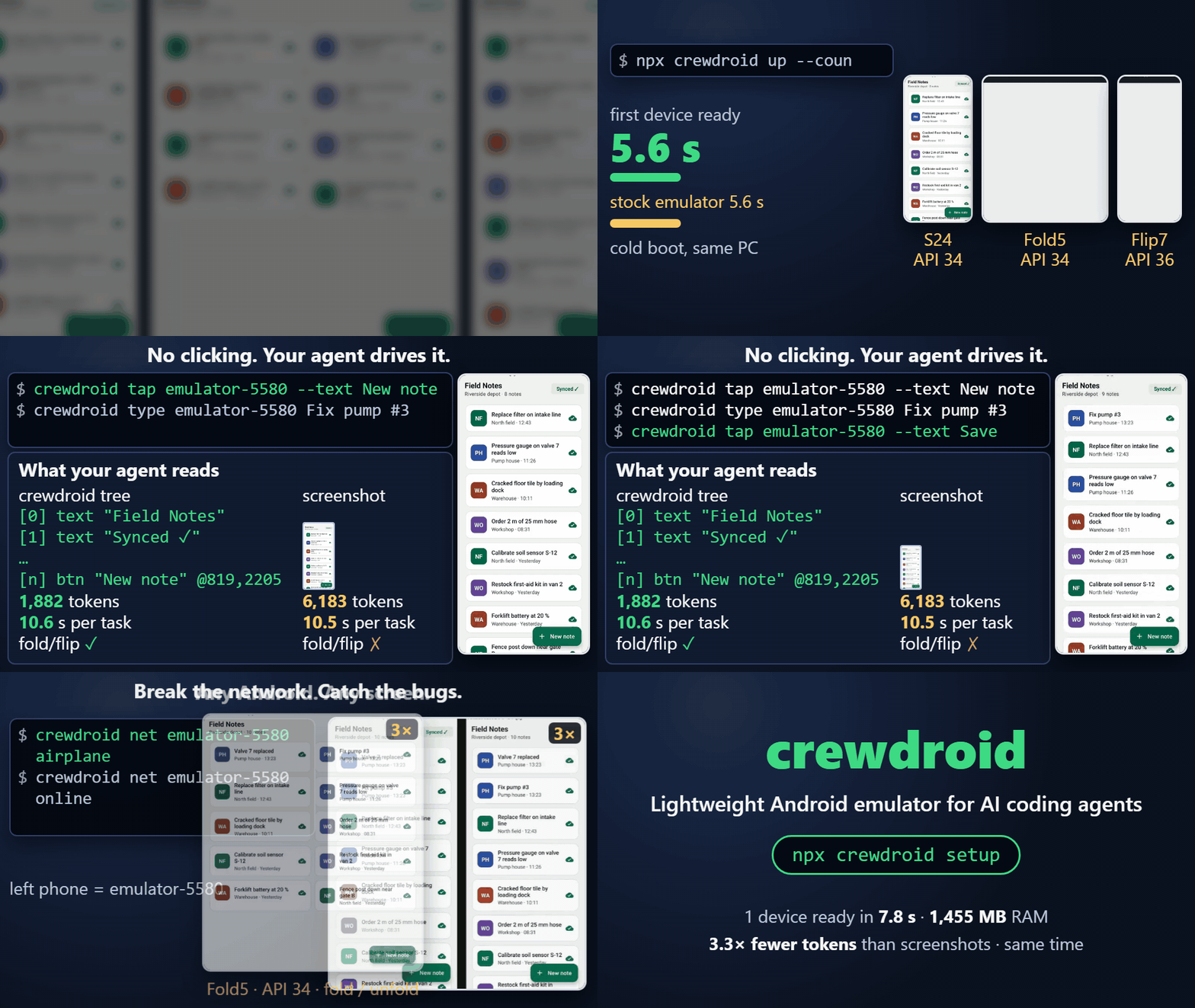
- Faster to a tested app. In one run per side, an AI agent built and 3-device tested the same app in 13 min 42 s on crewdroid and 40 min 30 s on Android Studio's default AVD, with the same result (details).
- Light. 1472 MB of host RAM and 2.09 GiB of disk per device, against 3388 MB and 7.29 GiB for Android Studio's default AVD; a screen read through the CLI takes 370.7 ms against 2074.1 ms (table).
- Made for an agent.
screenreturns a text outline ([3] btn "Send" #send @540,1210) in about a third of a screenshot's tokens (1882 vs 6183 per task),tap --text Sendtaps by name on any screen size, and every command is both a CLI with--jsonand an MCP tool. - Conditions on demand. Per device:
net airplane|nodata|slow|flaky,envbattery / location / dark mode / font size / locale / rotation, Galaxy S24 · Fold · Flip screens with fold / unfold, Android 12 / 14 / 16, a used-phoneload.
Also in the box: judging your server's data for duplicate, missing and silently overwritten records after a multi-device run, a layout sweep across screens and fonts, crash / ANR triage.
One app, built by an agent on both
We gave an AI agent the same empty project, spec and buggy server twice: build a designated-driver app, check every feature on screen, fix what breaks, then test 3 drivers against the server. Same model, no human. One run per side, 2026-11-02 (method and limits, files to repeat it).
| Android Studio default AVD + adb + mobile-mcp | crewdroid | |
|---|---|---|
| Empty project to finished 3-device test | 40 min 30 s | 13 min 42 s |
| Bringing up 3 devices | 759 s | 41 s |
| Server bugs found | 4 | 4 |
| Finished app, same scored run | passed | passed |
Same result, about a third of the time. Boot explains nearly half of the gap: without those 759 s the Studio side takes about 28 minutes, and an agent reusing a running emulator would not pay all of it. This is one run per side, not a benchmark.
The run command then took about 5 minutes for 3 devices x 5 rounds with network faults. It failed the buggy server 2 of 2 times and passed the fixed server 2 of 2 times.
One device, against Android Studio's default emulator
If you found crewdroid because an AI agent on the stock emulator is slow, start here. One device, medians of 3 runs, measured on the same PC (raw runs in docs/measurements/single-vs-studio.json):
| Android Studio default AVD | crewdroid up |
|
|---|---|---|
| Disk (AVD + system image) | 7.29 GiB | 2.09 GiB |
| Host RAM after ready | 3388 MB | 1472 MB |
Screen read in the MCP server (Studio side: adb uiautomator dump) |
2074.1 ms | 175.2 ms |
| Screen read through the CLI | 2074.1 ms | 370.7 ms |
Screenshot in the MCP server (Studio side: adb screencap) |
723.7 ms | 286.3 ms |
| Screenshot through the CLI | 723.7 ms | 445.6 ms |
Cold boot to sys.boot_completed |
25.1 s | 24.6 s |
| Idle CPU, 60 s (100 % = 1 core) | 200.5 % (runs: 42.5 to 383.1) | 213.3 % |
Start from snapshot to sys.boot_completed |
5.3 s | 5.5 s |
Bold = crewdroid clearly ahead. Cold boot and snapshot boot are a tie, and idle CPU varies too much between runs to call. The CLI rows time the installed crewdroid command (node bin/crewdroid.mjs, a new node process per call; it starts in 79 ms, --version); the MCP rows time calls to one crewdroid mcp server kept running. npx crewdroid adds about 0.4 s to every call (cli-speed.json), so install it once (npm i -g crewdroid) or use the MCP server. Per-phase numbers in single-vs-studio.md.
An AI agent driving one device (Field Notes demo app, "add a note and confirm it", 5 runs per path, API 34, s24ultra; raw in docs/measurements/agent-bench.json): path A reads crewdroid's text outline and taps by text, path B reads a screenshot after every action and taps by x,y.
| Agent, per task | Screenshots + x,y taps | crewdroid screen + tap --text |
|---|---|---|
| Estimated model input tokens | 6183 | 1882 |
| Tool time (s) | 10.46 | 10.58 (a tie, not faster) |
| Same task on fold5-main and flip6-cover at font 1.3, no re-deriving | FAIL (s24ultra x,y outside the screen) | pass |
What crewdroid adds over mobile-mcp + the stock emulator: a lighter device (table above, single-vs-studio.json), per-device network faults (net), layout checks across screens and fonts (layout.md) and judging the server's data (run-app.json). What it does not add: tap / type speed, which is the same (agent-bench.json; mobile-mcp itself was not benchmarked, path B stands in for screenshot-driven agents).
Setup: Android 16 (API 36); the Studio side is a pixel_9 AVD from google_apis_playstore with default 2 GB RAM and 4 cores, window on, -gpu auto, quickboot; the crewdroid side is up with no flags (headless, 2 cores, google_atd image); Ryzen 7 5700X, 64 GB, Windows 11, emulator 37.1.11.0. The CLI rows include starting node.
What only crewdroid does
- Judges the server, not the screen. After a run,
crewdroid judgereads your API's data and checks rules:unique(no duplicates),count(nothing missing),noLostUpdate(no silent overwrite). A bug comes back asVIOLATIONlines and exit code 1, not as a screenshot to interpret. No export endpoint?crewdroid proxy start --target http://127.0.0.1:8080records every request the emulators send (through the Android system proxy, no app or server change), andcrewdroid judge --rules judge/proxy.rules.json --log proxy.jsonlchecksdupSuccess(one write applied twice),lostUpdate(two edits on the same version both accepted),lostWrite(a failed write never retried) andidlefrom that log. Plain HTTP only for now (ADR 0008). - Breaks one device at a time, mid-flow. Network
airplane/nodata/slow/flakyper device on its own schedule, fold / unfold during an upload, Doze, trim-memory, full storage, a low-end CPU / RAM spec. Every setter reads the state back. - Runs a mixed fleet from one command. Android 12 / 14 / 16 and S24 · Fold · Flip or any
WxH@dpi, headless, all clones of one base image: 3 devices in 3.93 GB of host RAM and 6.99 GiB of disk (allocated).
Also in the box: crash / ANR triage, cold start and jank, APK inspection. Every command has --json and an exit code, and every command is an MCP tool.
npx crewdroid setup --yes        # Android SDK + emulator images, if you have none
npx crewdroid up --count 3       # S24 Ultra / API 34, Fold5 / API 34, Flip7 / API 36
npx crewdroid run --apk app.apk --flow flows/add-item.yaml --server http://127.0.0.1:8080   # your app: your Maestro flow on every device + network faults + judge, exit 1 on a bug
New to it? Try the bundled sample first (sample app + sample server with a race condition): npx crewdroid run scenarios/photo-upload.json --seed 1. Your own app step by step: docs/guide-your-app.md.
Why not just the Android Emulator?
The stock emulator is one phone with a window, driven by hand. crewdroid is a fleet driven by a program.
| Android Emulator / AVD Manager | crewdroid | |
|---|---|---|
| Multi-user bugs | not a feature | run repeats a flow on every device at different timings, then judge checks the server: unique, count, noLostUpdate |
| Network | one toggle in Extended Controls | per-device airplane, nodata, slow, flaky on a randomised schedule, mid-upload |
| Devices | one AVD = one window, one disk image each | N read-only clones of one base image, mixed screens (S/Fold/Flip/any WxH@dpi) and API levels, one command |
| Interaction | click in a window | --json output + exit code on every command |
| Device state | GUI panels | env (GPS, battery, rotation, dark mode, font, locale, GSM, SMS, calls) and app (permissions, deep links, Doze, trim, full storage) — each setter reads its state back |
| Fold / Flip | needs a foldable AVD | fold / unfold on any clone: the app gets a real configuration change |
| For an AI agent | nothing to call | MCP server, AGENTS.md, 7 skills triggered by symptoms ("app crashed", "deep link does not open", "sync duplicated a row") |
Resources for 3 devices (3 API levels each; stock = avdmanager defaults, headless, fresh):
stock google_apis |
stock google_atd |
crewdroid | |
|---|---|---|---|
| Disk | 24.7 GiB (file length; not re-measured as allocated) | 11.8 GiB allocated (33.2 GiB file length) | 6.99 GiB allocated |
| Host RAM | 8.45 GB | 8.5-8.8 GB | 3.93 GB |
| Idle CPU (100 % = 1 core) | ~1000 % | ~248-352 % | ~600 % |
"Allocated" = bytes really on disk (sparse holes and NTFS compression excluded), the only disk number comparable to crewdroid's slimmed clones; the google_apis figure was taken as file length, so it overstates that column. Disk and RAM are lighter than both stock images, but idle CPU is not: crewdroid's ~600 % is higher than 3 stock google_atd AVDs (~248-352 % over 6 runs; one 60 s sample is noisy), so the CPU gap against google_apis comes from the image, not from crewdroid. Measured on one Windows 11 PC (Ryzen 7 5700X, 64 GB, WHPX), 3 devices. Raw JSON and method in docs/measurements/ (baseline.md, baseline-atd.md).
No barrier, by design. Real concurrency bugs come from retries, offline queues and late edits overlapping — not from pressing a button at the exact same millisecond. crewdroid gives each device its own delays and network schedule and lets the overlap happen, then reads the truth from the server (ADR 0002).
60-second tour
Boot a mixed fleet (headless, no emulator windows; on Windows a tray icon shows what runs):
$ crewdroid up --count 3 --json
[
  { "serial": "emulator-5580", "profile": "s24ultra",   "api": 34, "screen": "1080x2340@450", "bootSeconds": 6.4, "readySeconds": 42.1 },
  { "serial": "emulator-5582", "profile": "fold5-main", "api": 34, "screen": "1812x2176@420", "bootSeconds": 6.7, "readySeconds": 41.8 },
  { "serial": "emulator-5584", "profile": "flip7-main", "api": 36, "screen": "1080x2520@480", "bootSeconds": 3.1, "readySeconds": 39.9 }
]
Cut one device's data mid-upload, let another go flaky:
$ crewdroid net emulator-5580 nodata
$ crewdroid net emulator-5582 flaky
Run your own app (a release APK is fine): run --apk app.apk --flow flows/add-item.yaml --server http://127.0.0.1:8080 repeats your Maestro flow on every device under network faults, puts the recording proxy in front of your backend and judges the request log (docs/guide-your-app.md; a scenario file adds intents / adb actions per iteration). Worked example on an app that is not ours: DAVx5 (F-Droid) + a local Radicale CardDAV server, scenarios/davx5-contacts.json, 3 devices with airplane / nodata / slow / flaky, then again with 30 % of the answers cut: 0 violations, 12 of 12 contacts stored, none twice, so no bug found in DAVx5 (docs/measurements/run-app.json).
Or try the bundled sample: the multi-user scenario against a server with a race condition (BUGGY=1 in the bundled sample server), and read the verdict:
$ BUGGY=1 npx -y tsx sample/server/main.ts 5599     # in another terminal; run checks it is up before booting
$ crewdroid run scenarios/photo-upload.json --seed 1
...
VIOLATION uploads unique(key): duplicate key="u13-1" (2 rows)
VIOLATION uploads count(acks): missing 1 of 48 expected key values
VIOLATION writes noLostUpdate(id,baseVersion): lost update: 3 writes to id="r2" all based on baseVersion=4; all but one were overwritten
FAIL: 5 violations            # exit code 1
Same scenario, server fixed → OK: 3 rules, 0 violations, exit 0. The judge rules are a JSON file, so the same check runs against your own API's export.
Read the screen as text (what to tap, by name; one line per element, --json for the full tree):
$ crewdroid screen emulator-5580
dev.crewdroid.demo/dev.crewdroid.demo.MainActivity 1080x2340
[0] text "Field Notes" #app_title @391,141
[2] text "Synced ✓" #sync @908,169
[3] list #list @540,1306
  [5] text "Replace filter on intake line" #note_title @579,380
...
[35] btn "New note" #fab @819,2205
$ crewdroid tap emulator-5580 '[35]'      # or --text "New note"; prints the new screen once it settled
Agent interface
What an agent gets is a contract, not speed claims: JSON in, JSON out, an exit code, and the state read back after every change.
- Every command is machine-readable:
--json, non-zero exit on failure, read-back after every setter, clear error before any adb call on bad input. - MCP server:
crewdroid mcpexposesdevices,up,down,net,env,app,fold,triage,screen,perf,apk,judge,hammer,runover stdio — the same functions the CLI calls, no second implementation. - Skills in
.agents/skills/(read by Claude Code, Cursor, Gemini CLI, Copilot, Codex):crewdroid,android-triage,android-screen,android-permissions-intents,android-apk,android-perf,android-offline-concurrency. Each is a short recipe of exact commands whose output the agent can act on. AGENTS.mdwith the rules an agent must keep (adb only againstemulator-<port>, one run at a time, never a barrier) andCLAUDE.mdfor Claude Code.- Safe on a shared machine: a USB phone plugged into the same PC is never touched; clones are read-only;
downkills onlycrew-*.
{ "mcpServers": { "crewdroid": { "command": "npx", "args": ["-y", "crewdroid", "mcp"] } } }
claude plugin marketplace add namyunsu/crewdroid && claude plugin install crewdroid@crewdroid
Cursor: install the MCP server · Codex / Gemini CLI / Copilot: the skills and AGENTS.md are picked up from the repo.
What it finds
| Bug class | How crewdroid reproduces it | Rule that catches it |
|---|---|---|
| Duplicate upload after a retry (missing idempotency) | flaky network drops the response, the app's outbox retries with the same key |
unique(key) |
| Dropped record (outbox lost on restart / airplane mode) | airplane during save, app restart offline, reconnect |
count(acks) |
| Lost update (two users edit the same row, last write wins) | devices read the same version at different times and both PUT | noLostUpdate(id,baseVersion) |
| Fold during upload | fold / unfold while the outbox drains: the app must survive the configuration change with exactly one upload |
unique + count |
| Crash / ANR only on one Android version or screen | mixed API 31/34/36 and S/Fold/Flip profiles in one run; triage reads the crash buffer, ANRs and exit reasons |
— |
On your app: docs/guide-your-app.md (run --apk --flow --server, proxy log rules dupSuccess / lostUpdate / lostWrite). On DAVx5 with 30 % of the answers cut, each committed-but-unanswered PUT was resent with If-None-Match: *, got 412 and made no second copy: 0 violations, 12 of 12 contacts (docs/measurements/run-app.json).
The bundled sample app (Kotlin, offline outbox, probe-app/) and sample server (sample/server/, BUGGY=1 switch) make every row above reproducible on a laptop.
Limits: when to use a real phone
crewdroid runs Google's google_atd images (chosen for lightness). Measured on fresh devices, API 31 / 34 / 36 (docs/measurements/atd-limits.md, re-check: node scripts/check-atd-limits.mjs):
| Missing on the image | What breaks because of it | Instead |
|---|---|---|
A Google account and any screen to add one: 0 accounts, ADD_ACCOUNT_SETTINGS resolves to nothing; Play services itself is there (prebuilt GmsCore 22.50 / 23.18 / 25.08) (measured) |
"Sign in with Google" and anything that needs a signed-in Google account; FCM push was not tested here | a real phone |
The Play Store: com.android.vending is only /product/app/LicenseChecker 1.8, market:// resolves to nothing (measured) |
Play Billing, in-app updates, store links, installing from Play | a real phone |
Chrome: com.android.chrome not installed; VIEW https:// goes to a stub browser (fakesystemapp), on API 36 to a chooser with the WebView shell (measured) |
Custom Tabs and browser links, browser-based OAuth redirects back into the app | the app's own WebView: the system WebView (91 / 113 / 133) rendered a local page on all three APIs (measured); else a real phone |
A camera app on API 31 and 34: IMAGE_CAPTURE resolves to nothing (API 36 has com.android.camera2) (measured) |
camera-intent photo pickers ("take a photo" buttons) | adb push a picture, then the app's own picker; the system photo picker (PICK_IMAGES) resolves on API 34 and 36, not on 31 (measured). A real camera: a real phone |
A launcher: MAIN/HOME is an empty stub (fakesystemapp EmptyHomeActivity) on all three APIs (measured) |
home-screen widgets, shortcuts, launcher badges | a real phone |
Requirements
- Android SDK with command-line tools and emulator >= 36.4 (
ANDROID_SDK_ROOTorANDROID_HOMEmust point at it, or~/.crewdroid/android-sdkmust exist). No SDK yet:npx crewdroid setup --yesinstalls JDK 17 (for sdkmanager only), command-line tools, platform-tools, emulator and thegoogle_atdimage (--images 34,31,36,--dry-runlists sizes first); crewdroid downloads thegoogle_atdimages it needs for the host CPU (x86_64, or arm64-v8a on Apple Silicon / ARM Linux; API 31/34/36, ~0.9 GB each) and shrinks them withslim - Node >= 22
- From a git checkout instead of npm: run
npm ci && npm run prepackonce. It builds the on-device helper APK (JDK 17) that the npm package already ships; without itscreen/tapfall back touiautomatorandtypetakes ASCII only - Windows 10/11 x64, macOS on Apple Silicon, or Linux x64/arm64
- Hardware acceleration: WHPX (Windows), Hypervisor.framework (macOS) or KVM (Linux,
/dev/kvm);setupreportsemulator -accel-check - Image limits (
google_atd, chosen for lightness): see Limits; also no Messages or Dialer (SMS and calls change telephony state only) and no GPU (frame numbers compare runs, not phones). Supported despite the image: any Unicode text input incl. Korean (on-device helper), and the API 31 black-screen-after-relaunch is detected and recovered (blackRelaunch) - macOS/Linux:
slimskips the NTFS sparse/compress steps (snapshot zero-fill and stale-overlay cleanup still run); RAM figures are process RSS (shared pages not split)
crewdroid MCP questions
How do I add crewdroid MCP to Claude Code?
Run claude mcp add crewdroid -- npx -y crewdroid in your terminal. Add --scope user to make it available in every project.
How do I add crewdroid MCP to Cursor?
Open ~/.cursor/mcp.json and add the server under mcpServers, using the Cursor config shown in the install section above.
How does crewdroid differ from the standard Android Studio emulator?
crewdroid is a fleet of lightweight emulators designed for programmatic control by AI agents, offering per-device network faults, battery, and location simulation with significantly lower RAM and disk usage.
Can crewdroid test how my app handles network issues?
Yes, you can simulate airplane mode, no data, slow, or flaky network connections on a per-device basis.
Does crewdroid help in finding server-side bugs?
Yes, it includes a 'judge' feature that reads your API's data to check for duplicate, missing, or silently overwritten records after a multi-device run.
Is it suitable for AI agents?
Yes, it provides a text outline of the screen to save tokens and includes an MCP server for direct tool integration.