
opencode-browser MCP server
Commit Sep 22, 2026Enables AI agents to remotely control Chrome browsers through a combination of an MCP server and a Chrome extension.
Also known as Mytai20100/opencode-browser
- Stars
- 14
- Tools
- 200
- Downloads, 30 days
- —
- Latest version
- —
- Last commit
- Sep 22, 2026
- License
- MIT
What is opencode-browser MCP?
opencode-browser enables AI agents to remotely control Chrome browsers through a combination of an MCP server and a Chrome extension. It exposes 200 tools, such as chrome_list_tabs, chrome_get_active_tab, chrome_get_tab_info.
Summary generated from the project's README
About opencode-browser MCP server
Giving AI agents remote control over Chrome browsers is what opencode-browser enables through a specialized MCP server and a companion Chrome extension. This setup allows developers to use tools like OpenCode, Claude Code, or Codex to automate web tasks by communicating via a local WebSocket connection. The system uses a Node.js process to expose over 165 tools to the agent, which then sends commands to a Manifest V3 service worker running in the browser.
Users can perform complex operations including tab management, network interception, and visual clicking. The server provides deep access to Chrome APIs and CDP debugging, allowing for advanced mouse and keyboard control, session management, and even lighthouse audits. To use it, you install the server via npm and load the provided extension folder into Chrome using developer mode. Once connected, the agent can navigate pages, manage cookies, and even mock API responses for testing purposes.
What you can do with it
- 1Automate web form completionAn AI agent can plan and execute the steps required to fill out and submit a login form.
- 2Test web applications with mocked dataDevelopers can instruct an agent to intercept specific network requests and return fake data to test how a site handles different responses.
- 3Capture visual page snapshotsThe agent can take screenshots of specific elements or the entire page to verify visual layouts.
- 4Maintain authenticated browser sessionsYou can save a successful login state to a named session so the agent does not have to re-authenticate in future tasks.
Written from the project's README. Every use case is checked against a quote from it.
opencode-browser MCP tools 200
Detected from the READMEchrome_list_tabschrome_get_active_tabchrome_get_tab_infochrome_search_tabschrome_navigatechrome_new_tabchrome_close_tabchrome_close_tabschrome_switch_tabchrome_duplicate_tabchrome_pin_tabchrome_mute_tab
| chrome_list_tabs | — | |
| chrome_get_active_tab | — | |
| chrome_get_tab_info | — | |
| chrome_search_tabs | — | |
| chrome_navigate | — | |
| chrome_new_tab | — | |
| chrome_close_tab | — | |
| chrome_close_tabs | — | |
| chrome_switch_tab | — | |
| chrome_duplicate_tab | — | |
| chrome_pin_tab | — | |
| chrome_mute_tab | — |
Show all 200 toolsShow fewer tools
chrome_reload_tabchrome_move_tabchrome_list_windowschrome_new_windowchrome_close_windowchrome_screenshotchrome_screenshot_elementchrome_screenshot_fullpagechrome_pdf_printchrome_clickchrome_double_clickchrome_right_clickchrome_middle_clickchrome_drag_dropchrome_typechrome_hoverchrome_selectchrome_scrollchrome_scroll_tochrome_key_presschrome_keyboard_shortcutchrome_wait_for_elementchrome_wait_for_navigationchrome_wait_for_network_idlechrome_focus_elementchrome_clear_inputchrome_select_textchrome_get_selected_textchrome_get_contentchrome_get_htmlchrome_get_element_infochrome_find_elementschrome_get_page_infochrome_execute_scriptchrome_go_backchrome_go_forwardchrome_go_homechrome_get_cookieschrome_set_cookiechrome_delete_cookiechrome_get_local_storagechrome_set_local_storagechrome_clear_local_storagechrome_get_session_storagechrome_get_historychrome_add_bookmarkchrome_search_bookmarkschrome_get_bookmarkschrome_downloadchrome_list_downloadschrome_group_tabschrome_ungroup_tabschrome_debug_attachchrome_debug_detachchrome_debug_get_logschrome_debug_clear_logschrome_debug_get_networkchrome_debug_clear_networkchrome_debug_get_response_bodychrome_debug_evalchrome_debug_get_performancechrome_debug_get_dom_snapshotchrome_debug_set_breakpointchrome_debug_remove_breakpointchrome_debug_get_cookieschrome_debug_set_xhr_breakpointchrome_debug_emulate_devicechrome_debug_emulate_networkchrome_debug_block_urlschrome_debug_get_storagechrome_debug_send_commandchrome_intercept_requestchrome_mock_responsechrome_modify_headerschrome_export_harchrome_replay_requestchrome_get_accessibility_treechrome_find_accessible_nodeschrome_visual_clickchrome_ocr_pagechrome_find_text_on_screenchrome_save_sessionchrome_restore_sessionchrome_subscribe_eventschrome_watch_dom_changeschrome_list_iframeschrome_switch_iframechrome_notifychrome_set_zoomchrome_get_zoomchrome_write_clipboardchrome_read_clipboardchrome_upload_filechrome_grant_permissionschrome_virtual_authenticatorchrome_get_extension_infochrome_get_workflow_contextchrome_get_tool_graphchrome_list_clientschrome_rank_candidateschrome_inject_csschrome_remove_csschrome_set_color_schemechrome_mock_geolocationchrome_mock_timezonechrome_mock_localechrome_mock_batterychrome_mock_media_typechrome_emulate_visionchrome_cpu_throttlechrome_mock_date_timechrome_modify_response_bodychrome_get_ws_frameschrome_set_extra_headerschrome_get_request_bodychrome_profiling_startchrome_profiling_stopchrome_heap_snapshotchrome_trace_startchrome_trace_stopchrome_pause_on_exceptionchrome_debugger_resumechrome_debugger_step_overchrome_debugger_step_intochrome_debugger_step_outchrome_get_call_frameschrome_evaluate_on_call_framechrome_get_script_sourcechrome_live_edit_scriptchrome_call_function_onchrome_get_propertieschrome_compile_scriptchrome_get_indexeddbchrome_get_cache_storagechrome_get_security_statechrome_ignore_cert_errorschrome_highlight_elementchrome_hide_elementchrome_dom_set_attributechrome_dom_remove_nodechrome_stealth_enablechrome_stealth_disablechrome_stealth_statuschrome_set_proxychrome_clear_proxychrome_get_proxychrome_set_webrtc_policychrome_get_webrtc_policychrome_handle_dialogchrome_fill_formchrome_checkchrome_uncheckchrome_wait_for_textchrome_verify_element_visiblechrome_verify_text_visiblechrome_verify_valuechrome_generate_locatorchrome_lighthouse_auditchrome_performance_insightchrome_screencast_startchrome_screencast_stopchrome_resize_pagechrome_emulatechrome_mouse_movechrome_mouse_downchrome_mouse_upchrome_mouse_wheelchrome_click_atchrome_heap_summarychrome_heap_query_objectschrome_cookie_clearchrome_localstorage_listchrome_localstorage_deletechrome_sessionstorage_setchrome_sessionstorage_getchrome_sessionstorage_deletechrome_sessionstorage_clearchrome_route_listchrome_unroutechrome_network_state_setchrome_get_network_requestchrome_indexeddb_listchrome_indexeddb_clearchrome_list_extensionschrome_enable_extensionchrome_disable_extensionchrome_reload_extensionchrome_trigger_extension_action
| chrome_reload_tab | — | |
| chrome_move_tab | — | |
| chrome_list_windows | — | |
| chrome_new_window | — | |
| chrome_close_window | — | |
| chrome_screenshot | — | |
| chrome_screenshot_element | — | |
| chrome_screenshot_fullpage | — | |
| chrome_pdf_print | — | |
| chrome_click | — | |
| chrome_double_click | — | |
| chrome_right_click | — | |
| chrome_middle_click | — | |
| chrome_drag_drop | — | |
| chrome_type | — | |
| chrome_hover | — | |
| chrome_select | — | |
| chrome_scroll | — | |
| chrome_scroll_to | — | |
| chrome_key_press | — | |
| chrome_keyboard_shortcut | — | |
| chrome_wait_for_element | — | |
| chrome_wait_for_navigation | — | |
| chrome_wait_for_network_idle | — | |
| chrome_focus_element | — | |
| chrome_clear_input | — | |
| chrome_select_text | — | |
| chrome_get_selected_text | — | |
| chrome_get_content | — | |
| chrome_get_html | — | |
| chrome_get_element_info | — | |
| chrome_find_elements | — | |
| chrome_get_page_info | — | |
| chrome_execute_script | — | |
| chrome_go_back | — | |
| chrome_go_forward | — | |
| chrome_go_home | — | |
| chrome_get_cookies | — | |
| chrome_set_cookie | — | |
| chrome_delete_cookie | — | |
| chrome_get_local_storage | — | |
| chrome_set_local_storage | — | |
| chrome_clear_local_storage | — | |
| chrome_get_session_storage | — | |
| chrome_get_history | — | |
| chrome_add_bookmark | — | |
| chrome_search_bookmarks | — | |
| chrome_get_bookmarks | — | |
| chrome_download | — | |
| chrome_list_downloads | — | |
| chrome_group_tabs | — | |
| chrome_ungroup_tabs | — | |
| chrome_debug_attach | — | |
| chrome_debug_detach | — | |
| chrome_debug_get_logs | — | |
| chrome_debug_clear_logs | — | |
| chrome_debug_get_network | — | |
| chrome_debug_clear_network | — | |
| chrome_debug_get_response_body | — | |
| chrome_debug_eval | — | |
| chrome_debug_get_performance | — | |
| chrome_debug_get_dom_snapshot | — | |
| chrome_debug_set_breakpoint | — | |
| chrome_debug_remove_breakpoint | — | |
| chrome_debug_get_cookies | — | |
| chrome_debug_set_xhr_breakpoint | — | |
| chrome_debug_emulate_device | — | |
| chrome_debug_emulate_network | — | |
| chrome_debug_block_urls | — | |
| chrome_debug_get_storage | — | |
| chrome_debug_send_command | — | |
| chrome_intercept_request | — | |
| chrome_mock_response | — | |
| chrome_modify_headers | — | |
| chrome_export_har | — | |
| chrome_replay_request | — | |
| chrome_get_accessibility_tree | — | |
| chrome_find_accessible_nodes | — | |
| chrome_visual_click | — | |
| chrome_ocr_page | — | |
| chrome_find_text_on_screen | — | |
| chrome_save_session | — | |
| chrome_restore_session | — | |
| chrome_subscribe_events | — | |
| chrome_watch_dom_changes | — | |
| chrome_list_iframes | — | |
| chrome_switch_iframe | — | |
| chrome_notify | — | |
| chrome_set_zoom | — | |
| chrome_get_zoom | — | |
| chrome_write_clipboard | — | |
| chrome_read_clipboard | — | |
| chrome_upload_file | — | |
| chrome_grant_permissions | — | |
| chrome_virtual_authenticator | — | |
| chrome_get_extension_info | — | |
| chrome_get_workflow_context | — | |
| chrome_get_tool_graph | — | |
| chrome_list_clients | — | |
| chrome_rank_candidates | — | |
| chrome_inject_css | — | |
| chrome_remove_css | — | |
| chrome_set_color_scheme | — | |
| chrome_mock_geolocation | — | |
| chrome_mock_timezone | — | |
| chrome_mock_locale | — | |
| chrome_mock_battery | — | |
| chrome_mock_media_type | — | |
| chrome_emulate_vision | — | |
| chrome_cpu_throttle | — | |
| chrome_mock_date_time | — | |
| chrome_modify_response_body | — | |
| chrome_get_ws_frames | — | |
| chrome_set_extra_headers | — | |
| chrome_get_request_body | — | |
| chrome_profiling_start | — | |
| chrome_profiling_stop | — | |
| chrome_heap_snapshot | — | |
| chrome_trace_start | — | |
| chrome_trace_stop | — | |
| chrome_pause_on_exception | — | |
| chrome_debugger_resume | — | |
| chrome_debugger_step_over | — | |
| chrome_debugger_step_into | — | |
| chrome_debugger_step_out | — | |
| chrome_get_call_frames | — | |
| chrome_evaluate_on_call_frame | — | |
| chrome_get_script_source | — | |
| chrome_live_edit_script | — | |
| chrome_call_function_on | — | |
| chrome_get_properties | — | |
| chrome_compile_script | — | |
| chrome_get_indexeddb | — | |
| chrome_get_cache_storage | — | |
| chrome_get_security_state | — | |
| chrome_ignore_cert_errors | — | |
| chrome_highlight_element | — | |
| chrome_hide_element | — | |
| chrome_dom_set_attribute | — | |
| chrome_dom_remove_node | — | |
| chrome_stealth_enable | — | |
| chrome_stealth_disable | — | |
| chrome_stealth_status | — | |
| chrome_set_proxy | — | |
| chrome_clear_proxy | — | |
| chrome_get_proxy | — | |
| chrome_set_webrtc_policy | — | |
| chrome_get_webrtc_policy | — | |
| chrome_handle_dialog | — | |
| chrome_fill_form | — | |
| chrome_check | — | |
| chrome_uncheck | — | |
| chrome_wait_for_text | — | |
| chrome_verify_element_visible | — | |
| chrome_verify_text_visible | — | |
| chrome_verify_value | — | |
| chrome_generate_locator | — | |
| chrome_lighthouse_audit | — | |
| chrome_performance_insight | — | |
| chrome_screencast_start | — | |
| chrome_screencast_stop | — | |
| chrome_resize_page | — | |
| chrome_emulate | — | |
| chrome_mouse_move | — | |
| chrome_mouse_down | — | |
| chrome_mouse_up | — | |
| chrome_mouse_wheel | — | |
| chrome_click_at | — | |
| chrome_heap_summary | — | |
| chrome_heap_query_objects | — | |
| chrome_cookie_clear | — | |
| chrome_localstorage_list | — | |
| chrome_localstorage_delete | — | |
| chrome_sessionstorage_set | — | |
| chrome_sessionstorage_get | — | |
| chrome_sessionstorage_delete | — | |
| chrome_sessionstorage_clear | — | |
| chrome_route_list | — | |
| chrome_unroute | — | |
| chrome_network_state_set | — | |
| chrome_get_network_request | — | |
| chrome_indexeddb_list | — | |
| chrome_indexeddb_clear | — | |
| chrome_list_extensions | — | |
| chrome_enable_extension | — | |
| chrome_disable_extension | — | |
| chrome_reload_extension | — | |
| chrome_trigger_extension_action | — |
Configuration
DECISION_API_KEYDECISION_ENDPOINTDECISION_MODELDECISION_TIMEOUT_MS
| Name | Description | |
|---|---|---|
| DECISION_API_KEY | — | |
| DECISION_ENDPOINT | — | |
| DECISION_MODEL | — | |
| DECISION_TIMEOUT_MS | — |
Automated checks
Ran Nov 14, 2026Full report →Not verified yet. A server needs a score of 80, no serious finding, and enough data for us to check. How checks work

- Source repository linked and reachablemytai20100/opencode-browser is public and reachablegithub.com/mytai20100/opencode-browser ↗Pass
- Package names this repository as its sourceNot checked
- Build provenance (Sigstore attestation)Not checked
- Open source license (OSI)MITspdx.org/licenses/MIT.html ↗Pass
- Commit or release in the last yearLast commit or release 2026-09-22github.com/mytai20100/opencode-browser ↗Pass
- OpenSSF ScorecardNot checked
- Package name not close to a popular packageNot checked
- No critical advisory in the package or its dependenciesNot checked
- No hidden instructions to the model200 tool descriptions and the README read; no override phrases, credential paths or hidden charactersPass
- Destructive tools are labelledNo tool named like delete, drop or execPass
- Remote endpoint answers the MCP handshakeNot checked
README
View on GitHubopencode-browser





Chrome automation plugin for OpenCode via WebSocket and Chrome Extension. Gives AI agents 165+ tools covering tabs, CDP debugging, network interception, visual clicking, session management, accessibility, advanced mouse/keyboard control, testing & mocking, profiling, stealth/anti-fingerprinting, proxy management, form automation, lighthouse audits, screencast recording, and more.
How it works
The system has two parts that talk to each other over a local WebSocket connection:
- MCP Server — a Node.js process that OpenCode connects to via stdio. It exposes all tools to the AI agent and forwards commands over WebSocket to the extension.
- Chrome Extension — a Manifest V3 service worker that receives commands from the MCP server and executes them inside the browser using Chrome APIs and CDP.
OpenCode <-- stdio --> MCP Server <-- WebSocket :3002 --> Chrome Extension <-- Chrome APIs --> Browser
Demo
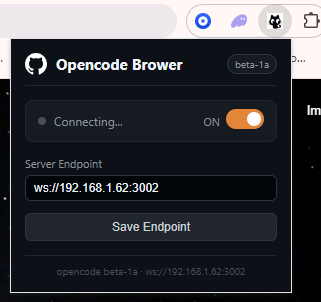
Extension popup — configure the WebSocket endpoint and toggle the connection:
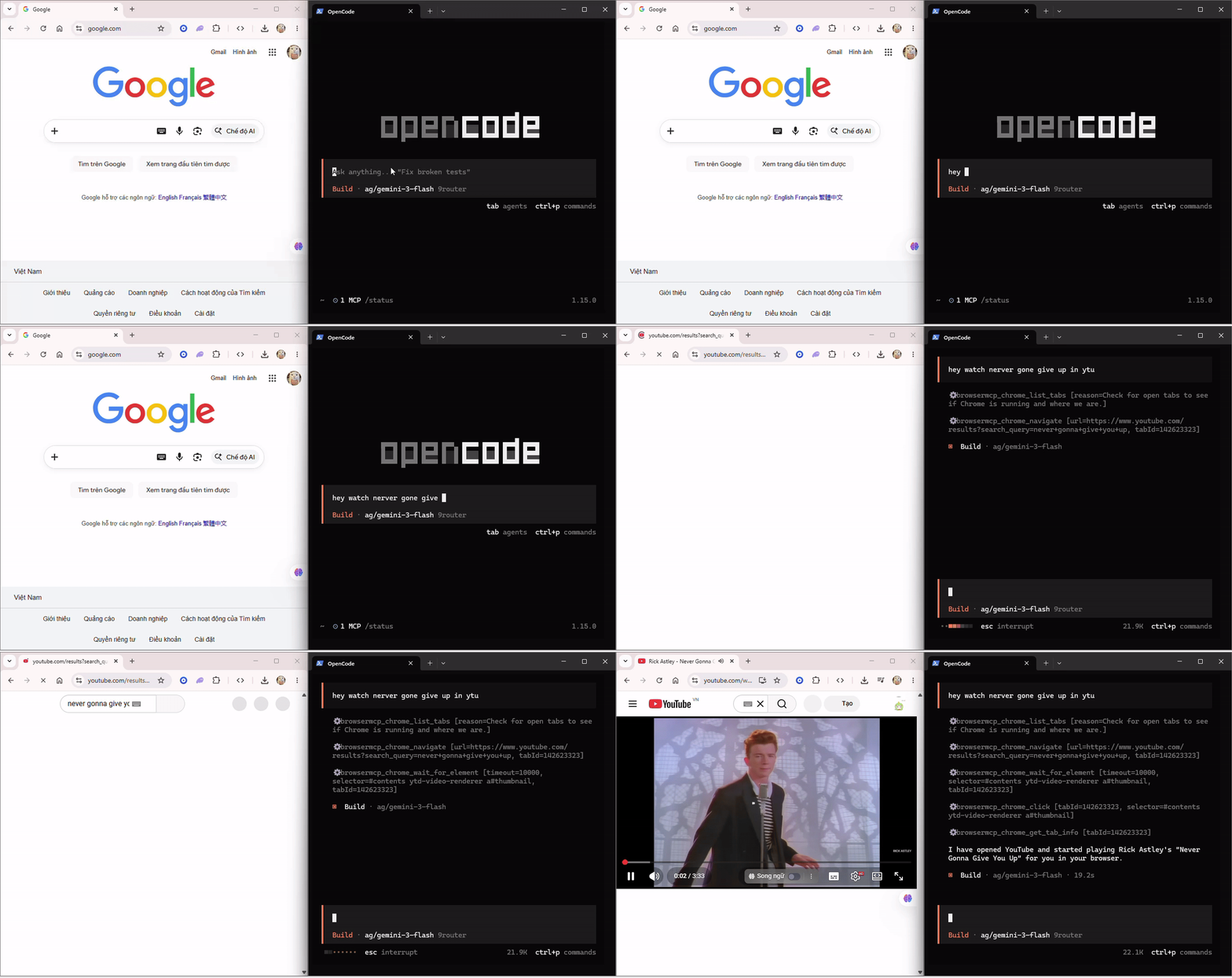
Demo — OpenCode controlling Chrome in real time:
Installation
1. Install the MCP server
npm install -g @mytai20100/opencode-browser
Or run directly with npx (no install needed):
npx @mytai20100/opencode-browser
2. Register with OpenCode / claude code / codex
Add the server to your OpenCode config (~/.config/opencode/config.json or opencode.json at project root):
{
  "$schema": "https://opencode.ai/config.json",
  "mcp": {
    "browsermcp": {
      "type": "local",
      "command": ["opencode-browser"],
      "enabled": true
    }
  }
}
Or
claude mcp add opencode-browser npx @mytai20100/opencode-browser #Claude code

opencode mcp add opencode-browser npx @mytai20100/opencode-browser #Opencode

codex mcp add opencode-browser npx @mytai20100/opencode-browser #Codex
3. Install the Chrome extension
- Download or clone this repository.
- Open Chrome and go to
chrome://extensions. - Enable Developer mode (top-right toggle).
- Click Load unpacked and select the
extension/folder.
4. Connect
Click the extension icon in the Chrome toolbar. The default endpoint is ws://localhost:3002. If the MCP server is running on a different machine or port, enter the correct address (e.g. ws://192.168.1.62:3002) and click Save Endpoint. The status indicator turns orange when connected.
5. Setup api & endpoint for Jev/Laya (Optional)
DECISION_ENDPOINT="https://api.typesafe.ai/v1/systemone"
DECISION_API_KEY="sk_xxxxxx"

# Model Configuration
DECISION_MODEL="jev-latest"
DECISION_TIMEOUT_MS=5000
Running locally from source
If you want to run the MCP server from a local clone instead of installing from npm:
git clone https://github.com/mytai20100/opencode-browser
cd opencode-browser/server
npm install
npm run build
Then point OpenCode at the local build by using the absolute path to dist/index.js in your config:
{
  "$schema": "https://opencode.ai/config.json",
  "mcp": {
    "browsermcp": {
      "type": "local",
      "command": ["node", "/absolute/path/to/opencode-browser/server/dist/index.js"],
      "enabled": true
    }
  }
}
Replace /absolute/path/to/opencode-browser with the actual path where you cloned the repo. On macOS and Linux you can get it by running pwd inside the server/ folder. On Windows use the full path with backslashes, e.g. C:\\Users\\you\\opencode-browser\\server\\dist\\index.js.
After saving the config, restart OpenCode. The MCP server will start automatically whenever OpenCode launches.
For the extension, load the extension/ folder from the cloned repo the same way as the regular install: chrome://extensions > Developer mode > Load unpacked > select extension/.
Prompt tips
A few patterns that get the most out of the 165+ available tools:
Always start with the tool graph. Before any multi-step task, ask the agent to call chrome_get_tool_graph with a plain description of the goal. This gives it an ordered execution plan and tells it which tools to skip, saving unnecessary calls.
Use chrome_get_tool_graph with intent "fill in the login form and submit"
Use chrome_get_workflow_context before interacting with a page. It gives the agent a snapshot of all forms, inputs, and buttons so it can build accurate CSS selectors before clicking or typing anything.
Before clicking anything, call chrome_get_workflow_context to map the page first.
Attach the debugger early when working with APIs. If the task involves reading network traffic, attach CDP at the start so requests are captured from the beginning.
Attach the debugger to the current tab, then navigate to the page and capture all API calls.
Prefer chrome_get_content over chrome_get_html for reading pages. It returns clean visible text without markup, which is faster and uses fewer tokens. Only reach for chrome_get_html when you need the raw DOM structure.
Use chrome_find_text_on_screen + chrome_visual_click as a fallback. When a button has no reliable CSS selector, find its text on screen first, then click the returned coordinates.
Find the text "Submit Order" on screen and click it visually.
Save sessions to avoid re-logging in. After a successful login, call chrome_save_session with a name. Restore it at the start of future tasks to skip the authentication flow entirely.
Save the current session as "prod-login" after logging in.
Mock API responses for testing. Use chrome_intercept_request and chrome_mock_response together to inject fake data without touching the backend.
Intercept all requests to /api/orders and return a mocked empty array.
Tools reference
All tools are prefixed with chrome_. The agent can call chrome_get_tool_graph with a plain-text intent to get an optimized execution plan before starting any task — this prevents redundant calls and saves tokens.
Tabs — viewing and querying
| Tool | Description |
|---|---|
chrome_list_tabs |
List all open tabs with id, title, url, active, pinned, muted, audible states |
chrome_get_active_tab |
Get info about the currently active tab |
chrome_get_tab_info |
Get detailed info about a specific tab by id |
chrome_search_tabs |
Search open tabs by title or URL keyword |
Tabs — management
| Tool | Description |
|---|---|
chrome_navigate |
Navigate a tab to a URL (defaults to active tab) |
chrome_new_tab |
Open a new tab, optionally with a URL |
chrome_close_tab |
Close a tab by id (defaults to active tab) |
chrome_close_tabs |
Close multiple tabs by id array |
chrome_switch_tab |
Focus a specific tab by id |
chrome_duplicate_tab |
Duplicate a tab |
chrome_pin_tab |
Pin or unpin a tab |
chrome_mute_tab |
Mute or unmute a tab |
chrome_reload_tab |
Reload a tab, optionally bypassing cache |
chrome_move_tab |
Move a tab to a different position or window |
Windows
| Tool | Description |
|---|---|
chrome_list_windows |
List all open windows with id, state, focused, tab count |
chrome_new_window |
Open a new browser window (supports incognito) |
chrome_close_window |
Close a browser window by id |
Screenshot
| Tool | Description |
|---|---|
chrome_screenshot |
Capture the visible area as a base64 PNG or JPEG |
chrome_screenshot_element |
Capture a specific element by CSS selector |
chrome_screenshot_fullpage |
Capture full page with scrolling and stitching |
chrome_pdf_print |
Save current page as PDF with custom options |
Page interaction
| Tool | Description |
|---|---|
chrome_click |
Click an element by CSS selector |
chrome_double_click |
Double click an element by selector or coordinates |
chrome_right_click |
Right click to open context menu |
chrome_middle_click |
Middle click (open in new tab) |
chrome_drag_drop |
Drag and drop from element A to B |
chrome_type |
Type text into an input element by CSS selector |
chrome_hover |
Hover over an element by CSS selector |
chrome_select |
Select an option in a <select> element |
chrome_scroll |
Scroll the page or a specific element by x/y pixels |
chrome_scroll_to |
Scroll an element into view |
chrome_key_press |
Dispatch a keyboard event (Enter, Escape, Tab, etc.) |
chrome_keyboard_shortcut |
Execute keyboard shortcuts (Ctrl+C, Ctrl+V, Ctrl+A, etc.) |
chrome_wait_for_element |
Wait until a CSS selector appears in the DOM |
chrome_wait_for_navigation |
Wait for page navigation to complete |
chrome_wait_for_network_idle |
Wait until no network requests for N milliseconds |
chrome_focus_element |
Focus an element without clicking |
chrome_clear_input |
Clear an input field |
chrome_select_text |
Select/highlight text on the page |
chrome_get_selected_text |
Get currently selected text |
Page content
| Tool | Description |
|---|---|
chrome_get_content |
Get the full visible text of the page |
chrome_get_html |
Get outer HTML of an element or the full page |
chrome_get_element_info |
Get tag, class, text, attributes, bounding box, visibility |
chrome_find_elements |
Find all elements matching a CSS selector |
chrome_get_page_info |
Get title, URL, scroll position, viewport, links, meta |
chrome_execute_script |
Execute arbitrary JavaScript with full DOM access |
Navigation history
| Tool | Description |
|---|---|
chrome_go_back |
Navigate back in the tab's history |
chrome_go_forward |
Navigate forward in the tab's history |
chrome_go_home |
Navigate the active tab to the new tab page |
Cookies
| Tool | Description |
|---|---|
chrome_get_cookies |
Get all cookies for a given URL |
chrome_set_cookie |
Set a cookie for a URL |
chrome_delete_cookie |
Delete a specific cookie |
Local storage
| Tool | Description |
|---|---|
chrome_get_local_storage |
Get localStorage value(s) from the current page |
chrome_set_local_storage |
Set a localStorage value on the current page |
chrome_clear_local_storage |
Clear all localStorage on the current page |
chrome_get_session_storage |
Get sessionStorage value(s) from the current page |
History and bookmarks
| Tool | Description |
|---|---|
chrome_get_history |
Search browser history by text query |
chrome_add_bookmark |
Add a bookmark |
chrome_search_bookmarks |
Search bookmarks by title or URL |
chrome_get_bookmarks |
Get all bookmarks in a flat list |
Downloads
| Tool | Description |
|---|---|
chrome_download |
Download a file from a URL |
chrome_list_downloads |
List recent downloads, optionally filtered by state |
Tab groups
| Tool | Description |
|---|---|
chrome_group_tabs |
Group tabs with an optional title and color |
chrome_ungroup_tabs |
Remove tabs from a group |
CDP debugging
These tools require calling chrome_debug_attach first.
| Tool | Description |
|---|---|
chrome_debug_attach |
Attach the CDP debugger to a tab |
chrome_debug_detach |
Detach the debugger from a tab |
chrome_debug_get_logs |
Get captured console logs (log, warn, error, info) |
chrome_debug_clear_logs |
Clear captured console logs |
chrome_debug_get_network |
Get captured network requests (XHR, Fetch, etc.) |
chrome_debug_clear_network |
Clear the captured network log |
chrome_debug_get_response_body |
Get the response body of a captured request by requestId |
chrome_debug_eval |
Evaluate JavaScript via CDP (async-safe, bypasses sandbox) |
chrome_debug_get_performance |
Get JS heap, DOM node count, layout metrics |
chrome_debug_get_dom_snapshot |
Full DOM snapshot with layout and bounding rects |
chrome_debug_set_breakpoint |
Set a JS breakpoint by URL and line number |
chrome_debug_remove_breakpoint |
Remove a JS breakpoint by id |
chrome_debug_get_cookies |
Get all cookies including HttpOnly ones via CDP |
chrome_debug_set_xhr_breakpoint |
Break on XHR/Fetch matching a URL pattern |
chrome_debug_emulate_device |
Emulate a mobile device (screen, user agent, DPR) |
chrome_debug_emulate_network |
Throttle network (offline, slow3g, fast3g) |
chrome_debug_block_urls |
Block URL patterns from loading |
chrome_debug_get_storage |
Get localStorage/sessionStorage for a specific origin |
chrome_debug_send_command |
Send a raw CDP command for advanced debugging |
Network interception and mocking
| Tool | Description |
|---|---|
chrome_intercept_request |
Intercept requests matching a URL pattern via CDP Fetch |
chrome_mock_response |
Mock a URL response with custom status, headers, and body |
chrome_modify_headers |
Automatically add or override request headers |
chrome_export_har |
Export all captured requests as a HAR archive |
chrome_replay_request |
Re-send an HTTP request with custom method, headers, body |
Accessibility
| Tool | Description |
|---|---|
chrome_get_accessibility_tree |
Get the full AX tree via CDP |
chrome_find_accessible_nodes |
Find AX nodes by label and/or ARIA role |
Visual interaction
| Tool | Description |
|---|---|
chrome_visual_click |
Click at specific X/Y coordinates via CDP Input |
chrome_ocr_page |
Extract all visible text with bounding box coordinates |
chrome_find_text_on_screen |
Find text on screen and return its coordinates |
Session management
| Tool | Description |
|---|---|
chrome_save_session |
Save current cookies and localStorage under a name |
chrome_restore_session |
Restore a previously saved session |
Events and DOM watching
| Tool | Description |
|---|---|
chrome_subscribe_events |
Subscribe to DOM events (click, input, submit, etc.) |
chrome_watch_dom_changes |
Watch DOM mutations via MutationObserver |
Iframes
| Tool | Description |
|---|---|
chrome_list_iframes |
List all iframes on the page |
chrome_switch_iframe |
Execute JavaScript inside a specific iframe by index |
Miscellaneous
| Tool | Description |
|---|---|
chrome_notify |
Show a desktop notification |
chrome_set_zoom |
Set the zoom level of a tab |
chrome_get_zoom |
Get the current zoom level of a tab |
chrome_write_clipboard |
Write text to the clipboard |
chrome_read_clipboard |
Read text from the clipboard |
chrome_upload_file |
Set files on a file input element via CDP |
chrome_grant_permissions |
Grant browser permissions to an origin |
chrome_virtual_authenticator |
Add/remove a virtual WebAuthn authenticator |
chrome_get_extension_info |
Get info about the extension itself |
chrome_get_workflow_context |
Snapshot of forms, buttons, inputs, and event log |
chrome_get_tool_graph |
Get optimal tool execution plan for a given intent |
chrome_list_clients |
Get list connected Chrome profiles (extension clients) |
chrome_rank_candidates |
Get list decision from model "System One Model" same JEV / LAYA |
CSS & Styling
| Tool | Description |
|---|---|
chrome_inject_css |
Inject CSS stylesheet into the page |
chrome_remove_css |
Remove previously injected CSS by ID |
chrome_set_color_scheme |
Force dark or light mode |
Testing & Mocking
| Tool | Description |
|---|---|
chrome_mock_geolocation |
Mock GPS location for testing |
chrome_mock_timezone |
Override timezone of the page |
chrome_mock_locale |
Override locale/language |
chrome_mock_battery |
Mock battery status API |
chrome_mock_media_type |
Override CSS media type (print/screen) |
chrome_emulate_vision |
Emulate vision deficiencies (color blindness, blurred vision) |
chrome_cpu_throttle |
Throttle CPU to simulate slower devices |
chrome_mock_date_time |
Override Date.now() for deterministic testing |
chrome_modify_response_body |
Modify response body before page receives it |
chrome_get_ws_frames |
Capture WebSocket frames |
chrome_set_extra_headers |
Add extra HTTP headers to all requests |
chrome_get_request_body |
Get POST body of a sent request |
Advanced Debugging & Profiling
| Tool | Description |
|---|---|
chrome_profiling_start |
Start CPU profiling |
chrome_profiling_stop |
Stop CPU profiling and get profile data |
chrome_heap_snapshot |
Take a heap snapshot for memory analysis |
chrome_trace_start |
Start tracing (Timeline/Performance recording) |
chrome_trace_stop |
Stop tracing and get trace events |
chrome_pause_on_exception |
Pause debugger on exceptions (all/uncaught/none) |
chrome_debugger_resume |
Resume execution after debugger pause |
chrome_debugger_step_over |
Step over current line |
chrome_debugger_step_into |
Step into function call |
chrome_debugger_step_out |
Step out of current function |
chrome_get_call_frames |
Get call stack when paused |
chrome_evaluate_on_call_frame |
Evaluate expression in paused call frame |
chrome_get_script_source |
Get source code of a script |
chrome_live_edit_script |
Live edit JavaScript without reload |
chrome_call_function_on |
Call function on remote object |
chrome_get_properties |
Get properties of a remote object |
chrome_compile_script |
Check JavaScript syntax without executing |
Storage & Security
| Tool | Description |
|---|---|
chrome_get_indexeddb |
Read IndexedDB data from the page |
chrome_get_cache_storage |
Read Service Worker cache storage |
chrome_get_security_state |
Get HTTPS security state and certificate info |
chrome_ignore_cert_errors |
Ignore SSL certificate errors |
DOM Manipulation
| Tool | Description |
|---|---|
chrome_highlight_element |
Highlight element on screen for debugging |
chrome_hide_element |
Hide or show element |
chrome_dom_set_attribute |
Set DOM attribute via CDP |
chrome_dom_remove_node |
Remove DOM node |
Stealth & Anti-fingerprinting
| Tool | Description |
|---|---|
chrome_stealth_enable |
Enable anti-fingerprint spoofs (webdriver, canvas, webgl, audio, etc.) |
chrome_stealth_disable |
Disable all stealth spoofs on a tab |
chrome_stealth_status |
Get active stealth flags and seed |
Proxy & Network Identity
| Tool | Description |
|---|---|
chrome_set_proxy |
Set browser proxy (direct, fixed_servers, pac_script) |
chrome_clear_proxy |
Clear proxy to direct connection |
chrome_get_proxy |
Get current proxy config |
chrome_set_webrtc_policy |
Prevent WebRTC IP leak |
chrome_get_webrtc_policy |
Get WebRTC policy |
Dialog & Form Automation
| Tool | Description |
|---|---|
chrome_handle_dialog |
Handle JavaScript dialog (alert, confirm, prompt) |
chrome_fill_form |
Fill multiple form fields in one call |
chrome_check |
Check a checkbox |
chrome_uncheck |
Uncheck a checkbox |
chrome_wait_for_text |
Wait for text to appear on page |
chrome_verify_element_visible |
Verify element is visible |
chrome_verify_text_visible |
Verify text is visible on page |
chrome_verify_value |
Verify input value matches expected |
chrome_generate_locator |
Generate Playwright locator string |
Lighthouse & Performance
| Tool | Description |
|---|---|
chrome_lighthouse_audit |
Heuristic audit (accessibility, SEO, best-practices) |
chrome_performance_insight |
Performance insights with Core Web Vitals |
Screencast & Device Emulation
| Tool | Description |
|---|---|
chrome_screencast_start |
Start screencast recording |
chrome_screencast_stop |
Stop screencast and get frame count |
chrome_resize_page |
Resize page viewport |
chrome_emulate |
Unified device emulation (viewport, UA, locale, timezone, colorScheme) |
Advanced Mouse Control
| Tool | Description |
|---|---|
chrome_mouse_move |
Move mouse to coordinates |
chrome_mouse_down |
Press mouse button |
chrome_mouse_up |
Release mouse button |
chrome_mouse_wheel |
Scroll mouse wheel |
chrome_click_at |
Click at specific coordinates |
Heap & Memory Analysis
| Tool | Description |
|---|---|
chrome_heap_summary |
Get heap summary |
chrome_heap_query_objects |
Query heap objects by class name |
Storage & Network Completeness
| Tool | Description |
|---|---|
chrome_cookie_clear |
Clear all cookies for URL |
chrome_localstorage_list |
List localStorage keys |
chrome_localstorage_delete |
Delete localStorage key |
chrome_sessionstorage_set |
Set sessionStorage value |
chrome_sessionstorage_get |
Get sessionStorage value |
chrome_sessionstorage_delete |
Delete sessionStorage key |
chrome_sessionstorage_clear |
Clear sessionStorage |
chrome_route_list |
List mock routes |
chrome_unroute |
Remove mock route |
chrome_network_state_set |
Set network offline/online state |
chrome_get_network_request |
Get network request by ID |
chrome_indexeddb_list |
List IndexedDB databases |
chrome_indexeddb_clear |
Clear IndexedDB object store |
Extension & PWA Management
| Tool | Description |
|---|---|
chrome_list_extensions |
List installed extensions |
chrome_enable_extension |
Enable extension by ID |
chrome_disable_extension |
Disable extension by ID |
chrome_reload_extension |
Reload extension |
chrome_trigger_extension_action |
Trigger extension action |
chrome_pwa_check |
Check PWA installability |
chrome_list_webmcp_tools |
List WebMCP tools on page |
chrome_execute_webmcp_tool |
Execute WebMCP tool |
Tool graph
Before starting any multi-step task, call chrome_get_tool_graph with a plain-text description of what you want to accomplish. It returns a ranked list of recommended tools, their cost (low / medium / high), prerequisites, suggested next steps, and tools to avoid. This is especially useful for agents that might otherwise make redundant or expensive calls.
intent: "capture network requests from the login page"
-> recommended: chrome_debug_attach -> chrome_navigate -> chrome_debug_get_network
-> avoid: chrome_screenshot, chrome_get_html
Requirements
- Node.js 22 or later
- Google Chrome (or a Chromium-based browser that supports Manifest V3)
- OpenCode v1.18.31 or later
Troubleshooting
opencode-browser MCP questions
What tools does opencode-browser MCP provide?
It exposes 200 tools, including chrome_list_tabs, chrome_get_active_tab, chrome_get_tab_info, chrome_search_tabs, chrome_navigate.
How does the system work?
It uses a two-part system where a Node.js MCP server communicates via WebSocket with a Chrome Extension, which then executes commands using Chrome APIs and CDP.
Can I use this to avoid re-logging into websites?
Yes, you can save browser sessions after a successful login and restore them later to skip authentication flows.
How can I get an optimized execution plan for a task?
You can call the chrome_get_tool_graph tool with a plain-text description of your goal to receive an ordered execution plan.
What should I use to read page content efficiently?
It is recommended to use chrome_get_content instead of chrome_get_html, as it returns clean visible text without markup, saving tokens and speed.