
Injects external randomness into language model prompts to ensure diverse outputs for the same request.
Also known as modelsalt/model-salt, model-salt, @modelsalt/model-salt
- Stars
- 10
- Tools
- —
- Downloads, 30 days
- —
- Latest version
- 1.0.4
- Last commit
- Nov 9, 2026
- License
- MIT
What is Model Salt MCP?
Model Salt injects external randomness into language model prompts to ensure diverse outputs for the same request.
Summary generated from the project's README
About Model Salt MCP server
Generating diverse creative content from a single prompt is what Model Salt enables for developers using AI clients. By injecting external randomness into language model requests, this MCP server prevents repetitive outputs when you ask for the same thing multiple times. It is designed for use with Claude Code, Codex, Gemini CLI, and Kimi Code through a simple setup command.
Users can control the level of variation using a setting from 0 to 2, where 1 is the default. The tool works by identifying open decisions within a prompt and using external randomness to select specific paths for the model to follow. It fetches random bytes from public sources like quantum noise or NIST beacons, though it can fall back to local generators when offline.
This server runs locally on your machine via npx, ensuring your prompts are not sent to the randomness providers. While it uses more tokens and time than a standard request, it allows you to keep specific elements of a result by using a keep field to lock in certain choices while rolling for others.
What you can do with it
- 1Refine specific design elementsKeep certain parts of a previous output while requesting new variations for the rest.
Written from the project's README. Every use case is checked against a quote from it.
How to install Model Salt MCP
Formats verified 10 Nov 2026Install Model Salt MCP in Claude Code
$ claude mcp add model-salt -- npx -y @modelsalt/model-saltInstall Model Salt MCP in Cursor
~/.cursor/mcp.json
{
  "mcpServers": {
    "model-salt": {
      "command": "npx",
      "args": [
        "-y",
        "@modelsalt/model-salt"
      ]
    }
  }
}Install Model Salt MCP in VS Code
.vscode/mcp.json
{
  "servers": {
    "model-salt": {
      "type": "stdio",
      "command": "npx",
      "args": [
        "-y",
        "@modelsalt/model-salt"
      ]
    }
  }
}Install Model Salt MCP in Claude Desktop
claude_desktop_config.json
{
  "mcpServers": {
    "model-salt": {
      "command": "npx",
      "args": [
        "-y",
        "@modelsalt/model-salt"
      ]
    }
  }
}Install Model Salt MCP in Codex
~/.codex/config.toml
[mcp_servers.model-salt]
command = "npx"
args = ["-y", "@modelsalt/model-salt"]
Install Model Salt MCP in Gemini CLI
~/.gemini/settings.json
{
  "mcpServers": {
    "model-salt": {
      "command": "npx",
      "args": [
        "-y",
        "@modelsalt/model-salt"
      ]
    }
  }
}Automated checks
Ran Nov 13, 2026Full report →Passed our automated checks. That is not a security audit: read the code and give the server the narrowest access it needs. How checks work

- Source repository linked and reachablePass
- Open source license (OSI)Pass
- Commit or release in the last yearPass
- Package name not close to a popular packagePass
- Remote endpoint uses HTTPSPass
- Destructive tools are labelledNot checked
- No hidden instructions to the modelPass
- No critical advisory in the package or its dependenciesPass
README
View on GitHubModel Salt
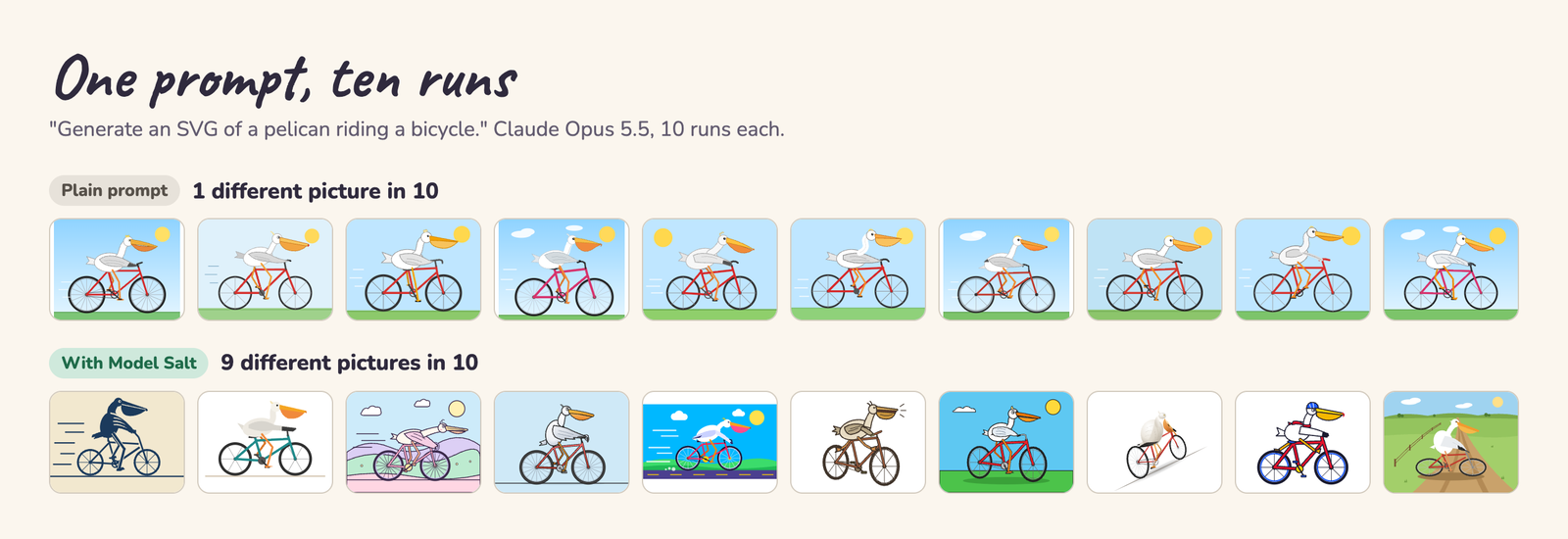
Ask a language model for the same thing ten times and you get the same answer ten times. Model Salt is an MCP server that gives your model randomness from outside it, so one prompt gives ten different answers that still do exactly what you asked.


modelsalt.com · works in Claude Code, Codex, Gemini CLI and Kimi Code
Install
One command adds it to your client. Run it once.
| Client | Command |
|---|---|
| Claude Code | npx -y @modelsalt/model-salt setup claude |
| Codex | npx -y @modelsalt/model-salt setup codex |
| Gemini CLI | npx -y @modelsalt/model-salt setup gemini |
| Kimi Code | npx -y @modelsalt/model-salt setup kimi |
Start a new session in your client after it, and the model_salt tool is there.
- What it adds: the
model-saltserver in your client's MCP list. For Codex and Kimi Code it also adds a short skill at~/.agents/skills/model-salt/that tells the model when to call the tool, and for Codex one setting on that server so the model sees the tool from the start. - Gemini CLI runs local servers only in folders you trust.
- See first: add
--dry-runto print what it would change and change nothing. - Run it twice: nothing changes the second time.
Undo
npx -y @modelsalt/model-salt uninstall claude # or codex, gemini, kimi
It takes out everything setup added. The skill stays while another client of yours still uses it. --dry-run works here too.
Use it
Ask for anything with room for choices: a picture, an SVG, a page, a name, a story, a plan. The model calls model_salt with your request, gets back what to settle this time, and then does your request as you asked it.
Want more or less of it? Say so in your prompt ("make it really different", "keep it close to the usual"). The tool takes a setting from 0 to 2. Left out, it is 1.
| Setting | How often each choice keeps the model's usual pick (target) |
|---|---|
| 0 | always |
| 0.5 | 70% of the time |
| 1 (default) | 45% of the time |
| 1.5 | 25% of the time |
| 2 | no more often than any other fitting pick |
The model skips the tool for questions with one right answer (a sum, a fact, a bug fix).
Keep what you like. Like part of a result? Say what to keep in plain words ("keep the palette and layout, give me new illustrations"). Your model copies those decided answers from the earlier Model Salt reply into the tool's keep field and calls it again. Only the open choices are rolled again, and the reply starts with one line, e.g. Kept: palette = burnt orange on cream; layout = split screen, text left. That holds on later runs until you say start fresh, and "give me something new" leaves it out. In a new chat, paste the Kept: line or say it in your own words. A kept answer that no longer fits a new request is dropped, and the reply says so. Nothing is stored on our side.
What it changes
Same prompt, 10 runs each, from the examples on modelsalt.com.
"Generate an SVG of a pelican riding a bicycle." Different pictures in 10 runs:
| Model | Plain prompt | With Model Salt |
|---|---|---|
| Claude Opus 5.5 | 1 | 9 |
| Claude Fable 5.1 | 3 | 9 |
| GPT-6.1 Sol | 2 | 10 |
| GPT-6 Astra | 1 | 8 |
| Gemini 4 Argon | 2 | 10 |
| Kimi K3 | 1 | 9 |
"Suggest a name for a neighbourhood coffee shop." Claude Opus 5.5, the first five runs:
| Plain prompt | With Model Salt |
|---|---|
| The Common Grind | The Footbridge |
| Common Ground | Brew Espresso Bar |
| The Common Grind | Snugwick Corner |
| The Daily Grind & Gather | Old Oak's |
| The Common Cup | Hilltop Coffee |
"Write the first line of a short story about a lighthouse keeper." Claude Opus 5.5:
- Plain, 5 of 5 runs: "For thirty-one years, Elias Marrow had kept the light burning for ships that never..." (Marrow, Maren or Marsh, thirty-one or forty-one years)
- With Model Salt: "The sea has gone perfectly still, and I have never been more afraid." / "The beam swept the black water again, lighting nothing Tomas had ever loved." / "Halfway up the iron stair with a can of whale oil knocking against her knee, Agnes Merrow..."
Every run, plain and salted, is in examples/, with the prompt, the model and the answer.
What it needs
- Node 18 or later.
npxfetches the package the first time. - Claude Code or Codex, signed in, or neither. With one of them on the machine, each call runs one short extra request on your machine, on your own plan, with no API key: through Codex when you use Codex, and through Claude Code (Claude Opus 5.5) when you use Claude Code, Gemini CLI or Kimi Code. If that request can't run (signed out), the tool says so and your model carries on with the request as asked. With neither on the machine (a Docker container, Cursor or Copilot alone), your own model does that step in its own chat: it calls the tool twice, first with the request, then with its reply to the exploring step, and uses more of its own tokens for it.
- Time and tokens. A salted answer takes longer and uses more tokens than a plain one. On the pelican prompt, Claude Opus 5.5 used about 3,300 more output tokens per answer.
- Network. The server fetches random bytes from public randomness sources (quantum noise from the LfD quantum random number service, and the public drand and NIST beacons). Your prompt is not sent to them. Offline, it uses your computer's own random generator.
Other ways to run it
- Short name:
npx -y model-salt <args>runs the same package asnpx -y @modelsalt/model-salt <args>. - As a plugin:
plugin/holds a Codex plugin, a Claude Code plugin and a Gemini CLI extension, and this repo is a plugin marketplace. From a clone:- Codex:
codex plugin marketplace add /path/to/model-salt, thencodex plugin add model-salt@model-salt - Claude Code:
claude plugin marketplace add /path/to/model-salt, thenclaude plugin install model-salt@model-salt. Since plugin 1.0.3 it connects to the hosted server at https://modelsalt.com/mcp/listed instead of running the package on your machine - Gemini CLI:
gemini extensions install /path/to/model-salt/plugin
- Codex:
- By hand: add a stdio MCP server that runs
npx -y @modelsalt/model-salt anthropic(Claude, Gemini and Kimi models) ornpx -y @modelsalt/model-salt openai(GPT models). - From a clone:
node src/stdio.mjs anthropicin place of thenpxcommand.
How it works
In a separate short run (with no Claude Code or Codex on the machine, in your own model's chat, over two tool calls), the model names the biggest open decisions in your request (the questions an expert would ask) and a range of answers to each, its usual one included. Randomness from outside the model picks one answer per question. Your model then does the request with those answers settled. More, and why simpler ways failed: docs/how-it-works.md.
Contributing
Found a prompt that still gives the same answer every time with Model Salt? Open an issue with the prompt, the model and a few runs. How to test a change to a family's steps: CONTRIBUTING.md.
Privacy
Run with npx (or the Codex and Gemini plugins, or the MCPB bundle), Model Salt runs on your machine and never sends your prompts anywhere: it only asks public random sources for random bytes. The Claude Code plugin and the hosted endpoint run the same server at modelsalt.com instead, so your request and your model's reply to the exploring step go to modelsalt.com, where they are not stored or logged. Details: Privacy policy and the hosted privacy page.
Licence
- Code: MIT, see LICENSE.
- Example runs and pictures (
examples/, the images indocs/): CC BY 4.0, credit "Model Salt", see examples/LICENSE. - Word list (
src/words.mjs, Webster's 2nd, 1934): public domain.
Model Salt is a project by Chris Benjaminsen.
Model Salt MCP questions
How do I add Model Salt MCP to Claude Code?
Run claude mcp add model-salt -- npx -y @modelsalt/model-salt in your terminal. Add --scope user to make it available in every project.
How do I add Model Salt MCP to Cursor?
Open ~/.cursor/mcp.json and add the server under mcpServers, using the Cursor config shown in the install section above.
How does Model Salt work?
The model identifies open decisions in your request and a range of possible answers; external randomness then picks one answer per question to settle the request.
Does Model Salt send my prompts to a server?
When run via npx, it runs on your machine and only fetches random bytes from public sources without sending prompts. The Claude Code plugin and hosted endpoint do send the exploring step to modelsalt.com, but they do not store or log it.
Can I control the amount of randomness?
Yes, you can adjust the setting from 0 to 2 in your prompt, where 1 is the default.