
Lets an AI client load and run WebAssembly Components as isolated tools inside a secure sandbox via MCP.
Also known as microsoft/wassette
- Stars
- 977
- Tools
- —
- Downloads, 30 days
- —
- Latest version
- —
- Last commit
- Nov 13, 2026
- License
- MIT
What is Wassette MCP?
Wassette lets an AI client load and run WebAssembly Components as isolated tools inside a secure sandbox via MCP.
Summary generated from the project's README
About Wassette MCP server
Extending AI agents with new capabilities through isolated WebAssembly components is what Wassette enables. Developers can add specialized tools to their chat interface without leaving the window by loading Wasm components that run within a secure Wasmtime sandbox. This architecture provides browser-grade isolation for every tool used by the agent.
Users can integrate this server with various MCP clients including Claude Code, GitHub Copilot, Copilot CLI, and Codex CLI. Once the local installation is complete via the provided shell script or other platform-specific methods, you can instruct your agent to load components directly from OCI registries. For example, you can tell an agent to load a specific component using an oci:// URI to grant it new functional skills.
What you can do with it
- 1Adding new agent skillsInstruct your AI agent to load a specific WebAssembly component to perform a new task like telling the time.
- 2Running isolated tool logicExecute code within a secure environment to ensure tool execution does not compromise the host system.
Written from the project's README. Every use case is checked against a quote from it.
Automated checks
Ran Nov 13, 2026Full report →Not verified yet. A server needs a score of 80, no serious finding, and enough data for us to check. How checks work · What to fix for more points

- Source repository linked and reachablemicrosoft/wassette is public and reachablegithub.com/microsoft/wassette ↗Pass
- Package names this repository as its sourceNot checked
- Build provenance (Sigstore attestation)Not checked
- Open source license (OSI)MITspdx.org/licenses/MIT.html ↗Pass
- Commit or release in the last yearLast commit or release 2026-11-13github.com/microsoft/wassette ↗Pass
- OpenSSF ScorecardNot checked
- Package name not close to a popular packageNot checked
- No critical advisory in the package or its dependenciesNot checked
- No hidden instructions to the model0 tool descriptions and the README read; no override phrases, credential paths or hidden charactersPass
- Destructive tools are labelledNot checked
- Remote endpoint answers the MCP handshakeNot checked
README
View on GitHubQuick Start | FAQ | Documentation | Releases | Contributing | Discord
[!WARNING] Early Development: This repository is not production ready yet. It is in early development and may change significantly.
Why Wassette?
- Convenience: Wassette makes it easy to extend AI agents with new tools, all without ever having to leave the chat window.
- Reusability: Wasm Components are generic and reusable; there is nothing MCP-specific about them.
- Security: Wassette is built on the Wasmtime security sandbox, providing browser-grade isolation of tools.
Architecture
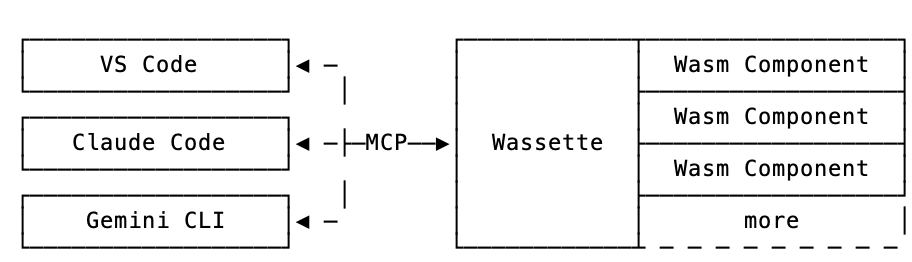
Installation
Quick start: For Linux/macOS, use our one-liner install script:
curl -fsSL https://raw.githubusercontent.com/microsoft/wassette/main/scripts/install.sh | bash
For complete installation instructions for all platforms (including Windows, Homebrew, Nix, Docker, and more), see our Installation Guide.
Using Wassette
With Wassette installed, the next step is to register it with your agent of choice. See our Quick Start guide (3 simple steps), or check the MCP Clients guide for detailed setup instructions for GitHub Copilot, Copilot CLI, Claude Code, and Codex CLI.
Once configured, you can start loading WebAssembly components. To teach your agent to tell the time, ask it to load a time component:
Please load the time component from oci://ghcr.io/microsoft/time-server-js:latest
Now that the time component is loaded, we can ask your agent to tell you the current time:
What is the current time?
The agent will respond with the current time, which is fetched from the time component running in a secure WebAssembly sandbox:
The current time July 31, 2025 at 10:30 AM UTC
Congratulations! You've just run your first Wasm Component and taught your agent how to tell time!
Demo
https://github.com/user-attachments/assets/8e5a371c-ac72-406d-859c-03833ee83963
Discord
You can join us via the #wassette channel on the Microsoft Open Source Discord:
Contributing
Please see CONTRIBUTING.md for more information on how to contribute to this project.
License
This project is licensed under the MIT License.
Trademarks
This project may contain trademarks or logos for projects, products, or services. Authorized use of Microsoft trademarks or logos is subject to and must follow Microsoft’s Trademark & Brand Guidelines. Use of Microsoft trademarks or logos in modified versions of this project must not cause confusion or imply Microsoft sponsorship. Any use of third-party trademarks or logos are subject to those third-party’s policies.
Contributors
Thanks to all contributors who are helping shape Wassette into something great.
Wassette MCP questions
What is Wassette?
Wassette is a security-oriented runtime that lets AI agents run WebAssembly Components as tools through MCP. It is built on the Wasmtime security sandbox for isolated execution.
How does Wassette isolate tools?
It runs components in the Wasmtime sandbox, giving browser-grade isolation. This keeps loaded tools separated from the host.
How do I install Wassette?
On Linux and macOS you can use the one-liner install script. Windows, Homebrew, Nix, and Docker installations are covered in the installation guide.
How do I load a WebAssembly component in Wassette?
Ask your agent to load a component from an OCI reference, such as the time component from ghcr.io. Once loaded, the agent can call it.
Is Wassette production ready?
No, it is in early development and may change significantly. The repository states it is not production ready yet.