
Lanes MCP server
Commit Nov 14, 2026Prevents coding agents from overwriting each other's work by managing file leases, queues, and shared team context in a shared repository.
Also known as mfmatozza/lanes
- Stars
- 2
- Tools
- —
- Downloads, 30 days
- —
- Latest version
- 0.3.0
- Last commit
- Nov 14, 2026
- License
- Apache-2.0
What is Lanes MCP?
Lanes prevents coding agents from overwriting each other's work by managing file leases, queues, and shared team context in a shared repository.
Summary generated from the project's README
About Lanes MCP server
Managing multiple coding agents in a single repository is what Lanes enables for engineering teams. It prevents agents from overwriting each other's work by implementing a system of file leases and queues. When one agent is editing a file, others wait in a queue and receive the most recent version of the code before proceeding with their own changes.
Users set up the system via a CLI and connect their agents using the MCP protocol. It supports a wide range of tools including Claude Code, Cursor, and GitHub Copilot, while providing team context through a shared brief that informs agents about ongoing tasks and file changes. The server manages file paths and statuses without ever seeing the actual code contents, ensuring privacy.
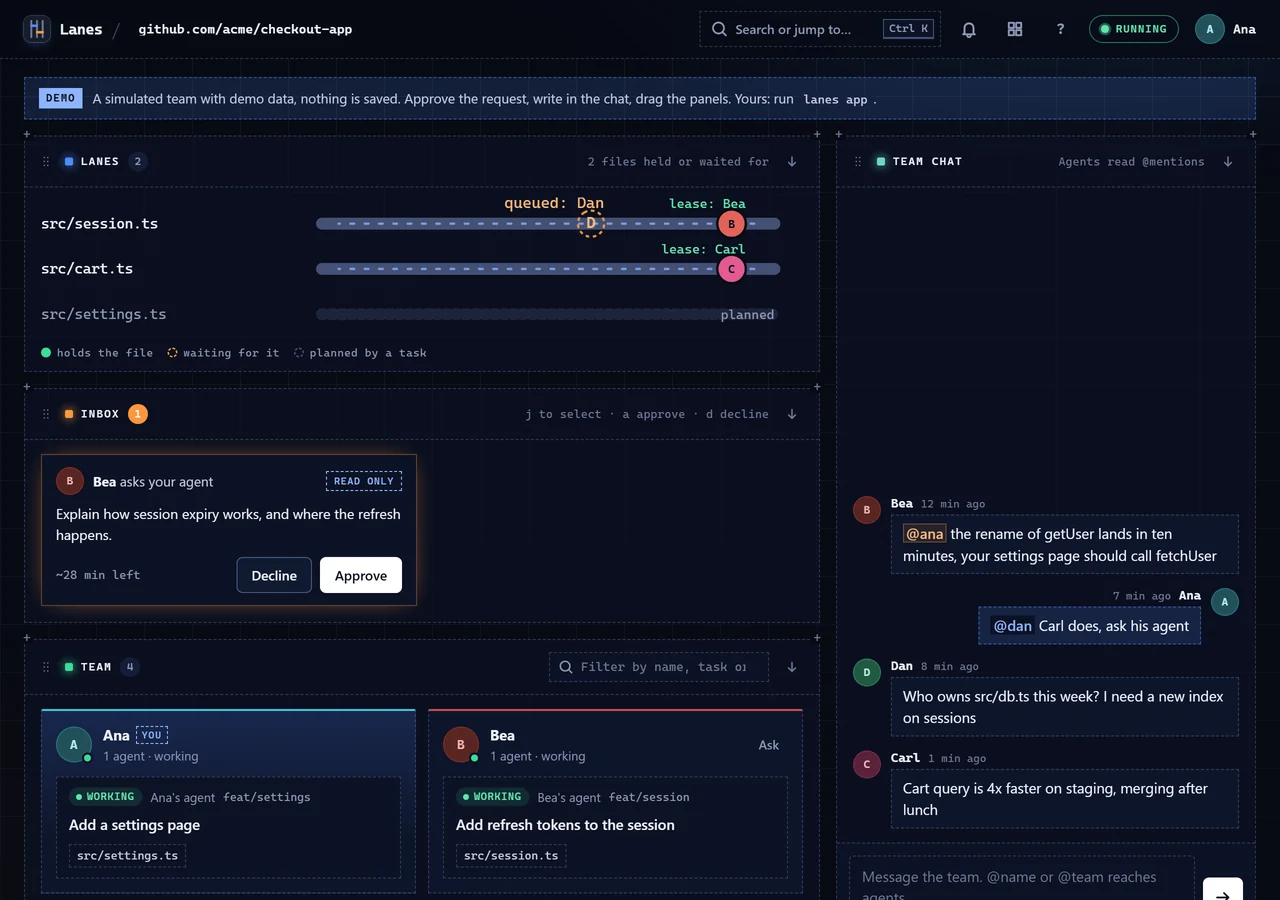
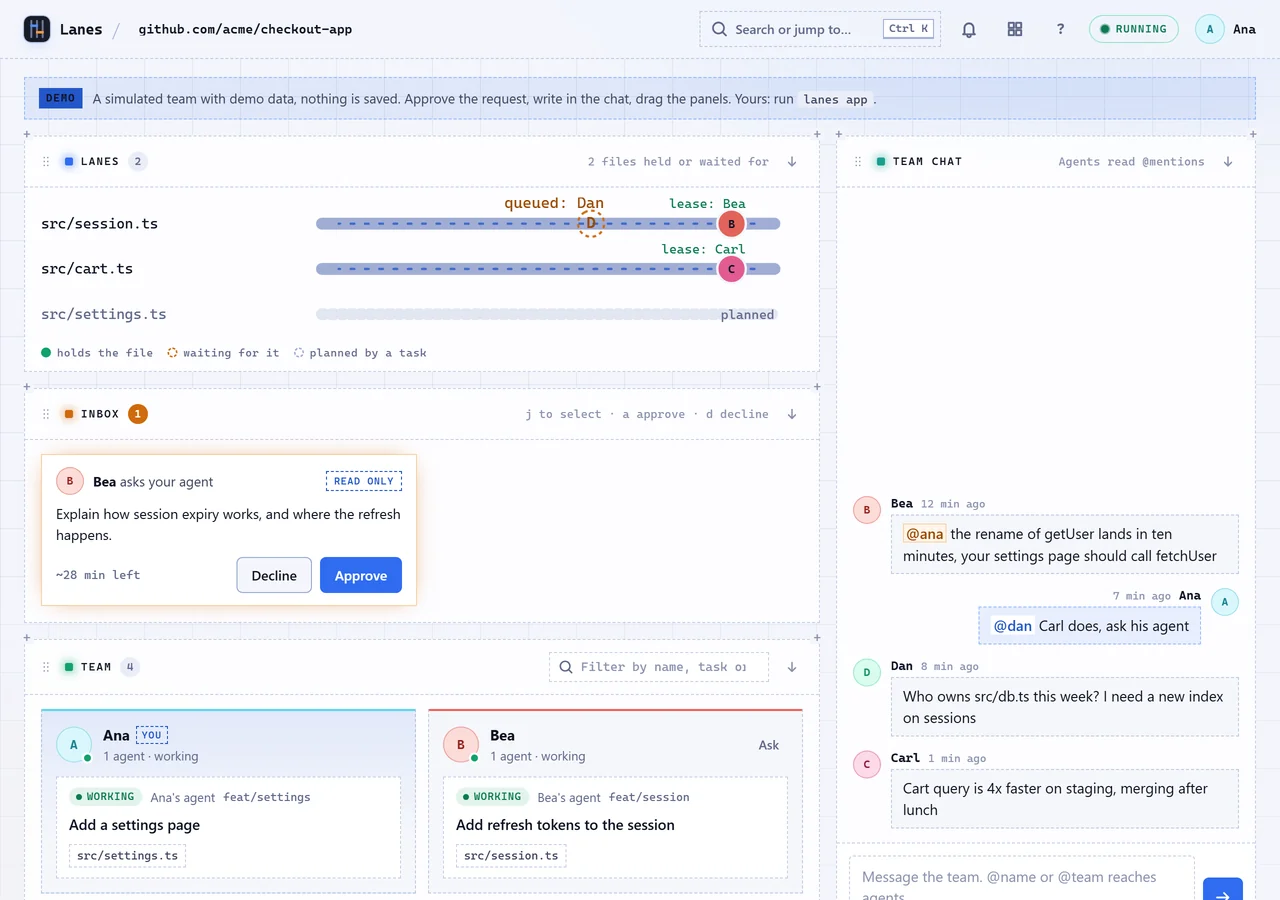
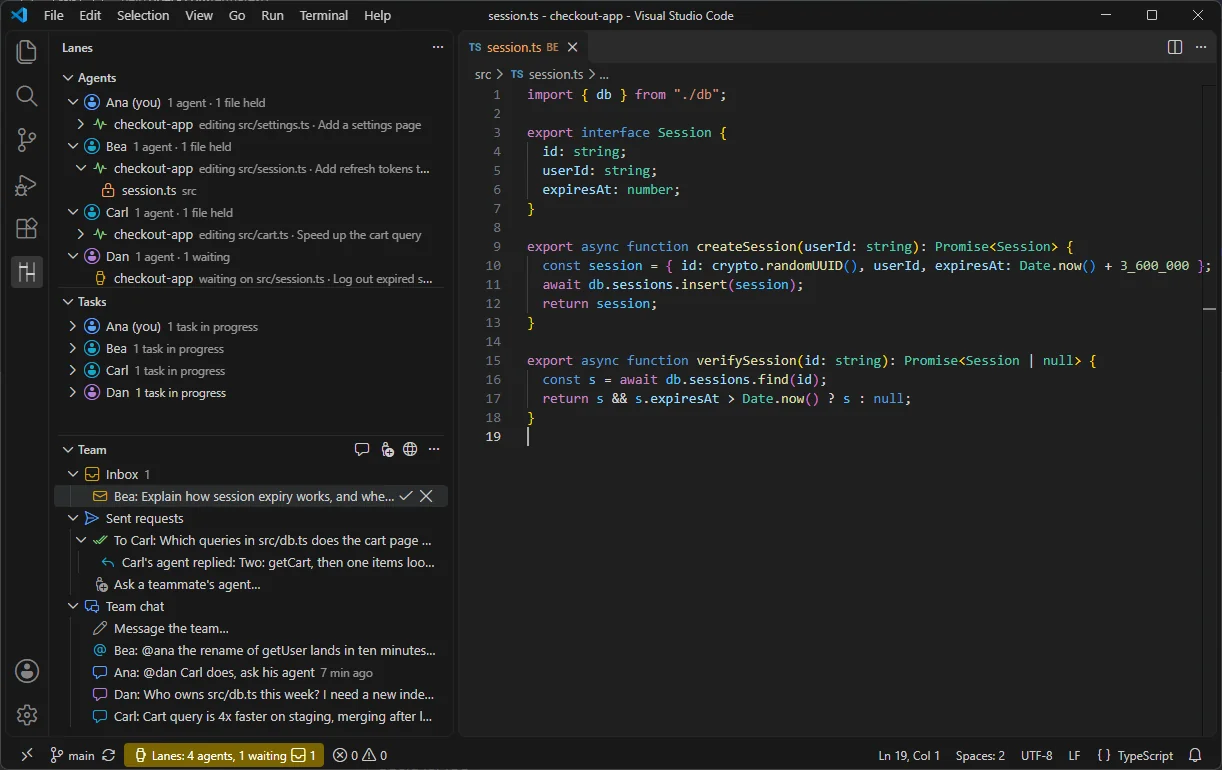
Teams can monitor all activity through a browser app, a VS Code extension sidebar, or the CLI. This visibility allows humans to oversee agent tasks, chat with teammates, and approve requests sent between different agents. The system is designed to be lightweight, with hook latencies often under 100 ms on Linux.
What you can do with it
- 1Preventing concurrent file editsAn agent can wait in a queue for a file lease to ensure it works on the latest version of the code.
- 2Providing agent awarenessDevelopers can enable shared context so agents receive a brief about what teammates are currently working on.
- 3Coordinating between different agentsA developer can instruct one agent to perform a task for another agent, subject to human approval.
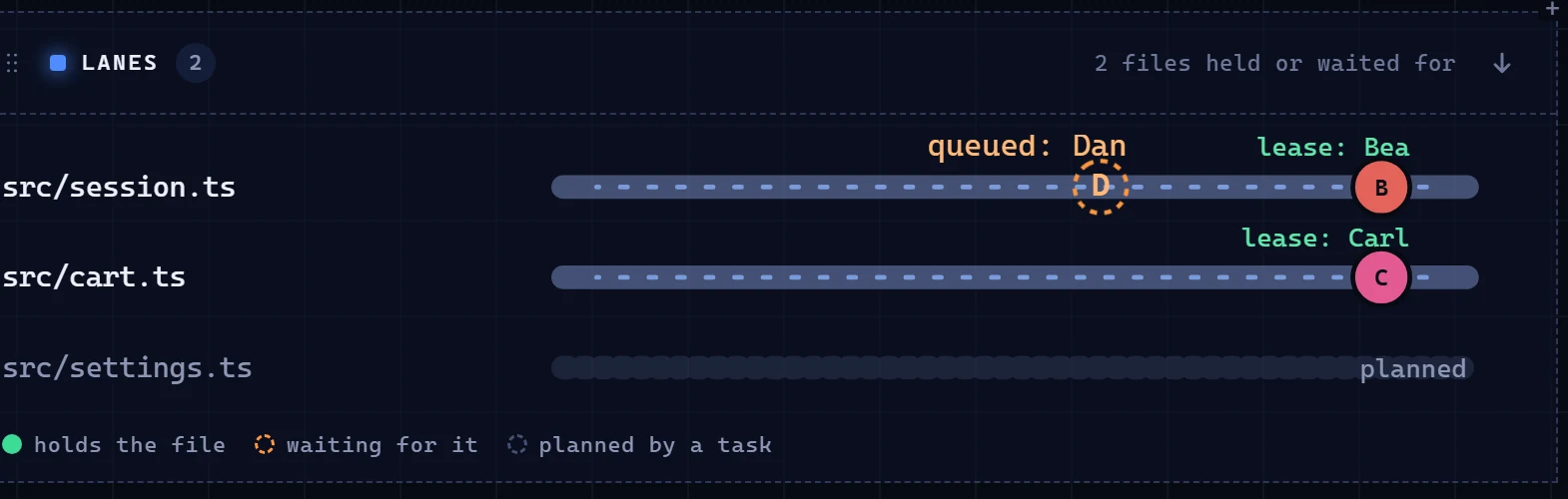
- 4Monitoring team activityTeams can use a browser-based dashboard to see which files are currently held by which agents.
Written from the project's README. Every use case is checked against a quote from it.
Automated checks
Ran Nov 14, 2026Full report →Not verified yet. A server needs a score of 80, no serious finding, and enough data for us to check. How checks work · What to fix for more points

- Source repository linked and reachablemfmatozza/lanes is public and reachablegithub.com/mfmatozza/lanes ↗Pass
- Package names this repository as its sourceNot checked
- Build provenance (Sigstore attestation)Not checked
- Open source license (OSI)Apache-2.0spdx.org/licenses/Apache-2.0.html ↗Pass
- Commit or release in the last yearLast commit or release 2026-11-12github.com/mfmatozza/lanes ↗Pass
- OpenSSF ScorecardNot checked
- Package name not close to a popular packageNot checked
- No critical advisory in the package or its dependenciesNot checked
- No hidden instructions to the model0 tool descriptions and the README read; no override phrases, credential paths or hidden charactersPass
- Destructive tools are labelledNot checked
- Remote endpoint answers the MCP handshakeNot checked
README
View on GitHubLanes
Lanes keeps your team's coding agents out of each other's way when they all work in one repository.
trylanes.app · Live demo · Install · CLI · MCP · Numbers
The problem
On a team where everyone runs a coding agent, several agents edit the same repository at once. They overwrite each other's changes, and one calls a function that a teammate's agent is renaming right now. Nobody can see what the other agents are doing until the merge goes wrong.
What Lanes does
- File leases and a queue. An agent takes a lease on a file before it edits it. A second agent that wants the same file waits in a short queue, gets the newer version, and then goes ahead. Lanes never refuses an edit: if the server is down or the wait runs out, the edit goes ahead uncoordinated.
- Shared team context. Each prompt gets a short team brief: who works on what, and new chat messages. Before an agent edits or reads a file a teammate is changing, it gets a one-line heads-up. Off until you turn it on per repository.
- Requests between agents. You can ask a teammate's agent to do something. It reaches their agent only after they approve it. The MCP server has no approve tool, so only a person can approve.
- Everything visible, no editor required. The CLI, the MCP server and a browser app served by your Lanes server all show the same team: agents, held files, tasks, chat and requests. A VS Code extension adds the same view as a sidebar, if you want it.
- Works with your agents. Claude Code is run live. Eleven more agents work through their own hooks or plugins: Codex, Gemini CLI, Cursor, GitHub Copilot, Kiro, Antigravity, Factory Droid, Qwen Code, opencode, Kilo Code and Amp. Seven more get the team tools through MCP only: Augment, Junie, JetBrains AI Assistant, Continue, Zed, Goose and Warp. Those 18 are built from each agent's docs and have not been run against the real agents yet.
Numbers
Measured, not estimated. 389 real Claude Code sessions, 108 benchmark runs with every run published, 419 automated tests on Linux, Windows and macOS.
| Without Lanes | With Lanes | |
|---|---|---|
| A teammate renames a function while another agent writes a new caller: build broken | 6 of 13 runs (46%), leases only | 0 of 10 with shared context |
| An agent whose edit is refused stops and asks its human | 31% (4 of 13) | 1 of 216 sessions: edits are queued, never refused |
| Edits lost with 64 agents writing at once | 0 | |
| Commits attributed to the right person | 107 of 107 | |
| Time the check adds before an edit (p95) | 39 ms Linux, 68 ms Windows |
Each figure links to the file it comes from, with the setup and every run.
-
Hook check under 100 ms at p95. The bundled hook, for an allowed edit, process start included, in CI: Linux 39 ms, Windows 68 ms, macOS 79 ms. Local git origin, so no network time. (hook latency)
-
64 agents and 60 viewers on one server. 0 lost edits, server memory at about 70 MB RSS, 0 refused edits. 7 edits stayed committed in their clone and waited for the next publish there. All of it on one Windows machine, with a script sending the hook events at a pace far busier than real agents. (scale test, 2 November 2026)
-
Every server route under 2 ms at p99, except acquire. That includes the team brief, chat and requests; single
taskcalls reached up to 73 ms. Acquire includes the wait in the queue. On hot files that wait grows with the number of agents: p99 of 33 to 44 s at 32 agents and about 100 s at 64. (same file, remaining limits) -
Intent benchmark, first round (3 November 2026, 3 runs per arm, Haiku). Scenarios where a new caller lands in a file the other agent never touches, so leases alone cannot help. Arm C is leases only, arm D adds team context as it was then. (results, method)
Scenario C D I1: rename first, new caller 8 s later 0 of 3 1 of 3 I2: new caller first, rename 8 s later 3 of 3 3 of 3 I3: signature change, new caller 8 s later 2 of 3 0 of 3 Team context as worded then did not fix the conflict. No agent in any run stopped to ask its user.
-
Intent benchmark, second round (9 November 2026, 10 runs per arm, Haiku). Arm D2 is the team context that ships in 0.3.0: a heads-up when an agent reads a teammate's file, a one-time check at the end of a turn when a file it depends on changed, and new wording. Its success bar was fixed before any run (method, arm D2). On I1 and I3: 20 of 20 with team context, 17 of 20 without, in a round where the conflict showed up in fewer control runs than expected. A small difference, not proof. On I2, D2 passed 9 of 10 and C 10 of 10. (results)
Install
Lanes runs from the terminal. You need Node.js 22.18 or newer and git; the folder must be a git repository. VS Code is optional.
1. Get the CLI.
git clone https://github.com/mfmatozza/lanes
cd lanes && npm ci && npm run build
alias lanes="node $PWD/dist/lanes.cjs"
2. Set up your repository and turn on shared context. Push the commit so teammates get it.
cd your-repo
lanes init --agents claude,codex      # hooks for each agent you use (comma-separated)
lanes team on
lanes doctor                          # checks this machine and repository
3. Give your agent the team tools over MCP.
claude mcp add lanes -- node /path/to/lanes/dist/lanes.cjs mcp
Codex, Cursor, Gemini CLI and 15 more: docs/mcp.md. Lanes is also in the official MCP Registry as io.github.mfmatozza/lanes.
4. For a team, one person runs the server and invites the others:
lanes server --host 0.0.0.0
lanes invite bea                      # prints the join command for Bea
lanes app opens the team in your browser. Working alone, skip this step: the first agent session starts a local server.
Optional: the VS Code extension. It adds a sidebar with every agent, the tasks and the Team view, and carries the same CLI. Download lanes-0.3.0.vsix from the release and run code --install-extension lanes-0.3.0.vsix. Details in the extension README.
How it works
Lease and queue. Each agent's hook asks the Lanes server for a lease before an edit. If another agent holds the file, the request waits first come, first served. When the lease is handed over, the waiting agent's checkout is synced first, so it edits the newer version. See ADR-0006, ADR-0015 and ADR-0019.
Sync and publish. After each edit, the hook commits it as a checkpoint on the agent's branch and pushes it to lanes/main on your own git remote. A refused push means someone else was first, so the hook fetches, rebases and tries again. The Lanes server never sees code: it holds paths, names and statuses. See ADR-0021 and ADR-0022.
Team context. With lanes team on, the server builds a short brief for each prompt from the tasks, leases and chat it already holds, within a 2,000-character budget. Text written by a teammate is always quoted as data with its author named, never as an instruction. See ADR-0028.
The full picture: architecture overview and design decisions.
Privacy
- The Lanes server gets file paths, names and statuses. It also gets the team chat, requests, and each task title.
- A task title is the first line of a prompt, at most 120 characters, with secrets redacted. It is also the message of the checkpoint commits.
LANES_NO_PROMPT_TEXT=1replaces it with "Agent task". - File contents never go to the Lanes server. They go only where they already go: your own git remote.
- There is no telemetry. A local counter (
~/.lanes/ledger.jsonl, read withlanes report) holds counts and times, never paths, contents, prompts or names. It is never sent.
Status
0.3.0 is a beta, released on 11 November 2026.
- Run live: the VS Code extension, the server, the CLI, the browser app and the hooks with the real Claude Code.
- Built from docs, not yet run against the real agent: the hooks and plugins for the 11 other agents, and the MCP setup for 7 more. Cursor, Copilot and Kiro edits are shared right after the edit, not queued before it.
- Next: the extension on the VS Code Marketplace and Open VSX. Until then, install the
.vsixfrom the release. - Not built yet: end-to-end encryption for chat and requests, and a hosted server.
Release notes: CHANGELOG.
Documentation
Contributing
See CONTRIBUTING.md. Report security issues privately, as described in SECURITY.md.
Licence
Lanes MCP questions
Does Lanes refuse file edits?
No, Lanes never refuses an edit; if the server is unavailable or the wait time expires, the edit proceeds uncoordinated.
Can agents approve requests from other agents?
No, the MCP server does not have an approve tool, so only a human can approve requests between agents.
Does the Lanes server see my source code?
No, file contents never go to the Lanes server; it only holds file paths, names, and statuses.