
Enables AI agents to record, branch, and diff conversation histories using a Directed Acyclic Graph (DAG) and encrypted context capsules.
Also known as Medhovarsh/forkmind
- Stars
- 3
- Tools
- —
- Downloads, 30 days
- —
- Latest version
- 0.9.0
- Last commit
- Aug 19, 2026
- License
- MIT
What is forkmind MCP?
forkmind enables AI agents to record, branch, and diff conversation histories using a Directed Acyclic Graph (DAG) and encrypted context capsules.
Summary generated from the project's README
About forkmind MCP server
ForkMind provides a local-first environment for developers to manage LLM conversation histories using a Directed Acyclic Graph structure. It functions as an OpenAI-compatible proxy that records every interaction into a local directory. This allows users to treat their AI dialogue history like a Git repository, enabling them to branch from specific turns, replay entire chains, and compare different model outputs side by side.
The system is designed for privacy and ease of use, storing all data as plain JSON on your machine without requiring external accounts or telemetry. It works with any OpenAI-compatible API, including local providers like Ollama and LM Studio, or remote services such as Anthropic, Groq, and OpenRouter. Developers can integrate it into their workflows using a dedicated JavaScript SDK or by simply pointing their existing clients to the ForkMind proxy URL.
Beyond simple recording, the tool includes an MCP server that allows AI agents to query their own history to trace lineage or self-correct. It also supports regression testing to catch model drift and context capsules for offloading encrypted, immutable segments of conversation history.
What you can do with it
- 1Debug agentic workflowsA developer can visually inspect tool-calling flows and branch from a specific turn to test prompt variations.
- 2Compare model outputsUsers can perform a word-level comparison between two different conversation branches to see exact differences in responses.
- 3Enable agent self-correctionAI agents can use the MCP server to access their own recorded history to understand previous attempts.
- 4Perform regression testingDevelopers can pin successful outputs as baselines to ensure new prompt or model changes do not cause performance drift.
Written from the project's README. Every use case is checked against a quote from it.
How to install forkmind MCP
Formats verified 10 Nov 2026Add to CursorAdd to GooseInstall forkmind MCP in Claude Code
$ claude mcp add forkmind -- npx -y forkmindInstall forkmind MCP in Cursor
~/.cursor/mcp.json
{
  "mcpServers": {
    "forkmind": {
      "command": "npx",
      "args": [
        "-y",
        "forkmind"
      ]
    }
  }
}Install forkmind MCP in VS Code
.vscode/mcp.json
{
  "servers": {
    "forkmind": {
      "type": "stdio",
      "command": "npx",
      "args": [
        "-y",
        "forkmind"
      ]
    }
  }
}Install forkmind MCP in VS Code CLI
$ code --add-mcp '{"name":"forkmind","type":"stdio","command":"npx","args":["-y","forkmind"]}'Install forkmind MCP in Claude Desktop
claude_desktop_config.json
{
  "mcpServers": {
    "forkmind": {
      "command": "npx",
      "args": [
        "-y",
        "forkmind"
      ]
    }
  }
}Install forkmind MCP in Codex
$ codex mcp add forkmind -- npx -y forkmindInstall forkmind MCP in Codex config.toml
~/.codex/config.toml
[mcp_servers.forkmind]
command = "npx"
args = ["-y", "forkmind"]
Install forkmind MCP in Gemini CLI
$ gemini mcp add -s user forkmind npx -- -y forkmindInstall forkmind MCP in Gemini settings.json
~/.gemini/settings.json
{
  "mcpServers": {
    "forkmind": {
      "command": "npx",
      "args": [
        "-y",
        "forkmind"
      ]
    }
  }
}Automated checks
Ran Nov 14, 2026Full report →Passed our automated checks. That is not a security audit: read the code and give the server the narrowest access it needs. How checks work

- Source repository linked and reachablemedhovarsh/forkmind is public and reachablegithub.com/medhovarsh/forkmind ↗Pass
- Package names this repository as its sourceforkmind names medhovarsh/forkmind as sourcenpmjs.com/package/forkmind ↗Pass
- Build provenance (Sigstore attestation)No build attestation published for this releaseNot checked
- Open source license (OSI)MITspdx.org/licenses/MIT.html ↗Pass
- Commit or release in the last yearLast commit or release 2026-08-19github.com/medhovarsh/forkmind ↗Pass
- OpenSSF ScorecardNot checked
- Package name not close to a popular packageNo popular package one edit away from forkmindPass
- No critical advisory in the package or its dependencies146 resolved dependencies checked; no critical advisoryosv.dev ↗Pass
- No hidden instructions to the model0 tool descriptions and the README read; no override phrases, credential paths or hidden charactersPass
- Destructive tools are labelledNot checked
- Remote endpoint answers the MCP handshakeNot checked
README
View on GitHubForkMind 🧠
Local-first LLM branching, debugging & context offloading
Treat your AI conversation history like a Git repository — capture every call, branch from any turn, and diff outcomes side by side. All on your machine.


Try in 10s · Features · Install · Quick start · MCP · Capsules

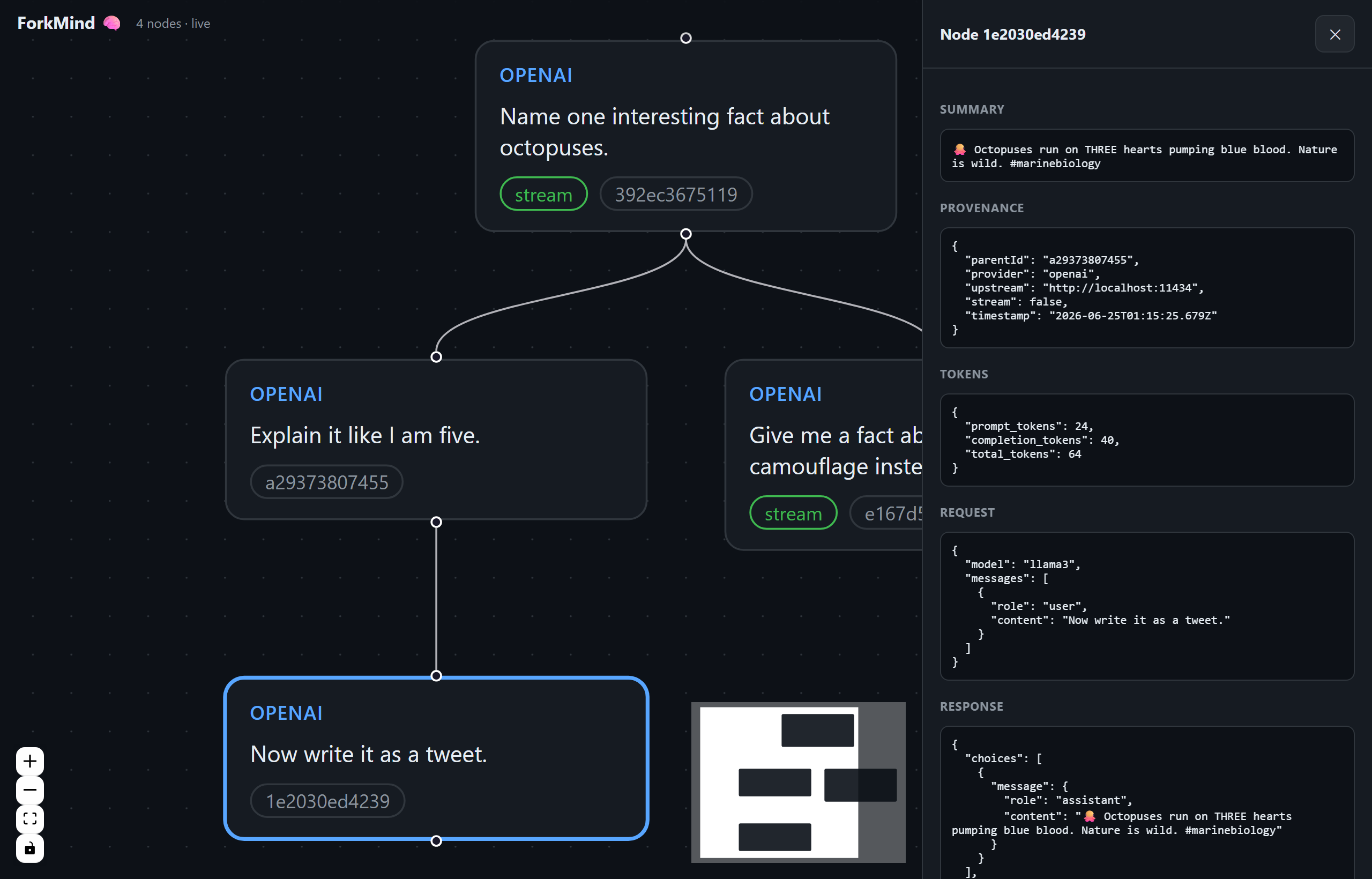
What you're seeing: the conversation DAG with a fork off the debug turn, the node inspector (request/response, tokens, provenance), and the ⇄ Compare view diffing two branches with per-token deltas. The green ● streaming badge shows live capture — nodes appear as they're recorded.
ForkMind captures every LLM call into a local .forkmind/ directory, visualizes
the conversation as a Directed Acyclic Graph (DAG), and lets you branch,
diff, and replay from any point in the history. Works with any
OpenAI-compatible API, defaulting to free, open-source models via
Ollama — also Anthropic, Groq, OpenRouter, Together,
vLLM, and LM Studio.
Why
Debugging agentic / tool-calling flows means re-running the same prompt with tiny tweaks over and over, then scrolling through terminal logs to see what changed. ForkMind records each run as a node in a conversation tree, so instead of re-reading logs you see the whole history, branch from any turn, and compare outcomes visually.
Everything is plain JSON on disk. No database, no account, no telemetry — nothing leaves your machine except the LLM call you were already making.
Features
- Capture — every LLM call is recorded to a plain JSON node under
.forkmind/. Works from any language via an OpenAI-compatible proxy; streaming responses are reconstructed (text and fragmented tool-call args). - DAG dashboard — a React Flow canvas draws the whole conversation as a tree: every turn, tool call, model, and token count, with the node inspector one click away.
- Live capture stream — nodes pulse into the DAG the instant they're recorded (Server-Sent Events), so you can watch an agent think in real time.
- Branch — fork any historical turn: edit the prompt or swap the model and re-run, linked to the original as a visible branch.
- ⇄ Compare — pick any two nodes for a side-by-side, word-level diff of prompts and responses, plus a token-usage table with per-field deltas. "Git diff for LLM outputs."
- ⏪ Time-travel replay — re-run a whole chain from an edited node; the regenerated turns land as a sibling branch while your original user turns and tool results re-apply in order.
- MCP server — agents query their own
.forkmind/history mid-task (recall what they tried, trace how they got somewhere, self-correct). - Regression testing — pin a known-good output as a baseline, re-run it after prompt/model changes, and catch drift with free offline checks (contains / regex / similarity), tool-call assertions, or an opt-in LLM judge graded against your own rubric. CI-ready.
- Trajectory regression — pin a whole multi-turn agent path from the captured graph and replay it, so a prompt change that reroutes an agent mid-run gets caught even when the final answer still reads fine.
- Context capsules — offload context into encrypted, immutable DAG capsules; restore in full or per segment; replicate (RAID), export/import, crypto-shred.
forkmind demo— one command opens the dashboard on a pre-seeded sample DAG, zero setup and zero API key.
Try it in 10 seconds
npx forkmind demo
No API key, no setup: the dashboard opens with a pre-seeded conversation DAG — a coding-agent debug session that forks into a failed fix and a winning fix, plus an archived context capsule. Everything lives in a throwaway temp directory; your project is never touched. If a local Ollama is running, Fork from here works live against your local model.
Once you're in, try:
- ⇄ Compare any two nodes for a side-by-side, word-level diff of prompts, responses, and token usage — "git diff for LLM outputs".
- ⏪ Replay from here to re-run a whole chain from an edited node; the regenerated turns land as a sibling branch.
- Live capture — nodes pulse into the DAG the instant they're recorded, so you can watch an agent think in real time.
Install
# Run without installing (published on npm)
npx forkmind init
npx forkmind start

# …or install the CLI globally
npm install -g forkmind
forkmind start
No npm registry needed either — ForkMind runs straight from the git link, and the dashboard builds automatically on install:
# Run without installing, from GitHub
npx github:medhovarsh/forkmind init
npx github:medhovarsh/forkmind start

# …or clone to hack on it
git clone https://github.com/medhovarsh/forkmind
cd forkmind && npm install
Install as a Claude Code plugin
ForkMind ships a Claude Code plugin (skill + /forkmind command) so Claude knows
when and how to drive it — same install flow as any marketplace plugin:
/plugin marketplace add Medhovarsh/forkmind
/plugin install forkmind
The plugin bundles:
forkmindskill — Claude reaches for ForkMind whenever you ask it to debug a prompt, compare models, branch from a past turn, or regression-test a call./forkmindcommand — start / branch / test / mcp on demand.forkmind-debuggeragent — runs model/prompt comparisons in an isolated context and returns a compact verdict instead of dumping transcripts.- MCP server, auto-wired — agents query their own
.forkmind/history (recall attempts, trace lineage, self-correct) with zero manual config.
The CLI is still what runs the proxy + dashboard; the plugin is the glue that teaches Claude to use it.
Quick start (free, no API key)
# 1. Install a free local model
#    (install Ollama from https://ollama.com first)
ollama pull llama3

# 2. Init + start ForkMind
npx github:medhovarsh/forkmind init    # create .forkmind/ in your project
npx github:medhovarsh/forkmind start   # proxy on http://localhost:4500 + dashboard

# 3. Point your code at the proxy (see SDK below), make some calls

# 4. Open the dashboard
open http://localhost:4500
Drop-in SDK (auto-builds the tree)
npm i openai # the wrapper extends the official SDK
const { ForkMindOpenAI } = require('forkmind');

const client = new ForkMindOpenAI({
  apiKey: 'ollama',                       // ignored by Ollama; required by SDK
  upstream: 'http://localhost:11434',     // free local open-source models
});

// Each call is recorded; sequential calls auto-chain into a conversation tree.
const res = await client.chat.completions.create({
  model: 'llama3',
  messages: [{ role: 'user', content: 'Explain backpropagation simply.' }],
});
Run the full example:
node examples/chain.js
Any language — point your client at the proxy
The SDK wrapper is convenience, not a requirement. ForkMind's proxy speaks the
OpenAI-compatible wire protocol, so capture works from any language: set
your client's base URL to http://localhost:4500/v1 and you're recorded. Chain
turns into a tree by passing back the x-forkmind-node-id from the previous
response as the next request's x-forkmind-parent header (the JS wrapper just
automates this).
# Python — official openai client, zero ForkMind code
from openai import OpenAI

client = OpenAI(base_url="http://localhost:4500/v1", api_key="ollama")
res = client.chat.completions.create(
    model="llama3",
    messages=[{"role": "user", "content": "Explain backpropagation simply."}],
    extra_headers={"x-forkmind-upstream": "http://localhost:11434"},
)
# read res via .with_raw_response to grab x-forkmind-node-id and chain the next call
# curl — anything that can POST JSON
curl http://localhost:4500/v1/chat/completions \
  -H 'content-type: application/json' \
  -H 'x-forkmind-upstream: http://localhost:11434' \
  -d '{"model":"llama3","messages":[{"role":"user","content":"hi"}]}' -i
# response header `x-forkmind-node-id: <id>` → pass as `x-forkmind-parent` next call
Go, Ruby, Rust, Java — same deal: base URL + the two headers. The dashboard, branching, MCP, and regression testing all work regardless of source language.
Framework integrations
ForkMind ships thin adapters for the two biggest JS LLM ecosystems. Both route through the same proxy, so capture, branching, the dashboard, MCP, and regression all work unchanged — no model-class swap, no callbacks.
LangChain.js
npm i @langchain/openai @langchain/core
const { ChatOpenAI } = require('@langchain/openai');
const { forkmind } = require('forkmind/langchain');

const fm = forkmind({ upstream: 'http://localhost:11434' }); // free local Ollama
const model = new ChatOpenAI({
  apiKey: 'ollama',
  model: 'llama3',
  configuration: fm.configuration, // baseURL → proxy + chaining fetch
});

await model.invoke('Explain backpropagation simply.');
// sequential calls on `fm` auto-chain; fm.setParent(id) to branch from a node.
Vercel AI SDK
npm i ai @ai-sdk/openai
const { generateText } = require('ai');
const { forkmindOpenAI } = require('forkmind/vercel');

const openai = forkmindOpenAI({ upstream: 'http://localhost:11434' });
const { text } = await generateText({
  model: openai('llama3'),
  prompt: 'Explain backpropagation simply.',
});
// openai.setParent(id) / openai.resetParent() control the branch point.
Both honor FORKMIND_PROXY (proxy base URL) and take an explicit baseURL /
upstream per instance.
Using other free / open providers
ForkMind is provider-agnostic — it forwards your auth headers verbatim and lets you set the upstream per client. Anything OpenAI-compatible just works:
| Provider | upstream |
apiKey |
|---|---|---|
| Ollama (local) | http://localhost:11434 |
any string |
| LM Studio (local) | http://localhost:1234 |
any string |
| Groq (free tier) | https://api.groq.com/openai |
gsk_... |
| OpenRouter | https://openrouter.ai/api |
sk-or-... |
| Together | https://api.together.xyz |
your key |
| OpenAI | https://api.openai.com (default) |
sk-... |
new ForkMindOpenAI({ apiKey: process.env.GROQ_API_KEY,
                     upstream: 'https://api.groq.com/openai' });
You can also override per request with the x-forkmind-upstream header if you
call the proxy directly instead of via the SDK.
Anthropic (Claude)
npm i @anthropic-ai/sdk
const { ForkMindAnthropic } = require('forkmind');
const client = new ForkMindAnthropic({ apiKey: process.env.ANTHROPIC_API_KEY });
await client.messages.create({ model: 'claude-3-5-sonnet-latest', max_tokens: 512,
                               messages: [{ role: 'user', content: 'hi' }] });
How it works
your app ──▶ ForkMindOpenAI (baseURL = localhost:4500/v1)
                │  injects x-forkmind-parent
                ▼
         ForkMind proxy (Express, :4500)
                │  forwards verbatim (your key, your upstream)
                ▼
         provider (Ollama / Groq / OpenAI / ...)
                │  response
                ▼
         proxy reconstructs + saveNode()  ──▶  .forkmind/nodes/<id>.json
                │  returns x-forkmind-node-id
                ▼
         wrapper chains it as the next call's parent
- Deterministic node IDs.
sha256(request + parentId)→ first 12 hex chars. Same prompt under the same parent collapses to one node. The ID doesn't depend on the response, so it can be returned as a header even before a streamed body finishes. - Streaming. Bytes pass through to your app untouched (real SSE); the proxy tees them, reconstructs the full message (text and fragmented tool-call arguments), and saves the node on stream end.
- Branching. Each node records its provider + upstream, so "Fork from here" in the dashboard replays the edited request to the same host, linked to the historical parent.
- Compare. Any two nodes diff side by side — word-level prompt/response
changes and a token table with signed deltas — computed client-side from the
captured JSON (
dashboard/src/lib/diff.js). - Replay.
POST /api/replaywalks a captured lineage from an edited node to a chosen leaf, regenerating each assistant turn against the modified history while original user turns and tool results re-apply verbatim. The new chain is saved as a sibling branch. - Live stream.
saveNodeemits on an in-process bus;GET /api/streamrelays each new node to the dashboard over SSE, so the canvas updates without polling.
MCP — let agents query their own history
ForkMind ships an MCP server so an AI agent
can read its own .forkmind/ history mid-task and self-correct — recall what it
already tried, see how it reached a state, or search past attempts.
forkmind mcp # stdio MCP server (or: forkmind-mcp)
One-line install via Smithery (configured in
smithery.yaml) — run it from your project root so it sees
your .forkmind/:
npx -y @smithery/cli install forkmind --client claude
…or register it manually with any MCP client (Claude Desktop / Claude Code / Cursor / Cline):
{
  "mcpServers": {
    "forkmind": {
      "command": "npx",
      "args": ["-y", "github:medhovarsh/forkmind", "mcp"]
    }
  }
}
Tools exposed:
| Tool | Purpose |
|---|---|
forkmind_recent |
Newest captured turns (compact) |
forkmind_get_node |
Full request + response for one node |
forkmind_lineage |
Root→node path — the exact context that produced a state |
forkmind_children |
Sibling branches forking from a node |
forkmind_search |
Substring search across all requests/responses |
forkmind_stats |
Tree totals: nodes, roots, leaves, providers |
forkmind_context_save |
Offload context into an encrypted DAG capsule |
forkmind_context_list |
List saved capsules (title, digest, size, age) |
forkmind_context_digest |
Digest + segment map — cheap pre-restore probe |
forkmind_context_restore |
Full or per-segment restore, integrity-verified |
forkmind_context_forget |
Irreversible crypto-shred (requires id echo) |
forkmind_context_replicas |
Replica (RAID) health, optional sync |
forkmind_context_stats |
Aggregate stats: count, bytes, estimated tokens |
forkmind_context_export |
Portable passphrase-encrypted bundle |
forkmind_context_import |
Import + re-verify a bundle, re-wrap locally |
The server reads the .forkmind/ in its working directory — point the client's
cwd at your project.
Context capsules — offload context as an encrypted DAG
Most context managers treat a full window as a cache-eviction problem: truncate and lose it. ForkMind capsules invert that — persist first, verify, then compact. A capsule is an immutable, content-addressed DAG of context segments, AES-256-GCM encrypted on disk, restorable in full or one segment at a time.
# Save (items JSON from a file or stdin), get back a 12-char handle
echo '{"title":"auth debug","items":[{"role":"user","content":"..."}]}' \
  | forkmind context save --digest "oauth loop root-caused; fix in token.js"

forkmind context list                 # all capsules, newest first
forkmind context show 9f3ac21b7e04    # decrypt + verify + print
forkmind context verify 9f3ac21b7e04  # DAG integrity: parents, acyclicity, hashes
forkmind context forget 9f3ac21b7e04 --confirm 9f3ac21b7e04   # crypto-shred
Same engine over HTTP (POST/GET/DELETE :4500/api/context…) and via five MCP
tools, so agents can archive their own context mid-task and pull it back later.
The Claude Code plugin ships a forkmind-archivist skill + subagent that
teaches Claude the offload contract: save → verify on disk → only then drop
it from the window.
Guarantees:
- Immutable & acyclic by construction — segment ids are hashes over content + parents (Git-style); a cycle would require a hash to contain itself.
- No plaintext at rest — per-capsule keys, wrapped by a master key stored
outside
.forkmind/(~/.forkmind-keys/); an accidentally committed.forkmind/leaks only ciphertext and structure. - Digests are opt-in — the agent writes a ≤5-line retrieval summary, or omits it entirely for private capsules.
- Forgetting is real — delete destroys the key first (crypto-shredding), then tombstones the id so identical content can never resurrect it.
- The model is never touched — capsules operate on what the client sends; provider, weights, and KV cache are out of scope by design.
RAID — Redundant Array of Independent DAGs
Mirror capsules to any number of extra filesystem targets (second disk, synced folder, network mount). Replicas hold ciphertext + manifests only — keys are never replicated. If the primary copy is lost or bit-rots, restore self-heals from the first replica that passes verification; healed copies get no trust shortcut (full integrity check still runs).
forkmind context replicas add D:\backup\forkmind   # add target + sync
forkmind context replicas list                     # coverage per target
forkmind context replicas sync                     # catch up offline targets,
                                                   # propagate tombstones
Forgetting reaches every copy: reachable replicas are shredded immediately;
a replica that was offline gets its stale ciphertext removed on the next
sync (tombstone propagation) — and it was unreadable anyway, since the
capsule key died at forget time. Tombstones also make heal refuse to
resurrect anything forgotten.
Portable export/import
Move a capsule to another machine or project — a laptop that doesn't share
this project's ~/.forkmind-keys/ master key, a teammate, cold storage:
forkmind context export 9f3ac21b7e04 --passphrase "correct horse battery staple" --out capsule.json
# ... move capsule.json anywhere ...
forkmind context import capsule.json --passphrase "correct horse battery staple"
The bundle carries its own scrypt-derived key material (N=32768, deliberately slow to resist offline brute force of a weak passphrase) — it never depends on the source machine's master key, and the passphrase is never written into the bundle itself. On import, every segment is independently re-verified (recomputed id, recomputed hash, resolved parents, acyclic DFS) before anything touches disk — the bundle is never trusted blindly, only proven. Import is idempotent and honors tombstones, same as a fresh save.
Archive straight from the capture DAG
The two halves connect: any conversation the proxy captured can be archived
into a capsule in one move — no manual JSON assembly — and restored later as
a provider-ready messages[] array, ready to splice into the next request:
# archive the whole lineage ending at a captured turn
forkmind context save --from-node a1b2c3d4e5f6 --digest "auth debug, resolved"

# restore as chat messages (or GET /api/context/:id/messages)
forkmind context show 9f3ac21b7e04 --messages
Same via MCP: forkmind_context_save { fromNodeId } and
forkmind_context_restore { asMessages: true } — an agent can archive its own
captured history mid-task and splice it back whenever needed. Capsules keep
sourceNodeIds links back into the turn DAG.
Token savings
forkmind context save and forkmind context stats report an estimated
token count freed from your context window (~4 bytes/token, the standard
rough heuristic) — a concrete number for how much a capsule actually saved.
Regression testing — pin good outputs, catch degradation
Tweaking a system prompt or swapping a model can silently degrade results. ForkMind lets you pin a known-good captured node as a baseline, then re-run its exact request later and check the new output for drift.
# 1. Pin a good node (grab its id from the dashboard or forkmind_recent)
forkmind regression pin a1b2c3d4e5f6 \
  --name octopus-fact \
  --contains "hearts" \
  --regex "blue|copper" \
  --min-similarity 0.5

# 2. List / remove cases
forkmind regression list
forkmind regression remove octopus-fact

# 3. Re-run after changing prompts/models (exit code 1 if any case fails — CI-ready)
forkmind regression run                 # keyless local (Ollama)
forkmind regression run --key $GROQ_API_KEY --upstream https://api.groq.com/openai
Mechanical checks — free, offline, deterministic
contains— substrings that must appearnot-contains— substrings that must NOT appearregex— patterns that must matchmin-similarity— Jaccard word-overlap vs the baseline (drift guard; defaults to0.3so a wildly different answer fails even without explicit assertions). LLM output is non-deterministic, so prefer assertions over exact match.
None of these read meaning. They answer "does this text still look like that
text", not "is this answer still correct". contains and regex are precise
proxies — if a required fact disappears, they catch it every time. Similarity is
a deliberately cheap alarm: it flags that something changed, and it will cry wolf
on a rewrite that's perfectly correct.
forkmind MCP questions
How do I add forkmind MCP to Claude Code?
Run claude mcp add forkmind -- npx -y forkmind in your terminal. Add --scope user to make it available in every project.
How do I add forkmind MCP to Cursor?
Open ~/.cursor/mcp.json and add the server under mcpServers, using the Cursor config shown in the install section above.
How does ForkMind handle conversation history?
It captures every LLM call into a local .forkmind/ directory and visualizes the conversation as a Directed Acyclic Graph (DAG).
What is the purpose of context capsules?
Context capsules allow you to offload context into encrypted, immutable DAG capsules that can be restored, replicated, or crypto-shredded.