
bricky MCP server
Commit Oct 30, 2026Compiles Python build scripts into precise LEGO models with geometric validation and visual rendering.
Also known as maxencefaldor/bricky
- Stars
- 20
- Tools
- —
- Downloads, 30 days
- —
- Latest version
- —
- Last commit
- Oct 30, 2026
- License
- Apache-2.0
What is bricky MCP?
bricky compiles Python build scripts into precise LEGO models with geometric validation and visual rendering.
Summary generated from the project's README
About bricky MCP server
Transforming Python build scripts into precise LEGO models is the primary function of bricky. Designed specifically for AI agents, this tool acts as a compiler that takes scripts defining parts by their BrickLink id and converts them into geometric structures. It ensures every piece is placed correctly in studs and plates, providing a rigorous validation process that identifies overlaps, offsets, or floating parts.
Developers can integrate this server into Claude Code using the Model Context Protocol or via the command line. The setup requires Python 3.14 and the uv package manager for installation. Once configured, the system uses Playwright and Chromium to generate four visual renderings of the model, complete with rulers and red highlights to indicate errors. This allows an agent to see exactly where a build failed and correct the script accordingly.
What you can do with it
- 1Validate LEGO geometryAsk an agent to check a Python script for overlapping bricks or floating plates.
- 2Visualize model buildsRequest a visual rendering of a Python-based LEGO design to inspect the layout.
- 3Debug build scriptsUse the compiler error reports to find the exact line in a script causing a placement error.
Written from the project's README. Every use case is checked against a quote from it.
Automated checks
Ran Nov 14, 2026Full report →Not verified yet. A server needs a score of 80, no serious finding, and enough data for us to check. How checks work · What to fix for more points

- Source repository linked and reachablemaxencefaldor/bricky is public and reachablegithub.com/maxencefaldor/bricky ↗Pass
- Package names this repository as its sourceNot checked
- Build provenance (Sigstore attestation)Not checked
- Open source license (OSI)Apache-2.0spdx.org/licenses/Apache-2.0.html ↗Pass
- Commit or release in the last yearLast commit or release 2026-10-30github.com/maxencefaldor/bricky ↗Pass
- OpenSSF ScorecardNot checked
- Package name not close to a popular packageNot checked
- No critical advisory in the package or its dependenciesNot checked
- No hidden instructions to the model0 tool descriptions and the README read; no override phrases, credential paths or hidden charactersPass
- Destructive tools are labelledNot checked
- Remote endpoint answers the MCP handshakeNot checked
README
View on GitHubbricky
A compiler for LEGO® models, built for AI agents.

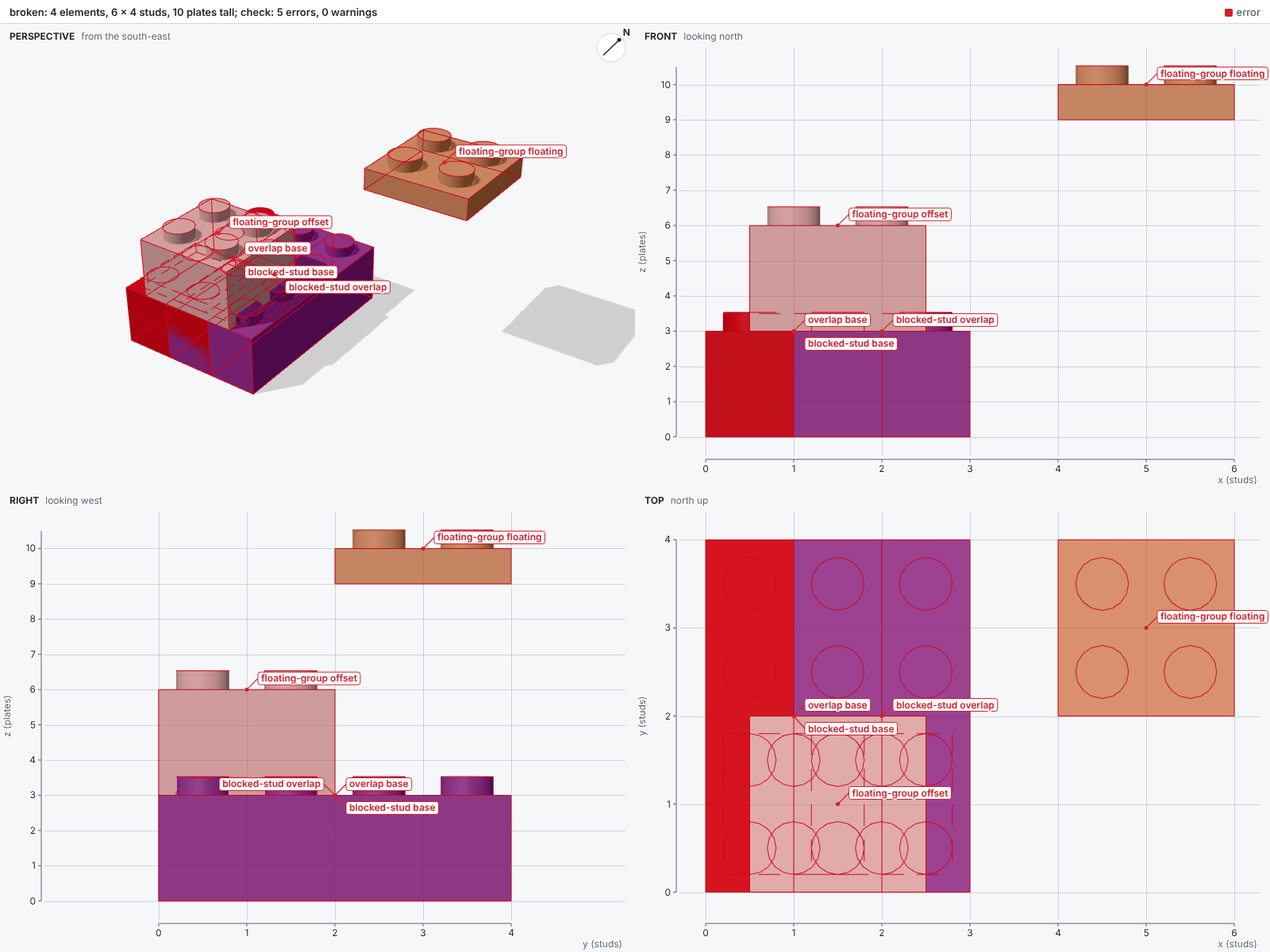
An AI agent writes a LEGO® model as a Python build script, and bricky builds it the way a compiler builds code. Each build places every part in exact geometry, reports each mistake with the script line behind it, and renders four views with rulers.
The documentation explains every concept and lists every command.
🚀 Quick start
The quick start needs uv, which installs Python if needed.
A uv project holds your build scripts, and uv add installs bricky into it from PyPI.
The project pins Python 3.14, the version bricky recommends: on 3.15, installing compiles the solver HiGHS, which needs a C++ compiler.
uv init --bare --pin-python --python 3.14 my-models  # a project for your build scripts
cd my-models
uv add bricky                                        # bricky and every dependency, from PyPI
uv run playwright install chromium                   # the browser bricky renders in, once per machine
Download an example and build it, which checks the model and renders it beside the script:
curl -O https://raw.githubusercontent.com/maxencefaldor/bricky/main/examples/japanese_garden.py
uv run bricky build japanese_garden.py
With pip on Python 3.12 to 3.14, run pip install bricky and then playwright install chromium.
On Linux, playwright install --with-deps chromium also installs the browser's system libraries.
To install bricky as a tool, run uv tool install --python 3.14 bricky --with-executables-from playwright, then playwright install chromium.
The command is then bricky, without uv run.
A clone of the repository runs every example and the benchmark: Get started shows how.
🤖 Use it with an agent
An agent reaches bricky through one of three front ends:
- The command line, for any harness that runs shell commands: the agent runs
uv run bricky buildand reads the report and the images. - The MCP server, for any harness that speaks the Model Context Protocol:
claude mcp add bricky -- uvx --python 3.14 bricky-mcpadds it to Claude Code. - The skill, which teaches the agent the build loop: Connect an agent shows how to install it.
🧱 How it works
A build script places parts by their BrickLink id, in studs and plates.
The four lines below come from examples/broken.py, which makes three mistakes: an overlap, a brick half a stud off and a floating plate.
builder.place("3001", at=(0, 0, 0), color="Red", id="base")  # Brick 2 x 4
builder.place("3001", at=(1, 0, 0), color="Blue", id="overlap")  # shares space
builder.place("3003", at=(0.5, 0, 3), color="White", id="offset")  # half a stud off
builder.place("3022", at=(4, 2, 9), color="Tan", id="floating")  # touches nothing
The report reads like compiler output, and every element it names points back at the script:
error[overlap]: base and overlap occupy the same space
  --> x 1..2  y 0..4  z 0..3
   = base: Brick 2 x 4 (3001), Red, examples/broken.py:15 in build()
   = overlap: Brick 2 x 4 (3001), Blue, examples/broken.py:16 in build()
The image marks the same elements in red, so the agent sees where they are:
ℹ️ Disclaimer
LEGO® is a trademark of the LEGO Group, which does not sponsor, authorize or endorse this project.
bricky MCP questions
What happens if my LEGO model build script has errors?
The compiler reports mistakes like overlaps or floating parts, providing the specific script line and marking the problematic elements in red in the rendered images.
What Python version is recommended for bricky?
It is recommended to use Python 3.14.