
Let an AI assistant generate permanent, embeddable static maps including choropleths, sea routes, and markers using URL-based state.
Also known as maproll-io/mcp, mcp, @maproll/mcp
- Stars
- 4
- Tools
- 4
- Downloads, 30 days
- —
- Latest version
- 0.2.4
- Last commit
- Nov 7, 2026
- License
- MIT
What is maproll MCP?
maproll lets an AI assistant generate permanent, embeddable static maps including choropleths, sea routes, and markers using URL-based state. It exposes 4 tools, such as create_map, add_layers, find_places.
Summary generated from the project's README
About maproll MCP server
Maproll allows AI assistants to generate permanent, embeddable static maps through a unique URL-based system. Instead of returning files, the server provides URLs that act as the map itself, making them easy to share or embed in web pages. This tool is designed for developers using clients like Claude Desktop, Cursor, or VS Code and requires Node 20 or newer. It functions without an account or API key, though providing a MAPROLL_API_KEY can remove the maproll wordmark from the final image.
The server provides specific tools to build complex visualizations. The create_map tool generates choropleths or qualitative maps using ISO 3166-1 alpha-2 or ISO 3166-2 region IDs. Users can then use add_layers to append markers, sea routes, proportional circles, or annotations to an existing map by passing its URL. To ensure accuracy, the find_places tool resolves names to coordinates and specific IDs for countries, cities, and airports. This approach allows an AI to build up a map incrementally over several turns of conversation.
What you can do with it
- 1Create data-driven choropleth mapsGenerate a map showing coffee consumption levels across different countries using numeric data.
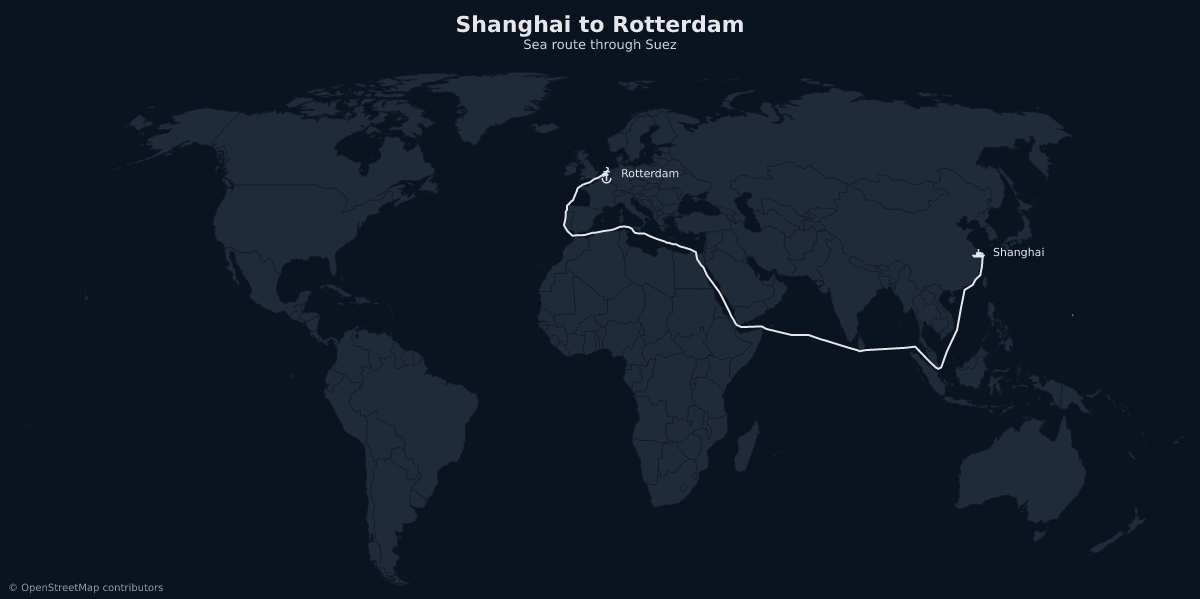
- 2Visualize complex maritime routesDraw a sea route from Shanghai to Rotterdam that follows actual shipping lanes through the Suez canal.
- 3Layer markers on existing mapsAdd specific port markers and ship icons to a previously generated sea route map.
- 4Resolve geographic locations accuratelyConvert a city or airport name into precise coordinates and map-ready identifiers.
Written from the project's README. Every use case is checked against a quote from it.
How to install maproll MCP
Formats verified 10 Nov 2026Add to CursorAdd to GooseInstall maproll MCP in Claude Code
$ claude mcp add mcp -- npx -y @maproll/mcpInstall maproll MCP in Cursor
~/.cursor/mcp.json
{
  "mcpServers": {
    "mcp": {
      "command": "npx",
      "args": [
        "-y",
        "@maproll/mcp"
      ]
    }
  }
}Install maproll MCP in VS Code
.vscode/mcp.json
{
  "servers": {
    "mcp": {
      "type": "stdio",
      "command": "npx",
      "args": [
        "-y",
        "@maproll/mcp"
      ]
    }
  }
}Install maproll MCP in VS Code CLI
$ code --add-mcp '{"name":"mcp","type":"stdio","command":"npx","args":["-y","@maproll/mcp"]}'Install maproll MCP in Claude Desktop
claude_desktop_config.json
{
  "mcpServers": {
    "mcp": {
      "command": "npx",
      "args": [
        "-y",
        "@maproll/mcp"
      ]
    }
  }
}Install maproll MCP in Codex
$ codex mcp add mcp -- npx -y @maproll/mcpInstall maproll MCP in Codex config.toml
~/.codex/config.toml
[mcp_servers.mcp]
command = "npx"
args = ["-y", "@maproll/mcp"]
Install maproll MCP in Gemini CLI
$ gemini mcp add -s user mcp npx -- -y @maproll/mcpInstall maproll MCP in Gemini settings.json
~/.gemini/settings.json
{
  "mcpServers": {
    "mcp": {
      "command": "npx",
      "args": [
        "-y",
        "@maproll/mcp"
      ]
    }
  }
}Started by HostedMCP on 16 Nov 2026
We ran this command for @maproll/mcp 0.2.4 in an isolated container with no network and no keys. It answered and listed 4 tools.
maproll MCP tools 4
Read from the server with tools/listcreate_mapRead-onlyMake a production-ready static map and return its URL plus a rendered preview. The map is a URL: the returned svg_url renders the same image forever, embeds in an <img> tag with no JavaScript, and is the handle the other maproll tools accept. Use it for choropleths (numeric values per region), flat colour paints, qualitative category maps, and plain highlight maps. Region ids are ISO 3166-1 alpha-2 at the "world" scope ("US", "DE", "BR") and ISO 3166-2 inside a country scope ("RO-B", "RO-CJ"). Numeric values and text categories cannot appear in the same map — pick one. Do not use it for interactive or zoomable maps, driving directions, or street-level detail; maproll renders static statistical maps, not a slippy map.
add_layersRead-onlyAdd markers, routes, proportional circles, pattern fills, annotations or labels to an existing map, and return the new URL. Takes the svg_url of a map you already made. Everything on it is kept — this appends rather than replaces, so it is also how you build a map up over several turns. Resolve coordinates with find_places before adding a marker. Guessed lat/lon lands in the wrong country and the render will not complain. Use sea routes for shipping: they follow the lanes through Suez, Panama and Malacca instead of drawing a straight line over land.
find_placesRead-onlyResolve a place name to real coordinates and the region id maproll uses. Searches countries, regions, cities and airports, and returns each hit's ISO 3166-1 / 3166-2 / IATA code alongside its latitude and longitude. Use it before placing any marker or lat,lon route endpoint. Coordinates recalled from memory are frequently wrong by degrees, and a map renders a wrong marker exactly as confidently as a right one.
describe_optionsRead-onlyReturn the exact accepted values for scopes, themes, marker icons, projections, pattern fills, or the URL grammar. The same content is published as the maproll:// resources; this tool is for hosts that do not read resources. Check it rather than guessing a name — an icon or theme that does not exist renders nothing and reports no error.
Configuration
MAPROLL_API_KEY
Automated checks
Ran Nov 13, 2026Full report →Passed our automated checks. That is not a security audit: read the code and give the server the narrowest access it needs. How checks work

- Source repository linked and reachablemaproll-io/mcp is public and reachablegithub.com/maproll-io/mcp ↗Pass
- Package names this repository as its source@maproll/mcp names maproll-io/mcp as sourcenpmjs.com/package/@maproll/mcp ↗Pass
- Build provenance (Sigstore attestation)No build attestation published for this releaseNot checked
- Open source license (OSI)MITspdx.org/licenses/MIT.html ↗Pass
- Commit or release in the last yearLast commit or release 2026-11-12github.com/maproll-io/mcp ↗Pass
- OpenSSF ScorecardNot checked
- Package name not close to a popular packageNo popular package one edit away from @maproll/mcpPass
- No critical advisory in the package or its dependenciesthe package checked; no critical advisoryosv.dev ↗Pass
- No hidden instructions to the model0 tool descriptions and the README read; no override phrases, credential paths or hidden charactersPass
- Destructive tools are labelledNot checked
- Remote endpoint answers the MCP handshakeNot checked
README
View on GitHub@maproll/mcp
Let an AI assistant make real maps. Every map comes back as a maproll URL — permanent, embeddable, and the handle for the next change.
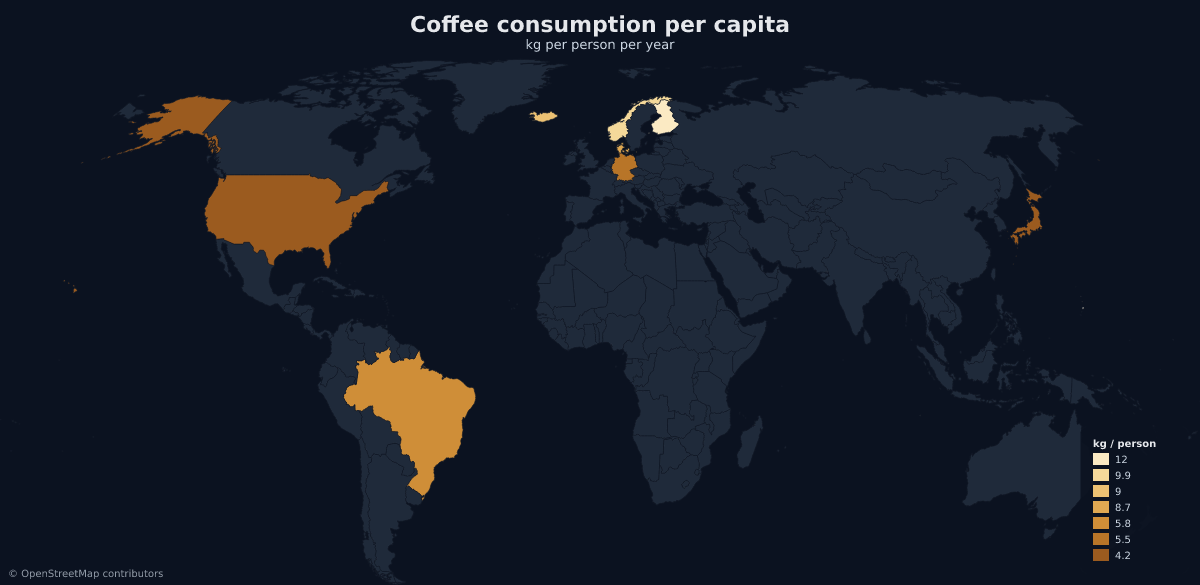
That image is not a file in this repository. It is a maproll URL rendering live, which is the whole idea: the URL is the map.
Install
claude mcp add maproll -- npx -y @maproll/mcp
Any other client takes the same command as config — Claude Desktop, Cursor
(.cursor/mcp.json), VS Code (.vscode/mcp.json under "servers"):
{
  "mcpServers": {
    "maproll": {
      "command": "npx",
      "args": ["-y", "@maproll/mcp"]
    }
  }
}
Needs Node 20 or newer. No API key, no signup, no account — the server runs from npm on demand and talks to the public render API.
Try it
Ask your assistant, in these words or your own:
Map coffee consumption per capita for the ten biggest drinkers.
Highlight the EU member states on a light map.
Draw the sea route from Shanghai to Rotterdam, with the ports marked.
Compare NATO and BRICS members on a dark map, and give me a URL I can embed.
The third one is the one to try if you only try one. Sea routes thread Suez, Panama and Malacca instead of drawing a straight line across Asia:
Tools
create_map
A map from your data. Numeric values give a choropleth, colours paint regions
flat, text values give qualitative buckets, and highlight covers the case
where the point is which regions rather than how much.
Region ids are ISO 3166-1 alpha-2 at the world scope (US, DE, BR) and ISO
3166-2 inside a country scope (RO-B, RO-CJ). Data arrives structured — the
server owns the URL grammar, so the model never hand-assembles US:200:#ff0000.
add_layers
Markers, routes, proportional circles, pattern fills, annotations and labels, added to a map you already made. It takes that map's URL and appends — so it is also how a map gets built up over several turns instead of rebuilt from scratch each time.
find_places
A place name resolved to real coordinates and the id maproll uses. Countries, regions, cities and airports, each with its ISO 3166-1 / 3166-2 / IATA code.
Worth using before every marker. Coordinates recalled from memory are routinely wrong by degrees, and a map draws a wrong marker exactly as confidently as a right one.
describe_options
The scopes, themes, marker icons, projections and pattern fills the renderer actually accepts. An invented theme or icon name renders nothing and reports no error, so checking beats guessing.
What comes back
Every tool that makes a map returns the rendered PNG to look at, plus:
| Field | What it is |
|---|---|
svg_url |
The map. Embeddable, permanent, and the handle the other tools take. |
png_url |
The same map as PNG. |
editor_url |
Opens it in the maproll editor, loaded and editable. |
embed |
A ready <img> tag. |
warnings |
Non-fatal problems — region ids the renderer did not recognise, for instance. |
Why the URL is the map
An agent usually hands back an artifact: a file, a blob, something that exists in the conversation and nowhere else. maproll hands back an address.
prompt → assistant → maproll MCP → https://api.maproll.io/map.svg?…
                                        ↓
              README · docs · dashboard · newsletter · the next tool call
There is no session and no state to keep, because svg_url is the state.
Pass it to add_layers and a new URL comes back with the addition applied.
Every URL from every step still renders, forever, in an <img> tag with no
JavaScript.
Branding and keys
Maps work with no account. What anonymous costs is the wordmark: every map this server makes carries the small maproll mark in the corner.
A key removes it. Mint one in the editor at app.maproll.io → API keys, and pass it in the server's environment:
{
  "mcpServers": {
    "maproll": {
      "command": "npx",
      "args": ["-y", "@maproll/mcp"],
      "env": { "MAPROLL_API_KEY": "mr_live_…" }
    }
  }
}
With a key, returned URLs carry a signature bound to that one map, so an embedded map renders clean wherever it is published — without the key itself ever appearing in a link someone can copy. Two things worth knowing: keys expire after 90 days, and when one expires, embeds published under it start carrying the wordmark again. Regenerate the maps if that matters.
OpenStreetMap attribution stays on either way. That is a licence obligation, not branding.
| Variable | Default | Purpose |
|---|---|---|
MAPROLL_API_KEY |
— | Entitles renders, and removes the wordmark. |
MAPROLL_PLACES_URL |
https://mcp.maproll.io/places |
Where find_places resolves names. Override only for local development. |
Resources and prompts
Seven read-only resources publish the catalogs a model otherwise guesses at —
maproll://grammar most of all, plus the scope, theme, icon, projection and
pattern lists and a set of worked examples.
Three prompts ship with the server: mapped_episode (a dataset in the house
style of Mapped), readme_map (a map plus a
paste-ready snippet with real alt text), and refine_map (change an existing
map in plain English).
Documentation
- maproll.io/mcp — what this is, in one page.
- docs.maproll.io/docs/mcp/intro — per-client install, every tool's schema, recipes.
- Listed in the MCP Registry as
io.maproll/maproll.
Development
See DEVELOPMENT.md for the layout, the local loop, and the end-to-end smoke test. Publishing notes are in PUBLISHING.md.
MIT licensed.
maproll MCP questions
How do I add maproll MCP to Claude Code?
Run claude mcp add mcp -- npx -y @maproll/mcp in your terminal. Add --scope user to make it available in every project.
How do I add maproll MCP to Cursor?
Open ~/.cursor/mcp.json and add the server under mcpServers, using the Cursor config shown in the install section above.
What tools does maproll MCP provide?
It exposes 4 tools, including create_map, add_layers, find_places, describe_options.
Do I need an API key to use maproll?
No, the server runs from npm on demand and talks to the public render API without an account or signup. However, using a key removes the maproll wordmark from your maps.
How can I add more elements to a map I already created?
You can use the add_layers tool, which takes the existing map's URL and appends new markers, routes, or annotations to it.
What are the requirements to install the server?
The server requires Node 20 or newer to run.