
Mermaid Code MCP server
Commit Nov 15, 2026Lets AI agents create, modify, and preview Mermaid diagrams by interacting with a local desktop editor and file system.
Also known as m8524769/mermaid-code
- Stars
- 19
- Tools
- —
- Downloads, 30 days
- —
- Latest version
- —
- Last commit
- Nov 15, 2026
- License
- MIT
What is Mermaid Code MCP?
Mermaid Code lets AI agents create, modify, and preview Mermaid diagrams by interacting with a local desktop editor and file system.
Summary generated from the project's README
About Mermaid Code MCP server
Mermaid Code is a desktop application for macOS and Windows that allows developers to create and manage Mermaid diagrams locally. It functions as an enhanced version of the Mermaid Live Editor, providing direct access to your local file system to open, edit, and save .mmd files. The application is designed for AI-native workflows, enabling users to maintain their architecture diagrams and database schemas entirely on their own machines without uploading data to a browser.
Users can connect AI agents like Claude Code, Cursor, or Windsurf to the application via a built-in MCP server running on localhost. This connection allows agents to use specific tools such as list_diagrams, preview_diagram, and search_icons to interact with the editor. By integrating with the MCP protocol, an AI client can read your codebase, write new diagram files, and see instant visual updates through a built-in file watcher that refreshes the preview as changes occur.
What you can do with it
- 1Generate diagrams from existing codeAn AI agent can read your local files to create an architecture diagram and save it directly to your documentation folder.
- 2Modify diagrams through natural languageYou can instruct an AI to add specific logic, such as error handling, to a diagram currently being edited.
- 3Find and insert diagram iconsDevelopers can ask an agent to search for specific service icons like Postgres or Redis to include in their visual flows.
- 4Instant visual prototypingAn AI can generate Mermaid code and send it to the draft tab for immediate visual feedback without saving a file.
Written from the project's README. Every use case is checked against a quote from it.
Automated checks
Ran Nov 14, 2026Full report →Not verified yet. A server needs a score of 80, no serious finding, and enough data for us to check. How checks work · What to fix for more points

- Source repository linked and reachablem8524769/mermaid-code is public and reachablegithub.com/m8524769/mermaid-code ↗Pass
- Package names this repository as its sourceNot checked
- Build provenance (Sigstore attestation)Not checked
- Open source license (OSI)MITspdx.org/licenses/MIT.html ↗Pass
- Commit or release in the last yearLast commit or release 2026-11-14github.com/m8524769/mermaid-code ↗Pass
- OpenSSF ScorecardNot checked
- Package name not close to a popular packageNot checked
- No critical advisory in the package or its dependenciesNot checked
- No hidden instructions to the model0 tool descriptions and the README read; no override phrases, credential paths or hidden charactersPass
- Destructive tools are labelledNot checked
- Remote endpoint answers the MCP handshakeNot checked
README
View on GitHub

English | 简体中文
Mermaid Code
A desktop Mermaid diagram editor app built on Mermaid Live Editor, enhanced with local file management and AI agent integration.
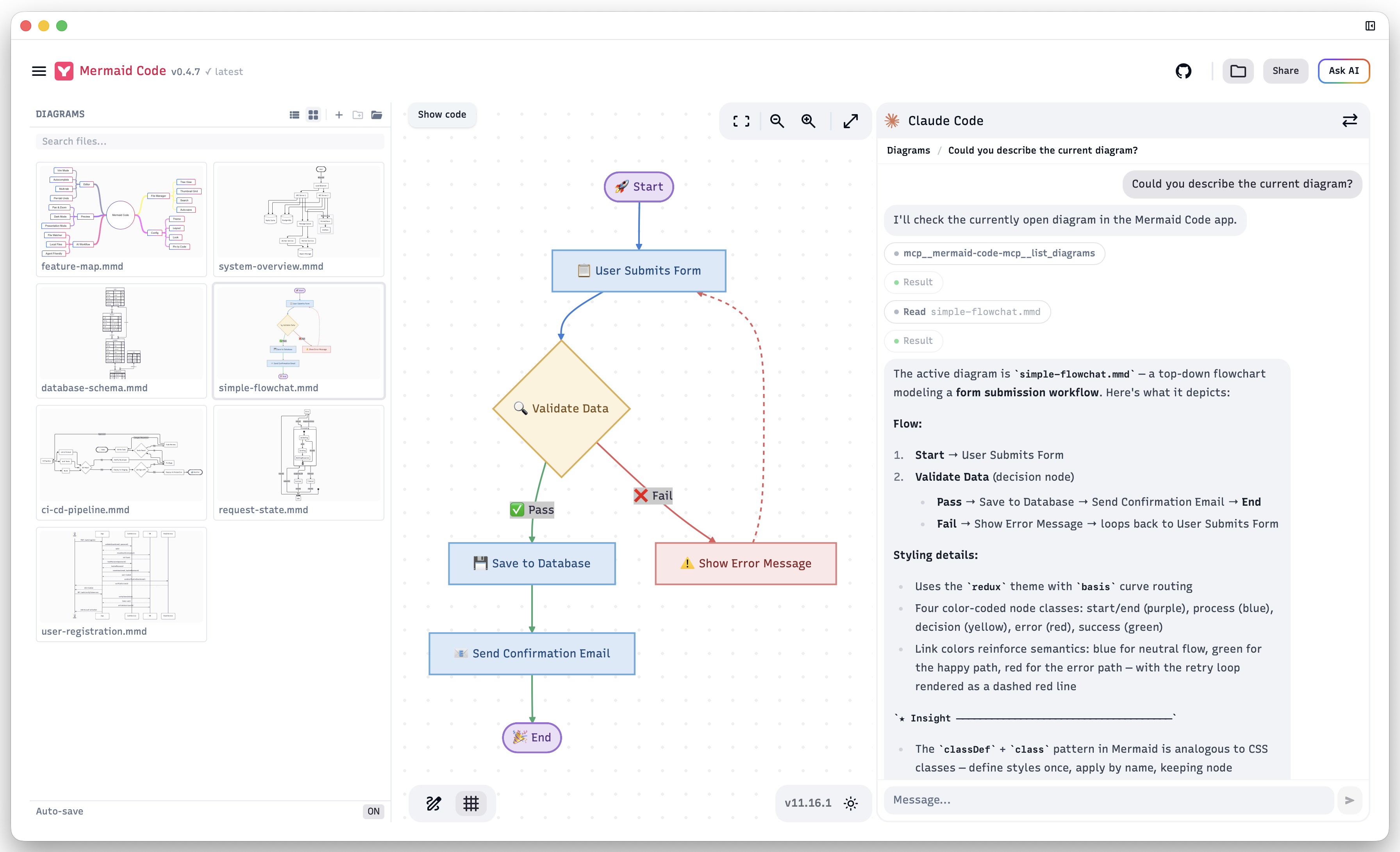
Built for AI-First Workflows
Mermaid Code is designed around AI-native diagram workflows.
Built-in AI Agent panel — chat with Claude Code or Codex directly inside the app. Ask it to create, modify, or explain diagrams in your project folder. The agent has full access to your local files and the MCP server, so it can read your codebase, write .mmd files, and see the live preview — all without leaving Mermaid Code.
Other AI agents (OpenCode, Cursor, etc.) can also connect via the built-in MCP server to interact with the app, read your codebase, and write diagrams directly — no copy-pasting, no browser automation required.
# Example: ask your AI agent to generate a diagram from code
"Generate an architecture diagram for this module and save it to docs/architecture.mmd"
The built-in file watcher detects changes instantly and refreshes the preview, closing the loop between AI generation and visual feedback. This workflow is not possible with browser-based editors.
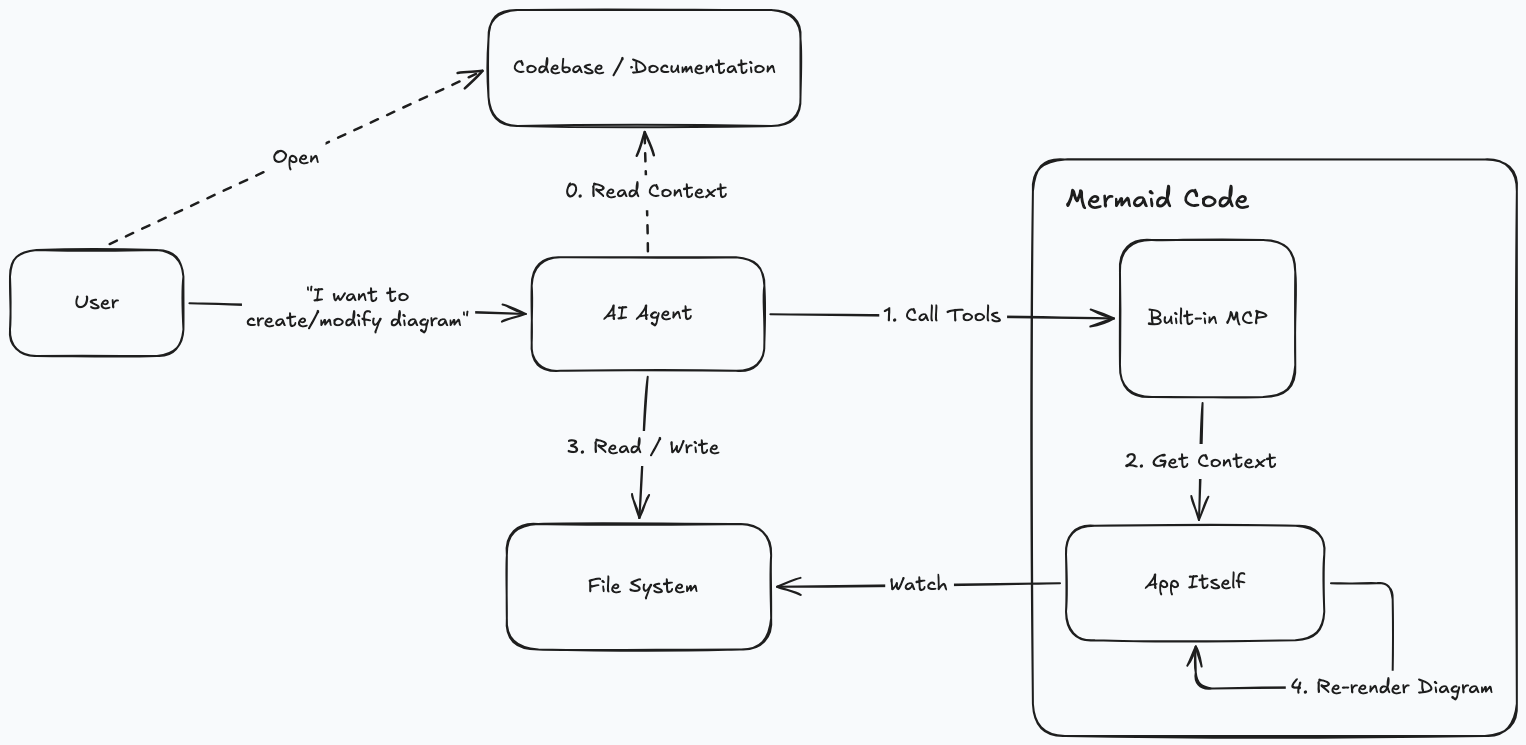
Everything stays local — architecture diagrams, database schemas, and business flows never leave your machine. No terms of service, no data retention policies to worry about.
Download the latest installer for macOS or Windows from the official download page. All builds and past versions are also available on the GitHub Releases page.
Install via Homebrew (macOS)
brew tap m8524769/tap
brew install --cask mermaid-code
Since the app is not signed with an Apple Developer certificate, macOS may block it on first launch. Go to System Settings → Privacy & Security and click Open Anyway next to the Mermaid Code entry. If that doesn't work, run the following command in Terminal:
xattr -dr com.apple.quarantine "/Applications/Mermaid Code.app"
Enhancements over Mermaid Live Editor
AI Agent Panel
- Built-in Claude Code and Codex integration — chat with either agent directly inside the app without switching windows
- Multi-turn conversations with session history — resume previous sessions per folder
- Built-in MCP server — lets AI agents interact with the app directly (see MCP Server Integration)
Desktop App (Tauri)
- Native macOS/Windows application
- Local file system access — open, edit, and save
.mmdfiles directly - "Open with" support — double-click any
.mmdor.mermaidfile in Finder or Explorer to open it directly in Mermaid Code - App quit guard: prompts when unsaved changes exist on close
File Manager Sidebar
- Open any local folder and browse its file tree or thumbnail grid view (SVG previews of all diagrams in the folder and subdirectories)
- Drag and drop
.mmdfiles or folders directly onto the app window to open them - Multi-tab editing — open multiple diagrams simultaneously
- Tab and active file restored per folder on next launch
- Auto-save with toggle (default on, 2s debounce)
- Hover actions: new file, new folder, rename, delete
Editor
- Tree-sitter syntax highlighting — accurate semantic highlighting for every diagram type, powered by @mermanjs/tree-sitter-mermaid
- Color preview swatches — inline color chips with a click-to-edit picker for
style/classDefcolors - Vim mode — toggle with the VIM ON/OFF button in the status bar
- Keyword autocomplete — diagram-type-aware suggestions
Config Tab
- Visual form — set theme, layout, and font family without editing JSON directly
- Pin to code — inserts the current config as a YAML frontmatter block at the top of the diagram code; re-clicking replaces the existing block
Diagram Icons
- Bundled Iconify icon packs — SVG Logos and Font Awesome 7 are registered out of the box and render offline with no CDN fetch; use them in flowchart icon shapes via the
logos:,fas:/far:/fab:prefixes
MCP Server Integration
Mermaid Code includes a built-in MCP server that lets AI agents interact with the app directly.
Enable the MCP server:
Open Mermaid Code → click the menu icon → toggle MCP Server on. The server starts on http://localhost:37079/mcp. (No need to install Node.js or Python environment on your machine)
Configure your MCP client (e.g. Claude Code, Cursor, Windsurf):
{
  "mcpServers": {
    "mermaid-code-mcp": {
      "type": "http",
      "url": "http://localhost:37079/mcp"
    }
  }
}
For Claude Code:
claude mcp add --transport http mermaid-code-mcp http://localhost:37079/mcp
Available tools:
| Tool | Description |
|---|---|
list_diagrams |
Get the opened folder, list of .mmd files, and the active tab. Call this first to understand the current context. |
preview_diagram |
Preview Mermaid diagram in the Draft tab (replaces existing Draft content). |
search_icons |
Search available icons by concept (e.g. "kubernetes", "aws s3") to get the exact names to use in your diagrams. |
Example — modifying an existing diagram:
"Add an error handling branch to the current diagram"
→ Agent calls list_diagrams to get the active file path
→ Agent reads the file content directly from the filesystem
→ Agent writes the modified diagram back to the file
→ Mermaid Code detects the change and refreshes the preview automatically
Example — previewing without saving:
"Preview a flowchart showing the user registration flow"
→ Agent generates Mermaid code and calls preview_diagram
→ The diagram appears instantly in Mermaid Code's Draft tab
Example — adding icons to a diagram:
"Add icons to the services in this architecture diagram"
→ Agent calls search_icons with concepts like "postgres", "redis", "nginx"
→ search_icons returns exact names (e.g. logos:postgresql, logos:redis)
→ Agent writes those names into the diagram and refreshes the preview
If your prompt triggers tools from other MCP servers (such as Figma MCP), that is expected — Mermaid Code MCP does not enforce its use. If you encounter tool conflicts, try phrasing your prompt as "Generate the mmd diagram within Mermaid Code app".
Development Requirements
Desktop Development
source ~/.cargo/env   # load Rust toolchain if needed
pnpm tauri:dev
Desktop Build
pnpm tauri:build
Build with MCP server binary included:
pnpm tauri:build:full
Troubleshooting
App freezes or crashes
If the app becomes unresponsive or crashes, it may be caused by a diagram or config that causes mermaid to hang during rendering.
Workaround: Move the suspected .mmd file(s) to a different folder outside the opened directory, then relaunch the app. Once the app is responsive again, move the files back and identify the problematic diagram or config.
Star History
Original Project
Fork of mermaid-live-editor. Web-only version: mermaid.live
Mermaid Code MCP questions
How do I install it on macOS?
You can install it via Homebrew using 'brew tap m8524769/tap' and 'brew install --cask mermaid-code'.