
a2wave MCP server
Commit Nov 13, 2026Orchestrates existing agent CLIs into shared, governed services reachable via Slack, Discord, Telegram, and HTTP APIs.
Also known as LilithGames/a2wave
- Stars
- 27
- Tools
- —
- Downloads, 30 days
- —
- Latest version
- —
- Last commit
- Nov 13, 2026
- License
- Apache-2.0
What is a2wave MCP?
a2wave orchestrates existing agent CLIs into shared, governed services reachable via Slack, Discord, Telegram, and HTTP APIs.
Summary generated from the project's README
About a2wave MCP server
Transforming existing agent command-line interfaces into shared team services is the primary function of a2wave. It allows developers to take tools like Claude Code, Cursor Agent, or OpenAI Codex and publish them as governed services accessible through Slack, Discord, Telegram, Feishu, or HTTP APIs. Instead of rebuilding reasoning logic through complex node-based graphs, users describe agents using natural language and bind them to specific model providers.
Setup is handled locally via a single command that installs a containerized environment with a built-in web dashboard. This dashboard serves as the central hub for managing providers, skills, and MCP servers, while also providing audit trails and run queues. The system is designed for internal enterprise teams who need to share trusted agent capabilities with colleagues while maintaining accountability through per-agent permissions and OIDC or SAML SSO authentication.
What you can do with it
- 1Extend agent capabilities via compositionAdd new functionality to your agents by connecting them to existing MCP servers or custom skills.
- 2Audit and govern agent usageMonitor how your team uses agents through a centralized dashboard that tracks permissions and execution history.
- 3Evaluate agent performance with snapshotsTest your agent configurations against specific case sets using frozen model and prompt settings.
Written from the project's README. Every use case is checked against a quote from it.
Automated checks
Ran Nov 14, 2026Full report →Not verified yet. A server needs a score of 80, no serious finding, and enough data for us to check. How checks work

- Source repository linked and reachablelilithgames/a2wave is public and reachablegithub.com/lilithgames/a2wave ↗Pass
- Package names this repository as its sourceNot checked
- Build provenance (Sigstore attestation)Not checked
- Open source license (OSI)Apache-2.0spdx.org/licenses/Apache-2.0.html ↗Pass
- Commit or release in the last yearLast commit or release 2026-11-13github.com/lilithgames/a2wave ↗Pass
- OpenSSF ScorecardNot checked
- Package name not close to a popular packageNot checked
- No critical advisory in the package or its dependenciesNot checked
- No hidden instructions to the model0 tool descriptions and the README read; no override phrases, credential paths or hidden charactersPass
- Destructive tools are labelledNot checked
- Remote endpoint answers the MCP handshakeNot checked
README
View on GitHuba2wave
Turn the agent CLIs you already use into shared services your whole team can call.
Describe an Agent in plain language, bind a model provider, publish it to Feishu, Slack, Discord, Telegram, an HTTP API, or a schedule. No flowcharts, no glue code.


Core Concepts · Project Guide · Contributing · Security
English | 简体中文
What is a2wave?
a2wave turns the agent CLIs you already use — Claude Code, Cursor Agent, OpenAI Codex, and more — into shared, governed services, reachable from Feishu, Slack, Discord, Telegram, an HTTP API, or a schedule.
Describe an Agent in natural language, bind a model provider, extend it with Skills and MCP servers, publish. a2wave handles credential injection, run queueing, audit trails, permissions, and delivery — all managed from a built-in web dashboard.
a2wave orchestrates; it does not execute. No bundled LLM inference, no sandbox runtime, no drag-and-drop DAG editor — execution comes from the underlying CLIs, and orchestration is written in natural language. These boundaries are enforced; see the Iron Rules.
How it compares
| a2wave | Workflow builders (n8n, Dify, Flowise) | A bare agent CLI | |
|---|---|---|---|
| How logic is expressed | Natural language | Nodes, edges, variable mapping | Natural language |
| Who can run it | Your whole team, via the channels they already use | Whoever opens the builder | Whoever has the terminal |
| Model execution | Your existing CLI + your credentials | Vendor-managed runtimes | Local only |
| Governance | Per-Agent permissions, audit trail, run queue | Varies | None |
Pick a2wave when your team already trusts an agent CLI and needs to share it — with access control, an audit trail, and delivery into Feishu or Slack — rather than rebuild its reasoning as a graph.
Features
- 🤖 Bring your own agent CLI — Claude Code, Cursor Agent, OpenAI Codex, OpenCode, Qoder, Trae, Kimi and Pi are interchangeable execution engines, installed on demand from a pinned, checksum-verified lockfile.
- 🌊 Publish to multiple channels — one Agent, reachable via HTTP API, Feishu, Slack, Discord, Telegram, A2A, schedules, GitLab / GitHub repository triggers, and a first-party chat page.
- 🖥️ Web dashboard — build and publish Agents, manage providers, Skills, MCP servers and SCM sources, watch runs, and browse the audit trail from one console.
- 🧩 Extend by composition — add capabilities through Skills and MCP servers (stdio / SSE / HTTP / proxy groups) instead of forking the platform.
- 🔗 Agent-to-agent calls — Agents reach other Agents over A2A, including ones hosted outside your deployment.
- 📚 Persistent memory — per-Agent, with progressive disclosure and keyword, vector and hybrid search.
- 🧪 Built-in evaluation — replay curated case sets against an Agent's current config, with a frozen provider/model/prompt snapshot for honest comparison.
- 📦 Git & Perforce workspaces — Agents work on real checkouts, with isolated worktrees per evaluation run.
- 🔐 Enterprise auth — OIDC and SAML SSO, per-Agent owner/editor/viewer permissions, rate limiting, and an audit entry behind every write.
Trust Model
a2wave is built for internal enterprise teams: Agent authors and Agent users are assumed to be trusted colleagues acting in good faith.
That shapes the boundaries. Agents run CLIs with real capabilities — filesystem, shell, injected credentials — by design. The platform does not sandbox authors from each other, nor defend against an insider crafting a hostile Agent. Its controls (authentication, per-Agent permissions, audit logging, rate limiting) enforce accountability and least privilege among teammates, not containment of an adversary already inside.
[!IMPORTANT] Exposing a2wave to untrusted users or running untrusted Agent configurations is out of scope — add your own isolation layer. Full statement: SECURITY.md.
Quick Start
npm i -g a2wave
a2wave setup
One command installs the published image, writes docker-compose.yml + .env,
starts the container and waits until it is healthy — no clone, no build. Then open
the web dashboard at http://localhost:3502: the first login claims the admin
account, and everything from there — creating an Agent, binding a model provider,
publishing it to channels — happens in the dashboard. The in-app manual at /wiki
walks through your first Agent end to end.
To deploy with the bundled PostgreSQL container (experimental — see Database Backend first):
a2wave setup --yes --with-postgres --dir "$HOME/a2wave-pg" --port 3512
The CLI selects the versioned image matching its own release; upgrade later with
a2wave setup --upgrade from the same install directory. The generated deployment
includes a dedicated a2wave-workspace volume — new Git sources use managed paths
there automatically. P4 sources instead require an absolute mounted path covered by
the existing P4 Client Root or AltRoots.
Every generated setting has a working default; see Configuration for what each one does.
Local Development
Requires Node.js ≥ 22 (matching the image's node:22-slim runtime) and pnpm ≥ 9.
pnpm install
cp .env.example .env       # leave AUTH_SECRET empty; pnpm dev generates one
pnpm dev                   # API :3502 + Web :3501
pnpm stop                  # free the ports if a previous run left orphans
A clone also ships a docker-compose.yml for building and
running the image from source (cp .env.example .env && docker compose up -d --build
— on macOS read the workspace-mount notes inside the compose file first).
Development guides, API reference and database operations: AGENTS.md. CLI install / upgrade / publish: CLI Installation & Publishing.
Database Backend
DATABASE_URL alone picks the backend: a postgres:// scheme means PostgreSQL,
anything else is a SQLite file path.
SQLite (default, supported) — nothing to configure; a2wave setup gives you one
container with the database on a named volume.
PostgreSQL ≥ 9.6 (experimental) — deploy the bundled sidecar with
a2wave setup --with-postgres, or point at an external server with
--database-url postgres://…. Migrations run on boot and pick the matching lineage;
the API waits for the database healthcheck, so a cold start is safe. The sidecar's
port is not published to the host.
[!WARNING] PostgreSQL is experimental and not recommended for production: it passes the full suite and a smoke test, but has no production soak time, and there is no SQLite → PostgreSQL migration path — switching starts from an empty database. It exists for multi-instance deployments, where one SQLite file cannot be shared safely. Details, including per-process cache caveats for replicas: docs/agent/postgresql.md.
Channels
A published Agent is reachable through HTTP API, Feishu, Slack, Discord, Telegram, the A2A protocol, scheduled triggers, GitLab / GitHub repository triggers, and the first-party chat page.
The Feishu channel supports Feishu (feishu.cn) apps; Lark international (larksuite.com) is not configurable yet.
Screenshots
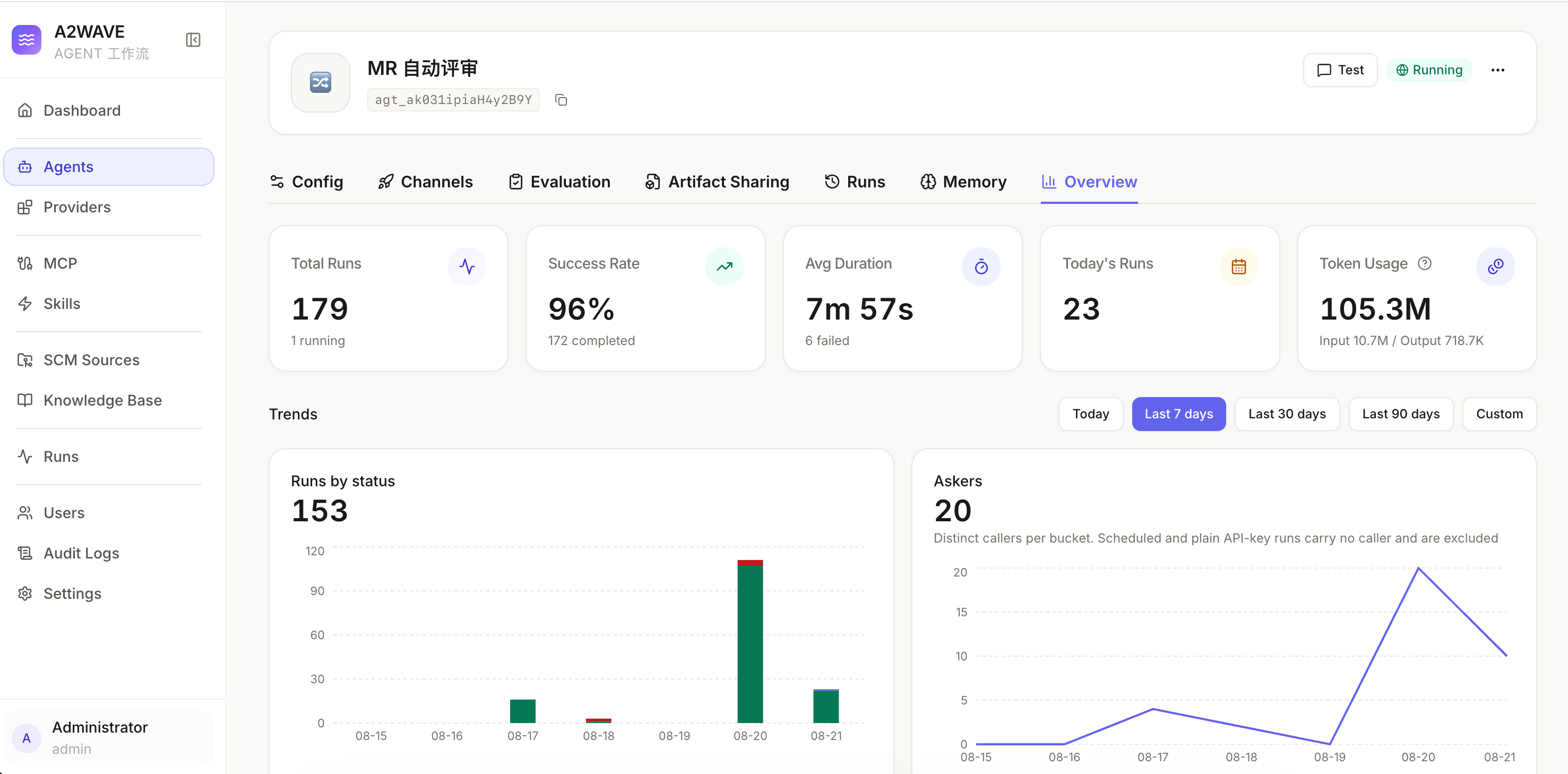
The Agent overview: run volume, success rate, average duration, token usage, and trends over the selected window.
Documentation
| Document | Contents |
|---|---|
| Core Concepts | Agent, Provider, Skill, MCP Server, SCM Source, Run, Evaluation |
| Configuration | Every environment variable and settings override |
| Project Guide | Architecture, full API reference, testing strategy, conventions |
| CLI Installation & Publishing | Installing, upgrading, and publishing the a2wave CLI |
| Contributing | Dev setup, commit convention, quality gates, AI policy |
| Security Policy | Trust model and vulnerability disclosure |
A running instance also serves an interactive API reference at /api/docs (Swagger
UI) and the user manual at /wiki.
Built with AI
a2wave is built extensively with AI coding agents — a fitting way to build a platform that orchestrates them. Every change lands through a full test pyramid (unit / integration / E2E), hard lint and typecheck gates, and human review. AI-assisted contributions are held to the same bar; see the AI Contribution Policy.
Contributing
Issues, discussions and pull requests are welcome. Start with CONTRIBUTING.md — dev setup, commit convention, quality gates and the AI contribution policy. a2wave has explicit product boundaries (the Iron Rules in AGENTS.md); features that cross them need maintainer discussion first. By participating you agree to the Code of Conduct.
[!WARNING] Do not report security vulnerabilities through public issues or pull requests — follow SECURITY.md to disclose privately.
Contributors
Thanks to everyone who has contributed to a2wave — see the contributors graph.
License
Licensed under the Apache License 2.0. Copyright 2026 Lilith Games — see NOTICE for attribution and bundled third-party material.
a2wave MCP questions
What agent CLIs can I use with a2wave?
You can use Claude Code, Cursor Agent, OpenAI Codex, OpenCode, Qoder, Trae, Kimi, and Pi.
How can my team access the agents?
Agents can be published to Feishu, Slack, Discord, Telegram, an HTTP API, or via a schedule.
Does a2wave provide its own LLM inference?
No, a2wave orchestrates existing CLIs and does not provide bundled LLM inference or a sandbox runtime.
Can I extend the capabilities of an agent?
Yes, you can extend agents by adding Skills and MCP servers.