
Protects Postgres databases from AI agents by requiring approval for risky SQL and providing one-command undo for updates and deletes.
Also known as lexang/pgbrake
- Stars
- 1
- Tools
- —
- Downloads, 30 days
- 711
- Latest version
- 0.3.0
- Last commit
- Nov 6, 2026
- License
- MIT
What is pgbrake MCP?
pgbrake protects Postgres databases from AI agents by requiring approval for risky SQL and providing one-command undo for updates and deletes.
Summary generated from the project's README
About pgbrake MCP server
pgbrake acts as a protective layer between AI agents like Claude Code, Codex, or Cursor and your Postgres database. It functions as a local MCP server that intercepts SQL commands to prevent accidental data loss. By using the pglast Postgres parser, the server identifies risky operations such as DDL commands, updates or deletes without a WHERE clause, and any write affecting more than the default limit of 100 rows. These actions are held for human approval via the client prompt or an interactive terminal.
Developers can reverse specific updates and deletes using a single command and a unique change id. The server maintains a local audit log in a journal database and ensures that all multi-statement calls run within a single transaction. While the free version tracks the last 20 undoable changes, the Pro version offers unlimited history and advanced migration guards. Setup requires providing a connection string through the PGBRAKE_DSN environment variable during installation.
What you can do with it
- 1Prevent accidental mass deletionsAn AI agent attempts to delete a large number of rows, but the server intercepts the command for manual review.
- 2Revert incorrect data updatesA developer needs to restore rows that were modified by an AI agent using a specific change identifier.
Written from the project's README. Every use case is checked against a quote from it.
How to install pgbrake MCP
Formats verified 10 Nov 2026Add to CursorAdd to GooseInstall pgbrake MCP in Claude Code
$ claude mcp add --env 'PGBRAKE_DSN=<YOUR_PGBRAKE_DSN>' pgbrake -- uvx pgbrakeInstall pgbrake MCP in Cursor
~/.cursor/mcp.json
{
  "mcpServers": {
    "pgbrake": {
      "command": "uvx",
      "args": [
        "pgbrake"
      ],
      "env": {
        "PGBRAKE_DSN": "<YOUR_PGBRAKE_DSN>"
      }
    }
  }
}Install pgbrake MCP in VS Code
.vscode/mcp.json
{
  "servers": {
    "pgbrake": {
      "type": "stdio",
      "command": "uvx",
      "args": [
        "pgbrake"
      ],
      "env": {
        "PGBRAKE_DSN": "<YOUR_PGBRAKE_DSN>"
      }
    }
  }
}Install pgbrake MCP in VS Code CLI
$ code --add-mcp '{"name":"pgbrake","type":"stdio","command":"uvx","args":["pgbrake"],"env":{"PGBRAKE_DSN":"<YOUR_PGBRAKE_DSN>"}}'Install pgbrake MCP in Claude Desktop
claude_desktop_config.json
{
  "mcpServers": {
    "pgbrake": {
      "command": "uvx",
      "args": [
        "pgbrake"
      ],
      "env": {
        "PGBRAKE_DSN": "<YOUR_PGBRAKE_DSN>"
      }
    }
  }
}Install pgbrake MCP in Codex
$ codex mcp add pgbrake --env 'PGBRAKE_DSN=<YOUR_PGBRAKE_DSN>' -- uvx pgbrakeInstall pgbrake MCP in Codex config.toml
~/.codex/config.toml
[mcp_servers.pgbrake]
command = "uvx"
args = ["pgbrake"]

[mcp_servers.pgbrake.env]
PGBRAKE_DSN = "<YOUR_PGBRAKE_DSN>"
Install pgbrake MCP in Gemini CLI
$ gemini mcp add -s user -e 'PGBRAKE_DSN=<YOUR_PGBRAKE_DSN>' pgbrake uvx -- pgbrakeInstall pgbrake MCP in Gemini settings.json
~/.gemini/settings.json
{
  "mcpServers": {
    "pgbrake": {
      "command": "uvx",
      "args": [
        "pgbrake"
      ],
      "env": {
        "PGBRAKE_DSN": "<YOUR_PGBRAKE_DSN>"
      }
    }
  }
}Needs a key before it starts
Started on 16 Nov 2026 with no keys, it stopped and asked for one, so a client sees no tools until you set the variables above.
Configuration
PGBRAKE_DSNRequiredSecretPostgres connection string, e.g. postgresql://me@localhost/app
Automated checks
Ran Nov 13, 2026Full report →Passed our automated checks. That is not a security audit: read the code and give the server the narrowest access it needs. How checks work

- Source repository linked and reachablelexang/pgbrake is public and reachablegithub.com/lexang/pgbrake ↗Pass
- Package names this repository as its sourcepgbrake names lexang/pgbrake as sourcepypi.org/project/pgbrake/ ↗Pass
- Build provenance (Sigstore attestation)No build attestation published for this releaseNot checked
- Open source license (OSI)MITspdx.org/licenses/MIT.html ↗Pass
- Commit or release in the last yearLast commit or release 2026-11-06github.com/lexang/pgbrake ↗Pass
- OpenSSF ScorecardNot checked
- Package name not close to a popular packageNo popular package one edit away from pgbrakePass
- No critical advisory in the package or its dependencies32 resolved dependencies checked; no critical advisoryosv.dev ↗Pass
- No hidden instructions to the model0 tool descriptions and the README read; no override phrases, credential paths or hidden charactersPass
- Destructive tools are labelledNot checked
- Remote endpoint answers the MCP handshakeNot checked
README
View on GitHubpgbrake
An undo button for your database when an AI agent is driving.
pgbrake is a local MCP server that sits between Claude Code / Codex / Cursor and your Postgres. Every write the agent makes gets a change id you can reverse with one command. Risky SQL waits for a human. Everything is logged. Nothing leaves your machine.
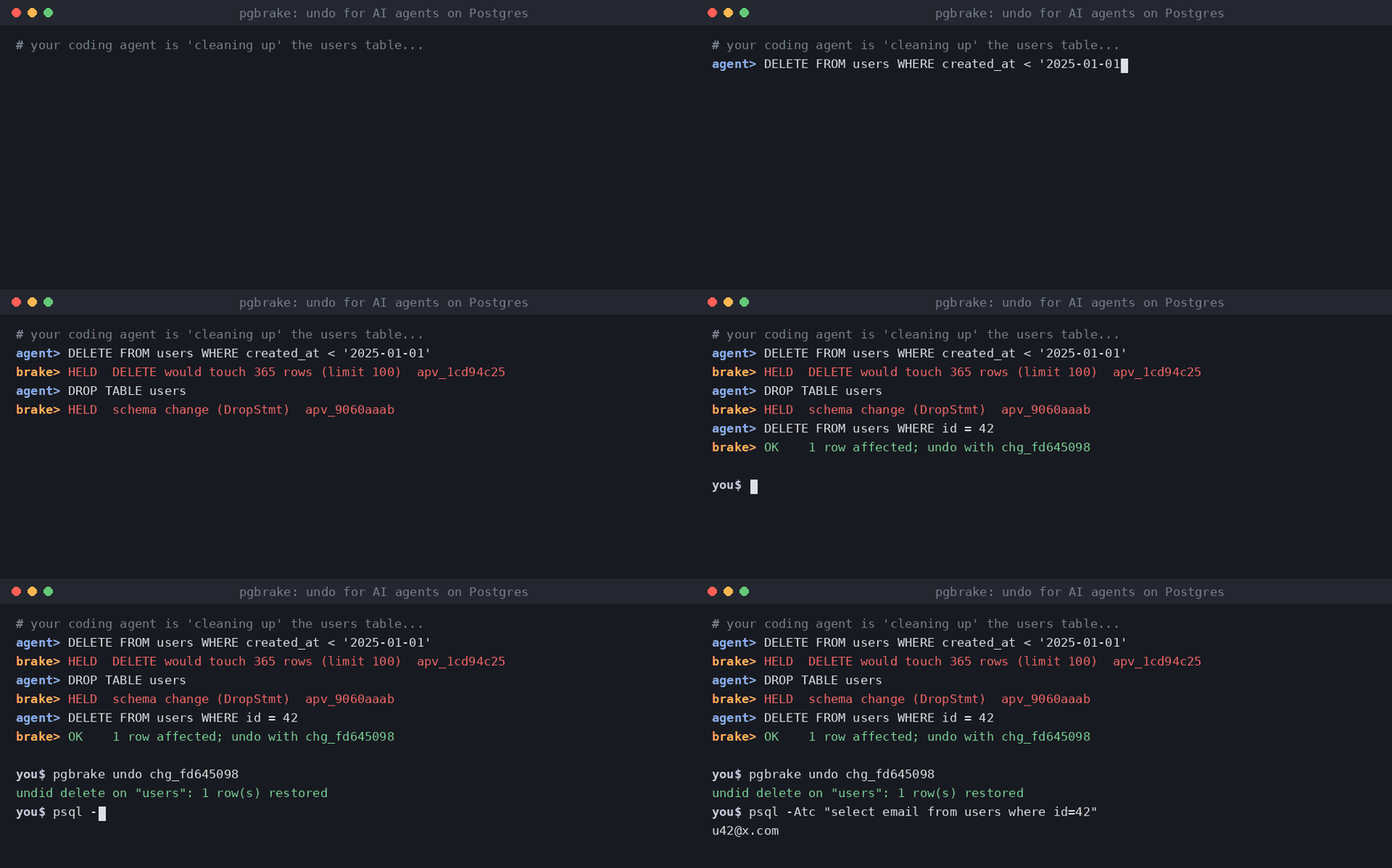
agent> DELETE FROM users WHERE created_at < '2025-01-01'
pgbrake> held: DELETE would touch 4,812 rows (limit 100) — approval apv_3f9c21aa

agent> DELETE FROM users WHERE id = 42
pgbrake> 1 row affected; undo with change id chg_8e01b7d2

you$ pgbrake undo chg_8e01b7d2
undid delete on "users": 1 row(s) restored
Why
Claude Code checkpoints rewind files, not databases. Client-side permission prompts and hooks can be skipped or misfire for MCP calls, and a tool's own "destructive" label is just a hint. pgbrake enforces its rules inside the server, so they hold no matter which agent or client calls it.
What it does (free, MIT)
- Real SQL parsing (the Postgres parser via pglast), not regex.
- Held for approval: DDL (
DROP,ALTER,TRUNCATE...),UPDATE/DELETEwithoutWHERE, any write over the row limit (default 100), upserts andMERGE. - Never allowed:
ALTER SYSTEM, role/database creation and drops,COPY ... PROGRAM,DOblocks. - One-command undo: before each
UPDATE/DELETE, the affected rows are saved locally; inserts are tracked by primary key. Undo refuses if the rows changed since, unless you--force. - Approval only by a human: in the client's own prompt (MCP elicitation) or
pgbrake approve <id>in an interactive terminal. Approvals are one-shot, expire in 15 minutes, and are bound to the exact SQL. - Audit log of every statement, decision and row count, in
~/.pgbrake/journal.db. - Multi-statement calls run in one transaction: all or nothing.
Install
pip install pgbrake # or: uvx pgbrake serve
Claude Code:
claude mcp add pgbrake --env PGBRAKE_DSN="postgresql://me@localhost/app" -- uvx pgbrake serve
Codex (~/.codex/config.toml):
[mcp_servers.pgbrake]
command = "uvx"
args = ["pgbrake", "serve"]
env = { PGBRAKE_DSN = "postgresql://me@localhost/app" }
Then remove any other database MCP / psql access from the agent, so pgbrake is the only way in.
In Claude Code, add "Bash(psql:*)" and "Bash(pgbrake approve:*)" to permissions.deny.
Commands
pgbrake pending            # SQL waiting for you
pgbrake approve <id>       # approve (interactive terminal only)
pgbrake deny <id>
pgbrake changes            # undoable changes
pgbrake undo <change-id>   # reverse one
pgbrake log                # audit log
Settings (env)
| Variable | Default | |
|---|---|---|
PGBRAKE_DSN |
— | connection string (falls back to DATABASE_URL) |
PGBRAKE_MAX_ROWS |
100 | writes touching more rows need approval |
PGBRAKE_ALLOW_DDL |
0 | set 1 to let schema changes through (still logged) |
PGBRAKE_READ_ONLY |
0 | set 1 to refuse every write |
PGBRAKE_STATEMENT_TIMEOUT_MS |
15000 | |
PGBRAKE_JOURNAL |
~/.pgbrake/journal.db |
Limits
- Undo covers rows changed through pgbrake. It is not a backup: keep real backups.
TRUNCATE, DDL, upserts andMERGEare held for approval but cannot be undone.- Updating a table with no primary key needs approval and cannot be undone.
- The free version keeps the last 20 undoable changes.
Pro
$29 one-time for the first 100 licenses (then $39). No subscription. 14-day refund. Buy pgbrake Pro
- Migration guard for agent terminal commands. A Claude Code
PreToolUsehook catchesprisma migrate reset --force,drizzle-kit push --force,alembic downgrade baseand friends, takes apg_dumpsnapshot first (whenPGBRAKE_DSNis set), checkspg_restorecan read it, then asks you. If the snapshot fails, the command is blocked instead (override withPGBRAKE_ALLOW_NO_SNAPSHOT=1). SetPGBRAKE_VERIFY_RESTORE=1to also restore the snapshot into a throwaway database and compare table counts before you're asked; if that restore fails, the command is blocked. The drill needs CREATEDB rights (orPGBRAKE_DRILL_DSNpointing at a server where it has them) and takes about as long as a restore. Install withpgbrake install-hook. - Unlimited undo history (free keeps the last 20).
- Audit export:
pgbrake log --export csv|json.
After paying you land on a page that shows your key. Activate it once:
pgbrake license <your-key> # or set PGBRAKE_LICENSE
Keys are verified offline; pgbrake never phones home.
pgbrake MCP questions
How do I add pgbrake MCP to Claude Code?
Run claude mcp add --env 'PGBRAKE_DSN=<YOUR_PGBRAKE_DSN>' pgbrake -- uvx pgbrake in your terminal. Add --scope user to make it available in every project.
How do I add pgbrake MCP to Cursor?
Open ~/.cursor/mcp.json and add the server under mcpServers, using the Cursor config shown in the install section above.
Does pgbrake send my data to a remote server?
No, the server is local and nothing leaves your machine.
What are the limits of the undo feature?
Undo is not a full backup and cannot undo TRUNCATE, DDL, upserts, or MERGE. Additionally, updating tables without a primary key cannot be undone.