
AgentCursor MCP server
Commit Nov 9, 2026Enables AI agents to control macOS applications and Chrome tabs using text-based accessibility trees and human-like cursor movements.
Also known as kumard3/agentcursor
- Stars
- 0
- Tools
- 27
- Downloads, 30 days
- —
- Latest version
- —
- Last commit
- Nov 9, 2026
- License
- MIT
What is AgentCursor MCP?
AgentCursor enables AI agents to control macOS applications and Chrome tabs using text-based accessibility trees and human-like cursor movements. It exposes 27 tools, such as read_page, find, click_text.
Summary generated from the project's README
About AgentCursor MCP server
Developers looking to automate macOS applications and web browsing can use AgentCursor to give AI agents direct control over their computer. Instead of relying on expensive and token-heavy screenshots, this tool reads the macOS accessibility tree to provide agents with compact text descriptions of windows and elements. This approach makes running local models on a laptop much more practical by significantly reducing the token cost of every visual update.
The system operates through two primary surfaces: a Chrome extension for managing browser tabs within a user's real profile and a Rust-based core for controlling any native macOS application. Users can connect various AI clients like Claude Desktop, Cursor, or VS Code by running a local setup command that registers the server. The tool uses a human-path engine to move the cursor along curved, realistic paths with natural jitter and velocity, helping to avoid detection while performing tasks like clicking, typing, and scrolling through accessibility actions.
What you can do with it
- 1Automate native macOS applicationsAn AI agent can open a local application like Notes to create and manage lists.
- 2Efficient web browsing via textA developer can instruct an agent to navigate Chrome tabs using compact text representations instead of heavy images.
- 3Perform human-like UI interactionsThe server can execute clicks and typing using realistic cursor movements to mimic a real person.
Written from the project's README. Every use case is checked against a quote from it.
AgentCursor MCP tools 27
Detected from the READMEread_pagefindclick_textmove_toclickhoverdragtypepress_keyscrollscreenshotnavigate
Show all 27 toolsShow fewer tools
get_urltabsevaluatewait_forstatusdesktop_appsdesktop_opendesktop_readdesktop_wait_fordesktop_clickdesktop_movedesktop_typedesktop_keydesktop_scrolldesktop_screenshot
Configuration
AGENTCURSOR_DRIVERAGENTCURSOR_HTTP_PORT
Automated checks
Ran Nov 14, 2026Full report →Not verified yet. A server needs a score of 80, no serious finding, and enough data for us to check. How checks work · What to fix for more points

- Source repository linked and reachablekumard3/agentcursor is public and reachablegithub.com/kumard3/agentcursor ↗Pass
- Package names this repository as its sourceNot checked
- Build provenance (Sigstore attestation)Not checked
- Open source license (OSI)MITspdx.org/licenses/MIT.html ↗Pass
- Commit or release in the last yearLast commit or release 2026-11-09github.com/kumard3/agentcursor ↗Pass
- OpenSSF ScorecardNot checked
- Package name not close to a popular packageNot checked
- No critical advisory in the package or its dependenciesNot checked
- No hidden instructions to the model27 tool descriptions and the README read; no override phrases, credential paths or hidden charactersPass
- Destructive tools are labelledNo tool named like delete, drop or execPass
- Remote endpoint answers the MCP handshakeNot checked
README
View on GitHubAgentCursor
Computer use that reads windows as text, not screenshots. Any Mac app or browser tab, over MCP.
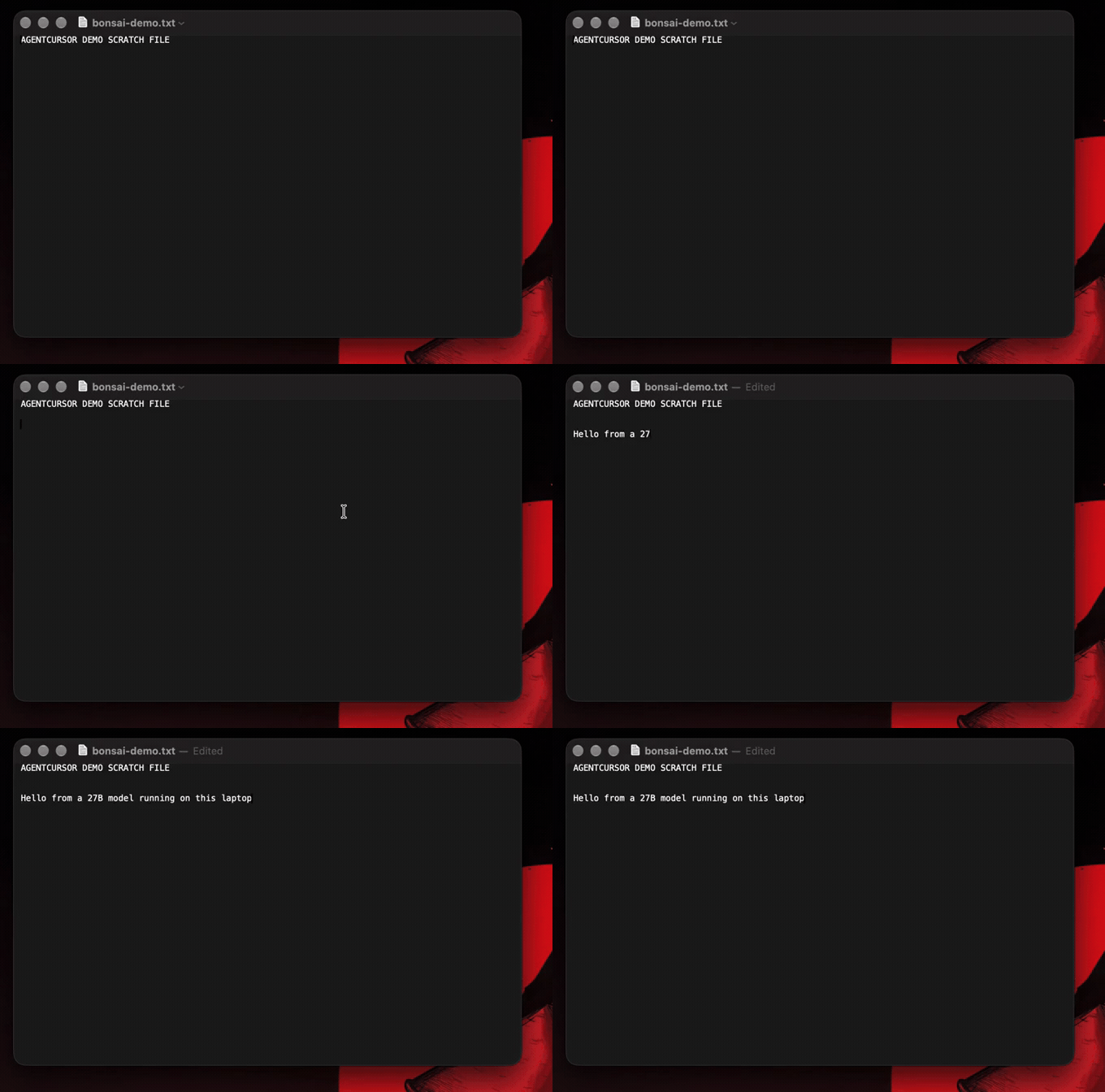
Above: a 27B model running entirely on the laptop drives TextEdit through AgentCursor. No network, no screenshots.
Screenshot-based computer use pays 600 to 1,200 tokens every time an agent looks at a window. AgentCursor reads the macOS accessibility tree instead and hands the agent compact text:
TextEdit window "notes.txt" @195,92 656x422
[d1] textarea value="AGENTCURSOR DEMO SCRATCH FILE" @523,316 focused
[d2] button "Delete" @845,386
A full window read costs 60 to 130 tokens. Clicking [d2] costs about 9. Then the real cursor moves along a curved path and clicks, so you can watch what the agent did.
That gap is what makes local models practical. In the run above, Bonsai 2 27B (ternary, 6.9 GB, on an M3 Pro) finished a read, click, type and verify loop in 6 turns and 180 seconds, with zero network calls. The same loop on screenshots would not fit the budget.
Two surfaces
| Browser extension | Computer use (Rust core) | |
|---|---|---|
| Drives | Chrome tabs, in your real logged-in profile | Any macOS app window |
| Code | src/ (Node MCP server) + extension/ |
rust/ (one binary, agentcursor) |
| Install | pnpm build, load extension/ in Chrome |
cd rust && cargo build --release |
| Background | tabs via tabs; stealth mode for trusted events |
accessibility actions; your front app and pointer stay put |
| Docs | docs/extension.md | docs/computer-use.md |
Web page task: use the extension. Native app task: use computer use. Coding agents: start with AGENTS.md.
All local. All free. MIT licensed. No cloud, no account. Computer use is macOS only (the Rust binary is arm64); the browser side runs wherever Chrome does. The Rust binary is not published anywhere yet: build it from source. There is no npm package named agentcursor.
The Claude Code plugin still runs the Node server. The Rust core is a separate binary you register yourself (agentcursor mcp); it is not wired under the Node desktop_* tools.
Quick start
Browser extension and Node server:
git clone https://github.com/kumard3/agentcursor.git
cd agentcursor && pnpm install && pnpm build
node dist/index.js setup
Computer use (Rust core):
cd agentcursor/rust && cargo build --release
./target/release/agentcursor tools
./target/release/agentcursor read Safari
For MCP, point your client at /abs/path/rust/target/release/agentcursor with args ["mcp"].
setup starts the local service, lists the AI apps it finds on your machine (Claude Code, Cursor, VS Code, Codex, Windsurf, Claude Desktop, Gemini CLI) and opens a setup page at http://127.0.0.1:8931. From there you connect each app with one click, grant the two macOS permissions, load the optional Chrome extension, and press Test the cursor. Prefer the terminal? node dist/index.js setup --all connects every detected app (or --client=cursor,codex).
Then ask your AI app something like: "Use agentcursor: open Notes, create a new note and write a 3 item shopping list."
How it fits together: every AI app launches agentcursor as an ordinary stdio MCP server. The first launch starts one shared background service (MCP over HTTP at 127.0.0.1:8931/mcp, the extension bridge on 8930) and every later launch reuses it, so several apps can use AgentCursor at once without fighting over a port. After a rebuild, the next launch replaces an older running service; an idle service exits after 10 minutes. The service only accepts requests from this machine and rejects other websites (Host and Origin checks).
Changelog (key updates)
-
0.5.0 (Rust core):
rust/addsagentcursor, a 609 KB arm64 binary with CLI and MCP (agentcursor mcp) for computer use. Tools: apps, open, read, wait_for, click, type, key, scroll, screenshot, permissions. Clicks and typing go through accessibility actions, so background apps work without moving your pointer or changing your front app (verified on Chrome, Safari, TextEdit). Measured 2026-09-30 against the Node tools on one Mac: read 278 to 71 ms, find 221 to 55 ms, apps 166 to 14 ms, and 9.9 MB peak per call vs 126 MB plus 218 MB. See docs/computer-use.md. -
Unreleased,
ac.record(): record a tab to mp4 from the SDK through a CDP screencast, encoded with ffmpeg at the real paint timing. -
Unreleased: E2E testing.
AgentCursor.launch()starts a private Chrome (throwaway profile, its own copy of the extension on a free port) with its own visible cursor, so tests never touch your mouse, your browser or the MCP server on 8930, and several can run side by side. Works headed orheadless: true. Computer use reaches the SDK too:Desktop.open("Notes")drives any Mac app with the real cursor and text-first reads. New agent CLI: every tool is a shell command (agentcursor read_page,agentcursor desktop_click --text Save) sharing one background service, so no tool schemas ever enter the model's context. Refs now stay with an element across reads, soread_page --changesanddesktop_read --changesreturn only what changed: a repeat read of an unchanged window costs ~8 estimated tokens instead of ~397. Page reads got ~43% smaller, and the stdio tool list dropped from about 3,178 to 2,735 estimated tokens. Newexpect()with auto-retrying matchers (toBeVisible,toBeHidden,toHaveText,toContainText,toHaveCount,toHaveURL,.not).navigatenow waits for the page to load, commands wait briefly for the content script after a navigation,isVisible()/count()answer immediately instead of waiting 5s, and headless screenshots no longer return the previous frame. -
0.4.0: Desktop control for any Mac app:
desktop_readreturns the window as compact text with[dN]refs from the macOS accessibility tree (a small Swift helper), thendesktop_click/desktop_type/desktop_key/desktop_scrolldrive the real cursor and keyboard with the same persona-based human motion.desktop_screenshotis a cropped, downscaled fallback. Chromium and Electron apps get their accessibility tree switched on automatically. New onboarding:agentcursor setupplus a local setup page that connects seven AI apps, checks permissions and tests the cursor. All AI apps now share one background service (stdio launches proxy to it), which removes theport 8930 already in usefailure. The extension WebSocket now rejects connections from web pages. -
0.3.0: Programmatic SDK —
import { AgentCursor } from "agentcursor"with a Playwright-shaped locator API (getByRole/getByText/getByLabel/getByPlaceholder/getByTestId/css + chaining +filter/nth+click/type/fill/hover/dragTo/press/scrollIntoView+boundingBox/isVisible/count/waitFor), every action driven by the human cursor.connect()andos()lifecycles. Library entry split from the MCP bin so importing the package no longer boots a server; built withtsup(ships.d.ts). Locator resolution uses@testing-library/domin the content script. -
0.2.9: Active-tab resolution no longer requires Chrome to be the OS-focused window — it falls back to the active tab in any window, then any open http(s) tab. Fixes
No active tab foundwhen an agent drives the browser while you're in your editor/terminal (the normal case). -
0.2.8: Interaction:
press_key— press Enter / Escape / Tab / arrows / Home / End / etc. on the focused element, content or stealth (trusted CDP key event). Rounds out the Comet-style action set: Navigation, Identification, Interaction. -
0.2.7: Identification tools —
find(locate elements by visible text / accessible name, shadow-DOM aware) andclick_text(find the best text match, then human-move + click, content or stealth, with a re-read retry). Target by what the element says, not by ref or pixel coords. -
0.2.6: Stealth typing inserts the whole string in one
Input.insertTextcall. Per-character insertion landed at a reset caret on controlled editors (X's Draft.js) and typed text backward. -
0.2.5: Content-script
dragreports the held button (buttonsmask) during the move, matching the stealth and OS drivers, so JS drag handlers see a real drag. Added a Known Limitations section. -
0.2.4:
read_pageresolves multi-IDaria-labelledbynames (it was passing the whole space-separated list togetElementByIdas one ID, so those labels came back empty); now shadow-DOM-tree-scope aware. -
0.2.3:
dragnow performs a real drag (press at the start, move with the button held, release at the end) in the stealth (chrome.debugger) and OS-cursor drivers — previously a move-then-click.pnpm smokeasserts thescreenshotimage content. -
0.2.2:
dragtool.screenshotnow returns a viewport-scaled image (1 image pixel = 1 click coordinate) for a vision loop — see the page, thenclick/move_tobyx/y. Stealth (chrome.debugger) moves also animate the visible overlay, so the cursor stays on screen. Ships as a Claude Code plugin. Internal snapshot refresh resolves refs past the 60th element.pnpm buildno longer mutates version files (usepnpm reloadfor the extension dev loop). -
0.2.0: Added
screenshot,hover,statusMCP tools. Deep shadow DOM traversal inread_page/ snapshot (critical for X.com, Reddit, modern SPAs). Library re-exports for programmatic use. Repositioned as general local automation/testing/workflow tool over MCP. Version bumps and packaging polish. -
0.1.0: Initial MCP server, human path engine, extension bridge, OS cursor driver, basic tools (read_page, click, type, etc.).
How it works
Three layers, with one shared wire contract (src/protocol):
coding agent ──MCP/stdio──▶ MCP server ──localhost WebSocket──▶ Chrome extension ──▶ your real tab
                            (src/server)                        (extension/)
                                 │
                                 ▼
                          human-path engine (src/path-engine)
            from + to → timed cursor samples with overshoot, log-normal
            velocity, jitter, off-center landing, dwell — fresh every call
The MCP server generates the cursor sample stream; the extension is a thin
replayer. The same stream works for the content-script driver, the
chrome.debugger stealth driver, and (phase 2) the OS cursor — they all
implement one BrowserDriver interface.
Why human-like movement is hard
Modern detectors (DataDome, Castle, reCAPTCHA v3, PerimeterX) flag overly smooth Bézier paths, constant velocity, dead-center clicks, zero dwell, teleporting jumps, and replayed identical paths. The engine addresses each:
- Fitts's law sets per-move duration from distance and target size.
- Asymmetric, eased velocity — not a symmetric min-jerk bell.
- Overshoot-and-correct on long moves.
- Sub-pixel Gaussian jitter, zero at the endpoints.
- Off-center landing inside the target.
- Right-skewed dwell before the press.
- Per-call entropy — paths are never cached or replayed.
Realism is necessary but not sufficient: content-script events are
isTrusted=false, and chrome.debugger still leaks CDP tells. The real evasion
endgame is the phase-2 OS cursor (genuine, trusted OS events).
Install
git clone https://github.com/kumard3/agentcursor.git
cd agentcursor
pnpm install
pnpm build      # builds dist/index.js + extension/dist/*
Install as a Claude Code plugin (one step)
AgentCursor ships as a Claude Code plugin that registers the MCP server for you:
claude plugin marketplace add kumard3/agentcursor
claude plugin install agentcursor
That registers the agentcursor MCP server automatically (no manual claude mcp add). You still load the extension once (step 1 below) if you want browser tabs. If you previously registered it by hand, remove that to avoid duplicate tools: claude mcp remove agentcursor.
1. Load the extension
- Open
chrome://extensions, enable Developer mode. - Load unpacked → select the
extension/folder. - Keep a normal
http(s)tab open and focused (notchrome://or the Web Store — content scripts can't run there).
2. Connect via MCP (agents, Cursor, Claude, custom tools, etc.)
The easy way is node dist/index.js setup (see Quick start). To do it by hand:
Claude Code:
claude mcp add --scope user agentcursor -- node /absolute/path/to/agentcursor/dist/index.js
Cursor, Windsurf, or any MCP-capable coding environment:
Add to your MCP servers config (exact format depends on the host):
{
  "mcpServers": {
    "agentcursor": {
      "command": "node",
      "args": ["/absolute/path/to/agentcursor/dist/index.js"]
    }
  }
}
Any other MCP client (including future Grok harnesses, custom agents, test runners that speak MCP) — just point it at the stdio server the same way.
HTTP-capable clients can skip the stdio launcher and point straight at http://127.0.0.1:8931/mcp while the service runs (node dist/index.js serve keeps it in the foreground).
The service exposes the WebSocket bridge on ws://127.0.0.1:8930 (override with AGENTCURSOR_WS_PORT; the HTTP port defaults to that plus one, or set AGENTCURSOR_HTTP_PORT). The extension auto-reconnects. AGENTCURSOR_TOOLS=desktop or =browser registers only one tool family, which keeps unused tool definitions out of your context.
3. Programmatic SDK (import { AgentCursor })
Drive the human cursor from your own Node/TS code with a Playwright-shaped locator API — no MCP client needed. Same engine, same stealth; every action moves a real cursor.
import { AgentCursor } from "agentcursor";

// Attach to a running Chrome that has the extension loaded.
// Pass { stealth: true } for trusted CDP events; use AgentCursor.os() for the nut-js OS cursor.
const ac = await AgentCursor.connect();

await ac.navigate("https://example.com");
await ac.getByRole("button", { name: "Buy now" }).click();
await ac.getByLabel("Email").fill("a@b.com");
await ac.getByText("Submit").click();
await ac.getByLabel("Email").press("Enter");

// chaining + filtering, just like Playwright
await ac.locator(".row").filter({ hasText: "Pro" }).nth(0).getByText("Edit").click();

if (await ac.getByTestId("checkout").isVisible()) {
  await ac.getByTestId("checkout").click();
}

await ac.screenshot({ path: "out.png" });
await ac.close();
Lifecycles
AgentCursor.launch({ headless?, userDataDir?, args?, executablePath?, seed?, stealth? }): start a browser with its own cursor.executablePathpicks the binary (Chrome for Testing, Brave, Edge, BrowserOS);userDataDirdrives a real, logged-in profile with no copy and leaves it intact;headlessruns it in the background. See Attach any browser and E2E tests.AgentCursor.connect({ port?, stealth?, timeoutMs? }): attach to a running Chrome with the extension loaded (works with your real, logged-in profile).AgentCursor.os({ stealth?, ... }): same locator API, but the real OS cursor is moved via nut-js (genuinely trusted events); page sensing still goes through the extension.
Run JS in the page: ac.evaluate(fn, ...args), Playwright-shaped, runs in the page realm via CDP (page cookies/session, awaits promises, ignores the page CSP):
const title = await ac.evaluate(() => document.title);
const res = await ac.evaluate(async (id) => {
  const r = await fetch(`/api/item/${id}`, { method: "POST", credentials: "include" });
  return { status: r.status, body: await r.text() };
}, 42);
Locators (lazy, chainable, Playwright-shaped)
- Find:
locator(css),getByRole(role, { name }),getByText,getByLabel,getByPlaceholder,getByTestId. - Refine:
.filter({ hasText }),.nth(i),.first(),.last(), and chaining (a.locator(b)). - Act:
.click(),.dblclick(),.hover(),.type(),.fill(),.press(key),.dragTo(other),.scrollIntoView(). - Query:
.boundingBox(),.textContent(),.isVisible(),.count(),.waitFor({ state }).
Each action resolves the locator in the page (role/label/etc. via @testing-library/dom, css/text via the DOM), then drives the human-path engine to the element. ac.actions exposes the lower-level ActionService (move by coords, find, clickText, scroll) as an escape hatch.
A full runnable example is in examples/sdk-quickstart.mjs; pnpm smoke:sdk runs the end-to-end pipeline against a simulated browser.
Note: in-page (
stealth: false) events areisTrusted=false. Usestealth: true(CDP) orAgentCursor.os()when you need trusted events.
4. CLI for coding agents (agentcursor <command>)
Every MCP tool is also a shell command. One background service holds the page, the [refs] and the frontmost app, so commands chain like a session, and an agent that uses the CLI loads no tool schemas at all.
agentcursor help                        # one line per command (agentcursor tools for full descriptions)

# browser
agentcursor navigate https://example.com
agentcursor read_page --includeText false
agentcursor click_text "Buy now"
agentcursor read_page --changes         # only what changed since your last read
agentcursor find Submit                 # a handful of tokens instead of a whole page
agentcursor screenshot                  # writes a file, prints the path

# any Mac app (computer use)
agentcursor desktop_open Notes
agentcursor desktop_read --max 40       # the window as text, not pixels
agentcursor desktop_click --text "New Note"
agentcursor desktop_type "hello" --submit
Positionals fill a command's parameters in the order agentcursor help lists them, and anything can be given as --flag value. Dashes work too (click-text). AGENTCURSOR_OUT sets where screenshots are written.
Reading only the changes. A [ref] stays with the same element for the life of the page (or until you switch apps), so a ref you learned earlier keeps working and reads can be compared. Pass --changes to read_page or desktop_read and you get the added and removed lines plus a count of the ones that merely moved:
- [e5] text "Email" <input> @293,300
+ [e5] text "Email" value="a@b.com" <input> @293,300
(5 moved, 2 unchanged, 10 total)
Measured on a Finder window: a repeat read costs 29 chars (~8 estimated tokens) against 1390 (~397) for the full read. The first read, or a diff that would be bigger than the full read, returns the full read instead.
5. Computer use from the SDK (Desktop)
import { Desktop } from "agentcursor";

const d = await Desktop.open("TextEdit");     // seed: 7 for reproducible motion
console.log(await d.read());                  // window as compact text with [dN] refs
await d.type("Dear team,", { clear: true });
await d.click("Save");                        // a [dN] ref or any visible label
await d.key("cmd+s");
if (await d.waitForText("Saved")) console.log("done");
find() returns only matching elements (tens of tokens), view() gives the structured elements, and screenshot({ path }) is the fallback when the text is not enough. macOS only, and it needs Accessibility permission for whichever app starts it.
Background runs, and a cursor per session. By default computer use moves the one real pointer, which takes your machine over. background: true posts input straight to the target process instead: your pointer never moves, the app is never raised, and every Desktop keeps a cursor of its own, so runs happen while you work and several can run at once.
const alice = await Desktop.open("Notes", { background: true, showCursor: { color: "#4ade80", label: "alice" } });
const bob = await Desktop.open("Reminders", { background: true, showCursor: { color: "#60a5fa", label: "bob" } });
await Promise.all([alice.type("from alice"), bob.type("from bob")]);
showCursor is off unless you ask for it: it draws a click-through cursor above every window, coloured and named, so a background run is watchable. For MCP and the CLI, set AGENTCURSOR_BACKGROUND=1 and AGENTCURSOR_SHOW_CURSOR=1.
Measured on a background TextEdit while the terminal stayed frontmost: the text landed, the frontmost app did not change, and the pointer sat at 471,628 before and after.
The limit worth knowing: this works for native (AppKit) apps. Chromium and Electron apps ignore process-posted events, measured on Chrome, which ignored them even while frontmost, so it covers Notes, Mail, Finder, TextEdit and friends but not Chrome, Arc, VS Code, Slack or Discord. For browsers use AgentCursor.launch({ headless: true }), which is fully background anyway and draws its cursor in the page.
Driving a browser with computer use instead of the DOM. A page can also be read and clicked as an app, with no extension and no DOM: the clicks are real OS clicks, so the page sees isTrusted=true. Chrome only builds its accessibility tree for a screen reader, so ask for it at launch:
const ac = await AgentCursor.launch({ accessibility: true });   // --force-renderer-accessibility
await ac.goto("http://localhost:3000");

const d = await Desktop.open();
console.log(await d.find("Menu"));     // [d23] button "Menu" @87,481
await d.click("Menu");                  // real cursor, trusted click
Without that option a desktop read of Chrome sees the toolbar and no page content (16 elements against 61 on the same window, measured). For your own Chrome, start it with --force-renderer-accessibility.
Which path to pick:
| Extension (DOM) | Computer use (accessibility tree) | |
|---|---|---|
| Events | synthetic, or trusted with stealth: true |
always real OS input |
| Reads | ~112 est tokens for a page | ~609 for the same window, browser chrome included |
| Runs headless / in parallel | yes | no: needs a visible, frontmost window and the real mouse |
| Works outside the browser | no | any Mac app, including Electron |
find costs about 8 tokens on either path, and --changes works for desktop reads too.
AgentCursor MCP questions
What tools does AgentCursor MCP provide?
It exposes 27 tools, including read_page, find, click_text, move_to, click.
How does AgentCursor differ from screenshot-based computer use?
Instead of using expensive screenshots, AgentCursor reads the macOS accessibility tree to provide compact text descriptions, significantly reducing token usage.
Can I use AgentCursor with my existing Chrome profile?
Yes, the browser extension drives Chrome tabs using your real logged-in profile.
Does AgentCursor move my actual mouse cursor?
The Rust core can drive the real OS cursor with human-like motion, but it can also perform actions via accessibility services so your pointer stays put.
Is AgentCursor cloud-based or local?
It is entirely local, free, and MIT licensed, with no cloud or account required.