
Manages pipeline-driven task workflows for AI coding agents with stage-gated dependencies, artifact versioning, and multi-agent collaboration.
Also known as keshrath/agent-tasks
- Stars
- 24
- Tools
- 8
- Downloads, 30 days
- —
- Latest version
- 3.0.0
- Last commit
- Nov 14, 2026
- License
- MIT
What is agent-tasks MCP?
agent-tasks manages pipeline-driven task workflows for AI coding agents with stage-gated dependencies, artifact versioning, and multi-agent collaboration. It exposes 8 tools, such as task_create, task_get, task_list.
Summary generated from the project's README
About agent-tasks MCP server
agent-tasks provides a structured pipeline for managing complex workflows when using multiple AI coding agents on a single codebase. Instead of a simple list, it organizes work into configurable stages such as backlog, spec, plan, implement, test, review, and done. This system is designed for developers using AI clients like Claude Code, Codex CLI, Gemini CLI, or Aider, allowing them to coordinate tasks through dependency tracking and stage gates.
The server operates via two transport layers: an MCP stdio connection for agent interaction and a loopback REST API for local communication. When used with Claude Code, it includes a dedicated /pipeline pane that provides a visual board for managing tasks directly within the CLI. The system manages task lifecycles through eight specific MCP tools, including task creation, stage advancement, and artifact management, while ensuring data integrity through a SQLite database.
What you can do with it
- 1Coordinate multi-agent workflowsManage a shared task pipeline to prevent multiple AI agents from working without visibility into each other's progress.
- 2Enforce quality through stage gatesRequire specific documents or comments before an agent can move a task from one stage to the next.
- 3Track technical decisions and insightsCapture and propagate important technical learnings and decisions across related tasks and parent hierarchies.
- 4Manage complex task dependenciesBuild a directed acyclic graph of tasks where progress is blocked until all prerequisite dependencies are resolved.
Written from the project's README. Every use case is checked against a quote from it.
How to install agent-tasks MCP
Formats verified 10 Nov 2026Add to CursorAdd to GooseInstall agent-tasks MCP in Claude Code
$ claude mcp add agent-tasks -- npx -y agent-tasksInstall agent-tasks MCP in Cursor
~/.cursor/mcp.json
{
  "mcpServers": {
    "agent-tasks": {
      "command": "npx",
      "args": [
        "-y",
        "agent-tasks"
      ]
    }
  }
}Install agent-tasks MCP in VS Code
.vscode/mcp.json
{
  "servers": {
    "agent-tasks": {
      "type": "stdio",
      "command": "npx",
      "args": [
        "-y",
        "agent-tasks"
      ]
    }
  }
}Install agent-tasks MCP in VS Code CLI
$ code --add-mcp '{"name":"agent-tasks","type":"stdio","command":"npx","args":["-y","agent-tasks"]}'Install agent-tasks MCP in Claude Desktop
claude_desktop_config.json
{
  "mcpServers": {
    "agent-tasks": {
      "command": "npx",
      "args": [
        "-y",
        "agent-tasks"
      ]
    }
  }
}Install agent-tasks MCP in Codex
$ codex mcp add agent-tasks -- npx -y agent-tasksInstall agent-tasks MCP in Codex config.toml
~/.codex/config.toml
[mcp_servers.agent-tasks]
command = "npx"
args = ["-y", "agent-tasks"]
Install agent-tasks MCP in Gemini CLI
$ gemini mcp add -s user agent-tasks npx -- -y agent-tasksInstall agent-tasks MCP in Gemini settings.json
~/.gemini/settings.json
{
  "mcpServers": {
    "agent-tasks": {
      "command": "npx",
      "args": [
        "-y",
        "agent-tasks"
      ]
    }
  }
}Started by HostedMCP on 16 Nov 2026
We ran this command for agent-tasks 3.0.0 in an isolated container with no network and no keys. It answered and listed 8 tools.
agent-tasks MCP tools 8
Read from the server with tools/listtask_createCreate a pipeline task. Tasks start in "backlog" and move through stages: backlog → spec → plan → implement → test → review → done. Use parent_id to create subtasks under an existing task.
task_getGet a single task by ID. By default returns task with artifacts, comment count, dependencies (blockers/blocking = `blocks` edges; links = `related`/`duplicate`, with direction), claim status and collaborators. Use "include" to inline full subtasks, artifacts (filterable by stage), comments (with limit), or transitive_deps (full upstream + downstream closure of the dependency graph in one call — answers questions like "what depends on this task transitively?" and "what is its critical path depth?" without forcing the caller to BFS the graph).
task_listList, search, or pick tasks. Without params: returns all tasks. With filters: narrow by status/stage/project/assignee. With "query": full-text search across titles and descriptions. With "next": true: returns the single highest-priority unassigned task with all dependencies met (uses affinity scoring when agent is provided).
task_updateUpdate task metadata — title, description, priority, tags, project, assignment, or dependencies. Does not change stage or status (use task_stage for that).
task_deleteDelete a task with its artifacts, comments, dependencies and finished subtasks (all levels). Refused while any subtask below it is still open: finish, cancel or delete those first. Cannot be undone.
task_stageMove a task through its lifecycle. Actions: "claim" → assign to you and advance from backlog to spec, "assign" → assign to you WITHOUT advancing the stage (use for custom pipelines where the first stage is itself a do-work stage), "advance" → next stage (or jump to a specific one), "regress" → earlier stage (requires reason; back in the first stage it is unclaimed again), "complete" → marks done with result, "fail" → marks failed with error, "cancel" → cancels with reason, "reopen" → a failed, completed or cancelled task open again and unclaimed at the stage it was closed in (optional reason), ready to claim.
task_artifactAttach artifacts or comments to a task. Types: "general" → document (spec, test-results, review-notes), "decision" → structured decision record (chose/over/because), "learning" → insight that auto-propagates to parent and sibling tasks on completion, "comment" → discussion comment (supports threading via parent_comment_id, satisfies stage-gate require_comment checks).
task_configConfiguration and admin. Actions: "session" → set agent identity (call this first), "pipeline" → get/set pipeline stages and gate config for a project, "cleanup" → purge old completed tasks, "rules" → generate IDE rule files (.mdc or CLAUDE.md).
Automated checks
Ran Nov 13, 2026Full report →Passed our automated checks. That is not a security audit: read the code and give the server the narrowest access it needs. How checks work

- Source repository linked and reachablePass
- Open source license (OSI)Pass
- Commit or release in the last yearPass
- Package name not close to a popular packagePass
- Remote endpoint uses HTTPSNot checked
- Destructive tools are labelledNot checked
- No hidden instructions to the modelPass
- No critical advisory in the package or its dependenciesPass
README
View on GitHubagent-tasks





Pipeline-driven task management for AI coding agents. An MCP server with stage-gated pipelines, multi-agent collaboration, and a native Claude Code /pipeline pane. Tasks flow through configurable stages — backlog, spec, plan, implement, test, review, done — with dependency tracking, stage gates, artifact versioning, and threaded comments.
Built for AI coding agents (Claude Code, Codex CLI, Gemini CLI, Aider) but works equally well with any MCP client or REST consumer.
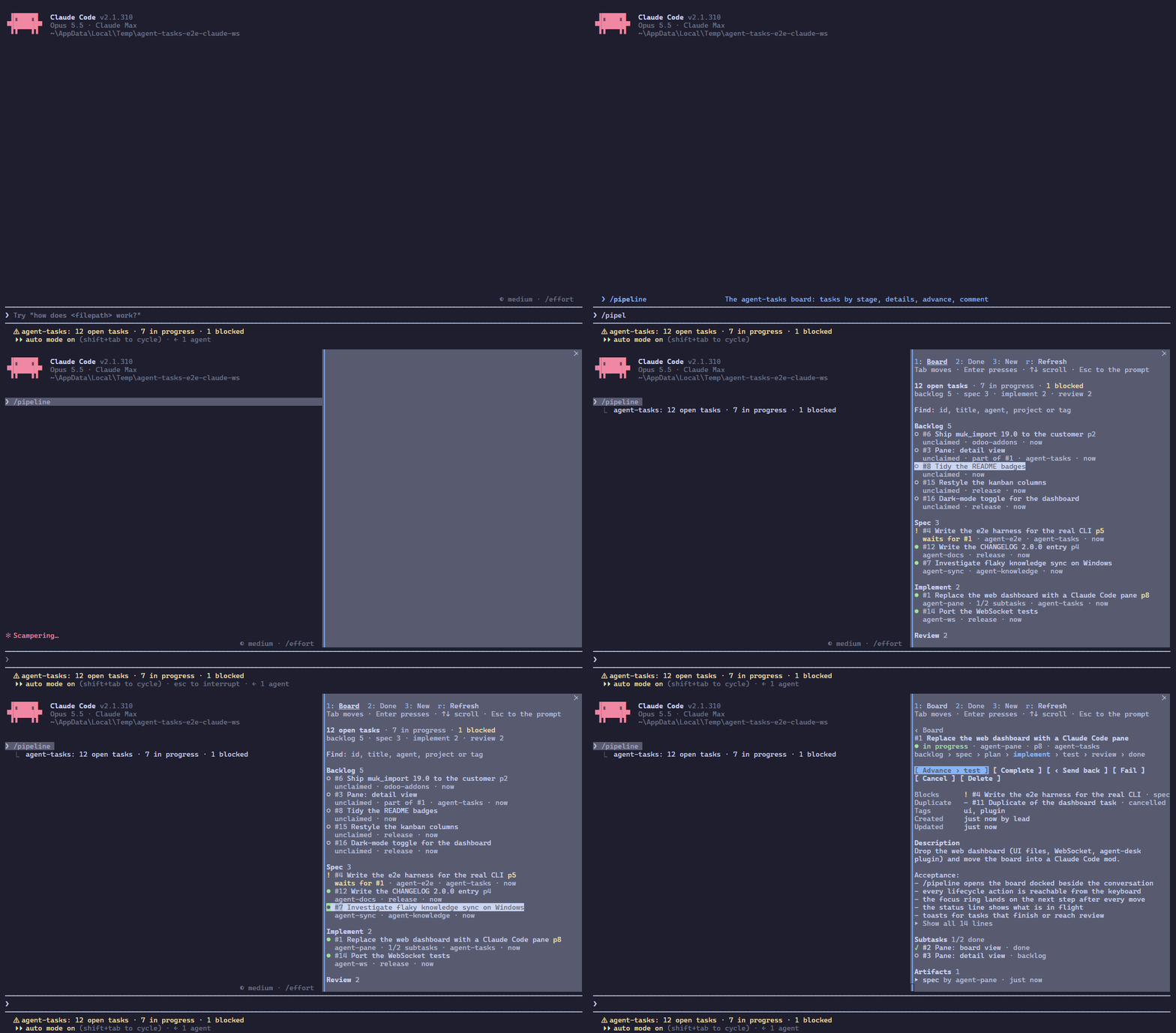
The user manual shows every view and action of the pane, with screenshots and short clips from the real CLI.
2.0 replaced the web dashboard with the /pipeline pane inside Claude Code; there is no browser UI, WebSocket or agent-desk plugin any more.
From 1.x
- The dashboard on http://localhost:3422 is gone: open the board with
/pipelinein Claude Code (install the plugin, below). The agent-desk Tasks tab is gone with it. - REST:
GET /api/overviewandPUT /api/tasks/:id/stageare gone (useGET /api/boardandPOST /api/tasks/:id/stagewith{"action": "advance"}), and so are the routes nothing called; see the REST API. - A 1.x process still holding port 3422 is named by the pane (
An older agent-tasks (1.10.13) holds the port) and in the status line (old server 1.10.13 on the port): end the Claude Code sessions still running it (or kill the oldagent-tasksprocess) so a 2.x process takes the port, then Refresh.
Why agent-tasks?
When you run multiple AI agents on the same codebase, they need a shared task pipeline — not just a flat todo list. They need stages, dependencies, stage gates, and visibility.
Features
- Pipeline stages — configurable per project:
backlog>spec>plan>implement>test>review>done - Task dependencies — DAG with automatic cycle detection; blocks advancement until resolved
- Multi-agent claiming — claim, assign, send back to an earlier stage with a reason
- Subtask hierarchies — parent/child task trees with progress tracking
- Threaded comments — async discussions between agents on any task
- Artifact versioning — per-stage document attachments with automatic versioning
- Full-text search — FTS5 search across task titles and descriptions
- Claude Code
/pipelinepane — the board beside the conversation, keyboard-first: tasks by stage, task detail with artifacts and comments, advance, send back, complete, fail, cancel, comment and delete, a status line entry - 2 transport layers — MCP (stdio) and a loopback REST API (HTTP) that the pane reads
- TodoWrite bridge — intercepts Claude Code's built-in TodoWrite and syncs to the pipeline
- Stage gates — configurable per-project gates with per-stage rules: require named artifacts, minimum artifact counts or a comment before advancing (the schema also has
require_approval, but no MCP tool or REST route records an approval, so a stage with it set cannot be left; keep it off) - Decisions log — structured decision artifacts (chose X over Y because Z) via
task_artifact(type: "decision") - Learnings propagation —
task_artifact(type: "learning")captures insights (technique, pitfall, decision, pattern); auto-propagated to parent and sibling tasks on completion - Agent affinity —
task_list(next: true)prefers routing tasks to agents with related history (parent, dependency, project) as a tie-breaker - Heartbeat-based cleanup — auto-fails tasks from dead agents using agent-comm heartbeat data
- Task cleanup hooks — auto-fails orphaned tasks on session stop and cleans up stale tasks on session start
- Agent bridge — notifies connected agents on task events (claim, advance, comment)
- Knowledge bridge — auto-pushes learning and decision artifacts to agent-knowledge on task completion, with embedding indexing and auto-linking
Quick Start
Install from npm
npm install -g agent-tasks
Or clone from source
git clone https://github.com/keshrath/agent-tasks.git
cd agent-tasks
npm install
npm run build
Option 1: MCP server (for AI agents)
Add to your MCP client config (Claude Code, Cline, etc.):
{
  "mcpServers": {
    "agent-tasks": {
      "command": "npx",
      "args": ["agent-tasks"]
    }
  }
}
The first MCP process to start also serves the REST API on http://localhost:3422; the others retry every 5 s and take over when it exits.
Option 2: Claude Code plugin (MCP server + /pipeline pane)
claude plugin marketplace add keshrath/agent-tasks
claude plugin install agent-tasks@agent-tasks
The plugin runs the MCP server and adds a Claude Code mod (function hooks, Claude Code 2.1.289+): /pipeline opens the board beside the conversation. The tutorial walks through it. Remove any hand-written agent-tasks entry from ~/.claude.json so tools do not appear twice.
Option 3: Standalone REST server
node dist/server.js --port 3422
Claude Code Integration
Once configured (see Quick Start above), Claude Code can use all 8 MCP tools directly — creating tasks, advancing stages, adding artifacts, commenting, and more. With the plugin installed, /pipeline opens the board in a pane beside the conversation (Claude Code 2.1.289+). See the Setup Guide for detailed integration steps.
MCP Tools (8)
| Category | Tools |
|---|---|
| Task CRUD (4) | task_create, task_get (include subtasks/artifacts/comments/transitive_deps), task_list (search, next), task_delete |
| Metadata (1) | task_update (title, description, priority, tags, project, assignment, dependencies) |
| Lifecycle (1) | task_stage (claim, assign, advance, regress, complete, fail, cancel) |
| Artifacts (1) | task_artifact (general, decision, learning, comment) |
| Config & utils (1) | task_config (pipeline, session, cleanup, rules) |
See full API reference for detailed descriptions of every tool and endpoint.
REST API (8 endpoints)
All endpoints return JSON. Loopback only: a foreign Host gets 403, so does any request carrying an Origin header (no browser calls this API), and request bodies must be application/json. Everything else goes through the MCP tools. See full API reference for details.
GET    /health                        Health check with version + uptime
GET    /api/tasks/:id                 One task, as task_get (?include=subtasks,comments,transitive_deps)
GET    /api/pipeline                  Pipeline stage configuration
GET    /api/board                     Open and recently closed tasks (what the pane polls)

POST   /api/tasks                     Create a task
POST   /api/tasks/:id/stage           Lifecycle action (claim, assign, advance, regress, complete, fail, cancel)
POST   /api/tasks/:id/comments        Add a comment
DELETE /api/tasks/:id                 Delete a task
Testing
npm test              # vitest: 472 tests across 25 files
npm run test:watch    # Watch mode
npm run test:coverage # Coverage report
npm run check         # Full CI: typecheck + lint + format + test
npm run plugin:check  # the /pipeline pane: claude plugin validate + its tests (needs the claude CLI)
npm run e2e:claude    # the pane in the real Claude Code CLI (see CONTRIBUTING.md)
Environment variables
| Variable | Default | Description |
|---|---|---|
AGENT_TASKS_DB |
~/.agent-tasks/agent-tasks.db |
SQLite database file path |
AGENT_TASKS_PORT |
3422 |
REST API port (the /pipeline pane reads it) |
AGENT_TASKS_HOST |
127.0.0.1 |
REST bind address (0.0.0.0 exposes it to the network) |
AGENT_TASKS_USER |
the OS user | Who the /pipeline pane acts as (created_by, comment author, by) |
AGENT_TASKS_INSTRUCTIONS |
enabled | Set to 0 to disable response-embedded instructions |
AGENT_TASKS_RETENTION_DAYS |
30 |
Days the cleanup keeps resolved approval records |
AGENT_TASKS_COMPLETED_RETENTION_DAYS |
7 |
Days a completed task is kept (and listed under the pane's Done) before purge |
AGENT_TASKS_FAILED_RETENTION_DAYS |
7 |
Days a failed task is kept before purge |
AGENT_TASKS_CANCELLED_RETENTION_DAYS |
1 |
Days a cancelled task is kept before purge |
AGENT_TASKS_ORPHAN_TIMEOUT_MINUTES |
360 |
Minutes before an in-progress task with no assignee is cancelled |
AGENT_TASKS_COMM_TIMEOUT_MS |
5000 |
Timeout of the cleanup's agent-comm requests |
AGENT_TASKS_DEAD_SESSION_GRACE_MINUTES |
60 |
task-cleanup-start.js: idle minutes before a dead session's task is failed |
AGENT_TASKS_HEARTBEAT_FRESH_MINUTES |
15 |
task-cleanup-start.js: an agent with a heartbeat this recent counts as alive |
AGENT_COMM_URL |
http://localhost:3421 |
Agent-comm REST URL for bridge notifications |
AGENT_KNOWLEDGE_URL |
http://localhost:3423 |
Agent-knowledge REST URL for knowledge bridge |
Dependencies
Required: Node.js >= 20.11, better-sqlite3 (bundled)
Optional (soft dependencies — fail-open, HTTP-only, no npm dep):
-
agent-comm — Heartbeat-based task cleanup and event notifications. agent-comm tracks heartbeats → agent-tasks checks heartbeats → auto-fails tasks from dead agents. Also sends direct messages on claim/advance and posts to a channel on comments. Without agent-comm, stale agent detection and notifications are skipped gracefully.
-
agent-knowledge — Knowledge persistence for task learnings and decisions. On task completion, the KnowledgeBridge pushes
learninganddecisionartifacts to agent-knowledge viaPOST /api/knowledge. Entries are auto-indexed with embeddings, auto-linked to similar entries, and git-synced. Without agent-knowledge, artifacts stay in agent-tasks only.
Documentation
- Tutorial — the
/pipelinepane step by step, recorded from the real CLI - User Manual — the
/pipelinepane view by view (screenshots and GIFs), every tool, the pipeline, gates, cleanup - API Reference — all 8 MCP tools and the REST endpoints
- Hooks — the Claude Code command hooks
scripts/setup.jsinstalls - Architecture — source structure, design principles, database schema
- Setup Guide — installation, client setup (Claude Code, OpenCode, Cursor, Windsurf), hooks
- Contributing — development, tests, the e2e run in the real CLI
- Changelog
License
MIT — see LICENSE
agent-tasks MCP questions
How do I add agent-tasks MCP to Claude Code?
Run claude mcp add agent-tasks -- npx -y agent-tasks in your terminal. Add --scope user to make it available in every project.
How do I add agent-tasks MCP to Cursor?
Open ~/.cursor/mcp.json and add the server under mcpServers, using the Cursor config shown in the install section above.
What tools does agent-tasks MCP provide?
It exposes 8 tools, including task_create, task_get, task_list, task_update, task_delete.
Does it have a user interface?
Version 2.0 removed the web dashboard in favor of a native /pipeline pane within Claude Code, meaning there is no longer a browser-based UI.
Can I use it with other AI agents besides Claude Code?
Yes, while built for agents like Claude Code, it is compatible with Codex CLI, Gemini CLI, Aider, or any MCP client or REST consumer.
How are task dependencies handled?
The system uses a Directed Acyclic Graph (DAG) with automatic cycle detection that prevents tasks from advancing until their dependencies are resolved.