
codex-progress-panel MCP server
Commit Oct 14, 2026Provides a local progress panel for OpenAI Codex to track task stages, parallel agents, and plan changes during engineering workflows.
Also known as Karikatun/codex-progress-panel
- Stars
- 1
- Tools
- —
- Downloads, 30 days
- —
- Latest version
- —
- Last commit
- Oct 14, 2026
- License
- MIT
What is codex-progress-panel MCP?
codex-progress-panel provides a local progress panel for OpenAI Codex to track task stages, parallel agents, and plan changes during engineering workflows.
Summary generated from the project's README
About codex-progress-panel MCP server
Monitoring engineering workflows through a visual interface is what this tool enables for developers using OpenAI Codex. It provides a local progress panel that tracks task stages, including pending, active, completed, and blocked work. Users can observe parallel agents via short summaries and watch how plans change when requirements are reconciled during a session.
Running locally on macOS or Linux, the server operates without telemetry, network listeners, or remote assets. It uses a Python-based stdio MCP server and stores execution state in a local SQLite database at ~/.codex-progress-panel/progress.sqlite3. This local persistence allows you to retain history across server restarts, with successful finalizations freezing a snapshot of the execution history.
To use the full integration, you install the plugin via the codex plugin marketplace. For a standalone setup, you can use npx with Node.js 22+ and Python 3.9+. The panel relies on an MCP Apps host for UI rendering and displays updates reported directly by the root agent.
What you can do with it
- 1Track multi-stage engineering tasksAsk the agent to display task stages in the progress panel to monitor pending and active work.
- 2Monitor parallel agent activityObserve the summaries of different agents working simultaneously under their specific task stages.
- 3Manage evolving project requirementsUpdate the remaining stages of a plan when new requirements are added to the task.
- 4Review historical execution snapshotsAccess frozen histories of completed tasks to see how previous executions progressed.
Written from the project's README. Every use case is checked against a quote from it.
README
View on GitHubcodex-progress-panel
A lightweight progress panel for OpenAI Codex. See what the agent is doing, what it has completed, what remains, and how parallel agents and task requirements change during the work.
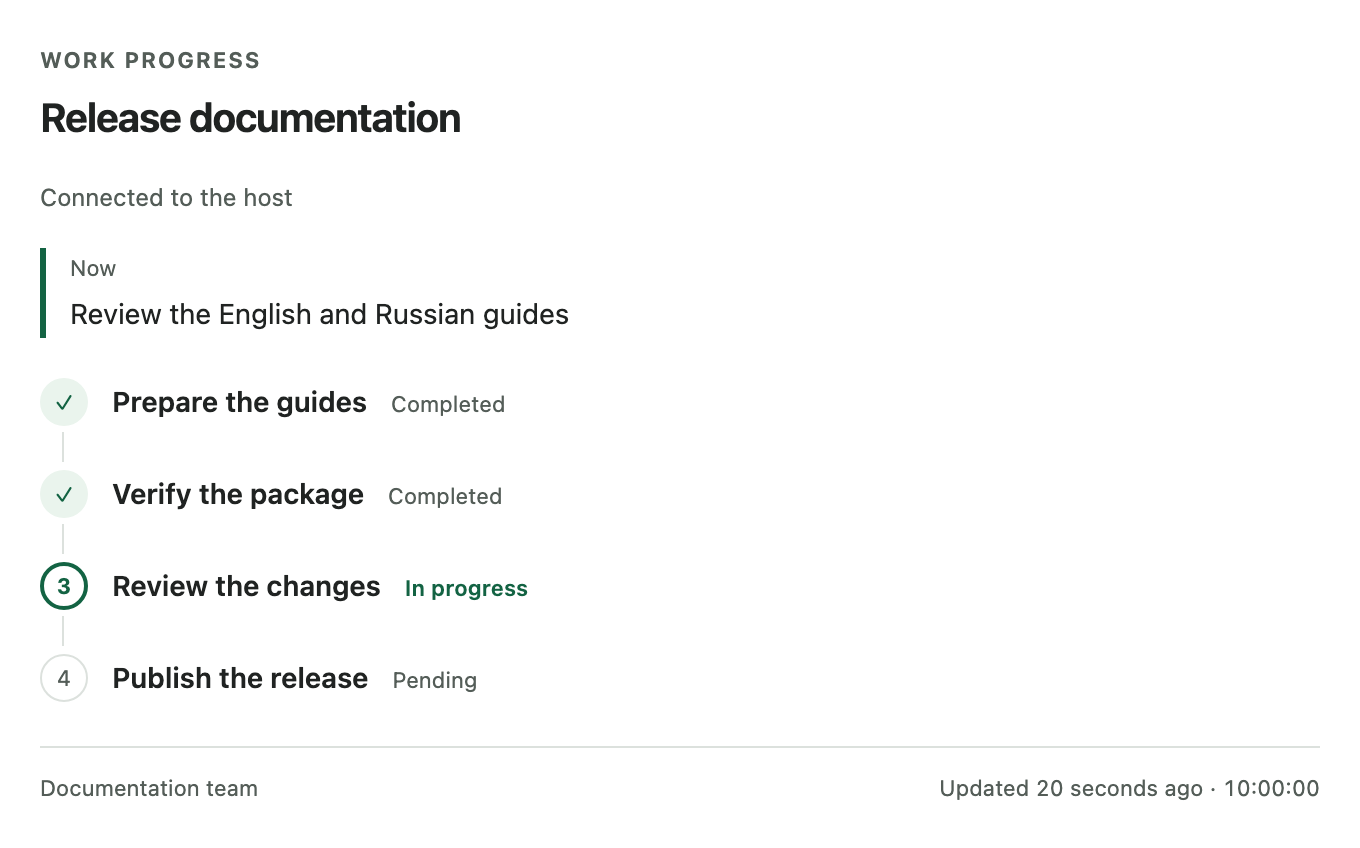
The current panel component with illustrative English task data. This preview does not prove native Codex rendering or placement.
Features
- Task stages: see pending, active, completed and blocked work.
- Parallel agents: see short agent summaries under their stage.
- Plan changes: keep the same panel when the agent reconciles changed requirements; retain confirmed progress and retired-stage history.
- Local persistence: keep execution state across server restarts.
- Final snapshots: successful finalization freezes each execution's history.
- Freshness: see the last confirmed update and a stale indication after two minutes without one.
- Local operation: no telemetry, network listener, remote assets or background daemon.
The panel displays progress reported by the agent. It does not independently verify that code is correct.
Install the complete plugin
Install the complete plugin, including its skill, MCP server and UI integration, directly from GitHub:
codex plugin marketplace add Karikatun/codex-progress-panel
codex plugin add codex-progress-panel@codex-progress-panel --json
Start a new chat, then ask: “Show the stages of this task in the progress panel and keep them updated as you work.”
The marketplace tracks main, which can change. Pin a reviewed Git ref with --ref if you need a fixed source revision. For example, codex plugin marketplace add Karikatun/codex-progress-panel --ref main selects the current branch.
The full plugin requires macOS or Linux, Python 3.9+ as python3 in PATH, and a Codex host that supports plugins, plugin-relative MCP cwd and MCP Apps UI.
The source manifests identify version 0.2.1. Check distribution status for public package availability.
Start using it
Ask Codex in the new chat:
Show the stages of this task in the progress panel and keep them updated as you work.
You can refine the active task, for example:
Add a check for the export format and update the remaining stages.
The root agent reconciles the plan and reports progress. The panel does not read the conversation automatically or orchestrate subagents.
Standalone MCP server alternative
Use npm/npx when you need the server separately. It requires Node.js 22+, npm/npx and Python 3.9+ on macOS or Linux.
npx -y codex-progress-panel@0.2.1 --help
Add this stdio entry through your host's supported MCP configuration:
{"mcpServers":{"progress":{"command":"npx","args":["-y","codex-progress-panel@0.2.1"]}}}
This starts the standalone MCP server. It does not install the progress-panel skill or activate the complete plugin. The server supplies an HTML resource, but UI rendering still requires an MCP Apps host. See standalone installation.
How it works
The complete plugin bundles a skill, a Python standard-library stdio MCP server and an MCP Apps panel. The root agent sends explicit progress summaries; SQLite stores each execution under its own identity and capabilities. The read-only panel displays those summaries and polls for confirmed updates. Successful finish_progress freezes the final snapshot; later executions get separate widgets.
Requirements and limitations
- Windows is unsupported; private storage relies on POSIX ownership and permissions.
- The host controls rendering, placement and accessibility. Native
0.2.1acceptance remains unverified here; protocol and mock UI tests are separate evidence. - Completed stages do not prove successful execution finalization. A Stop action or crash before successful finish can leave a snapshot unfinished.
- Stale means no recent confirmed update. It does not prove that the agent failed or stopped.
- State is private and local at
~/.codex-progress-panel/progress.sqlite3. Automatic cleanup is off by default; history is limited to 128 executions.
English UI labels are the default; Russian labels are configurable. Task summaries keep their supplied language. See configuration for language, storage and limits, and limitations for unsupported and deferred behavior.
Documentation
- Installation — complete plugin, standalone server, updates and removal.
- Architecture and security — MCP Apps lifecycle and trust boundaries.
- Protocol — tools, revisions, recovery, agents and plan changes.
- Configuration — UI language, storage, limits and server flags.
- Development — tests, measured overhead, packaging and native acceptance.
- Limitations — supported behavior and deferred proposals.
Technical references are in English. PRODUCT.md and DESIGN.md describe product and design constraints, including proposals that are not implemented.
License
MIT, copyright 2026 Karikatun.
codex-progress-panel MCP questions
How do I start using the progress panel in a chat?
Start a new chat and ask: “Show the stages of this task in the progress panel and keep them updated as you work.”
Does the panel verify if the code generated is correct?
No, the panel only displays progress reported by the agent and does not independently verify code correctness.
Where is the execution state stored?
The state is stored locally in a SQLite database at ~/.codex-progress-panel/progress.sqlite3.
Is Windows supported?
No, Windows is currently unsupported and the tool relies on POSIX ownership and permissions.