
Provides persistent memory for AI agents including conversation history, key-value context, semantic search, and FIFO queues.
Also known as jyswee/agenticmemory, agmry
- Stars
- 1
- Tools
- —
- Downloads, 30 days
- —
- Latest version
- 1.10.0
- Last commit
- Sep 23, 2026
- License
- —
What is agenticmemory MCP?
agenticmemory provides persistent memory for AI agents including conversation history, key-value context, semantic search, and FIFO queues.
Summary generated from the project's README
About agenticmemory MCP server
Agentic Memory provides a persistent memory layer for AI agents to store and recall information across different sessions and machines. It is designed for developers using tools like Claude Code, Cursor, Cline, and Windsurf. The system allows agents to manage their own state through various memory types, including short-term conversation history, durable key-value context for preferences, and long-term tagged knowledge entries. It also includes a scratchpad for ephemeral working memory and FIFO queues that act as an agent bus for passing tasks between different agents.
Users can interact with the service via a CLI, a REST API, or an MCP server. The MCP server can be run locally using the agmry mcp-serve command or connected to hosted clients through a remote SSE endpoint. For security, the service supports end-to-end encryption for zero-knowledge spaces where the server cannot read the data. Agents can even perform a self-signup via the CLI to receive an API key without manual browser intervention.
What you can do with it
- 1Maintain project context across sessionsAn agent can use the boot command to load all messages, context, and entries at the start of a new session.
- 2Store and retrieve durable factsDevelopers can save specific decisions or runbooks as typed key-value pairs to ensure they are never forgotten.
- 3Perform semantic searches on past dataWhen an agent only partially remembers a topic, it can use semantic search to find relevant historical entries.
- 4Coordinate tasks between multiple agentsOne agent can push a JSON task into a FIFO queue for another agent to pick up later.
Written from the project's README. Every use case is checked against a quote from it.
How to install agenticmemory MCP
Formats verified 10 Nov 2026Add to CursorAdd to GooseInstall agenticmemory MCP in Claude Code
$ claude mcp add --env 'AGMRY_API_KEY=<YOUR_AGMRY_API_KEY>' agenticmemory -- npx -y agmryInstall agenticmemory MCP in Cursor
~/.cursor/mcp.json
{
  "mcpServers": {
    "agenticmemory": {
      "command": "npx",
      "args": [
        "-y",
        "agmry"
      ],
      "env": {
        "AGMRY_API_KEY": "<YOUR_AGMRY_API_KEY>"
      }
    }
  }
}Install agenticmemory MCP in VS Code
.vscode/mcp.json
{
  "servers": {
    "agenticmemory": {
      "type": "stdio",
      "command": "npx",
      "args": [
        "-y",
        "agmry"
      ],
      "env": {
        "AGMRY_API_KEY": "<YOUR_AGMRY_API_KEY>"
      }
    }
  }
}Install agenticmemory MCP in VS Code CLI
$ code --add-mcp '{"name":"agenticmemory","type":"stdio","command":"npx","args":["-y","agmry"],"env":{"AGMRY_API_KEY":"<YOUR_AGMRY_API_KEY>"}}'Install agenticmemory MCP in Claude Desktop
claude_desktop_config.json
{
  "mcpServers": {
    "agenticmemory": {
      "command": "npx",
      "args": [
        "-y",
        "agmry"
      ],
      "env": {
        "AGMRY_API_KEY": "<YOUR_AGMRY_API_KEY>"
      }
    }
  }
}Install agenticmemory MCP in Codex
$ codex mcp add agenticmemory --env 'AGMRY_API_KEY=<YOUR_AGMRY_API_KEY>' -- npx -y agmryInstall agenticmemory MCP in Codex config.toml
~/.codex/config.toml
[mcp_servers.agenticmemory]
command = "npx"
args = ["-y", "agmry"]

[mcp_servers.agenticmemory.env]
AGMRY_API_KEY = "<YOUR_AGMRY_API_KEY>"
Install agenticmemory MCP in Gemini CLI
$ gemini mcp add -s user -e 'AGMRY_API_KEY=<YOUR_AGMRY_API_KEY>' agenticmemory npx -- -y agmryInstall agenticmemory MCP in Gemini settings.json
~/.gemini/settings.json
{
  "mcpServers": {
    "agenticmemory": {
      "command": "npx",
      "args": [
        "-y",
        "agmry"
      ],
      "env": {
        "AGMRY_API_KEY": "<YOUR_AGMRY_API_KEY>"
      }
    }
  }
}Configuration
AGMRY_API_KEYSecretAgentic Memory API key (amk_...). Optional for tool discovery; required to call a tool. Get one instantly with `agmry signup my-project` — no browser, no card, live for 48h; $0 card-auth starts the free 7-day trial.
| Name | Description | |
|---|---|---|
| AGMRY_API_KEY | Agentic Memory API key (amk_...). Optional for tool discovery; required to call a tool. Get one instantly with `agmry signup my-project` — no browser, no card, live for 48h; $0 card-auth starts the free 7-day trial. | Secret |
Automated checks
Ran Nov 14, 2026Full report →Passed our automated checks. That is not a security audit: read the code and give the server the narrowest access it needs. How checks work · What to fix for more points

- Source repository linked and reachablejyswee/agenticmemory is public and reachablegithub.com/jyswee/agenticmemory ↗Pass
- Package names this repository as its sourceagmry names jyswee/agenticmemory as sourcenpmjs.com/package/agmry ↗Pass
- Build provenance (Sigstore attestation)No build attestation published for this releaseNot checked
- Open source license (OSI)No licenseFinding
- Commit or release in the last yearLast commit or release 2026-09-23github.com/jyswee/agenticmemory ↗Pass
- OpenSSF ScorecardNot checked
- Package name not close to a popular packageNo popular package one edit away from agmryPass
- No critical advisory in the package or its dependencies1 resolved dependencies checked; no critical advisoryosv.dev ↗Pass
- No hidden instructions to the model0 tool descriptions and the README read; no override phrases, credential paths or hidden charactersPass
- Destructive tools are labelledNot checked
- Remote endpoint answers the MCP handshakeEndpoint did not answer initialize: HTTP 404Finding
README
View on GitHubagmry



Persistent memory for AI agents — conversation history, key-value context, and semantic search across sessions. As easy as git.
git remembers your code. agmry remembers everything else.
Your agent writes great code all day — then forgets every decision the moment its context window resets. So you become the memory layer: re-explaining the project, the preferences, what broke last time. Agentic Memory is the memory your agent runs itself: one install, and it stores, recalls, and searches its own state across sessions, machines, and even other agents. It can even sign itself up — one command returns a working API key, no browser, no human.
Works with: Claude Code · Cursor · Cline · Windsurf · Aider · Codex · any MCP client

Install to full recall in 60 seconds — real terminal session, no mockups. Watch all the demos.
Install
npm install -g agmry
Quick Start
# Agent signs itself up — working key returned instantly, no card, no browser
agmry signup my-project --local

# Store memory
agmry store my-project "User prefers TypeScript strict mode and pnpm"

# New session? Recall everything
agmry recall my-project

# Half-remember something? Search it
agmry search my-project "how do we deploy"

# Full reference
agmry --help
Agents sign themselves up
No browser. No OAuth. No waiting for a human.
$ agmry signup my-project
✓ Project "my-project" created
  API key: amk_************************  (saved to .agmry/config.json)
  Live:    full access for 48h — no card, $0 today
The key works immediately — every endpoint, every tool, full access for 48 hours. Within that window, your human completes a $0 card-auth that starts the free 7-day trial on the same key. Miss the window? Nothing is deleted — the key pauses and revives the moment the card-auth completes. Add --email you@company.com and the human gets the link automatically.
Three tiers of memory — because not all memory is equal
A transcript dump isn't memory. Agents need different recall for different things:
# Short-term: ordered, role-aware conversation history (sub-ms reads)
agmry store my-project "Deployed v2.1, rolled back — migration locked the users table" -r assistant
agmry recall my-project -n 50

# Durable facts: typed key-value context — decisions, preferences, runbooks
agmry ctx my-project set deploy_flow "push image to registry, then ask infra to roll"
agmry ctx my-project get deploy_flow

# Long-term: titled, tagged knowledge entries that survive months
agmry entry my-project "Auth decision" "JWT not sessions — mobile clients can't hold cookies" --tags "arch,decisions"
agmry entries my-project --tags "decisions"

# Work-in-progress: scratchpad that's allowed to expire
agmry scratch my-project set "midway through the billing refactor, invoice.js next"
And semantic search stitches it together when the agent only half-remembers:
agmry search my-project "did we ever discuss rate limiting"
# → surfaces a months-old entry, with similarity score
Session start = one command
Instead of pasting yesterday's summary into today's prompt:
agmry boot my-project --json          # messages + context + entries, one call
agmry boot my-project --semantic "billing refactor"   # or focused on a topic
~200 tokens of structured state, not top-k chunks of old transcripts.
MCP Server
Prefer tools over a CLI? agmry ships an MCP server. Point Claude Code (or any MCP client) at it and your agent gets 17 native tools: store, recall, search, bootstrap, context, entries, spaces, queues.
claude mcp add agenticmemory -- agmry mcp-serve
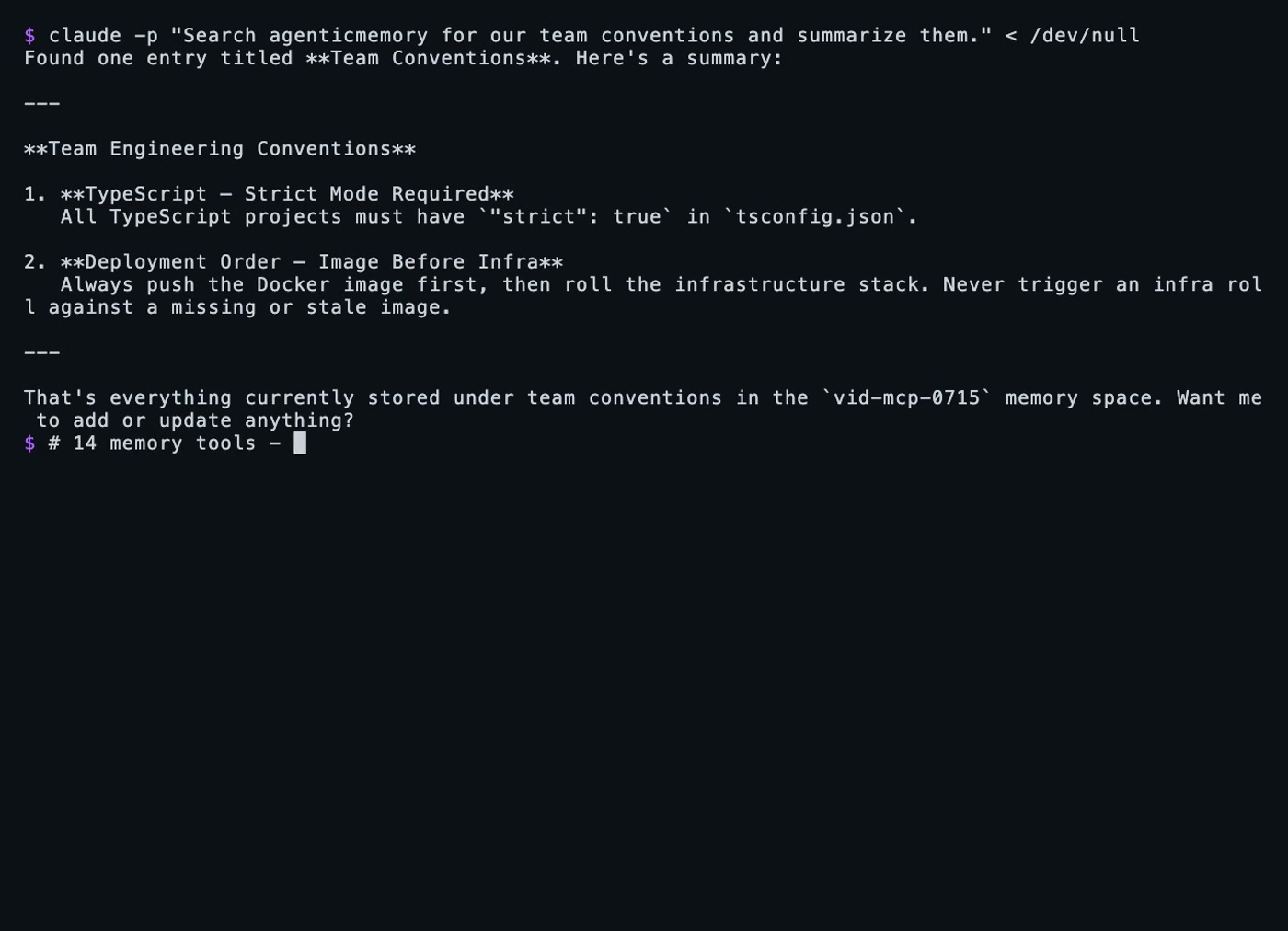
Claude Code remembering across sessions via MCP — click to watch.
For clients that use a JSON config (Cline, Cursor, Windsurf), pass your API key via the environment — the MCP server runs outside your project directory, so it won't pick up .agmry/config.json:
{
  "mcpServers": {
    "agenticmemory": {
      "command": "agmry",
      "args": ["mcp-serve"],
      "env": { "AGMRY_API_KEY": "amk_your_key_here" }
    }
  }
}
Remote MCP — zero install
Claude Web, Claude Desktop, Raycast, or any hosted MCP client can connect straight to the remote server. Same tools, same API key, nothing to install:
URL:  https://mcp.agenticmemory.ai/sse
Auth: Authorization: Bearer YOUR_API_KEY
End-to-end encryption (zero-knowledge spaces)
Create a space the server can never read. Encryption happens inside the CLI — the API only ever sees ciphertext.
agmry key generate                                  # one-time: creates + saves your key
agmry space create "Private" private --encryption e2e

agmry store SPACE "my secret"                       # encrypted before it leaves your machine
agmry recall SPACE                                  # transparently decrypted
agmry key verify SPACE                              # holding the right key?
Or derive per-space keys from a passphrase instead of storing a key:
agmry key set --passphrase "long secret phrase"
Notes:
- Semantic search is impossible on zero-knowledge spaces by design.
- Prefer encrypted at rest instead?
--encryption managed— the server encrypts your data at rest and every feature (search, summaries) keeps working. No client key needed. - Losing the key or passphrase means the data is unrecoverable. That's the point. Back it up:
agmry key show --reveal.
Key resolution order: --enc-key / --passphrase flag → AGMRY_ENCRYPTION_KEY env → ./.agmry/config.json → ~/.agmry/config.json. Same envelope and key derivation as the Node and Python SDKs — keys are interchangeable across all three.
Multi-agent: one brain, many agents
Spaces are shareable. One agent stores the deploy runbook; another recalls it a week later, from a different machine, over a different interface (CLI, MCP, or REST — same memory). Your agents hand off between sessions and between projects without you couriering context.
And you stay in the loop: everything your agents remember is browsable in a human dashboard.
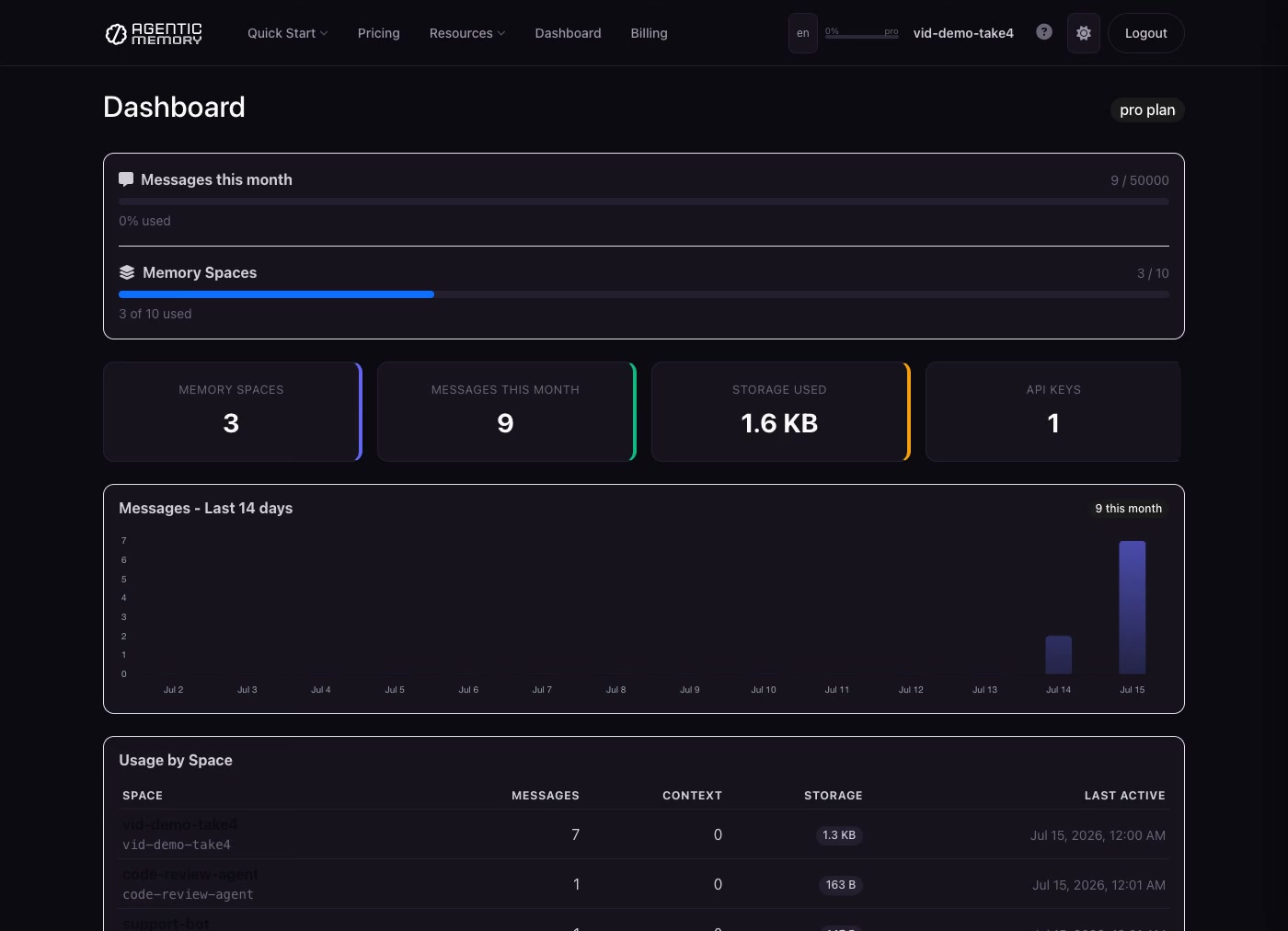
Everything your agents remember, in one dashboard — click to watch.
Queues — the agent bus
FIFO queues inside a space. One agent pushes work, another pops it — no polling glue, no extra infra.
agmry queue SPACE jobs push '{"task":"review PR #42"}'   # enqueue (FIFO)
agmry queue SPACE jobs pop                                # dequeue oldest — exit code 2 if empty
agmry queue SPACE jobs pop --wait 25                      # long-poll up to 25s for the next item
agmry queue SPACE jobs                                    # peek: length + head, without consuming
agmry queue SPACE jobs dlq push '{"task":"..."}' --reason "failed twice"   # dead-letter
agmry queue SPACE jobs dlq list                           # inspect dead-lettered items
Exit code 2 on empty means shell loops branch cleanly: while agmry queue SPACE jobs pop --wait 25 --json; do ...; done. Envelopes are opaque JSON — the server never inspects them.
Agent Integration
Add to your CLAUDE.md, .cursorrules, .clinerules, .windsurfrules, or AGENTS.md:
## Agentic Memory
This project uses Agentic Memory for persistent memory across sessions.
Use the `agmry` CLI. Key is in .agmry/config.json (auto-loaded).

agmry boot SPACE --json               # load everything at session start
agmry store SPACE "what happened"     # remember something
agmry ctx SPACE set key "value"       # store a durable decision/fact
agmry search SPACE "the deadline"     # find past context
agmry queue SPACE jobs push '{...}'   # send work to another agent
agmry queue SPACE jobs pop --wait 25  # receive work (exit 2 = empty)
Config Priority
--keyflagAGMRY_API_KEYenvironment variableAGENTICMEMORY_API_KEYenvironment variable./.agmry/config.json(project-local)~/.agmry/config.json(global)
Add .agmry/ to your .gitignore.
Features
- Conversation history — ordered, role-aware messages with recency windowing, sub-ms reads
- Key-value context — typed durable facts: decisions, preferences, runbooks
- Long-term entries — titled, tagged knowledge that survives months, with auto-summarisation
- Entities — people and systems the agent should know about
- Scratchpad — ephemeral working memory with TTLs (expiry is a feature)
- Semantic search — across everything the agent has ever stored
- Bootstrap — full session context in one call
- Agent self-signup — working API key from one CLI command, live for 48h keyless; $0 card-auth starts the free 7-day trial
- Queues — FIFO agent bus with long-poll and dead-letter,
agmry queue(exit 2 = empty) - MCP server — 46 tools, local (
agmry mcp-serve) or fully remote (mcp.agenticmemory.ai) - REST API — same memory on the request path of proxies and pipelines
- Multi-agent spaces — a fleet of agents reads and writes one memory
- End-to-end encryption — zero-knowledge spaces where only you hold the key (
agmry key generate) - Export — full data takeout per space, one command (
agmry space export)
Pricing: The agent's key works instantly — full access for 48h, no card. A $0 card-auth starts the free 7-day trial; after that from $24.99/mo. No data deletion, ever: your memory waits for you. Details.
Why not just Claude's built-in memory?
Claude Memory is great — but it only works with Claude, and only Claude decides what's in it.
| Agentic Memory | Claude Memory | |
|---|---|---|
| LLM support | Any — GPT, Claude, Gemini, Llama, Mistral, DeepSeek | Claude only |
| Switch LLMs | Keep all memory | Lose everything |
| Multi-agent | Shared spaces across agents | Single user |
| Programmatic control | Full CLI + MCP + REST | Black box — Claude decides |
| Structured data | Messages + context + entries + entities + scratchpad | Free-text notes |
| Semantic search | agmry search "the deadline" |
No search API |
| Data ownership | You own it, export any time | Stored by Anthropic |
Why this exists
I was my agents' memory. Every session started with me re-explaining my own project to my own tools — decisions, preferences, what broke last time. So I built the memory they run themselves. My own agents use it in production across a dozen projects; if something's rough or missing, open an issue — I read every one.
Documentation
- Quickstart guides — Claude Code, Cursor, LangChain, CrewAI, AutoGen + 7 more
- API docs
- Pricing
License
Proprietary — Tyga.Cloud Ltd. See LICENSE.
agenticmemory MCP questions
How do I add agenticmemory MCP to Claude Code?
Run claude mcp add --env 'AGMRY_API_KEY=<YOUR_AGMRY_API_KEY>' agenticmemory -- npx -y agmry in your terminal. Add --scope user to make it available in every project.
How do I add agenticmemory MCP to Cursor?
Open ~/.cursor/mcp.json and add the server under mcpServers, using the Cursor config shown in the install section above.
Can agents sign themselves up without human intervention?
Yes, agents can sign up via a single command which returns a working API key immediately without requiring a browser or human.
Does it support end-to-end encryption?
Yes, you can create zero-knowledge spaces where encryption happens inside the CLI and the server only sees ciphertext.
Can I use it with remote MCP clients?
Yes, hosted MCP clients like Claude Web or Claude Desktop can connect directly to the remote server using the provided URL and API key.