
Provides a single MCP endpoint to discover, manage, and execute commands across multiple machines and distributed skills.
Also known as jtsang4/lanesh
- Stars
- 1
- Tools
- 7
- Downloads, 30 days
- —
- Latest version
- —
- Last commit
- Nov 14, 2026
- License
- MIT
What is Lanesh MCP?
Lanesh provides a single MCP endpoint to discover, manage, and execute commands across multiple machines and distributed skills. It exposes 7 tools, such as list_machines, describe_machine, find_skills.
Summary generated from the project's README
About Lanesh MCP server
Managing distributed computing resources and specialized AI skills across multiple machines is what lanesh enables. It provides a single MCP endpoint that allows an AI agent to discover, manage, and execute commands across a group of machines known as a lane. This setup is ideal for developers who need an agent to access tools, credentials, and network environments spread across different hardware like laptops, development boxes, or GPU servers.
Users self-host a central server and run a daemon on each target machine. The daemon connects via WebSockets to the server, allowing it to work even behind NAT. To connect an agent, you simply provide the lane's MCP URL and an access key to clients like Claude Code, Cursor, or Codex. The system includes a web UI for managing machines, keys, and viewing audit logs. It features specific tools for running background jobs, transferring files between machines, and searching for skills using grep_skill or find_skills.
What you can do with it
- 1Execute commands on remote hardwareAn agent can run specific commands or long-running background jobs on a remote machine within its lane.
- 2Transfer files between different machinesA developer can instruct an agent to move directories or files from one machine to another in the lane.
- 3Discover available tools across a fleetAn agent can identify which machines are online and what specific skills are installed on them.
Written from the project's README. Every use case is checked against a quote from it.
How to install Lanesh MCP
Formats verified 10 Nov 2026Add to CursorAdd to GooseInstall Lanesh MCP in Claude Code
$ claude mcp add lanesh -- npx -y laneshInstall Lanesh MCP in Cursor
~/.cursor/mcp.json
{
  "mcpServers": {
    "lanesh": {
      "command": "npx",
      "args": [
        "-y",
        "lanesh"
      ]
    }
  }
}Install Lanesh MCP in VS Code
.vscode/mcp.json
{
  "servers": {
    "lanesh": {
      "type": "stdio",
      "command": "npx",
      "args": [
        "-y",
        "lanesh"
      ]
    }
  }
}Install Lanesh MCP in VS Code CLI
$ code --add-mcp '{"name":"lanesh","type":"stdio","command":"npx","args":["-y","lanesh"]}'Install Lanesh MCP in Claude Desktop
claude_desktop_config.json
{
  "mcpServers": {
    "lanesh": {
      "command": "npx",
      "args": [
        "-y",
        "lanesh"
      ]
    }
  }
}Install Lanesh MCP in Codex
$ codex mcp add lanesh -- npx -y laneshInstall Lanesh MCP in Codex config.toml
~/.codex/config.toml
[mcp_servers.lanesh]
command = "npx"
args = ["-y", "lanesh"]
Install Lanesh MCP in Gemini CLI
$ gemini mcp add -s user lanesh npx -- -y laneshInstall Lanesh MCP in Gemini settings.json
~/.gemini/settings.json
{
  "mcpServers": {
    "lanesh": {
      "command": "npx",
      "args": [
        "-y",
        "lanesh"
      ]
    }
  }
}Lanesh MCP tools 7
Detected from the READMElist_machinesdescribe_machinefind_skillsread_skillgrep_skillexectransfer
Automated checks
Ran Nov 14, 2026Full report →Passed our automated checks. That is not a security audit: read the code and give the server the narrowest access it needs. How checks work

- Source repository linked and reachablejtsang4/lanesh is public and reachablegithub.com/jtsang4/lanesh ↗Pass
- Package names this repository as its sourcelanesh names jtsang4/lanesh as sourcenpmjs.com/package/lanesh ↗Pass
- Build provenance (Sigstore attestation)Sigstore attestation for laneshnpmjs.com/package/lanesh/v/0.2.2#provenance ↗Pass
- Open source license (OSI)MITspdx.org/licenses/MIT.html ↗Pass
- Commit or release in the last yearLast commit or release 2026-11-11github.com/jtsang4/lanesh ↗Pass
- OpenSSF ScorecardNot checked
- Package name not close to a popular packageNo popular package one edit away from laneshPass
- No critical advisory in the package or its dependenciesNot checked
- No hidden instructions to the model7 tool descriptions and the README read; no override phrases, credential paths or hidden charactersPass
- Destructive tools are labelledNot checked
- Remote endpoint answers the MCP handshakeNot checked
README
View on GitHubLanesh
Share skills and shells across your machines through one MCP endpoint.


An AI agent can only use the machine it runs on. Your skills are spread across a laptop, a dev box and a GPU server, each with its own tools, credentials and network access. Copying skills around drifts out of sync, and SSH gives an agent a shell but tells it nothing about what each machine can do.
Lanesh gives an agent one MCP endpoint that reaches all of your machines. Through it, the agent can:
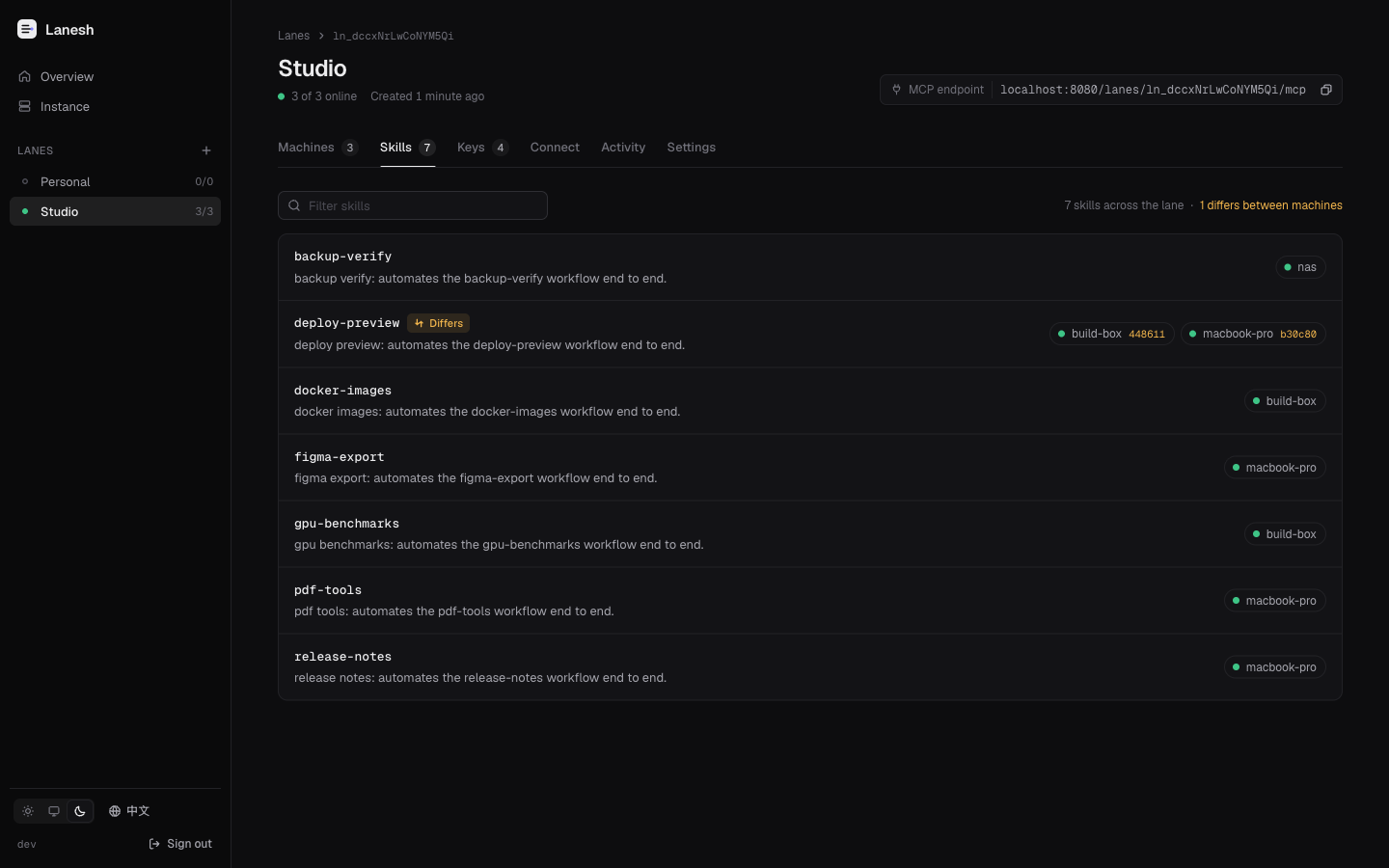
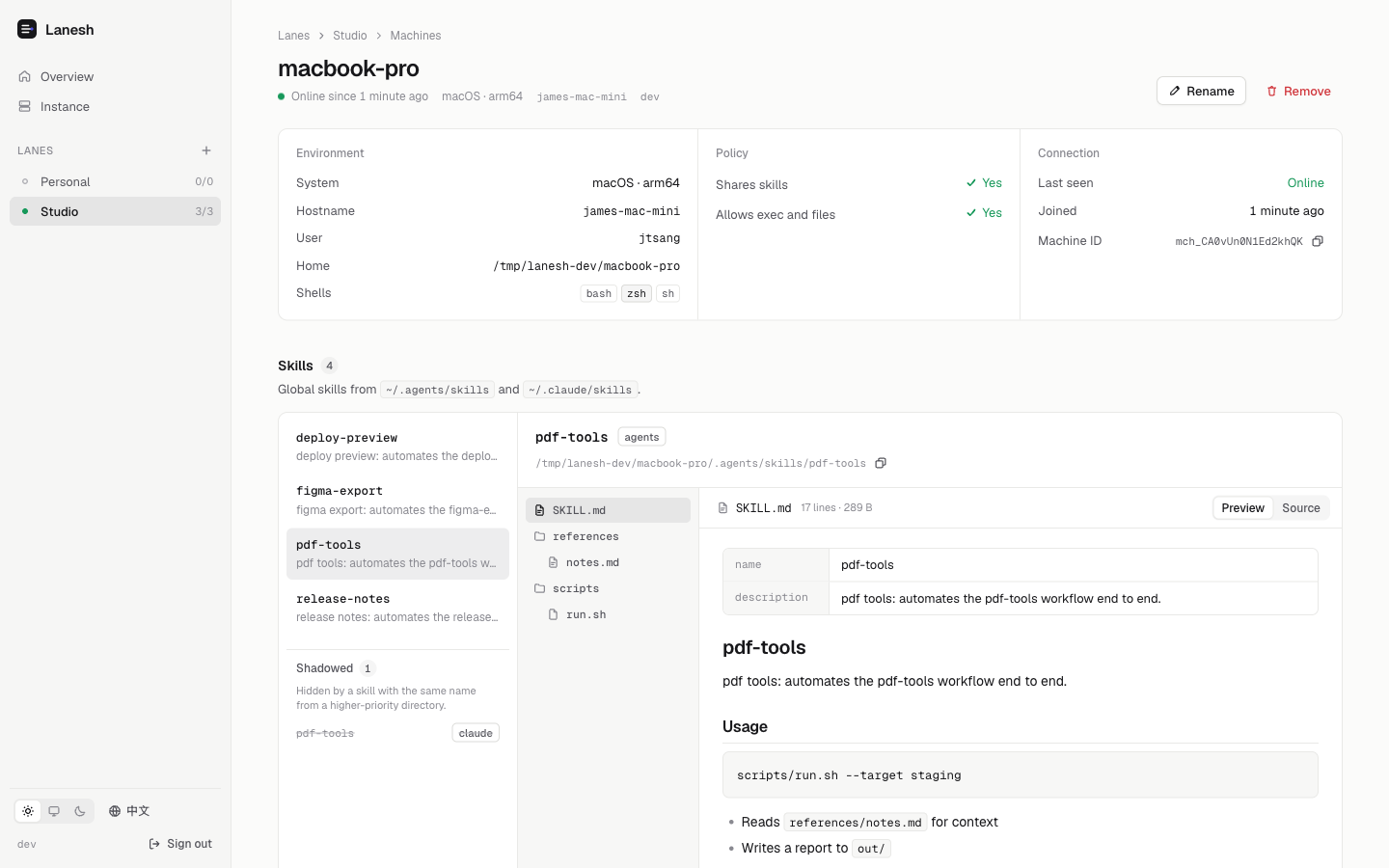
- Discover which machines are online and which global skills each one has installed
- Read a skill's
SKILL.md, scripts and references on demand - Run commands on a specific machine, including long-running background jobs
- Move files and directories between machines
A web UI shows every lane, machine and skill, manages keys, and keeps an audit log of everything agents do.
How it works
Agent ──HTTP (MCP)──▶ Lanesh server ◀──WebSocket── machine A (lanesh daemon)
                      (self-hosted)  ◀──WebSocket── machine B (lanesh daemon)
- You self-host a server and create lanes. A lane is a group of machines that trust each other.
- Each machine runs the lanesh daemon as a background service and joins one or more lanes. The daemon dials out to the server, so machines behind NAT work too.
- An agent adds the lane's MCP URL and an access key to its MCP configuration. It does not need to install anything.
The daemon shares the global skills in ~/.agents/skills and ~/.claude/skills. When both contain a skill with the same name, the one in ~/.agents/skills wins.
Quick start
1. Deploy the server
With Docker Compose (or Coolify, using the same image and a persistent volume for /data):
services:
  lanesh:
    image: ghcr.io/jtsang4/lanesh:latest
    restart: unless-stopped
    environment:
      LANESH_PUBLIC_URL: https://lanesh.example.com
    volumes:
      - lanesh-data:/data
    ports:
      - "8080:8080"
volumes:
  lanesh-data:
Put it behind a reverse proxy that terminates TLS and allows WebSocket upgrades. On first start the server prints a generated admin token to its log; it is shown only once. You can set LANESH_ADMIN_TOKEN instead.
Prefer a single binary? Download it from Releases and run lanesh server --public-url https://lanesh.example.com.
2. Create a lane
Open the server in a browser, sign in with the admin token, create a lane, then create a join key (for machines) and an access key (for agents). The web UI shows ready-to-paste commands for the next two steps.
From a terminal instead:
lanesh admin login https://lanesh.example.com
lanesh lane create work
lanesh key create work --kind join --name machines
lanesh key create work --kind access --name claude-code
3. Join your machines
On each machine:
# macOS / Linux
curl -fsSL https://lanesh.example.com/install.sh | sh -s -- join https://lanesh.example.com/lanes/<lane-id> --key <join-key>
# Windows (PowerShell)
& ([scriptblock]::Create((irm https://lanesh.example.com/install.ps1))) join https://lanesh.example.com/lanes/<lane-id> --key <join-key>
Or with Node.js: npx lanesh join https://lanesh.example.com/lanes/<lane-id> --key <join-key>.
lanesh join installs the binary to ~/.lanesh/bin, registers the machine and starts a per-user background service: a launchd agent on macOS, a systemd user unit on Linux, or a scheduled task on Windows. The daemon keeps itself on the same version as the server. Add --no-exec to share skills without allowing commands or file access.
4. Connect an agent
Claude Code:
claude mcp add --scope user --transport http lanesh https://lanesh.example.com/lanes/<lane-id>/mcp \
  --header "Authorization: Bearer <access-key>"
--scope user makes Lanesh available in every project.
Codex: add this to the global ~/.codex/config.toml:
[mcp_servers.lanesh]
url = "https://lanesh.example.com/lanes/<lane-id>/mcp"
default_tools_approval_mode = "approve"

[mcp_servers.lanesh.http_headers]
Authorization = "Bearer <access-key>"
default_tools_approval_mode = "approve" lets Codex use Lanesh, including running commands, without asking each time; remove it to approve each call. Without it, codex exec rejects Lanesh commands, because nobody is there to approve them.
Cursor: add it to the global ~/.cursor/mcp.json. The web UI shows each of these with your lane's URL filled in.
Any MCP client that supports Streamable HTTP works. Pass the access key as Authorization: Bearer <access-key>, or as ?key=<access-key> if the client cannot set headers. If the agent's own machine is in the lane, add ?machine=<name> so that Lanesh can tell the agent which machine is its own.
MCP tools
| Tool | Purpose |
|---|---|
list_machines |
Machines in the lane, their status, platform, permissions and skill counts |
describe_machine |
A machine's environment, permissions and installed skills, plus a briefing token |
find_skills |
Optional quick keyword search over skill names and descriptions on every machine |
read_skill |
SKILL.md with the skill's file tree, a directory listing, or one or more files |
grep_skill |
Search a skill's text files on its machine |
exec |
Run a command; long commands continue as background jobs |
job_read / job_write / job_kill / job_list |
Follow, feed and stop background jobs |
read_file / write_file |
Small inline file operations |
transfer |
Stream a file or directory from one machine to another |
get_project / update_project |
Read or change a project: where some work lives and what an agent should know about it |
A project says where some work lives (a machine and a path, or several) and what an agent should know about it: free Markdown for what it is, its rules and where it stands. Locations are a guide, not a limit. Reading a project checks each location on its machine (does the path exist, which Git branch, is it a worktree, does it have AGENTS.md or CLAUDE.md), so nothing that a machine can report goes stale. Manage projects in the web UI, or tell an agent to.
Results are compact plain text kept within a token budget. Whatever Lanesh leaves out (long output, large skill trees, the rest of a file) is stated in place with how to get it, and every result ends with [lanesh] end of result, so an agent can tell when its client cut a result short.
Every tool that touches a machine requires that machine's briefing token, a short value such as build-box:k3f9q2ab returned by describe_machine. It makes the agent look at a machine's environment and skills before acting on it. When a call has no valid token (the agent forgot it, or the machine's skills changed), nothing runs and the reply is the machine's current briefing with its token, so the agent catches up and retries in one step. If the skills changed, the briefing starts with what changed since that agent's own last briefing (new, updated and removed skills), so a long-running session knows which skills to re-read while a new session simply sees the current state.
Managing a machine
| Command | Description |
|---|---|
lanesh status |
Service state and the connection of each lane |
lanesh logs [-f] |
Daemon log |
lanesh doctor |
Diagnose the installation, service, connectivity and environment |
lanesh start / stop / restart |
Control the background service |
lanesh config set policy.allow_exec false |
Change what this machine allows (lanesh config --help lists all keys) |
lanesh update |
Update now (the daemon also follows the server's version automatically) |
lanesh leave <lane> |
Leave a lane; the service is removed when no lanes remain |
Commands run as your user, in your login shell's environment, so tools installed through nvm, Homebrew, pipx and similar are on the PATH.
Server configuration
| Variable | Default | Description |
|---|---|---|
LANESH_PUBLIC_URL |
(request host) | Public URL of the server, used in install snippets |
LANESH_ADMIN_TOKEN |
generated | Admin token for the web UI and API |
LANESH_DATA_DIR |
/data in the image, ./data otherwise |
SQLite database location |
LANESH_LISTEN |
:8080 |
Listen address |
LANESH_TRANSFER_MAX_BYTES |
unlimited | Maximum size of one transfer |
LANESH_TRANSFER_PART_BYTES |
16 MiB | Largest upload request of a transfer; keep it below the request size limit of any proxy in front of the server (Cloudflare Free/Pro: 100 MB) |
LANESH_TRANSFER_GZIP |
true |
Compress transfers between daemons that support it |
LANESH_AUDIT_RETENTION_DAYS |
90 |
How long audit records are kept |
LANESH_LOG_LEVEL |
info |
debug, info, warn or error |
Security
- An access key grants control over every machine in its lane that allows execution. Treat it like an SSH key, give each agent its own, and revoke keys you no longer use.
- A lane is a trust boundary. Skills from one machine become instructions for agents, so only put machines that fully trust each other in the same lane.
- The server relays commands, output and files in plaintext and must be self-hosted behind TLS.
- Each machine decides locally what it allows (
policy.expose_skills,policy.allow_exec); the server cannot override it. - Every command, file operation and transfer is recorded in the server's audit log and in
~/.lanesh/logs/audit.logon the machine.
See SECURITY.md to report a vulnerability.
Documentation
Development
Requirements: Go (the version in go.mod is fetched automatically), Node.js 24+ and pnpm (the version pinned in web/package.json).
make web          # build the UI (embedded into the binary)
make build        # build ./bin/lanesh
make test         # Go, web and npm launcher tests
make lint
scripts/dev.sh    # local server with demo machines at http://localhost:8080 (admin token lsa_dev_token)
make dev-web      # UI dev server with API proxy
See CONTRIBUTING.md for details.
License
Lanesh MCP questions
How do I add Lanesh MCP to Claude Code?
Run claude mcp add lanesh -- npx -y lanesh in your terminal. Add --scope user to make it available in every project.
How do I add Lanesh MCP to Cursor?
Open ~/.cursor/mcp.json and add the server under mcpServers, using the Cursor config shown in the install section above.
What tools does Lanesh MCP provide?
It exposes 7 tools, including list_machines, describe_machine, find_skills, read_skill, grep_skill.
How do machines connect to the Lanesh server?
Each machine runs a Lanesh daemon as a background service that dials out to the server via WebSockets, allowing machines behind NAT to connect.
Can I use Lanesh to run long-running tasks?
Yes, the server supports running commands on specific machines, including long-running background jobs that can be followed or stopped.
How is security handled for agent access?
Agents use an access key provided via the MCP configuration, which should be treated like an SSH key and kept private.
Can I move files between machines using Lanesh?
Yes, Lanesh includes a transfer tool to stream files or directories from one machine to another.