
SQLite MCP server
Allows an AI client to perform CRUD operations, explore schemas, and execute custom SQL queries on a SQLite database.
Also known as jparkerweb/mcp-sqlite
- Stars
- 130
- Tools
- —
- Downloads, 30 days
- —
- Latest version
- —
- Last commit
- Apr 5, 2026
- License
- MIT
What is SQLite MCP?
SQLite allows an AI client to perform CRUD operations, explore schemas, and execute custom SQL queries on a SQLite database.
Summary generated from the project's README
About SQLite MCP server
Managing and querying local SQLite databases directly from an AI client is what this server enables. Developers using IDEs like Cursor or VSCode can connect their AI assistants to specific database files to perform data manipulation and structural analysis. The setup requires providing the path to your .db file as an argument when configuring the server via npx.
Users can interact with their data using specialized tools for database exploration and standard operations. The server provides tools like list_tables and get_table_schema to understand the database structure, alongside create_record, read_records, update_records, and delete_records for standard CRUD tasks. For more complex requirements, the query tool allows for the execution of custom SQL statements with optional parameter values. This makes it possible to handle everything from simple record updates to intricate data retrieval within a single chat interface.
What you can do with it
- 1Explore database structureAsk the AI to list all tables and show the schema for a specific table to understand the data model.
- 2Perform standard data operationsInstruct the AI to add new users, update existing contact information, or remove outdated records.
- 3Run complex SQL commandsRequest the AI to execute a specific SQL statement to join tables or perform advanced filtering.
- 4Retrieve filtered data setsAsk the AI to find specific records based on certain conditions with a defined limit.
Written from the project's README. Every use case is checked against a quote from it.
How to install SQLite MCP
Formats verified 10 Nov 2026Install SQLite MCP in Claude Code
$ claude mcp add mcp-sqlite -- npx -y mcp-sqliteInstall SQLite MCP in Cursor
~/.cursor/mcp.json
{
  "mcpServers": {
    "mcp-sqlite": {
      "command": "npx",
      "args": [
        "-y",
        "mcp-sqlite"
      ]
    }
  }
}Install SQLite MCP in VS Code
.vscode/mcp.json
{
  "servers": {
    "mcp-sqlite": {
      "type": "stdio",
      "command": "npx",
      "args": [
        "-y",
        "mcp-sqlite"
      ]
    }
  }
}Install SQLite MCP in Claude Desktop
claude_desktop_config.json
{
  "mcpServers": {
    "mcp-sqlite": {
      "command": "npx",
      "args": [
        "-y",
        "mcp-sqlite"
      ]
    }
  }
}Install SQLite MCP in Codex
~/.codex/config.toml
[mcp_servers.mcp-sqlite]
command = "npx"
args = ["-y", "mcp-sqlite"]
Install SQLite MCP in Gemini CLI
~/.gemini/settings.json
{
  "mcpServers": {
    "mcp-sqlite": {
      "command": "npx",
      "args": [
        "-y",
        "mcp-sqlite"
      ]
    }
  }
}README
View on GitHub🐇 MCP SQLite Server
This is a Model Context Protocol (MCP) server that provides comprehensive SQLite database interaction capabilities.

Maintained by
Features
- Complete CRUD operations (Create, Read, Update, Delete)
- Database exploration and introspection
- Execute custom SQL queries
Setup
Define the command in your IDE's MCP Server settings:
e.g. Cursor:
{
    "mcpServers": {
        "MCP SQLite Server": {
            "command": "npx",
            "args": [
                "-y",
                "mcp-sqlite",
                "<path-to-your-sqlite-database.db>"
            ]
        }
    }
}
e.g. VSCode:
{
    "servers": {
        "MCP SQLite Server": {
            "type": "stdio",
            "command": "npx",
            "args": [
                "-y",
                "mcp-sqlite",
                "<path-to-your-sqlite-database.db>"
            ]
        }
    }
}
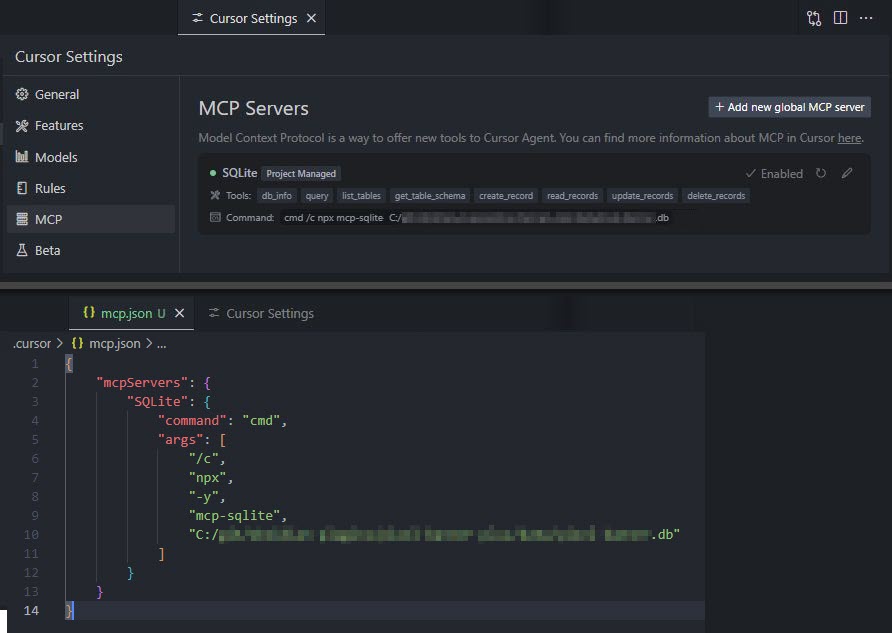
Your database path must be provided as an argument.
Available Tools
Database Information
db_info
Get detailed information about the connected database.
Example:
{
  "method": "tools/call",
  "params": {
    "name": "db_info",
    "arguments": {}
  }
}
list_tables
List all tables in the database.
Example:
{
  "method": "tools/call",
  "params": {
    "name": "list_tables",
    "arguments": {}
  }
}
get_table_schema
Get detailed information about a table's schema.
Parameters:
tableName(string): Name of the table
Example:
{
  "method": "tools/call",
  "params": {
    "name": "get_table_schema",
    "arguments": {
      "tableName": "users"
    }
  }
}
CRUD Operations
create_record
Insert a new record into a table.
Parameters:
table(string): Name of the tabledata(object): Record data as key-value pairs
Example:
{
  "method": "tools/call",
  "params": {
    "name": "create_record",
    "arguments": {
      "table": "users",
      "data": {
        "name": "John Doe",
        "email": "john@example.com",
        "age": 30
      }
    }
  }
}
read_records
Query records from a table with optional filtering.
Parameters:
table(string): Name of the tableconditions(object, optional): Filter conditions as key-value pairslimit(number, optional): Maximum number of records to returnoffset(number, optional): Number of records to skip
Example:
{
  "method": "tools/call",
  "params": {
    "name": "read_records",
    "arguments": {
      "table": "users",
      "conditions": {
        "age": 30
      },
      "limit": 10,
      "offset": 0
    }
  }
}
update_records
Update records in a table that match specified conditions.
Parameters:
table(string): Name of the tabledata(object): New values as key-value pairsconditions(object): Filter conditions as key-value pairs
Example:
{
  "method": "tools/call",
  "params": {
    "name": "update_records",
    "arguments": {
      "table": "users",
      "data": {
        "email": "john.updated@example.com"
      },
      "conditions": {
        "id": 1
      }
    }
  }
}
delete_records
Delete records from a table that match specified conditions.
Parameters:
table(string): Name of the tableconditions(object): Filter conditions as key-value pairs
Example:
{
  "method": "tools/call",
  "params": {
    "name": "delete_records",
    "arguments": {
      "table": "users",
      "conditions": {
        "id": 1
      }
    }
  }
}
Custom Queries
query
Execute a custom SQL query against the connected SQLite database.
Parameters:
sql(string): The SQL query to executevalues(array, optional): Array of parameter values to use in the query
Example:
{
  "method": "tools/call",
  "params": {
    "name": "query",
    "arguments": {
      "sql": "SELECT * FROM users WHERE id = ?",
      "values": [1]
    }
  }
}
Built with
Appreciation
If you enjoy this library please consider sending me a tip to support my work 😀
🍵 tip me here
SQLite MCP questions
How do I add SQLite MCP to Claude Code?
Run claude mcp add mcp-sqlite -- npx -y mcp-sqlite in your terminal. Add --scope user to make it available in every project.
How do I add SQLite MCP to Cursor?
Open ~/.cursor/mcp.json and add the server under mcpServers, using the Cursor config shown in the install section above.
Can I run my own SQL queries?
Yes, you can use the query tool to execute custom SQL queries against the connected database, optionally using parameter values.