
PPCL Workbench MCP server
Commit Nov 11, 2026Provides an IDE, linter, simulator, and debugger for Siemens PPCL programming to validate control logic offline.
Also known as jamesccupps/PPCL
- Stars
- 3
- Tools
- —
- Downloads, 30 days
- —
- Latest version
- —
- Last commit
- Nov 11, 2026
- License
- MIT
What is PPCL Workbench MCP?
PPCL Workbench provides an IDE, linter, simulator, and debugger for Siemens PPCL programming to validate control logic offline.
Summary generated from the project's README
About PPCL Workbench MCP server
Validating Siemens PPCL control logic offline is what PPCL Workbench enables for building automation engineers. This toolkit provides a comprehensive development environment including an IDE, a linter, a simulator, and a debugger to catch errors before they reach live hardware. It runs entirely locally using Python 3.10+ and requires no external dependencies, ensuring that program text never leaves your machine.
Users can interact with the system via a browser-based workbench or a command line interface. The linter applies 90 specific rules derived from the Siemens manual to check for syntax and semantic errors, such as improper command placement or priority conflicts. For testing, the bench feature allows you to run programs against simulated equipment like fans, coils, and dampers under specific weather conditions or injected faults. This setup helps identify priority arbitration issues where a command might be blocked by a higher-priority state, a common defect that is difficult to diagnose on a physical panel.
What you can do with it
- 1Validate control logic against faultsRun a simulation of an air handling unit to see how the logic responds to a stuck outdoor air damper.
- 2Identify priority arbitration conflictsDetect when a specific command is being blocked by a higher priority point during a simulation run.
- 3Automate code quality checksUse the command line linter within a build script to ensure programs meet specific firmware standards.
Written from the project's README. Every use case is checked against a quote from it.
Automated checks
Ran Nov 15, 2026Full report →Not verified yet. A server needs a score of 80, no serious finding, and enough data for us to check. How checks work · What to fix for more points

- Source repository linked and reachablejamesccupps/ppcl is public and reachablegithub.com/jamesccupps/ppcl ↗Pass
- Package names this repository as its sourceNot checked
- Build provenance (Sigstore attestation)Not checked
- Open source license (OSI)MITspdx.org/licenses/MIT.html ↗Pass
- Commit or release in the last yearLast commit or release 2026-11-11github.com/jamesccupps/ppcl ↗Pass
- OpenSSF ScorecardNot checked
- Package name not close to a popular packageNot checked
- No critical advisory in the package or its dependenciesNot checked
- No hidden instructions to the model0 tool descriptions and the README read; no override phrases, credential paths or hidden charactersPass
- Destructive tools are labelledNot checked
- Remote endpoint answers the MCP handshakeNot checked
README
View on GitHubPPCL Workbench


Website: jamesccupps.github.io/PPCL · Download the latest release
Read, inspect, lint, debug, optimize and write Siemens PPCL.
PPCL is not a legacy language. Siemens' 2025 reference manual for its current panels points you at the same PPCL User's Manual (125-1896) that covered the old ones, and its 2026 modernization guide converts PPCL onto the new hardware rather than off it. You edit it in Desigo — on the panel itself if you have to, but that is not where the work happens. This toolkit covers six firmware families.
Zero dependencies, Python 3.10+, stdlib only. Everything runs locally — no program text ever leaves the machine.
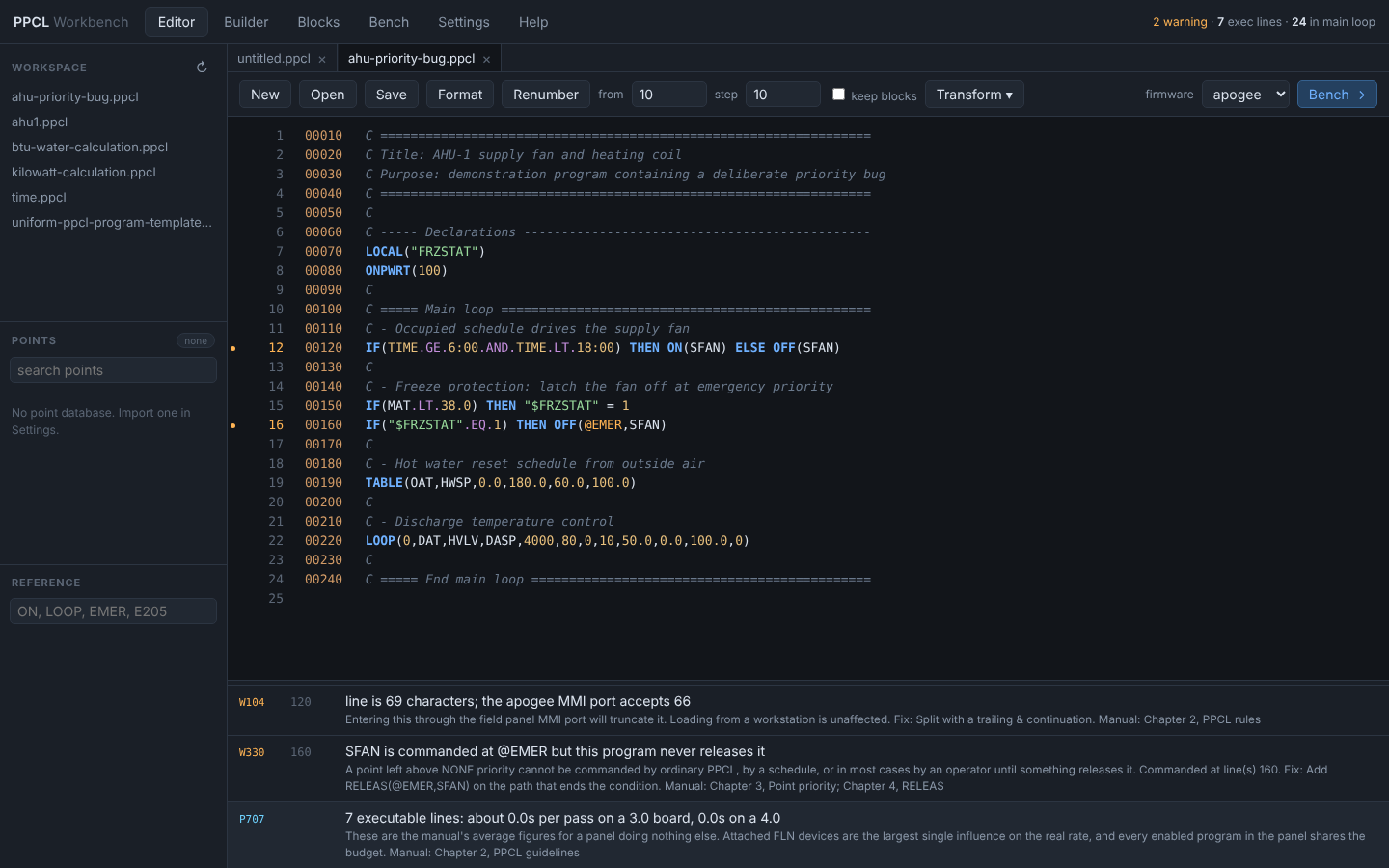
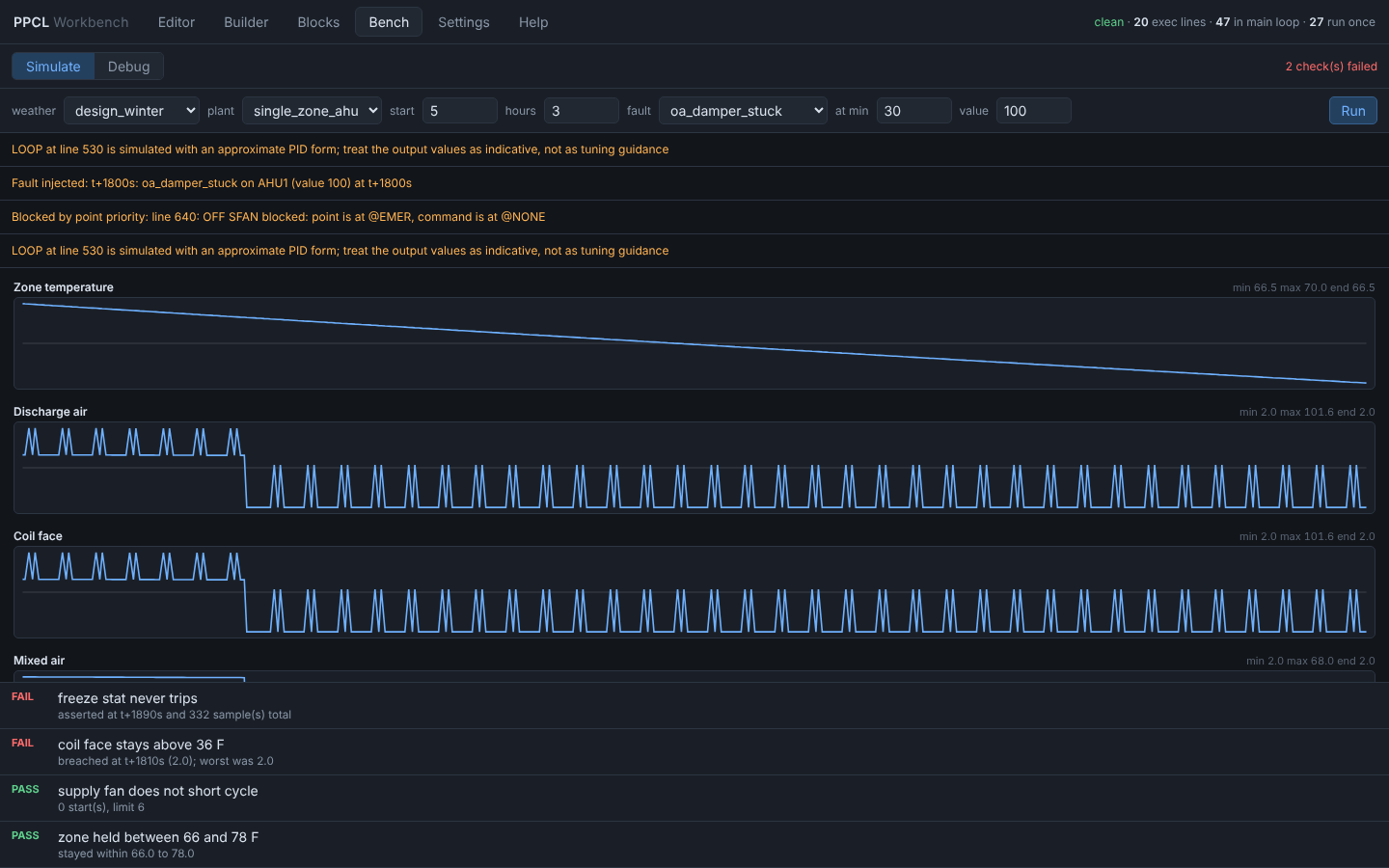
The samples that ship in samples/ and sequences/, in the browser workbench (python -m ppcl serve).
Running it
Nothing to install.
On Windows, double-click ppcl.bat. It finds a suitable Python, starts the
workbench and opens it in your browser. The same file takes a subcommand if you
would rather use the command line — ppcl.bat lint programs\ — and passes the
exit code through, so it drops into a build script unchanged.
Otherwise, stand in the directory and run:
python -m ppcl serve
That opens the workbench in a browser. For the command line, the same module takes a subcommand:
python -m ppcl lint  path/to/programs/
python -m ppcl bench AHU1.ppcl --weather design_winter
python -m ppcl bench AHU1.ppcl --fault "AHU1,oa_damper_stuck,1800,100"
python -m ppcl rules                        # every rule and what it checks
python -m ppcl help                         # the built-in documentation
--help works on the top level and on every subcommand.
Changing the port. The workbench serves on 8765 unless told otherwise, and there are three ways to tell it, in order of precedence:
ppcl.bat 8800orpython -m ppcl serve --port 8800-- for that launch only- Settings -> Workbench -> Server port -- saved with the workspace, and
used every time after, including by a double-clicked
ppcl.bat - otherwise 8765
If the port is already taken the workbench says so and stops, rather than quietly starting somewhere else -- usually it means one is already running.
If your programs only ever reach a panel from a workstation and are never
typed at a panel's serial port, add --workstation-only to lint. It drops
the line-length findings, which are usually most of the output on anything
written in Desigo.
To install it properly instead, so that ppcl is on the path:
pip install -e .
Then ppcl lint ... works from anywhere. The install pulls in nothing; the
dependency list is empty and meant to stay that way.
The app
python -m ppcl.cli serve --workspace .
Opens a local IDE in the browser with six panes over everything below.
Editor
A PPCL editor that checks as you type. Open reads a program from anywhere
on the machine — a Desigo or Insight .pcl export, say — or drop the file on
the window. Multi-file tabs, syntax coloring, and
error, warning and unresolved-point markers in the gutter — click a finding to
jump to it.
Everything the Desigo CC PPCL Editor does to a program, this does to a file,
with the same keys so muscle memory transfers: Ctrl+G go to statement,
Ctrl+F find and replace, Ctrl+/ comment, Ctrl+wheel to zoom, quick
numbering on Enter, and Command Assist using Siemens' own eight command
categories, with the signature and the argument you are on shown as you type.
It adds what Desigo has nowhere to put: 90 lint rules, each citing the manual page it comes from, and a set of source transforms that are exact by machine and tedious by hand — DEFINE expand and collapse, point-name separator swap, clone a block of statements with renames and retargeted branches, and enable/disable statements.
Builder
Author from a decision table — equipment down the side, modes across the top. This is Siemens' own recommended planning method, not an invention here. Modes, interlocks, control loops, reset schedules and free-form rules each get a form; the document text and the generated PPCL stay in step with the forms either way you edit.
The compiler guarantees by construction what you would otherwise check by eye:
exactly one backward GOTO and it is last, every interlock force matched by a
RELEAS at the same priority, and no time-based command inside an IF or
a subroutine.
Blocks
Draw the control as blocks and wires — 30 block types across inputs, logic, maths, control, timing and outputs — and compile that to PPCL as you draw.
The compiler is the interesting part. Pure logic and arithmetic stay as expressions, so an AND of two comparisons is one statement rather than three statements and two locals. A value condenses into a named local only when it feeds more than one block, holds state, is timed, would exceed the 16-operand statement limit, or you gave the block a name — which is how a wire on the drawing gets a name you can look up at the panel.
A loop of pure logic is refused, naming the blocks in it. A loop through a latch or a delay is allowed, reads the previous pass's value, and says so in the generated program.
Bench
Run the program against simulated equipment: mixing box, coils, fan, zone with thermal mass, sensor lag, actuator stroke time, damper leakage. Pick the weather, inject a fault, read the trends. Point priority arbitration is exact, so a command refused because the point is owned at a higher priority is reported — which is the defect this catches most often.
Bench → Debug
A real debugger over the same interpreter:
- Line breakpoints, for "why does this branch never run".
- Write watchpoints, which stop on the statement that wrote a point and name the line — for "something is commanding this and I cannot find what".
- Conditional breakpoints, written as PPCL expressions and evaluated against live point values.
Step, step over, step out, run to cursor, a watch window showing each point's value and its current priority, coverage marking for lines that have never run, and the one thing you cannot do on a panel: override any point mid-run and carry on.
Settings and Help
Firmware, editor behavior, bench defaults, theme, and the point database import. Settings are stored as JSON in the workspace and validated on load — a bad value is reported with its limit rather than quietly clamped.
The Help pane carries the full documentation, including what is verified against the manual and what is approximated.
Point database
Import a CSV or JSON export from Desigo CC or Insight. Columns are matched by
name, and anything unrecognised is reported rather than guessed at. Loading
one turns on three things: unresolved-reference marking in the gutter (the
same red U the Desigo editor shows, produced offline), type-aware lint
rules, and real point names in Command Assist.
Safety
Zero dependencies here too: the server is http.server, and the UI is plain
ES modules with no framework and no build step.
Nothing here touches a building system. No panel writes, no network client, no BACnet or P2 connection. The workbench reads and writes files; you load the result through Insight or Desigo CC yourself.
The server binds 127.0.0.1 and confines all file access to the workspace
directory. Paths that escape it are refused rather than normalized; so are
hidden files and folders (.git, .claude), drive-relative paths, files with
no extension, and any extension outside the PPCL set. Binding elsewhere with
--host prints a warning, because the API has no authentication and can write
files. On Windows it refuses to start if the port is already taken, rather
than silently sharing it with another instance.
Simulation is a model. The equipment models are first-order lumped
approximations, good for exercising control logic and worthless as a load
calculation. The LOOP output value is approximated — Siemens does not
publish the PID form — and says so at runtime. Never take a tuning constant
from the bench to a real panel. Long bench runs lower the simulated line rate
to stay responsive, and the response says when it did.
No statement's behavior has been validated against a live panel. Every command signature traces to the manual or to Desigo CC's own Command Assist, which is a stronger claim than "tested" and close to the whole claim being made.
The grammar is a step further along. An independent project reading APOGEE P2 traffic ran this parser over 2,644 lines recovered from programs running on panels and it handled all of them; Siemens' own 115 worked examples take command coverage to 57 of 66. Nothing there says a modeled behavior is right — only that the language is read correctly.
Why
PPCL has no compiler, no type checker, and no way to try a change except on a live panel. The language actively invites a handful of failures that are invisible on the screen and expensive in the building:
| Failure | What you see on the panel | Rule |
|---|---|---|
Point latched at @EMER, never released |
Schedule silently stops working | W330 |
LOOP/TOD/WAIT outside the main loop |
Runs once at load, then never again | E205 |
| Duplicate line number | One line silently vanishes on load | E102 |
SAMPLE/TIMAVG inside a GOSUB |
Timing drifts unpredictably | E213 |
GOSUB inside IF/THEN |
Undefined per the manual | E214 |
| Two unconditional writers on one point | Behavior depends on line order | W332 |
Every rule cites the section of the APOGEE PPCL User's Manual (125-1896) it comes from, so a finding can be argued with a vendor rather than just asserted.
Commands
lint — check programs
python -m ppcl.cli lint programs/ --min-severity warning
python -m ppcl.cli lint AHU1.ppcl --points panel.csv --format json
python -m ppcl.cli lint programs/ --firmware logical --disable W104 --strict
--pointstakes a point database (name,typeCSV or JSON) which turns on type-aware checks such as analog equality comparison.--firmwareselectsapogee(default),logical,physical,unitary,cm. Several rules differ by firmware —SETaccepts integers on APOGEE only.--strictexits non-zero on warnings, for CI.
90 rules across five groups: E1xx syntax, E2xx/W2xx control flow,
E3xx/W3xx semantics and priority, S6xx style, P7xx optimization.
python -m ppcl.cli rules lists them all.
run — simulate a program offline
python -m ppcl.cli run AHU1.ppcl --set MAT=35 --set OAT=20 --time 8.0 \
    --passes 20 --interval 30 --trace writes
Executes the program against made-up sensor values on a virtual clock and shows what it does, including priority arbitration — the thing you cannot see by reading. Blocked commands are called out explicitly:
3 command(s) were blocked by point priority:
  line 120: ON SFAN blocked: point is at @EMER, command is at @NONE
--scenario file.json loads starting values and a clock. --format json gives
the full event trace for scripting.
Fidelity is stated honestly. Assignment, arithmetic, IF/THEN/ELSE,
GOTO/GOSUB/RETURN, all the commanding verbs and their priority rules,
MAX, MIN, TABLE, DBSWIT, TIMAVG, SAMPLE, WAIT, TOD, TODSET,
TODMOD, HOLIDA and the enable/disable family are exact. LOOP is an
approximation — Siemens does not publish the internal PID form — and says so at
runtime. PDL, SSTO, OIP and DC/DCR are traced as no-ops.
seq — author without writing PPCL
python -m ppcl.cli seq new -o AHU1.seq          # starter document
python -m ppcl.cli seq check AHU1.seq           # validate, then lint the result
python -m ppcl.cli seq compile AHU1.seq -o AHU1.ppcl
python -m ppcl.cli seq bench AHU1.seq --weather design_winter
python -m ppcl.cli seq json AHU1.seq            # the same document as JSON
You describe the sequence; the compiler writes the PPCL. The primary surface is a decision table of equipment against modes, which is Siemens' own recommended design artifact (Desigo CC, "PPCL Program Plans"):
sequence "AHU-1 single zone"
  equipment AHU1

points
  SFAN    LDO
  HVLV    LAO
  MAT     LAI
  DMD     local

modes
  Unoccupied  otherwise
  Occupied    when TIME between 6:00 and 18:00

table
              Unoccupied  Occupied
  SFAN        off         on
  OADPR       closed      20
  HVLV        closed      modulate

interlock Freeze
  trip when MAT < 38
  reset when MAT > 45
  force SFAN off at emer

loop Discharge
  measure DAT
  output DMD
  setpoint DASP
  acting reverse
  throttling 10
  range 0 to 100
Each point carries its panel type (LDO, LAI, MV...), local for a
program local, or - to take it from the loaded point database.
Modes are listed lowest priority first and the last match wins, so putting a
shutdown mode after the occupied mode is all it takes to override it. A cell
saying modulate emits nothing and leaves the point to its loop; anything else
overrides the loop, because the table is compiled after it.
A safety can drive a whole column. Interlock latches are computed before
modes, so a mode can be written when Freeze is on and the table then shows,
in one place, what every piece of equipment does during that shutdown:
modes
  Unoccupied  otherwise
  Occupied    when TIME between 6:00 and 18:00
  Shutdown    when Freeze is on

table
              Unoccupied  Occupied  Shutdown
  SFAN        off         on        off
  HVLV        closed      modulate  closed
  CVLV        closed      modulate  closed
This is worth preferring over forcing points one at a time. An interlock that only drops the fan leaves the discharge loop running against no airflow, where it saturates and drives the heating and cooling valves at once -- a defect the bench caught in this project's own example sequence.
What the compiler makes impossible, rather than merely detectable:
- Exactly one backward GOTO, and it is the last statement — the only one the Desigo compiler permits.
- Every interlock gets its matching
RELEASat the same priority. The most common PPCL field defect cannot be written. - No time-based command inside an
IFor a subroutine, soLOOP,TABLEandSAMPLEare evaluated every pass as the manual requires. - Line references stay symbolic until render, so nothing points at a stale line.
The text form, the JSON, and the compiled PPCL are three views of one document, and text→JSON→text round-trips exactly. Compilation is deliberately one way: a document compiles to PPCL reliably, but arbitrary hand-written PPCL does not lift back into a table, because real GOTO structure carries intent a table cannot represent.
new — generate a program
python -m ppcl.cli new ahu --author "A Tech" --organization ACME -o AHU1.ppcl
python -m ppcl.cli new schedule --points-list "SFAN,RFAN,EFAN"
python -m ppcl.cli new leadlag --points-list "CHWP1,CHWP2"
python -m ppcl.cli new reset --option inp=OAT --option out=HWSP
python -m ppcl.cli new skeleton --title "AHU-3 rebuild"
Templates: skeleton, ahu, reset, schedule, leadlag. Every generated
program is linted before it is handed back, and all of them lint clean — the
ahu template deliberately includes the matched RELEAS that the freeze-latch
bug is missing.
For programmatic authoring, ppcl.generator.Builder lets you write against
symbolic labels instead of raw line numbers:
from ppcl.generator import Builder

b = Builder()
b.label("MAIN")
b.code("IF(TIME.GE.6:00) THEN ON(SFAN) ELSE OFF(SFAN)")
b.goto("MAIN")          # resolved to a real line number at render time
print(b.render())
Engineering helpers compute the values the manual gives formulas for:
proportional_gain(device_range, throttling_range), integral_gain(pg),
loop_bias(lo, hi), duty_cycle_pattern(slots), table_statement(...).
Writing files. fmt, renumber, transform, blocks and seq fmt write
a file back the way it was read: the same encoding (a Windows-1252 degree sign
stays B0), byte-order mark and line endings. With -i they keep a byte-exact
.bak unless told --no-backup, and write through a temporary file so a
failure leaves the original whole. A line with no line number -- an export
header, stray text -- would be lost by a rewrite, so the file is refused until
it is fixed or --force is given. A folder only expands to .ppcl and .pcl
files for these commands; a .txt has to be named outright.
renumber — renumber safely
python -m ppcl.cli renumber AHU1.ppcl --preserve-blocks -i
Rewrites every GOTO, GOSUB, ACT, DEACT, ENABLE, DISABL and ONPWRT
reference to match, including references nested inside IF/THEN/ELSE and behind
a SAMPLE. --preserve-blocks keeps the thousands-block layout used for
subroutines.
On duplicate line numbers it refuses by default. The panel keeps only one copy but the file holds both, so renumbering has to either drop code or change what the panel runs. Pick explicitly:
--split-duplicates— every line survives, each gets its own number. This makes the program do more than the one in the field.--allow-duplicates— keep the first of each, matching the panel today.
bench — run against simulated equipment
python -m ppcl.cli bench AHU1.ppcl --weather design_winter --seconds 10800
python -m ppcl.cli bench AHU1.ppcl --fault "AHU1,oa_damper_stuck,1800,100"
python -m ppcl.cli bench AHU1.ppcl --format csv --chart AHU1.actual_dat > run.csv
python -m ppcl.cli bench --list-faults
Runs the program against a simulated air handler -- mixing box, hot and chilled water coils, fan, zone thermal mass, and sensors with realistic lag -- on a virtual clock. The program only ever sees the sensors, which is the point: a sequence tuned against instantaneous perfect measurements is a sequence that hunts in the field.
--fault injects a failure at a given second and asks whether the sequence
catches it: oa_damper_stuck, hw_valve_leak, supply_fan_proof_fail,
mat_sensor_fail, coil_fouling, hot_water_loss and others.
Checks make a run pass or fail instead of producing numbers to squint at --
freeze stat never trips, coil face stays above 36 F, fan does not short cycle,
zone held between 66 and 78 F. A scenario file (--scenario) defines the
plant, bindings, faults and checks together.
Model fidelity is stated, not implied. These are first-order lumped
models in IP units, good for exercising control logic. They are not a load
calculation and not an energy model. LOOP output values are approximate and
say so at runtime.
graph, points, explain
python -m ppcl.cli graph AHU1.ppcl              # loop entry, subroutines, branches
python -m ppcl.cli graph AHU1.ppcl --format dot | dot -Tpng -o flow.png
python -m ppcl.cli points programs/             # cross-program point inventory
python -m ppcl.cli explain LOOP                 # command, with the manual's notes
python -m ppcl.cli explain EMER                 # the priority hierarchy
python -m ppcl.cli explain E205                 # what a rule means and why
blocks — compile a block diagram
python -m ppcl.cli blocks diagrams/ahu1-freeze.blocks.json
python -m ppcl.cli blocks diagrams/ahu1-freeze.blocks.json --in-place
Compiles the JSON a Blocks-pane drawing saves to, lints the result, and writes
the PPCL -- with --in-place, beside the diagram as ahu1-freeze.ppcl. Exits
non-zero if the program has errors, so it works in CI.
transform — the edits that are exact by machine
python -m ppcl.cli transform expand-defines AHU1.ppcl
python -m ppcl.cli transform underscores AHU1.ppcl --in-place
python -m ppcl.cli transform clone AHU1.ppcl --first 200 --last 340     --rename AHU1.SFAN=AHU2.SFAN --rename AHU1.MAT=AHU2.MAT
expand-defines / collapse-defines, dots / underscores for point-name
separators, disable / enable / comment on selected lines, and clone to
copy a block of statements with points renamed and branches retargeted. All of
them work on a real parse, so a decimal point or a .AND. is never mistaken
for a name separator. Each reports exactly what it changed.
db — point database and unresolved references
python -m ppcl.cli db exports/points.csv
python -m ppcl.cli db exports/points.csv --check programs/
Imports a CSV or JSON export and lists every point a program names that the
database does not contain — the offline equivalent of the red U the Desigo
PPCL Editor shows in its status column. Exits non-zero when there are any.
help — the built-in documentation
python -m ppcl.cli help                 # the contents
python -m ppcl.cli help priority        # one page
python -m ppcl.cli help --search releas
The same pages the Help pane shows, in the terminal.
redact — share a program safely
python -m ppcl.cli redact programs/ --outdir /tmp/shareable --mapping local-map.json
Replaces site-identifying names while leaving the control logic byte-identical,
so a program can go to a vendor or into a ticket without carrying the building's
topology. Generic HVAC vocabulary (SFAN, OAT, AHU01) is preserved so the
code stays readable; --aggressive replaces that too. Comment bodies are
dropped entirely rather than rewritten — free text is where tenant names and
room numbers actually live, and no token substitution catches that reliably.
The mapping file is the only thing that reverses it. Keep it local.
Library
from ppcl import parser, linter, analyzer

prog = parser.parse_file("AHU1.ppcl")
a = analyzer.analyze(prog)

a.steady_state      # lines that execute every pass
a.one_shot          # lines that run once at startup and never again
a.subroutines       # GOSUB entry -> body, RETURNs, callers
a.loop_entry        # first line of the main loop

for d in linter.lint(prog):
    print(d.code, d.severity.value, d.line, d.message)
Modules: spec (the language, machine-readable), lexer, parser,
ast_nodes, analyzer (control and data flow), linter + rules/,
formatter (format and renumber), unparse, simulator, debug
(breakpoints, stepping, watch), generator, transforms (source edits),
points (the panel database), settings, helpdocs, sequence/
(document model, text form, compiler), blocks/ (block catalog and the
diagram compiler), plant/ (equipment models and the test bench), web/
(JSON API and the UI), redact, cli.
PPCL Workbench MCP questions
Does this tool connect to live building hardware?
No, the workbench is a local tool that reads and writes files only. It does not have a network client or BACnet/P2 connection to live panels.
Can I use this in a CI/CD pipeline?
Yes, you can use the lint command with the --strict flag to ensure the process exits with a non-zero code on warnings.