
Zenith MCP server
Commit Nov 14, 2026A self-hosted AI workspace that provides a coding agent, deep research, long-term memory, and multi-modal capabilities using local Ollama models.
Also known as ItzAditya43/Zenith
- Stars
- 3
- Tools
- —
- Downloads, 30 days
- —
- Latest version
- —
- Last commit
- Nov 14, 2026
- License
- AGPL-3.0
What is Zenith MCP?
Zenith is a self-hosted AI workspace that provides a coding agent, deep research, long-term memory, and multi-modal capabilities using local Ollama models.
Summary generated from the project's README
About Zenith MCP server
Running a private, self-hosted AI workspace on your own hardware is what Zenith enables for developers and researchers who prioritize data privacy. By connecting to local Ollama models, this system provides a centralized environment for chat, deep research, and long-term memory without sending data to external providers. You can deploy it using Docker, a Tauri-based desktop application, or a manual Python and Node installation.
Users can interact with the system through a web interface, a desktop app, or even a mobile device over a local network or Tailscale. The platform features a specialized coding agent that uses diff previews and approval gates before modifying files. It also includes multi-modal capabilities such as Whisper speech-to-text, Piper text-to-speech, and local Stable Diffusion for image generation. For those needing structured workflows, the workspace supports projects with custom personas, document Q&A via vector retrieval, and personal tools like calendars and email integration.
What you can do with it
- 1Managing long-term personal knowledgeUse hybrid retrieval to ask questions about your uploaded documents, watched folders, and previous chat history.
- 2Hands-free voice interactionInteract with your local models using speech-to-text and text-to-speech for a completely hands-free experience.
Written from the project's README. Every use case is checked against a quote from it.
Automated checks
Ran Nov 16, 2026Full report →Not verified yet. A server needs a score of 80, no serious finding, and enough data for us to check. How checks work · What to fix for more points

- Source repository linked and reachableitzaditya43/zenith is public and reachablegithub.com/itzaditya43/zenith ↗Pass
- Package names this repository as its sourceNot checked
- Build provenance (Sigstore attestation)Not checked
- Open source license (OSI)AGPL-3.0spdx.org/licenses/AGPL-3.0.html ↗Pass
- Commit or release in the last yearLast commit or release 2026-11-14github.com/itzaditya43/zenith ↗Pass
- OpenSSF ScorecardNot checked
- Package name not close to a popular packageNot checked
- No critical advisory in the package or its dependenciesNot checked
- No hidden instructions to the model0 tool descriptions and the README read; no override phrases, credential paths or hidden charactersPass
- Destructive tools are labelledNot checked
- Remote endpoint answers the MCP handshakeNot checked
README
View on GitHubZenith
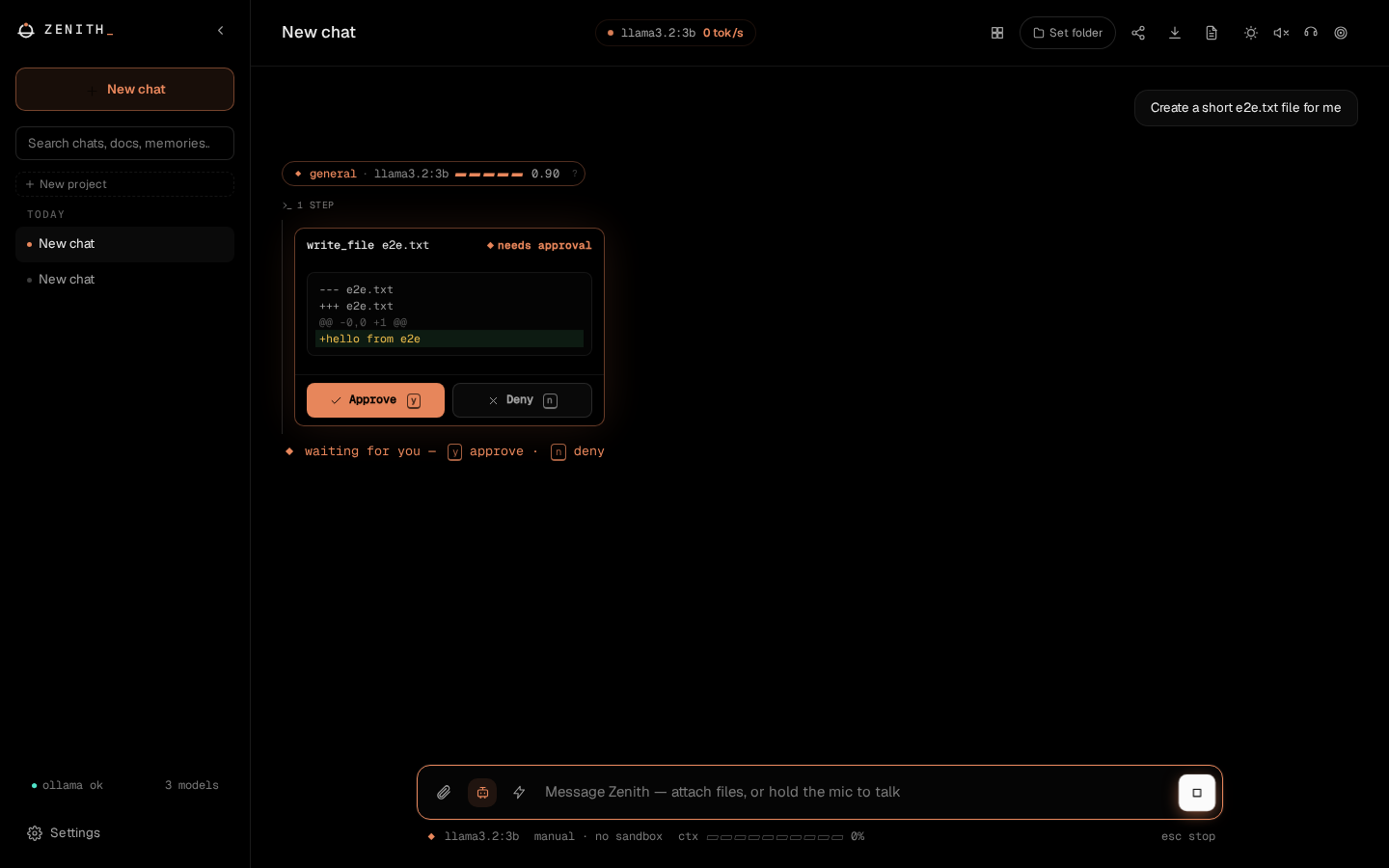
A self-hosted AI workspace that runs on your own hardware with your own Ollama models. It covers chat, a coding agent that asks before it acts, document Q&A, deep research, long-term memory, voice and image generation. Nothing leaves your machine unless you turn on a feature that needs the web.
Run it with Docker, install it as a desktop app (Tauri), or open it from your phone over your LAN or Tailscale.

Quick start
You need Ollama running locally.
Desktop app — download the installer for your OS from
the latest release:
.AppImage / .deb / .rpm (Linux), .exe / .msi (Windows), .dmg
(macOS). It bundles the backend, so there's nothing else to run — just point
it at Ollama on first launch. See DESKTOP.md.
Docker
docker compose up -d --build                   # http://localhost:5173
docker compose --profile search up -d --build  # optional: adds a SearXNG search container
Manual (Python 3.11–3.13, Node 18+)
./install.sh          # sets up the backend and frontend, then suggests models for your hardware
cd backend && ./run.sh
cd frontend && npm run dev
install.sh runs python -m app.setup_models. It detects your RAM, GPU and
VRAM, proposes chat, code and embedding models that will run well, and pulls
them when you confirm. You can re-run it any time from backend/.
What it does
| Chat | Routes each message to the right installed model (code, reasoning, quick, vision) and shows why it picked it, with a confidence meter. Branching, edit-and-resend, per-message model override with search, slash commands (/agent, /research, /image…). |
| Agent mode | Multi-step tool use: shell, file edits with diff preview and per-hunk accept/skip, git, test runs, browser automation, sub-agents, native Ollama tool calling on models that support it, and an MCP server gallery (search the official registry, install in one click). Manual, semi-auto, full or plan-first autonomy. Optional Docker sandbox. |
| Documents and memory | Hybrid vector and keyword retrieval over uploads, watched folders and past conversations, with citations. Long-term memory with conflict review and an undoable "Remembered: …" toast. |
| Projects | Group conversations into a workspace with its own folder, default persona and standing instructions, plus a per-project agent autonomy override. |
| Deep Research | Multi-step search, read and report with inline citations. It can't touch your files or shell. |
| Voice and images | Whisper speech-to-text, Piper text-to-speech, wake word, a hands-free voice mode (auto-stops when you stop talking, talk over a reply to interrupt), and local Stable Diffusion if you point it at one. |
| Personal tools | Notes, to-dos, calendar, email (IMAP/SMTP), schedules, automations and webhooks, daily digest. |
| Interface | OLED Ember theme by default (true black, one warm accent, optional night dim) plus eight others. Thinking models stream their reasoning live, y/n approve agent steps, j/k move between chats, Esc stops, and a status line shows model, context and speed. |
| Multi-device | Open Zenith on your phone by scanning a QR code for your LAN/Tailscale address, with a checklist of what's left to enable (Settings → Connection). |
| Observability | Per-turn traces: routing decision, retrieved context, every tool call, time to first token. Health panel, usage dashboard, and agent eval scores per model (python -m evals). |
The full reference is in docs/FEATURES.md.
Security model
Zenith is a single-user tool. Agent mode can run commands, so access is locked down by default:
- The backend only listens on
127.0.0.1. Other devices are refused (403) until you set a passcode or a shared secret, even with LAN access enabled. Requests with a foreignHostheader are rejected, which blocks DNS-rebinding attacks from web pages. See MULTIDEVICE.md. - Chats never auto-route to Ollama Cloud models. Cloud models you've pulled are used only when you pin one or pick it for a single message. Automatic routing chooses the most capable local model that fits your GPU.
- Agent mode is off by default. In semi-auto, only genuinely read-only steps
inside the working folder run without asking. The agent can't fetch your LAN
or
localhost, so a prompt-injected page can't pull local data out. - The Docker sandbox is optional (Settings → Agent tools). With it on, commands run in a throwaway container that sees only the working folder and has no network.
- Secrets are encrypted at rest and never returned by the API. The passcode lock uses salted PBKDF2 and backs off after repeated wrong guesses.
Known limits, stated plainly: the conversation database itself is not encrypted, and without the sandbox the agent has your user's permissions. See docs/FEATURES.md#safety-model and docs/NOT_BUILT.md.
How it compares
Zenith sits in the same space as other self-hosted AI front ends such as Open WebUI, LibreChat and AnythingLLM. Those are mature, popular projects; pick on fit, not hype. Where Zenith is deliberately different:
- The coding agent is the main event. Approval gates, diff preview and per-call undo, plan-first mode, checkpoint and resume, and a container sandbox are core features, not plugins.
- It's local-only by design. No hosted model providers are built in. Web search, page reading and push notifications are opt-in exceptions.
- It's single-user and personal. It includes memory, notes, email, a calendar and schedules, and gives each person a separate profile on a shared machine. It doesn't do multi-tenant accounts or role-based access control. If you need those, one of the projects above will suit you better.
- It measures itself.
python -m evalsbenchmarks routing, retrieval and agent task success on your own models, and per-turn traces show why a reply came out the way it did.
Development
cd backend && pytest -q && ruff check app tests evals && mypy app
cd frontend && npm run lint && npm run typecheck && npm test
cd frontend && npm run e2e          # Playwright: real backend, fake Ollama
cd backend && python -m evals       # benchmarks against your real Ollama
CI runs all of the above, plus blocking pip-audit and npm audit and a
coverage gate. Desktop builds are covered in DESKTOP.md and
multi-device setup in MULTIDEVICE.md.
License
Zenith MCP questions
Does Zenith require an internet connection?
No, it is designed to be local-first and runs on your own hardware with Ollama models. Nothing leaves your machine unless you opt-in to web-based features.
How can I run Zenith?
You can run it using Docker, install it as a desktop application via Tauri, or perform a manual installation using Python and Node.
Is there a way to run agent commands safely?
Yes, you can enable an optional Docker sandbox so that commands run in a throwaway container with no network access.