
Quipu MCP server
Commit Nov 15, 2026Provides a governed, bitemporal knowledge store that allows AI agents to read, reuse, and share facts with provenance and history.
Also known as intigraph/quipu
- Stars
- 16
- Tools
- —
- Downloads, 30 days
- —
- Latest version
- 0.18.1
- Last commit
- Nov 15, 2026
- License
- Apache-2.0
What is Quipu MCP?
Quipu provides a governed, bitemporal knowledge store that allows AI agents to read, reuse, and share facts with provenance and history.
Summary generated from the project's README
About Quipu MCP server
Quipu provides a governed, bitemporal knowledge store designed for AI agents and their operators. It allows users to store facts, decisions, and relationships in a central graph that maintains a queryable history of all changes. By using a bitemporal model, the system can answer questions about what was known at any specific point in time, ensuring that agents have access to both current and historical context.
Developers can interact with the store through a command line interface, REST API, or by integrating the Rust library directly into their applications. For those using Claude Code, the server can be connected to a local database using the MCP command. The system supports checking incoming knowledge against specific vocabularies and shapes to maintain data integrity. It also enables agents to share memory and facts across different tools while maintaining provenance and a clear record of where information originated.
What you can do with it
- 1Maintain historical knowledge contextAn AI agent can query the database to retrieve the state of facts as they existed at a specific transaction number or time.
- 2Enforce data governanceYou can ensure that all new information added to the knowledge graph adheres to your predefined rules and vocabulary.
- 3Share memory between agentsMultiple AI agents can access and reuse a common set of facts and decisions instead of repeating context.
Written from the project's README. Every use case is checked against a quote from it.
How to install Quipu MCP
Formats verified 10 Nov 2026Add to CursorAdd to GooseInstall Quipu MCP in Claude Code
$ claude mcp add quipu -- docker run -i --rm ghcr.io/intigraph/quipu:0.18.1Install Quipu MCP in Cursor
~/.cursor/mcp.json
{
  "mcpServers": {
    "quipu": {
      "command": "docker",
      "args": [
        "run",
        "-i",
        "--rm",
        "ghcr.io/intigraph/quipu:0.18.1"
      ]
    }
  }
}Install Quipu MCP in VS Code
.vscode/mcp.json
{
  "servers": {
    "quipu": {
      "type": "stdio",
      "command": "docker",
      "args": [
        "run",
        "-i",
        "--rm",
        "ghcr.io/intigraph/quipu:0.18.1"
      ]
    }
  }
}Install Quipu MCP in VS Code CLI
$ code --add-mcp '{"name":"quipu","type":"stdio","command":"docker","args":["run","-i","--rm","ghcr.io/intigraph/quipu:0.18.1"]}'Install Quipu MCP in Claude Desktop
claude_desktop_config.json
{
  "mcpServers": {
    "quipu": {
      "command": "docker",
      "args": [
        "run",
        "-i",
        "--rm",
        "ghcr.io/intigraph/quipu:0.18.1"
      ]
    }
  }
}Install Quipu MCP in Codex
$ codex mcp add quipu -- docker run -i --rm ghcr.io/intigraph/quipu:0.18.1Install Quipu MCP in Codex config.toml
~/.codex/config.toml
[mcp_servers.quipu]
command = "docker"
args = ["run", "-i", "--rm", "ghcr.io/intigraph/quipu:0.18.1"]
Install Quipu MCP in Gemini CLI
$ gemini mcp add -s user quipu docker -- run -i --rm ghcr.io/intigraph/quipu:0.18.1Install Quipu MCP in Gemini settings.json
~/.gemini/settings.json
{
  "mcpServers": {
    "quipu": {
      "command": "docker",
      "args": [
        "run",
        "-i",
        "--rm",
        "ghcr.io/intigraph/quipu:0.18.1"
      ]
    }
  }
}Automated checks
Ran Nov 13, 2026Full report →Not verified yet. A server needs a score of 80, no serious finding, and enough data for us to check. How checks work · What to fix for more points

- Source repository linked and reachablePass
- Open source license (OSI)Pass
- Commit or release in the last yearPass
- Package name not close to a popular packageNot checked
- Remote endpoint uses HTTPSNot checked
- Destructive tools are labelledNot checked
- No hidden instructions to the modelPass
- No critical advisory in the package or its dependenciesNot checked
README
View on GitHubQuipu is a governed, bitemporal knowledge store for AI agents and the people who run them. Use it from the command line, REST, MCP or a Rust application.
Why you would want it
- Governed: check incoming knowledge against your vocabulary and shapes.
- Bitemporal: keep a queryable history of facts and decisions.
- Reusable agent knowledge: store memory agents can read, reuse and share across tools.
- Time-aware entities: attach event-triggering time attributes for Chaski to react to.
Use Quipu as the central graph and base for many tools: see the stack. The full case is in Why Quipu.
Install
curl -fsSL https://raw.githubusercontent.com/intigraph/quipu/main/install.sh | sh
Linux and macOS, x86_64 and arm64; requires Python 3.9+ and curl.
The installer verifies the published archive checksum and executable version.
Then run quipu --version. Install, upgrade or remove Quipu.
For the whole stack, use Tambo's guided onboarding.
First success: insert a fact, watch the graph change
Write one fact in plain Turtle, knot it into a local store, and ask for it back:
printf '@prefix : <urn:demo:> .\n:Ada :studies :Engine .\n' > ada.ttl
quipu knot ada.ttl --db demo.db
quipu read 'SELECT ?who ?what WHERE { ?who <urn:demo:studies> ?what }' --db demo.db
Add a second fact and the graph grows. The first version is still there to query:
printf '@prefix : <urn:demo:> .\n:Babbage :designed :Engine .\n' > babbage.ttl
quipu knot babbage.ttl --db demo.db
quipu read 'SELECT ?s ?p ?o WHERE { ?s ?p ?o }' --db demo.db
quipu read 'SELECT ?s ?p ?o WHERE { ?s ?p ?o }' --tx 1 --db demo.db
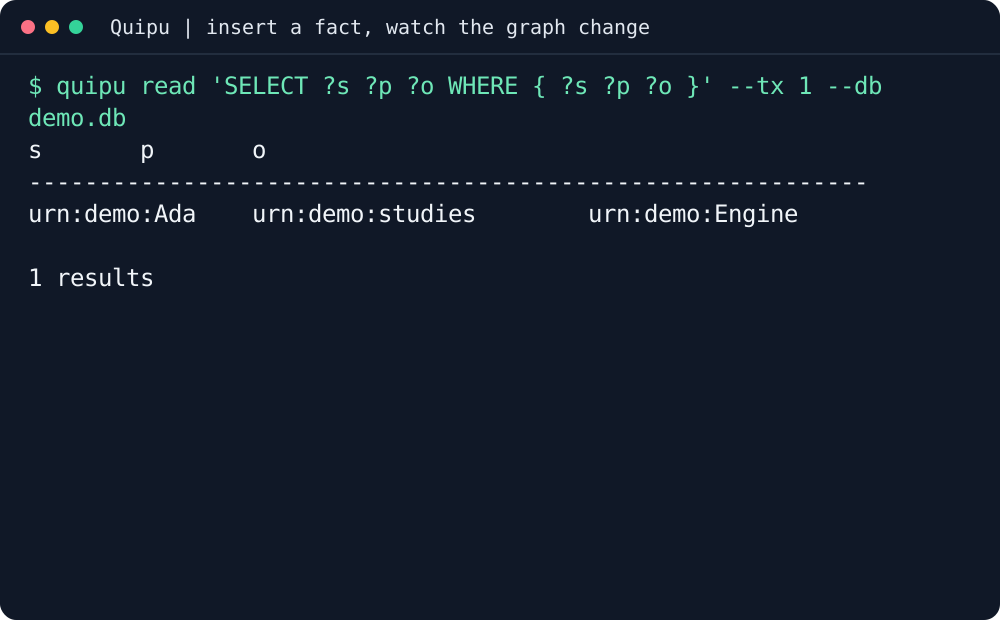
Transcript, tool version and reproducible capture.
On your own code
Keep project facts, decisions and relationships together instead of pasting the same context into each agent.
| You want to | Start here |
|---|---|
| Load facts and apply your vocabulary | Quick Start |
| Ask about current or historical knowledge | SPARQL and time |
| Share a governed knowledge bundle | Verified sharing |
| Prepare domain knowledge and shapes | Camayoc |
The latest release includes a repository pendant,
checksum and provenance. Verify them together, then use quipu import SHARE_DIR --db repository.db;
import stages knowledge and leaves ROOT unchanged. Follow the verified import workflow.
Wire it into your agent
For Claude Code, connect the local MCP server to your database:
claude mcp add quipu -- quipu mcp --db /path/to/knowledge.db
The MCP Registry identifier is mcp-name: io.github.intigraph/quipu.
Other clients, HTTP MCP and credential configuration: Agent Setup.
Use Tambo to configure and verify the tools together.
Before you start
- The CLI runs locally;
quipu-serversupplies the network API and explorer. - Fresh stores support keyword search without downloading a model.
quipu search "your terms"uses keyword search until an embedding provider is configured; explicit--mode semanticstill requires a model and vectors. Install the pinned default model withquipu model installin a full build. Check readiness withquipu doctor search. - Configuration covers storage and server settings.
What's next
- The Quipu book: tutorials, concepts and references.
- Quick Start: governed local examples.
- Domain shapes: producer-owned vocabulary.
- Stack README format and shared hero theme.
🧺 The stack
Tambo installs these together and proves each one works; every tool also stands alone. Use each tool's README for its own installation and first success.
The Quipu stack is built around a governed, bitemporal knowledge store: shared facts, decisions and work history your agents can query. Quipu can check writes against your rules, records where each fact came from, and answers what was true when.
| tool | what it gives your agents |
|---|---|
| tambo | 🧰 Agent Platform Toolkit - installs and configures the quipu stack |
| quipu | stores shared facts with provenance and history; can check writes against your rules |
| camayoc | prepares knowledge and vocabulary for Quipu, with checks before it is admitted |
| quechua | shared vocabulary and shapes for interoperable knowledge |
| chaski | reacts to graph changes and delivers governed notifications |
| bobbin | indexes your codebase and injects context from that index and Quipu knowledge |
| yupana | shows code impact and can read policies from Quipu to govern agent actions |
| desire-path | turns agent mistakes into feature requests; works on its own without Quipu |
| seeds | a work item tracker backed by the Quipu knowledge base |
| shantytown | runs crews of AI agents on work items, triggered by hand, on a schedule or by events; can share work and memory through Quipu |
| rikuy | live brief: status, graphs, watches and signed decisions over Quipu |
| shuttle | runs signed agent workflows and keeps their records in Quipu |
Contributing
See CONTRIBUTING.md. The repository's checks are:
just check
just docs check
📜 License
Quipu MCP questions
How do I add Quipu MCP to Claude Code?
Run claude mcp add quipu -- docker run -i --rm ghcr.io/intigraph/quipu:0.18.1 in your terminal. Add --scope user to make it available in every project.
How do I add Quipu MCP to Cursor?
Open ~/.cursor/mcp.json and add the server under mcpServers, using the Cursor config shown in the install section above.
What makes Quipu 'governed'?
Quipu is governed because it allows you to check incoming knowledge against your specific vocabulary and SHACL shapes.
Does Quipu support historical queries?
Yes, it is bitemporal, meaning it keeps a queryable history of facts and decisions, allowing you to see what was true at a specific time.
Can I perform searches on the knowledge store?
Yes, fresh stores support keyword search by default, and you can also use semantic search if an embedding provider and model are configured.