
Lets AI coding agents record task goals, decisions, and checkpoints in the repo so later sessions can resume where work stopped.
Also known as ihorponom/agentpack, agentpack-cli
- Stars
- 19
- Tools
- —
- Downloads, 30 days
- 1,337
- Latest version
- 1.11.1
- Last commit
- Oct 25, 2026
- License
- MIT
What is Agentpack MCP?
Agentpack lets AI coding agents record task goals, decisions, and checkpoints in the repo so later sessions can resume where work stopped.
Summary generated from the project's README
About Agentpack MCP server
Maintaining task continuity for AI coding agents is what Agentpack enables by storing progress directly within your repository. Instead of losing progress when chat histories are cleared or context is compacted, agents use this tool to record goals, decisions, dead ends, and verification evidence in a local .agentpack directory. This approach allows different clients like Claude Code, Cursor, Codex, or Claude Desktop to pick up exactly where a previous session left off.
This local-first solution operates without cloud storage or telemetry, keeping all task state as plain files in your repo. Developers can manage these records using a CLI to inspect state, create checkpoints, or export task bundles. The system uses a Task Passport to track the lifecycle of a specific goal, including its constraints and next actions. It also features a task gate that can warn or block edits to ensure agents stay within their defined write scope.
What you can do with it
- 1Resume interrupted coding sessionsAn agent can reload the specific goal and recent decisions after a context compaction or a new chat session starts.
- 2Switch between different AI clientsYou can move a task from Claude Code to Cursor without losing the investigation history.
- 3Enforce task boundariesPrevent an agent from making unauthorized changes by using a task gate to monitor the write scope.
- 4Track file-specific conclusionsRecord notes about what a specific file does and receive a warning if that file is modified later.
Written from the project's README. Every use case is checked against a quote from it.
How to install Agentpack MCP
Formats verified 10 Nov 2026Add to CursorAdd to GooseInstall Agentpack MCP in Claude Code
$ claude mcp add agentpack -- npx -y agentpack-cliInstall Agentpack MCP in Cursor
~/.cursor/mcp.json
{
  "mcpServers": {
    "agentpack": {
      "command": "npx",
      "args": [
        "-y",
        "agentpack-cli"
      ]
    }
  }
}Install Agentpack MCP in VS Code
.vscode/mcp.json
{
  "servers": {
    "agentpack": {
      "type": "stdio",
      "command": "npx",
      "args": [
        "-y",
        "agentpack-cli"
      ]
    }
  }
}Install Agentpack MCP in VS Code CLI
$ code --add-mcp '{"name":"agentpack","type":"stdio","command":"npx","args":["-y","agentpack-cli"]}'Install Agentpack MCP in Claude Desktop
claude_desktop_config.json
{
  "mcpServers": {
    "agentpack": {
      "command": "npx",
      "args": [
        "-y",
        "agentpack-cli"
      ]
    }
  }
}Install Agentpack MCP in Codex
$ codex mcp add agentpack -- npx -y agentpack-cliInstall Agentpack MCP in Codex config.toml
~/.codex/config.toml
[mcp_servers.agentpack]
command = "npx"
args = ["-y", "agentpack-cli"]
Install Agentpack MCP in Gemini CLI
$ gemini mcp add -s user agentpack npx -- -y agentpack-cliInstall Agentpack MCP in Gemini settings.json
~/.gemini/settings.json
{
  "mcpServers": {
    "agentpack": {
      "command": "npx",
      "args": [
        "-y",
        "agentpack-cli"
      ]
    }
  }
}Automated checks
Ran Nov 12, 2026Full report →Passed our automated checks. That is not a security audit: read the code and give the server the narrowest access it needs. How checks work

- Source repository linked and reachablePass
- Open source license (OSI)Pass
- Commit or release in the last yearPass
- Package name not close to a popular packagePass
- Remote endpoint uses HTTPSNot checked
- Destructive tools are labelledNot checked
- No hidden instructions to the modelPass
- No critical advisory in the package or its dependenciesPass
README
View on GitHubAgentpack


Repo-native task continuity for AI coding agents.
Agent memory remembers how you work. Agentpack remembers where the task stands.
Your agent spent an hour on a task. It found the cause, rejected two approaches, and wrote down the next step. Then the context was compacted, or the chat closed. The next session starts from zero and does the same investigation again.
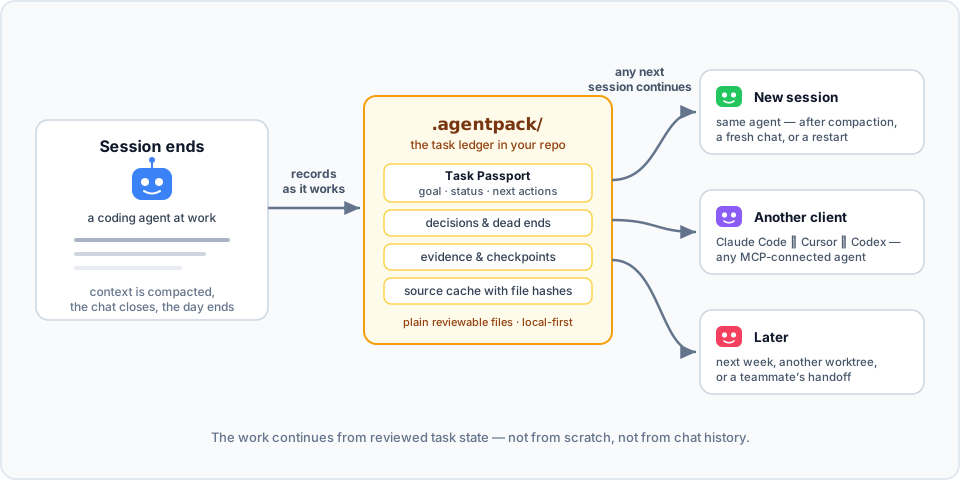
Agentpack keeps the task state in your repo. Connected agents record the goal, decisions, dead ends, verification evidence, and checkpoints in .agentpack/ while they work. Then the next session loads that state and continues: the same agent after compaction, a different client, or you next week.
Here it is in action. In session 1, an agent works on a flaky test and records a decision, a dead end, and a checkpoint through the Agentpack MCP tools. In session 2, the next day with an empty context, one load_context call brings the task back:

▶ Watch the 80-second explainer, with sound
To try the same flow by hand from the CLI, see docs/DEMOS.md.
- Local-first. Plain files in your repo. No cloud, no telemetry, no network calls.
- Made for agents. A local MCP server and generated project instructions (
AGENTS.md,CLAUDE.md, Cursor rules) tell agents when to load and record state. - Open to people. The CLI shows the same state, so you can inspect it, fix it, or hand it off yourself.
How is this different from agent memory?
Claude Code memory, Codex memories, and CLAUDE.md or AGENTS.md keep how to work: your preferences, project conventions, and facts that stay true. Agentpack keeps where the work is: the goal of the current task, its constraints, decisions, dead ends, next actions, and verification result.
| Agent memory | Agentpack | |
|---|---|---|
| Holds | Preferences, conventions, long-lived facts | The state of one task |
| Lives in | The profile or account of one client | .agentpack/ in the repo, local by default, portable with task bundles |
| Read by | That client only | Any MCP client: Claude Code, Codex, Cursor, Claude Desktop |
| Shape | Free-form notes, recalled by relevance | A Task Passport per task: goal, lifecycle, the paths it may change, and verification bound to a commit |
| Staleness | Not tied to file changes | Notes about files store the file hash, so Agentpack flags a note when its file changes |
Use both. Memory keeps how you like to work. Agentpack keeps what the task needs next.
Quick start
Agentpack needs Node.js 20 or later.
npm install -g agentpack-cli

cd path/to/your/repo
agentpack init                     # once per repo
agentpack install claude --write   # per client: codex | claude | cursor | claude-desktop
agentpack install git-hooks --write  # optional: task gate check before each commit
Restart or reconnect your coding agent, and approve the Agentpack server or hooks when the client asks. From then on, the agent loads the task state when a session starts, records decisions and evidence while it works, and creates checkpoints at meaningful points.
To check the setup, run agentpack doctor. To see the task state yourself, run agentpack resume --preset agent --query "<topic>".
In a Git repository, init adds the local Agentpack files to .git/info/exclude. The list includes .agentpack/, .mcp.json, .claude, .codex, .cursor, AGENTS.md, and CLAUDE.md. Agentpack does not change your .gitignore. Files that Git already tracks stay tracked.
For each client, docs/INTEGRATIONS.md shows what the installer writes and why.
How it works
- When a session starts, the agent loads a compact summary: the current Task Passport, recent checkpoints, decisions, and source conclusions.
- While it works, the agent records what is worth keeping: decisions, failed approaches, and verification evidence. It can also record a source conclusion: a short note about what a file does, stored with the file hash. If the file changes later, Agentpack flags the conclusion. A matching hash shows that the file is unchanged, not that the conclusion is correct.
- At a natural stop, the agent creates a checkpoint with the status, the next actions, and the Git state.
- The next session, in any MCP client, continues from that state. It does not rebuild the task from chat history.
Each task has a Task Passport: the goal, status, constraints, write scope (the paths the task may change), next actions, and verification. You can start, park, switch, and finalize tasks, so each handoff is explicit.
The task gate checks edits against the current Passport. The client installers add native hooks for Claude Code, Codex, and Cursor. install git-hooks adds a pre-commit check. By default, the gate only warns. Set "gateMode" in .agentpack/config.json to "block" to stop edits outside the write scope or outside an active task, or to "off" to turn the gate off. Hooks are a guardrail, not a sandbox. See docs/CLI.md.
The summary stays inside a token budget. The agent gets the useful state back, not the full history.
More features
- Task bundles. Export a task to one JSON file, and import it in a fresh clone or on another machine. See docs/TASK-PASSPORT.md.
- Tasks across repositories. One Passport can cover changes in several repositories, each with its own write scope.
- Monorepo focus. Give each part of a monorepo (
api/,frontend/,cron/) short tasks with their own write scope. The task gate warns when the agent leaves that part. - Usage reports.
agentpack usage reportreads local Claude Code and Codex transcripts and shows the token use of a task, including the Agentpack share. Nothing leaves your machine. - Read-only inspector.
agentpack tuishows tasks, evidence, and checkpoints in the terminal. See docs/TUI.md. - Builder subagent. Codex, Claude Code, and Cursor installs include an optional builder for larger implementation work. The main agent says what it will hand off before it uses the builder. Small tasks stay with the main agent.
When it helps
- The context is compacted in the middle of a task, and the next turn needs the state back.
- You start a new chat on a task that is still open.
- You change between Claude Code, Cursor, Codex, or another MCP client.
- You come back to a refactor or a bug fix days later.
- Another agent continues from your checkpoint.
Agentpack context also uses tokens. The compact output keeps the task state available without the full ledger history.
Security posture
- Zero runtime dependencies, exact dev dependencies, a committed lockfile, and
ignore-scripts=true. - No telemetry and no network calls in normal CLI or MCP operation.
- Best-effort redaction of values that look like secrets in stored context and handoff output.
- GitHub Actions publishes each release with npm provenance (Trusted Publisher, no long-lived tokens). To verify, run
npm audit signatures.
See SECURITY.md for the full policy, including what Agentpack reads outside the repo.
Documentation
- docs/INTEGRATIONS.md: setup for Codex, Claude Code, Cursor, Claude Desktop, and Git hooks
- docs/TASK-PASSPORT.md: task lifecycle, handoffs, additional repositories, and task bundles
- docs/CLI.md: full CLI reference, budgets, and manual workflows
- docs/MCP.md: MCP server contract and tools
- docs/DEMOS.md: short continuity demos to run yourself
- docs/TUI.md: the read-only terminal inspector
- docs/LEDGER-HYGIENE.md: keep the ledger small and useful
Contributing
Clone the repo and use Node.js 20 or later:
npm ci --ignore-scripts
npm test
npm run mcp:smoke
node dist/src/agentpack.js --help
See docs/SETUP.md for the development setup and docs/RELEASING.md for the release steps.
Mirror: Codeberg. Issues, releases, and npm provenance stay on GitHub.
Agentpack MCP questions
How do I add Agentpack MCP to Claude Code?
Run claude mcp add agentpack -- npx -y agentpack-cli in your terminal. Add --scope user to make it available in every project.
How do I add Agentpack MCP to Cursor?
Open ~/.cursor/mcp.json and add the server under mcpServers, using the Cursor config shown in the install section above.
Where does Agentpack store task state?
It stores task state as plain files in a .agentpack/ directory inside your repository, with no cloud or network calls.
Which MCP clients does Agentpack work with?
It works with Claude Code, Codex, Cursor, Claude Desktop, and other MCP clients.
How is Agentpack different from agent memory?
Agent memory keeps preferences and long-lived conventions, while Agentpack keeps the state of the current task: goal, decisions, dead ends, next actions, and verification.
How do I install Agentpack?
Install the agentpack-cli npm package (Node.js 20 or later), run agentpack init in your repo, then install the integration for your client.
Does Agentpack send any data to the cloud?
No. It has no telemetry and makes no network calls during normal CLI or MCP operation.