
ProtoMap MCP server
Commit Nov 14, 2026Maps gRPC services and protobuf fields to provide AI agents with architectural context and impact analysis.
Also known as hounddogai/protomap
- Stars
- 8
- Tools
- —
- Downloads, 30 days
- —
- Latest version
- —
- Last commit
- Nov 14, 2026
- License
- —
What is ProtoMap MCP?
ProtoMap maps gRPC services and protobuf fields to provide AI agents with architectural context and impact analysis.
Summary generated from the project's README
About ProtoMap MCP server
Mapping gRPC services and protobuf fields to provide AI agents with architectural context is what ProtoMap does for engineering teams. It analyzes your repositories to visualize how services, methods, and messages connect across monorepos or microservices. By scanning code in languages like Go, Java, Python, and TypeScript, it builds a graph that shows exactly how data flows through your system.
Developers run the server on their own infrastructure using Docker and Compose, requiring at least 4 GB of RAM. You use a CLI to scan local repositories and upload the data to your server. To connect an AI client like Claude Code, you add the server via the command protomap mcp serve. This setup allows coding agents to see uncommitted changes laid over the shared architectural graph.
This tool is unique because it traces protobuf fields through specific files and functions to determine the blast radius of a change. It integrates with AI providers like Anthropic or OpenAI using your own API keys to power an assistant that can draw diagrams and locate specific call sites.
What you can do with it
- 1Assess change impactDetermine which services and consumers will be affected before modifying a specific service or field.
- 2Trace data flowFollow a specific protobuf field through multiple services and code locations step by step.
- 3Locate RPC call sitesIdentify every file and function where a particular RPC method is being called.
- 4Provide context to agentsGive coding agents access to your architectural graph including your current uncommitted changes.
Written from the project's README. Every use case is checked against a quote from it.
Configuration
PROTOMAP_URL
Automated checks
Ran Nov 14, 2026Full report →Not verified yet. A server needs a score of 80, no serious finding, and enough data for us to check. How checks work · What to fix for more points

- Source repository linked and reachablehounddogai/protomap is public and reachablegithub.com/hounddogai/protomap ↗Pass
- Package names this repository as its sourceNot checked
- Build provenance (Sigstore attestation)Not checked
- Open source license (OSI)No licenseFinding
- Commit or release in the last yearLast commit or release 2026-11-14github.com/hounddogai/protomap ↗Pass
- OpenSSF ScorecardNot checked
- Package name not close to a popular packageNot checked
- No critical advisory in the package or its dependenciesNot checked
- No hidden instructions to the model0 tool descriptions and the README read; no override phrases, credential paths or hidden charactersPass
- Destructive tools are labelledNot checked
- Remote endpoint answers the MCP handshakeNot checked
README
View on GitHubProtoMap
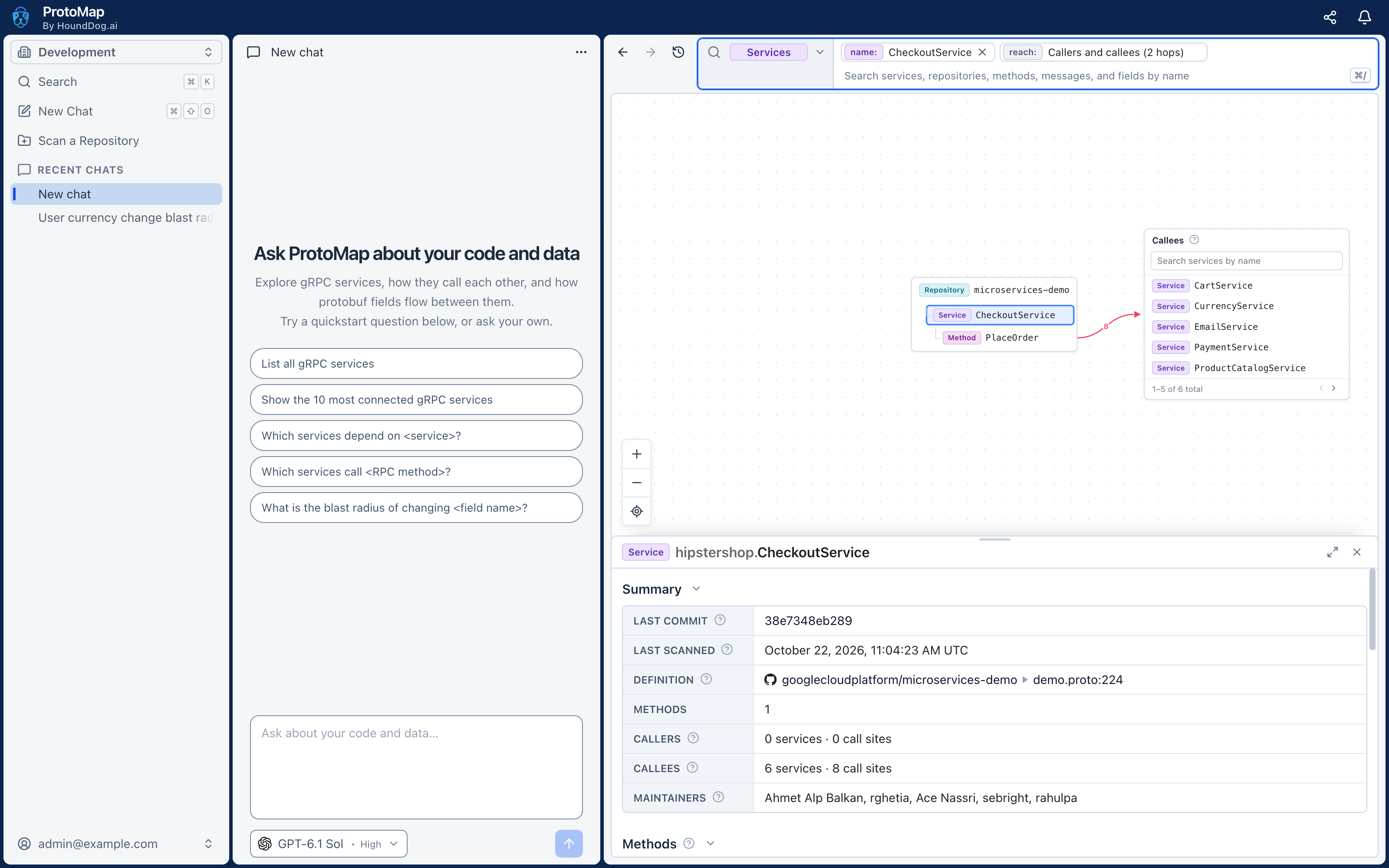
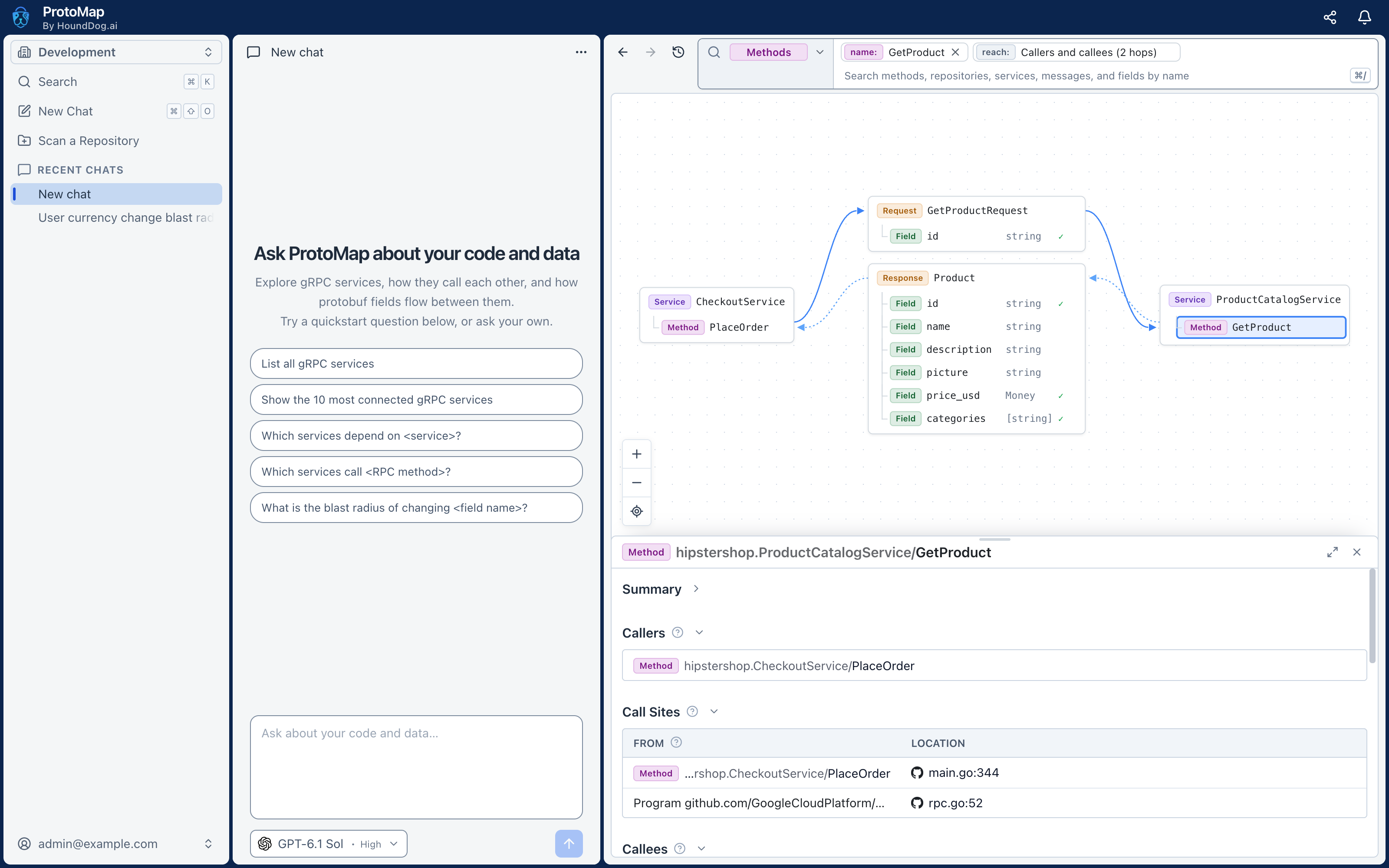
ProtoMap by HoundDog.ai maps your gRPC services: which services call which, through which methods and protobuf fields, down to every call site. Run it on your own infrastructure, explore your architecture in its platform, ask its assistant what a change would break, and give the same graph to coding agents such as Claude Code.
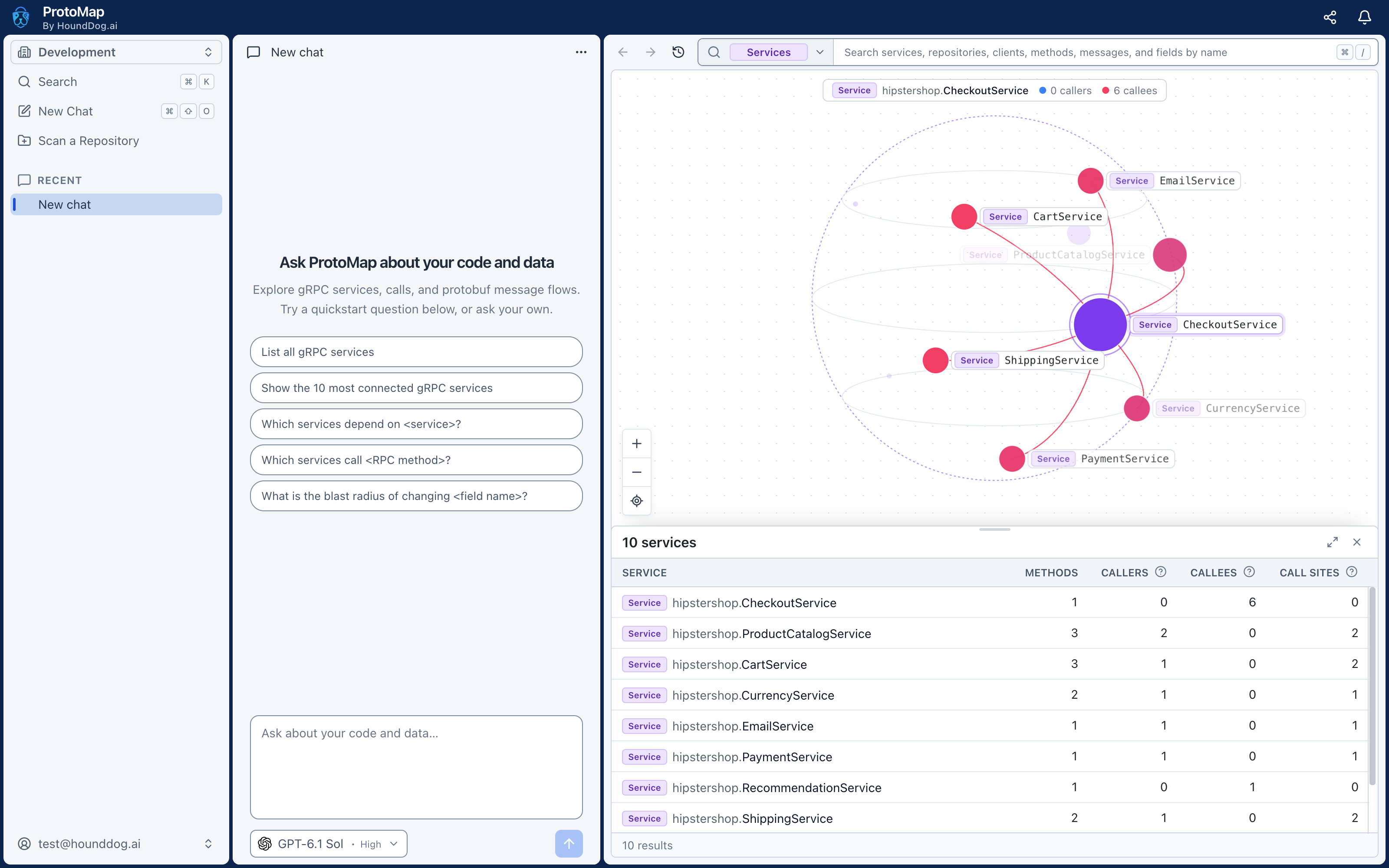
What you can do
- See your architecture. Every gRPC service defined across your repositories, in monorepos or across microservices, and how they connect, by repository, service, method, message, and field.
- Assess the blast radius of a change. Before you change a service, method, or field, see the services, consumers, and call sites it affects.
- Find every call site of an RPC. Which services call a method, in which file and function, and the call itself.
- Trace how a field flows. Follow a protobuf field through the code step by step, with the code at each step, from one service into the next.
- Ask the assistant. It answers from your scans, with file locations, and draws diagrams, using the AI provider you connect.
- Give coding agents the graph. Over MCP, with your uncommitted changes laid over the shared graph.
ProtoMap reads .proto files and the gRPC code that serves and calls them in Go, C#, Java, JavaScript, Kotlin, Python,
Rust, Swift, and TypeScript.
Install ProtoMap Server
You need Docker with Compose 2.23.1 or newer, and at least 4 GB of RAM and 20 GB of disk space.
git clone https://github.com/hounddogai/protomap
cd protomap
./server/scripts/install.sh
Open the address the installer prints, enter the setup key it shows, and create your organization and its owner. Setup
then lets you connect an AI provider for the assistant, such as Anthropic or OpenAI, with your own API key, and shows
how to install the CLI. The installer also installs the CLI on the computer it runs on. See
server/ for more.
Scan your repositories with the CLI
The ProtoMap CLI scans repositories on your computer and uploads the scans to your server. Install it on macOS or Linux:
curl -fsSL https://protomap.ai/install.sh | sh
On Windows, in PowerShell:
irm https://protomap.ai/install.ps1 | iex
The scripts install the latest release from the releases page, after
checking it against the release's SHA256SUMS. The CLI goes to ~/.local/bin on macOS and Linux, as a link into
~/.protomap, and to %LOCALAPPDATA%\protomap\bin on Windows, or %ProgramFiles%\protomap\bin for all users when
the script runs as an administrator, or to the folder PROTOMAP_INSTALL_DIR names. The scripts add the folder to your
PATH, on macOS and Linux in your shell's profile. The Linux builds are static and run on any Linux, Alpine included.
To install a given version, which then stays:
curl -fsSL https://protomap.ai/install.sh | sh -s -- --version 0.1.0
& ([scriptblock]::Create((irm https://protomap.ai/install.ps1))) -Version 0.1.0
The CLI keeps itself up to date: at most once a day, a command downloads a newer release in the background for the next
one. It does not in CI, in containers, when installed as root or by a Windows administrator into Program Files, or when
installed at a given version, which then stays, as the CLI that ProtoMap Server's installer installs at the server's
release does. Run protomap update to update by hand, protomap update --auto on or off to choose, and protomap update --rollback to go back to the version an update replaced. PROTOMAP_DISABLE_AUTOUPDATE=1 turns automatic updates
off for one command or a whole environment.
Log in to your server, then scan a repository:
protomap login --server=http://<your server>:3300
protomap scan /path/to/repository
protomap login opens the platform in your browser to approve the login, through an address on your computer that
works once: if a second browser opens it, such as one of another user of the computer, the login is refused, and you
run protomap login again. On a computer without a browser, such as a VM over SSH, or with --no-open, it prints a
code instead: open http://<your server>:3300/#/cli in a browser on any computer and enter it. Check the account it
says it logged in as. protomap logout forgets the server and revokes this computer's key on it.
Scans of a pushed commit on a repository's primary branch, with no uncommitted changes, join the graph everyone in the organization sees. Your other scans, such as of uncommitted changes or other branches, only show to you.
Connect a coding agent
Add the CLI to your coding agent as an MCP server, once for every repository. While the agent runs, the CLI scans the
repository the agent works in as files are saved, so the agent sees your changes laid over the graph. Those scans
upload to your server, as protomap scan does:
claude mcp add -s user protomap -- protomap mcp serve
To add it to one repository instead, run the command from the repository's folder without -s user.
Scan a Repository in the platform's sidebar gives the command for Codex, Gemini CLI, Copilot CLI, VS Code,
OpenCode, Amp, Droid, and Qwen Code, and the JSON for other agents, which run protomap mcp serve over standard input
and output. The agent reads the graph as you, so log in first, or use a personal API key.
Containers, CI, and other automation
Instead of logging in, set PROTOMAP_URL to your server and PROTOMAP_API_KEY to an API key from the platform's
Settings > API Keys:
export PROTOMAP_URL=http://<your server>:3300 PROTOMAP_API_KEY=<key>
protomap scan /path/to/repository
A personal key acts as you, and also serves protomap mcp serve to an agent. An organization key, which admins create
for continuous integration, scans without a user, so only scans that can join the shared graph count, and it cannot
serve an agent.
ProtoMap MCP questions
What languages does ProtoMap support?
ProtoMap supports Go, C#, Java, JavaScript, Kotlin, Python, Rust, Swift, and TypeScript.
What are the system requirements for the ProtoMap Server?
You need Docker with Compose 2.23.1 or newer, at least 4 GB of RAM, and 20 GB of disk space.
Can I use ProtoMap in a CI/CD pipeline?
Yes, administrators can create organization keys for continuous integration to scan repositories without a user.