
Pointout MCP server
Commit Nov 15, 2026Allows AI agents to receive precise visual feedback and component context by clicking elements in a running application.
Also known as Himato/pointout
- Stars
- 12
- Tools
- —
- Downloads, 30 days
- —
- Latest version
- —
- Last commit
- Nov 15, 2026
- License
- MIT
What is Pointout MCP?
Pointout allows AI agents to receive precise visual feedback and component context by clicking elements in a running application.
Summary generated from the project's README
About Pointout MCP server
Providing precise visual feedback to coding agents by clicking elements in a running application is what Pointout enables. Developers use a crosshair interface via a keyboard shortcut to select specific UI components and type instructions for changes. This process generates structured context including the component name, source file, selector, and route, which eliminates the need for manual screenshots or vague descriptions.
Users can integrate this into their workflow by installing the MCP server locally using npx. When configured with the server option enabled in the application code, Claude can directly read, fix, and resolve comments. The system provides specific packages for different environments, such as @point-out/angular for Angular applications or @point-out/core for plain web components. It is designed to work in development builds while remaining absent from production environments.
What you can do with it
- 1Fixing UI styling issuesHand an AI agent a specific instruction to change a text element into a red pill component.
- 2Updating component copyDirect an agent to adjust the tone of a button label based on a visual selection.
- 3Replacing UI elementsInstruct a coding agent to swap a simple toggle for a functional switch component.
- 4Triaging visual bugsUse a specific command to have Claude walk through all open visual comments in the application.
Written from the project's README. Every use case is checked against a quote from it.
Automated checks
Ran Nov 14, 2026Full report →Not verified yet. A server needs a score of 80, no serious finding, and enough data for us to check. How checks work · What to fix for more points

- Source repository linked and reachablehimato/pointout is public and reachablegithub.com/himato/pointout ↗Pass
- Package names this repository as its sourceNot checked
- Build provenance (Sigstore attestation)Not checked
- Open source license (OSI)MITspdx.org/licenses/MIT.html ↗Pass
- Commit or release in the last yearLast commit or release 2026-11-08github.com/himato/pointout ↗Pass
- OpenSSF ScorecardNot checked
- Package name not close to a popular packageNot checked
- No critical advisory in the package or its dependenciesNot checked
- No hidden instructions to the model0 tool descriptions and the README read; no override phrases, credential paths or hidden charactersPass
- Destructive tools are labelledNot checked
- Remote endpoint answers the MCP handshakeNot checked
README
View on GitHubPointout
Click things in your running app, say what is wrong, hand your coding agent a brief it can act on.
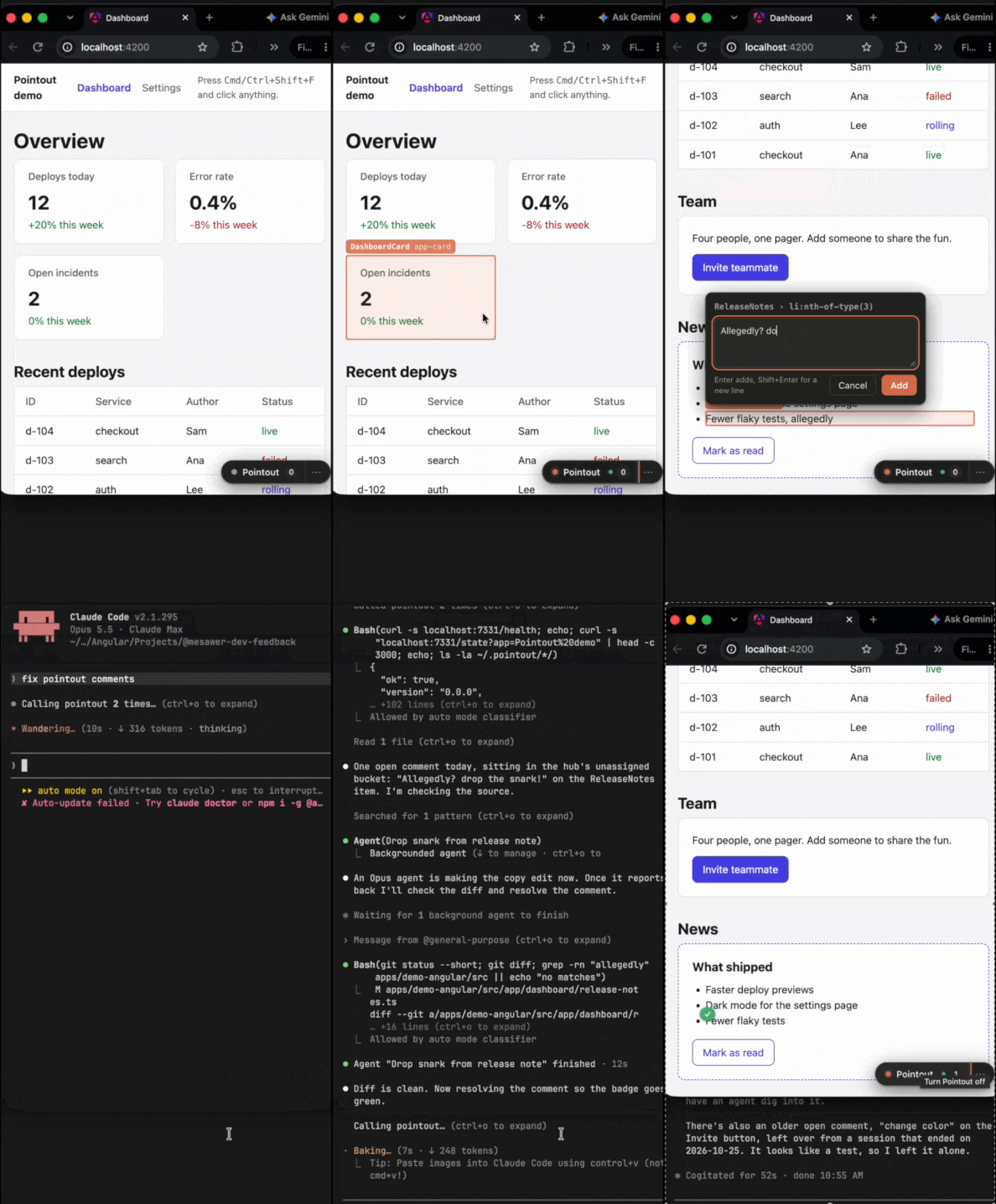
How it feels
- Hit Cmd+Shift+F. Your app grows a crosshair.
- Click the thing that bugs you.
- Type what should change. Enter.
- Copy for Claude, paste into Claude Code, sip something warm.
No screenshots with red circles. No "the button, you know, the blue one".
Install
pnpm add -D @point-out/core @point-out/angular
Angular in one line
In app.config.ts:
import { providePointout } from '@point-out/angular/providers';

export const appConfig: ApplicationConfig = {
  providers: [provideRouter(routes), providePointout({ appName: 'My app' })],
};
Dev builds get Pointout. Production builds do not. No markup changes, no decorators. Older Angular, or no Angular at all? The package READMEs have you covered.
The shortcut
Cmd+Shift+F on macOS, Ctrl+Shift+F everywhere else. Or click the pill in the bottom right corner.
What Claude gets
Straight from the demo app, trimmed:
Pointout on Pointout demo — 2026-10-23T06:08:28.001Z
5 items, viewport 1280×813, dark

1. [DashboardCard (src/app/dashboard/dashboard-card.ts) › .value] on / — "12"
   Make the number bigger
2. [Dashboard (src/app/dashboard/dashboard.ts) › .failed] on / — "failed"
   Failed should be a red pill, not just red text
4. [ReleaseNotes (src/app/dashboard/release-notes.ts) › button] on / — "Mark as read"
   Copy feels smug, tone it down
5. [Settings (src/app/settings/settings.ts) › [data-testid="theme-toggle"]] on /settings — "Switch to light"
   Use a real switch here

Resolve each item in the component named; the selector is relative to that component. Ask before changing anything outside those components.

```json
{ "appName": "Pointout demo", "comments": [ ... ] }
```
Component, source file, selector, route, your words. The JSON adds inputs, parent chain, bounding box and a DOM fallback owner.
Talk to Claude directly
Copy and paste works. Skipping it is nicer.
- Install the MCP once.
- Add
server: trueto Pointout. - Comment in your app like always.
- Ask Claude to check Pointout. It reads, fixes, replies and resolves. Badges turn green.
For every project on your machine:
claude mcp add --scope user pointout -- npx -y @point-out/mcp
Or for one project, in .mcp.json:
{
  "mcpServers": {
    "pointout": { "command": "npx", "args": ["-y", "@point-out/mcp"] }
  }
}
Then in app.config.ts:
providePointout({ appName: 'My app', server: true });
Each Claude chat gets its own session. Several open? The pill asks which one hears you.
No MCP, no hub? Copy for Claude still works, no strings attached.
The prompt /mcp__pointout__triage walks Claude through every open comment.
Packages
| Package | What it does |
|---|---|
@point-out/core |
The whole UI. Plain web component, zero deps, any framework. |
@point-out/angular |
Names the Angular component behind every click. Angular 2+. |
@point-out/mcp |
Local hub and MCP server. Claude reads, replies, resolves. |
@point-out/react, @point-out/vue, yours |
React and Vue adapters welcome. |
Write an adapter
An adapter is one function. Give it an element, get back the component that owns it, or null.
import { mountPointout, type OwnerResolver } from '@point-out/core';

const myResolver: OwnerResolver = (el) => {
  const name = findComponentName(el); // your framework's dev hooks
  return name ? { framework: 'mine', component: name, chain: [] } : null;
};

mountPointout({ appName: 'My app', resolveOwner: myResolver });
Never throw, and say null when unsure.
docs/adapters.md has the full contract and a React sketch.
Develop
git clone https://github.com/Himato/pointout.git
cd pointout
corepack enable
pnpm install
pnpm build
pnpm test
pnpm --filter demo-angular start
Then open http://localhost:4200 and start pointing.
Release
See CONTRIBUTING.md. Changesets do the boring part.
Credits
Built with Claude Code.
MIT licensed.
Pointout MCP questions
Can I use Pointout without the MCP server?
Yes, you can use the 'Copy for Claude' feature to manually paste component and selector details into your AI chat.
What information is sent to the AI agent?
The agent receives the component name, source file, selector, route, user comments, and additional JSON data including bounding boxes and DOM fallbacks.