
Heym MCP server
Commit Nov 15, 2026Build, orchestrate, and observe agentic systems using a self-hosted runtime that supports visual workflow composition and human-in-the-loop control.
Also known as heymrun/heym
- Stars
- 1,669
- Tools
- —
- Downloads, 30 days
- —
- Latest version
- —
- Last commit
- Nov 15, 2026
- License
- —
What is Heym MCP?
Heym is an MCP server. Build, orchestrate, and observe agentic systems using a self-hosted runtime that supports visual workflow composition and human-in-the-loop control.
Summary generated from the project's README
About Heym MCP server
Building and managing agentic systems on your own infrastructure is what Heym enables through its self-hosted runtime. Developers can visually compose agents and deterministic workflows on a canvas or use an AI Assistant to generate them from text. The platform coordinates complex tasks by managing sub-agents, parallel execution branches, and data flows between models, tools, and internal systems.
Users can connect various resources including MCP servers, HTTP APIs, and databases like PostgreSQL with pgvector for RAG. The system provides deep visibility into execution through live traces, model costs, and OpenTelemetry exports. It also incorporates human-in-the-loop controls, allowing users to pause execution at checkpoints for manual approval or edits before resuming from a saved state. This makes it suitable for teams needing to observe, evaluate, and control autonomous workflows while maintaining security through encrypted credentials and OIDC SSO.
What you can do with it
- 1Automate complex multi-agent tasksAn orchestrator can trigger multiple sub-agents to perform different tasks at the same time and combine their results.
- 2Maintain human oversight of AIYou can set up checkpoints that pause an agent so a person can review or edit the work before it continues.
- 3Monitor operational costs and performanceDevelopers can track how much money is being spent on different models and monitor latency or error rates.
- 4Integrate existing tool ecosystemsConnect your agentic workflows to external tools and services using the Model Context Protocol.
Written from the project's README. Every use case is checked against a quote from it.
Configuration
ENCRYPTION_KEYSECRET_KEY
| Name | Description | |
|---|---|---|
| ENCRYPTION_KEY | — | |
| SECRET_KEY | — |
Automated checks
Ran Nov 12, 2026Full report →Not verified yet. A server needs a score of 80, no serious finding, and enough data for us to check. How checks work · What to fix for more points

- Source repository linked and reachablePass
- Open source license (OSI)No licenseFinding
- Commit or release in the last yearPass
- Package name not close to a popular packageNot checked
- Remote endpoint uses HTTPSNot checked
- Destructive tools are labelledNot checked
- No hidden instructions to the modelPass
- No critical advisory in the package or its dependenciesNot checked
README
View on GitHubHeym
Build agentic systems. Run them with confidence.









What Is Heym?
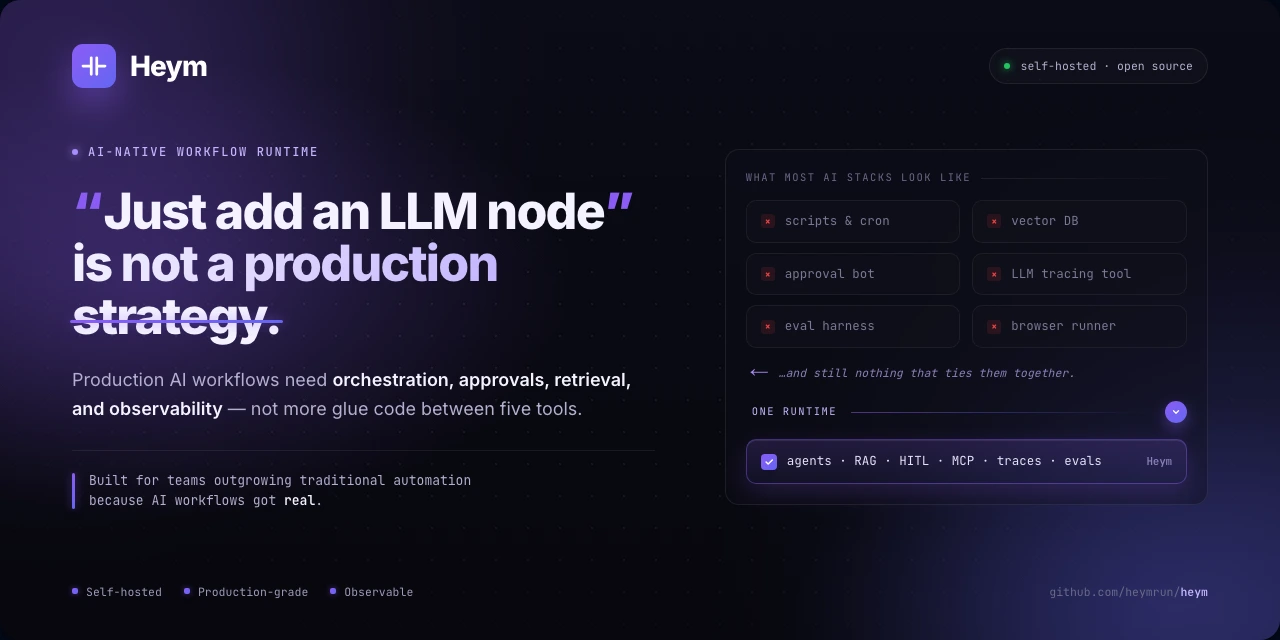
In Heym, a workflow defines how agents, deterministic steps, tools, and data work together. The runtime executes that graph, coordinates dependent and parallel work, records execution history, and supports human review checkpoints.
The canvas is one interface into Heym. It is not Heym itself. Use it to build, inspect, debug, and understand systems running on the runtime. Those same workflows also run through APIs, schedules, event triggers, MCP clients, and Portal conversations.
Explore the product site at heym.run.
One Runtime for the Agent Lifecycle
Build → Orchestrate → Run → Observe → Evaluate → Control → Expose
These are connected parts of operating an agentic system in Heym.
| Stage | What you do in Heym |
|---|---|
| Build | Compose agents and deterministic workflows visually, generate them with AI, or start from reusable templates and skills. |
| Orchestrate | Coordinate agents, sub-agents, sub-workflows, and tools with explicit data flow, branching, and parallel execution where dependencies allow. |
| Run | Execute from APIs, schedules, event triggers, or interactive interfaces, with configurable retries, error paths, and browser automation. |
| Observe | Inspect execution history, live state, traces, tool calls, tokens, latency, errors, and model costs. Review analytics and alerts, and export OpenTelemetry traces. |
| Evaluate | Test prompts and model responses against expected outputs, compare results across models, and inspect saved evaluation runs. |
| Control | Pause Agent execution at review checkpoints and resume from saved state after a human decision. Configure guardrails, credentials, authentication, and team access. |
| Expose | Serve workflows through REST, SSE streaming, MCP tools, and Portal chat interfaces, or connect their results to in-app dashboard widgets. |
Use observations and evaluation results to refine prompts, tools, and workflow logic, then run and inspect the next iteration.
🗺️ Platform Overview
The workflow definition connects the build experience to execution. The runtime uses that definition to coordinate nodes and tools, while execution state feeds the interfaces people use to inspect, review, and consume the results.
| Part of the system | How it fits |
|---|---|
| Build and inspect | The canvas, AI Assistant, templates, and Expression DSL create and edit workflow definitions. The same canvas can attach to an active execution for inspection. |
| Orchestrate and execute | The executor coordinates agents, deterministic nodes, sub-workflows, parallel branches, retries, and review checkpoints. |
| Connect tools and data | Nodes and agent tools reach models, HTTP APIs, MCP servers, internal knowledge, persistent memory, databases, queues, and files. |
| Operate and improve | History, traces, costs, analytics, alerts, logs, and OpenTelemetry reveal runtime behavior. Evals support prompt and model iteration; access controls and human review shape how systems run. |
| Serve people and applications | REST and SSE endpoints, MCP tools, Portal conversations, Board jobs, and workflow-backed dashboards provide ways to invoke systems and use their results. |
✨ Key Capabilities
Build: Agents, Workflows, and Connected Tools
- Visual and AI-assisted authoring. Build and inspect workflow graphs on the canvas, generate or revise them through the AI Assistant using text or voice, and reuse templates.
- Agents and deterministic logic. Combine LLM and Agent nodes with conditions, switches, loops, merges, data transformations, and sub-workflow calls. Use expressions in supported node fields.
- Multi-agent orchestration. Give an orchestrator named sub-agents and sub-workflows to call. Independent sub-agent calls can execute concurrently.
- Knowledge and persistent memory. Retrieve documents through RAG using Qdrant or PostgreSQL with pgvector. Enable per-agent knowledge graphs to retain facts across runs, with configurable sharing between agents.
- Tools and integrations. Connect communication services, developer tools, productivity apps, databases, queues, and storage through built-in nodes, HTTP APIs, and MCP. Use MCP Call nodes for deterministic tool invocation.
- Skills and custom behavior. Attach reusable
SKILL.mdinstructions and optional Python tools to agents, create or revise skills with AI, install plugins, or implement custom nodes with typed configuration and execution handlers.
Run: Execute and Coordinate Work
- Parallel execution and recovery. Run independent nodes concurrently, synchronize branches with Merge, and configure retries, backoff, error paths, and model fallback.
- Schedules and triggers. Start workflows through cron, webhooks, messaging integrations, inbox events, WebSocket messages, and Heym platform events.
- Browser and coding agents. Automate browser tasks with Playwright and AI-assisted selector recovery. Run Codex or OpenCode Go against a repository as workflow steps, with diff and pull-request outputs.
- Agentic Kanban Board. Cards are persistent agentic jobs. Moving a card into a column runs its ordered workflow chain with card content, comments, history, and previous outputs, then writes results back to the card.
- Load distribution. Share eligible background runs across Heym instances through PostgreSQL, with execution weights configured in Settings → Instances.
Observe: Understand Execution and Cost
- History and live execution. Open a production run from History or a Board card, inspect its saved state, and follow live node progress, Debug logs, and final output.
- Traces and model costs. Inspect model requests, responses, tool calls, input/output tokens, latency, and errors. Calculate USD costs with maintained model pricing and custom overrides, and explore historical spending by model and time range.
- Analytics, logs, and alerts. Track execution volume, success rates, and duration; review logs; set alerts for errors, duration, token or USD spend, and run count. Export workflow, node, and Agent tool spans through OpenTelemetry.
Evaluate & Control: Improve Behavior and Keep Humans Involved
- Evals and analysis. Run repeatable prompt evaluations across models, compare expected and actual outputs, and review historical results. The Workflow Analyzer uses execution context to create a shared, editable Markdown report on purpose, step behavior, and improvement areas.
- Human review. Agent checkpoints pause execution for acceptance, edits, or refusal, then continue from a saved execution snapshot. A review branch can notify people through existing integrations.
- Security and access. Configure input guardrails, encrypted credentials, team sharing, execution tokens, and workflow authentication. Sign in with JWT authentication or OIDC SSO through providers such as Keycloak, Okta, Entra ID, Auth0, and Google.
Expose: Put Systems to Work
- REST, SSE, and MCP. Invoke workflows from applications, stream execution events, or publish workflows as tools for MCP clients.
- Portal and Chat. Publish workflow-backed chat interfaces with streaming, uploads, and conversation history. Use the Chat tab to call workflows and work with models and platform data.
- Dashboards, data, and files. Build custom dashboard widgets backed by workflows, manage structured Data Tables, and keep generated files in Heym Drive with team sharing and share links.
🎬 Product Tour
One e-commerce sales campaign, followed end to end: workflow generation with the AI Assistant, human review, board execution, structured data, dashboards, traces, RAG, MCP, analytics, and team collaboration.
Product Demos
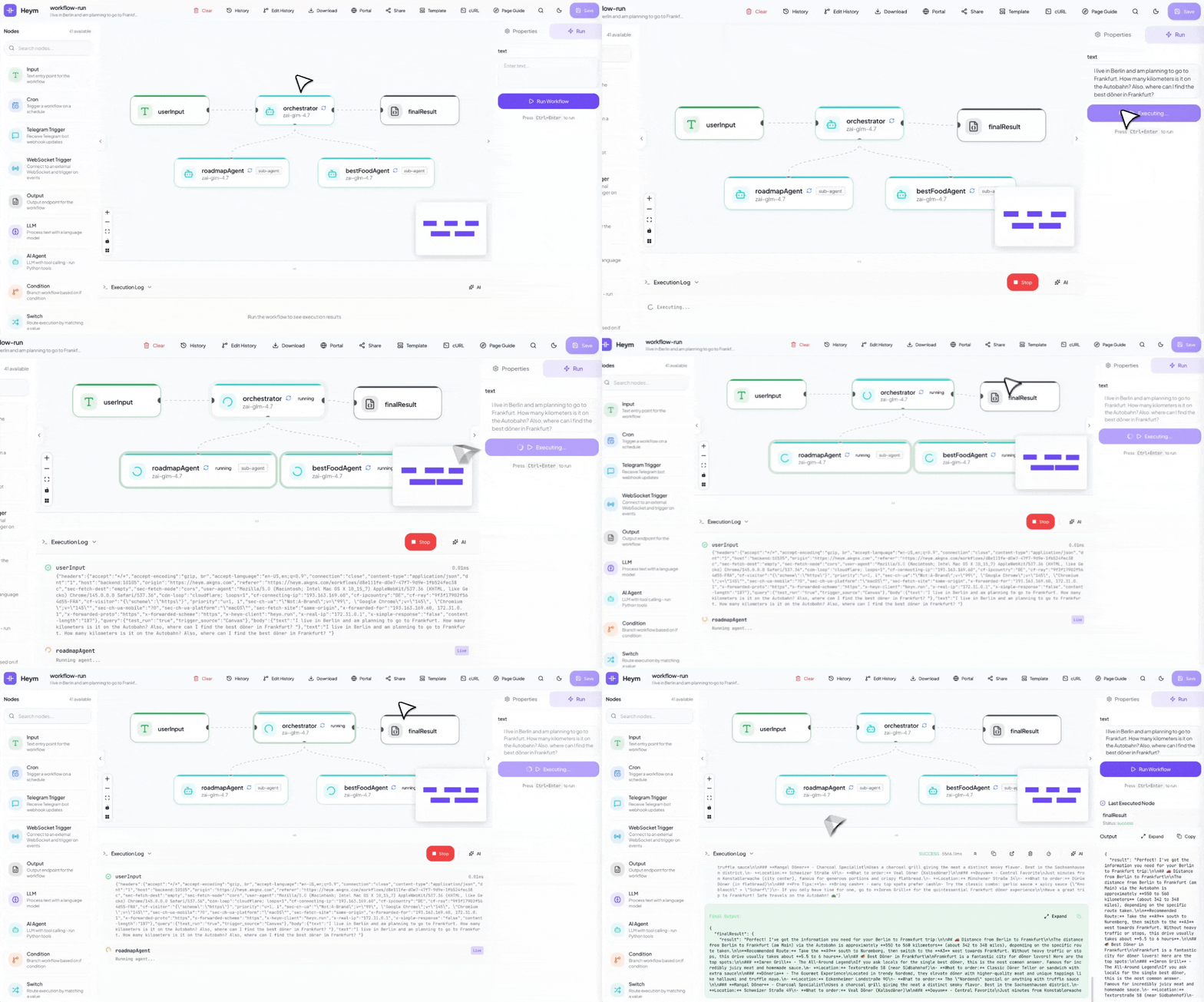
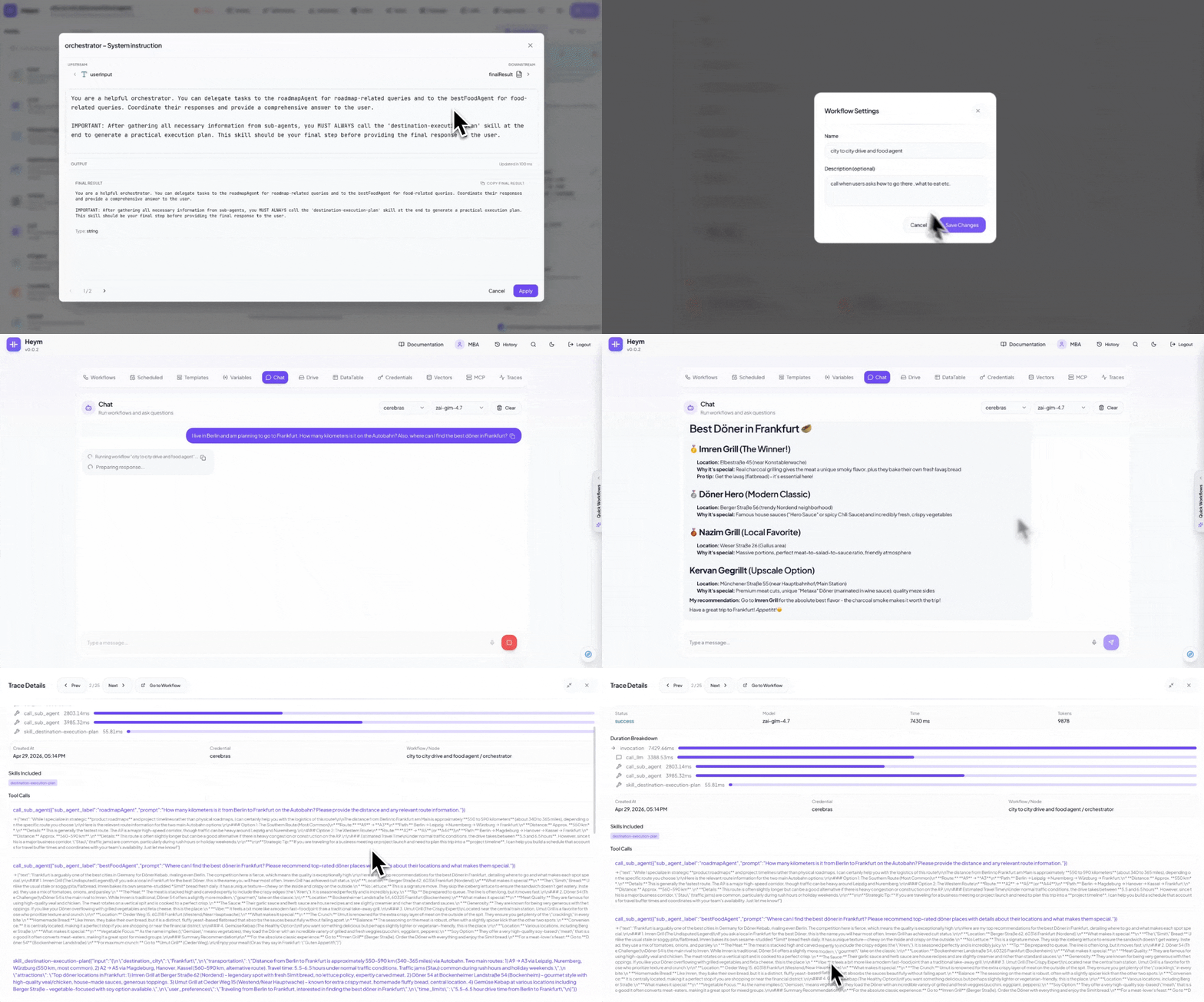
The demos follow an orchestrator and sub-agent system from creation to a chat interface. For a request such as “How do I get from Berlin to Frankfurt?” and “What should I eat there?”, the orchestrator can call independent sub-agents in the same turn, run those tasks concurrently, and combine their results.
Generate Workflows from Natural Language
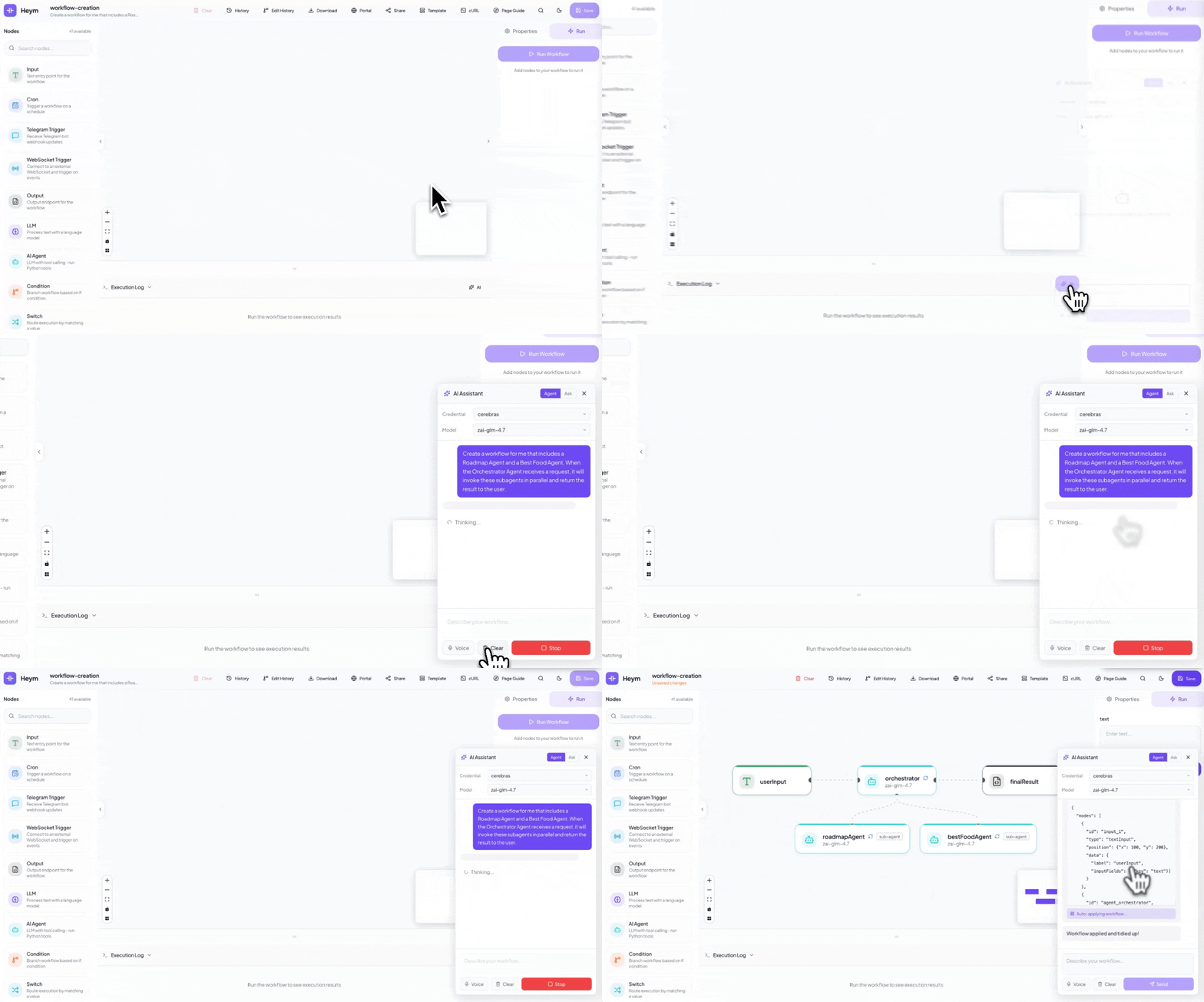
Describe the agents, orchestration pattern, and user-facing result you want; Heym builds the workflow on the canvas.
Example prompt
Create a workflow for me that includes a Roadmap Agent and a Best Food Agent. When the Orchestrator Agent receives a request, it will invoke these subagents in parallel and return the result to the user.
Run and Inspect a System
Start a runtime execution from the canvas and inspect each step as results move through the graph. APIs, schedules, triggers, and MCP can invoke the same workflow.
Create Skills for Agents
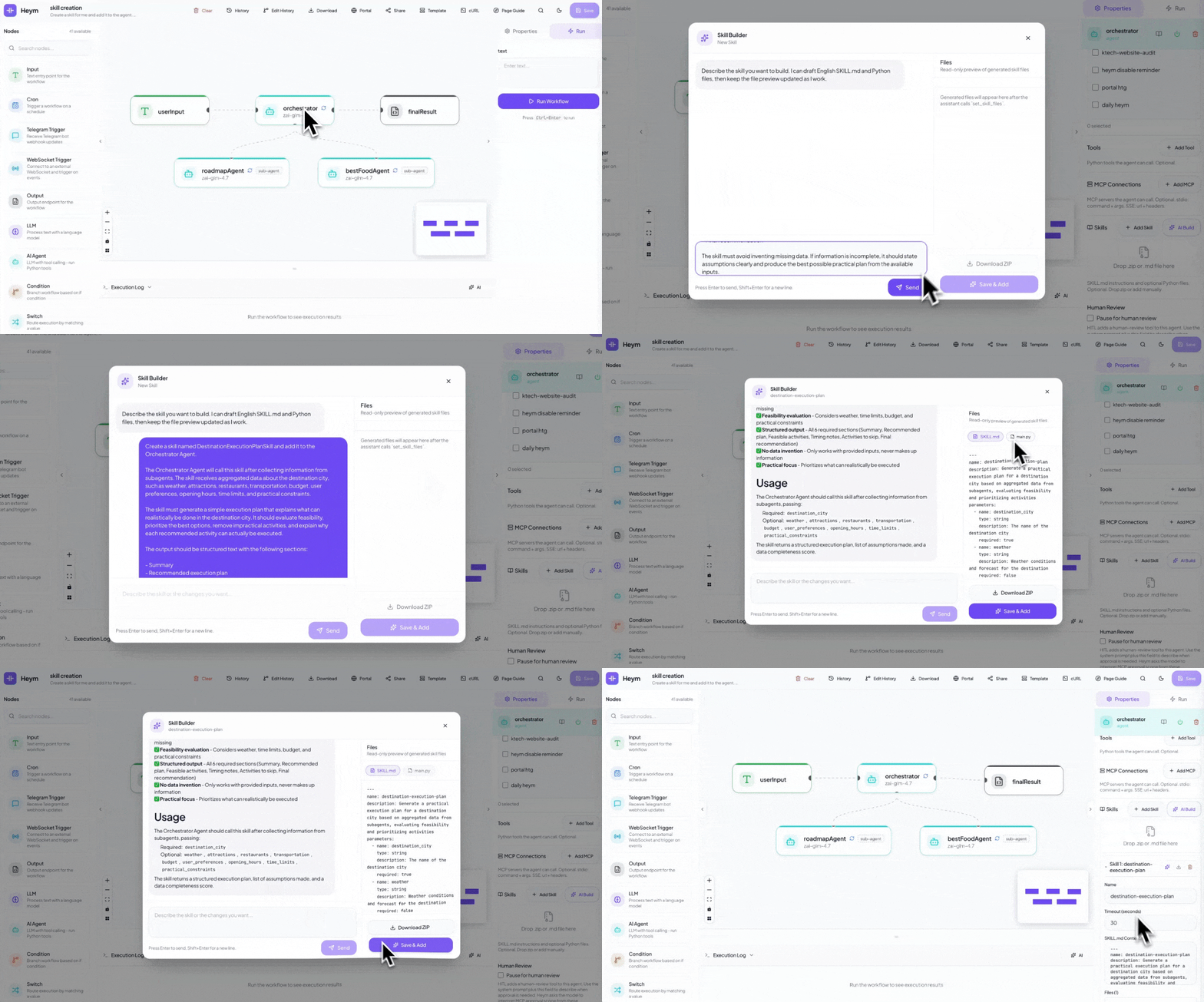
Create agent skills from natural language, preview the generated SKILL.md, and attach them to the agent.
Example prompt
Create a skill for me and add it to the agent. The Orchestrator Agent will call this skill after receiving information from the subagents, and the skill will create a simple execution plan explaining what can actually be done in the destination city.
Call Workflows from Chat
Turn a workflow into a chat experience so users can invoke the orchestration with a natural request.
Example prompt
I live in Berlin and am planning to go to Frankfurt. How many kilometers is it on the Autobahn? Also, where can I find the best doner in Frankfurt?
📸 Screenshots
Watch Heym Tutorials
🚀 Quick Start
Prefer to watch it first? Set Up Heym Locally in Under 2 Minutes walks the whole path: clone the repository, start PostgreSQL and create your account on a local instance.
git clone https://github.com/heymrun/heym.git
cd heym
./run.sh

# OR: with .env file (run.sh auto-generates SECRET_KEY and ENCRYPTION_KEY)
git clone https://github.com/heymrun/heym.git
cd heym
cp .env.example .env
./run.sh
Open http://localhost:4017 to create your account and start building. run.sh starts PostgreSQL, the backend, and the frontend, and generates SECRET_KEY and ENCRYPTION_KEY when needed.
Prerequisites: Bun, Python 3.11+, UV, and Docker. For containers, use the deployment options below. See ENVIRONMENT-VARIABLES.md for every setting and its default.
Deployment
Heym runs on your infrastructure with PostgreSQL as its core database. The standard Compose setup includes PostgreSQL, the backend, and the frontend, with local volumes for persistent files. RabbitMQ and Redis are integrations you connect when a workflow needs them. RAG can use the built-in PostgreSQL/pgvector backend or an external Qdrant server; S3 is available through its integration node.
Docker Compose
Use Docker Compose and Python 3 for production deployment:
cp .env.example .env
./deploy.sh              # Build and deploy (auto-generates keys if empty)
./deploy.sh --down       # Stop services
./deploy.sh --logs       # View logs
./deploy.sh --restart    # Restart services
Register your admin account first, then set
ALLOW_REGISTER=falsein.envand restart to close registration in production.
Prebuilt Docker Image
The release image bundles the frontend and backend. The examples below connect it to an existing PostgreSQL database on the host; set DATABASE_URL to your database address and credentials. On Linux, add --add-host=host.docker.internal:host-gateway when using that hostname.
# Docker with .env file
git clone https://github.com/heymrun/heym.git
cd heym
cp .env.example .env
# Generate required keys and write them into the placeholder lines copied from
# .env.example (replace in place: appending with >> would create duplicate entries):
SECRET_KEY=$(python3 -c "import secrets; print(secrets.token_urlsafe(32))")
ENCRYPTION_KEY=$(python3 -c "import secrets; print(secrets.token_hex(32))")
sed -i.bak "s|^SECRET_KEY=.*|SECRET_KEY=${SECRET_KEY}|; s|^ENCRYPTION_KEY=.*|ENCRYPTION_KEY=${ENCRYPTION_KEY}|" .env && rm -f .env.bak
docker run --env-file .env \
  -e DATABASE_URL=postgresql+asyncpg://postgres:postgres@host.docker.internal:6543/heym \
  -p 4017:4017 \
  --shm-size 2g \
  -e FILE_STORAGE_DIR=/app/data/files \
  -e HEYM_PLUGINS_DIR=/app/data/plugins \
  -v /var/run/docker.sock:/var/run/docker.sock \
  -v "$(pwd)/data/files:/app/data/files" \
  -v "$(pwd)/data/plugins:/app/data/plugins" \
  -v heym-codex-workspaces:/app/data/codex-workspaces \
  -v heym-opencode-workspaces:/app/data/opencode-workspaces \
  ghcr.io/heymrun/heym:latest

# OR: minimal, no .env file
docker run \
  -e ENCRYPTION_KEY=$(python3 -c "import secrets; print(secrets.token_hex(32))") \
  -e SECRET_KEY=$(python3 -c "import secrets; print(secrets.token_hex(32))") \
  -e DATABASE_URL=postgresql+asyncpg://postgres:postgres@host.docker.internal:6543/heym \
  -e FILE_STORAGE_DIR=/app/data/files \
  -e HEYM_PLUGINS_DIR=/app/data/plugins \
  -p 4017:4017 \
  --shm-size 2g \
  -v /var/run/docker.sock:/var/run/docker.sock \
  -v "$(pwd)/data/files:/app/data/files" \
  -v "$(pwd)/data/plugins:/app/data/plugins" \
  -v heym-codex-workspaces:/app/data/codex-workspaces \
  -v heym-opencode-workspaces:/app/data/opencode-workspaces \
  ghcr.io/heymrun/heym:latest
The mounts and runtime settings support these capabilities:
- Playwright:
--shm-size 2ggives Chromium room for browser tasks. Step-based Playwright runs inside the Heym container; customplaywrightCodeuses a sibling container with its own shared-memory setting. Compose configures this for you. - Heym Drive:
FILE_STORAGE_DIR=/app/data/filespoints file storage at the mounted directory, keeping uploads and generated files across container restarts. - Plugins:
HEYM_PLUGINS_DIR=/app/data/pluginsand its mount preserve installed plugin packages. - Skills and Codex: the
heym-codex-workspacesvolume connects the runtime to its hardened sibling containers. Per-run isolation uses Docker Engine 25.0+. - OpenCode Go: the
heym-opencode-workspacesvolume preserves the workspace shared with its sibling runner. - Docker access: the socket supports sandbox containers and MCP
stdioexecution. It grants broad host control, so restrict access to your deployment. Docker log access is configured separately withDOCKER_LOGS_ENABLEDandDOCKER_LOGS_ALLOWED_EMAILS; create allow-listed accounts before opening registration.
Multi-Instance Execution
Connect additional Heym instances to the same PostgreSQL database to distribute eligible background workflow runs. Configure their shares from Settings → Instances. PostgreSQL carries the queue and coordination, so the cluster needs no separate message broker or direct instance-to-instance connection.
The main instance serves the UI, API, MCP, and Portal and owns local files and installed plugins. Workers execute eligible queued runs; workflows that depend on main's local storage or workspaces run there. The Load Distribution guide covers placement, shared keys, database sizing, ingress, and upgrades, with cluster and worker Compose examples.
Heym is in its pre-1.0 release series. Follow the version badge and releases for updates. The deployment guide and security policy provide the operational setup reference.
For on-call response, use the Incident Playbook (L0) for triage and the Runbook (L1) for diagnosis, database checks, service restarts, capacity issues, and recovery procedures.
Extending Heym
Connect Heym to the systems your team already uses. Choose built-in integrations, HTTP APIs, MCP, reusable skills, plugins, or custom nodes to bring tools and data into the runtime.
| Extension path | Best for | How it works |
|---|---|---|
| HTTP APIs | APIs and internal services | Configure requests, headers, authentication, and expressions with the HTTP node. |
| Plugins | Installable node types and triggers | Add operator-installed packages with runtime handlers and editor schemas. See Plugin Authoring. |
| Custom nodes | Product-grade workflow steps and integrations | Add a typed node with editor configuration, execution behavior, and schema metadata. |
| Agent skills | Portable agent abilities | Attach a SKILL.md file and optional Python tools to Agent nodes, or generate them with AI Build. |
| MCP | External tools and AI clients | Agent nodes consume MCP servers, and Heym workflows can be exposed as MCP tools. |
| Workflow as tool | Reusable automations | Call workflows through REST, SSE, Portal chat, or MCP without duplicating the logic. |
Heym MCP questions
Can I host Heym on my own infrastructure?
Yes, Heym is a self-hosted runtime and platform that you can deploy on your own infrastructure.
Does Heym support human intervention in agent workflows?
Yes, it includes human review checkpoints that allow you to pause execution for acceptance, edits, or refusal.
Can Heym automate web browser tasks?
Yes, it can automate browser tasks using Playwright with AI-assisted selector recovery.