
toolkit-map MCP server
Commit Nov 13, 2026Helps AI coding assistants identify correct local tool versions and absolute paths based on project requirements and installed copies.
Also known as haxsd/toolkit-map
- Stars
- 111
- Tools
- —
- Downloads, 30 days
- —
- Latest version
- —
- Last commit
- Nov 13, 2026
- License
- MIT
What is toolkit-map MCP?
toolkit-map helps AI coding assistants identify correct local tool versions and absolute paths based on project requirements and installed copies.
Summary generated from the project's README
About toolkit-map MCP server
Helping AI coding assistants identify the correct local tool versions and absolute paths is what toolkit-map does for developers working on complex projects. It prevents common errors where an agent might use a version of Node, Python, or Git from the system PATH that does not match the specific requirements of a project. By reading configuration files like mise.toml, .nvmrc, or Node engines, the server determines exactly which version is needed and scans the local machine to find a verified copy.
This MCP server runs locally on Windows using PowerShell and requires Node.js 18 or higher for MCP integration. It operates primarily through read-only queries using the find command to return a path, version, and verification status. While it can suggest updates through a setup process, it does not automatically install tools, modify the system PATH, or change global execution policies. This ensures that the AI assistant always works with the specific, verified absolute paths required by the current project environment.
Written from the project's README. Every use case is checked against a quote from it.
Automated checks
Ran Nov 14, 2026Full report →Not verified yet. A server needs a score of 80, no serious finding, and enough data for us to check. How checks work · What to fix for more points

- Source repository linked and reachablehaxsd/toolkit-map is public and reachablegithub.com/haxsd/toolkit-map ↗Pass
- Package names this repository as its sourceNot checked
- Build provenance (Sigstore attestation)Not checked
- Open source license (OSI)MITspdx.org/licenses/MIT.html ↗Pass
- Commit or release in the last yearLast commit or release 2026-11-13github.com/haxsd/toolkit-map ↗Pass
- OpenSSF ScorecardNot checked
- Package name not close to a popular packageNot checked
- No critical advisory in the package or its dependenciesNot checked
- No hidden instructions to the model0 tool descriptions and the README read; no override phrases, credential paths or hidden charactersPass
- Destructive tools are labelledNot checked
- Remote endpoint answers the MCP handshakeNot checked
README
View on GitHubtoolkit-map
让 AI 编程助手先查工具、再动手:发现本机已装副本,按项目要求选对版本,只返回可验证的绝对路径。



简体中文 · English · 快速开始 · 参考手册 · agent 接入 · 更新记录
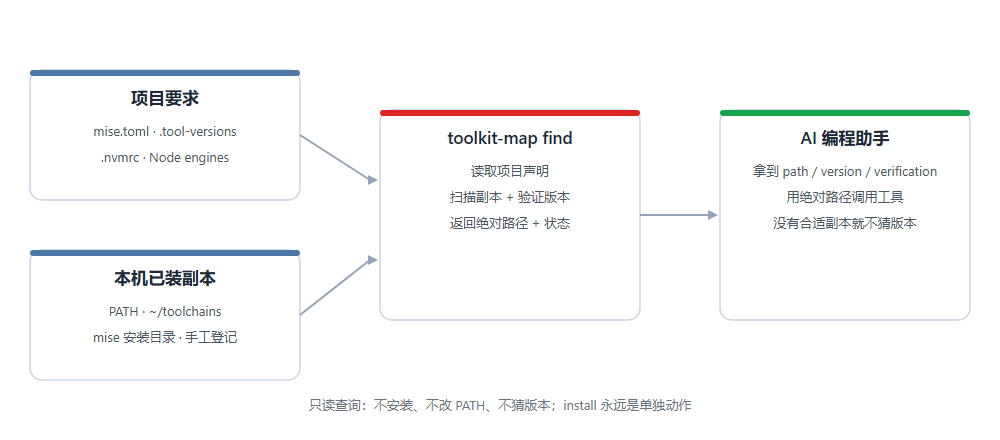
解决的问题
AI 编程助手执行 node、python、git 时通常直接走 PATH:PATH 上是 Node 16,项目声明要求 Node 22;机器上装着多份副本,agent 不知道选哪个;node --version 只说明 PATH 解析到谁,不说明这个项目需要谁。
toolkit-map 在调用前回答三件事:
- 项目要求什么版本? 读取
mise.toml、.tool-versions、.nvmrc、Nodeengines等常见声明; - 本机有哪些已验证的副本? 扫描 PATH、统一仓库、mise 安装目录和手工登记的位置;
- 这次该用哪个绝对路径? 返回
path、version、verification和requirement。
查询严格只读,不安装、不改 PATH、不猜版本。 地图维护(scan / update / add)是单独动作;setup 默认预授权 agent 在 find 返回维护建议时自动执行定向 update <tool>,未执行 setup 时不预授权;scan / add / install 仍需用户确认。没有满足要求的副本时返回 version_mismatch,不降级;声明无法解释时返回 requirement_unsupported,交给版本管理器或人处理。与其他工具的区别和返回示例见参考手册。
快速开始
要求:Windows + Windows PowerShell 5.1 或 PowerShell 7 + Git。想用 MCP 接入时另需 Node.js 18+;地图本身不依赖 Node。
一次完成下载、项目接入并写入项目级 MCP 配置:
$project = (Get-Location).Path
$d = Join-Path $env:USERPROFILE 'Projects\toolkit-map'
git clone --branch v2.1.0 --depth 1 https://github.com/haxsd/toolkit-map $d
if ($LASTEXITCODE -ne 0) { throw '下载未完成。已有安装请按升级指南处理,不要覆盖。' }
$ps = (Get-Process -Id $PID).Path
& $ps -NoProfile -ExecutionPolicy Bypass -File "$d\scripts\quickstart.ps1" -Project $project -Mcp -WriteMcp
看退出码:0 全部完成;2 部分完成(规则已接入,MCP 未写成,例如没有 Node 18+ 或启动检查失败);1 项目接入失败。-ExecutionPolicy Bypass 只作用于该子进程,不修改用户或机器策略;组织策略拒绝时按组织流程申请,不要改注册表或组策略。
手动完成同样的步骤:
$project = (Get-Location).Path
$installDir = Join-Path $env:USERPROFILE 'Projects\toolkit-map'
git clone --branch v2.1.0 --depth 1 https://github.com/haxsd/toolkit-map $installDir
$map = Join-Path $installDir 'scripts\map.ps1'
$ps = (Get-Process -Id $PID).Path
function toolkit { & $ps -NoProfile -ExecutionPolicy Bypass -File $map @args }
toolkit setup -Project $project -WhatIf -Json   # 预览
toolkit setup -Project $project                 # 建图并把规则写入 AGENTS.md
toolkit doctor -Project $project -Json          # 只读诊断
toolkit find git -Project $project              # 只读查询
已有安装见升级步骤;没有 Git 或希望下载 ZIP 时走 ZIP 接入。MCP 客户端可以直接调用地图工具,配置、协议与验收见 MCP 接入;规则位置、模板与生效验收见 agent 接入。
安全边界
- 查询只读:
status/find/doctor不安装工具、不改 PATH、不写配置;find不执行新候选、不写地图。 - 维护与安装是显式动作:
scan/update/add会写地图并可能探测本机候选程序;install需要单独调用,建议先-WhatIf。MCP 维护默认只预览,confirm:true只是执行请求,仍需用户授权。 - 不动已有环境:不迁移已有工具、不改 PATH、不改全局执行策略,也不碰凭据。
- 团队仓库:接入规则和 MCP 配置含本机绝对路径,不要提交到共享仓库;每位成员本地生成。
- 本机地图、工具、缓存和凭据不进入发布包;完整边界见安全策略。
文档
参考手册 · 契约冻结 · MCP 接入 · 2 分钟演示 · agent 接入 · 平台说明 · 存储与大工具安装 · 故障排查 · 撤销与卸载 · 开发与贡献 · 安全策略 · 更新记录
常见问题
- 没有项目声明时会选最新版吗? 不会。顺序是
-Version> 项目声明 > 父目录/全局声明 > 系统默认;PATH 上是 Node 16 就返回 16,要特定版本请写声明或传-Version。 - 会搬走工具或改 PATH 吗? 不会;已有副本留在原处,
install是单独的明确操作。 - 必须用 mise 吗? 不用;没有 mise 也能发现、登记和查询,需要完整管理器环境时再用。
- 能撤销吗? 可以移除接入规则、MCP 配置与技能链接,保留已有工具,见撤销与卸载。
贡献与许可
欢迎 Issue 和 PR:先看开发与贡献,Bug 与功能建议请用 Issue 模板,尽量附上复现步骤与 doctor -Bundle -Json 输出(粘贴前隐去路径中的用户名)。
源码、协议、通用示例与配方使用 MIT 许可。
toolkit-map MCP questions
Does it install tools or change my PATH?
No, queries are strictly read-only and do not install tools, modify PATH, or change global execution policies.