
Capsule MCP server
Commit Nov 1, 2026Reduces model token usage through exact-recoverable context compression for terminal, file, project, web, and memory data.
Also known as hakiyaka/capsule
- Stars
- 4
- Tools
- —
- Downloads, 30 days
- —
- Latest version
- —
- Last commit
- Nov 1, 2026
- License
- MIT
What is Capsule MCP?
Capsule reduces model token usage through exact-recoverable context compression for terminal, file, project, web, and memory data.
Summary generated from the project's README
About Capsule MCP server
Reducing model token usage through exact-recoverable context compression is what Capsule enables for developers using Codex or MCP-compatible clients. It functions as a local-first compression layer that minimizes the amount of terminal, file, project, web, and memory data visible to the AI model while ensuring the full original content remains locally recoverable. By replacing repetitive or massive outputs with compact handles, it prevents context windows from filling up with redundant information.
Users set up the server by cloning the repository and adding the root as a local Codex plugin. The system works by classifying requests and providing a compact view, which can be expanded on demand using specific IDs. It handles diverse tasks through tools like run, batch, and flow for terminal commands, project indexing for codebase understanding, and a lossless web lease for fetching URLs. Because it is deterministic and conservative, it passes through any data that would be unsafe or lossy, ensuring that the model always has access to the exact evidence it needs when requested.
What you can do with it
- 1Navigating large codebases efficientlyDevelopers can use incremental indexing to understand symbols and dependencies without reading every file from the start.
- 2Managing long-term memory storesThe server can index and recall durable facts using progressive disclosure to keep the context window small.
Written from the project's README. Every use case is checked against a quote from it.
README
View on GitHubCapsule — Codex plugin MCP server for exact-recoverable token efficiency






A local-first Codex plugin and MCP server for exact-recoverable context compression.
Capsule reduces model-visible terminal, file, project, web, and context output while keeping the complete result locally recoverable.
Capsule is a Codex token efficiency tool and an MCP context compression layer: it keeps the smallest safe evidence view visible while preserving exact local recovery for the complete result.
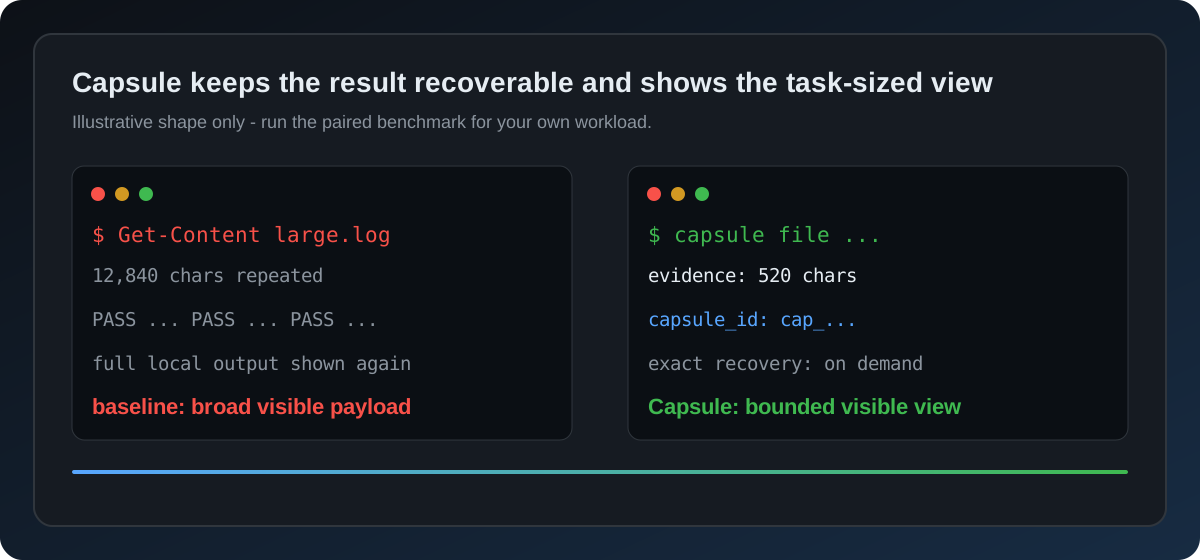
The graphic is illustrative, not a universal percentage claim; reproduce the paired workload with the benchmark commands below.
Codex does not need to reread the same terminal output, whole files, project neighbours, web pages, or tool catalogues on every turn. Capsule turns that repetition into compact, exact-recoverable evidence.
Why Capsule?
For GPT-6 Astra, Capsule provides smaller automatic text budgets while preserving the selected model, reasoning effort, explicit detail, and exact recovery. See the Astra configuration and measurement guide.
| Without Capsule | With Capsule |
|---|---|
| Repeated output fills the context window | Replays become a compact exact handle |
| Large files are reread from line 1 | Task-specific ranges are selected first |
| A project is explored file by file | Symbols and dependency impact are compiled once |
| Web results arrive as a giant page | Text, URLs, and reference IDs stay recoverable on demand |
| Every tool exposes its full catalogue | Common actions stay small; the rest is discoverable |
The core rule is simple:
request -> classify -> compact view \-> exact local evidence -> expand on demand
Capsule is local-first, deterministic, and conservative. If a projection would be larger, lossy, unsafe, or explicitly disallowed, it passes the original result through.
What it covers
- Terminal:
run,batch, andflowprojections remove repeated, low-value stdout/stderr while preserving failures and critical lines. Plain PowerShellGet-Contentreads use a verified local file fast path, query-focused evidence, and unchanged-file replay; unsafe or complex syntax falls back to the normal shell. See the Get-Content guide. - Files: bounded reads, replay detection, immutable-baseline edits, and exact range expansion.
- Projects: incremental symbol/dependency indexing, impact cones, and proof packets for query and refactor work.
- Web: bounded structured results plus an opt-in, lossless web lease for
exact text, URLs, and
ref_idrecovery. See the web search guide. - Context: compaction ledgers, memory loadouts, polling receipts, and pressure-aware summaries.
- Skills and tools: abstaining skill routing, deferred action discovery, local filters, and batched execution.
- Measurement: workload-specific A/B benchmarks and local gain telemetry; start with the benchmark methodology.
- Release quality: shared atomic state primitives, portable verification, and a documentation/link audit for public installations.
Capsule does not claim to control hidden provider-side reasoning, cache, or billing counters. Its measurements describe the observable model-facing payload and local exact-recovery path.
Find Capsule
Capsule is an open-source Codex token-efficiency, MCP context-compression, and AI-agent developer-tool project. The public project site is hakiyaka.github.io/capsule; the source, benchmarks, installation instructions, and release history remain on GitHub. Use the site for a concise overview and the repository for exact implementation and verification evidence.
In search terms, Capsule is a codex-plugin MCP server for token reduction and exact-recoverable context; each phrase describes a shipped capability, not a ranking promise.
Questions and workflow comparisons belong in the public Discussions; reproducible defects belong in Issues. The recommended starting point is How to measure Capsule visibility and token-efficiency results. For concise boundary and compatibility answers, see the Capsule FAQ.
Public guides: install, Codex plugin skills, Codex token efficiency, MCP context compression, Get-Content, web search, terminal output, benchmarks, share and cite, and GitHub discoverability.
A measured first web call
For a first real web search (local measurement):
| Size | |
|---|---|
| Raw result | 25,877 characters |
| Capsule lease | 519 characters |
| Model-facing reduction | 97.99% |
| Recovery | byte-exact |
This is one workload, not a universal percentage. Run the benchmarks on your own tasks before drawing billing conclusions.
Install
Requirements
- Node.js 18 or newer
- Codex with local plugin/MCP support
- Windows, macOS, or Linux
- Python 3 only for the optional Python benchmarks
Local plugin
git clone https://github.com/hakiyaka/capsule.git
cd capsule
npm test
Add the repository root as a local Codex plugin. The bundled
.codex-plugin/plugin.json and .mcp.json register the capsule MCP server
and its lifecycle hooks. Trust the hooks when Codex asks, then restart Codex.
For a reproducible checkout instead of the moving main branch, use the
v1.0.7 release and
verify its SHA-256 sidecar
before unpacking the source archive. Capsule is intentionally clone/release
based (package.json remains private); it is not the unrelated public npm
package named capsule.
Verify that the server is loaded:
{"action":"doctor","payload":{}}
For a deliberate global-hook installation or removal:
npm run hooks:install
npm run hooks:status
npm run hooks:restore
The action surface
| Goal | Capsule action |
|---|---|
| Plan a bounded task | advisor |
| Route an installed skill | skills |
| Run commands | run, batch, flow |
| Read or edit a file | file |
| Understand a codebase | project |
| Index or recall durable facts | index, search, remember, memory |
| Fetch a real URL | fetch |
| Derive structured data | execute |
| Recover exact evidence | expand, diff |
| Measure behavior | stats, gain, insight, doctor |
For multi-agent work, Capsule keeps a task-wide default of 16 subagents (hard maximum
20), permits one agent per UI/i18n/performance/release lane by default, and asks for one structured decision/evidence/files/blockers digest after the first
10 independent agents, and projects child results without raw screenshots, base64,
full diffs, or transcripts. After each grouped change and decisive check, run stats
and gain once; these are local exposure measurements, not billing claims.
Examples:
{"action":"run","payload":{"command":"npm test"}}
{"action":"project","payload":{"operation":"query","root":"."}}
{"action":"memory","payload":{"operation":"recall","query":"current task","max_chars":900}}
For large memory stores, use progressive disclosure: index returns compact
IDs and previews; get recovers one selected record exactly.
For multi-project or multi-agent stores, add a deterministic loadout (or
binding) to pre-filter the candidate set before ranking. It accepts tags,
sources, layers/asset_types, and scope; strict_scope:true prevents
unscoped records from crossing a project or team boundary. This is local
selection, not a replacement for a provider or server-side ACL. Set
strategy:"bootstrap" to prefer L3/L2 profile and scenario records first,
falling back to L1/L0 only when no high-level match exists.
{"action":"memory","payload":{"operation":"index","query":"current task","max_chars":420}}
{"action":"memory","payload":{"operation":"get","id":"mem_..."}}
{"action":"memory","payload":{"operation":"recall","query":"release check","loadout":{"tags":["release"],"scope":{"project":"demo"},"strict_scope":true,"strategy":"bootstrap"},"max_chars":900}}
fetch requires a real payload.url or payload.requests.
expand and diff require a real payload.capsule_id returned by an earlier
Capsule call. Capsule never invents recovery IDs.
Lossless web mode
Web zero-copy is intentionally opt-in because it replaces the visible response with a local lease. The complete response remains on disk, addressed by its SHA-256 hash; no text, URL, or reference ID is discarded.
$env:CAPSULE_WEB_ZERO_COPY="1"
Or enable one call with capsule_web_zero_copy: true. Measure it with:
npm run benchmark:web:zero-copy
The same exact-recovery principle is available for media with:
npm run benchmark:media:zero-copy
Safety contract
Capsule follows four rules:
- Exact first: the original result is stored before a compact view is emitted.
- No token-negative compression: small, literal, failed-to-classify,
raw,full,exact,benchmark, orverbatimrequests pass through. - Proof on demand: every compact view identifies how to recover the complete evidence.
- Local and bounded: state is local, caches have finite limits, and fingerprints are preferred over raw prompts.
For web and media leases, the exact file is content-addressed and verified with SHA-256. For file edits, stale or overlapping baselines reject the whole transaction before writing.
Benchmarks and verification
Run the fast confidence set:
npm run verify
npm run benchmark:web:zero-copy
npm run benchmark:project
npm run benchmark:refactor
npm run benchmark:get-content
npm run benchmark:get-content:history
npm run verify runs the complete Node test suite, source-integrity audit,
public-readiness audit, and documentation audit. Run the broader suites with
npm run benchmark:full. All benchmark results
are workload-specific; they are not a promise of a fixed saving on every
prompt or a substitute for provider billing telemetry.
The optional read-only GitHub visibility audit records repository metadata and volatile search/traffic signals for maintainers. See the GitHub discoverability guide for bounded commands and interpretation limits; search order is not a promise about Google ranking, users, billing, or quota.
For a consistent public reference, use the share and cite guide, the canonical GitHub repository, or CITATION.cff. Describe the workload and version beside any measurement; do not present one benchmark as a universal saving or ranking claim.
The bounded Get-Content replay benchmark is bounded by
CAPSULE_HISTORY_MAX_BYTES (2 GB by default) and reports only aggregate,
hash-safe measurements; it does not export session text.
See BENCHMARK.md for methodology and CHANGELOG.md for release history.
Repository map
capsule/
|-- mcp/             MCP server and core actions
|   `-- storage.cjs   shared atomic JSON, bounds, and hashing primitives
|-- scripts/         lifecycle hook, installers, and audits
|-- hooks/           bundled Codex hook entry points
|-- bench/           reproducible A/B benchmarks
|-- tests/           contract and parity tests
|-- skills/          bundled map-token-context plugin skill
|-- optional-skills/ optional specialist skill packages
|-- docs/            crawlable Pages site and search-intent guides
`-- .codex-plugin/  Codex plugin manifest
Privacy
Automatic decisions store bounded counters and keyed fingerprints, not raw
prompts. Automatic event, phase, and final-memory capture is off by default; set
CAPSULE_CAPTURE_MEMORY=1 only when you explicitly want sanitized, bounded
excerpts stored locally. Explicit index, remember, and memory capture
operations store only the content requested by the caller. State lives in the
platform-appropriate local data directory. See the full privacy policy
for the explicit web-search and GitHub-audit boundaries.
Set CAPSULE_STATE to an absolute directory to choose a different local state
root. Use the supported purge operation to remove cached projects or
capsules. Telemetry responses omit session identities and absolute paths by
default; request include_identity:true only for a local diagnostic.
Contributing
Read CONTRIBUTING.md before opening a pull request. Report security issues using SECURITY.md. Capsule is released under the MIT License.
Capsule MCP questions
What does Capsule do to improve token efficiency?
It acts as a context compression layer that provides a compact view of terminal, file, project, and web outputs while keeping the complete results locally recoverable.
Is the compression lossy?
No, Capsule is designed to be exact-recoverable, meaning the original, complete data is stored locally and can be expanded on demand.
How can I enable lossless web mode?
You can enable web zero-copy by setting the environment variable CAPSULE_WEB_ZERO_COPY to 1 or by passing capsule_web_zero_copy: true in a call.