
ecobrowser MCP server
Commit Nov 11, 2026Provides an AI-native browser framework with structured perception and self-healing actions for reliable web automation.
Also known as HaidarESBER/ai-browser, ecobrowser
- Stars
- 1
- Tools
- 22
- Downloads, 30 days
- —
- Latest version
- —
- Last commit
- Nov 11, 2026
- License
- MIT
What is ecobrowser MCP?
ecobrowser provides an AI-native browser framework with structured perception and self-healing actions for reliable web automation. It exposes 22 tools, such as browser_navigate, browser_snapshot, browser_changes.
Summary generated from the project's README
About ecobrowser MCP server
Automating web tasks through an AI agent is what ecobrowser enables by providing a specialized perception and action layer. Instead of relying on visual screenshots that consume high token counts, this framework gives models a structured, addressable list of interactive elements with stable IDs. This allows an AI to interact with the web using precise commands rather than guessing coordinates or CSS selectors.
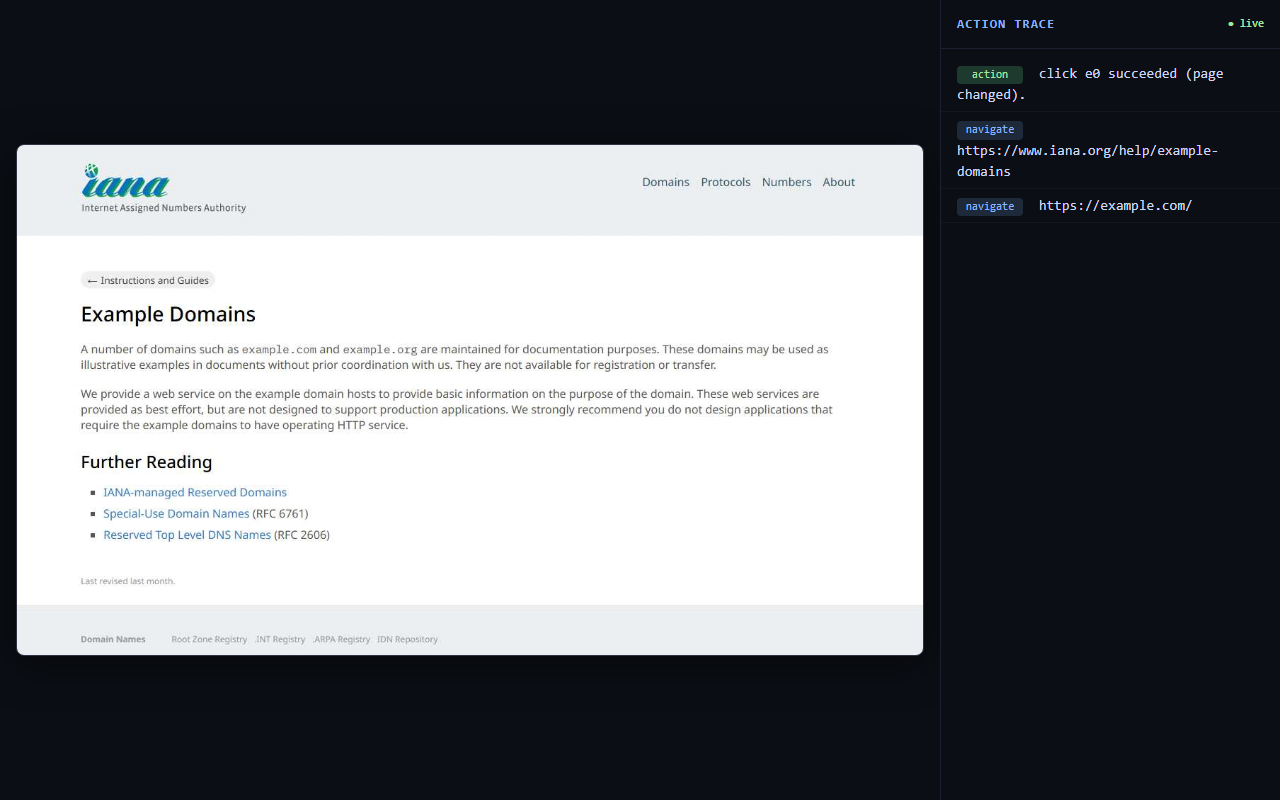
Developers can use this as a local MCP server via Claude Desktop or Claude Code by running the ecobrowser-mcp package through npx. It requires Node.js 18 or higher and automatically manages Chromium via Playwright. The system includes a live view for human supervision, allowing you to watch a headless run through a refreshing screenshot and action trace.
What sets this tool apart is its self-healing capability and incremental perception. If a page re-renders and an element moves, the server re-locates it by identity to prevent failure. It also uses a MutationObserver to provide only the changes between snapshots, significantly reducing the data payload sent to the model compared to standard Playwright MCP implementations.
What you can do with it
- 1Reliable web element interactionAn AI agent can click or type into specific fields using stable IDs instead of fragile selectors.
- 2Efficient page state monitoringA developer can instruct an AI to only process the parts of a page that have actually changed.
- 3Automated error recoveryThe browser can automatically fix broken automation paths if the underlying page structure shifts.
- 4Visual debugging of headless tasksUsers can monitor the progress of an automated browser session through a real-time web interface.
Written from the project's README. Every use case is checked against a quote from it.
How to install ecobrowser MCP
Formats verified 10 Nov 2026Add to CursorAdd to GooseInstall ecobrowser MCP in Claude Code
$ claude mcp add ai-browser -- npx -y ecobrowserInstall ecobrowser MCP in Cursor
~/.cursor/mcp.json
{
  "mcpServers": {
    "ai-browser": {
      "command": "npx",
      "args": [
        "-y",
        "ecobrowser"
      ]
    }
  }
}Install ecobrowser MCP in VS Code
.vscode/mcp.json
{
  "servers": {
    "ai-browser": {
      "type": "stdio",
      "command": "npx",
      "args": [
        "-y",
        "ecobrowser"
      ]
    }
  }
}Install ecobrowser MCP in VS Code CLI
$ code --add-mcp '{"name":"ai-browser","type":"stdio","command":"npx","args":["-y","ecobrowser"]}'Install ecobrowser MCP in Claude Desktop
claude_desktop_config.json
{
  "mcpServers": {
    "ai-browser": {
      "command": "npx",
      "args": [
        "-y",
        "ecobrowser"
      ]
    }
  }
}Install ecobrowser MCP in Codex
$ codex mcp add ai-browser -- npx -y ecobrowserInstall ecobrowser MCP in Codex config.toml
~/.codex/config.toml
[mcp_servers.ai-browser]
command = "npx"
args = ["-y", "ecobrowser"]
Install ecobrowser MCP in Gemini CLI
$ gemini mcp add -s user ai-browser npx -- -y ecobrowserInstall ecobrowser MCP in Gemini settings.json
~/.gemini/settings.json
{
  "mcpServers": {
    "ai-browser": {
      "command": "npx",
      "args": [
        "-y",
        "ecobrowser"
      ]
    }
  }
}Started by HostedMCP on 16 Nov 2026
We ran this command for ecobrowser 0.2.0 in an isolated container with no network and no keys. It answered and listed 22 tools.
ecobrowser MCP tools 22
Read from the server with tools/listbrowser_navigateOpen a URL and return a structured snapshot of the page's interactive elements.
browser_snapshotGet a structured snapshot of the current page — each interactive element has a stable id you can act on. Cached until the page changes.
browser_changesReturn ONLY what changed since your last snapshot (added/removed/changed elements). Cheaper than a full snapshot — prefer this after an action.
browser_findFind interactive elements matching a description (e.g. 'search box', 'Sign in button') and get just the matches with their ids — far cheaper than reading a full snapshot when you know what you want.
browser_read_textReturn the visible text of the current page, 5000 characters at a time; pass offset to read further.
browser_backGo back in the browser history.
browser_forwardGo forward in the browser history.
browser_screenshotTake a screenshot of the visible page. Use only when the structured snapshot isn't enough (layout, images, canvas).
browser_waitWait for text to appear on the page (up to 20 s), or for a number of milliseconds (up to 10 s). Returns what changed.
browser_clickClick an element by its snapshot id. Returns a fresh snapshot after the action.
browser_typeType text into a field by its snapshot id (clears the field first).
browser_selectChoose an option in a dropdown (<select>) by its snapshot id. Pass the option's value or its visible label (the snapshot lists them).
Show all 22 toolsShow fewer tools
browser_pressPress a key or chord on the focused element, e.g. 'Enter' to submit, 'Escape' to close a dialog, 'Tab', 'ArrowDown', 'Control+A'.
browser_hoverHover over an element by its snapshot id (reveals menus and tooltips).
browser_scrollScroll the page (loads lazy / infinite-scroll content). Returns what appeared.
browser_tabsList the open tabs (the current one is marked). Links with target=_blank open a new tab and the browser switches to it automatically.
browser_switch_tabSwitch to an open tab by its index from browser_tabs, and return its snapshot.
browser_consoleReturn console logs and page errors captured on the current page.
browser_networkReturn the network responses (status, method, url) captured on the current page.
browser_evaluateRun a JavaScript EXPRESSION in the page and return its JSON-serialized result (e.g. `document.title` or `[...document.links].length`). Not a statement body.
browser_extract_linksExtract all links on the page as name/href pairs.
browser_resetClose and discard the current browser session; the next action starts a fresh one. Use to recover from a wedged or crashed page.
Configuration
AI_BROWSER_HEADED
Automated checks
Ran Nov 13, 2026Full report →Not verified yet. A server needs a score of 80, no serious finding, and enough data for us to check. How checks work · What to fix for more points

- Source repository linked and reachablehaidaresber/ai-browser is public and reachablegithub.com/haidaresber/ai-browser ↗Pass
- Package names this repository as its sourceecobrowser names haidaresber/ai-browser as sourcenpmjs.com/package/ecobrowser ↗Pass
- Build provenance (Sigstore attestation)No build attestation published for this releaseNot checked
- Open source license (OSI)MITspdx.org/licenses/MIT.html ↗Pass
- Commit or release in the last yearLast commit or release 2026-11-11github.com/haidaresber/ai-browser ↗Pass
- OpenSSF ScorecardNot checked
- Package name not close to a popular packageNo popular package one edit away from ecobrowserPass
- No critical advisory in the package or its dependenciesNot checked
- No hidden instructions to the model18 tool descriptions and the README read; no override phrases, credential paths or hidden charactersPass
- Destructive tools are labelledNo tool named like delete, drop or execPass
- Remote endpoint answers the MCP handshakeNot checked
README
View on GitHub🌐 ecobrowser — AI-Native Browser Framework
The AI's hands and eyes on the web
A browser built to be driven by an AI — the perception and action layer that gives an agent
fast, complete, verifiable control of the web. Ships on npm as ecobrowser: a TypeScript library and an MCP server in one package.







Structured (no-pixel) perception · verified self-healing actions · incremental diff perception · a live view to watch it work.
Table of contents
- What is this?
- Highlights
- Architecture
- How it works
- Quick start
- MCP tools
- How it compares
- Configuration
- Scripts
- Project layout
- Security & scope
- Roadmap
What is this?
Most "AI browsers" are one of two things: a chat sidebar bolted onto a browser, or a headless scraping API with no feedback loop. This is neither. It's the layer that makes a real browser usable by a model — the primary "user" is an AI, and a human just supervises.
It gives an agent a compact, structured view of a page (an addressable list of interactive elements, not a screenshot), lets it act on those elements by stable id, tells it whether each action actually worked, and streams the whole thing to a live view a human can watch. It's model-agnostic and downloadable — not tied to one vendor's extension.
The design principle, everywhere: do work in code so the model doesn't spend tokens and reasoning on it — verifying outcomes, diffing pages, recovering from failures, finding elements.
⚠️ Scope & honesty. This is a fast, local, single-user developer tool, built to be pointed at your own or authorized sites. It's young — thoroughly tested on its own paths, but not battle-hardened across thousands of real websites the way mature tools are. See Security & scope.
See it in action
The live view is a loopback-only page that shows what a headless run is doing: a refreshing screenshot plus a colour-coded action trace. Real capture below (the AI navigated to example.com and clicked its first link):
✨ Highlights
| 👁️ Structured perception | The AI sees a compact list of interactive elements with stable ids — no screenshot→vision round-trip. |
| 🎯 Act by id | Click/type/select by e3, never by guessed CSS selectors or pixel coordinates. |
| ✅ Verified actions | Every action returns did it work and did the page change — success / silent no-op / failure, not a guess. |
| 🩹 Self-healing | If an element's id moved (page re-rendered), it re-locates the element by identity and retries — and refuses to guess when that identity is ambiguous. |
| 🔗 Durable ids | An element keeps its id across snapshots, so the AI can reference something it saw steps ago. Ids are never reused, even across pages. |
| 🧩 Sees the modern web | ARIA widgets, contenteditable editors, open shadow DOM and iframes; dropdowns list their options; covered elements are flagged obscured. |
| 🗂️ Tabs | A link that opens a new tab is reported, and the MCP server switches to it. |
| ⚡ Incremental perception | changes() returns only the delta; snapshots are cached until the DOM actually changes. |
🔎 find(description) |
Ask for "the search box" and get just the match — not a whole-page dump. |
| 🐛 First-class debugging | Console logs, page errors, and network requests captured — errors scoped to the action that caused them. |
| 🖥️ Live view | Watch a headless run in your browser — refreshing screenshot + colour-coded action trace. |
| 🔌 MCP + npm | One engine, two front doors: an MCP server (zero-code) and a typed TypeScript library. |
🏗 Architecture
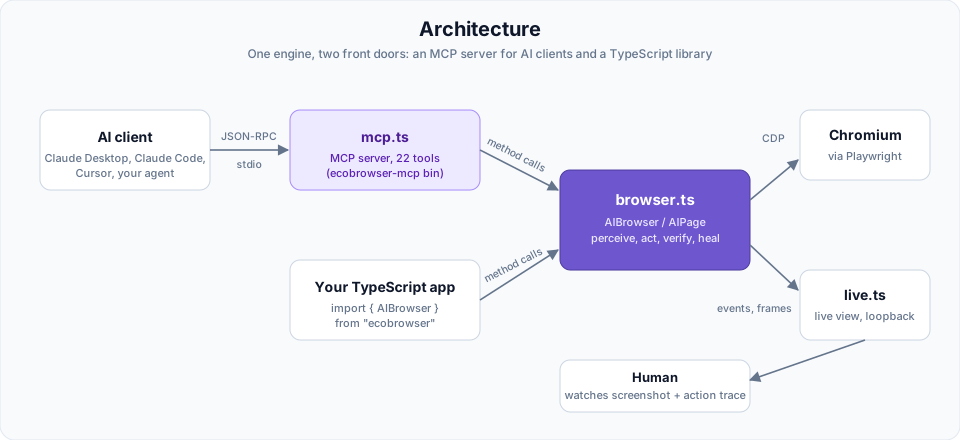
One engine, two front doors. All the real logic lives in browser.ts. mcp.ts is a thin adapter that exposes the engine's methods as protocol tools; live.ts is a read-only window for a human. The same engine could be wrapped as a CLI or REST API — MCP is just one adapter.
🧠 How it works
Perception → action → verification
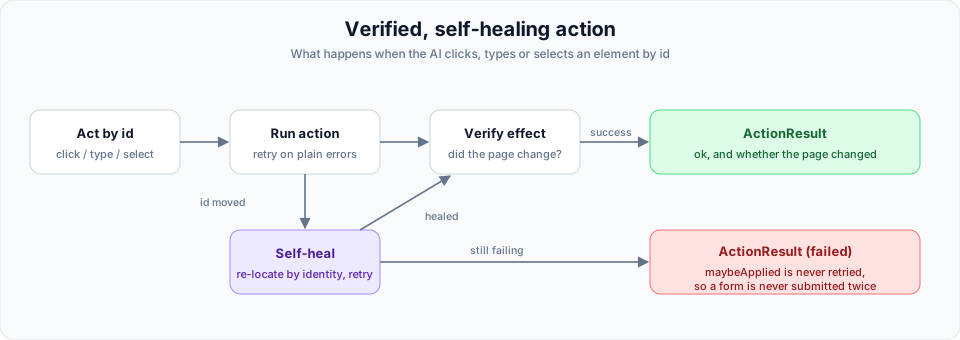
Perception runs a script inside every frame (and every open shadow root) that collects interactive elements, stamps each with a durable data-ai-id, and captures role / name / value / state. Password values are never captured — they show as [redacted].
An action that fails after it may already have been dispatched (a click whose handler hung, a key press) is reported as maybeApplied and never retried, so a form is never submitted twice. A MutationObserver tracks a DOM version, so unchanged snapshots are served from cache and changes() can return just the delta.
The MCP conversation
sequenceDiagram
    participant AI as 🤖 AI client
    participant S as mcp.ts (server)
    participant E as browser.ts (engine)
    AI->>S: initialize
    S-->>AI: capabilities
    AI->>S: tools/list
    S-->>AI: 22 tools + JSON schemas
    Note over AI: the model now knows what it can do
    AI->>S: tools/call · browser_navigate {url}
    S->>E: goto() + snapshot()
    E-->>S: structured elements
    S-->>AI: content:[ text ]
    AI->>S: tools/call · browser_click {id}
    S->>E: clickById() → verify → heal
    E-->>S: ActionResult + delta
    S-->>AI: content:[ text ]
It's an MCP server because it registers schema-typed tools and answers initialize / tools/list / tools/call as JSON-RPC 2.0 over stdio — the browser control is just what those tools happen to do.
🚀 Quick start
Prerequisites: Node.js 18+.
npm install ecobrowser
Chromium is downloaded automatically on install (a postinstall hook that never
fails the install). If you install with --ignore-scripts, set
PLAYWRIGHT_SKIP_BROWSER_DOWNLOAD=1, or were offline, fetch it manually:
npx playwright install chromium.
Option A — as an MCP server (drive it from an AI)
Claude Desktop — add to claude_desktop_config.json:
{
  "mcpServers": {
    "ecobrowser": {
      "command": "npx",
      "args": ["-y", "ecobrowser-mcp"],
      "env": { "AI_BROWSER_HEADED": "1" }
    }
  }
}
Claude Code:
claude mcp add ecobrowser -- npx -y ecobrowser-mcp
Restart the client, then just ask: "navigate to example.com and list the links."
Run npx ecobrowser-mcp --help for setup, the full tool list, and environment variables.
(Working from a clone instead of the published package? Point the client at the source directly: npx tsx <repo>/src/mcp.ts.)
Option B — as a TypeScript library
import { AIBrowser } from "ecobrowser";

const browser = await AIBrowser.launch({ headless: true });
const page = await browser.newPage();

await page.goto("https://example.com");

const snap = await page.snapshot();          // { url, title, elements: [{ id, tag, role, name, value?, state?, options? }] }
const [search] = await page.find("search box");

const result = await page.clickById(snap.elements[0].id);
console.log(result.detail);                  // "click e0 succeeded (page changed)."

const diff = await page.changes();           // { added, removed, changed, unchanged }
console.log(page.console(), page.network()); // first-class debugging

await browser.close();
Stay signed in across runs with a persistent profile:
AIBrowser.launchPersistent("./profile", { headless: true }).
🧰 MCP tools
The server exposes 22 tools; an MCP client discovers them (name + JSON schema) via tools/list.
| Tool | What it does |
|---|---|
browser_navigate |
Open a URL (example.com works — https is added), return a structured snapshot. |
browser_snapshot |
Structured snapshot of the current page (cached until it changes; capped at 250 elements). |
browser_changes |
Only what changed since your last snapshot — cheap re-perception. |
browser_find |
Find interactive elements matching a description; get just the matches. |
browser_read_text |
Visible text of the page, 5000 characters at a time (offset to read on). |
browser_screenshot |
A JPEG of the visible page, for when structure isn't enough. |
browser_back / browser_forward |
Move through history. |
browser_click |
Click an element by id (verified, self-healing); returns the delta, or the new tab it opened. |
browser_type |
Type into a field by id (verifies the value landed; tolerates input masks). |
browser_select |
Pick a dropdown option by value or visible label. |
browser_press |
Press a key or chord — Enter, Escape, Control+A. |
browser_hover |
Hover an element (menus, tooltips). |
browser_scroll |
Scroll up/down; returns what appeared (lazy / infinite scroll). |
browser_wait |
Wait for text to appear, or a delay. |
browser_tabs / browser_switch_tab |
List open tabs; switch between them. |
browser_console |
Console logs + page errors on the current page. |
browser_network |
Network responses (status, method, url). |
browser_evaluate |
Run a JS expression in the page, return the result. |
browser_extract_links |
All links as name/href pairs. |
browser_reset |
Discard the session; the next action starts fresh (crash recovery). |
📊 How it compares (measured)
Head-to-head vs Playwright MCP on the same page (npm run bench), measuring bytes returned to the model and tool latency.
Full page snapshot — smaller is better
This framework   ███████░░░░░░░░░░░░░░░░░   41 KB   (~10K tokens)
Playwright MCP   ████████████████████████  128 KB   (~32K tokens)
Re-perceive latency — smaller is better
This framework   ▏                           5 ms   (cache hit)
Playwright MCP   ████████████████████████  150 ms   (re-serializes every time)
Incremental re-perceive after an action
This framework   ▏  delta only (bytes)
Playwright MCP   ████████████████████████  full page again  (no diff primitive)
Honest caveats. This measures perception payload + tool latency, not end-to-end LLM wall-clock (no live model ran). Part of the size gap is scope — we capture interactive elements only, Playwright MCP captures the full accessibility tree. And we're faster than Playwright MCP (the wrapper), not Playwright (the shared engine under both) — the wins are caching, diffing, and a leaner format, all ideas a competitor could adopt.
⚙️ Configuration
| Env var | Effect |
|---|---|
AI_BROWSER_HEADED=1 |
Show the native browser window (default: headless). |
AI_BROWSER_LIVE=0 |
Disable the live-view server. |
AI_BROWSER_LIVE_PORT=N |
Preferred live-view port (default 7333, steps to the next free port if busy). |
AI_BROWSER_ALLOW_LOCAL=1 |
Allow file:// / privileged-scheme navigation (blocked by default). |
AI_BROWSER_BLOCK_PRIVATE=1 |
Refuse localhost / private-network / cloud-metadata hosts — for navigation and every request the page makes. |
AI_BROWSER_PROFILE=dir |
Keep cookies and logins in dir across sessions. |
AI_BROWSER_TOOL_TIMEOUT_MS=N |
Per-tool time budget (default 45000); a timed-out action is cancelled, not left running. |
PLAYWRIGHT_SKIP_BROWSER_DOWNLOAD=1 |
Skip the Chromium download at install time. |
Live view: when the MCP server starts it also serves a loopback-only page (default http://localhost:7333/?token=…) — a refreshing screenshot plus a colour-coded action trace — so you can watch a headless run. Open the exact URL the server prints: it carries a per-session token.
📜 Scripts
npm test           # unit tests (diff, find, state, url-guard) — no browser needed
npm run regress    # browser-backed regression tests, one per fixed review finding
npm run regress:mcp # the same, through a real MCP client against a local fixture site
npm run build      # compile the publishable package to dist/ (library + MCP bin)
npm run typecheck  # tsc --noEmit over everything, dev scripts included
npm run demo       # exercises the engine directly (headed; AI_BROWSER_HEADED=0 for headless)
npm run smoke      # spawns the MCP server as a real MCP client and drives it
npm run live       # starts the live view and verifies its endpoints
npm run bench      # head-to-head vs Playwright MCP
npm run mcp        # run the MCP server on stdio
Benchmark note: Playwright MCP is a
devDependency; install its browser once withnpx @playwright/mcp install-browser chrome-for-testingbeforenpm run bench.
🗂 Project layout
src/
  index.ts         # public package entry — re-exports the engine + LiveView
  browser.ts       # the core engine — AIBrowser / AIPage (this is the whole product)
  mcp.ts           # MCP server: registers the engine's methods as 22 tools (the ecobrowser-mcp bin)
  live.ts          # live-view server (screenshot + action trace)
  demo.ts          # in-code engine demo (5 parts, incl. self-healing)
  mcp-smoke.ts     # end-to-end MCP client test
  live-smoke.ts    # live-view endpoint test
  bench-h2h.ts     # head-to-head benchmark vs Playwright MCP
  test.ts          # unit tests for the pure logic
  regress.ts       # browser-backed regression tests
  mcp-regress.ts   # MCP-level regression tests
scripts/
  postinstall.mjs  # fetches Chromium on install; never fails the install
tsconfig.build.json # build config — compiles only the public surface to dist/
SPEC.md            # full technical specification, north star, roadmap
Only dist/ and scripts/ (plus README, SPEC, LICENSE) ship in the npm tarball — the dev scripts stay in the repo.
🔒 Security & scope
Because it's a downloadable tool you run yourself, how it's used is your responsibility. Built-in guards:
- Locked-down live view — loopback-only, a per-session token on every request, and a Host-header check against DNS rebinding; the trace is rendered XSS-safely (
textContent, neverinnerHTML). - Navigation guard —
file://,chrome://,javascript:and other privileged schemes blocked by default (AI_BROWSER_ALLOW_LOCAL=1to opt out);AI_BROWSER_BLOCK_PRIVATE=1also blocks private-network hosts. - No secrets in the model's context — password field values are redacted from snapshots, diffs, errors and the trace.
- Page content is data — names, values and titles are JSON-quoted in MCP replies so a page can't forge extra lines, and the server tells the client that page content is untrusted.
- Bounded & recoverable — capped logs and snapshots, per-tool timeouts that cancel the action, automatic crash recovery, graceful shutdown, port fallback.
Deliberately not in scope: multi-tenant hosting, auth/session isolation between users, or sandboxing browser_evaluate (which runs arbitrary JS in the page — appropriate only for sites you trust). Point it at your own or authorized sites.
🗺 Roadmap
flowchart LR
    M0["M0 · spike"] --> M1["M1 · engine"] --> REL["reliability<br/>+ self-heal"] --> M3["M3 · MCP"] --> M4["M4 · speed"] --> M5["M5 · live view"] --> AIF["AI-friendliness"] --> HARD["hardening"] --> M2["M2 · npm<br/>package"] --> M6["M6 · auth/proxy<br/>(BYO) 📦 next"]

    classDef done fill:#1e3a2e,stroke:#a6e3a1,color:#a6e3a1;
    classDef next fill:#3a2e1e,stroke:#f9e2af,color:#f9e2af;
    class M0,M1,REL,M3,M4,M5,AIF,HARD,M2 done;
    class M6 next;
Built and tested: the engine, reliability + self-healing, the MCP server, caching + diff perception, the live view, the AI-friendliness pass, the hardening pass, and the npm package (ecobrowser, with the ecobrowser-mcp bin).
Next — M6: opt-in, BYO-key auth/proxy/CAPTCHA for authorized sites.
See SPEC.md for the full specification and north star.
📝 Write-ups
- Making browser perception cheap for LLM agents: snapshots, caching and diffs
- Self-healing browser actions for AI agents (and why they must refuse to guess)
👤 Author
Built by Haidar Esber — Lebanese software & web developer based in France.
📄 License
MIT © 2026 Haidar Esber
ecobrowser MCP questions
How do I add ecobrowser MCP to Claude Code?
Run claude mcp add ai-browser -- npx -y ecobrowser in your terminal. Add --scope user to make it available in every project.
How do I add ecobrowser MCP to Cursor?
Open ~/.cursor/mcp.json and add the server under mcpServers, using the Cursor config shown in the install section above.
What tools does ecobrowser MCP provide?
It exposes 22 tools, including browser_navigate, browser_snapshot, browser_changes, browser_find, browser_read_text.
How does the browser handle element changes?
It uses self-healing actions that re-locate elements by identity if their ID moves due to a page re-render.
Can I watch the AI's actions in real-time?
Yes, it includes a live view that provides a refreshing screenshot and a color-coded action trace of the headless run.
Does it use screenshots for element detection?
No, it uses structured perception by providing an addressable list of interactive elements with stable IDs instead of a screenshot-to-vision round-trip.