
Provides Roslyn-accurate C# and .NET code intelligence to AI coding assistants by mapping symbols, dependencies, and impact analysis.
Also known as gregordadera/AICB, aicb
- Stars
- 12
- Tools
- 18
- Downloads, 30 days
- —
- Latest version
- 0.5.464.66
- Last commit
- Nov 13, 2026
- License
- —
What is AIContextBuilder MCP?
AIContextBuilder provides Roslyn-accurate C# and .NET code intelligence to AI coding assistants by mapping symbols, dependencies, and impact analysis. It exposes 18 tools, such as find_usages, impact_of_change, find_implementations.
Summary generated from the project's README
About AIContextBuilder MCP server
AIContextBuilder provides Roslyn-accurate code intelligence for C# and .NET developers using AI coding assistants. It functions as a local MCP server or CLI that maps symbols, dependencies, and impact analysis to provide a semantic understanding of a solution. Instead of simple text searches, it uses a Roslyn symbol graph to distinguish overloads, follow interface relationships, and track dependency injection paths.
Users can interact with the server through various tools to build task-specific context. For example, the pack_for_task tool assembles a semantic neighborhood around specific symbols, while the measure tool allows an agent to check token counts before sending large payloads. The server can also manage context via a token budget to ensure responses fit within an LLM's limits. It supports structured Markdown output called AI-Builder-MD, which includes architecture graphs and metadata.
Developers can use a Windows desktop app for visual context selection and analysis. The system handles large solutions by analyzing them once and then providing quick answers to follow-up questions. It also supports optional XML documentation tags to explicitly define architectural roles and responsibilities.
What you can do with it
- 1Analyze code change impactDetermine which parts of a solution might be affected by modifying a specific service.
- 2Assemble task-specific contextPack a focused set of symbols and their semantic surroundings into a single context package for an LLM.
- 3Manage LLM token limitsCheck the exact token count of planned tool answers to avoid exceeding the agent's context window.
- 4Prepare for code editingGather the necessary context including covering tests and related factory or validator classes to prepare for a modification.
Written from the project's README. Every use case is checked against a quote from it.
AIContextBuilder MCP tools 18
Detected from the READMEfind_usagesimpact_of_changefind_implementationsfind_tests_forresolve_injectionfind_by_side_effectsfind_dead_codeget_diagnosticsfind_symbolexplain_symbolarchitecture_overviewfind_binding_usages
| find_usages | — | |
| impact_of_change | — | |
| find_implementations | — | |
| find_tests_for | — | |
| resolve_injection | — | |
| find_by_side_effects | — | |
| find_dead_code | — | |
| get_diagnostics | — | |
| find_symbol | — | |
| explain_symbol | — | |
| architecture_overview | — | |
| find_binding_usages | — |
Show all 18 toolsShow fewer tools
prepare_taskserver_infoaicb-csharpaicb-codeaicb-usageaicb-smoke
| prepare_task | — | |
| server_info | — | |
| aicb-csharp | — | |
| aicb-code | — | |
| aicb-usage | — | |
| aicb-smoke | — |
Automated checks
Ran Nov 13, 2026Full report →Passed our automated checks. That is not a security audit: read the code and give the server the narrowest access it needs. How checks work · What to fix for more points

- Source repository linked and reachablePass
- Open source license (OSI)No licenseFinding
- Commit or release in the last yearPass
- Package name not close to a popular packageNot checked
- Remote endpoint uses HTTPSNot checked
- Destructive tools are labelledPass
- No hidden instructions to the modelPass
- No critical advisory in the package or its dependenciesNot checked
README
View on GitHubAIContextBuilder (aicb)





Give coding agents a Roslyn-accurate map of your C#/.NET solution. aicb is
a code intelligence server for C# and .NET: it answers questions about callers,
implementations, dependency injection, tests, side effects and change impact,
then packs the relevant code into compact Markdown for an LLM. It runs locally as
an MCP server and CLI; a Windows desktop app adds visual context selection,
analysis and editing.
The software is closed source. This public repository contains its documentation, license and releases. It is free for individuals, education and organizations below the license thresholds.
This page is a short tour, not the reference. It names 38 of the 54 tools an agent sees by default; the three manuals run to 35 chapters, about 37 times the length of this page.
See it answer a code question
Ask your coding agent:
What could be affected if I change
ColorMixerService? Use AICB.
Or call the same tool from a terminal:
aicb call impact_of_change --sln C:/repo/App.sln --arg symbol=ColorMixerService
Abridged output from the bundled ColorMixer.SelectionLab sample:
{
  "symbol": "ColorMixerService",
  "resolvedKind": "type",
  "directCount": 1,
  "transitiveCount": 2,
  "risk": "low",
  "productionImpactCount": 2,
  "directImpact": {
    "items": [
      {
        "name": "DemoCompositionRoot",
        "file": "ColorMixer.SelectionLab.ConsoleApp/DemoCompositionRoot.cs",
        "line": 9
      }
    ]
  }
}
The desktop app's MCP Usage page records calls locally and separates guided refusals from suspected defects:
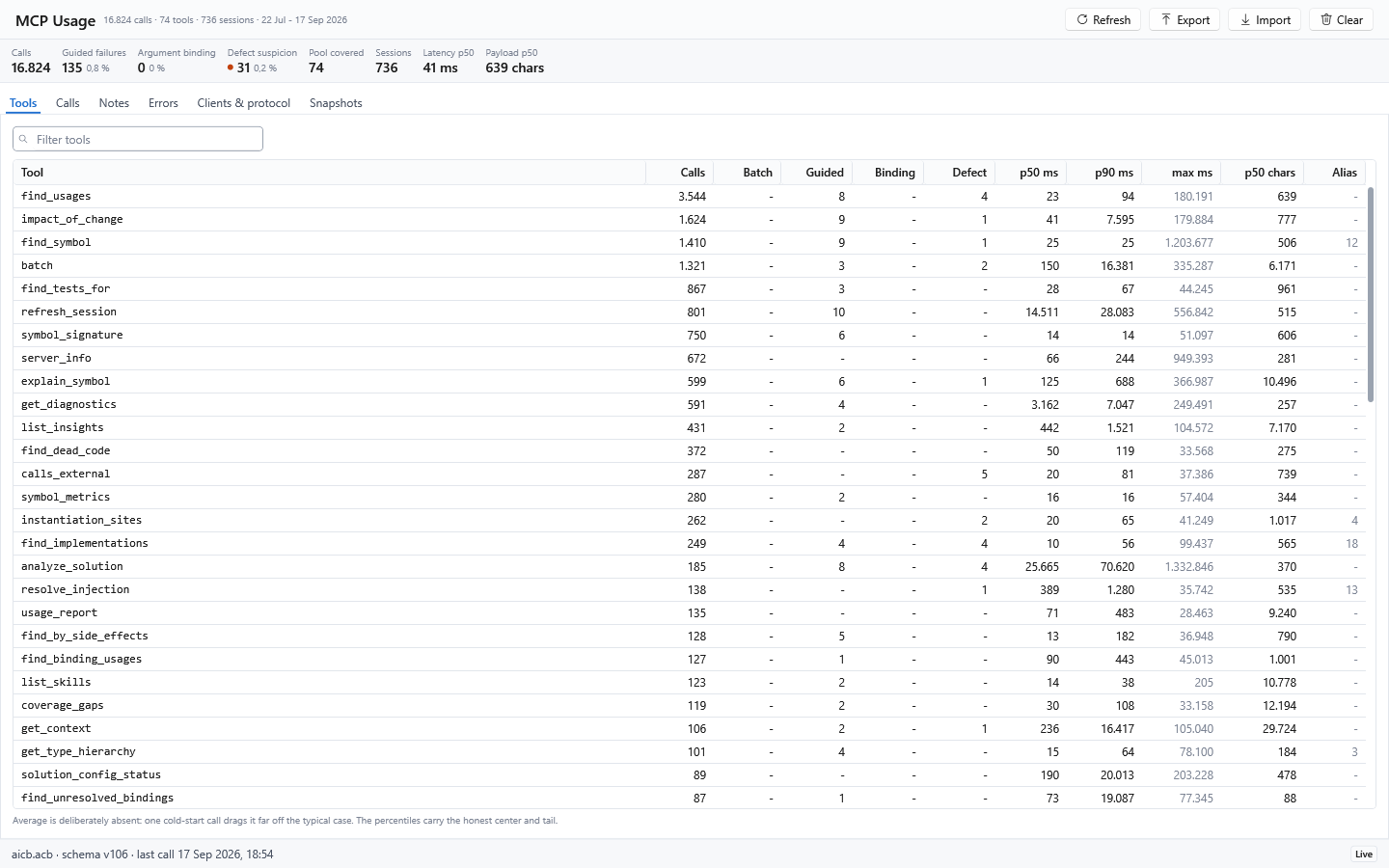
That answer comes from the Roslyn symbol graph, not a substring search. AICB distinguishes overloads, follows interface and override relationships, understands partial types and records DI construction paths.
Build context that fits the task
AICB does more than answer individual symbol questions. It can assemble a focused, task-specific context package for an agent instead of sending an unfiltered source dump:
| Need | Tool | What it returns |
|---|---|---|
| Read one symbol in context | get_context |
The symbol plus its direct dependencies and callees |
| Explore a named symbol with selected surroundings | explain_symbol |
Callers, callees, implementations, tests or other requested dimensions |
| Pack context for a natural-language goal | pack_for_task |
Goal-named symbols and their semantic neighborhood |
| Prepare to edit | prepare_task |
The goal-focused context plus covering tests and likely siblings such as a factory or validator |
| Check the response cost first | measure |
The exact token count of one or more planned tool answers, without returning their large payloads |
The focused context tools accept a token budget, so a package fits the room your agent has. The symbols you name stay in; when the budget is tight, the package becomes less detailed around them instead of being cut off in the middle of a block, and a leading note says which types, tests or siblings were left out. AICB can therefore tell you that a bundle was reduced or capped; it cannot certify that what remains is enough to solve the task correctly. Whole-document rendering can use the same budget through a pipeline profile, with an allowance for overshoot and an optional report of what was trimmed.
The result is AI-Builder-MD: structured Markdown for an LLM, containing the selected code together with symbol relationships, architecture graphs, semantic metadata and provenance. It can use the established tag notation or YAML. See the context-document guide and the task-packing tools.
Add explicit meaning with AI Tags and semantic annotations
AICB works without annotations. Where source structure and conventions are not
enough, optional <ai> tags in XML documentation let a developer state the intended
role of a type or method explicitly:
/// <ai
///   role="service"
///   layer="Application"
///   responsibility="Coordinates order validation and submission."
///   stability="Stable"
/// />
public sealed class OrderService
Annotations can describe semantics such as role, domain, architectural layer,
priority, stability, responsibility and side effects. Explicit values take
precedence over heuristic inference; sentinel values such as none can deliberately
suppress inference for one field. AICB preserves provenance so an agent can
distinguish source-derived facts, author-provided meaning and inferred hints. The
AI annotation reference
documents the supported forms and fields.
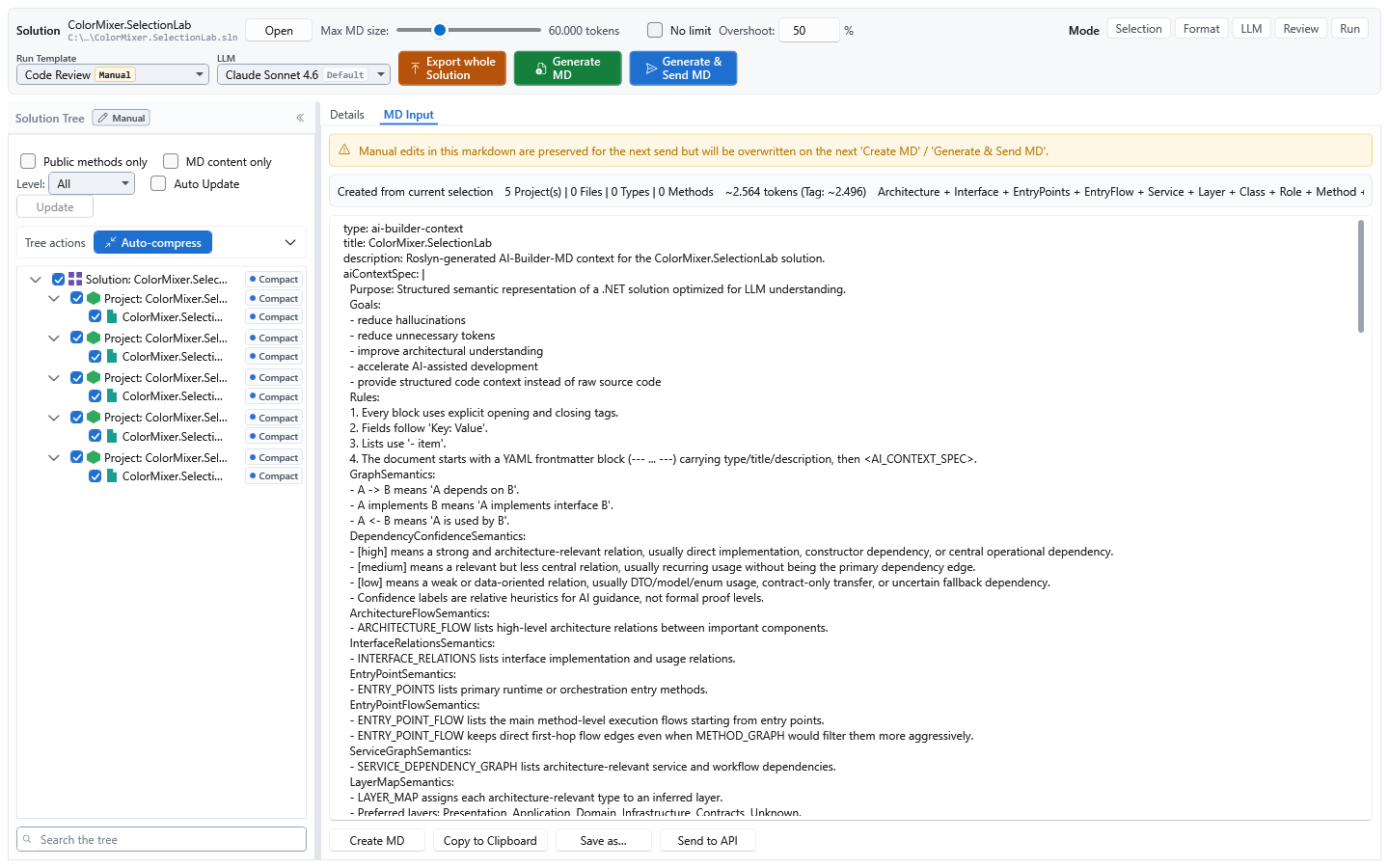
What happens after your first question
- The first question about a solution takes the longest. You name a
.sln,.slnxor.slnf; AICB loads it the way your build would and reads its C# code and its XAML/AXAML markup. - The questions after it are quick. Callers, implementations, tests, injection and impact come from what the first analysis learned, as a single answer or as a context document sized to your budget.
- Your saved edits are picked up. With the shipped settings the next question brings the analysis up to date with the saved files; an explicit refresh does the same in every setting.
AICB analyzes the solution once and then answers each question from what it learned: who calls what, which types use or implement which, what the markup refers to and which code reaches outside the program. Follow-up questions therefore come back quickly, and the context tools pick and render the part of the code a task needs. This does not mean that every possible answer or runtime relationship is known in advance.
Every agent session that starts aicb mcp gets its own analysis, and the desktop
app, the CLI and the server answer alike and can share configuration and saved
snapshots. After you edit source files, the next refresh picks up what changed,
usually without loading the solution again (force: true loads it completely). A
client that gives up waiting for a long first analysis can simply ask again: the
analysis finishes anyway, and a retry with the same arguments gets it from the
cache.
Live sessions, snapshots and persistent codebase memory
These states serve different purposes and should not be treated as interchangeable:
| State | Lifetime and purpose | Important boundary |
|---|---|---|
| Live MCP session | In-memory graph and Roslyn workspace reused by one server process | Sees saved files, not unsaved editor buffers; another server process has a separate session |
| Remembered codebase | remember_codebase persists an analyzed model; recall_codebase can rehydrate it later or in another process without running Roslyn |
A recalled session has no live workspace, no reliable line numbers and a reduced insight contract; use refresh_remembered when live precision is required |
| Saved snapshot | Named baseline used by compare_with_previous and public-contract comparison |
A comparison baseline, not a live workspace |
<Solution>.aicb.json |
Git-trackable solution configuration | Contains rules and choices, never analysis results, sessions or credentials |
remember_codebase, recall_codebase and refresh_remembered are opt-in tools: no
MCP profile exposes them, so start the server with AICB_MCP_TOOLS naming them (or
AICB_MCP_TOOLS=all). recall_codebase reports whether the persisted model still matches the source,
payload schema and analyzer identity. It deliberately returns the recalled model
even when it is stale, with metadata that tells the agent when a live re-analysis
is necessary. See sessions, recall and staleness.
What the model can and cannot prove
- AICB analyzes statically visible C# (including the C# the Razor generator compiles
from
.cshtmlviews) and selected Razor, XAML and AXAML relationships. Code reached only through reflection, runtime assembly scanning, dynamic configuration or an external consumer can remain invisible. - DI analysis recognizes statically readable Microsoft-DI-shaped registrations and MEF export attributes; runtime-produced registrations are disclosed as dynamic or unknown rather than invented.
- A XAML binding is checked only where its data type is known for certain; where it is not, the binding is left unjudged rather than reported as broken.
- A reported side effect means the method reaches such an operation in its code, itself or through the methods it calls. It tells you that a method can write a file, not which file or when.
- Responses disclose stale sessions, unresolved projects and capped result sets.
Read
staleness,incompleteProjects,totalFoundandtruncatedbefore treating an empty or short answer as proof.
How an agent should judge an answer
An AICB response is evidence together with its limits. Before acting on an empty, short or apparently definitive result, inspect the accompanying signals:
| Signal | Meaning | Typical response |
|---|---|---|
staleness |
Saved source changed after the analysis, or an automatic refresh ran or failed | Save the files and refresh if the response is not current |
incompleteProjects or verdict: "inconclusive" |
Project references could not be resolved well enough for a complete semantic graph | Restore, then call refresh_session; after a build, refresh_session(force: true) |
totalFound and truncated |
More matches exist than were returned | Narrow the scope, paginate or raise the documented cap |
| Bundle manifest or leading omission note | A token budget removed surrounding types, tests or sibling implementations | Increase the budget or request the missing axis explicitly |
mergedNamesakes, ambiguity or multiple candidates |
A name did not resolve to one unique symbol | Repeat the query with a qualified symbol name |
confidence, provenance, dynamic or unknown markers |
A value is measured, author-supplied, inferred or not statically knowable | Preserve the uncertainty and verify the relevant runtime configuration when needed |
origin: "Recalled" or lineNumbersAvailable: false |
The answer came from persisted memory rather than a live Roslyn workspace | Use refresh_remembered before relying on live-only details |
The MCP profile controls automatic refresh. Off only discloses drift,
Reactive refreshes before a reading tool answers and is the normal shipped
setting, while Proactive starts analysis after saved edits settle. Automatic
refresh never sees unsaved editor buffers. Staleness is also different from
reference incompleteness: the first needs a refresh; the second normally needs a
restore followed by a refresh (after a build, a forced one).
AICB also distinguishes unknown from verified absent. Tools such as
assert_absence return confirmed, refuted or indeterminate rather than
turning missing evidence into a false negative.
The question-first architecture, limits and evidence guide explains what lives in memory, how refresh and context selection work, which claims are measured, and where the published scale benchmark stands.
Where it helps
| Question | Tool |
|---|---|
| Who calls or uses this? | find_usages |
| What is the blast radius of a change? | impact_of_change |
| Where is this interface implemented or overridden? | find_implementations, find_overrides |
| Which tests exercise this symbol? | find_tests_for |
| What gets injected here? | resolve_injection |
| Which code has side effects or calls an external API? | find_by_side_effects, calls_external |
| What context does an agent need for this task? | explain_symbol, prepare_task, pack_for_task |
| How large would these answers be before I pull them? | measure |
| Where is this property or resource used in XAML/AXAML? | find_binding_usages, find_resource_usages |
| Which markup bindings cannot be resolved safely? | find_unresolved_bindings |
| What changed between two analyzed states? | semantic_diff, diff_review |
| Does this change set violate a policy or public contract? | evaluate_change_set, compare_public_api |
| Is the claim that this symbol is unused, untested or absent actually supported? | assert_absence, verify_claim |
| What evidence should a reviewer see for these changed symbols? | review_context |
| Where are concurrency, resource-lifetime or event-subscription risks? | find_by_concurrency_risk, find_by_resource_leak, find_by_event_subscription |
| Where did repeated structures, conventions or documentation drift apart? | find_structural_twins, check_pattern_drift, check_doc_drift |
The default profile exposes every tool in this table except semantic_diff,
diff_review, find_by_concurrency_risk, find_by_resource_leak,
find_structural_twins, check_pattern_drift and check_doc_drift, which need the
Full Select profile, and compare_public_api, which is opt-in (see
Tool sets and Agent Skills).
These tools form a broader capability map rather than a flat search catalog:
| Capability | Examples |
|---|---|
| Semantic navigation | usages, implementations, overrides, hierarchy, DI and XAML |
| Change safety | impact, tests, diagnostics, review context and public API comparison |
| Runtime-risk indicators | concurrency, resources, events, external calls and side effects |
| Architecture and consistency | layers, cycles, structural twins, pattern drift and documentation drift |
| Verification | negative claims, baseline-to-changed claims and change-set policy |
| Context economy | task packing, measurement, token budgets and compression |
The desktop app turns code-quality, security, design and architecture findings into an actionable review queue:
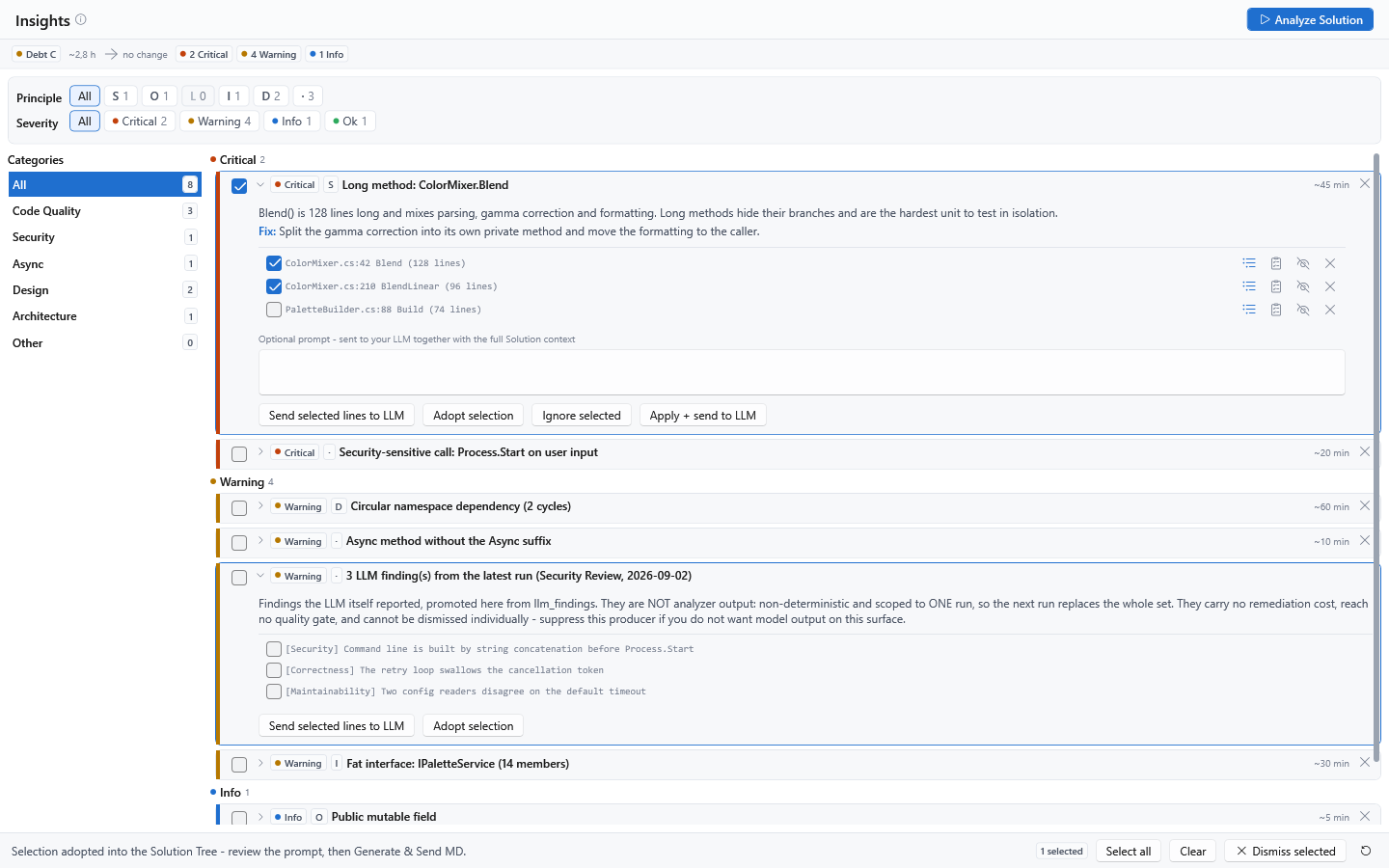
AICB is most useful for non-trivial C#/.NET solutions and semantic questions that plain text search cannot answer reliably. It analyzes C#; selected XAML/AXAML relationships supplement that graph. Other programming languages are out of scope.
Multi-targeted projects are loaded once per target framework by default, while
query surfaces generally deduplicate them to one logical project. Setting
analyzePreferredTfmOnly in <Solution>.aicb.json reduces analysis and export work
to the newest target-framework instance. The symbol inventory remains available,
but fan-in edges that exist only in another target can disappear, so this is a
documented precision-versus-cost choice rather than a transparent optimization.
A safe agent workflow
An agent can use AICB without memorizing the tool catalog:
- Call
server_infoto verify the connection and detect binary or configuration drift. Uselist_skillsfor the complete capability map ordocs()for the built-in operating manual. - Start an edit task with
prepare_taskto collect the named symbols, relevant context, covering tests and likely sibling implementations within one budget. - Before changing a symbol that other code names, call
impact_of_change; usefind_tests_forwhen the task bundle does not give enough test evidence. - Read uncertainty and completeness signals before treating an empty result as proof. Qualify ambiguous symbol names; restore and force-refresh incomplete projects.
- Make and save the change. Then call
refresh_sessionbeforeget_diagnostics. Under the normalReactiveprofile this is usually redundant, but it remains correct in every mode and makes the intended boundary explicit. - Use
review_context,evaluate_change_setorverify_claimwhen the task makes a review or policy claim; do not infer absence merely from a short search result. - Finish with the repository's real build and test commands.
get_diagnosticsreports Roslyn compiler diagnostics, not third-party analyzer or runtime results.
For several independent read-only questions, batch reuses one session and returns
one bounded response. Use measure first when the likely response size matters.
Reproducible analysis, CI and review
| Need | AICB workflow |
|---|---|
| Version the portable solution rules | Commit <Solution>.aicb.json next to the solution. It can carry layer rules, namespace exclusions, test definitions, suppressions, auto-init flags and analysis scope. Each surface consumes only the axes documented for it; the sidecar contains configuration, not analysis results, sessions, snapshots or credentials. Use solution_config_status → init_solution_config → apply_solution_config; aicb init does not create this file. |
| Enforce a quality threshold in CI | Run aicb analyze -s App.sln -o context.md --fail-on "critical>0 OR debt>120min". A failed gate returns exit code 6 and still writes the context document for diagnosis. |
| Compare an in-place change with a baseline | Call save_session before the edit, then refresh_session and compare_with_previous; use diff_public_contract (Full Select profile) when the public API is the contract that matters. |
| Review two live analyzed states | semantic_diff reports structural changes. diff_review adds blast radius, tests and newly introduced findings with a policy verdict. These two-session tools require the Full Select profile. |
| Reuse an analyzed model across processes | remember_codebase persists it, recall_codebase loads it without Roslyn, and refresh_remembered restores a full live analysis when required. These three are opt-in tools (AICB_MCP_TOOLS). |
| Curate context visually | The Windows app adds a solution tree, manual context selection, detail and token controls, AI-Builder-MD preview/export, snapshots, Insights, LLM runs and a source editor. |
In GitHub Actions the gate is one step. The action at the root of this repository sets up
the .NET 10 SDK, installs the published tool, restores the solution and runs
aicb analyze; a failed gate fails the step with exit code 6, and the document is still
written:
- uses: gregordadera/aicb-roslyn-mcp@v0.5.515.1
  with:
    version: 0.5.515.1
    solution: App.sln
    output: artifacts/context.md
    fail-on: "critical>0 OR debt>120min"
The example pins both halves: @v0.5.515.1 fixes the action, version fixes the package it
installs. Without version the action installs the newest published package, and @main
follows every change to the action, so neither belongs in a build you depend on. A release
tag can in principle be moved; the full commit SHA of that tag is the immutable form. Further
inputs are dotnet-version, restore and args for other
aicb analyze options; the outputs are output and exit-code. See
action.yml.
Configuration precedence is axis- and surface-specific. For example, headless layer
mapping can fall back to the sidecar, while headless test detection currently resolves
from the database or built-in rules rather than the sidecar's test axis. The exact
matrix is in the
configuration guide.
A running MCP session keeps the configuration it was analyzed with; after editing the
sidecar, start a new analysis instead of assuming refresh_session re-reads it.
Suppressions hide accepted findings from suppression-aware reading surfaces, but
solution_metrics and the CLI quality gate continue to count them. A shared
suppression is therefore an explicit review decision, not a way to lower the gate.
From semantic engine to human-in-the-loop workspace
The MCP server is currently AICB's most complete and operationally mature integration surface. Its 82 registered tools cover semantic navigation, change impact, dependency injection, test discovery, architecture, quality, context packing, review and session management. Profiles expose a curated 54-tool default or the 72-tool Full Select set, while sessions, staleness signals and bounded responses make the surface practical for coding agents. These numbers describe the available product surface; they are not a published benchmark of agent outcome quality.
The active MCP profile also selects task-oriented facets: each facet connects agent
guidance, a context-template slot and the corresponding tool subset. list_skills
is the runtime source of truth for which tools are exposed, which are callable, and
which additional registered tools sit outside the active pool.
The Windows app complements that agent-facing surface with a visual workspace for people: solution navigation, manual context selection, detail and token controls, AI-Builder-MD preview and export, snapshots, Insights, reusable configuration and manual LLM runs.
AIContextBuilder MCP questions
What tools does AIContextBuilder MCP provide?
It exposes 18 tools, including find_usages, impact_of_change, find_implementations, find_tests_for, resolve_injection.
Can I use explicit annotations to help the AI understand my code?
Yes, you can use optional <ai> tags in XML documentation to explicitly state the role, layer, responsibility, or stability of a type or method.