
Compiles Three.js code into native 3D scenes for Android, iOS, visionOS, and WebXR, providing an MCP server for AI-driven spatial verification and rendering.
Also known as google/three-live, three-live
- Stars
- 379
- Tools
- —
- Downloads, 30 days
- —
- Latest version
- 1.3.1
- Last commit
- Nov 14, 2026
- License
- Apache-2.0
What is Three-Live MCP?
Three-Live compiles Three.js code into native 3D scenes for Android, iOS, visionOS, and WebXR, providing an MCP server for AI-driven spatial verification and rendering.
Summary generated from the project's README
About Three-Live MCP server
Three-Live 3D, CAD & Spatial XR Compiler provides a specialized environment for converting Three.js code into native 3D experiences. It functions as an on-device JIT compiler that translates web-based graphics into native formats for Android using Google Filament and Jetpack XR, as well as iOS and visionOS via Apple RealityKit. This allows developers to use standard Three.js commands like THREE.Mesh and KHR_interactivity to drive high-performance spatial computing without writing platform-specific boilerplate.
For AI developers and agents, the server offers a headless CLI and MCP implementation that enables closed-loop visual and spatial verification. It can render 4-up contact sheets, perform spatial linting with JSON telemetry, and convert scenes to .glb or .usdz formats. The system supports an agent gym for reinforcement learning tasks, allowing an AI to act, observe, and react to a scene step by step. Users can connect it to various LLM backends via the Chat Completions protocol to enable interactive scene editing and voice-driven spatial commands.
What you can do with it
- 1Headless spatial verificationAn AI agent can render orthographic contact sheets and run spatial linting to check for frustum or overlap issues.
- 2Automated scene generation from imagesDevelopers can synthesize procedural Three.js scenes directly from a reference photo, sketch, or blueprint.
- 3Reinforcement learning agent trainingAn AI can play through a 3D scene step by step to determine if a specific level is winnable.
Written from the project's README. Every use case is checked against a quote from it.
How to install Three-Live MCP
Formats verified 10 Nov 2026Add to CursorAdd to GooseInstall Three-Live MCP in Claude Code
$ claude mcp add three-live -- npx -y three-liveInstall Three-Live MCP in Cursor
~/.cursor/mcp.json
{
  "mcpServers": {
    "three-live": {
      "command": "npx",
      "args": [
        "-y",
        "three-live"
      ]
    }
  }
}Install Three-Live MCP in VS Code
.vscode/mcp.json
{
  "servers": {
    "three-live": {
      "type": "stdio",
      "command": "npx",
      "args": [
        "-y",
        "three-live"
      ]
    }
  }
}Install Three-Live MCP in VS Code CLI
$ code --add-mcp '{"name":"three-live","type":"stdio","command":"npx","args":["-y","three-live"]}'Install Three-Live MCP in Claude Desktop
claude_desktop_config.json
{
  "mcpServers": {
    "three-live": {
      "command": "npx",
      "args": [
        "-y",
        "three-live"
      ]
    }
  }
}Install Three-Live MCP in Codex
$ codex mcp add three-live -- npx -y three-liveInstall Three-Live MCP in Codex config.toml
~/.codex/config.toml
[mcp_servers.three-live]
command = "npx"
args = ["-y", "three-live"]
Install Three-Live MCP in Gemini CLI
$ gemini mcp add -s user three-live npx -- -y three-liveInstall Three-Live MCP in Gemini settings.json
~/.gemini/settings.json
{
  "mcpServers": {
    "three-live": {
      "command": "npx",
      "args": [
        "-y",
        "three-live"
      ]
    }
  }
}Automated checks
Ran Nov 12, 2026Full report →Passed our automated checks. That is not a security audit: read the code and give the server the narrowest access it needs. How checks work

- Source repository linked and reachablePass
- Open source license (OSI)Pass
- Commit or release in the last yearPass
- Package name not close to a popular packagePass
- Remote endpoint uses HTTPSNot checked
- Destructive tools are labelledNot checked
- No hidden instructions to the modelPass
- No critical advisory in the package or its dependenciesPass
README
View on GitHubDisclaimer: This is not an officially supported Google product.
Three-Live
AI-First Native 3D, CAD & Spatial Computing: On-device JIT compiler turning live, AI-generated Three.js into native Android (Google Filament & Jetpack XR), iOS & visionOS (Apple RealityKit), and WebXR.


🧭 Why Three-Live? • ⚡ Quickstarts (Android • iOS • CLI • Web) • 📦 Install (JitPack • SwiftPM • Cargo • npm) • ▶ Live 3D Studio • 🧩 Domain Kits Catalog • 🥽 Live Spatial XR Studio • 📚 Docs
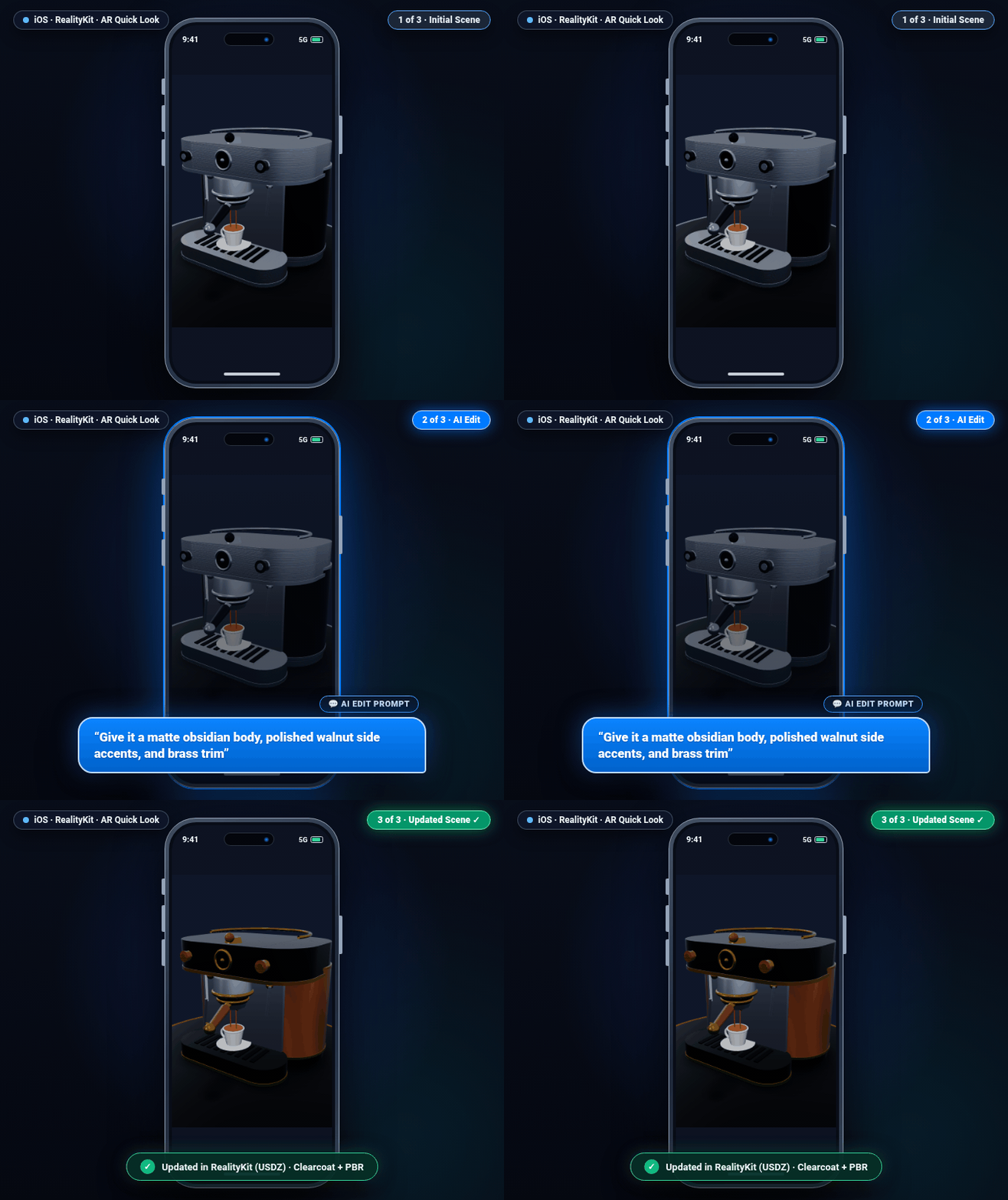
| iOS & visionOS · RealityKit | Android XR · Google Filament |
|---|---|
 |
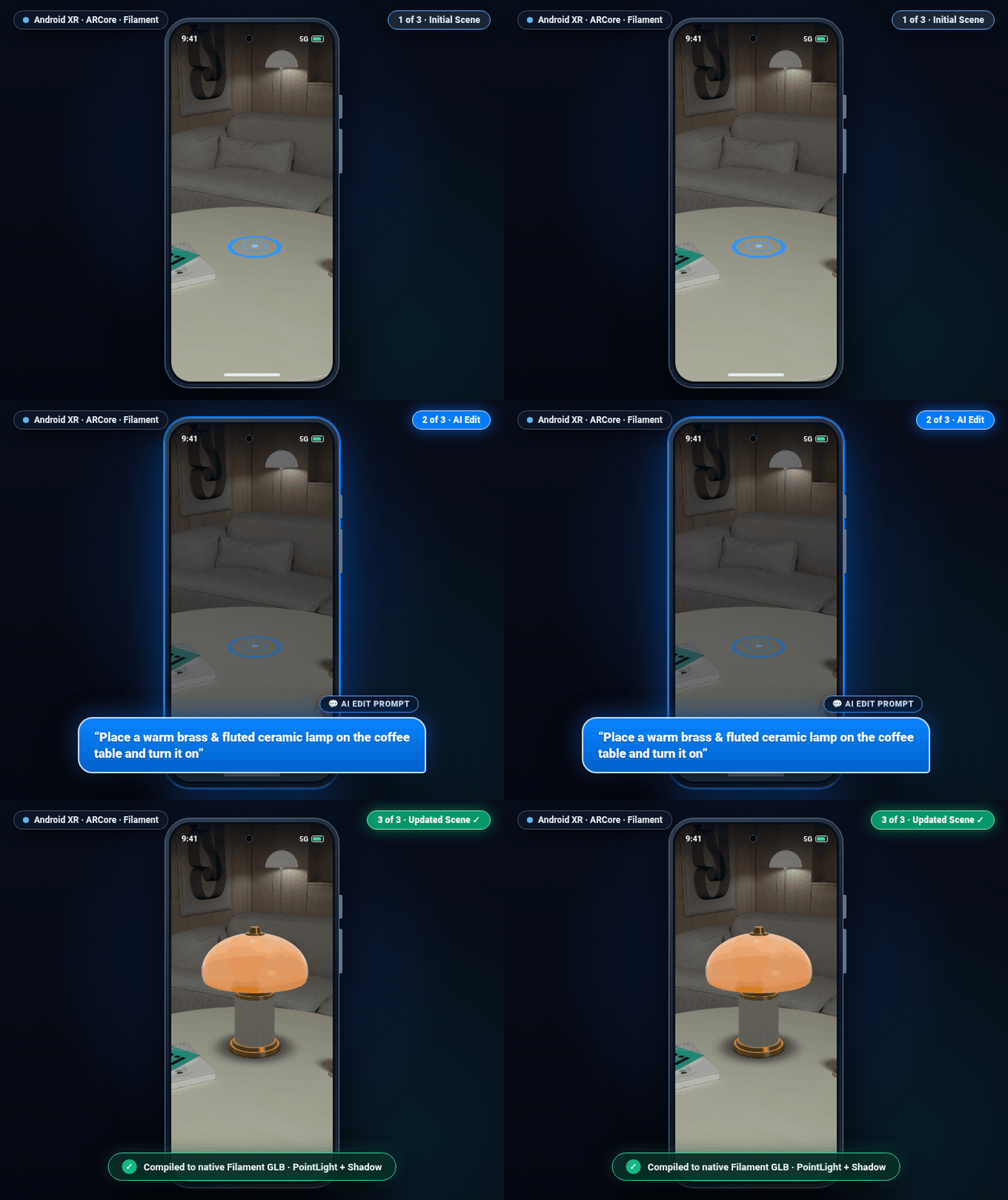 |
LLMs and developers excel at writing concise Three.js code—not hundreds of
lines of platform-specific native 3D, shader, and AR boilerplate. Three-Live
compiles standard Three.js (THREE.Mesh, THREE.CSG, userData.xr,
KHR_interactivity) on-device in a sandboxed Rust VM and renders natively in
Google Filament and Jetpack XR SceneCore on Android, Apple RealityKit and
Quick Look on iOS and visionOS, headless 4-up PNG contact sheets
(three-live-cli) for AI coding agents, and WebGL2 / WebXR on the Web.
Quickstarts
1. Run Three.js natively on Android (Google Filament & Jetpack XR SceneCore)
Compile standard Three.js code over zero-copy JNI and drive native Google Filament rendering, 60 Hz physics, and Jetpack XR SceneCore spatial entities:
import com.google.threelive.FilamentHelper
import com.google.threelive.XRLiveRuntimeSession
import com.google.threelive.XRLiveSceneCoreHelper

val threeJsCode = """
  const core = new THREE.Mesh(
    new THREE.IcosahedronGeometry(0.55, 3),
    new THREE.MeshStandardMaterial({ color: 0x38bdf8, metalness: 0.85, roughness: 0.15 })
  );
  core.userData.xr = { grab: '2-hand', orbit: { speed: -0.4 } };
  scene.add(core);
""".trimIndent()

// Compile Three.js to a zero-copy GLB ByteBuffer and load directly into Google Filament
val holder = FilamentHelper.loadModelZeroCopy(threeJsCode) { buffer ->
    assetLoader.createAssetFromBinary(buffer)
}

// Step live KHR_interactivity graphs, 60 Hz rigid-body physics, and spatial traits per frame
val runtime = XRLiveRuntimeSession.fromGlb(holder.byteBuffer)
runtime.step(dtSeconds = 1.0 / 60.0)

// Or attach interactive spatial traits (grab, scale, billboard, anchor) in Android XR SceneCore
XRLiveSceneCoreHelper.attachTraitsFromGlb(xrSession, entity, holder.byteBuffer)
2. Run Three.js natively on iOS, macOS, and visionOS (Apple RealityKit)
Compile the exact same Three.js code into Apple RealityKit (ARView /
RealityView) or .usdz:
import ThreeLiveCompiler
import RealityKit

@MainActor
func loadSpatialScene(from threeJsCode: String, into arView: ARView) async throws -> XRLiveRealityKitSession? {
    let glb = try ThreeCompiler.compileToGLB(script: threeJsCode)
    let entity = try await RealityKitHelper.loadEntity(fromGLB: glb)
    XRLiveRealityKit.installTraits(on: entity, in: arView)

    // Bind live KHR_interactivity, 60 Hz physics, and spatial traits to RealityKit SceneEvents.Update
    let session = XRLiveRealityKitSession(glbData: glb, root: entity)
    session?.installInputTargets()
    session?.start()
    return session
}
3. Verify & compile Three.js headlessly for AI agents (three-live-cli & MCP server)
Render a 4-up orthographic/camera contact sheet (zero GPU required), run the
spatial linter for JSON frustum/overlap telemetry, compile scene.js to .glb
/ .usdz, generate a scene from a reference image (from-image), or attach
three-live-cli mcp as a zero-dependency Model Context Protocol (MCP) stdio
server (three_live_validate, three_live_render, three_live_convert,
three_live_from_image, three_live_bake_textures, three_live_sim,
three_live_link, and the three_live_gym_reset / three_live_gym_step /
three_live_gym_close agent gym) in Gemini CLI, Google Antigravity, Claude
Code, or any MCP client. The agent gym lets an agent play a scene step by step
(act, observe, react) to check a level is winnable; "gym" is the
reinforcement-learning term for such a reset/step environment, and no ML is
involved. Not using MCP? three-live-cli gym reset level.js --session ep.json
and three-live-cli gym step --session ep.json --actions '[...]' do the same,
one command per step. three-live-cli link scene.js --qr prints a playground
link (and a terminal QR code) that opens the scene on a phone, one tap from AR.
Building from a photo, mockup, sketch, or blueprint? Pass --reference (or
reference in MCP) to get a side-by-side + aligned-overlay + silhouette-diff
sheet with IoU and proportion guidance, or run from-image to synthesize and
verify a procedural Three.js scene directly from an image:
$ npx three-live-cli render scene.js --view=quad --grid --annotations -o contact_sheet.png
$ npx three-live-cli render scene.js --reference=blueprint.png --view=front -o compare.png
$ npx three-live-cli from-image photo.jpg -o scene.js --visual-turns 2 --render compare.png
$ npx three-live-cli validate scene.js --json
$ npx three-live-cli link scene.js --qr
$ npx three-live-cli convert scene.js -o model.usdz
$ npx three-live-cli textures bake scene.js -o scene.textures.json   # AI textures (needs THREE_LIVE_AI_IMAGE_ENDPOINT)
$ npx three-live-cli convert scene.js --texture-pack scene.textures.json -o model.glb

# Or register the built-in MCP server for closed-loop visual + spatial AI verification:
$ claude mcp add three-live -- npx -y -p three-live three-live-cli mcp
4. Run on the Web (<three-live> and <xr-live>)
On the web, <three-live> (< 31 KB gz viewer, < 78 KB gz with the live
Three.js compiler) and <xr-live> (< 90 KB gz) render the same Three.js
scenes in WebGL2 and 6DoF WebXR with 1-tap mobile AR handoff:
// Standard Three.js scene (runs identically in Android, iOS, CLI, and Web)
const mesh = new THREE.Mesh(
  new THREE.TorusKnotGeometry(0.4, 0.14, 64, 16),
  new THREE.MeshStandardMaterial({ color: 0x38bdf8, metalness: 0.8, roughness: 0.15 })
);
mesh.userData.xr = { grab: '1-hand', billboard: 'capsule' };
scene.add(mesh);
Add three-live-ai.min.js (< 33 KB gz; built into the full bundles) to let
users reshape a scene with any LLM: every edit is compiled in the sandbox
first, auto-repaired once on failure, and only then hot-swapped, so a bad
generation never breaks the live scene.
<three-live allow-client-scripts
    ai-endpoint="https://your-backend.example/chat"  ai-model="gemini-2.5-flash">
  <script type="text/three">/* your scene */</script>
</three-live>
<script type="module">
  const el = document.querySelector('three-live');
  const result = await el.editScene('make the roof red and add a chimney');
  if (!result.applied) console.warn(result.error);  // live scene unchanged
  // el.undoEdit() reverts; el.aiProvider = { complete: async ({messages}) => '...' } plugs in any model.
</script>
ai-endpoint speaks the widely supported Chat Completions protocol
(ai-provider="ai-chat"): your own backend proxy, Ollama or LM Studio
(http://localhost:..., no account needed), vLLM, OpenRouter, or Gemini's
compatibility endpoint. Keep API keys on your server; never put them in pages.
Tap & Speak: let users tap a mesh and say what to change. The voice model
talks, and your code model writes the edit through an edit_scene tool, so edit
quality never depends on the voice model.
<three-live allow-client-scripts ai-endpoint="https://your-backend.example/chat"
    ai-select-on-tap ai-voice-button
    ai-voice-url="wss://your-backend.example/realtime">
  <script type="text/three">/* your scene */</script>
</three-live>
ai-select-on-tap: tapping a mesh setsselected-mesh(tap again to clear), so "make this red" knows what "this" is.ai-voice-button: a mic button. Withai-voice-urlit toggles a realtime voice conversation (ai-voice-provider="ai-realtime", the default, for any server speaking the Realtime WebSocket protocol, or"gemini-live"). Without it, it runs push-to-talk with the browser's speech recognizer (el.startVoiceEdit()).- From code:
await el.connectVoice({provider: 'gemini-live', url})orawait el.startVoiceEdit(). Progress arrives asthree-live-voiceevents (listening,editing, transcripts, results).
Talk-to-Select: users can select by voice instead of tapping, so they can check that the right objects are highlighted before an edit.
- Say "select the two red chairs on the left", "also select the lamp", "deselect the small one", or "clear the selection". References are resolved locally with no model call: names (with synonyms and plurals), material colors, left / right / front / back from the current camera, top / bottom, size, ordinals ("the second mug"), counts ("both"), "all … except …", and lists ("the lamp and the sofa").
- "Select the lamp and make it blue" selects first, then edits right away when the reference was unambiguous. When it isn't, it asks ("Which one: Chair Left or Chair Right?") and changes nothing.
- References the local matcher can't resolve ("the cup next to the sofa", other languages) go to your code model, which picks from a compact scene index or asks a question.
- Shift / Ctrl / Cmd-tap or a long press adds to the selection.
el.selectedMeshesholds it;three-live-selectevents report it. - Push-to-talk shows confirmation chips: each selected mesh with ×, buttons
for the candidates of a question, and Apply for an edit that is waiting on
a model-resolved selection. Set
ai-select-chips="off"to hide them. Realtime voice sessions read the selection back instead, using theselect_meshestool. - From code:
await el.selectByVoice('the red chairs', {mode: 'add'}).
Image to Scene (compileFromImage): turn a photo, sketch, or blueprint into
a live procedural Three.js scene across Web
(await el.compileFromImage(image, {prompt, priors, visualTurns: 2})), Android
(editor.compileFromImage(bitmap, prompt, priors)), iOS
(await editor.compileFromImage(imageData: ...)), CLI
(three-live-cli from-image --visual-turns 2), and MCP (three_live_from_image
with visualTurns). Images are automatically downscaled and JPEG-normalized,
compiled in the sandbox, verified against spatial quality gates (minimum 2
meshes, finite bounds, non-empty frustum coverage, and zero critical overlap
errors) with one-turn auto-repair, optionally refined closed-loop against
rendered REFERENCE | RENDER | OVERLAY 50/50 (+ 4-up orthographic/iso) sheets
(visualTurns: 0..5), and hot-swapped into the scene (el.undoEdit()
reverts). Optional metric spatial priors (userHeight, floorNormal, and 3D
detected object bounding boxes from ARCore / ARKit / world-understanding, or a
whole RoomPlan scan on iOS via AISpatialPriors.fromCapturedRoom(room), or any
room scan via AISpatialPriors.fromRoomScan on Android) anchor real-world scale
and placement.
AI textures (userData.xr.material.prompt): add a texture prompt next to a
material preset. The preset is the offline fallback, so the scene always renders
the same way without a network:
<three-live allow-client-scripts texture-pack="scene.textures.json"
    ai-image-endpoint="https://your-backend.example/v1/images/generations">
  <script type="text/three">
    const wall = new THREE.Mesh(new THREE.BoxGeometry(4, 2.5, 0.2),
        new THREE.MeshStandardMaterial());
    wall.name = 'TempleWall';
    wall.userData.xr = {material: {preset: 'brick',
        prompt: 'weathered Kyoto temple stone with moss', size: 512}};
    scene.add(wall);
  </script>
</three-live>
- The compiler never calls an image model. Textures come from a texture
pack (
texture-pack="…json",el.texturePack = json, or an inline<script type="application/three-live-texture-pack">), keyed by the prompt, size (256, 512, or 1024), and seed. Normal and roughness maps (up to 512) are derived on-device. - With an OpenAI-compatible Images endpoint configured (
ai-image-endpoint/ai-image-model, orel.aiImageProvider), missing textures are generated, cached in IndexedDB, and hot-swapped in. Setai-textures="manual"to generate only when you callawait el.generateTextures(). - Runtime generation gives each visitor different textures. For consistent
results, save
await el.exportTexturePack()and ship it with the scene. Exported.glb/.usdzfiles already contain the final textures; GLB nodes showing an AI texture carry its pack key inextras.xr.material.textureKey. - Android (
ThreeLiveAITextures), iOS (AITextures), the CLI (three-live-cli textures bake), and MCP (three_live_bake_textures) use the same packs and give the same pixels. On Android and iOS, auto generation works like the Web once a provider is set (sceneLoaded, oreditor.textures).
Install packages and bundles
Package installation
-
1. Android (JitPack, GitHub Packages Maven, prebuilt release AAR, or source):
-
JitPack (
https://jitpack.io, no authentication required): Addmaven("https://jitpack.io")tosettings.gradle.kts, then add:dependencies { implementation("com.github.google.three-live:compiler:v1.4.0") // Optional adapters: :filament, :firebase-ai, :detect-mlkit, :hands-androidxr, :hands-mediapipe } -
GitHub Packages Maven (
https://maven.pkg.github.com/google/three-live): Configure the repository insettings.gradle.ktsand addimplementation("com.google.threelive:compiler:1.4.0")(plus optional:filament,:firebase-ai,:detect-mlkit,:hands-androidxr,:hands-mediapipe). -
Prebuilt AAR: Download
three-live-compiler-release.aar(includesarm64-v8a,armeabi-v7a, andx86_64JNI.solibraries) and optional adapter AARs (three-live-filament-release.aar, etc.) from GitHub Releases intoapp/libs/and addimplementation(files("libs/three-live-compiler-release.aar")). -
Maven Local (
com.google.threelive:compiler:1.4.0): Run./gradlew :mobile:android:publishReleasePublicationToMavenLocaland addimplementation("com.google.threelive:compiler:1.4.0"). -
From source: Run
make android(orbash scripts/build_android_aar.sh).
-
-
2. iOS, macOS, and visionOS (Swift Package Manager):
.package(url: "https://github.com/google/three-live.git", from: "1.0.0")Swift Package Manager automatically resolves the prebuilt, checksum-pinned
ThreeLiveCompiler.xcframework.ziparchive from GitHub Releases—no local Rust or Node.js toolchain is required. -
3. Rust CLI (
three-live-cli) and library crate (Crates.io, prebuilt binaries, or source):-
Crates.io (library & CLI):
cargo add three-live-compiler # Or install the standalone CLI binary from Crates.io: cargo install three-live-compiler --bin three-live-cli -
Prebuilt binaries: Download standalone binaries for macOS (
arm64andx86_64), Linux (x86_64andaarch64), and Windows (x86_64.exe) from GitHub Releases. -
From source: Run
make rust(npm run build && cargo build --manifest-path compiler/Cargo.toml --release --bin three-live-cli).
-
-
4. Web (npm, CDN, prebuilt release, or source):
-
npm:
npm install three-live xr-live -
Hosted ES module (
jsDelivror GitHub Pages CDN): Loadhttps://cdn.jsdelivr.net/npm/three-live/dist/three-live.min.jsorhttps://google.github.io/three-live/dist/three-live.min.js. -
Prebuilt bundle archive: Download
three-live-web-dist.zipfrom GitHub Releases. -
From source: Run
git clone https://github.com/google/three-live.git && cd three-live && npm install && npm run build.
-
Why Three-Live and XR-Live
Native mobile and headset AR/XR from Three.js
In practice, browser WebXR (navigator.xr) only covers part of the device
landscape:
- Android System
WebView, iOS Safari, and iOSWKWebViewdon't support WebXR. A WebXR-only app can't run inside an embeddedWebVieworWKWebViewin a native Android or iOS app, and can't enter AR in Safari on iPhone or iPad. - Static OS handoffs (
Scene ViewerandAR Quick Look) strip interactivity. Exporting a static.glbor.usdzfile to the OS previewer works for viewing a model, but drops Three.jsanimate()loops, 60 Hz physics, custom state, and interactive plugins. - Browser WebXR doesn't use native spatial compositors. On Android,
browser WebXR renders WebGL2 in the browser process rather than using Google
Filament or Jetpack XR SceneCore's
HomeSpaceshared space. On visionOS, browser WebXR runs in an isolated fullscreen VR session without camera passthrough or SwiftUI Shared Space integration.
Three-Live solves this by compiling the same Three.js code on-device and running it natively on each platform's own engine:
| Target environment | What happens with browser WebXR or static AR handoff | What you can do with Three-Live and XR-Live |
|---|---|---|
| Android phones and tablets (native Compose or View app) | android.webkit.WebView has no WebXR; Scene Viewer only shows static .glb files |
Compile Three.js over JNI and render natively in Google Filament and ARCore (XRLiveRuntimeSession) inside your app UI. |
| Android XR and Apple Vision Pro headsets | Browser WebXR is isolated in a fullscreen WebGL session | Attach native Jetpack XR SceneCore (GltfEntity, MovableComponent, Anchor) or RealityKit entities that live in the system shared space alongside native panels. |
| iPhone and iPad (native SwiftUI app) | WKWebView has no WebXR; AR Quick Look only shows static .usdz files |
Run live Three.js scenes, animate() loops, KHR_interactivity, and spatial plugins natively in ARKit and RealityKit (ARView and RealityView). |
| Mobile and headset web browsers | Standard WebXR works on Android Chrome and headsets; iOS Safari has no WebXR | Run 6DoF WebXR where supported, with automatic Stereo SBS, gyroscope, and in-memory .usdz and .glb AR handoff on iOS Safari. |
Compare <three-live> and <xr-live>
The following table compares the two runtime tiers across Android, iOS, and Web:
| Capability | three-live (Core 3D, CAD & Animation) |
xr-live (Spatial Computing & Simulation) |
|---|---|---|
| Primary use case | 3D product viewers, parametric CAD/CSG, skeletal animation, and 1-tap AR handoff | Interactive 6DoF XR, native mobile AR/XR, spatial UI cards, depth physics, hand tracking, and 60 Hz simulations |
| Three.js JIT compiler | Yes (sandboxed Rust Boa/QuickJS VM on Android/iOS/CLI, Web Worker on Web) |
Yes (inherits three-author JIT compiler plus userData.xr spatial traits) |
| Android & iOS runtime | Google Filament (FilamentHelper), Apple RealityKit (RealityKitHelper), and .glb/.usdz export |
Native Android (Filament + Jetpack XR SceneCore + XRLiveRuntimeSession) and native iOS/visionOS (RealityKit + XRLiveRealityKitSession) |
| Spatial interaction | Orbit controls, mesh picking, 3D surface hotspots, KHR_interactivity |
Declarative userData.xr traits (grab, scale, billboard, anchor, handles, snapTo, gaze, explode, navigable, sync, audioEmitter), 15 spatial plugins, 6 xr-live-sim simulation plugins, 25-joint hands, and KHR_interactivity |
| Web bundle budget | < 31 KB gz (viewer), < 78 KB gz (three-live.min.js), < 224 KB gz (three-live-full.min.js) |
< 56 KB gz (viewer), < 90 KB gz (xr-live.min.js), < 333 KB gz (xr-live-full.min.js) |
Three-Live MCP questions
How do I add Three-Live MCP to Claude Code?
Run claude mcp add three-live -- npx -y three-live in your terminal. Add --scope user to make it available in every project.
How do I add Three-Live MCP to Cursor?
Open ~/.cursor/mcp.json and add the server under mcpServers, using the Cursor config shown in the install section above.
Can I use Three-Live with an AI agent?
Yes, you can attach the three-live-cli mcp as a zero-dependency Model Context Protocol server in Gemini CLI, Claude Code, or any MCP client to allow agents to render, validate, and convert scenes.