
devloop-supervisor MCP server
Commit Nov 2, 2026Keeps local development servers and build watches alive by auto-restarting crashes and providing an MCP endpoint for AI agents to read errors.
Also known as ganeshkg04/devloop-supervisor
- Stars
- 0
- Tools
- 6
- Downloads, 30 days
- —
- Latest version
- —
- Last commit
- Nov 2, 2026
- License
- MIT
What is devloop-supervisor MCP?
devloop-supervisor keeps local development servers and build watches alive by auto-restarting crashes and providing an MCP endpoint for AI agents to read errors. It exposes 6 tools, such as get_status, get_errors, get_logs.
Summary generated from the project's README
About devloop-supervisor MCP server
Maintaining local development environments by automatically restarting crashed build watches and dev servers is the primary function of devloop-supervisor. It manages multiple processes, such as Vite or TSC, ensuring that if a Node heap error or file lock causes a crash, the process restarts with backoff. It also prevents infinite crash loops by pausing until a file change is detected.
Developers use this tool locally on Windows, macOS, or Linux by initializing a configuration file and running the supervisor via npx. It provides a live status page at localhost:4290 to monitor logs and control processes manually. The system can also increase the Node heap size for heavy builds and ensures processes start in the correct order so servers do not attempt to serve incomplete files.
Coding agents like Claude Code or Cursor can interact with the supervisor through an MCP endpoint via stdio or HTTP. This allows an AI to monitor build status, read specific error logs using get_errors, and wait for builds to complete, creating a closed loop where the agent can fix code and verify the results automatically.
What you can do with it
- 1Automated error correctionAn AI agent can detect build failures, read the specific error messages, and apply code fixes to resolve them.
- 2Monitoring process healthDevelopers can use the status page to view live logs and manage the lifecycle of their development processes.
- 3Managing complex build sequencesThe supervisor ensures that build watches start in a specific order and wait for successful initial builds before starting the next step.
- 4Handling resource exhaustionYou can prevent crashes caused by memory limits by assigning a larger Node heap to your processes.
Written from the project's README. Every use case is checked against a quote from it.
devloop-supervisor MCP tools 6
Detected from the READMEget_statusget_errorsget_logswait_for_buildsrestart_processbuild_once
| get_status | — | |
| get_errors | — | |
| get_logs | — | |
| wait_for_builds | — | |
| restart_process | — | |
| build_once | — |
README
View on GitHubdevloop-supervisor




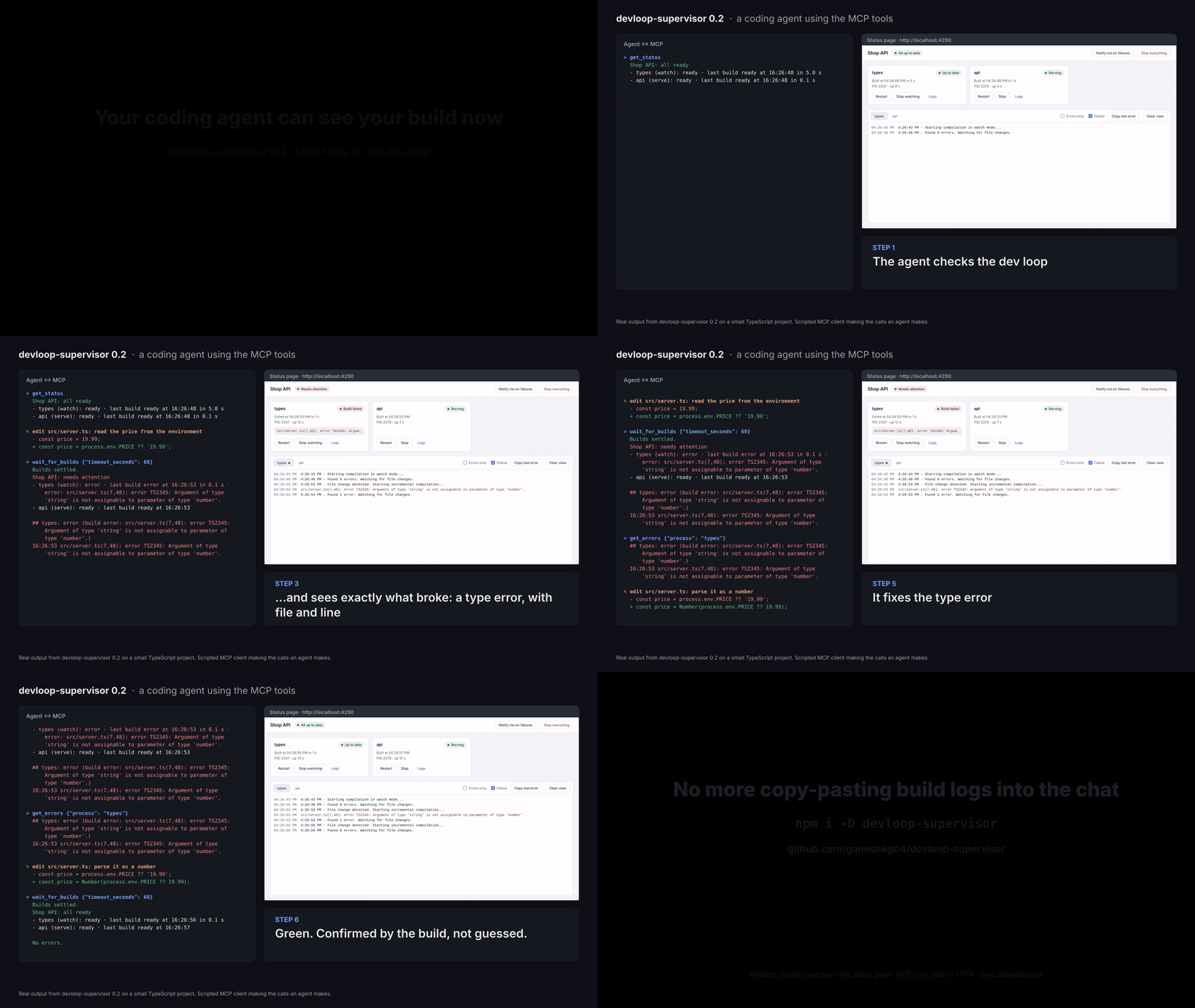
Keeps your local dev loop alive. It runs your build watches and dev servers, restarts whatever crashes, shows live logs on a status page, and gives coding agents (Claude Code, Cursor, …) an MCP endpoint to read build errors and restart processes.
Zero dependencies. Node 18.18+. Windows, macOS and Linux.
npx devloop-supervisor init      # writes devloop.config.json
npx devloop-supervisor           # status page on http://localhost:4290
Or add it to a project: npm install --save-dev devloop-supervisor, then run npx devloop-supervisor or add "dev": "devloop-supervisor" to your scripts.
Why
A watch (ng build --watch, tsc --watch, …) survives a compile error, but not a crash: the Node heap running out on a large build, its output folder deleted by a concurrent build, a locked file on Windows. Nothing restarts it, and you find out when the app stops picking up your changes.
devloop-supervisor:
- builds before it serves: watches start in order, and each waits for its first build, so the dev server never reads half-written output;
- restarts what dies, with backoff, and pauses a crash loop until your next save instead of spinning;
- can give the processes a larger Node heap;
- warns about competing processes, e.g. a second watch fighting over the same output folder;
- rebuilds stale outputs you aren't watching, before starting;
- writes one log file per process;
- serves a status page with live logs and Watch / Build once / Restart / Stop controls, plus desktop notifications on failure;
- exposes it all over MCP, so an agent can edit code, wait for the rebuild, and read the errors itself.
Configuration
devloop.config.json (found in the current folder or any parent folder):
{
  "name": "My dev loop",
  "prepare": "npm install",
  "processes": [
    {
      "id": "types",
      "kind": "watch",
      "command": "npx tsc --watch --preserveWatchOutput -p packages/shared",
      "preset": "tsc-watch",
      "sources": "packages/shared/src",
      "output": "packages/shared/dist",
      "buildOnce": "npx tsc -p packages/shared"
    },
    {
      "id": "web",
      "kind": "serve",
      "command": "npm run dev",
      "cwd": "apps/web",
      "preset": "vite",
      "port": 5173
    }
  ]
}
Processes start in the order listed. More in examples/.
Top level
| Key | Default | Meaning |
|---|---|---|
name |
"Dev loop" |
Title on the status page |
port |
4290 |
Status page, API and MCP port (bound to 127.0.0.1) |
logDir |
.devloop/logs |
One log file per process |
heapMb |
none | Sets --max-old-space-size for every process (via NODE_OPTIONS) |
prepare |
none | Command (or { "command", "cwd", "env" }) run before anything starts |
crashLimit |
5 |
Quick crashes in a row before pausing |
quickExitMs |
60000 |
An exit sooner than this after start counts as a quick crash |
firstBuildTimeoutMs |
1800000 |
Longest wait for a process's first build before starting the next |
conflictPattern |
none | Regex over running processes' command lines; matches are shown as warnings |
freshMarker |
none | File written once every tracked output is newer than its sources |
errorPattern, warnPattern |
built in | Regexes that colour log lines and feed get_errors |
urlPattern |
Local:\s+(https?://\S+) |
Picks the dev server's URL out of its output |
Each process
| Key | Default | Meaning |
|---|---|---|
id |
required | Letters, digits, -, _ |
kind |
required | watch (a build watch) or serve (a dev server) |
command |
required | Run through the shell, as written |
label |
id |
Display name |
cwd |
config folder | Working folder |
env |
{} |
Extra environment variables |
autostart |
true |
Start it at launch (--only overrides) |
waitForReady |
true for watch |
Wait for its first build before starting the next process |
preset |
none |
Readiness patterns: angular-library, angular-app, vite, tsc-watch, none |
signals |
from preset | { "building": [...], "ready": [...], "error": [...] } regexes; replace the preset per state |
port |
none | If busy, wait and retry instead of crashing |
buildOnce |
none | One-off build command (enables "Build once" and stale rebuilds) |
sources, output |
none | Folders compared by modification time to detect a stale build |
watchPaths |
[sources] |
After a crash loop, a save here restarts the process |
A process with no ready signals counts as ready as soon as it starts.
Command line
devloop-supervisor [init | mcp] [options]

  --config <file>     config file (default: nearest devloop.config.json)
  --only <a,b>        start only these processes
  --port <n>          override the port
  --heap <mb>         override heapMb
  --skip-prepare      skip prepare and stale-output builds
  --detach            run in the background
  --open              open the status page
  --stop              stop the running supervisor
  --status            print its status
Options also accept key=value (only=web port=4300 detach=1), which suits Makefiles.
For coding agents (MCP)
The supervisor speaks the Model Context Protocol, in two ways:
stdio (works with any MCP client). The mcp command connects to the supervisor running for this project:
claude mcp add devloop -- npx devloop-supervisor mcp
Or in a client's JSON config:
{ "mcpServers": { "devloop": { "command": "npx", "args": ["devloop-supervisor", "mcp"] } } }
HTTP (no extra process), at http://127.0.0.1:4290/mcp:
claude mcp add --transport http devloop http://127.0.0.1:4290/mcp
Tools
| Tool | What it does |
|---|---|
get_status |
Every process: state, last build result, restarts, dev server URL |
get_errors |
Recent error lines, from all processes or one |
get_logs |
Recent output of one process (optionally errors only) |
wait_for_builds |
Waits until nothing is building, then returns status and errors |
restart_process |
Restarts a process (also clears a crash-loop pause) |
start_process / stop_process |
Starts or stops a process |
build_once |
One-off build of a stopped watch |
A typical agent loop: edit files → wait_for_builds → fix whatever get_errors reports → repeat.
Security
- The server listens on 127.0.0.1 only and refuses requests whose
Hostisn't127.0.0.1orlocalhost(blocks DNS rebinding). - State-changing API calls need an
X-Devloopheader, which forces a CORS preflight that is never granted. /mcpaccepts onlyapplication/jsonbodies and rejects non-localOrigins.- Commands come only from your config file; nothing received over HTTP or MCP is ever run as a command.
Development
npm test
The tests start a real supervisor over fake build and serve processes and drive it through the HTTP API, the HTTP MCP endpoint and the stdio MCP server.
License
MIT
devloop-supervisor MCP questions
What tools does devloop-supervisor MCP provide?
It exposes 6 tools, including get_status, get_errors, get_logs, wait_for_builds, restart_process.
What does devloop-supervisor do for AI coding agents?
It provides an MCP endpoint that allows agents to read build errors, check process status, and restart processes automatically.
Does it support Windows, macOS, and Linux?
Yes, it is compatible with Windows, macOS, and Linux and requires Node 18.18 or higher.