
Lets an AI client discover, read, and validate SKILL.md agent skills through a built-in MCP server.
Also known as furkan708/skillkit, skillkit-cli
- Stars
- 0
- Tools
- —
- Downloads, 30 days
- 136
- Latest version
- 1.0.2
- Last commit
- Sep 4, 2026
- License
- MIT
What is skillkit MCP?
skillkit lets an AI client discover, read, and validate SKILL.md agent skills through a built-in MCP server.
Summary generated from the project's README
About skillkit MCP server
Skillkit provides a complete toolkit for managing SKILL.md agent skills. It allows developers to scaffold, lint, pack, and install skills that follow the Agent Skills specification. The tool helps prevent common mistakes by checking for security smells like leaked API keys and quality issues such as vague descriptions or oversized bodies. Every linting run produces a quality score from 0 to 100 along with a letter grade.
Users can run the built-in MCP server via the command skillkit mcp to expose their skill library to clients like Claude Code, Cursor, or Windsurf. This server uses stdio and JSON-RPC 2.0 to provide three specific tools: list_skills, read_skill, and lint_skill. The system is written in pure Python with zero dependencies, making it easy to integrate into local environments or CI pipelines using uvx, pipx, or standard pip installations.
What you can do with it
- 1Scaffold a new skillCreate a spec-compliant folder for a new agent skill using a single command.
- 2Audit skill security and qualityCheck a skill file for leaked credentials or formatting errors before publishing.
- 3Expose skills to an AI clientMake your installed skills discoverable by an MCP-compatible agent like Cursor.
- 4Package skills for distributionCompress a skill into a zip file to upload it to compatible platforms.
Written from the project's README. Every use case is checked against a quote from it.
How to install skillkit MCP
Formats verified 10 Nov 2026Add to CursorAdd to GooseInstall skillkit MCP in Claude Code
$ claude mcp add skillkit -- uvx skillkit-cliInstall skillkit MCP in Cursor
~/.cursor/mcp.json
{
  "mcpServers": {
    "skillkit": {
      "command": "uvx",
      "args": [
        "skillkit-cli"
      ]
    }
  }
}Install skillkit MCP in VS Code
.vscode/mcp.json
{
  "servers": {
    "skillkit": {
      "type": "stdio",
      "command": "uvx",
      "args": [
        "skillkit-cli"
      ]
    }
  }
}Install skillkit MCP in VS Code CLI
$ code --add-mcp '{"name":"skillkit","type":"stdio","command":"uvx","args":["skillkit-cli"]}'Install skillkit MCP in Claude Desktop
claude_desktop_config.json
{
  "mcpServers": {
    "skillkit": {
      "command": "uvx",
      "args": [
        "skillkit-cli"
      ]
    }
  }
}Install skillkit MCP in Codex
$ codex mcp add skillkit -- uvx skillkit-cliInstall skillkit MCP in Codex config.toml
~/.codex/config.toml
[mcp_servers.skillkit]
command = "uvx"
args = ["skillkit-cli"]
Install skillkit MCP in Gemini CLI
$ gemini mcp add -s user skillkit uvx -- skillkit-cliInstall skillkit MCP in Gemini settings.json
~/.gemini/settings.json
{
  "mcpServers": {
    "skillkit": {
      "command": "uvx",
      "args": [
        "skillkit-cli"
      ]
    }
  }
}Automated checks
Ran Nov 15, 2026Full report →Passed our automated checks. That is not a security audit: read the code and give the server the narrowest access it needs. How checks work

- Source repository linked and reachablefurkan708/skillkit is public and reachablegithub.com/furkan708/skillkit ↗Pass
- Package names this repository as its sourceNot checked
- Build provenance (Sigstore attestation)Sigstore attestation for skillkit-clipypi.org/project/skillkit-cli/ ↗Pass
- Open source license (OSI)MITspdx.org/licenses/MIT.html ↗Pass
- Commit or release in the last yearLast commit or release 2026-09-04github.com/furkan708/skillkit ↗Pass
- OpenSSF ScorecardNot checked
- Package name not close to a popular packageNo popular package one edit away from skillkit-cliPass
- No critical advisory in the package or its dependencies1 resolved dependencies checked; no critical advisoryosv.dev ↗Pass
- No hidden instructions to the model0 tool descriptions and the README read; no override phrases, credential paths or hidden charactersPass
- Destructive tools are labelledNot checked
- Remote endpoint answers the MCP handshakeNot checked
README
View on GitHubskillkit






The toolbox for AI agent skills. Scaffold, lint, pack, and install SKILL.md skills — and serve your whole skill library to Claude Code, Cursor, and any MCP client with a built-in Model Context Protocol server.
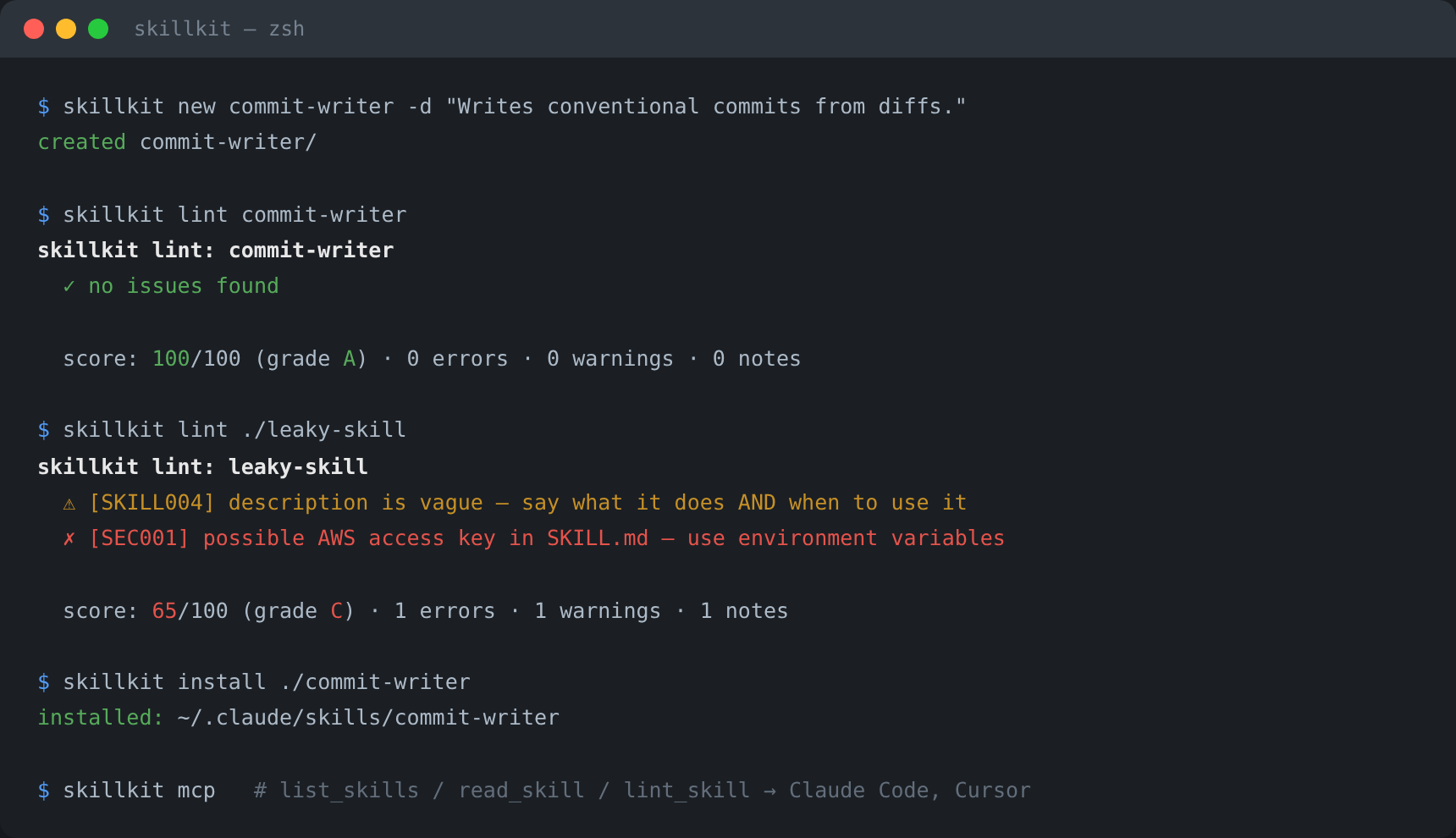
Community audits found that the overwhelming majority of published SKILL.md files carry at least one "skill smell" — and a large share leak secrets. skillkit catches those before you ship.
Deep docs: Usage guide — lint rules reference, MCP patterns, CI usage · Architecture · Contributing · Changelog · Security
Features
new— scaffold a spec-compliant skill folder in one commandlint— validate against the Agent Skills spec plus security smells: leaked API keys, vague descriptions, oversized bodies, folder typos, and more (scored 0–100 with a grade)pack— zip a skill for upload to skill-capable platformsinstall— install from a folder or any git URL into~/.claude/skills(or your own directory)list/remove— manage your installed skill librarymcp— a zero-dependency MCP server (stdio, JSON-RPC 2.0) that exposeslist_skills,read_skill, andlint_skilltools to any client- Zero dependencies — pure Python standard library
- 76 tests, CI on Python 3.10 → 3.12
Quick start
# run without installing (uvx — pulls from PyPI on demand)
uvx --from skillkit-cli skillkit lint ./skills

# or install (installs the `skillkit` command)
pipx install skillkit-cli

# ...or from source
git clone https://github.com/furkan708/skillkit.git
cd skillkit && pip install .

# 1. create a skill
skillkit new commit-writer -d "Writes conventional commit messages from staged diffs. Use when the user asks to commit changes."

# 2. lint it (spec + security + quality)
skillkit lint commit-writer
# ✓ no issues found
# score: 100/100 (grade A) · 0 errors · 0 warnings · 0 notes

# 3. pack it for upload
skillkit pack commit-writer        # → commit-writer.zip

# 4. install it for Claude Code
skillkit install ./commit-writer   # → ~/.claude/skills/commit-writer
Serve your skills over MCP
Add skillkit to any MCP client config — Claude Code, Cursor, Windsurf, and every other MCP-compatible agent:
{
  "mcpServers": {
    "skillkit": { "command": "skillkit", "args": ["mcp"] }
  }
}
Your agent can now discover and read every installed skill on demand:
| Tool | What it does |
|---|---|
list_skills |
Discover installed skills with names + descriptions |
read_skill |
Load the full SKILL.md instructions of one skill |
lint_skill |
Validate a skill and get its quality score |
What lint catches
| Rule | Severity | Check |
|---|---|---|
| SEC001 | error | Leaked secrets: GitHub/AWS/OpenAI/Slack tokens, private keys, hardcoded credentials |
| SKILL001 | error | Invalid name: charset, length ≤ 64, reserved words (anthropic, claude) |
| SKILL002 | error | name does not match the folder name |
| SKILL003 | error | description longer than 1,024 characters |
| SKILL009 | error | metadata is not a string→string map |
| SKILL004 | warn | Vague description (won't trigger — describe what and when) |
| SKILL005 | warn | Body over ~500 lines (move detail into references/) |
| SKILL007 | warn | Folder typos: script/, reference/, docs/… |
| SKILL006 | · info | Very thin body — add steps and examples |
| SKILL008 | · info | Unknown frontmatter fields |
Every run ends with a 0–100 score and a letter grade, so you know when a skill is ready to publish.
CLI reference
skillkit new <name> -d <description> [--dir DIR]   scaffold a skill
skillkit lint <path> [--json] [--strict]           validate a skill
skillkit pack <path> [-o FILE.zip]                 zip for upload
skillkit install <path|git-url> [--agent claude|project] [--dir DIR]
skillkit list [--agent ...] [--dir DIR] [--json]   show installed skills
skillkit remove <name> [--dir DIR]                 uninstall a skill
skillkit mcp [--dir DIR]                           serve skills over MCP
Built on the open Agent Skills specification — the same format supported by 40+ platforms including Claude, OpenAI Codex, and GitHub Copilot.
Tests
pip install pytest
pytest -v
Project Structure
skillkit/
├── skillkit/
│   ├── frontmatter.py   # minimal YAML frontmatter parser
│   ├── model.py         # skill loading (Agent Skills spec)
│   ├── linter.py        # rules, security smells, 0-100 score
│   ├── scaffold.py      # new + pack
│   ├── installer.py     # install / list / remove (folder or git)
│   ├── mcp_server.py    # zero-dependency MCP stdio server
│   └── cli.py           # command-line interface
└── tests/
Roadmap
-
skillkit search— search community skill registries - More install targets (Codex, Copilot CLI paths as they standardize)
-
skillkit doctor— prompt-injection heuristics (planned, not implemented yet)
License
MIT — see the LICENSE file for details.
skillkit MCP questions
How do I add skillkit MCP to Claude Code?
Run claude mcp add skillkit -- uvx skillkit-cli in your terminal. Add --scope user to make it available in every project.
How do I add skillkit MCP to Cursor?
Open ~/.cursor/mcp.json and add the server under mcpServers, using the Cursor config shown in the install section above.
What tools does the MCP server provide?
The server exposes tools to list installed skills, read the full instructions of a specific skill, and validate a skill's quality.
Can skillkit detect security issues in my skills?
Yes, the linter checks for security smells such as leaked API keys, private keys, and hardcoded credentials.
Does skillkit require any external dependencies?
No, it is a zero-dependency tool built using the pure Python standard library.