
Agent Lighthouse MCP server
Commit Nov 13, 2026Audits websites to ensure AI agents, LLM crawlers, and MCP clients can effectively discover, parse, cite, and act on site content.
Also known as ForkPoint/agent-lighthouse, @forkpoint/agent-lighthouse, @forkpoint/agent-lighthouse-core, @forkpoint/agent-lighthouse-mcp
- Stars
- 17
- Tools
- —
- Downloads, 30 days
- 10,490
- Latest version
- —
- Last commit
- Nov 13, 2026
- License
- Apache-2.0
What is Agent Lighthouse MCP?
Agent Lighthouse audits websites to ensure AI agents, LLM crawlers, and MCP clients can effectively discover, parse, cite, and act on site content.
Summary generated from the project's README
About Agent Lighthouse MCP server
Agent Lighthouse provides a specialized auditing framework for developers and site owners to evaluate how well their websites interact with artificial intelligence. It assesses whether LLM crawlers, agentic browsers, and MCP clients can successfully discover, parse, and act on site content. The tool examines critical elements such as robots.txt policies for bots like GPTBot and ClaudeBot, machine discovery files like llms.txt, and structured data via Schema.org.
Users can run audits through a command line interface using npx or integrate the functionality into their development workflows via an MCP server. This allows clients like Claude Desktop or Cursor to execute the audit_website tool directly. The system generates various outputs including terminal summaries, HTML reports, and JSON files. It also offers a GitHub Action to automate testing in continuous integration pipelines by failing builds if a site falls below a specified minimum score.
What you can do with it
- 1Automate AI readiness testingSet up a continuous integration check to ensure website changes do not drop the AI accessibility score below a certain threshold.
- 2Audit agentic commerce capabilitiesVerify that your website provides the necessary surfaces for AI agents to handle product offers, availability, and checkout processes.
- 3Directly audit via IDERun website scans through an MCP client like Cursor to check for machine discovery and interface compliance.
Written from the project's README. Every use case is checked against a quote from it.
How to install Agent Lighthouse MCP
Formats verified 10 Nov 2026Add to CursorAdd to GooseInstall Agent Lighthouse MCP in Claude Code
$ claude mcp add agent-lighthouse -- npx -y @forkpoint/agent-lighthouseInstall Agent Lighthouse MCP in Cursor
~/.cursor/mcp.json
{
  "mcpServers": {
    "agent-lighthouse": {
      "command": "npx",
      "args": [
        "-y",
        "@forkpoint/agent-lighthouse"
      ]
    }
  }
}Install Agent Lighthouse MCP in VS Code
.vscode/mcp.json
{
  "servers": {
    "agent-lighthouse": {
      "type": "stdio",
      "command": "npx",
      "args": [
        "-y",
        "@forkpoint/agent-lighthouse"
      ]
    }
  }
}Install Agent Lighthouse MCP in VS Code CLI
$ code --add-mcp '{"name":"agent-lighthouse","type":"stdio","command":"npx","args":["-y","@forkpoint/agent-lighthouse"]}'Install Agent Lighthouse MCP in Claude Desktop
claude_desktop_config.json
{
  "mcpServers": {
    "agent-lighthouse": {
      "command": "npx",
      "args": [
        "-y",
        "@forkpoint/agent-lighthouse"
      ]
    }
  }
}Install Agent Lighthouse MCP in Codex
$ codex mcp add agent-lighthouse -- npx -y @forkpoint/agent-lighthouseInstall Agent Lighthouse MCP in Codex config.toml
~/.codex/config.toml
[mcp_servers.agent-lighthouse]
command = "npx"
args = ["-y", "@forkpoint/agent-lighthouse"]
Install Agent Lighthouse MCP in Gemini CLI
$ gemini mcp add -s user agent-lighthouse npx -- -y @forkpoint/agent-lighthouseInstall Agent Lighthouse MCP in Gemini settings.json
~/.gemini/settings.json
{
  "mcpServers": {
    "agent-lighthouse": {
      "command": "npx",
      "args": [
        "-y",
        "@forkpoint/agent-lighthouse"
      ]
    }
  }
}Automated checks
Ran Nov 14, 2026Full report →Not verified yet. A server needs a score of 80, no serious finding, and enough data for us to check. How checks work · What to fix for more points

- Source repository linked and reachableforkpoint/agent-lighthouse is public and reachablegithub.com/forkpoint/agent-lighthouse ↗Pass
- Package names this repository as its source@forkpoint/agent-lighthouse, @forkpoint/agent-lighthouse-core name forkpoint/agent-lighthouse as sourcenpmjs.com/package/@forkpoint/agent-lighthouse ↗Pass
- Build provenance (Sigstore attestation)No build attestation published for this releaseNot checked
- Open source license (OSI)Apache-2.0spdx.org/licenses/Apache-2.0.html ↗Pass
- Commit or release in the last yearLast commit or release 2026-11-11github.com/forkpoint/agent-lighthouse ↗Pass
- OpenSSF ScorecardNot checked
- Package name not close to a popular packageNo popular package one edit away from @forkpoint/agent-lighthouse, @forkpoint/agent-lighthouse-core, @forkpoint/agent-lighthouse-mcpPass
- No critical advisory in the package or its dependenciesNot checked
- No hidden instructions to the model0 tool descriptions and the README read; no override phrases, credential paths or hidden charactersPass
- Destructive tools are labelledNot checked
- Remote endpoint answers the MCP handshakeNot checked
README
View on GitHub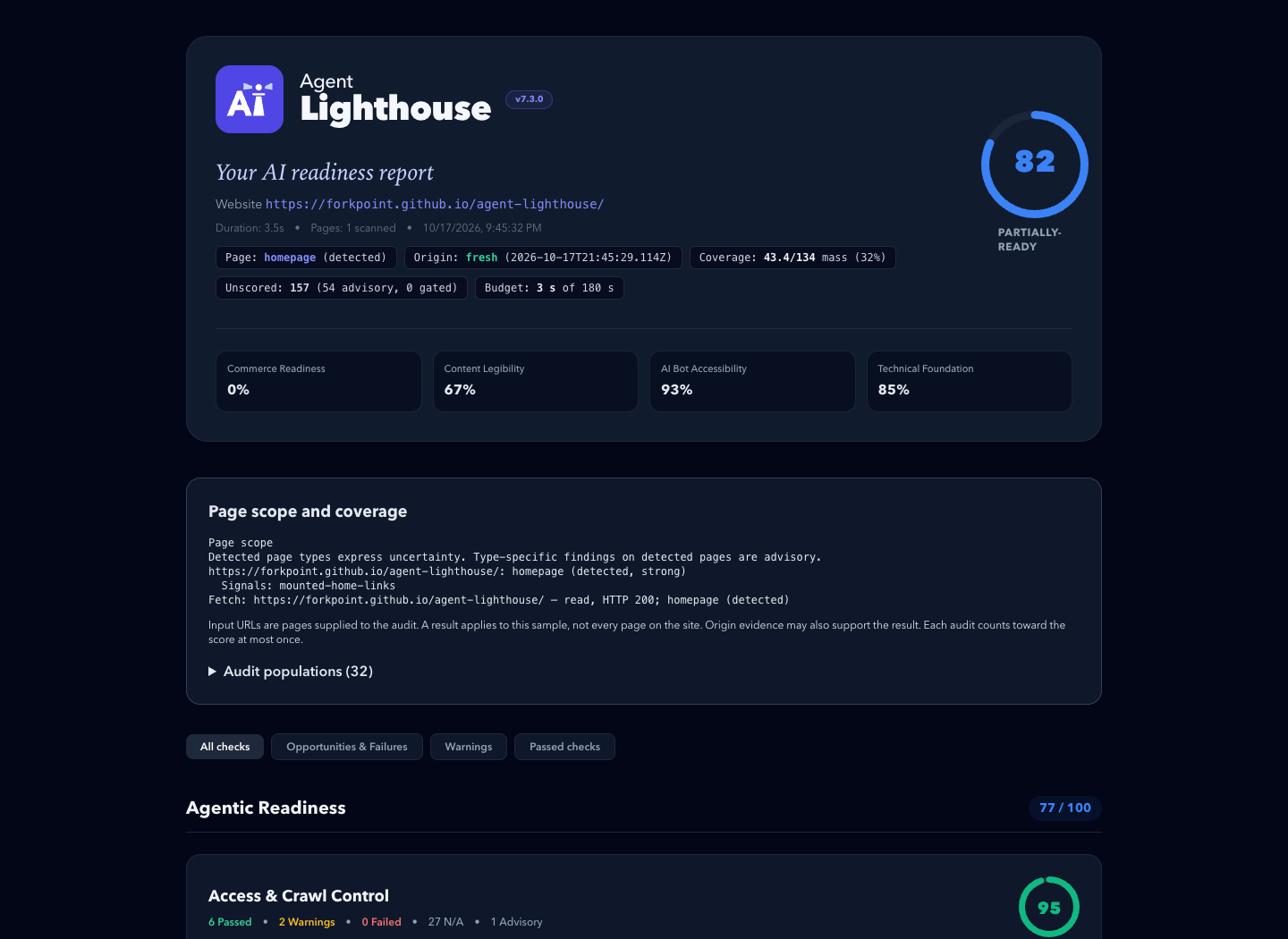
An example report. Its scores describe one past scan, not the site's current state.
⚡ Quickstart
Requires Node.js 22.22.2+ (22.x), 24.15.0+ (24.x), or 26+.
# Terminal report, plus HTML and JSON reports in ./reports
npx @forkpoint/agent-lighthouse https://example.com

# Open the HTML report in your browser
npx @forkpoint/agent-lighthouse https://example.com --view

# Fail (exit 1) below a score, for CI
npx @forkpoint/agent-lighthouse https://staging.example.com --min-score 85
Agentic readiness skill
The agent-lighthouse skill lets a coding agent turn a report into verified fixes, on any website stack. It traces findings through source files and hosting settings, and keeps local fixes apart from deployed scan results.
Install it from this repository's marketplace. In Claude Code:
claude plugin marketplace add ForkPoint/agent-lighthouse
claude plugin install agent-lighthouse@agent-lighthouse
In Codex:
codex plugin marketplace add ForkPoint/agent-lighthouse
codex plugin add agent-lighthouse@agent-lighthouse
From a local checkout, pass /absolute/path/to/agent-lighthouse to marketplace add. Start a new chat after installing. The CLI and MCP npm packages are separate. See the installation and workflow guide.
🎯 What Agent Lighthouse Checks
Agent Lighthouse evaluates websites across 8 agent-journey categories grouped into 3 readiness pillars:
├── 1. Agentic Readiness
│   ├── Access & Crawl Control (robots.txt rules for GPTBot, ClaudeBot, PerplexityBot, blocks, status codes)
│   ├── Machine Discovery (llms.txt, llms-full.txt, sitemaps, feeds, .well-known surfaces)
│   ├── Agent Interfaces (WebMCP manifests, OpenAPI specs, agents.json, search actions)
│   └── Agentic Commerce (product offers, availability, checkout and payment surfaces)
│
├── 2. AI Search Optimization
│   ├── Content Extraction (clean main content, semantic structure, render and response cost)
│   ├── Structured Data (Schema.org Product, Offer, SKU, GTIN, Organization, JSON-LD validity)
│   └── Answer Readiness (direct answerability, step lists, tables, unique data, citations)
│
└── 3. Technical Foundation
    └── Agent Operability & Safety (HTTPS, security.txt, tdmrep, stability, broken agent endpoints)
📦 Packages & Architecture
A pnpm monorepo published under the @forkpoint scope:
| Package | npm Package | Description |
|---|---|---|
packages/cli |
@forkpoint/agent-lighthouse |
Main CLI binary (npx @forkpoint/agent-lighthouse <url>). |
packages/core |
@forkpoint/agent-lighthouse-core |
Core gatherer-audit engine, scoring algorithms, and types. |
packages/report |
@forkpoint/agent-lighthouse-report |
Standalone HTML, Markdown, and unified report view-model. |
packages/mcp |
@forkpoint/agent-lighthouse-mcp |
Model Context Protocol (MCP) server for Claude / Cursor / IDEs. |
🛡️ GitHub Actions CI
- uses: ForkPoint/agent-lighthouse@main
  with:
    url: https://staging.example.com
    min-score: "85"
    github-token: ${{ secrets.GITHUB_TOKEN }}
The action writes terminal, HTML, JSON, and Markdown reports. With github-token it comments the Markdown summary on the pull request. Inputs and pinning are in the GitHub Action guide.
💻 Programmatic Node.js / TypeScript SDK
import { runScan } from "@forkpoint/agent-lighthouse-core";
import {
  buildReportView,
  generateHtmlReport,
} from "@forkpoint/agent-lighthouse-report";

const report = await runScan("https://example.com");
const view = buildReportView(report);

// overallScore is null when the scan saw too little to judge the site
console.log(`Overall Score: ${view.overallScore}/100 (${view.scoreTier})`);

const html = generateHtmlReport(report); // standalone HTML report
Options are in programmatic options.
🤖 Model Context Protocol (MCP) Server
Let Claude Desktop, Cursor or another MCP client run scans through the audit_website tool:
{
  "mcpServers": {
    "agent-lighthouse": {
      "command": "npx",
      "args": ["-y", "@forkpoint/agent-lighthouse-mcp"]
    }
  }
}
📣 Share Your Score
Reports are standalone files: attach them to pull requests, send them to clients, or publish a before/after. Put the score in a README with a badge. Share a public site's result through the site score template.
More: media kit (boilerplate, screenshots, logos) · brand guide · brand kit download
🛠️ Development
git clone https://github.com/ForkPoint/agent-lighthouse.git
cd agent-lighthouse
pnpm install
pnpm build
pnpm test   # deterministic tests with fixed inputs
Contributor rules, including how to add an audit, are in CLAUDE.md.
📄 License
Apache-2.0 © ForkPoint
Agent Lighthouse MCP questions
How do I add Agent Lighthouse MCP to Claude Code?
Run claude mcp add agent-lighthouse -- npx -y @forkpoint/agent-lighthouse in your terminal. Add --scope user to make it available in every project.
How do I add Agent Lighthouse MCP to Cursor?
Open ~/.cursor/mcp.json and add the server under mcpServers, using the Cursor config shown in the install section above.
What does Agent Lighthouse check?
It evaluates websites across eight agent-journey categories including access control, machine discovery, agent interfaces, agentic commerce, content extraction, structured data, answer readiness, and technical foundation.
Can I use this in my CI/CD pipeline?
Yes, you can use the CLI to fail builds below a certain score or use the official GitHub Action to comment Markdown summaries on pull requests.
How can I use this with Claude Desktop or Cursor?
You can connect it as an MCP server using the @forkpoint/agent-lighthouse-mcp package via npx.