
pmlens MCP server
Commit Nov 14, 2026Track tasks, visualize progress, and manage architectural decisions across multiple AI coding assistants using natural language.
Also known as flc-design/pmlens
- Stars
- 1
- Tools
- 48
- Downloads, 30 days
- —
- Latest version
- —
- Last commit
- Nov 14, 2026
- License
- MIT
What is pmlens MCP?
pmlens tracks tasks, visualize progress, and manage architectural decisions across multiple AI coding assistants using natural language. It exposes 48 tools, such as pm_init, pm_status, pm_tasks.
Summary generated from the project's README
About pmlens MCP server
PM Lens is a project management MCP server designed for developers who use multiple AI coding assistants. It provides a unified substrate to track tasks, visualize progress, and record architectural decisions through natural language. The server is built to work across several hosts, including Claude Code, Codex CLI, Cursor, and Grok Build, allowing users to switch between different AI tools without losing project context or workflow history.
Users can manage their work by interacting with the assistant using plain language commands to check status, add tasks, or identify blockers. The system stores data in a local .pm directory using plain YAML files for git compatibility and a SQLite database for session memory and full-text search. It includes specialized tools such as a pm_dashboard for HTML-based progress visualization, an ADR system for decision lineage, and a research skill set that utilizes parallel agents for deep analysis. Setup is handled via pipx and a simple installation command that automatically detects available hosts.
What you can do with it
- 1Monitor project progressAsk the AI for a summary of current phase completion and task velocity.
- 2Record architectural decisionsDocument the reasoning behind a specific design choice to maintain a versioned history.
- 3Identify development blockersRequest a list of all tasks that are currently stuck or blocked.
- 4Visualize project healthGenerate a visual dashboard to see phases, velocity, and risks at a glance.
Written from the project's README. Every use case is checked against a quote from it.
pmlens MCP tools 48
Detected from the READMEpm_initpm_statuspm_taskspm_add_taskpm_update_taskpm_nextpm_blockerspm_add_issuepm_logpm_add_decisionpm_decision_querypm_decision_brief
Show all 48 toolsShow fewer tools
pm_update_decisionpm_add_explanationpm_add_feedbackpm_update_decision_posturepm_velocitypm_riskspm_dashboardpm_prompt_packpm_discoverpm_cleanuppm_listpm_rememberpm_recallpm_session_summarypm_memory_searchpm_memory_statspm_memory_ingestpm_memory_cleanuppm_recordpm_knowledgepm_knowledge_querypm_workflow_startpm_workflow_statuspm_workflow_advancepm_workflow_abandonpm_workflow_listpm_workflow_templatespm_draft_contentpm_redact_draftpm_drafts_pendingpm_reject_draftpm_outbox_rememberpm_outbox_logpm_outbox_pendingpm_outbox_mergepm_outbox_reject
Automated checks
Ran Nov 14, 2026Full report →Not verified yet. A server needs a score of 80, no serious finding, and enough data for us to check. How checks work · What to fix for more points

- Source repository linked and reachableflc-design/pmlens is public and reachablegithub.com/flc-design/pmlens ↗Pass
- Package names this repository as its sourceNot checked
- Build provenance (Sigstore attestation)Not checked
- Open source license (OSI)MITspdx.org/licenses/MIT.html ↗Pass
- Commit or release in the last yearLast commit or release 2026-11-11github.com/flc-design/pmlens ↗Pass
- OpenSSF ScorecardNot checked
- Package name not close to a popular packageNot checked
- No critical advisory in the package or its dependenciesNot checked
- No hidden instructions to the model48 tool descriptions and the README read; no override phrases, credential paths or hidden charactersPass
- Destructive tools are labelledNo tool named like delete, drop or execPass
- Remote endpoint answers the MCP handshakeNot checked
README
View on GitHubPM Lens





PM Lens for Claude Code, Codex CLI, Cursor and Grok Build — a project management MCP server that works across multiple AI coding assistants.
Track tasks, visualize progress, record decisions — through natural language in whichever host you happen to be in. One PM substrate, multiple hosts.
> 進捗は?
✓ Phase 1 "Backend API": 60% complete (12/20 tasks)
  - 3 tasks in progress, 1 blocked
  - Velocity: 8 tasks/week (↑ trending up)

> 次にやること
1. [P0] MYAPP-014: Add user authentication endpoint
2. [P1] MYAPP-015: Implement rate limiting
3. [P1] MYAPP-018: Write integration tests

> MYAPP-014 に着手
✓ MYAPP-014 → in_progress
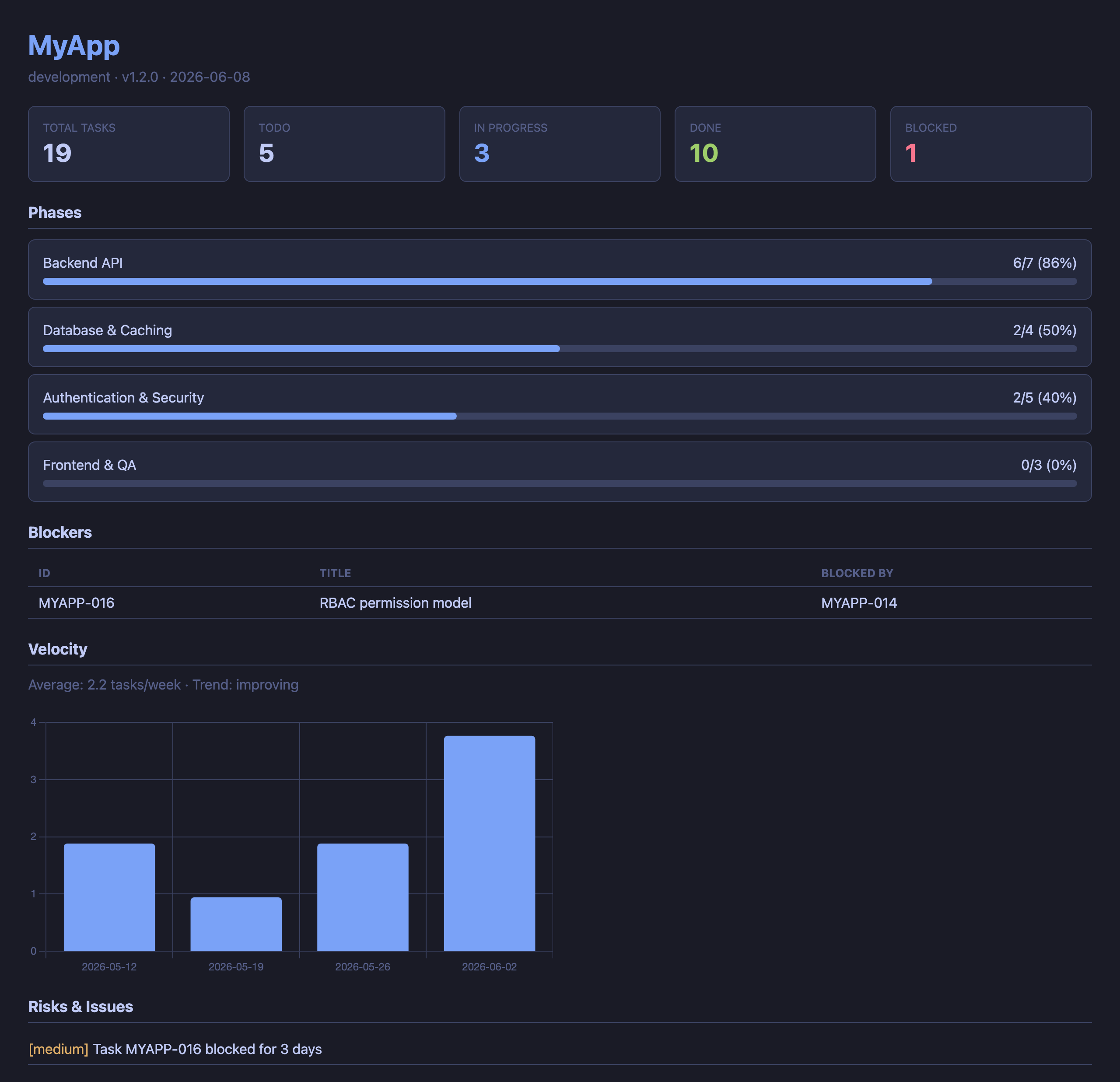
HTML dashboard (pm_dashboard) — phase progress, velocity, blockers, and risks at a glance:
Features
- 🔌 Multi-host first — registers in Claude Code, Codex CLI, Cursor and Grok Build with one command (
pmlens install --target=auto). Project rules sync toCLAUDE.mdandAGENTS.mdautomatically (ADR-008). Switch hosts mid-project without losing context — same.pm/data, same workflows - 50 MCP tools + 2 compatibility aliases — task CRUD, child issues, status, blockers, velocity, dashboard, prompt packs, ADR, session memory, workflows, knowledge records, multi-host rules injection, cross-host outbox bridge, content pipeline (recorded knowledge → redacted drafts), and more
- Decision lineage — each ADR keeps a lifecycle, a versioned fact core, the explanations an assistant wrote from it and the user's replies, so a decision can be explained, questioned, revised and adopted with a record of why (see Decision Lineage)
- Workflow engine — template-based development workflows with loops, user gates, and chaining (Discovery → Development)
- Knowledge records — structured findings between casual memory and formal ADR (research, tradeoff, spec, etc.)
- Super Research skill — 3 parallel agents (Domain Expert, Critical Analyst, Lateral Thinker) + Depth Check (6 dimensions) + Fact Check + Cross-Check
- Session memory — SQLite + FTS5 full-text search. Memories persist across sessions and link to tasks/decisions. Branch-aware recall (
pm_recall(track=...), ADR-028) restores the last context of a specific work line; "latest" always means most recently worked — millisecond-precision, index-backed, and self-healing against clock skew (ADR-042/043) - Cross-project search — search memories across all projects via a global index
- Natural language — say "進捗は?" or "what's next?" instead of memorizing commands
- Zero configuration —
pip install+pmlens install, then just say "PM初期化して" - Multi-project — manage all your projects from a global registry with cross-project dashboards
- Git-friendly — plain YAML files in
.pm/directory, trackable withgit diff;pm_initwrites a.pm/.gitignorethat keeps the SQLite databases there (memories, and drafts before redaction) out of git - Non-invasive — adds only a
.pm/directory to your project.rm -rf .pm/to remove completely
Quick Start
Install (once)
pipx install pmlens
pmlens install          # Registers MCP server in Claude Code
# Restart Claude Code
Update
pipx upgrade pmlens
# Restart Claude Code
Note:
pipxis recommended becausepmlensis a command-line tool — it gets its own isolated environment, and a plainpip installoutside a virtualenv is refused outright on Homebrew and Debian/Ubuntu Pythons (PEP 668,error: externally-managed-environment). Inside a virtualenv,pip install pmlensandpip install -U pmlenswork the same way.
After upgrading, each project's rule section is updated with the user's agreement:
- On the next session start,
pm_statusreturns arules_outdated(orrule_file_version_mismatch) warning, which the model passes on - When the user agrees,
pm_update_rules(target='existing')rewrites only the files that already carry the section, keeping a.bak.<timestamp>copy - Rule files are often committed, so review the diff before committing it
You can also update manually:
> CLAUDE.md を更新して # or: pm_update_rules
The legacy
pm_update_claudemdtool is still available as a back-compat alias (CLAUDE.md only). It emits aDeprecationWarningsince v0.6.0 and is slated for removal in v1.0.0 (PMSERV-055).
Troubleshooting: MCP fails to connect after an update
If Claude Code reports an MCP connection failure (or pmlens: ENOENT) right
after pip install --upgrade, the usual cause is an interrupted install. If
pip is stopped mid-extraction (Ctrl-C, sleep, low disk), the package can be left
half-written: pip list still shows it as installed, but some modules and the
pmlens console script are missing — so the launcher can't be found.
Recover with a forced clean reinstall of the code package (pmlens):
pip install --force-reinstall --no-deps pmlens==<version>
pyenv rehash          # pyenv users only — regenerate the shim
pmlens --help         # verify → "PM Lens — ..."
MCP servers connect only at startup, so restart Claude Code afterward (a failed connection is not retried within a running session).
Initialize a project
# In Claude Code, cd to your project directory
> PM初期化して
✓ .pm/ created
✓ Registered in global registry
✓ Detected: name=my-app, version=1.2.0 (from package.json)
PM Lens automatically detects project info from package.json, pyproject.toml, Cargo.toml, .git/config, and README.md.
Use it
| You say | What happens |
|---|---|
進捗は? / status |
Show project progress summary |
次にやること / what's next |
Recommend next tasks by priority & dependencies |
タスク追加:○○を実装 |
Add a new task (auto-numbered) |
MYAPP-003 完了 |
Mark task as done |
MYAPP-003 に課題がある |
Add child issue to task (auto-inherits phase) |
ブロッカーある? |
List blocked tasks |
ダッシュボード見せて |
Generate HTML dashboard (Chart.js, dark theme) |
この設計にした理由を記録 |
Record an Architecture Decision Record (ADR) |
全プロジェクトの状態 |
Cross-project portfolio view |
Multi-Host Support (Claude Code + Codex + Cursor + Grok Build)
PM Lens registers as an MCP server in four hosts, each of which keeps its MCP configuration in a completely separate store:
| Host | MCP registration | Format | Rule file |
|---|---|---|---|
| Claude Code | claude mcp add (user) |
— | CLAUDE.md |
| Codex CLI | ~/.codex/config.toml |
TOML [mcp_servers.pmlens] |
AGENTS.md |
| Cursor | ~/.cursor/mcp.json |
JSON "mcpServers" |
AGENTS.md |
| Grok Build | ~/.grok/config.toml |
TOML [mcp_servers.pmlens] |
AGENTS.md |
Three of the four read AGENTS.md, so rule injection is keyed on the rule
file, not the host: --target all writes AGENTS.md exactly once and
reports which hosts read it.
Grok Build note. Grok Build already reads Claude Code's and Cursor's MCP configs as compatibility sources, so if you installed PM Lens for Claude Code it very likely works in Grok already. Registering natively still helps: the compatibility scan is opt-out (
[compat.claude] mcps = false) and is merged at lower priority than~/.grok/config.toml.Grok Build also loads every recognised rule file in a directory — both
AGENTS.mdandCLAUDE.md. In a project managed for Claude Code and Codex it therefore sees the PM rules twice. Neither file can be dropped, sopm_statusreports this inwarnings[]rather than "fixing" it.
--target flag
pmlens install and pmlens uninstall accept a --target (alias -t)
flag. The default is conservative on purpose: existing scripts and
documentation that say pm-server install continue to register only
Claude Code, exactly as in v0.4.x.
--target |
Behavior |
|---|---|
claude-code |
(default) Register in Claude Code only. No other host's config is opened. |
codex |
Register in Codex CLI only. ~/.claude/ is never touched. |
cursor |
Register in Cursor only (~/.cursor/mcp.json, created if ~/.cursor exists). |
grok |
Register in Grok Build only (~/.grok/config.toml). |
auto |
Detect installed hosts by their config paths — register in those only. |
all |
Attempt every known host; hosts that are not installed report skipped. |
The companion command pmlens update-rules (introduced in v0.5.0 alongside
this feature) defaults to --target auto because it is a brand-new command
with no v0.4.x baseline to preserve.
Safety properties
- Idempotent: running
installtwice is a no-op on the second call. - Backed up:
~/.codex/config.tomlis copied to a timestamped backup before each write. (Claude Code usesclaude mcp add, which has its own internal handling.) - Comment-preserving: edits to
config.tomlgo throughtomlkit, so user-written comments, key order, and blank lines survive verbatim. - Dry-run:
--dry-runprints the planned actions per host without writing anything. The output prefixes each line with[dry-run]. - Per-host isolation: a failure in one host (e.g. Codex CLI not
installed when
--target=all) does not abort the others; the outcome is reported per host with statusinstalled/already_registered/skipped/failed. Registering with one host leaves every other host's config byte-identical — asserted bytests/test_hosts.py. - Never clobbers what it cannot read: a malformed
~/.cursor/mcp.jsonis reported asfailedand left exactly as found, never rewritten.
Quick examples
# Default (back-compat) — Claude Code only
pmlens install

# Add PM Lens to whichever host(s) are detected on this machine
pmlens install --target auto

# Force registration in both, creating ~/.codex/config.toml if needed
pmlens install --target all

# Preview what would happen, don't touch any files
pmlens install --target auto --dry-run

# Symmetric removal (same --target semantics)
pmlens uninstall --target auto
See docs/design.md §5.2 and ADR-007 for the detailed
rationale (detect-then-patch, backup, dry-run, absolute-path embedding).
Project rules injection (CLAUDE.md / AGENTS.md)
pm_init and pm_update_rules keep PM Lens's auto-action rules synced
into the appropriate per-host instruction file:
| Host | Instruction file |
|---|---|
| Claude Code | CLAUDE.md |
| Codex CLI | AGENTS.md |
| Cursor | AGENTS.md |
| Grok Build | AGENTS.md |
The rules section is bracketed by <!-- pm-server:begin v=N --> /
<!-- pm-server:end --> markers and updated in place — user content
outside the markers is never touched.
pm_update_rules (and its CLI sibling pmlens update-rules) defaults
to --target auto: it detects which host(s) are present on this machine
and updates only those instruction files. Detection runs four signals
(filesystem, marker, CLAUDECODE env, fallback) — see ADR-008 amendment
A3 in docs/design.md §6.4.
| Action | Tool |
|---|---|
| MCP (in-session) | pm_update_rules(target="auto", dry_run=False) |
| CLI (this project) | pmlens update-rules --target auto |
| CLI (every registered project) | pmlens update-rules --all (plan), then --apply |
| Legacy CLAUDE.md only | pm_update_claudemd / pmlens update-claudemd |
Both files are backed up to <file>.bak.<timestamp> before each write.
Rule sections only move forward: a pmlens whose template is older than the
section on disk leaves it alone and reports rules_newer_than_server
(pass force to downgrade on purpose). pm_status also warns when a section
is older than the running pmlens (rules_outdated) or when CLAUDE.md and
AGENTS.md carry different versions (rule_file_version_mismatch).
--all touches every registered repository, and those often commit their
rule files, so it defaults to --target existing (only files that already
carry the section; nothing is created) and prints the plan without writing
until you add --apply.
See docs/design.md §6 and ADR-008 for the multi-host
rules-injection design (claudemd → rules module rename, marker convention,
dataclasses, atomic-write helpers).
MCP Tools (50 tools + 2 compatibility aliases)
Project Management
| Tool | Description |
|---|---|
pm_init |
Create .pm/, register in global registry, auto-detect project info |
pm_status |
Phase progress, task summary, blockers, velocity, active tasks, hook auto-setup |
pm_tasks |
List tasks with filters (status / phase / priority / tag) |
pm_add_task |
Add task with auto-numbered ID (e.g., MYAPP-001) |
pm_update_task |
Update status, priority, notes, blocked_by |
pm_next |
Recommend next tasks (excludes blocked / unmet dependencies) |
pm_blockers |
List blocked tasks across projects |
pm_add_issue |
Add child issue to a task (phase auto-inherited, parent auto-reverted to review) |
Records
| Tool | Description |
|---|---|
pm_log |
Daily log entry with auto task linking (progress / decision / blocker / note / milestone) |
pm_add_decision |
Add ADR with context, decision, and consequences. Saved as proposed by default; pass status="accepted" only when the user has accepted the content itself (a convention: pmlens cannot verify who accepted it, so recording as accepted returns a decision_created_accepted warning to relay). Declared provenance (origin, recorded_timing, decision_kind, default unknown) and the recording time go to .pm/decision_lineage/ADR-NNN.yaml, stored as declared, not verified |
pm_decision_query |
Read ADRs and their lineage without changing anything (read-only, also available in Lens mode). action="list" lists the ADRs with their status, lifecycle and declared origin, limit (default 50) at a time from offset, with has_more / next_offset (lifecycle="proposed" lists the ones still waiting for the user's review; long titles are cut there, get shows them whole); action="get" returns the ADR text, declared provenance, links in both directions and recent events. An ADR without a usable lineage is shown as derived from its status, and not_recorded names what was never recorded. Declared values and events are shown as recorded, not verified; unknown keys come back by name only, and secret-like strings are redacted in the response |
pm_decision_brief |
Get what the assistant needs to explain one ADR to the user in front of it, changing nothing (read-only, also available in Lens mode): the current fact_core, the rules an explanation must follow, the floor and the one question to ask afterwards (a quoted fact comes apart from the template, in question.quoted_fact). judgeable_kinds (which of spec_policy, premise_dependent, technical the reader can judge; omitted until the reader has said, when the brief returns the question to ask) and reader_hint (more_detail / simpler, for this call only) change only language_rules, judgment_request and question; the project's decision posture changes only posture. The facts, the floor and the validation are the same for every reader: an external_irreversible decision, or one whose reversibility is unknown, needs a person able to judge before its irreversible effect, for every decision kind. Secret-like strings are redacted in the response |
pm_update_decision |
Change an ADR's lifecycle (proposed / adopted / deprecated / superseded / rejected / reverted) along a fixed transition table, its links (supersedes / superseded_by / amends), or append an evaluation (shown as an assistant's record, not a human review) or a note. The ADR text is never changed; decisions.yaml's status is rewritten as the lifecycle's projection (adopted → accepted, rejected → deprecated). A reason is required for every lifecycle change. Set adopted only when the user accepted the ADR's own content and rejected only after the user decided: pmlens cannot verify that, so every lifecycle change returns a decision_lifecycle_changed warning to relay. A declared origin (only ai_auto) or recorded_timing that is still unknown can be filled in later, with a reason. fact_core (with expected_fact_core_version, the version read, 0 for the first) records the decision's facts as a new version: the full list as it should now stand, five required facts (F-what, F-change, F-revert with its reversibility: code_revertable / external_irreversible / unknown, F-weak, F-uncertain with its confidence) and numbered F-alt.N, F-conditions.N and F-premise.N (a premise_dependent ADR needs at least one premise). pmlens assigns the ids and never reuses one, keeps the values a revision replaces, refuses a version that is not the current one (fact_core_version_mismatch), and changes nothing else in a fact_core call (adopt in another call). caused_by cites the feedback ids (ADR-NNN.FB-n) of this ADR that led to a fact core revision or an evaluation. Once written, reversibility is never lowered to code_revertable by this tool (fact_core_reversibility_lowering_refused, with or without caused_by), and an ADR adopted with its facts recorded keeps them fixed until it is moved back to proposed (fact_core_after_adoption); see Decision Lineage. Full mode only (not in Lens) |
pm_add_explanation |
Save an explanation of an ADR that the assistant wrote for the user from the ADR's current fact core, as paragraphs ([{"fact_ids": [1-2 ids, the first being what the paragraph is mainly about], "text": "..."}]) with the fact_core_version it was written from and an optional closing question. Every fact of the current version must lead a paragraph that is not only a mermaid diagram; a missing or unknown id is refused and listed (missing_fact_ids / unknown_fact_ids), and a version that is no longer current is refused with current_version. pmlens checks only that every fact id is present and that the version is current: the accuracy is never checked and always shown as unconfirmed. After the fact core is revised, older explanations are shown as stale with the changed ids. Takes only the ADR's lineage lock and never changes its lifecycle, status or decisions.yaml (full mode only, not registered in Lens) |
pm_add_feedback |
Record what the user said about an ADR, in the user's own words (text, required), as one of eight feedback_kinds: premise_mismatch, what_if, unacceptable, try_alternative, approve, reject, comment or check_answer (the answer to the question asked after an explanation; needs its explanation_id). Optional fact_ids of the current fact core version. Each reply gets an id ADR-NNN.FB-n that pm_update_decision's caused_by can cite. respondent_scope (can_judge / cannot_judge / unknown, default) is a declaration pmlens never checks: a reply is shown as respondent_declared_can_judge or no_review_by_able_person, never as confirmed, and replies are never scored. Approval and rejection recorded here never change the lifecycle or the status. Takes only the ADR's lineage lock and starts a lineage for an ADR that has none (full mode only, not registered in Lens) |
pm_update_decision_posture |
Change the project's decision posture (bold for new or exploratory work, cautious for maintenance and fixes, unset = not chosen yet, which acts as cautious), kept in .pm/decision_policy.yaml with a history of every change. Use it only when the user asks, with their reason (required, redacted before saving); every change returns a decision_posture_changed warning to relay. pm_init(decision_posture=…) sets it only for a new project, and pm_status shows it with its last change. Full mode only (not in Lens) |
pmlens MCP questions
What tools does pmlens MCP provide?
It exposes 48 tools, including pm_init, pm_status, pm_tasks, pm_add_task, pm_update_task.
What AI coding assistants does PM Lens support?
It works across Claude Code, Codex CLI, Cursor, and Grok Build.
Is my project data safe with Git?
Yes, it uses plain YAML files in a .pm/ directory that are trackable with git, and it automatically creates a .gitignore to keep SQLite databases out of your repository.
Can I see a visual representation of my project progress?
Yes, you can generate an HTML dashboard to view phase progress, velocity, blockers, and risks.