
CVE Intel MCP server
Commit Nov 15, 2026Enables AI agents to triage vulnerabilities, assess risk scores, and analyze dependencies using 46 security data sources.
Also known as Fazmin/cve-intel
- Stars
- 148
- Tools
- —
- Downloads, 30 days
- —
- Latest version
- —
- Last commit
- Nov 15, 2026
- License
- Apache-2.0
What is CVE Intel MCP?
CVE Intel enables AI agents to triage vulnerabilities, assess risk scores, and analyze dependencies using 46 security data sources.
Summary generated from the project's README
About CVE Intel MCP server
Security analysts and developers can triage vulnerabilities and assess real-world risk directly through their AI coding assistants. By connecting this MCP server to tools like Claude Code, Cursor, or VS Code, agents gain access to 42 specialized tools that query 46 different security data sources. The system provides a risk score from 0 to 100 by combining severity, exploitation probability, and confirmed exploitation data from sources like CISA KEV, FIRST EPSS, and the ENISA EU Vulnerability Database.
This setup runs locally on your machine without requiring a central account or mandatory API keys for basic lookups. It allows AI agents to analyze project folders, lockfiles, and CycloneDX or SPDX SBOMs to identify vulnerable dependencies. Users can also perform passive exposure checks on domains or investigate suspicious IP addresses and file hashes. Because the intelligence is delivered via MCP, your AI assistant can explain complex vulnerabilities in plain English and suggest specific remediation steps based on the latest vendor advisories and patches.
What you can do with it
- 1Prioritize vulnerability patchingAn AI agent can take a list of CVE IDs from a scanner report and determine the most urgent ones to fix first.
- 2Analyze project dependenciesDevelopers can hand a project folder or lockfile to an AI to identify which packages contain known vulnerabilities.
- 3Generate security SBOMsYou can instruct an AI to perform a dependency scan and output the results as a standardized CycloneDX file.
- 4Investigate suspicious network indicatorsAn AI assistant can check an unfamiliar IP address or domain against threat intelligence sources to assess risk.
Written from the project's README. Every use case is checked against a quote from it.
Configuration
CVE_INTEL_OAUTH_ISSUERCVE_INTEL_OAUTH_REQUIRED_ROLESCVE_INTEL_OAUTH_RESOURCECVE_INTEL_OAUTH_SCOPES_SUPPORTEDCVE_INTEL_TLS_CERTCVE_INTEL_TLS_KEY
Automated checks
Ran Nov 13, 2026Full report →Not verified yet. A server needs a score of 80, no serious finding, and enough data for us to check. How checks work · What to fix for more points

- Source repository linked and reachablePass
- Open source license (OSI)Pass
- Commit or release in the last yearPass
- Package name not close to a popular packageNot checked
- Remote endpoint uses HTTPSNot checked
- Destructive tools are labelledNot checked
- No hidden instructions to the modelPass
- No critical advisory in the package or its dependenciesNot checked
README
View on GitHubWhat is CVE Intel?
Every known software vulnerability gets a public ID, such as CVE-2024-3400. For each one, security, IT and development teams face the same question: does this affect us, and do we fix it now or can it wait? Answering it usually means checking NVD, CISA, FIRST, GitHub and vendor advisories by hand, one browser tab at a time.
Why it matters now
CVE publication keeps rising (48,185 in 2025, 20.6% more than 2024, and over 86,000 by 27 October 2026), and in April 2026 NIST said the National Vulnerability Database cannot keep up, so it will enrich CVEs in CISA's Known Exploited Vulnerabilities (KEV) catalog, federal-use software and critical software first, and move its unenriched backlog from before 1 March 2026 to "Not Scheduled". Meanwhile, Mandiant's M-Trends 2026 estimates the mean time to exploit at −7 days, so exploitation routinely begins before a patch is released, and exploits were the most common initial infection vector for the sixth year running (32% of intrusions).
What it does
Give CVE Intel a CVE ID, a project folder, a lockfile or SBOM, a container image, the software on this computer, your own domains, or a suspicious IP address, file hash or domain. It queries up to 46 public sources, including CISA KEV, FIRST's EPSS and ENISA's EU Vulnerability Database alongside NVD, and returns what the vulnerability is, a risk score from 0 to 100, whether attackers are already using it, the evidence behind each signal and what to do next. It also shows what changed this week across those sources, and watches the vendors, products and packages you run.
- 46 data sources for vulnerability, exploit, network and threat intelligence, listed under Data sources. Many need no API key.
- 42 MCP tools for AI agents and coding assistants. The same program is also a command line and a REST API (see Developer notes).
- SBOMs in and out. It reads CycloneDX and SPDX SBOMs along with
lockfiles, and Save SBOM (or
scan deps . --format cyclonedx) writes any scan as a CycloneDX 1.5 SBOM with the findings, their risk signals and your recorded decisions. - Local. There is no CVE Intel account or server. Lookups go straight from your computer to the public sources, and the AI assistant runs on a local model unless you choose a remote provider.
It is for security analysts, IT and operations teams, developers checking their dependencies, and anyone learning vulnerability management.
What it helps you do
- Decide whether to patch now. Enter a CVE ID and get a risk score from 0 to 100, a plain recommendation and how urgent it is, with the evidence behind it.
- Work out how to fix it on what you run. Say the distribution, package or product and version you have, and the Remediation Lab merges what every source says into one ranked plan: your distribution's own build of the fix, the vendor's update or hotfix for your branch, or the vendor's workaround when there is no fix yet, each naming who said it. Tick options to see what they would change before you commit, then save the choice as a decision or take the steps away as a runbook.
- Put a list of vulnerabilities in order. Paste up to 10 CVE IDs from a scanner report and get the order to patch them in.
- Check your project's dependencies. Drop a project folder on the window, or paste a lockfile or SBOM. You see which packages have known vulnerabilities, ranked by how likely they are to hurt you (Log4Shell first, not just the highest CVSS), and which version fixes them. Scan again later to see what is new, fixed or riskier since last time, or save the scan as a CycloneDX SBOM with the findings in it.
- Check what you run and ship. Scan the apps and operating system on this computer, or a container image you build (no Docker needed). Or see what public sources already know about your own domains and servers, without CVE Intel ever connecting to them.
- See what affects the products you run. List the known vulnerabilities for a product and version, such as Apache Tomcat 9.0.80, with actively exploited ones first.
- See what changed this week. Open Landscape for new CISA KEV entries, CVEs ENISA marks exploited that KEV does not list yet, rising EPSS scores, new Metasploit modules and PoCs, new critical CVEs, Project Zero's in-the-wild zero-days and the latest CISA advisories. CVEs that several sources agree on are listed first.
- Watch the products you run. Add a vendor, product, package or CVE to the local watchlist. Each refresh records what changed: new CVEs, KEV listings, EPSS jumps, new exploits, CVSS revisions and newly available fixes.
- Remember what you decided, and hear when the reasons change. Record a decision on a CVE (patch now, defer until a date, accept the risk, not affected, mitigated) with the assumptions it rests on. Every refresh re-checks them: a deferral turns stale the day the CVE enters CISA KEV or an exploit appears, and the ledger tells you how your past calls held up.
- Keep an eye on what attackers are exploiting. Filter CISA's catalog of actively exploited vulnerabilities by vendor, product, ransomware use or date.
- Investigate something suspicious. Check an IP address from your logs, a file hash your antivirus flagged, or an unfamiliar domain or URL against threat-intelligence sources.
- Ask questions in plain English. "Should we patch CVE-2024-3400 this weekend?" The AI assistant looks up the facts first, then explains them, and shows which sources it used.
- Give AI coding assistants the same knowledge. Claude Code, Cursor, VS Code and other tools can use CVE Intel while they work, through MCP.
Terms you'll see
| Term | What it means |
|---|---|
| CVE | A public ID for one known vulnerability, such as CVE-2021-44228 (Log4Shell). |
| CVSS | A 0–10 severity score: how bad the flaw is if someone exploits it. It says nothing about how likely an attack is. |
| EPSS | The probability that a vulnerability will be exploited in the next 30 days, published daily by FIRST. |
| CISA KEV | The US government's catalog of vulnerabilities known to be exploited by attackers. A CVE on this list is urgent. |
| ENISA EUVD | The EU vulnerability database. Its own "exploited" flag is independent of CISA KEV and can raise the SSVC Exploitation input. |
| Exploit / PoC | Public code that demonstrates or carries out an attack. A Metasploit module means the attack is packaged and easy to use. |
| SSVC | A decision method from CISA and CERT/CC that ends in one of four actions: Act, Attend, Track* or Track. |
| SBOM / lockfile | A list of every package your software uses, with exact versions. |
| MCP | Model Context Protocol, the standard way AI assistants call outside tools. |
The risk score combines these signals: severity (CVSS), the chance of exploitation (EPSS), confirmed exploitation (CISA KEV) and public exploit code. Anything on CISA KEV is always CRITICAL. See Risk score for the formula.
CVE Intel helps you decide what to patch. It does not probe, port-scan or attack anything, and it does not apply fixes. Scans read what is already on your machine (dependency files, the software installed on this computer, a container image you choose) and send only package and product names and versions to OSV.dev and NVD. The exposure check is passive: it asks public sources (Shodan, certificate transparency logs) what they already know about domains and addresses you own, and sends nothing to them. Results are only as current as the public sources.
Getting started
You don't need an account or any API keys to start. Most people are looking at their first result within a couple of minutes:
- Download the app for your operating system and open it. The Landscape view loads first: what changed this week across the public sources.
- Open CVE Triage, type a CVE ID such as
CVE-2024-3400and press Triage, or click one of the examples under the search box. Press Watch CVE (or Watch next to the vendor) to be told when it changes. - Drag a project folder onto the window to check its dependencies, or open Scan and choose This computer to check the software installed on this machine. Findings come back ranked by real-world risk, with the version that fixes each one.
- Press
⌘K(Ctrl+Kon Windows and Linux) to open Quick Find. Paste anything there (a CVE, IP address, file hash, domain, URL orpackage:ecosystem:version) and CVE Intel picks the right lookup. - Optional: in Settings → Data source API keys, add free API keys for faster lookups and more exploit data. See API keys.
- Optional: open Local Model and download a model to use Ask AI with answers that never leave your computer.
- Optional: open MCP Server to connect your AI coding assistant.
The buttons at the bottom of the sidebar switch between the light and dark themes and make the text larger or smaller. The version you are running is shown below them.
Everything up to Developer notes is about the desktop app. To use CVE Intel from a terminal, a script, a CI pipeline or another program, go straight to that section.
Features
Threat landscape
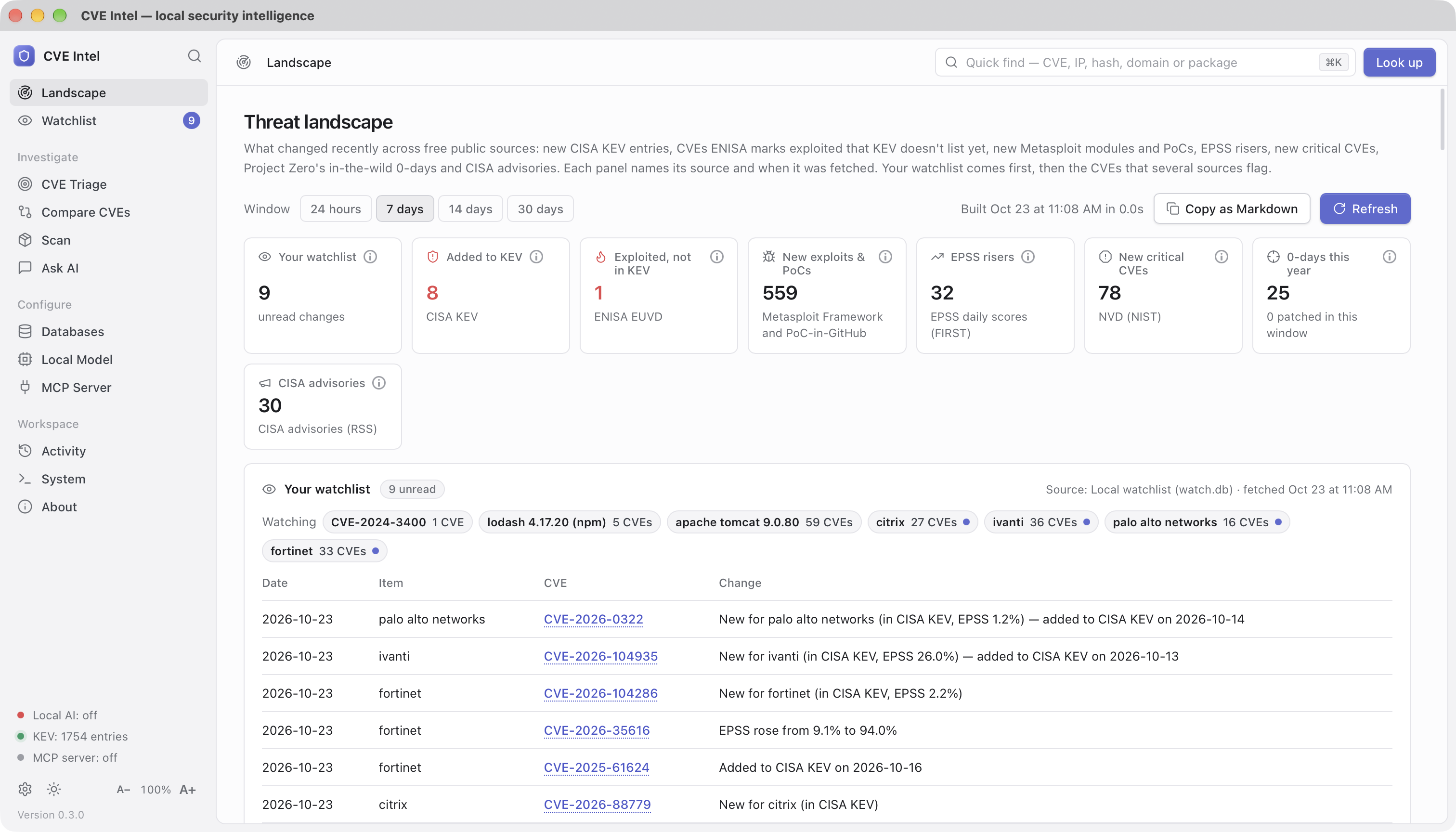
What changed recently, from several independent sources at once: new CISA KEV entries (with ransomware flags and vendor counts), CVEs ENISA EUVD marks exploited that CISA KEV does not list, the largest EPSS rises, new or updated Metasploit modules and PoC-in-GitHub repositories, newly published critical NVD CVEs, Project Zero's in-the-wild zero-days and the latest CISA advisories. Each panel names its source and when it was fetched, and the ⓘ on each tile explains what it counts. Your watchlist comes first, then the CVEs that appear in two or more panels. Each watched item is a chip that opens it in the Watchlist. Copy the briefing as Markdown for a ticket or weekly note. Ask "What's new this week?" in Ask AI for the same briefing.
Watchlist
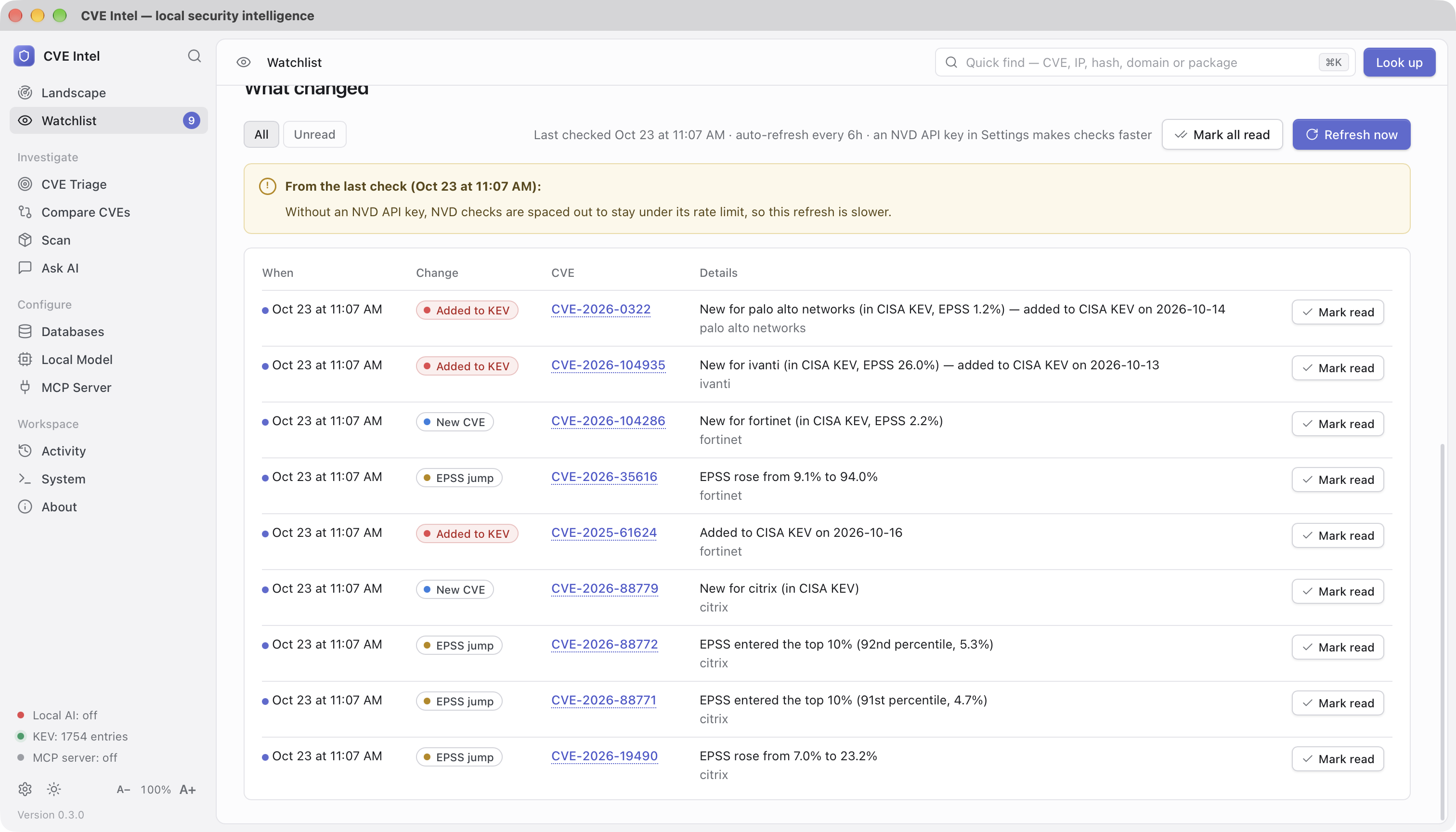
Watch the vendors, products, packages and CVEs you run. Each refresh
compares them with the last check and records what changed: new CVEs, KEV
listings, ransomware use, EPSS jumps, new exploits or Metasploit modules,
CVSS changes, newly available fixes and ENISA exploitation reports. The
first check of an item records a silent baseline. The list lives only on
this machine (~/.cve-intel/watch.db, owner-only). While the app is open
it can refresh on a schedule (every 6 hours by default; change or turn it
off in Settings). AI agents can read the watchlist over MCP but cannot
change it.
Decisions
Every tool says what is risky. None remembers what you decided, why, and whether the reasons still hold. Decisions does. Press Record decision on a triage result, a scan finding or a comparison, choose a verdict (patch now, defer until a date, accept the risk, not affected, mitigated) and tick the assumptions it rests on. The machine-checked ones are pre-ticked from today's evidence: not in CISA KEV, EPSS below a threshold, no public exploit, no Metasploit module, local access only, needs privileges, needs user interaction, no fix yet, not marked exploited by ENISA, no ransomware use, CVSS below a threshold, the sources agree, NVD has not analysed it yet. The manual ones (not internet-facing, behind a WAF, a compensating control, not reachable, the vendor says not affected, or your own words) carry a review date.
Recording a decision adds the CVE to the watchlist, and every refresh re-checks the assumptions. The day the CVE enters KEV, EPSS crosses the threshold, an exploit or a fix appears, or NVD publishes its analysis, the decision turns stale with the exact reason, an event lands in the watchlist feed, and the Landscape counts it under Decisions to revisit. A deferral past its date is expired; a manual assumption past its review date is review due. Re-decide replaces a decision and keeps the old one as history; Close records whether it was patched, accepted for good, won't be fixed, or other.
The ledger also tells you how your judgment held up: of the CVEs you held
back in the last 30, 90 or 365 days, how many later entered KEV, gained
an exploit or rose in EPSS, and how many days after the decision; of the
patch-now calls, how many were confirmed by KEV, an exploit or a high
EPSS at the time or since. Export the ledger as OpenVEX or CycloneDX VEX
for scanners and SBOM consumers (the CycloneDX document lists each
decided-on package as a component, so its references resolve in
Dependency-Track and the like). It lives only on this machine
(~/.cve-intel/decisions.db, owner-only); AI agents can read it over MCP
(list_decisions, get_decision_calibration) but never change it, and
Ask AI mentions your decision when you ask about a CVE you decided on.
From the terminal: cve-intel decide record CVE-2025-12345 --verdict defer --until 2026-12-31 --auto, then decide list, decide check,
decide calibration and decide export.
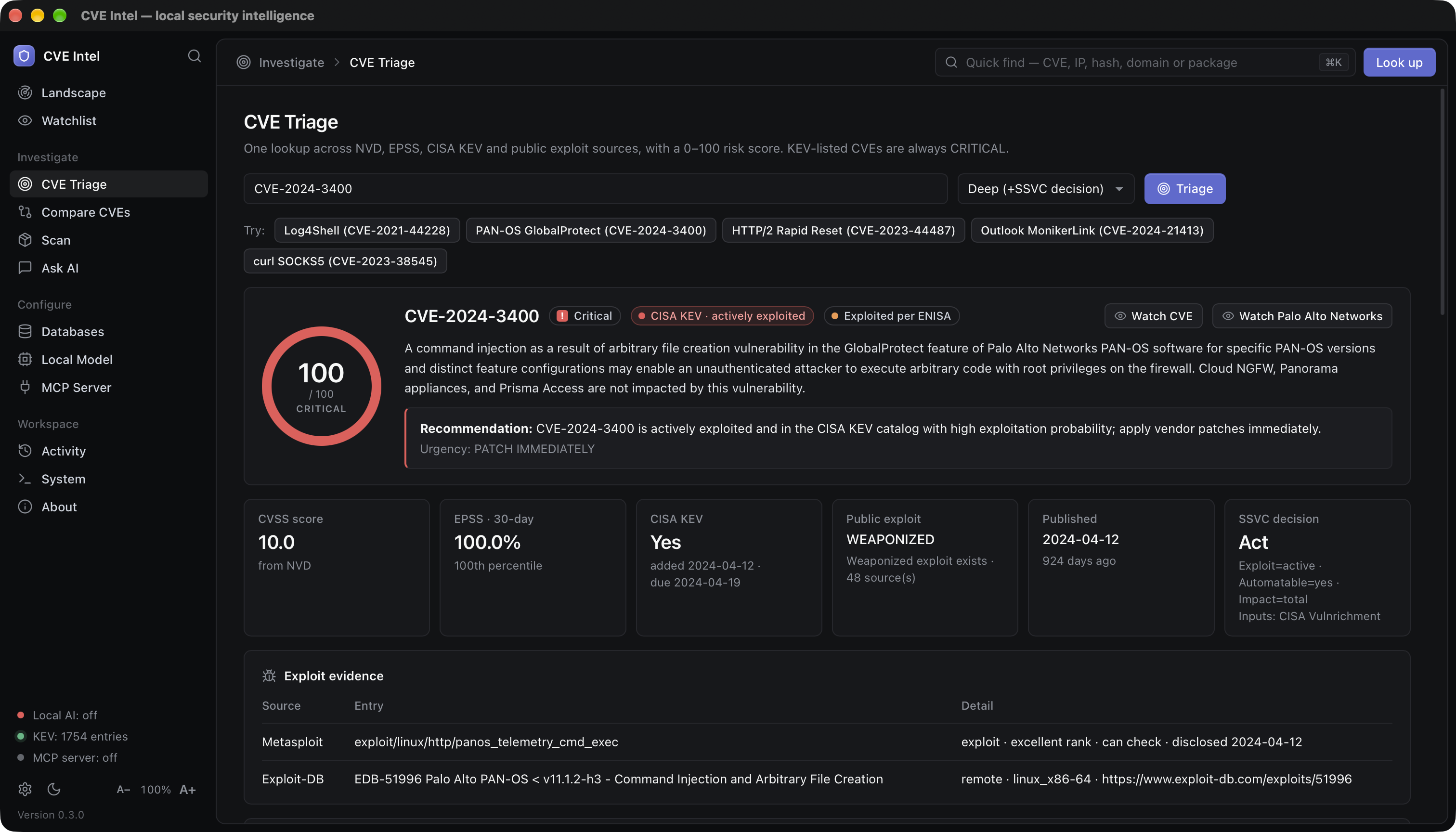
CVE Triage
One lookup across NVD, CVE.org, EPSS, CISA KEV, ENISA EUVD and public
exploit sources. The result includes the risk score, a plain recommendation
and urgency, and the evidence behind it: CVSS (and where it came from),
30-day EPSS probability and its recent trend, KEV dates, ENISA's exploited
flag, CIRCL sightings (deep triage), and the exploit evidence found in
Metasploit, Exploit-DB, Nuclei, GitHub, PoC-in-GitHub and, with a
VulnCheck token, VulnCheck KEV and XDB. When NVD has not scored a CVE yet,
the CNA's or CISA's score from the CVE.org record is used. Deep triage
also returns a CISA SSVC decision, using CISA's own published SSVC
assessment (Vulnrichment) where one exists. ENISA EUVD or VulnCheck KEV
can raise SSVC Exploitation to active; they do not change the risk
score.
Who says what. Every triage result also lays the sources side by side:
NVD's own score and analysis status, the CNA's score, CISA's ADP
(Vulnrichment) score and SSVC assessment, EPSS, CISA KEV, ENISA EUVD,
VulnCheck KEV and, in deep triage, Microsoft, Red Hat and Ubuntu (press
Check vendors on a standard triage to add them). It names where they
disagree: scores 2 or more points apart, a CVE that NVD has not analysed
(common since NVD limited its analysis in 2026), a critical score that
attackers have ignored for six months, exploitation reported by a source
other than CISA KEV, a distribution that says its build is not affected or
will not be fixed, and rejected or disputed CVEs. The card is marked
Sources agree, Sources disagree or Thin evidence, and the
same appears as the Agreement row in Compare CVEs, in the
consensus field of triage_cve, and in the CLI's triage output. None of
it changes the risk score.
Exploit speed. EPSS is a daily statistical model and the exploit
indexes record what already exists; both lag. With language models
reading patches, the public fix commit of an open-source CVE is itself a
leading signal. A standard or deep triage therefore shows an Exploit
speed estimate: Hours, Days, Weeks, Unknown, or
Exploit exists when a PoC or a KEV listing already makes the question
moot. It starts at 30 points and adds or subtracts for the fix (a small,
localised public fix with a test that encodes the trigger counts most; no
public fix at all counts against), the weakness class (injection,
traversal, authentication bypass and deserialisation are fast; memory
corruption and races are slow), the CVSS vector (network, no privileges,
no user interaction) and the time already elapsed without a PoC. Every
line of the rationale is shown, the label says estimate, the confidence
never exceeds medium, and without a public fix the label is capped at
Days. Fix commits come from the references NVD, CVE.org, OSV and GitHub
Advisories tag as the patch and are read from GitHub (two requests per
CVE at most; a free token raises the limit from 60 to 5,000 an hour). The
same estimate is a row in Compare CVEs, a chip on the riskiest
unexploited findings of a scan, the exploit_speed field of triage_cve
and scan_dependencies, and the fix date on get_cve_timeline. It never
changes the risk score.
The interface follows your system's light or dark theme until you pick one
with the sun and moon button at the bottom of the sidebar. Beside it,
A− and A+ make the text and controls smaller or larger in every
view (⌘ −, ⌘ + and ⌘ 0 on macOS; Ctrl on Windows and Linux), and
the size is remembered.
Ask in plain language
Ask questions such as "Which is worse: CVE-2024-3400 or CVE-2023-44487?" CVE Intel runs the lookups first, then the model explains the results and lists the tools it used. Small local models can still get details wrong, so check an answer you will act on against CVE Triage.
Compare and prioritise
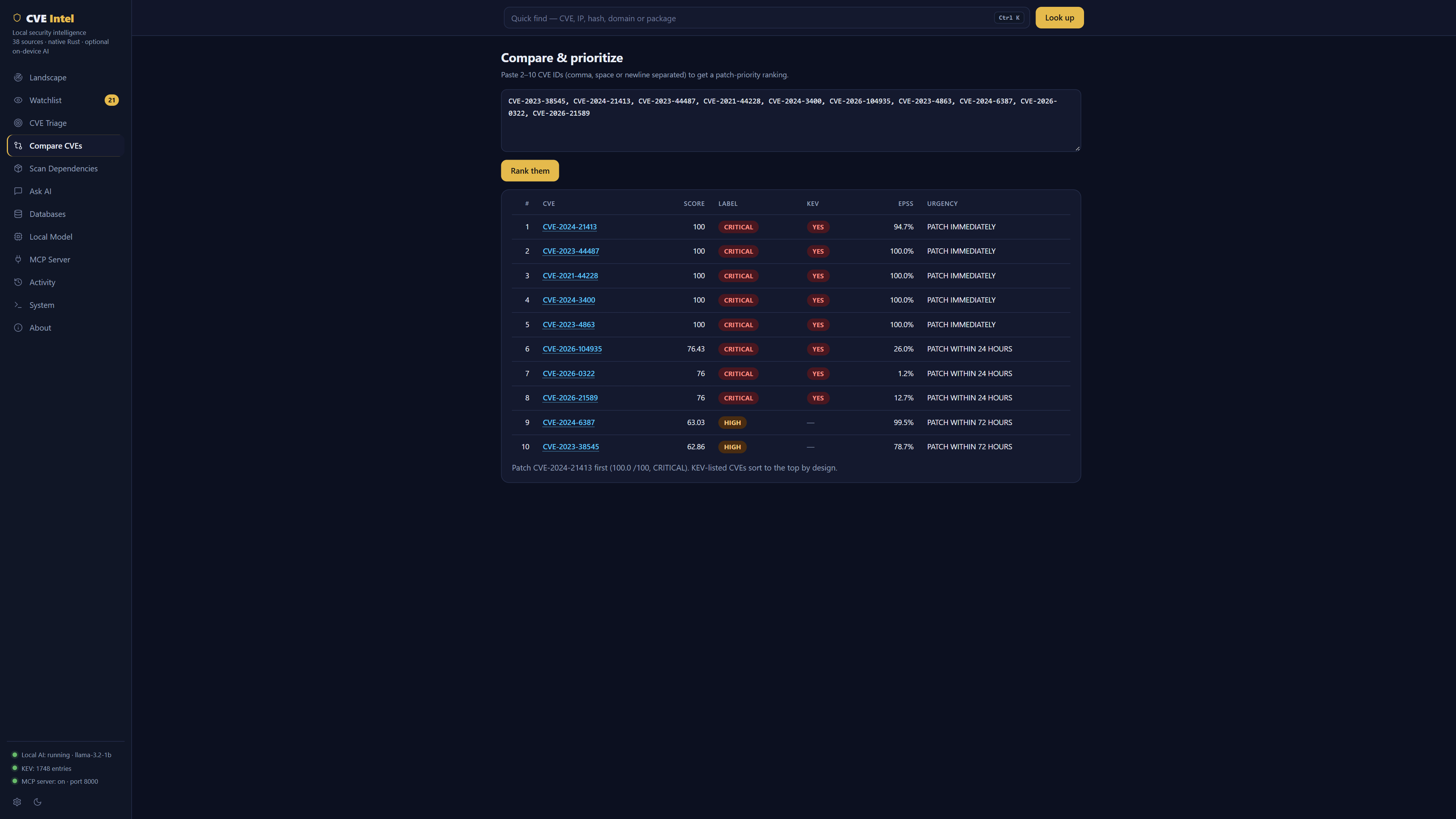
Paste 2 to 10 CVE IDs to compare them and get a patch order based on KEV status, score, EPSS and exploit evidence, not on CVSS alone. Not sure where to start? The examples under the box (KEV vs. CVSS, VPN & firewall zero-days, Microsoft patch day and Open-source libraries) each show one way the order can surprise you.
CISA KEV CVEs come first, then the risk score. Equal scores are common (exploited CVEs with a high EPSS all reach 100), so ties are broken by known ransomware use, EPSS, exploit maturity, CVSS and the earlier KEV due date. Each CVE says why it sits above the next one.
- Side by side: one column per CVE, with rows for the score's parts, KEV dates, ransomware use, who reports exploitation, EPSS and its 30-day trend, exploit sources, CVSS attack vector, complexity, privileges, user interaction and impact, product, CWE and age. Riskier values that differ are in red. Only rows that differ hides the rest.
- What they have in common: CVEs in the same product (one update may cover them) or from the same vendor, ransomware use, exploitation reported outside CISA KEV (which the score doesn't count), network access without sign-in or user action, public exploits, rising EPSS, and shared weaknesses.
Remediation plans
Triage tells you whether a CVE matters. A remediation plan tells you what to do about it for what you run. It reads what every source says about fixing the CVE and merges it into one ordered list:
- Fixes: the upstream version, your distribution's own build of the package, or the vendor's update (a Microsoft KB with its fixed build and whether it needs a restart).
- Workarounds and mitigations, in the vendor's own words.
- What sources state: "not affected", "will not fix", "fix deferred".
- General controls, marked as such and ranked last: the mitigations MITRE ATT&CK lists against the techniques the CVE maps to, and controls that follow from the CVSS vector (a flaw reachable over the network with no sign-in → restrict who can reach it). They are for when no vendor guidance exists, or while you wait for the fix.
In the app, open Remediation Lab, or get there from a result: Open in Remediation Lab on a triage, or Plan fix on a scan finding, which fills in the package and version you have. Say what you run and the plan picks the option for it and explains why each one sits above the next. The same plan is on the command line:
# A distribution package: Ubuntu's own build, not the upstream version
cve-intel remediate CVE-2024-6387 --distro ubuntu:jammy --package openssh@1:8.9p1-3ubuntu0.6

# A vendor product and the version you run: the fix for your branch
cve-intel remediate CVE-2024-3400 --product "PAN-OS@10.2.8"

# A library: the upgrade, checked against the version you have
cve-intel remediate CVE-2020-28500 --package npm:lodash@4.17.20
CVE Intel MCP questions
How does the risk score work?
The risk score combines CVSS severity, EPSS exploitation probability, CISA KEV confirmed exploitation, and the presence of public exploit code.
Can I use this with my AI coding assistant?
Yes, tools like Claude Code, Cursor, and VS Code can use CVE Intel through the Model Context Protocol (MCP).