
DEVONthink MCP server
Commit Sep 9, 2026Enables an AI client to manage, search, and organize records and databases within DEVONthink Pro on macOS.
Also known as dvcrn/mcp-server-devonthink
- Stars
- 104
- Tools
- 16
- Downloads, 30 days
- —
- Latest version
- —
- Last commit
- Sep 9, 2026
- License
- GPL-3.0
What is DEVONthink MCP?
DEVONthink enables an AI client to manage, search, and organize records and databases within DEVONthink Pro on macOS. It exposes 16 tools, such as is_running, create_record, delete_record.
Summary generated from the project's README
About DEVONthink MCP server
Managing and organizing your DEVONthink Pro databases directly from an AI client is what becomes possible for macOS users through this setup. It allows an AI to interact with a local knowledge base by performing actions like searching for specific text, creating new notes or bookmarks, and moving records between different groups. You can also use it to retrieve record content, rename files, or manage tags to keep your information structured.
The connection works locally by using JavaScript for Automation to communicate with the DEVONthink application via AppleScript APIs. Users can instruct the AI to perform complex tasks such as using the classify tool to get AI-driven group or tag proposals, or using the compare tool to find similarities between different records. It also supports creating new records from web URLs and listing all currently open databases to help navigate your existing workspace.
What you can do with it
- 1Organizing research notes with tagsAsk the AI to add specific labels to a record to improve its discoverability.
- 2Finding similar documents in a databaseRequest a comparison between two specific records to identify how they relate to each other.
- 3Automating document classificationHave the AI suggest appropriate groups or tags for a new document using built-in intelligence.
Written from the project's README. Every use case is checked against a quote from it.
DEVONthink MCP tools 16
Detected from the READMEis_runningcreate_recorddelete_recordmove_recordget_record_propertiessearchlookup_recordcreate_from_urlget_open_databaseslist_group_contentget_record_contentrename_record
Show all 16 toolsShow fewer tools
add_tagsremove_tagsclassifycompare
Automated checks
Ran Nov 14, 2026Full report →Not verified yet. A server needs a score of 80, no serious finding, and enough data for us to check. How checks work · What to fix for more points

- Source repository linked and reachabledvcrn/mcp-server-devonthink is public and reachablegithub.com/dvcrn/mcp-server-devonthink ↗Pass
- Package names this repository as its sourceNot checked
- Build provenance (Sigstore attestation)Not checked
- Open source license (OSI)GPL-3.0spdx.org/licenses/GPL-3.0.html ↗Pass
- Commit or release in the last yearLast commit or release 2026-09-09github.com/dvcrn/mcp-server-devonthink ↗Pass
- OpenSSF ScorecardNot checked
- Package name not close to a popular packageNot checked
- No critical advisory in the package or its dependenciesNot checked
- No hidden instructions to the model16 tool descriptions and the README read; no override phrases, credential paths or hidden charactersPass
- Destructive tools are labelledNot checked
- Remote endpoint answers the MCP handshakeNot checked
README
View on GitHubDevonthink MCP Server
This MCP server provides access to DEVONthink functionality via the Model Context Protocol (MCP). It enables listing, searching, creating, modifying, and managing records and databases in DEVONthink Pro on macOS.
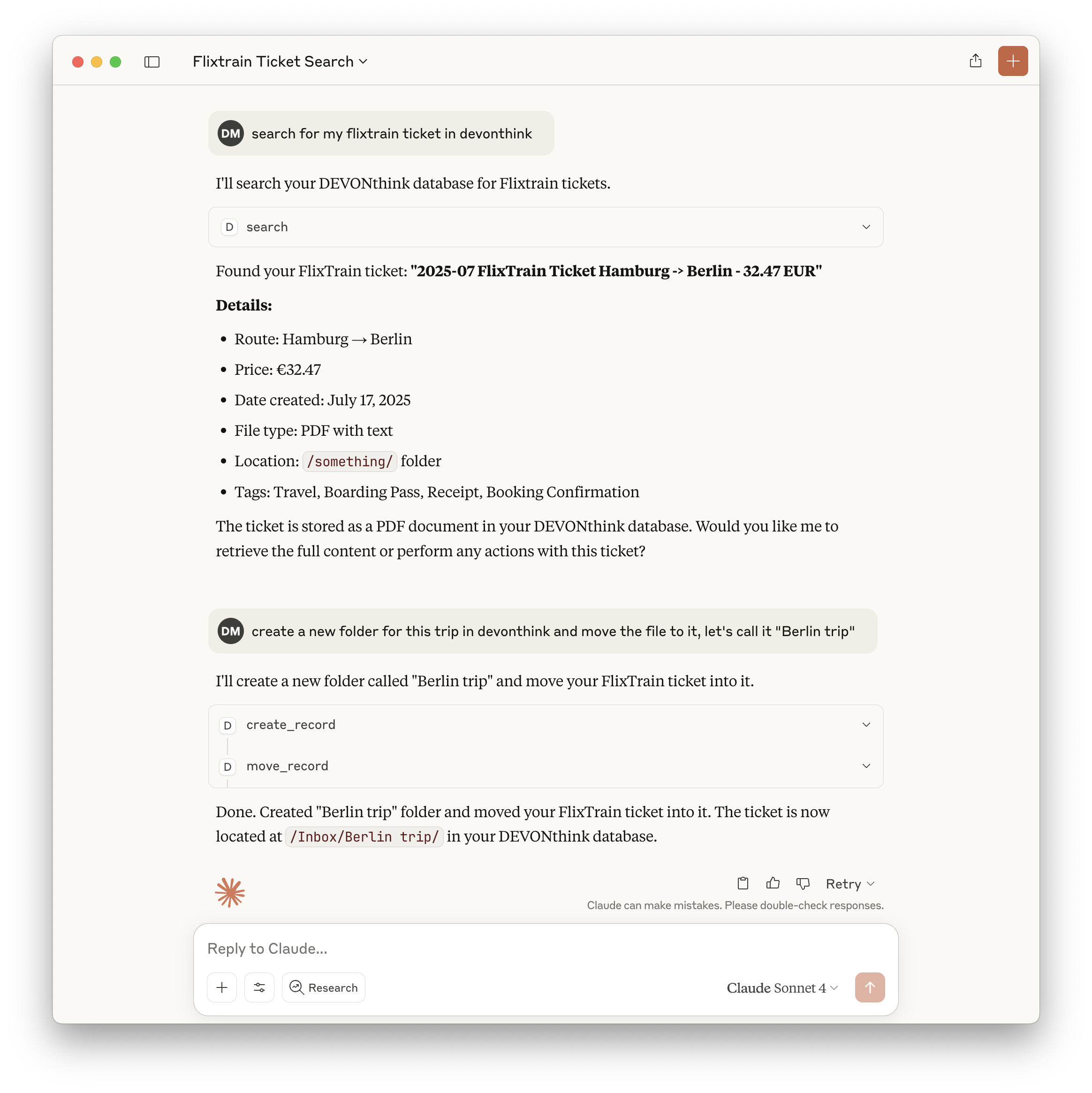
Features
- Exposes a comprehensive set of DEVONthink operations as MCP tools
- List, search, and look up records by various attributes
- Create, delete, move, and rename records and groups
- Retrieve and modify record content, properties, and tags
- Create records from URLs in multiple formats
- List open databases and group contents
- All tools are type-safe and validated with Zod schemas
Tools
Core Tools
-
is_running- Checks if DEVONthink is currently running
- No input required
- Returns:
{ "success": true | false }
-
create_record- Creates new records (notes, bookmarks, groups) with specified properties
- Input: record type, name, parent group, and optional metadata
-
delete_record- Deletes records by ID, name, or path
- Input: record identifier
-
move_record- Moves records between groups
- Input: record ID and destination group
-
get_record_properties- Retrieves detailed metadata and properties for records
- Input: record identifier
-
search- Performs text-based searches with various comparison options
- Input: query string and search options
-
lookup_record- Looks up records by filename, path, URL, tags, comment, or content hash (exact matches only)
- Input: lookup type and value
-
create_from_url- Creates records from web URLs in multiple formats
- Input: URL and format options
-
get_open_databases- Lists all currently open databases
- No input required
-
list_group_content- Lists the content of a specific group
- Input: group identifier
-
get_record_content- Retrieves the content of a specific record
- Input: record identifier
-
rename_record- Renames a specific record
- Input: record ID and new name
-
add_tags- Adds tags to a specific record
- Input: record ID and tags
-
remove_tags- Removes tags from a specific record
- Input: record ID and tags
-
classify- Gets classification proposals for a record using DEVONthink's AI
- Input: record UUID, optional database name, comparison type, and tags option
- Returns: Array of classification proposals (groups or tags) with scores
-
compare- Compares records to find similarities (hybrid approach)
- Input: primary record UUID, optional second record UUID, database name, and comparison type
- Returns: Either similar records (single mode) or detailed comparison analysis (two-record mode)
Example: Search Tool
{
  "query": "project plan",
  "comparison": "contains",
  "database": "Inbox"
}
Returns:
{
  "results": [
    { "id": "123", "name": "Project Plan", "path": "/Inbox/Project Plan.md" }
  ]
}
Usage with Claude
Add to your Claude configuration:
{
  "mcpServers": {
    "devonthink": {
      "command": "npx",
      "args": ["-y", "mcp-server-devonthink"]
    }
  }
}
Implementation Details
- Uses JXA (JavaScript for Automation) to control DEVONthink via AppleScript APIs
- All tool inputs are validated with Zod schemas for safety and clarity
- Returns structured JSON for all tool outputs
- Implements robust error handling for all operations
- Includes comprehensive tests using Vitest
See CLAUDE.md for full documentation, tool development guidelines, and API reference.
DEVONthink MCP questions
What tools does DEVONthink MCP provide?
It exposes 16 tools, including is_running, create_record, delete_record, move_record, get_record_properties.
What can this server do with DEVONthink records?
It allows you to list, search, create, modify, delete, move, and rename records and groups.
Can the AI use DEVONthink's AI features?
Yes, the server provides a classify tool that retrieves classification proposals using DEVONthink's built-in AI.
How does the server communicate with DEVONthink?
The server uses JavaScript for Automation (JXA) to control DEVONthink via AppleScript APIs.
Can I create records from web links?
Yes, you can create records from URLs in multiple formats using the create_from_url tool.