
doc2mcp MCP server
Converts any documentation URL into a hosted, ready-to-use MCP server for AI agents and IDEs like Cursor.
Also known as doc2mcp/doc2mcp
- Stars
- 6
- Tools
- 6
- Downloads, 30 days
- —
- Latest version
- 1.0.1782367812
- Last commit
- Aug 1, 2026
- License
- MIT
What is doc2mcp MCP?
doc2mcp converts any documentation URL into a hosted, ready-to-use MCP server for AI agents and IDEs like Cursor. It exposes 6 tools, such as list_documentation_pages, get_documentation_page, search_documentation.
Summary generated from the project's README
About doc2mcp MCP server
Turning any documentation URL into a hosted MCP server for AI agents is what opencode enables. Developers can transform websites like Stripe, LangChain, or GitHub into ready-to-use tools for IDEs such as Cursor, Claude, or Windsurf. The system crawls and analyzes documentation to generate specific tools including search_documentation, get_documentation_page, and ask_documentation with citations.
Users can access this service through a web interface, a command line interface via npm, or a dedicated TypeScript SDK. The web and CLI methods require a User PAT and a project token obtained from the platform. The SDK allows for programmatic integration into workflows involving LangChain, LangGraph, or CrewAI. Once a URL is processed, the platform provides a hosted endpoint and a bearer token that can be added directly to an MCP configuration file.
What you can do with it
- 1Convert documentation for IDE useA developer can turn a documentation URL into a Cursor-ready server in under a minute.
- 2Automate documentation search in agentsIntegrate heading-aware documentation search into custom AI agents using the provided SDK.
- 3Programmatic documentation analysisUse the SDK to convert a source URL and immediately call tools like search_documentation within a script.
- 4Retrieve full documentation contentAccess the complete markdown of a specific documentation page through an MCP tool.
Written from the project's README. Every use case is checked against a quote from it.
How to install doc2mcp MCP
Formats verified 10 Nov 2026Add to CursorAdd to GooseInstall doc2mcp MCP in Claude Code
$ claude mcp add --transport http opencode https://doc2mcp.site/api/mcp/3f20f9f1-6c33-4679-8d37-613e07293a1d/mcpInstall doc2mcp MCP in Cursor
~/.cursor/mcp.json
{
  "mcpServers": {
    "opencode": {
      "url": "https://doc2mcp.site/api/mcp/3f20f9f1-6c33-4679-8d37-613e07293a1d/mcp"
    }
  }
}Install doc2mcp MCP in VS Code
.vscode/mcp.json
{
  "servers": {
    "opencode": {
      "type": "http",
      "url": "https://doc2mcp.site/api/mcp/3f20f9f1-6c33-4679-8d37-613e07293a1d/mcp"
    }
  }
}Install doc2mcp MCP in VS Code CLI
$ code --add-mcp '{"name":"opencode","type":"http","url":"https://doc2mcp.site/api/mcp/3f20f9f1-6c33-4679-8d37-613e07293a1d/mcp"}'Install doc2mcp MCP in Codex
$ codex mcp add opencode --url https://doc2mcp.site/api/mcp/3f20f9f1-6c33-4679-8d37-613e07293a1d/mcpInstall doc2mcp MCP in Codex config.toml
~/.codex/config.toml
[mcp_servers.opencode]
url = "https://doc2mcp.site/api/mcp/3f20f9f1-6c33-4679-8d37-613e07293a1d/mcp"
Install doc2mcp MCP in Gemini CLI
$ gemini mcp add -s user --transport http opencode https://doc2mcp.site/api/mcp/3f20f9f1-6c33-4679-8d37-613e07293a1d/mcpInstall doc2mcp MCP in Gemini settings.json
~/.gemini/settings.json
{
  "mcpServers": {
    "opencode": {
      "url": "https://doc2mcp.site/api/mcp/3f20f9f1-6c33-4679-8d37-613e07293a1d/mcp",
      "type": "http"
    }
  }
}doc2mcp MCP tools 6
Detected from the READMElist_documentation_pagesget_documentation_pagesearch_documentationget_documentation_overviewread_full_documentationask_documentation
| list_documentation_pages | — | |
| get_documentation_page | — | |
| search_documentation | — | |
| get_documentation_overview | — | |
| read_full_documentation | — | |
| ask_documentation | — |
Automated checks
Ran Nov 15, 2026Full report →Not verified yet. A server needs a score of 80, no serious finding, and enough data for us to check. How checks work · What to fix for more points

- Source repository linked and reachabledoc2mcp/doc2mcp is public and reachablegithub.com/doc2mcp/doc2mcp ↗Pass
- Package names this repository as its sourceNot checked
- Build provenance (Sigstore attestation)Not checked
- Open source license (OSI)MITspdx.org/licenses/MIT.html ↗Pass
- Commit or release in the last yearLast commit or release 2026-08-01github.com/doc2mcp/doc2mcp ↗Pass
- OpenSSF ScorecardNot checked
- Package name not close to a popular packageNot checked
- No critical advisory in the package or its dependenciesNot checked
- No hidden instructions to the model6 tool descriptions and the README read; no override phrases, credential paths or hidden charactersPass
- Destructive tools are labelledNo tool named like delete, drop or execPass
- Remote endpoint answers the MCP handshakeEndpoint did not answer initialize: HTTP 402Finding
README
View on GitHubdoc2mcp
Documentation infrastructure for AI agents
Paste any docs URL → get a hosted, Cursor-ready MCP server in under 60 seconds.
Live · Docs · SDK · Marketplace · Open Source



⭐ Star this repo — it helps developers discover doc2mcp on GitHub and the MCP Registry.
Three ways to use doc2mcp
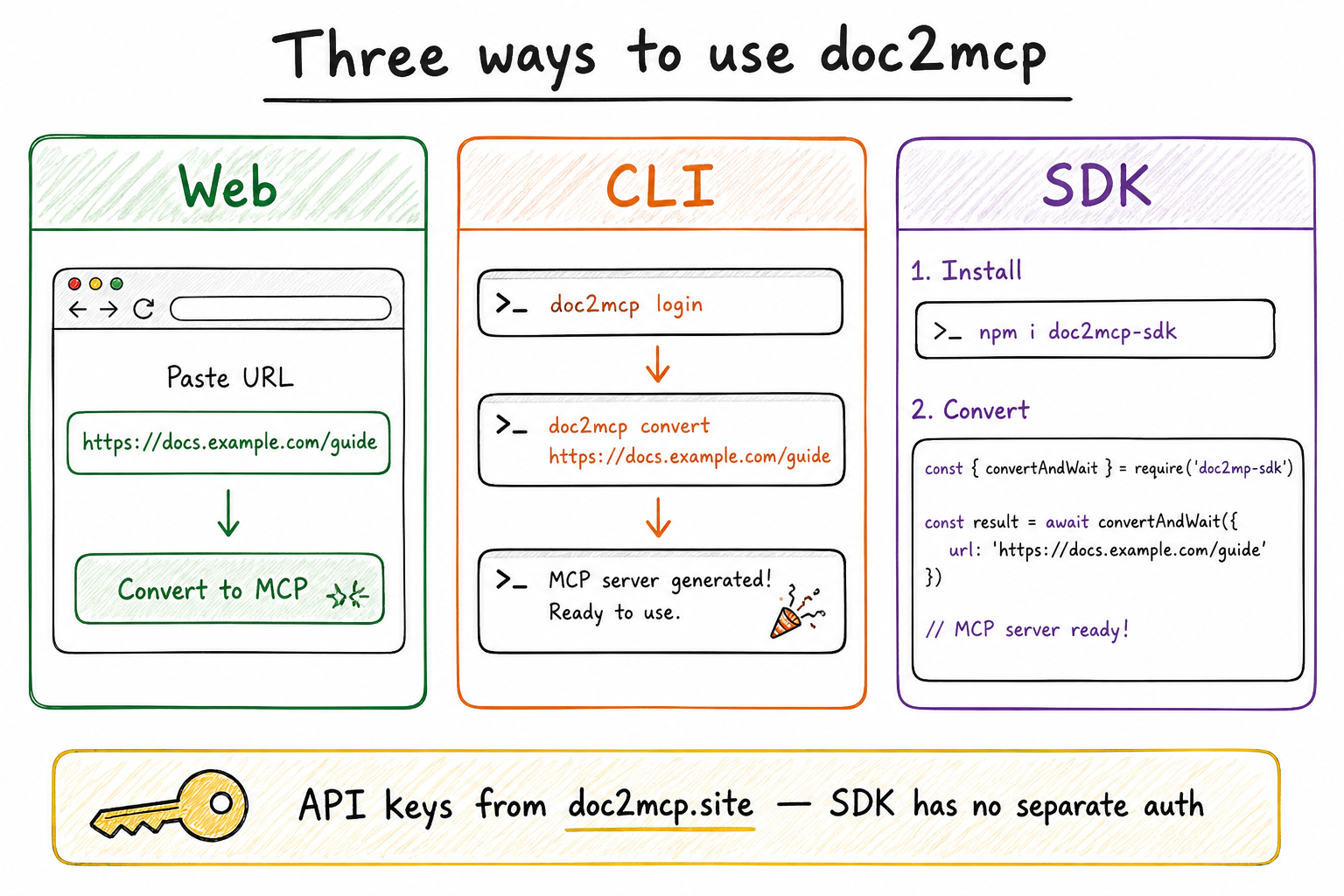
| Surface | Best for | Start here |
|---|---|---|
| Web | Instant convert in the browser | doc2mcp.site |
| CLI | Terminal + one-shot install into Cursor | npm i -g doc2mcp |
| SDK | Code, CI, LangChain / LangGraph / agents | doc2mcp-sdk |
API keys always come from doc2mcp.site (User PAT + project token). The SDK has no separate login.
The pipeline
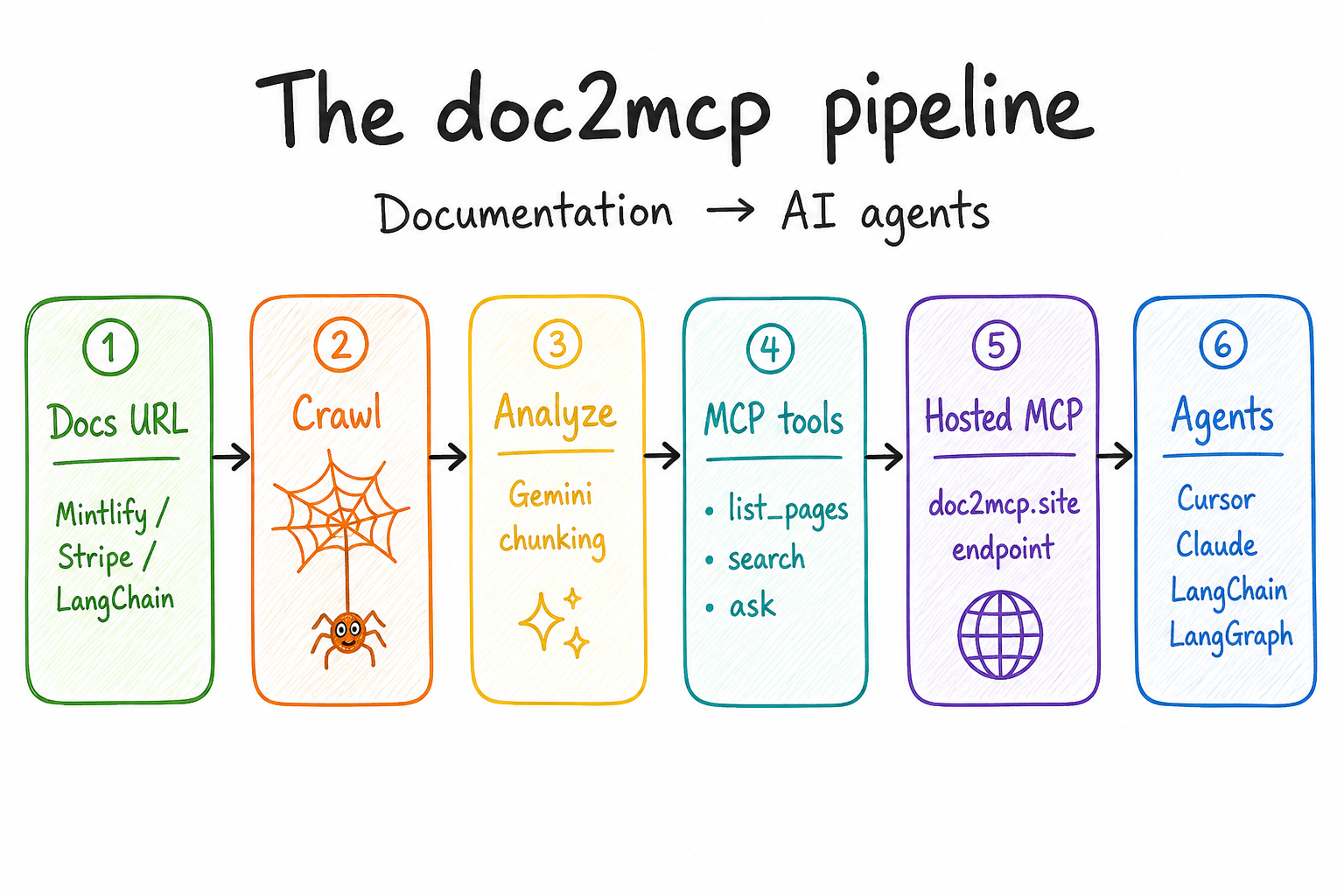
Docs URL → crawl → analyze → MCP tools → hosted endpoint → Cursor / Claude / LangChain / LangGraph.
1) Web (normal)
- Sign in at doc2mcp.site/login
- Paste a docs URL (Stripe, LangChain, Mintlify, GitHub…)
- Copy the hosted MCP URL + Bearer token into Cursor / Claude / VS Code
{
  "mcpServers": {
    "my-docs": {
      "url": "https://doc2mcp.site/api/mcp/{project_id}/mcp",
      "headers": { "Authorization": "Bearer <project-token>" }
    }
  }
}
2) CLI
npm install -g doc2mcp
doc2mcp login                 # creates User PAT (d2mcp_pat_…)
doc2mcp https://docs.example.com
Lists the same projects as the dashboard. Install helpers for Cursor / VS Code / Claude / Windsurf.
3) SDK (doc2mcp-sdk)
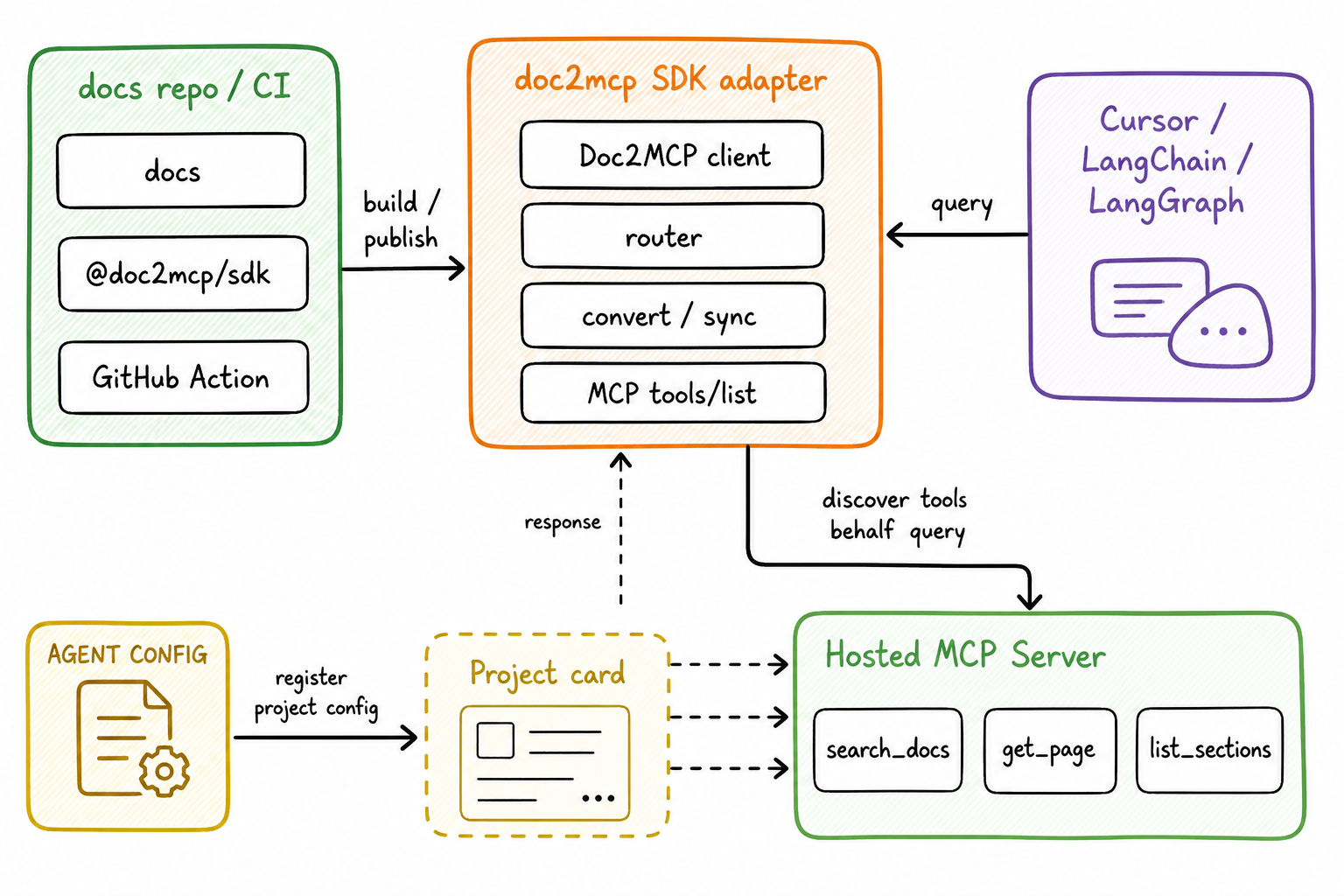
npm i doc2mcp-sdk
import { Doc2MCP } from "doc2mcp-sdk";

// User PAT from doc2mcp.site / `npx doc2mcp login` — SDK has no auth of its own
const client = new Doc2MCP({ token: process.env.DOC2MCP_API_TOKEN! }); // Settings → d2mcp_usr_…

const ready = await client.convertAndWait({
  sourceUrl: "https://js.langchain.com/docs",
});

const answer = await client.callToolText({
  mcpUrl: ready.mcp.url,
  mcpToken: ready.mcp.token, // project token d2mcp_…
  name: "search_documentation",
  arguments: { query: "how do runnables work?" },
});
Full handbook (API keys, Cursor, Claude, LangChain, LangGraph, LangSmith, OpenAI, Vercel AI SDK, CrewAI, AutoGen, Mastra):
Product docs page: doc2mcp.site/docs/sdk
MCP tools generated per project
| Tool | What it does |
|---|---|
list_documentation_pages |
Every crawled page |
get_documentation_page |
Full markdown of one page |
search_documentation |
Heading-aware search |
get_documentation_overview |
Summary + index |
read_full_documentation |
All pages combined |
ask_documentation |
Q&A with citations |
Repos
| Repo | Purpose |
|---|---|
| doc2mcp/doc2mcp (this) | Next.js app, CLI, pipeline, MCP runtime |
| doc2mcp/doc2mcp-sdk | Programmatic JS/TS SDK + framework examples |
| doc2mcp/doc2mcp-registry | MCP Registry gateway manifest |
Contribute
- Read CONTRIBUTING.md and CODE_OF_CONDUCT.md
- Branch from
staging→ open PR →staging - AI review (
Gemini PR review) fails the check on must-fix — fix blockers before merge - Coupon
opensourcedoc2mcp→ Starter free for 12 months on Pricing
More: doc2mcp.site/open-source
Local development
pnpm install
cp .env.example .env.local
pnpm dev
pnpm check
pnpm exec tsc --noEmit --skipLibCheck
CI / CD
Feature → staging (preview) → main → v* tag deploys production on Vercel.
PR checks: Biome/Ultracite, TypeScript, Next build, CLI build, Gemini AI review (must-fix → failed check).
License
MIT — see LICENSE.
doc2mcp MCP questions
How do I add doc2mcp MCP to Claude Code?
Run claude mcp add --transport http opencode https://doc2mcp.site/api/mcp/3f20f9f1-6c33-4679-8d37-613e07293a1d/mcp in your terminal. Add --scope user to make it available in every project.
How do I add doc2mcp MCP to Cursor?
Open ~/.cursor/mcp.json and add the server under mcpServers, using the Cursor config shown in the install section above.
What tools does doc2mcp MCP provide?
It exposes 6 tools, including list_documentation_pages, get_documentation_page, search_documentation, get_documentation_overview, read_full_documentation.
Where do I get API keys for the SDK?
API keys are obtained from doc2mcp.site using a User PAT and project token; the SDK does not have its own separate login.