
Skills-Atlas MCP server
Commit Nov 13, 2026Allows AI agents to browse, search, and install over 75,000 agent skills through a terminal interface, web UI, or MCP server.
Also known as devohmycode/Skills-Atlas
- Stars
- 48
- Tools
- —
- Downloads, 30 days
- —
- Latest version
- —
- Last commit
- Nov 13, 2026
- License
- MIT
What is Skills-Atlas MCP?
Skills-Atlas allows AI agents to browse, search, and install over 75,000 agent skills through a terminal interface, web UI, or MCP server.
Summary generated from the project's README
About Skills-Atlas MCP server
Developers can expand the capabilities of AI agents by browsing, searching, and installing a massive catalog of over 75,000 agent skills. This tool works through a terminal interface, a local web UI, or as an MCP server for clients like Claude. It aggregates skills from sources such as skills.sh, claude-plugins.dev, and Smithery, organizing them into 20 distinct themes.
Users can manage their skill sets using commands like npx skills-atlas to interactively select skills via a terminal tree or use specific flags for non-interactive installation. The system includes a security audit that flags high, medium, or info-level risks, such as skills that download and run code or access credential files. To maintain a lean environment, developers can check the context cost of skills, identify unused ones, or use profiles to switch between different sets of capabilities. It also supports team synchronization by importing and exporting skill selections through JSON files.
What you can do with it
- 1Install curated skill packsA developer can install a complete set of security-focused skills for their agent using a single command.
Written from the project's README. Every use case is checked against a quote from it.
Configuration
SKILLS_ATLAS_LANG
Automated checks
Ran Nov 14, 2026Full report →Not verified yet. A server needs a score of 80, no serious finding, and enough data for us to check. How checks work · What to fix for more points

- Source repository linked and reachabledevohmycode/skills-atlas is public and reachablegithub.com/devohmycode/skills-atlas ↗Pass
- Package names this repository as its sourceNot checked
- Build provenance (Sigstore attestation)Not checked
- Open source license (OSI)MITspdx.org/licenses/MIT.html ↗Pass
- Commit or release in the last yearLast commit or release 2026-11-10github.com/devohmycode/skills-atlas ↗Pass
- OpenSSF ScorecardNot checked
- Package name not close to a popular packageNot checked
- No critical advisory in the package or its dependenciesNot checked
- No hidden instructions to the model0 tool descriptions and the README read; no override phrases, credential paths or hidden charactersPass
- Destructive tools are labelledNot checked
- Remote endpoint answers the MCP handshakeNot checked
README
View on GitHubBrowse public Agent Skills (SKILL.md format) by theme in a collapsible terminal tree or a local web interface. Tick several and install them together through npx skills add. Installed skills start ticked: untick one to uninstall it.
🤖 Visit Website.
- Find: about 75,000 skills from skills.sh, claude-plugins.dev and Smithery, in 20 themes, plus ★ Recommended repositories, 🔥 Trending skills and 📦 Packs to install as a block.
- Check before installing: read any skill's
SKILL.mdwithp, with a risk check that points at what it runs, reads or sends, at content it fetches from a URL and at a name imitating a far more installed skill. A skill that would replace another of the same name is flagged before anything runs. - Keep up to date: installed skills are detected and ticked; untick to uninstall, press
uto update the outdated ones, and see which agent has what. - Keep it lean: see what each skill costs in context, which ones were not used lately, which ones an agent may confuse, and switch between sets of skills with profiles.
- Share:
exportandimporta selection, or commit askills-atlas.jsonso thatskills-atlas syncgives every teammate the same skills. - From your agent: a skill, an MCP server and a Claude Code plugin let Claude and other agents search, read and install skills for you.
- Everywhere: 79 agents, a terminal tree and a web page, nine languages, shell completion, and it works offline.
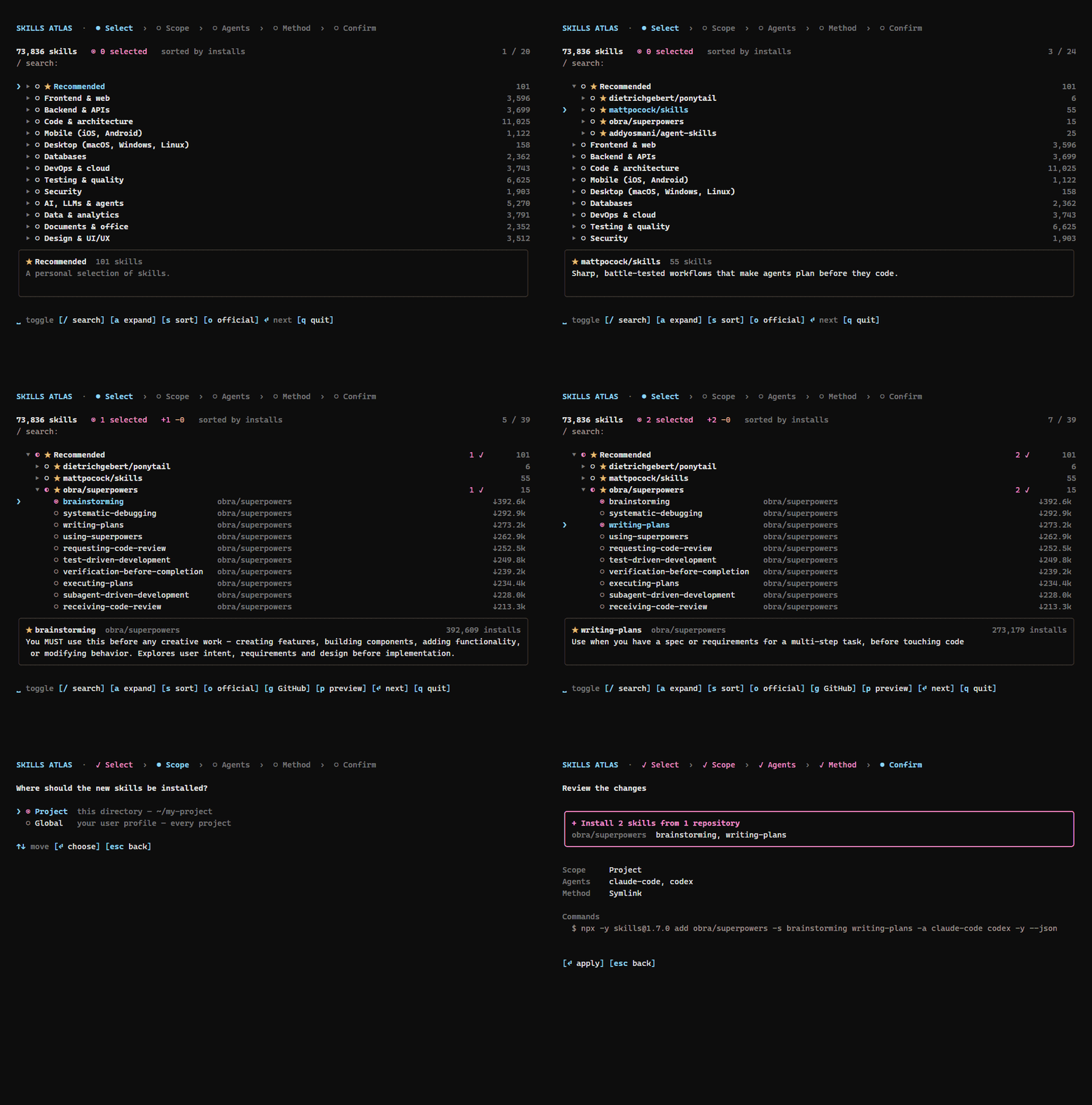
A session: tick skills in ★ Recommended, read a SKILL.md with p, then review the npx skills command. Try the web interface online, nothing installs there.
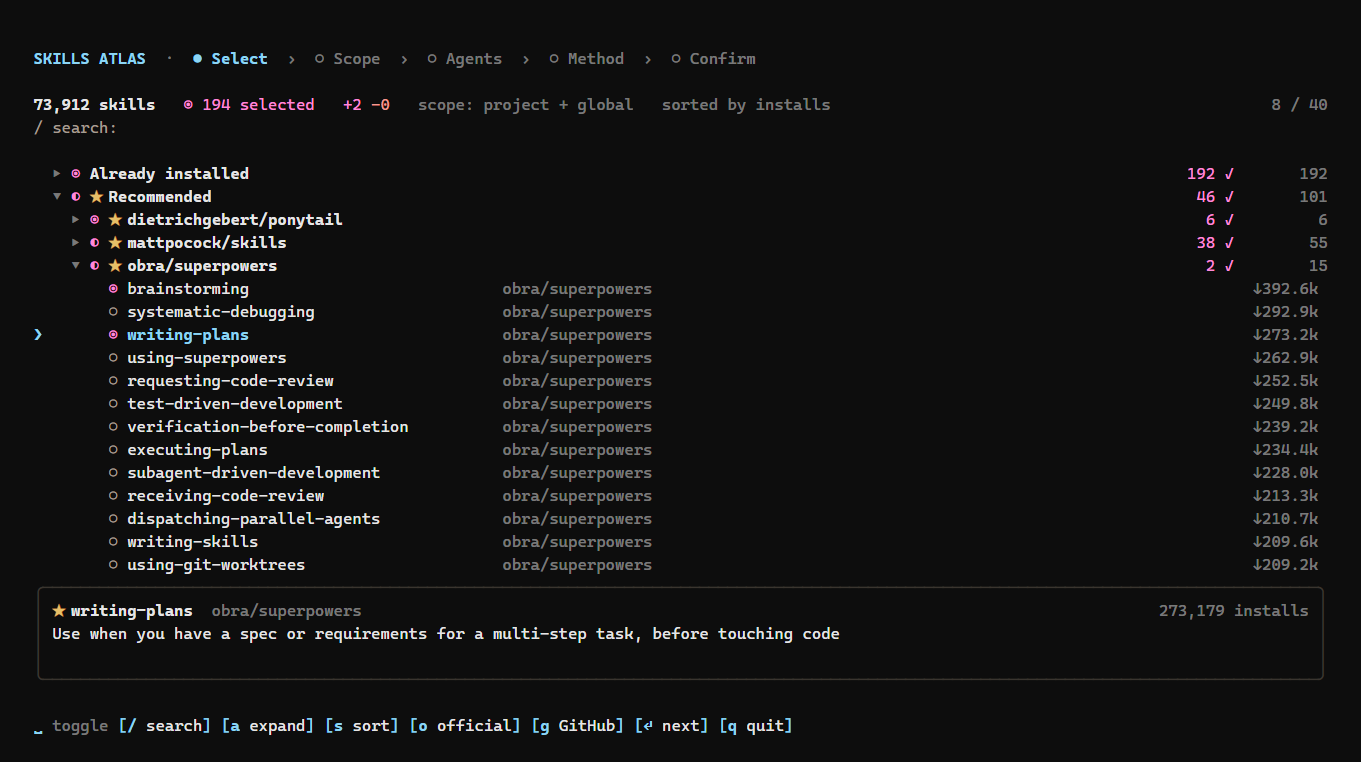
Terminal: installed skills ticked, ★ Recommended opened by repository, candy-pink selections.
Installation
npx skills-atlas # or: npm i -g skills-atlas
Node ≥ 20. A catalog snapshot ships inside the package, so it works offline; online, the CLI fetches the latest snapshot, rebuilt every other day (see The catalog).
Updating
npm i -g skills-atlas@latest   # global install
skills-atlas --version         # check the installed version
npx skills-atlas@latest        # with npx, which may otherwise run a cached older version
npx clear-npx-cache            # if npx still runs the old version
The catalog updates on its own, without a new version: the CLI checks for a newer snapshot at most every 12 hours. skills-atlas --refresh checks now.
Usage
skills-atlas                                  # interactive: tree → scope → options → confirm, then back to the tree
skills-atlas browse -t security -q audit      # tree pre-filtered by theme and text
skills-atlas browse -a claude-code cursor -g  # options given as flags are not asked; -g/-p also limits the tree to that scope
skills-atlas themes                           # themes and their skill counts
skills-atlas list -t databases -n 10          # non-interactive listing (--json available)
skills-atlas agents                           # ids accepted by --agent (★ = detected here)
skills-atlas install anthropics/skills@pdf supabase/agent-skills@supabase -a claude-code -p -y
skills-atlas ui                               # the same in your browser, with the mouse
skills-atlas export > my-skills.json          # installed skills as a selection file (-g / -p for one scope)
skills-atlas import my-skills.json -a claude-code -g  # install the same skills on another machine or project
skills-atlas show obra/superpowers@brainstorming      # a skill's SKILL.md, read from GitHub (--json available)
skills-atlas outdated                         # installed skills, project and global, with a newer version on GitHub (-p/-g, --json)
skills-atlas update                           # update them all, each in its scope (or name some; -p/-g, --dry-run)
skills-atlas suggest                          # skills for this project, from its package.json, pyproject.toml, Dockerfile… (--json)
skills-atlas rollback <id>                    # reinstall the version it had before its last update (--list, --to <sha>)
skills-atlas mcp                              # MCP server on stdio, for Claude and other agents
skills-atlas installed -a claude-code codex   # installed skills by agent: what each one sees (--json available)
skills-atlas installed --size                 # the same, with what each skill costs in context (tokens) and on disk
skills-atlas unused                           # installed skills Claude Code has not used in 30 days (--days, --remove, --json)
skills-atlas overlaps                         # installed skills an agent may confuse: close descriptions (--threshold, --json)
skills-atlas packs                            # curated packs: frontend, security, quality, writing
skills-atlas install --pack security -a claude-code -g   # install a whole pack
skills-atlas sync                             # install what this project's skills-atlas.json lists and is missing
skills-atlas profile create Design <ids...>   # a personal pack to use as a profile (--from-installed available)
skills-atlas profile use design               # keep only that pack's skills in the global scope (-p: this project), after a backup
skills-atlas profile restore                  # put the scope back exactly as before (--initial: before any profile)
skills-atlas completion bash                  # shell completion script (bash, zsh, fish, powershell)
Shell completion completes commands, options, skill ids, agents, themes and languages. Load it from your shell's startup file:
| Shell | Line to add |
|---|---|
bash (~/.bashrc) |
eval "$(skills-atlas completion bash)" |
zsh (~/.zshrc) |
eval "$(skills-atlas completion zsh)" |
fish (~/.config/fish/config.fish) |
skills-atlas completion fish | source |
PowerShell ($PROFILE) |
skills-atlas completion powershell | Out-String | Invoke-Expression |
It needs skills-atlas installed (npm i -g skills-atlas), not run through npx. Skill ids come from the cached catalog, so Tab never waits for the network.
export writes the installed skills that have a GitHub source as { "skillsAtlas": 1, "skills": ["owner/repo@skill", …] }; home-made skills are listed on stderr and left out. import takes the same options as install and asks for what they leave open. A selection file is checked before anything runs: a malformed id, or a name that could pass for a flag, stops the import.
When a newer skills-atlas is published, a dim line says so above the tree and under the ui address. npm is asked at most once a day, in the background, so it never slows the start; --offline skips it.
Risk check
The SKILL.md preview (p), skills-atlas show and the MCP server's show_skill point at what a skill asks for beyond its description:
| Level | Warning sign |
|---|---|
| high | downloads and runs code (curl … | sh, base64 -d | sh), reads or sends credential files (~/.ssh, ~/.aws…), deletes broadly (rm -rf ~), asks the agent to hide things from the user or ignore its instructions |
| medium | needs a program missing from this machine, runs commands as administrator, reads secrets from the environment, sends data to a server, reads content from a URL (curl https://…/llms.txt, “fetch the rules at https://…”), holds what looks like a secret key (sk-…, ghp_…, AKIA…, a private key block; shown cut to its first characters), has a name close to a far more installed skill |
| info | installs or runs packages or bundled scripts, states its requirements |
The catalog already carries them for the 3,000 most installed skills, read at each crawl, with the day their folder last changed for the top 1,000: the tree's details show needs gh, ✗ jq (missing programs in red), the compatibility text and updated 2026-09-30; the web page shows the same as tags, and MCP's search_skills returns requires and updated_at. Prerequisites come from the frontmatter: the programs listed under requires.bins (OpenClaw metadata) are looked up on your PATH, and the spec's compatibility text (agent versions, tools, network) is shown as is. A missing program does not block the install, but the review screen and install -y name it before any command runs. Skills rarely declare either field, so no warning does not mean nothing is needed.
Content read from a URL is flagged because it can change after you reviewed the skill, and pinning the skill to a commit (lock) does not pin it: read what is served there, and expect it to differ later. A plain link after a word such as “read” is flagged too; a line that already downloads and runs code, or sends data, is reported under that sign only. A name close to a far more installed skill comes from the catalog, not from the skill's files: the name, or the owner's name for a skill of the same name, is one character away from one installed at least 1,000 times and 20 times more (skil-creator for skill-creator, anthroplcs/skills for anthropics/skills). It names that skill so that you can compare the two; honest forks match too.
It is a pattern check on the text, tuned on the 150 most installed skills: it points at lines worth reading, it does not prove a skill safe. show prints the warning signs on stderr, so that stdout stays the SKILL.md alone; show --json adds them as risks.
The security audit runs this check before every install and update, on the SKILL.md and on the other text files of the skill folder (scripts, references, configs: up to 30 files of 64 KB, listed with one GitHub call per repository), since a script the skill runs can hold what its SKILL.md does not show. Each finding names its file (scripts/setup.sh:12); binaries, larger files and files that could not be read are listed as not audited, never as passed. show and the MCP server's show_skill report the same. A skill fails it with at least one high warning sign; medium ones are shown and do not block.
- In the tree and with
install's questions, the review screen lists the skills that fail, unticked: they are left out. Read one (pin the list, orskills-atlas show <id>), then tick it with space to install it anyway. - Without a person at the keyboard (
install -y,import,sync,update), a failing skill is left out with its warning signs printed;--no-auditinstalls it anyway. - Through the MCP server,
install_skillsrefuses a failing skill and tells the agent why; it passes only withignore_audit: true, which the agent is told to send only after the user's yes.
skills-atlas audit off turns the audit off for good, skills-atlas audit on turns it back on, and --no-audit skips it for one command. A SKILL.md that cannot be read is reported as not audited, not as failing.
Packs
A pack is a set of skills meant to be installed together: 📦 Frontend dev, 📦 Security review, 📦 Code quality & testing and 📦 Writing & docs. Each one is a theme in the tree and on the web page, after Recommended and Trending: tick the theme to take the whole pack, or open it to pick. skills-atlas packs lists them and install --pack <id> installs one.
In the web interface, Save as pack saves the checked catalog skills, including installed ones that remain checked, as a personal pack. Enter a unique lowercase id (letters, digits and hyphens), a name and description; a pack contains 1–100 skills. Saving adds to your personal file, preserves bundled packs on the first save, and opens the new pack immediately without restarting. Duplicate ids and invalid existing files are rejected without overwriting them. The offline demo explicitly disables saving.
The packs ship in data/packs.json. They always show. Personal packs are added to them from ~/.config/skills-atlas/packs.json, with the same shape: [{ "id", "name", "description", "skills": ["owner/repo@skill", …] }]; an entry under a shipped pack's id is ignored.
Profiles
A profile is a pack activated on its own, to switch between configurations such as Design or Backend. skills-atlas profile use <pack> (or, on the web page, a pack's Use this pack as a profile…) shows what stays, what goes and what comes, then, once confirmed: saves the scope, removes every skill of the scope that is not in the pack (home-made ones included), and installs the pack's missing skills, audited like any install. A profile changes one scope: the global one, or the project with -p.
Nothing is lost. Before each profile change, the whole scope is saved in ~/.local/state/skills-atlas/backups/ (or $XDG_STATE_HOME): every skills directory as it is on disk (folders copied, links kept as links) and the lock file, byte for byte. Home-made and edited skills are thus moved to the backup, not deleted. skills-atlas profile restore [id] (or Backups on the web page) puts the scope back exactly as it was, offline, and saves the current state first, so a restore can be undone too. The first backup of a scope is its initial configuration, kept for good: profile restore --initial returns to it. The ten latest others are kept.
Personal packs are kept in ~/.config/skills-atlas/packs.json (or $XDG_CONFIG_HOME), as many as you like, next to the shipped ones (which can be used but not changed). Changing or deleting a pack never touches the backups: the initial configuration stays restorable.
| Terminal (tree) | Command line | Web page | |
|---|---|---|---|
| Create | N: the ticked skills, named and described in the tree's own window |
profile create <name> <ids...> (-d, --from-installed) |
Save as pack (name, description) |
| Change | E on a personal pack: tick its skills, Enter, then name and description in a window |
profile edit <id> (asks), or --name, -d, --add, --remove |
Edit this pack… (name, description, skills) |
| Delete | D on a personal pack, confirmed in a window |
profile delete <id> |
Delete this pack |
| Activate as profile | P on any pack: scope (← →) and plan in a window, then the install |
profile use <id> (-p) |
Use this pack as a profile… |
| Restore a backup | B: the backups in a window, Enter then y |
profile backups, profile restore [id] (--initial) |
Backups |
profile list shows every pack (✎ marks the personal ones) and the active profile.
A project's skills: skills-atlas.json
A skills-atlas.json at the root of a repository lists the skills the project expects, versioned with its code:
{ "skillsAtlas": 1, "agents": ["claude-code"], "skills": ["anthropics/skills@pdf", "obra/superpowers@writing-plans"] }
skills-atlas export -p > skills-atlas.json writes it from what the project has (add agents by hand if you want them fixed). Then anyone who clones the repository runs skills-atlas sync: it installs, in the project, the listed skills that are missing, for the file's agents unless -a says otherwise. skills-atlas sync --check installs nothing; it lists what is missing and exits with 1 if anything is, for a CI step.
With agents in the file (or -a on the command line), sync checks each target agent separately. A skill installed for Cursor alone does not satisfy a request for Claude Code. sync --check lists the missing skill/agent combinations, and sync installs only those combinations. -a overrides the file's agents; -a '*' checks every supported agent. Without explicit agents, the existing project-wide presence check is used.
The web interface and skills-atlas packs show how many pack members are present in the current catalog and list any missing ids. An absent catalog entry may still be installable; direct pack installation keeps the pack's original member list.
For reproducible project installs, resolve each repository's current HEAD to a full commit SHA:
skills-atlas lock --dry-run  # review old/new commits and GitHub compare links; writes nothing
skills-atlas lock            # write revisions only after every repository resolves
skills-atlas sync -y
skills-atlas sync --check    # also detect pinned file drift; exit 1 on a mismatch
The version-1 manifest accepts an optional mapping:
{"skillsAtlas":1,"agents":["codex"],"skills":["owner/repo@skill"],"revisions":{"owner/repo@skill":"0123456789abcdef0123456789abcdef01234567"}}
Each pin must be a full 40-character Git commit SHA and name a listed skill. Omit a pin to keep the existing latest-version workflow. Locking reuses one HEAD lookup per repository and preserves other manifest fields. It does not install anything or roll back an installation.
Pinned sync audits SKILL.md at the pinned revision, passes that same revision to skills@1.7.0, and checks installed file bytes against GitHub's tree at that revision. It checks canonical files and discovered agent copies, including supporting and extra files, before declaring success. The project's skills-lock.json must retain the installer's ref and skillPath fields; commit both manifests. Unreadable pinned audits block installation unless auditing was explicitly disabled with --no-audit or configuration.
Pinned verification requires network access to GitHub. Missing verification metadata, incomplete Git trees, symbolic links/submodules inside a skill, repository Git attributes or filters that transform checked-out bytes, and agent formats that rewrite skill content fail explicitly; they never fall back to HEAD. Pinned installs run with core.autocrlf=false and core.eol=lf for their checkout only; your Git configuration is not changed. Git file modes are not checked. Upstream excludes metadata.json, .git, __pycache__, and __pypackages__ from installed content; these are excluded from the expected tree. Existing manifests without revisions keep presence-only sync behavior.
Repository health
Each crawl asks GitHub, 50 repositories a query, for the license, archive state and last push of the 5,000 repositories with the most installed skills. Skills of an archived repository, or of one not pushed to for over a year, come after the others in every order, at equal relevance in a search; --active leaves them out. The tree's details and the web page show the license and archived or no push since …; MCP results carry license, archived and last_push.
Trending
Each crawl records the installs every skill gained since the previous snapshot. The 50 that gained the most form 🔥 Trending, right after Recommended, sorted by growth. The theme appears once two snapshots with install counts can be compared.
Copies do not count. A repository that shares at least three growing skill names (each up 1,000 installs or more) with at least two other repositories is taken for a clone network: its skills stay out of Trending, and their details say how many repositories grow the same skills together. In the 2026-10-19 snapshot this left out six copies of one superpowers bundle, which held nearly half of the theme; a single fork or a common name such as code-review does not reach the threshold.
From Claude and other agents
Three ways to let an agent find and install skills for you, from the lightest:
-
The skill.
npx skills add devohmycode/skills-atlas -s skills-atlasteaches any agent the commands above (list --json,show,install … -y,outdated --json). Ask "find me a skill to draw diagrams": the agent searches, reads the candidates'SKILL.md, then installs the one you pick. -
The MCP server.
skills-atlas mcpserves the same catalog as tools:search_skills,list_themes,show_skill(with its risk check),list_packs,list_installed,unused_skills(what Claude Code has not used lately),overlapping_skills(descriptions an agent may confuse),suggest_skills(skills for the current project),outdated_skills({ skills, unchecked, modified }),update_skills,rollback_skill,doctor,sync_project(the project'sskills-atlas.json),install_skills(ids orpacks, withdry_run; it refuses to replace a skill of the same name unlessreplace: true) andremove_skills. Updates, rollbacks and syncs are audited like installs: a failing skill passes only withignore_audit: true. Installs and removals run one at a time per server, each re-checking what is installed; reads and dry runs do not wait. In Claude Code:claude mcp add skills-atlas -- npx -y skills-atlas@latest mcpIn Claude Desktop, under
mcpServersinclaude_desktop_config.json:"skills-atlas": { "command": "npx", "args": ["-y", "skills-atlas@latest", "mcp"] }. On Windows, use"command": "cmd", "args": ["/c", "npx", "-y", "skills-atlas@latest", "mcp"]. -
The Claude Code plugin. The skill, the MCP server and a
/skills-atlas <need>command in one install:/plugin install skills-atlas --marketplace devohmycode/skills-atlas
The tools only change your machine through install_skills and remove_skills, which your agent asks you to approve. Skill ids and names are checked first, as for import, and every SKILL.md is shown without its escape sequences; it remains untrusted text, which the tools tell the agent to report rather than follow.
Skills-Atlas MCP questions
Does Skills-Atlas work offline?
Yes, a catalog snapshot is included in the package, allowing it to work without an internet connection.
How does the tool handle security risks?
It performs a security audit on the skill's files and flags high, medium, or info-level risks, such as downloading code or reading credential files.