
Enables AI assistants to create Dev Proxy configurations, retrieve documentation, and check installed versions using natural language.
Also known as dev-proxy-tools/mcp, @devproxy/mcp
- Stars
- 4
- Tools
- —
- Downloads, 30 days
- 710
- Latest version
- 0.3.1
- Last commit
- Nov 12, 2026
- License
- MIT
What is Dev Proxy MCP?
Dev Proxy enables AI assistants to create Dev Proxy configurations, retrieve documentation, and check installed versions using natural language.
Summary generated from the project's README
About Dev Proxy MCP server
Managing API simulation settings through natural language is what this server enables for developers using AI assistants. It provides a bridge between MCP-compatible clients, like Visual Studio Code, and the Dev Proxy API simulator. By connecting via stdio using npx, an AI can help you build configurations to test error handling, rate limits, and slow network responses without modifying your application code.
Users interact with the server through specific tools to streamline their testing workflows. The GetBestPractices tool provides configuration guidance, while FindDocs allows for natural language queries to locate relevant documentation. You can also use GetVersion to verify that your current Dev Proxy installation is compatible with the configurations being generated. This setup requires Node.js LTS and a global installation of Dev Proxy on your local machine.
What you can do with it
- 1Generate API error simulationsAsk the AI to create a configuration that mimics API errors to test how your application responds.
- 2Retrieve technical documentationQuery the assistant to find specific instructions on how to simulate various network conditions.
- 3Apply configuration best practicesRequest a list of recommended settings for setting up your API simulator.
Written from the project's README. Every use case is checked against a quote from it.
How to install Dev Proxy MCP
Formats verified 10 Nov 2026Add to CursorAdd to GooseInstall Dev Proxy MCP in Claude Code
$ claude mcp add mcp -- npx -y @devproxy/mcpInstall Dev Proxy MCP in Cursor
~/.cursor/mcp.json
{
  "mcpServers": {
    "mcp": {
      "command": "npx",
      "args": [
        "-y",
        "@devproxy/mcp"
      ]
    }
  }
}Install Dev Proxy MCP in VS Code
.vscode/mcp.json
{
  "servers": {
    "mcp": {
      "type": "stdio",
      "command": "npx",
      "args": [
        "-y",
        "@devproxy/mcp"
      ]
    }
  }
}Install Dev Proxy MCP in VS Code CLI
$ code --add-mcp '{"name":"mcp","type":"stdio","command":"npx","args":["-y","@devproxy/mcp"]}'Install Dev Proxy MCP in Claude Desktop
claude_desktop_config.json
{
  "mcpServers": {
    "mcp": {
      "command": "npx",
      "args": [
        "-y",
        "@devproxy/mcp"
      ]
    }
  }
}Install Dev Proxy MCP in Codex
$ codex mcp add mcp -- npx -y @devproxy/mcpInstall Dev Proxy MCP in Codex config.toml
~/.codex/config.toml
[mcp_servers.mcp]
command = "npx"
args = ["-y", "@devproxy/mcp"]
Install Dev Proxy MCP in Gemini CLI
$ gemini mcp add -s user mcp npx -- -y @devproxy/mcpInstall Dev Proxy MCP in Gemini settings.json
~/.gemini/settings.json
{
  "mcpServers": {
    "mcp": {
      "command": "npx",
      "args": [
        "-y",
        "@devproxy/mcp"
      ]
    }
  }
}Automated checks
Ran Nov 14, 2026Full report →Passed our automated checks. That is not a security audit: read the code and give the server the narrowest access it needs. How checks work

- Source repository linked and reachabledev-proxy-tools/mcp is public and reachablegithub.com/dev-proxy-tools/mcp ↗Pass
- Package names this repository as its source@devproxy/mcp names dev-proxy-tools/mcp as sourcenpmjs.com/package/@devproxy/mcp ↗Pass
- Build provenance (Sigstore attestation)Sigstore attestation for @devproxy/mcpnpmjs.com/package/@devproxy/mcp/v/0.3.1#provenance ↗Pass
- Open source license (OSI)MITspdx.org/licenses/MIT.html ↗Pass
- Commit or release in the last yearLast commit or release 2026-11-12github.com/dev-proxy-tools/mcp ↗Pass
- OpenSSF ScorecardNot checked
- Package name not close to a popular packageNo popular package one edit away from @devproxy/mcpPass
- No critical advisory in the package or its dependencies99 resolved dependencies checked; no critical advisoryosv.dev ↗Pass
- No hidden instructions to the model0 tool descriptions and the README read; no override phrases, credential paths or hidden charactersPass
- Destructive tools are labelledNot checked
- Remote endpoint answers the MCP handshakeNot checked
README
View on GitHubDev Proxy MCP Server


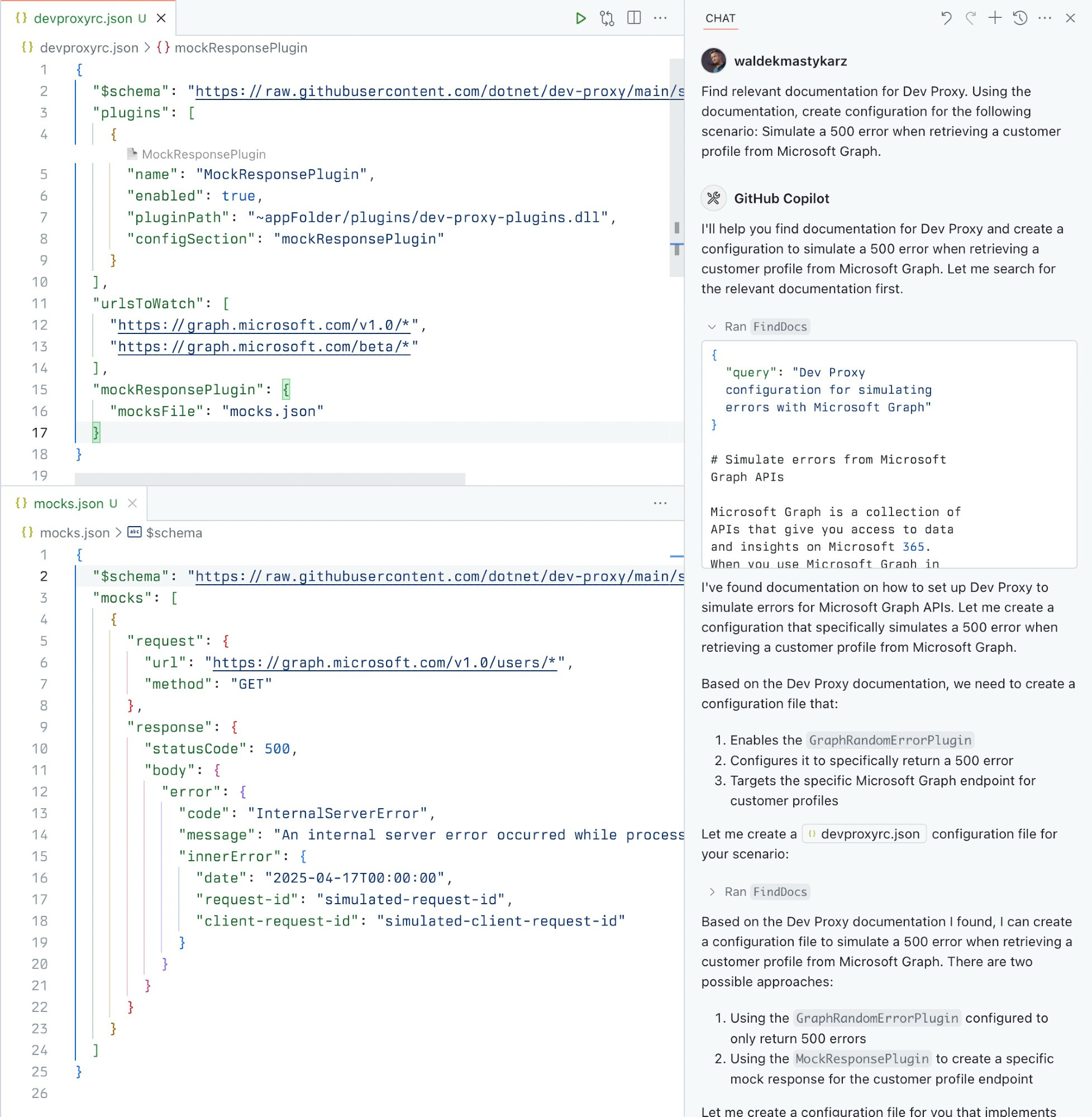
A Model Context Protocol (MCP) server for Dev Proxy that enables AI assistants to interact with Dev Proxy capabilities using the MCP standard. Use this server to:
- Create Dev Proxy configurations using natural language
- Get contextual help for working with Dev Proxy
- Discover Dev Proxy features and capabilities
What is Dev Proxy?
Dev Proxy is an API simulator that helps you effortlessly test your app beyond the happy path. It allows you to:
- Test API error handling: See how your app responds to API errors without changing your code
- Verify rate limit handling: Simulate API rate limits to improve user experience
- Test slow API responses: See how your app handles slow APIs to implement necessary affordances
- Create mock APIs: Quickly stand up mock APIs without writing code you won't ship
Dev Proxy works with any type of app and tech stack as it intercepts network requests at the proxy level.
What This Package Does
This package provides a Model Context Protocol (MCP) server interface to Dev Proxy. It allows AI assistants and other MCP-compatible clients to:
- Find Dev Proxy documentation using natural language queries
- Get the installed Dev Proxy version
Prerequisites
Usage
To set up and use the MCP server, refer to the instructions for your MCP host, such as Visual Studio Code. The Dev Proxy MCP server is published on npm under @devproxy/mcp.
Use the following values:
- Type:
stdio - Command:
npx - Arguments:
-y@devproxy/mcp
- Environment: none
[!TIP] If you want to test the preview version of the server using
@devproxy/mcp@next.
Connect with an MCP Client
This MCP server exposes the following tools:
GetBestPractices
Gets a list of best practices for configuring and using Dev Proxy. Call it for any code generation or operation involving Dev Proxy. These best practices do not change so once it has been called during the current session, you do not need to invoke it again.
_Best practices in markdown_
FindDocs
Finds relevant Dev Proxy documentation related to a specific query.
{
  "query": "How to simulate API errors"
}
GetVersion
Gets the currently installed Dev Proxy version. This is useful to ensure that the generated configuration is compatible with the installed version of Dev Proxy.
{}
Development
# Clone the repository
git clone https://github.com/waldekmastykarz/dev-proxy-mcp.git
cd dev-proxy-mcp

# Install dependencies
npm install

# Build the project
npm run build

# Run the server
npm start

# Run with MCP inspector for debugging
npm run inspect
Contributing
Contributions are welcome! Please feel free to submit a Pull Request.
- Fork the repository
- Create your feature branch (
git checkout -b feature/amazing-feature) - Commit your changes (
git commit -m 'Add some amazing feature') - Push to the branch (
git push origin feature/amazing-feature) - Open a Pull Request
License
This project is licensed under the MIT License - see the LICENSE file for details.
Related Projects
- Dev Proxy - The core Dev Proxy tool
- Model Context Protocol (MCP) - Protocol specification for AI assistant tools
Dev Proxy MCP questions
How do I add Dev Proxy MCP to Claude Code?
Run claude mcp add mcp -- npx -y @devproxy/mcp in your terminal. Add --scope user to make it available in every project.
How do I add Dev Proxy MCP to Cursor?
Open ~/.cursor/mcp.json and add the server under mcpServers, using the Cursor config shown in the install section above.
What can Dev Proxy do?
Dev Proxy is an API simulator that allows you to test API error handling, verify rate limit handling, test slow API responses, and create mock APIs.