
skilled MCP server
Commit Nov 15, 2026Lets an AI client validate, run, and compare agent skill evaluations to detect behavioral regressions.
Also known as DeadHead04/skillEd
- Stars
- 72
- Tools
- —
- Downloads, 30 days
- —
- Latest version
- —
- Last commit
- Nov 15, 2026
- License
- Apache-2.0
What is skilled MCP?
skilled lets an AI client validate, run, and compare agent skill evaluations to detect behavioral regressions.
Summary generated from the project's README
About skilled MCP server
Checking that an agent Skill still behaves correctly after edits is the job skillEd handles, through a command-line tool and a local MCP route. Developers who keep Skills as SKILL.md plus evals/eval.yaml files write repeatable evaluations in YAML, with fixtures, script assertions, model judges and multi-turn cases, then run them against a configured engine such as Codex, Claude Code, OpenCode, Qoder CLI, Qwen Code or a custom one. Comparisons of saved JSON reports flag verdict and coverage changes and return a nonzero exit code for regressions when passed --fail-on-regression.
The MCP server runs over local stdio, started with the skilled mcp command pointed at an absolute workspace path. By default it exposes validation, dry runs and report comparison; adding --allow-execution lets it launch evaluations through the configured engine, subject to the host's approval policy. Agents call skilled_start, poll skilled_status, fetch output with skilled_results, compare with skilled_compare and stop work with skilled_cancel, using an idempotency key to reconnect to a run instead of starting a duplicate. Graders still produce the scores.
Installation bundles a Node runtime, so no source checkout is needed, and setup preserves existing Skills. Native runs can reuse an existing engine login, with usage billed to that account. Isolated with/without-Skill benchmarks need Docker, while ordinary native evaluations do not.
What you can do with it
- 1Validate an eval file before spending model callsHave the agent check a Skill's eval.yaml and selected cases for structural problems without invoking a model.
- 2Run evaluations and store baseline reportsAsk the client to execute the configured engine on an eval suite and write JSON, HTML and JUnit reports to an output directory.
- 3Detect skill regressions after a revisionCompare a fresh report against a saved baseline and fail the step when a previously passing case drops.
- 4Track a long evaluation from an agentStart a run, poll its status, then pull the results and reports back into the conversation.
- 5Recover an interrupted run without duplicationReconnect to the same workspace after a client restart and pick up the existing run rather than launching another.
Written from the project's README. Every use case is checked against a quote from it.
Automated checks
Ran Nov 14, 2026Full report →Not verified yet. A server needs a score of 80, no serious finding, and enough data for us to check. How checks work · What to fix for more points

- Source repository linked and reachabledeadhead04/skilled is public and reachablegithub.com/deadhead04/skilled ↗Pass
- Package names this repository as its sourceNot checked
- Build provenance (Sigstore attestation)Not checked
- Open source license (OSI)Apache-2.0spdx.org/licenses/Apache-2.0.html ↗Pass
- Commit or release in the last yearLast commit or release 2026-11-01github.com/deadhead04/skilled ↗Pass
- OpenSSF ScorecardNot checked
- Package name not close to a popular packageNot checked
- No critical advisory in the package or its dependenciesNot checked
- No hidden instructions to the model0 tool descriptions and the README read; no override phrases, credential paths or hidden charactersPass
- Destructive tools are labelledNot checked
- Remote endpoint answers the MCP handshakeNot checked
README
View on GitHubskilled is maintained in DeadHead04/skillEd. Start with the documentation, installation guide, or real skill improvement example.
A Skill can look right and still fail on edge cases. skilled turns the behavior you expect into repeatable evaluations, so you can check a change to the Skill, agent, or model before relying on it.
One installation includes the evaluation CLI, MCP tools, and the skilled-improve workflow. Use your existing Skills and local engine login. The release bundles its Node runtime; you do not need a source checkout or a separate Node installation.
Install
macOS & Linux
curl -fsSL https://github.com/DeadHead04/skillEd/releases/latest/download/install.sh | bash
export PATH="$HOME/.local/bin:$PATH"
skilled --version
Add the PATH line to ~/.zshrc or ~/.bashrc for future terminals. Requires Bash, curl, and standard archive tools.
$installer = Join-Path $env:TEMP 'skilled-install.ps1'
Invoke-WebRequest https://github.com/DeadHead04/skillEd/releases/latest/download/install.ps1 -OutFile $installer
& $installer
$env:Path = "$(Join-Path $HOME '.local/bin');$env:Path"
skilled --version
Add $HOME\.local\bin to your user PATH for future terminals. Follow your organization's script policy if PowerShell blocks downloaded scripts.
The installer verifies the release archive’s SHA-256 checksum before activating the CLI. Downloads are public; no GitHub login is required. Project setup is available in v0.3.0 and newer.
Manual downloads · Pin a version, update, or uninstall
Use it in your project
From the project where you keep your Skills, activate the bundled improvement workflow for your agent:
skilled setup --host codex
# For Claude Code instead:
skilled setup --host claude-code
Start a new agent session in that same folder and ask:
Use skilled-improve on my Skill at
<path-to-skill>. Inspect its policy and existing tests, add cases for boundaries and invalid inputs, and validate the suite first. Then run it with my configured engine, save a baseline, improve the Skill, and rerun the same cases plus independent holdouts. Show the reports and any regressions.
Replace <path-to-skill> with the actual directory. Your agent follows the workflow and uses skilled to evaluate the changes. skilled-improve is an agent workflow, not a second terminal command.
Setup preserves existing Skills and protects local workflow edits. Repeat setup after upgrading the CLI; add --remove to remove an unmodified managed copy. Setup does not authenticate an engine. Native evaluations can use an existing Codex or Claude Code login; model usage follows your account’s limits and billing.
No Skill yet? Create your first Skill and evaluation. Prefer agent-assisted installation? Give your agent these setup instructions.
Run the evaluation loop
For a Skill with SKILL.md and evals/eval.yaml, run from its root:
# Check the files and selected cases without calling a model.
skilled validate --skill .
skilled validate evals/eval.yaml
skilled run evals/eval.yaml --dry-run

# Run the configured, authenticated engine and save the baseline.
skilled run evals/eval.yaml --output-dir reports/before --format json --format html --format junit

# After revising the Skill, evaluate the same cases again.
skilled run evals/eval.yaml --output-dir reports/after --format json --format html --format junit

# Compare saved results; return a nonzero exit code for a regression.
skilled compare reports/before/iteration-1/report.json reports/after/iteration-1/report.json --fail-on-regression
Use fresh output directories for this example, or use the actual report paths printed by your runs. Open report.html to inspect case verdicts, outputs, and grading evidence. JSON supports automation; JUnit fits existing CI tooling.
Drift detection means comparing saved evaluations. Rerun after changing a Skill, engine, or model. Comparison surfaces verdict and coverage changes; inspect its comparability warnings before drawing conclusions. Installing skilled does not continuously monitor unrelated conversations. Comparison and scoring →
See the Skill improve
A refund-policy Skill refunded shipping, rounded refunds up, and rejected eligible returns after day 14. A real Codex evaluation exposed those mistakes. Revising the Skill to match the policy—30 days, no shipping refund, round down—fixed five cases without changing the tests.
| Same 18 cases | Original Skill | Revised Skill |
|---|---|---|
| Cases passed | 13 / 18 (72.2%) | 18 / 18 (100%) |
| Day 14 partial refund | 933 cents · FAIL · score 0 | 333 cents · PASS · score 1 |
| Day 30 return | Denied · FAIL · score 0 | Approved · PASS · score 1 |
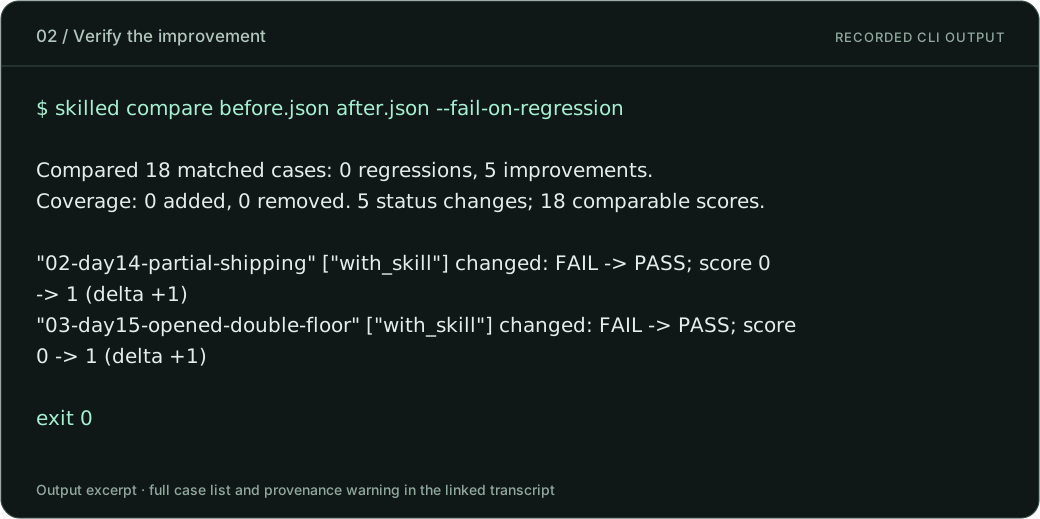
Typeset excerpt of actual CLI output, not a native application screenshot. Full output, including the provenance warning.
Each case here has one script assertion that checks the final JSON, saved refund file, and injection side effects. Score 1 means that assertion passed; 0 means it failed. The percentages above are case pass rates, not confidence scores. The revised Skill also passed 10 / 10 independent holdouts. See the exact Skill changes and scoring evidence →
Catch a regression before you ship
Compare a passing report with one from an intentionally broken version of the Skill:
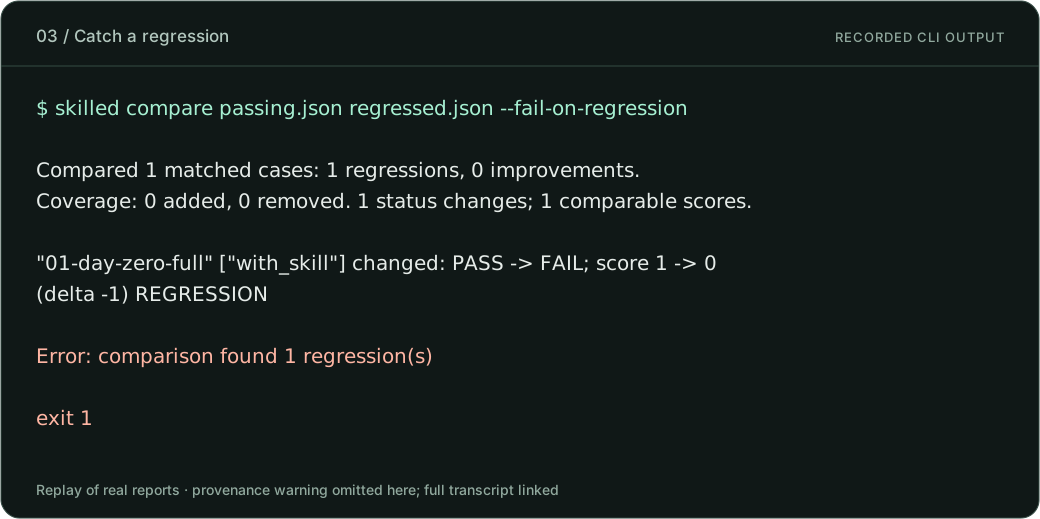
Replay of real evaluation reports; full output. Exit 1 is the expected regression signal.
This is how saved-run comparison can expose behavioral drift after a change. It does not watch unrelated conversations in the background. These results demonstrate one Skill and engine; they are not an accuracy guarantee. The reports lack complete input fingerprints, so the CLI warns that matching cases alone cannot establish equivalent grading conditions. Review that warning and the underlying inputs.
Where MCP fits: your agent starts an evaluation with skilled_start, checks skilled_status, retrieves reports with skilled_results, and compares runs with skilled_compare. Graders produce the scores; MCP makes the tools and evidence available to the agent. Visual walkthrough → · Verification scope →
What you can test
| Capability | How it helps |
|---|---|
| YAML cases and fixtures | Keep expected behavior versioned beside the Skill |
| Assertions, scripts, and model judges | Check exact outputs, custom policy, or qualitative criteria |
| Multi-turn cases and repeated runs | Exercise follow-up pressure and variation |
| Codex, Claude Code, OpenCode, Qoder CLI, Qwen Code, and custom engines | Evaluate through your configured agent engine |
| Native, Docker, and configured OpenSandbox execution | Choose the runtime for ordinary evaluations |
| Isolated with/without-Skill benchmarks | Measure Skill contribution with a verified Docker filesystem boundary |
| Saved-report comparison | Detect regressions and coverage changes without another model call |
Anthropic evals.json import |
Bring an existing evaluation suite |
With/without-Skill benchmarks require Docker; native and OpenSandbox benchmark modes are rejected before execution. Ordinary native evaluations do not require Docker. Benchmark configuration →
Connect through MCP
MCP is an optional route for agents that support local stdio servers:
skilled mcp --workspace /absolute/path/to/your-project
The default connection exposes validation, dry runs, report comparison, and the bundled workflow. Add --allow-execution to enable evaluations using your configured engine. This enables the server capability; your host’s approval policy still applies.
For long evaluations, use skilled_start, then skilled_status and skilled_results. A stable idempotency key lets the client reconnect to the same workspace and recover the run without launching a duplicate. Use skilled_cancel to request cancellation.
Host configuration, tools, and recovery →
Optional Codex and DSH observation integrations have separate setup. They are not required for the evaluation loop above.
Documentation
| I want to… | Start here |
|---|---|
| See a Skill evolve, with scores and a regression | Recorded walkthrough |
| Create a first evaluation | Getting started |
| Write cases and configure an engine | Writing evaluations |
| Understand scores and regressions | Comparison · Scoring |
| Look up commands and exit codes | CLI reference |
| Check what has actually been tested | Verification scope |
| Report a problem or contribute | Issues · Contributing · Security |
Release status
v0.3.0 is available, including project setup, durable MCP jobs, preserved report formats, and benchmark isolation. All eight release acceptance jobs passed, covering packaged execution and published installation on native Linux, macOS, and Windows runners.
Distribution is through GitHub Releases. An npm registry package and Homebrew formula are not published. Optional authenticated Codex execution inside Docker remains unverified; authenticated native Codex and Docker isolation were tested separately. See verification for provider and architecture limits.
Develop locally
Use Node 24.21.0 (see .nvmrc), npm, and Git:
git clone https://github.com/DeadHead04/skillEd.git
cd skillEd
npm ci
npm run build
node dist/src/bootstrap.js --help
The application is TypeScript compiled to ESM. src/ contains the CLI and execution API; skills/ and plugins/ contain agent workflows; examples/, tests/, and docs/ contain examples, verification, and guides. Development checks →
License
Apache-2.0. Copyright and attribution notices are retained in NOTICE.
skilled MCP questions
How does skilled connect through MCP?
Run the MCP server over local stdio with the workspace path. By default it exposes validation, dry runs, report comparison, and the bundled workflow; add --allow-execution to run evaluations.
Which MCP tools does skilled provide?
Agents can start an evaluation with skilled_start, check skilled_status, retrieve reports with skilled_results, compare runs with skilled_compare, and request cancellation with skilled_cancel.
Which agent engines can skilled evaluate skills with?
skilled supports Codex, Claude Code, OpenCode, Qoder CLI, Qwen Code, and custom engines, using your existing engine login.
Does skilled need Docker?
Ordinary native evaluations do not require Docker, but with/without-Skill benchmarks require Docker.
Can skilled detect regressions in a skill?
Yes, comparing saved reports returns a nonzero exit code when a regression appears.