
Gives AI coding agents persistent session memory, local on-device inference, and an auditable token savings report.
Also known as dcostenco/prism-coder, prism-mcp-server
- Stars
- 156
- Tools
- 53
- Downloads, 30 days
- —
- Latest version
- 20.22.4
- Last commit
- Nov 14, 2026
- License
- Apache-2.0
What is Prism Coder MCP?
Prism Coder gives AI coding agents persistent session memory, local on-device inference, and an auditable token savings report. It exposes 53 tools, such as brave_web_search, brave_web_search_code_mode, brave_local_search.
Summary generated from the project's README
About Prism Coder MCP server
Developers using AI coding agents like Claude, Cursor, or Claude Code can provide their tools with persistent session memory that survives restarts. By using the prism-coder MCP server, users can maintain long-term context through knowledge graphs and handoff notes, allowing projects to resume with recent work and open TODOs intact. The server operates locally on your machine without requiring an account or API keys, though a paid subscription via the Synalux portal can add cloud sync and team features.
This setup enables local-first inference by routing tasks to on-device models like Ollama or oMLX. It includes a specialized savings meter that uses the local_savings tool to report exactly how many tokens were kept off cloud models. Users can manage their local AI configuration through the prism dashboard, which allows for independent selection of coder, reviewer, and image models. The system also features a prompt-triggered factory for bounded implementation requests and uses ACT-R ranking to automatically manage memory relevance and recency.
What you can do with it
- 1Maintain long-term project contextA developer can resume a coding project across different sessions without losing recent work or TODO lists.
- 2Reduce cloud API costsUsers can track exactly how much token volume is being handled by local models instead of expensive cloud providers.
- 3Run offline tool routingAn AI agent can use local models from the prism-coder fleet to handle tasks without an internet connection.
- 4Configure multiple AI clientsA developer can use a single command to set up memory and local inference for various tools like Cursor or Gemini CLI.
Written from the project's README. Every use case is checked against a quote from it.
How to install Prism Coder MCP
Formats verified 10 Nov 2026Add to CursorAdd to GooseInstall Prism Coder MCP in Claude Code
$ claude mcp add --env 'BRAVE_API_KEY=<YOUR_BRAVE_API_KEY>' --env 'GEMINI_API_KEY=<YOUR_GEMINI_API_KEY>' --env 'SUPABASE_KEY=<YOUR_SUPABASE_KEY>' prism-coder -- npx -y prism-mcp-serverInstall Prism Coder MCP in Cursor
~/.cursor/mcp.json
{
  "mcpServers": {
    "prism-coder": {
      "command": "npx",
      "args": [
        "-y",
        "prism-mcp-server"
      ],
      "env": {
        "BRAVE_API_KEY": "<YOUR_BRAVE_API_KEY>",
        "GEMINI_API_KEY": "<YOUR_GEMINI_API_KEY>",
        "SUPABASE_KEY": "<YOUR_SUPABASE_KEY>"
      }
    }
  }
}Install Prism Coder MCP in VS Code
.vscode/mcp.json
{
  "servers": {
    "prism-coder": {
      "type": "stdio",
      "command": "npx",
      "args": [
        "-y",
        "prism-mcp-server"
      ],
      "env": {
        "BRAVE_API_KEY": "<YOUR_BRAVE_API_KEY>",
        "GEMINI_API_KEY": "<YOUR_GEMINI_API_KEY>",
        "SUPABASE_KEY": "<YOUR_SUPABASE_KEY>"
      }
    }
  }
}Install Prism Coder MCP in VS Code CLI
$ code --add-mcp '{"name":"prism-coder","type":"stdio","command":"npx","args":["-y","prism-mcp-server"],"env":{"BRAVE_API_KEY":"<YOUR_BRAVE_API_KEY>","GEMINI_API_KEY":"<YOUR_GEMINI_API_KEY>","SUPABASE_KEY":"<YOUR_SUPABASE_KEY>"}}'Install Prism Coder MCP in Claude Desktop
claude_desktop_config.json
{
  "mcpServers": {
    "prism-coder": {
      "command": "npx",
      "args": [
        "-y",
        "prism-mcp-server"
      ],
      "env": {
        "BRAVE_API_KEY": "<YOUR_BRAVE_API_KEY>",
        "GEMINI_API_KEY": "<YOUR_GEMINI_API_KEY>",
        "SUPABASE_KEY": "<YOUR_SUPABASE_KEY>"
      }
    }
  }
}Install Prism Coder MCP in Codex
$ codex mcp add prism-coder --env 'BRAVE_API_KEY=<YOUR_BRAVE_API_KEY>' --env 'GEMINI_API_KEY=<YOUR_GEMINI_API_KEY>' --env 'SUPABASE_KEY=<YOUR_SUPABASE_KEY>' -- npx -y prism-mcp-serverInstall Prism Coder MCP in Codex config.toml
~/.codex/config.toml
[mcp_servers.prism-coder]
command = "npx"
args = ["-y", "prism-mcp-server"]

[mcp_servers.prism-coder.env]
BRAVE_API_KEY = "<YOUR_BRAVE_API_KEY>"
GEMINI_API_KEY = "<YOUR_GEMINI_API_KEY>"
SUPABASE_KEY = "<YOUR_SUPABASE_KEY>"
Install Prism Coder MCP in Gemini CLI
$ gemini mcp add -s user -e 'BRAVE_API_KEY=<YOUR_BRAVE_API_KEY>' -e 'GEMINI_API_KEY=<YOUR_GEMINI_API_KEY>' -e 'SUPABASE_KEY=<YOUR_SUPABASE_KEY>' prism-coder npx -- -y prism-mcp-serverInstall Prism Coder MCP in Gemini settings.json
~/.gemini/settings.json
{
  "mcpServers": {
    "prism-coder": {
      "command": "npx",
      "args": [
        "-y",
        "prism-mcp-server"
      ],
      "env": {
        "BRAVE_API_KEY": "<YOUR_BRAVE_API_KEY>",
        "GEMINI_API_KEY": "<YOUR_GEMINI_API_KEY>",
        "SUPABASE_KEY": "<YOUR_SUPABASE_KEY>"
      }
    }
  }
}Started by HostedMCP on 16 Nov 2026
We ran this command for prism-mcp-server 20.22.4 in an isolated container with no network and no keys. It answered and listed 53 tools.
Prism Coder MCP tools 53
Read from the server with tools/listbrave_web_searchPerforms a web search using the Brave Search API, ideal for general queries, news, articles, and online content. Use this for broad information gathering, recent events, or when you need diverse web sources. Supports pagination, content filtering, and freshness controls. Maximum 20 results per request, with offset for pagination.
brave_web_search_code_modePerforms a web search using the Brave Search API, and then runs a custom JavaScript code string against the RAW API RESPONSE in a secure QuickJS sandbox. This drastically reduces context window usage by only returning the output of your script. Use this for broad information gathering, recent events, or when you need diverse web sources and only need specific parts of the result. Your script should read the 'DATA' global variable (a JSON string of the API response), process it, and use console.log() to print the desired output.
brave_local_searchSearches for local businesses and places using Brave's Local Search API. Best for queries related to physical locations, businesses, restaurants, services, etc. Returns detailed information including: - Business names and addresses - Ratings and review counts - Phone numbers and opening hours Use this when the query implies 'near me' or mentions specific locations. Automatically falls back to web search if no local results are found.
brave_local_search_code_modePerforms a local search using Brave APIs, and then runs a custom JavaScript code string against the RAW API RESPONSE in a secure QuickJS sandbox. This reduces context window usage by only returning the output of your script. Use this for local/business lookups when you only need specific fields from large local payloads. Your script should read the 'DATA' global variable (a JSON string payload) and use console.log() to print the desired output.
code_mode_transformA universal code-mode transformer. Takes RAW TEXT or JSON output from ANY MCP tool (GitHub, Firecrawl, chrome-devtools, camoufox, codegraphcontext, videoMcp, arxiv, etc.) and runs a custom JavaScript code string against it in a secure QuickJS sandbox. Use this as a second step after calling any tool that returns large payloads — pass the raw output as 'data' and a JS extraction script as 'code'. Your script reads the 'DATA' global variable (a string of the tool output) and uses console.log() to print only the fields you need. NEW in v2.1: Pass 'template' instead of 'code' for instant extraction. Available templates: github_issues, github_prs, jira_tickets, dom_links, dom_headings, api_endpoints, slack_messages, csv_summary. Example: { data: '<raw JSON>', template: 'github_issues' } — no custom code needed.
brave_answersReturns direct AI answers grounded in Brave Search using Brave AI Grounding. Uses an OpenAI-compatible chat completions endpoint and is best for concise answer generation with live web grounding.
gemini_research_paper_analysisPerforms in-depth analysis of research papers using Google's Gemini-2.0-flash model. Ideal for academic research, literature reviews, and deep understanding of scientific papers. Can extract key findings, provide critical evaluation, summarize complex research, and place papers within the broader research landscape. Best for long-form academic content that requires expert analysis.
prism_inferRead-onlyRun local inference using the saved coding backend preference. Explicit local_backend overrides it. oMLX uses authenticated loopback oMLX for text-only code/reviewer drafts, without Ollama/cloud substitution or final sign-off. Owns model selection across 27B / 9B / 4B / 2B using an explicit `model_ceiling` or the caller's `task_complexity`, then validates loaded memory size, model context, entitlements, installed models, and free RAM at call time. Falls through to the Synalux portal Gemini 3.6 Flash cloud fallback only when local is unviable or refused and the plan allows cloud; `cloud_fallback: false` forbids it. When `project` is provided, loads the dashboard-configured quick/standard/deep handoff and bounded history as untrusted historical context for a memory-aware local worker. Use this for code generation, summarisation, classification, or any synth task you would otherwise hand to the cloud model — it costs $0 when the local hit succeeds. For a FOLLOW-UP to an earlier prism_infer answer, pass the accepted prior turns as `messages` (paid plans): without them the worker answers the follow-up from nothing and fabricates. Every entitlement-resolved result reports `multi_turn` (your plan's caps) and `history_turns` (what was sent); the crisis intercept reports only `history_turns`. A behaviour-plan request also reports `clinical_sections` — how many required sections were found and which were not. That is a structural census, never a clinical endorsement: a section can be present and still be wrong, and a credentialed BCBA decides whether a plan is adequate. History over the plan's caps is refused (history_over_plan_cap), never trimmed; a free plan or a host with no portal is refused (multi_turn_not_in_plan). Hosts that compact large schemas may drop parameter text, so the contract lives here.
session_bootstrapRead-onlyIMPORTANT: On the first user turn of every conversation, including a greeting, call this tool exactly once before any user-facing response, passing the user's verbatim first message as {prompt: "<first user message>"}. The prompt is matched against prompt_keywords ON-DEVICE to load symptom-triggered skills on turn one; it is used for routing only and never leaves the machine. Pass {} only when there is no user message. Do not substitute session_load_context for this startup call. This starts a Prism-backed conversation without host hooks. Prism reads the dashboard's Auto-Load Projects, Context Depth (quick/standard/deep), developer name, and default role, then returns the greeting and correctly scoped prior-session context. Emit no preamble. Print the complete tool result verbatim as the entire first-turn startup display, before any optional answer. Do not summarize, paraphrase, rename headings, reformat, or omit any returned section. Preserve its order and line content. For a greeting-only prompt, stop after the verbatim startup display. Do not guess or pass a project or depth. Prism returns a stable conversation_id on the trailing <prism_session /> line; reuse it for session_save_ledger, session_save_handoff, and session_detect_drift throughout this conversation without adding it to the visible greeting. This is the first-turn startup call only: if a later save is refused with context_not_loaded, recover with session_load_context for that save's project and conversation_id, then retry the save once, rather than repeating this startup display.
session_route_promptRead-onlyCall this at the START of any turn where the user states a NEW task, changes the kind of work, or reports a defect — passing their verbatim message as {prompt: "..."} and the skills you already have as {loaded: [...]}. session_bootstrap routes only the first turn of a conversation; this routes every turn after it, so a long session still picks up the skills its current work requires. The prompt is matched ON-DEVICE against the same table and the same account-scoped frontmatter triggers; it never leaves the machine. Calling it is cheap: when nothing new matches it returns a single line, and anything named in `loaded` is never returned again. When it does return skills, read and follow them before doing the work — they are the rules for the task at hand, not background. It also checks bounded implementation requests for Factory. Supply the current project, working_directory, files_involved and test_command when known. When prism_factory_route recommends session_start_pipeline, call it automatically with recommended_args, then report the pipeline id and monitor it. Routing itself does not execute code. Skip it only for follow-ups within work you have already routed.
skill_saveSave a skill at one of three scopes: local (this machine only, works signed out), user (your account — follows you to every machine), or team (a workspace — delivered to its members; owner/admin only, optionally targeted with assign_to). Default when signed in is USER; team is never a default. Content must be a SKILL.md body with frontmatter (name, description). To make the skill load automatically when a prompt matches, add prompt_triggers to the frontmatter — a list of up to 5 case-insensitive regexes. They stay as private as the skill itself (matching happens on-device; scoped skills cannot use the public routing table): prompt_triggers: - "\\binvoice\\b.{0,20}\\bsubmit\\b"
skill_manageManage scoped skills and platform-skill activation. Actions: list (your skills, team skills, releases); delete (remove a user/team/local skill — the final content is archived locally first); release (deactivate a PLATFORM skill you never use, freeing host catalog budget — per user, or per team by admins); restore (re-activate a released platform skill; lossless).
Show all 53 toolsShow fewer tools
session_save_ledgerSave an immutable session log entry to the session ledger. Use this at the END of each work session to record what was accomplished. The ledger is append-only — entries cannot be updated or deleted. This creates a permanent audit trail of all agent work sessions. The save is refused with context_not_loaded until session_bootstrap or session_load_context has loaded this exact project for this conversation_id; on that refusal call session_load_context with the same project and conversation_id, then retry the save once.
session_save_handoffUpsert the latest project handoff state for the next session to consume on boot. This is the 'live context' that gets loaded when a new session starts. Calling this replaces the previous handoff for the same project (upsert on project). **v5.4 CRDT Merge**: On version conflict, a CRDT OR-Map engine automatically merges your changes with concurrent work (Add-Wins OR-Set for arrays, Last-Writer-Wins for scalars). Pass expected_version to enable concurrency control. **v0.4.0 OCC**: If you received a version number from session_load_context, /resume_session prompt, or memory resource attachment, you MUST pass it as expected_version to prevent overwriting another session's changes. Pass the same conversation_id as session_save_ledger: the save is refused with context_not_loaded until session_bootstrap or session_load_context has loaded this exact project for it; on that refusal call session_load_context with the same project and conversation_id, then retry the save once, passing the version it shows as expected_version.
session_load_contextLoad session context for a project using progressive context loading. Use this to recover when session_save_ledger or session_save_handoff is refused with context_not_loaded (pass that save's project and the same conversation_id, then retry the save once; a recovery load is not a second startup), for an explicit project reload, or as a startup fallback only when session_bootstrap is unavailable. When session_bootstrap is available, do not substitute this tool for the first-turn bootstrap. Three levels available: - **quick**: Just the latest project state — keywords and open TODOs (~50 tokens) - **standard**: Project state plus recent session summaries and decisions (~200 tokens, recommended) - **deep**: Everything — full session history with all files changed, TODOs, and decisions (~1000+ tokens)
knowledge_searchSearch accumulated knowledge across all sessions by keywords, category, or free text. The knowledge base grows automatically as sessions are saved — keywords are extracted from every ledger and handoff entry. Use this to find related past work, decisions, and context from previous sessions. Categories available: debugging, architecture, deployment, testing, configuration, api-integration, data-migration, security, performance, documentation, ai-ml, ui-frontend, resume
knowledge_forgetSelectively forget (delete) accumulated knowledge entries. Like a brain pruning bad memories — remove outdated, incorrect, or irrelevant session entries to keep the knowledge base clean and relevant. Forget modes: - **By project**: Clear all knowledge for a specific project - **By category**: Remove entries matching a category (e.g. 'debugging') - **By age**: Forget entries older than N days - **Full reset**: Wipe everything (requires confirm_all=true) ⚠️ This permanently deletes ledger entries. Handoff state is preserved unless explicitly cleared.
session_compact_ledgerAuto-compact old session ledger entries by rolling them up into AI-generated summaries. This prevents the ledger from growing indefinitely and keeps deep context loading fast. How it works: 1. Finds projects with more entries than the threshold 2. Summarizes old entries using Gemini (keeps recent entries intact) 3. Inserts a rollup entry and archives the originals (soft-delete) Use dry_run=true to preview what would be compacted without executing.
session_search_memorySearch session history semantically (by meaning, not just keywords). Uses vector embeddings to find sessions with similar context, even when the exact wording differs. Requires pgvector extension in Supabase. Complements knowledge_search (keyword-based) — use this when keyword search returns no results or when the query is phrased differently from stored summaries.
memory_historyView the timeline of past memory states for this project. Use this BEFORE memory_checkout to find the correct version to revert to. Shows version numbers, timestamps, and summaries of each saved state.
memory_checkoutTime travel! Restores the project's memory to a specific past version. This overwrites the current handoff state with the historical snapshot, like a Git revert — the version number moves forward (no data is lost). Call memory_history first to find the correct target_version.
session_save_imageSave a local image file into the project's permanent visual memory. Use this to remember UI states, diagrams, architecture graphs, or bug screenshots. The image is copied into Prism's media vault and indexed in the handoff metadata. On the next session_load_context, the agent will see a lightweight index of available images.
session_view_imageRetrieve an image from visual memory using its ID. Returns the image as Base64 inline content for the LLM to analyze. Use session_load_context first to see available image IDs.
session_health_checkRun integrity checks on the agent's memory (like fsck for filesystems). Scans for missing embeddings, duplicate entries, orphaned handoffs, and stale rollups. Checks performed: 1. **Missing embeddings** — entries that can't be found via semantic search 2. **Duplicate entries** — near-identical summaries wasting context tokens 3. **Orphaned handoffs** — handoff state with no backing ledger entries 4. **Stale rollups** — compaction artifacts with no archived originals Use auto_fix=true to automatically repair missing embeddings and clean up orphans.
session_backfill_embeddingsRepair ledger entries that are missing vector embeddings. This can happen if the Gemini API was temporarily unavailable when the entry was saved. How it works: 1. Scans for active ledger entries where embedding IS NULL 2. Generates embeddings via Gemini text-embedding-004 3. Patches each row with the generated embedding Run this periodically or after known API outages to ensure full semantic search coverage.
session_forget_memoryForget (delete) a specific memory entry by its ID. Supports two modes: - **Soft delete** (default): Tombstones the entry — it stays in the database for audit trails but is excluded from all search results. Reversible. - **Hard delete**: Permanently removes the entry from the database. Irreversible. Use only when GDPR Article 17 requires complete erasure. ⚠️ Soft delete is recommended for most use cases. The entry can be restored in the future if needed.
knowledge_set_retentionSet an automatic data retention policy (TTL) for a project's memory. Entries older than ttl_days will be soft-deleted (archived) automatically on every server startup and every 12 hours while running. **Use cases:** - Set `ttl_days: 90` to auto-expire sessions older than 3 months - Set `ttl_days: 0` to disable auto-expiry (default) **Note:** Rollup/compaction entries are never expired — only raw sessions.
session_save_experienceRecord a typed experience event. Unlike session_save_ledger (flat logs), this captures structured behavioral data for pattern detection. Event Types: - **correction**: Agent was corrected by user - **success**: Task completed successfully - **failure**: Task failed - **learning**: New knowledge acquired - **validation_result**: Verification sandbox passed or failed
knowledge_upvoteUpvote a memory entry to increase its importance (graduation). Entries with importance >= 7 become 'graduated' insights that always surface in behavioral warnings.
knowledge_downvoteDownvote a memory entry to decrease its importance. Importance cannot go below 0.
knowledge_sync_rulesAuto-sync graduated insights (importance >= 7) into your project's IDE rules file (.cursorrules or .clauderules). This bridges behavioral memory with static IDE context — turning dynamic agent learnings into always-on rules. **How it works:** 1. Fetches graduated insights from the ledger 2. Formats them as markdown rules inside sentinel markers 3. Idempotently writes them into the target file at the project's configured repo_path **Requirements:** The project must have a repo_path configured in the dashboard. **Idempotency:** Uses `<!-- PRISM:AUTO-RULES:START -->` / `<!-- PRISM:AUTO-RULES:END -->` sentinel markers. Running this tool multiple times produces the same file. User-maintained content outside the sentinels is never touched.
deep_storage_purgev5.1 Deep Storage Mode: Purge high-precision float32 embedding vectors for entries that already have TurboQuant compressed blobs, reclaiming ~90% of vector storage. Only affects entries older than the specified threshold (default: 30 days, minimum: 7). Entries without compressed blobs are NEVER touched. Use dry_run=true to preview the impact before executing. **When to use:** After running TurboQuant backfill (session_backfill_embeddings), call this tool to reclaim disk space from legacy float32 vectors that are no longer needed for search. **Safety:** Tier-2 search (TurboQuant) maintains 95%+ accuracy with compressed blobs. Tier-3 (FTS5 keyword) search is completely unaffected.
session_export_memoryExport all of a project's memory to a local file. Fulfills GDPR Article 20 (Right to Data Portability) and the 'local-first' portability promise. **What is exported:** - All session ledger entries (summaries, decisions, TODOs, file changes) - Current handoff state (live project context) - System settings (API keys are "**REDACTED**" for security) - Visual memory index (descriptions, captions, timestamps; not the raw files) **Formats:** - `json` — machine-readable, suitable for import into another Prism instance - `markdown` — human-readable, ideal for static archiving - `vault` — Prism-Port: exports a compressed `.zip` of interrelated Markdown files with proper Obsidian/Logseq YAML frontmatter and `[[Wikilinks]]` ⚠️ Output directory must exist and be writable. Filenames are auto-generated: `prism-export-<project>-<date>.(json|md|zip)`
session_backfill_linksRetroactively create graph edges (memory links) for all existing entries in a project. This builds the associative memory graph from your existing session history. Three strategies are run: 1. **Temporal Chaining**: Links consecutive entries within the same conversation 2. **Keyword Overlap**: Links entries sharing ≥3 keywords (bidirectional) 3. **Provenance**: Links rollup summaries to their archived originals All strategies use INSERT OR IGNORE — safe to re-run multiple times. **When to use:** Run once after upgrading to v6.0 to populate the graph for existing memories. New entries are auto-linked on save (no manual action needed).
session_synthesize_edgesStep 3A Edge Synthesis: Scans recent project entries with embeddings, finds high-similarity but currently disconnected entries, and creates inferred links as 'synthesized_from'. **On-Demand Graph Enrichment**: Use this tool periodically to discover semantic relationships between structurally disconnected memory nodes. It batch processes the newest active entries.
session_cognitive_routeResolve an HDC compositional state into a nearest semantic concept with policy-gated routing. Returns concept, confidence, distance, ambiguity, convergence steps, and route outcome. Use this for explainable cognitive recall decisions in v6.5.
session_detect_driftDetect whether the current agent session has semantically drifted from its original goal. Scores recent ledger entries against the goal using synalux's HRR embedding stack (GloVe → Gemini/Voyage → cosine similarity), then runs the rolling-window drift detector algorithm. **Triggers:** - `goal-drift` — cumulative alignment loss is high and monotonic (not random tangents) - `context-collapse` — average output quality has dropped below floor **Pre-warning:** - `quality-degrading` — quality slope steeply negative before collapse **Returns:** drifted, reason, warning, drift_score (0..1), goal_alignment, quality_avg, sample_count, adaptive_threshold, recommendation. Use alongside GATE 5 (60-minute drift check): call this tool instead of session_cognitive_route for goal-alignment drift detection.
verify_behaviorCall BEFORE editing behavioral source files (API routes, ordering logic, billing, auth, migrations). Returns a domain-specific scenario you must answer to demonstrate understanding of the end-user impact. Example: editing a KDS route returns 'A cook has a 3-item ticket. One item is voided. What should the cook see?' Answer the scenario concretely before proceeding with the edit. If the MCP transport is unavailable, use the packaged `prism verify-behavior` CLI fallback; never fabricate a replacement scenario.
maintenance_vacuumReclaim disk space after large purge operations by running VACUUM on the local SQLite database. Best called after `deep_storage_purge` removes many entries — SQLite reclaims page allocations only when explicitly vacuumed, so the file size stays the same until you call this tool. For remote (Supabase) backends, returns guidance on triggering maintenance via the dashboard. **Note:** On large databases this may take up to 60 seconds. The tool runs synchronously so you will know when it is safe to proceed.
onboarding_wizardInteractive setup wizard for new Prism users. Provides a step-by-step guided experience to get productive in under 3 minutes. **Actions:** - `start` (default when omitted) — Begin the wizard from step 1 - `next` — Advance past `step` (pass the step number you are on) - `status` — Check current wizard progress - `skip` — Skip to completion Each step returns instructions, code snippets, and progress percentage.
extract_entitiesExtract named entities from raw text using rule-based + optional LLM extraction. Automatically identifies technologies, file paths, decisions, TODOs, people, projects, and configuration values without explicit tagging. **Entity types:** PERSON, PROJECT, TECH, FILE, DECISION, TODO, CONFIG Use this to auto-enrich session context with structured metadata from raw conversation text.
api_analyticsView API usage analytics per project or system-wide. Shows call counts, success rates, latency, token usage, top tools, and daily trends. **Scopes:** - `project` — Analytics for a specific project - `system` — System-wide aggregate analytics
backup_databaseCreate, list, or restore SQLite database backups. **Actions:** - `create` — Create a new backup now - `list` — List available backups with sizes and ages - `restore` — Restore from a specific backup file - `configure` — Set backup schedule (hourly/daily/weekly) Backups are stored in ~/.prism/backups/ by default. Automatic retention pruning keeps only the configured maximum.
configure_notificationsConfigure real-time notifications for memory events via webhook, Slack, or email. **Actions:** - `status` — Show current notification configuration - `add_channel` — Add a notification channel (webhook/slack/email) - `remove_channel` — Remove a channel by URL - `test` — Send a test notification to all configured channels **Events:** health_degradation, compaction_complete, backup_complete, backup_failed, memory_threshold, new_graduated_insight, scheduler_error
query_memory_naturalQuery memories using natural language instead of structured tool syntax. Searches Prism memory first. When memory has no useful result, paid tiers automatically run one quick Synalux web search, preserve the raw sources, and synthesize a grounded answer through prism_infer. Reserved or uncertain content is cloud-or-refuse and never sent through the local web-grounded path. **Examples:** - "What did we decide about authentication?" - "What's still open on the billing project?" - "What files did we change last week?" - "Show me recent work on the API" Returns the parsed intent, search results, and optionally an LLM-synthesized answer.
knowledge_ingestIngest source code or documentation into the knowledge graph. Feed your codebase to Prism so knowledge_search can retrieve it at inference time. Accepts raw source code, file paths, or a git repo URL. The content is chunked, Q&A pairs are generated, and stored in the knowledge graph. Use this when the user says 'learn this code', 'index my repo', or 'ingest this file'.
inference_metricsReturns local-model inference metrics — call count, local vs cloud split, token totals, per-model breakdown, and average latency. period: 'session' (default) reports this MCP process's prism_infer delegation only. period: 'all' imports the Synalux VS Code panel spool and reports persisted MCP + panel usage across restarts, including the panel local-serve rate. This does not include the host model's (Claude's) own token spend (use /cost for that).
local_savingsReports what prism's local serving displaced, in TOKENS: volume handled by a local model instead of the cloud, calls served locally vs routed, and a per-model breakdown. Reports tokens, never money — prism cannot know your host's current rates, which model a call would otherwise have used, or whether you are on a flat plan, so any dollar figure would be invented. period: 'all' (default, durable ledger), 'month'/'week' (trailing 30/7 days), or 'session' (this MCP process); 'days' sets a custom trailing window. Excludes refused calls and states its known undercounts inline.
sync_pull_handoffPulls this account's synced handoff for a project from the E2E relay and opens it with THIS machine's device key. The relay stores ciphertext only; a handoff is readable here only if it was sealed to this device. Requires handoff sync enabled (prism handoff enable), a paid plan, and a signed-in account. Push happens automatically on session_save_handoff.
session_task_routeAnalyze a coding task and recommend whether it should be handled by the host cloud model or delegated to Prism's local memory-aware worker (Qwen3). The `claw` target value is retained for API compatibility. **How to use:** 1. Call this tool before delegating a bounded subtask 2. Read the `target` field in the response 3. If target is `claw`, call the returned `recommended_tool` (`prism_infer`) with `recommended_args` 4. If target is `host`, handle the task yourself Bounded high-complexity inference may still target `claw`; the forwarded 1-10 complexity selects 4B/9B/27B inside `prism_infer`. Architecture, security, host-tool workflows, and other reserved judgment remain on `host`. **v7.1.0/v7.2.0:** Uses deterministic keyword/scope heuristics. When a project is specified, routing is enhanced by analyzing past experience events (success/failure/correction) to adjust confidence scores based on historical outcomes.
session_start_pipelineStart an autonomous Dark Factory pipeline. The pipeline runs in the background and executes a PLAN → EXECUTE → VERIFY cycle up to `max_iterations` times. **Requires:** Dark Factory is enabled at startup (enabled by default; the dashboard setting applies when no explicit `PRISM_DARK_FACTORY_ENABLED=true|false` override is present). **How it works:** 1. Call this tool with an objective (what to accomplish) 2. The pipeline is queued and executes autonomously in the background 3. Use `session_check_pipeline_status` to poll for results **Safety:** - Pipelines are scoped to a `working_directory` — no filesystem escape - Strict iteration cap (default: 3) prevents infinite loops - Wall-clock timeout (default: 15min) prevents runaway execution - All operations are logged to the session ledger for audit
session_check_pipeline_statusCheck the status of a Dark Factory pipeline. Returns the current step, iteration count, and any error messages. **Statuses:** - `PENDING` — Queued, waiting for runner pickup - `RUNNING` — Currently executing a step - `COMPLETED` — Successfully finished all steps - `FAILED` — Encountered an error or exceeded limits - `ABORTED` — Manually cancelled
session_abort_pipelineAbort a running Dark Factory pipeline. The pipeline will be marked as ABORTED and the background runner will stop processing it on the next tick. **Note:** This is a 'kill switch' — the runner detects the status change via the storage status guard and gracefully stops execution.
Configuration
BRAVE_API_KEYSecretBrave Search API key for web search tools
GEMINI_API_KEYSecretGoogle Gemini API key for AI-powered summarization and embeddings
SUPABASE_KEYSecretSupabase service role key for database access
GCP_PROJECT_IDGoogle Cloud project ID for Vertex AI Discovery Engine integration
LOCAL_LLM_URLPRISM_SYNALUX_API_KEYPRISM_USER_IDUser ID for multi-tenant row-level security isolation (defaults to 'default')
SUPABASE_URLSupabase project URL for session memory and knowledge persistence
VERTEX_DATA_STORE_IDVertex AI Discovery Engine data store ID for enterprise search
VERTEX_LOCATIONVertex AI location/region (defaults to 'global')
Automated checks
Ran Nov 16, 2026Full report →Passed our automated checks. That is not a security audit: read the code and give the server the narrowest access it needs. How checks work

- Source repository linked and reachabledcostenco/prism-coder is public and reachablegithub.com/dcostenco/prism-coder ↗Pass
- Package names this repository as its sourceprism-mcp-server names dcostenco/prism-coder as sourcenpmjs.com/package/prism-mcp-server ↗Pass
- Build provenance (Sigstore attestation)Sigstore attestation for prism-mcp-servernpmjs.com/package/prism-mcp-server/v/20.22.4#provenance ↗Pass
- Open source license (OSI)Apache-2.0spdx.org/licenses/Apache-2.0.html ↗Pass
- Commit or release in the last yearLast commit or release 2026-11-14github.com/dcostenco/prism-coder ↗Pass
- OpenSSF ScorecardNot checked
- Package name not close to a popular packageNo popular package one edit away from prism-mcp-serverPass
- No critical advisory in the package or its dependencies248 resolved dependencies checked; no critical advisoryosv.dev ↗Pass
- No hidden instructions to the model53 tool descriptions and the README read; no override phrases, credential paths or hidden charactersPass
- Destructive tools are labelledNo tool named like delete, drop or execPass
- Remote endpoint answers the MCP handshakeNot checked
README
View on GitHubPrism Coder
Give your AI agent memory that lasts — and see the cloud tokens it never had to spend. Persistent sessions, knowledge graphs, offline tool-routing, and an auditable savings meter. Fully local and free.
Current release: v20.22.5 — local oMLX images and memory accounting Choose an independent image model from discovered local inventory. Compatible oMLX servers support controlled PNG image requests with local screening and generation. Image accuracy depends on the model; Ollama image execution remains unavailable for the saved image choice. See the oMLX guide.




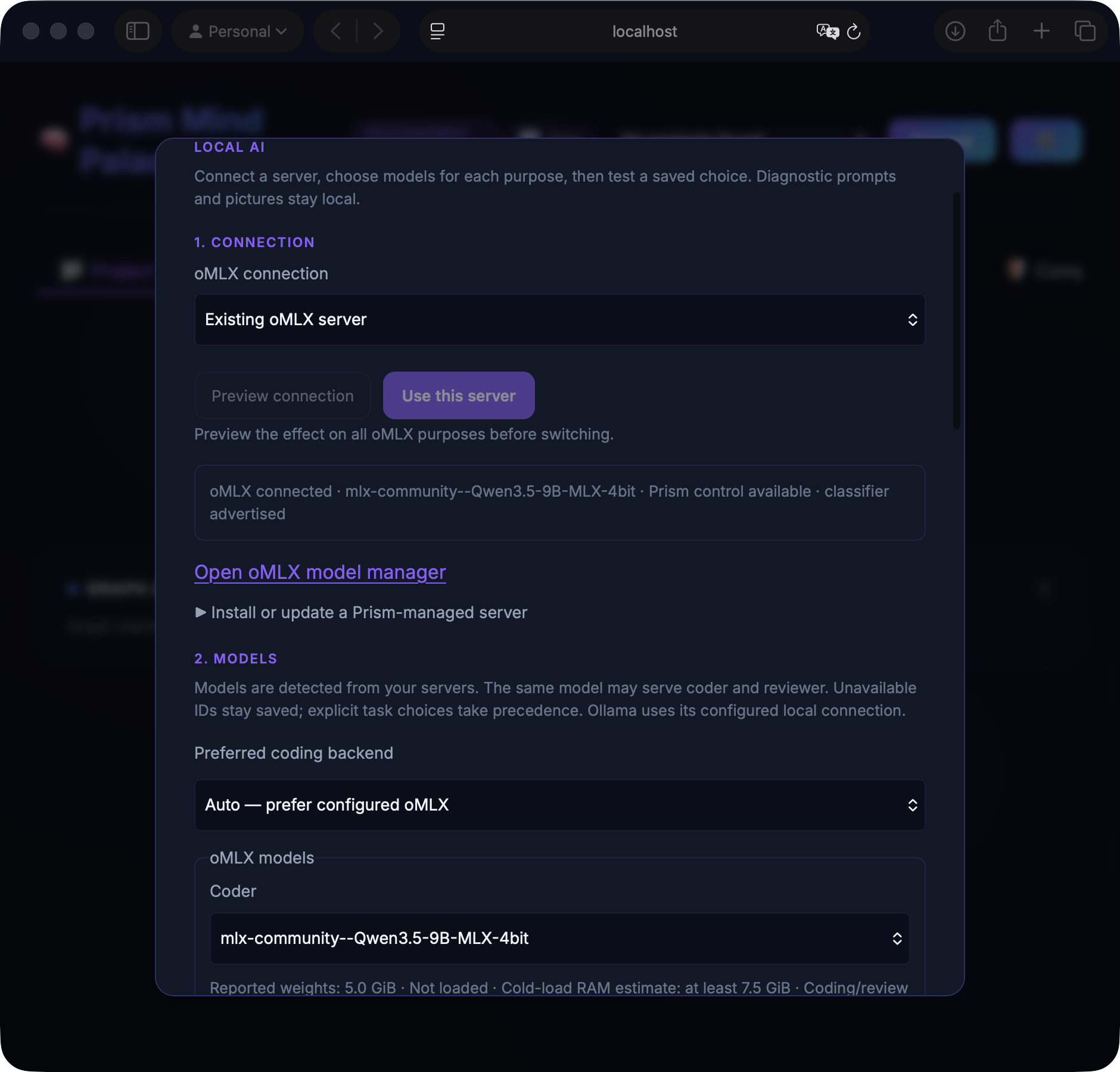
Local AI dashboard development preview. Screenshots below use an isolated demo with illustrative inventory and responses; they do not show a live account or prove model accuracy. The npm release may show an earlier interface.
Prism Coder is an MCP server that gives Claude, Cursor, and other AI tools long-term memory that survives across sessions. It ships with the open-weight prism-coder model fleet (2B–27B) for fast, offline tool-routing — no cloud required. And it keeps score: every call served locally is metered, so prism savings shows the token volume that never reached your cloud model — measured honestly, in tokens.
No account needed. No API keys. Runs on your machine.
A paid subscription adds cloud sync, higher model tiers, and team features through the Synalux portal.
What Prism gives you
- Session memory that survives restarts — resume projects with handoff notes, recent work, open TODOs, and configurable quick, standard, or deep context.
- Local-first inference — local Ollama models use automatic 2B/4B/9B/27B selection based on installed models, available RAM, context fit, and subscription entitlements. Eligible text-only coding can prefer configured oMLX; explicit task choices override the saved backend preference.
- A savings meter you can audit —
prism savings(or thelocal_savingstool from any host) reports the token volume local serving kept off your cloud model: headline, local share, per-model breakdown. It reports tokens, never an invented dollar figure, and prints its assumptions and known undercounts inline — a number you can check, not marketing. - Route-output enforcement — route mode returns only well-formed calls to
tools the host actually advertised. Standard and higher plans can add
authenticated deterministic correction;
route_guard: "local"disables that correction only.cloud_fallback: falseforbids cloud inference fallback andverify: false(with noevidence) disables the grounding verifier. With all three off, no request carries your prompt, draft or evidence; the per-call entitlement check and telemetry still contact the portal and carry neither. - One setup for every agent —
prism connectconfigures Claude Code, Claude Desktop, Cursor, Gemini CLI, and Codex while preserving unrelated settings. - Subscription-aware skills — entitled skills are synchronized before the host launches, with safe upgrades, downgrades, conflict preservation, and offline last-good recovery.
- Hook-free startup — MCP metadata and native instructions request Prism's
startup context without requiring lifecycle hooks or a Prism-owned launcher.
Where a host offers hooks (Claude Code, Codex),
prism connectadds two small ones on top: mid-session prompt routing, and a post-compaction re-injection of the protected-floor digest. - Prompt-triggered Factory — enabled by default for suitable bounded
implementation requests with explicit files, an allowed write list, and a
verification command. The host starts and monitors the recommended pipeline;
BCBA requests stay with the host. A dashboard toggle or
PRISM_DARK_FACTORY_ENABLED=falsedisables Factory after an MCP restart. Try the three-test filename fix. - Safe escalation and observability — inference outcomes are explicit, reserved text remains fail-closed (clinical images are processed locally, never sent to the cloud), and local/cloud usage is recorded for review.
Local AI in the dashboard
Run prism dashboard, open Account & Settings → Local AI, then work through
Connection → Models → Test. These controls configure local inference;
session memory continues to work without installing a model.
| Step | What you do | What to expect |
|---|---|---|
| 1. Connection | Choose an existing oMLX server or a Prism-managed installation, then Preview connection. | Review the effect on coder, reviewer and image assignments before Use this server switches the shared oMLX connection. Saved model IDs are preserved. |
| 2. Models | Choose coder and reviewer models for each backend and Save coding preference. Save the separate Image model form independently. | Saving records a choice; it does not download or load weights. Missing saved IDs stay visible instead of being silently replaced. |
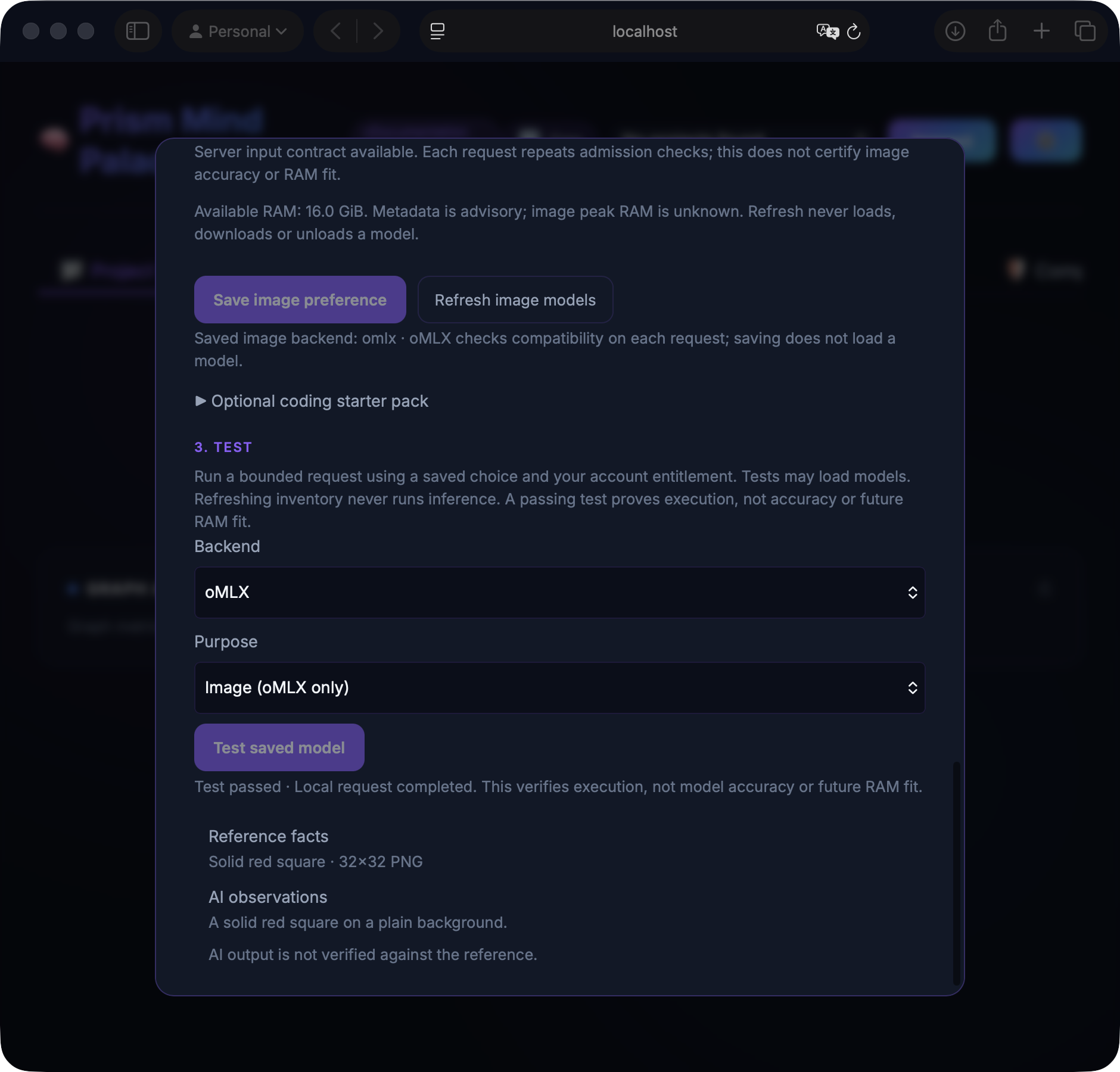
| 3. Test | Select backend and purpose, then Test saved model. | A small request may load the saved model. The result reports execution or a blocking reason, with no cloud inference fallback. |
Coding and review. Auto prefers configured oMLX for eligible coding. You can choose Ollama instead; explicit task choices take precedence. oMLX coding and review need the integration's separate text safety classifier. Local drafts and reviews still need host inspection and tests.
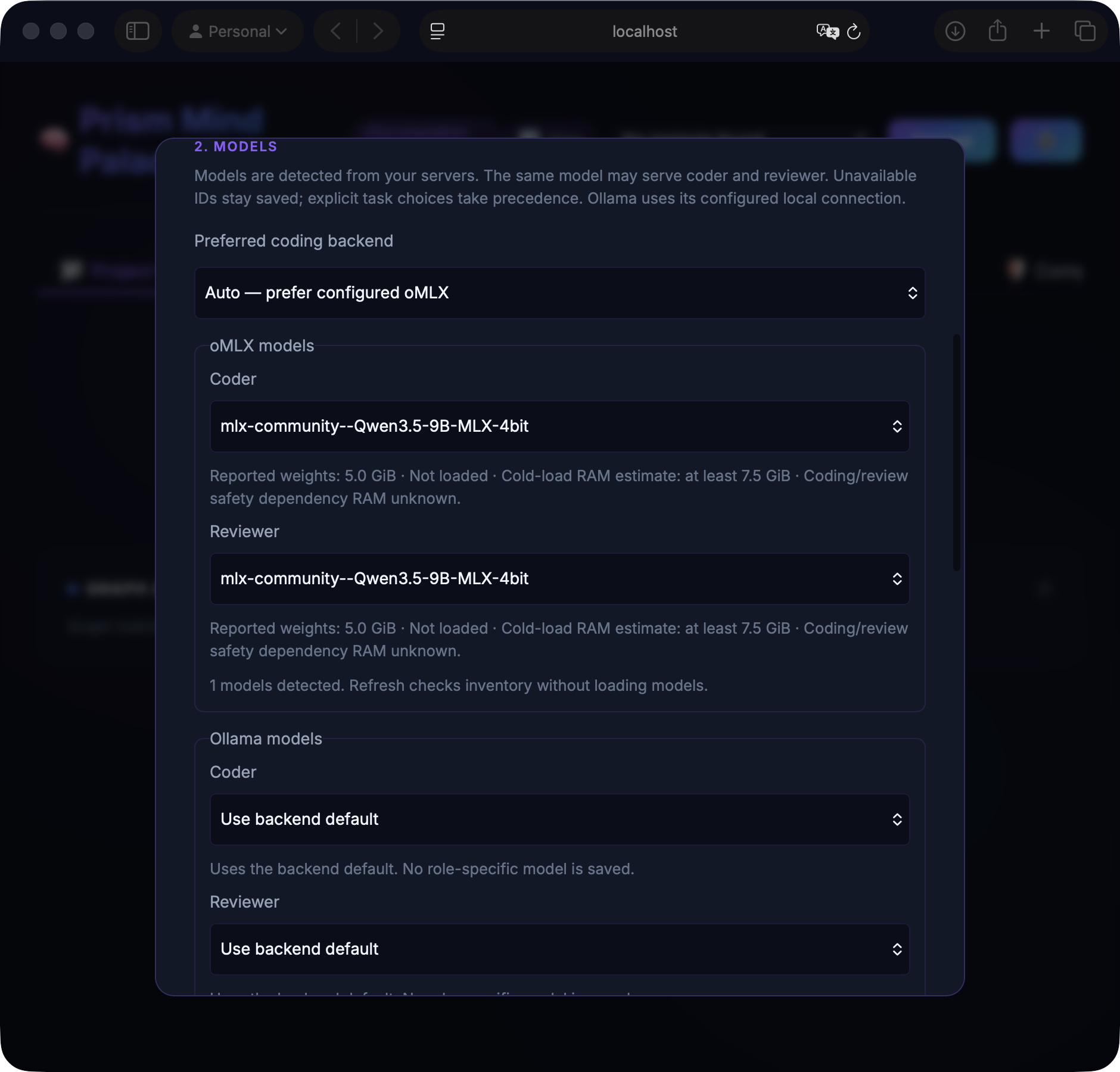
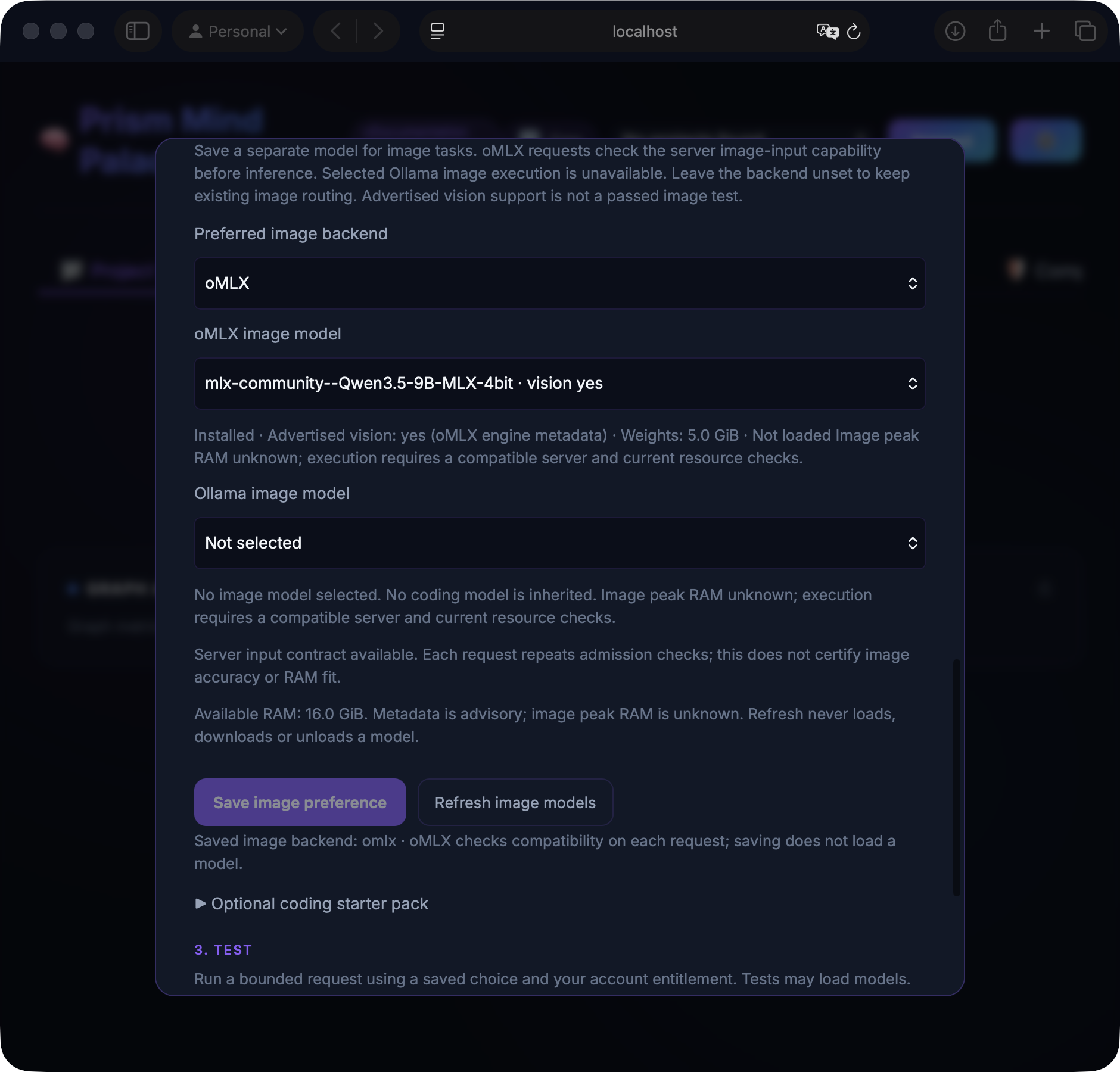
Images have their own choice. Select an oMLX vision model under Image model, then Save image preference. It may be the same model used for coding, but the setting is independent. Refresh image models reads metadata without loading a model. Vision metadata and RAM estimates are advisory; each request repeats compatibility and resource checks. The saved Ollama image option currently refuses execution; leave the image backend Not selected to retain existing image routing.
Read image-test results in two parts. The built-in diagnostic sends a red square. Reference facts describe that known PNG; AI observations contain the model's answer. A wrong answer cannot change the reference. A passing test proves execution, not visual accuracy. User images do not receive catalog facts from this diagnostic. Starting another test or changing backend or purpose clears the previous image result.
Server setup is optional and separate from npm. On supported Apple Silicon Macs, expand Install or update a Prism-managed server to install the server without downloading the optional coding starter pack. Add models through Open oMLX model manager. Installing a server update does not restart it or switch your connection. Restart managed server interrupts local inference and is available only when Prism can establish managed ownership and idle activity. External servers use their own upgrade and restart procedure.
Updating the Prism npm package or restarting your AI client does not upgrade an external oMLX server. If image status says Server update required, follow the existing-server upgrade guide. Tested Prism-compatible source identifies the compatible revision; Latest upstream releases is for release notes and may lack Prism's routes. See the oMLX guide for requirements and troubleshooting.
Get started
Memory search automatically applies ACT-R ranking: relevance plus recency,
frequency and memory associations. No upvote or prompt instruction is required.
To opt out, use Account & Settings → Preferences → Automatic Memory Ranking
(ACT-R), then restart your AI client. PRISM_ACTR_ENABLED=false also disables
it. This ranking is separate from the neural graph's stored importance filter.
npm install -g prism-mcp-server
prism connect
prism dashboard
Use prism connect --dry-run to preview changes, prism connect --all to
configure every detected host, or prism connect --refresh to reconcile
Prism-managed entries after an upgrade. Restart the host after connecting.
prism dashboard opens the current local Mind Palace without a Synalux login.
Prism works locally without an account, API key, or cloud subscription. Add a
Synalux subscription when you want cloud memory, paid-tier skills, or team
features.
To check your plan, open ⚙ Account & Settings → Account in the dashboard. Free users see Start 14-day trial; paid users see Manage subscription. During a trial, the same panel shows the paid tier and exact end date. No card is required to start. Add payment details before the end date to continue; if you do not, the subscription cancels and local Prism Free remains available. You can also compare plans directly at synalux.ai/pricing#prism-plans.
After a few sessions, ask what it's been worth:
prism savings --period month
💾 Local serving — LAST 30 DAYS
  ~510K tokens kept off your cloud model
  53 call(s) served locally of 58 routed (91%)
Your numbers will differ — that's the point: it reports what your machine
actually served, not a projection. Full report anatomy and the honesty rules
behind it are in the
local_savings section.
Install as a plugin
Prism also ships as a plugin, which registers the MCP server and the startup skill for you.
Both hosts install straight from this repository. There is nothing to host and
no server to run: the catalogue is the .claude-plugin/marketplace.json file
committed here, and your client clones it from GitHub.
Claude Code:
claude plugin marketplace add dcostenco/prism-coder
claude plugin install prism-coder@prism
Codex:
codex plugin marketplace add dcostenco/prism-coder
codex plugin add prism-coder@prism
The plugin registers prism-mcp via npx -y prism-mcp-server. If you already
configured Prism by hand — prism connect writes an mcp_servers.prism-mcp
entry — you have that server twice under one key. Install the plugin or
run prism connect, not both.
What prism connect changes about host subagents
connect steers bounded work to prism_infer on your machine rather than to
host-spawned agents. What it writes differs per host, and it does not disable
subagents everywhere — Claude Code keeps them and is pointed at an economy
model instead. Prism's local workers stay available over MCP in every case.
| Host | Setting written | Effect |
|---|---|---|
| Claude Code | env.CLAUDE_CODE_SUBAGENT_MODEL = "sonnet" in ~/.claude/settings.json |
Subagents stay enabled, pinned to an economy model. Fan-out is discouraged by policy text, not by config |
| Gemini CLI | experimental.enableAgents = false in ~/.gemini/settings.json |
Subagents off. Gemini exposes one boolean, so that is all there is to set |
| Codex | features.multi_agent = false in $CODEX_HOME/config.toml (default ~/.codex), plus a bounded fallback: 2 threads, depth 1, cheap subagent model, 900s cap |
Subagents off, with a bounded profile underneath so a deliberate re-enable lands somewhere sane |
Two things worth knowing:
experimentalis Gemini's namespace, not ours. Prism is not enabling anything experimental — it writesfalseto a flag Gemini already defines at that path. Writing anywhere else would have no effect.- That namespace is by definition temporary. If Gemini promotes
enableAgentsout ofexperimental, Prism keeps writing the old path, Gemini reads the new one, and host subagents quietly turn back on. Nothing errors and the settings file still looks correct. If you see host subagents running whileenableAgentsreadsfalse, check whether the key has moved before assumingconnectfailed to write it.
Both writes are idempotent in the sense that a host already configured this way
is left untouched — but they are re-applied on every prism connect run,
not only on --refresh. If you deliberately re-enable host subagents, the next
connect will turn them off again. Keep them on by not re-running connect,
or by re-enabling after each run.
What's New in v20.22.5
- Independent image model: Settings exposes a separate image choice from discovered oMLX/Ollama inventory, without changing coder/reviewer assignments.
- Controlled local images: compatible oMLX servers accept inline PNGs after model capability, settings and resource checks. Images and derived content stay local. Transport support does not certify recognition accuracy; selected Ollama image execution remains unavailable.
- Memory and model switching: count macOS free and file-backed pages once, and reclaim eligible idle oMLX models without interrupting active or pinned work. Memory estimates do not guarantee fit.
- Reliability: updated oMLX installer pin, device-key race fixes, dependency and CodeQL remediation, shared idle Factory polling, and the civilian-use policy correction for Syria. Full details are in CHANGELOG.md.
What's New in v20.22.4
- Dashboard and CLI setup: Settings → Local Coding and
prism localinstall a pinned oMLX server/model pack with progress, retry and managed startup, or connect an existing server. See the oMLX guide for requirements. - Saved coding preference: choose Auto, oMLX or Ollama without restarting Prism. Auto prefers configured oMLX for eligible text-only coding; an explicit per-task backend overrides that preference.
- Discovered model roles: select installed coder and reviewer models for each backend, including the same model for both roles. Explicit task model choices win. Reported sizes and conservative memory estimates help compare choices; unknown metadata stays unknown and estimates do not guarantee fit.
- Managed isolation: model discovery, Hub cache and cluster launchers stay private to the managed installation. Competing Ollama residency refuses the call without unloading other jobs.
- Setup-state hardening: bounded reads use one file handle and reject symlinks, closing the filesystem race reported by CodeQL.
- Vision boundary: this release does not enable image requests through the controlled oMLX coding path. Picture-recognition tests remain separate work.
What's New in v20.22.3
- Dependency fixes: Hono 4.13.11 addresses its static-path middleware bypass advisory; Vite 8.2.4 addresses its development editor-launch advisories.
- Local resource probes use numeric loopback by default. The default
Ollama endpoint is now
http://127.0.0.1:11434, so a stalledlocalhostDNS lookup cannot block those probes. Explicit URL overrides are preserved; IPv6-only servers need an explicit URL. - Read-only oMLX inspection accepts release-candidate versions. Valid
rcNlabels no longer invalidate status. Inspection still reports generation disabled and the provider not qualified; it is not an activation or a generation check. - Stable oMLX setup: the current setup link uses the Prism integration
based on upstream
v0.7.1. Stock oMLX still lacks the required control routes.
What's New in v20.22.2
Why it matters: an agent that followed session_task_route's advice was
refused on explicit oMLX before anything ran.
- A complexity hint no longer refuses explicit oMLX.
session_task_routerecommends atask_complexityfor every code task. That hint picks Ollama's starting tier, but on explicit oMLX it lowered the model ceiling, so a call that passed the recommended arguments was refused withomlx_model_ceiling. Now only an explicitmodel_ceilingbelow the top tier, or a plan below it, refuses. Thinking on oMLX stays with the server's settings.
What's New in v20.22.1
Why it matters: on explicit oMLX, a long prompt could keep the device busy
for minutes while being classified, and timeout_ms did not limit it.
- The call budget now covers classification.
timeout_ms(default 300 s) starts before the safety screen, and each classifier read is bounded by the remaining budget as well as its own 90 s. - A failed read ends the classification. An oversize prompt is read in 3,600-character windows; a read that fails already means refusal on this path, so the remaining windows are no longer read. Before, a stalled server could cost about four minutes per window.
- Tests: the owned-job marker tests pin the size limit and the non-blocking open directly.
What's New in v20.22.0
Why it matters: on Apple Silicon, prism_infer can now draft code on an
oMLX server instead of Ollama, opt-in per call, behind its own safety screen.
Separately, Layer 1 now marks two more kinds of auth request reserved, on every
path.
- Opt-in oMLX backend:
local_backend: "omlx"withmode: "code", text only. Nothing changes for calls that do not ask for it. It requires the oMLX build with Prism's control routes, published as theprism-v0.7.1rc1branch of dcostenco/omlx (install and settings); with stock oMLX every call is refused. - Its own safety screen: the 9b classifier on the same oMLX server reads every request; rules only refuse. In our tests, of 327 labelled sensitive requests, the 9b alone let 2 run locally, against 19 for the 4b classifier on Ollama; two rules written after reviewing those rows bring this path to 0, so 0 is not an out-of-sample figure. Of 294 routine requests, 2 were escalated (27 on Ollama). Of 135 adversarial probes, 3 ran locally, all one shape (a documentation field).
- Speed and cost: a classifier read took about 0.37 s at the 95th percentile on an idle machine and up to 0.65 s under load. The first read after a long idle took 14.5 s, because macOS had paged the classifier out, so Prism waits up to 90 s for it instead of refusing. The classifier holds about 9.2 GB while loaded (9.7 GB peak).
- Fails closed: a classifier failure, an unreadable answer or a missing model refuses the call; it never falls back to a keyword check or to Ollama. A long prompt is read whole, in windows, not as an excerpt.
- Frees memory first: Ollama's loaded models are unloaded before the call (they reload on the next Ollama call), so the two runtimes do not hold large models at once.
- Layer 1, every path: a request that decides whether signed-out, anonymous or guest users may reach a route, page or endpoint (granting or blocking it), makes one public, or gives them admin rights is marked reserved by rule, and so is code that exchanges an authorization code for tokens. Measured on the 327 sensitive requests on the default Ollama path: 18 now run locally, against 19 before; routine escalations are unchanged (27 of 294).
What's New in v20.21.27
Why it matters: a script that feeds Prism Browser through a pipe can now pause between blocks of commands. Before, commands that had already arrived waited for the next write, and never ran if the 600 s idle timeout came first, so a script that checked a result before sending more stalled and then failed.
- Every piped command runs when it arrives. The reader waited on
select()for new pipe data whilereadline()had already buffered the commands sent so far. It now reads the descriptor itself and decodes it as the text stream did (its encoding, universal newlines). Measured with two commands written together and a third written only after the reader hands over the second: the second came out only with the third before, and before the third is written now. - Unchanged: the idle timeout,
\line continuation (CRLF endings included), comment lines, and streamsselect()cannot watch, now read blocking. At the idle timeout, a command still being written is dropped, never run cut short.
Prism Coder MCP questions
How do I add Prism Coder MCP to Claude Code?
Run claude mcp add --env 'BRAVE_API_KEY=<YOUR_BRAVE_API_KEY>' --env 'GEMINI_API_KEY=<YOUR_GEMINI_API_KEY>' --env 'SUPABASE_KEY=<YOUR_SUPABASE_KEY>' prism-coder -- npx -y prism-mcp-server in your terminal. Add --scope user to make it available in every project.
How do I add Prism Coder MCP to Cursor?
Open ~/.cursor/mcp.json and add the server under mcpServers, using the Cursor config shown in the install section above.
What tools does Prism Coder MCP provide?
It exposes 53 tools, including brave_web_search, brave_web_search_code_mode, brave_local_search, brave_local_search_code_mode, code_mode_transform.
Does Prism Coder require an account or API key?
No. Prism runs locally without an account, API key, or cloud subscription; a paid Synalux subscription is optional for cloud sync and team features.
Which AI clients does Prism Coder work with?
It configures Claude Code, Claude Desktop, Cursor, Gemini CLI, and Codex through the prism connect command.
Does Prism Coder keep memory across sessions?
Yes, it provides session memory that survives restarts, letting you resume projects with handoff notes, recent work, and open TODOs.
How do I see how many tokens local inference saved?
Run prism savings or call the local_savings tool to get the token volume served locally, with assumptions and undercounts printed inline.