
Lets an AI client rehearse ads, prices and sales pitches on simulated AI buyers and get a go / iterate / no-go report.
Also known as DarkWorldCoder/market-mirror, market-mirror
- Stars
- 16
- Tools
- —
- Downloads, 30 days
- 258
- Latest version
- 0.4.2
- Last commit
- Nov 14, 2026
- License
- AGPL-3.0
What is MarketMirror MCP?
MarketMirror lets an AI client rehearse ads, prices and sales pitches on simulated AI buyers and get a go / iterate / no-go report.
Summary generated from the project's README
About MarketMirror MCP server
Testing marketing materials with simulated buyers before launching real campaigns is what MarketMirror enables. It allows founders, marketers, and sales teams to rehearse ads, pricing models, and sales pitches using AI-generated personas that react to marketing content in simulated environments. Users can test how different headlines perform, how prices are perceived, or how a sales pitch lands through a series of simulated interactions.
This tool is used through MCP clients like Claude Code, Cursor, or Gemini CLI by providing plain language instructions. It runs locally on Linux, macOS, or WSL using Python and uv, and connects to a model provider of your choice to perform the simulations. The results are delivered in an offline HTML dashboard that provides a go, iterate, or no-go report based on the simulated reactions. It utilizes MiroFish and the OASIS social simulation to create realistic buyer behaviors, such as scrolling through social feeds or arguing about trial terms, without spending money on actual advertising.
What you can do with it
- 1Compare advertising headlinesAsk the AI to test different versions of an ad headline on specific demographic groups to see which one draws more interest.
- 2Validate pricing and offersDetermine if a specific price point or a free trial requirement will cause potential customers to reject your product.
- 3Rehearse sales pitchesPresent a sales pitch to simulated buyers to identify likely objections and test how different responses affect their interest.
- 4Simulate social media engagementSee how your brand posts might trigger discussions, questions, or objections within a simulated social media environment.
Written from the project's README. Every use case is checked against a quote from it.
How to install MarketMirror MCP
Formats verified 10 Nov 2026Add to CursorAdd to GooseInstall MarketMirror MCP in Claude Code
$ claude mcp add market-mirror -- uvx marketmirrorInstall MarketMirror MCP in Cursor
~/.cursor/mcp.json
{
  "mcpServers": {
    "market-mirror": {
      "command": "uvx",
      "args": [
        "marketmirror"
      ]
    }
  }
}Install MarketMirror MCP in VS Code
.vscode/mcp.json
{
  "servers": {
    "market-mirror": {
      "type": "stdio",
      "command": "uvx",
      "args": [
        "marketmirror"
      ]
    }
  }
}Install MarketMirror MCP in VS Code CLI
$ code --add-mcp '{"name":"market-mirror","type":"stdio","command":"uvx","args":["marketmirror"]}'Install MarketMirror MCP in Claude Desktop
claude_desktop_config.json
{
  "mcpServers": {
    "market-mirror": {
      "command": "uvx",
      "args": [
        "marketmirror"
      ]
    }
  }
}Install MarketMirror MCP in Codex
$ codex mcp add market-mirror -- uvx marketmirrorInstall MarketMirror MCP in Codex config.toml
~/.codex/config.toml
[mcp_servers.market-mirror]
command = "uvx"
args = ["marketmirror"]
Install MarketMirror MCP in Gemini CLI
$ gemini mcp add -s user market-mirror uvx -- marketmirrorInstall MarketMirror MCP in Gemini settings.json
~/.gemini/settings.json
{
  "mcpServers": {
    "market-mirror": {
      "command": "uvx",
      "args": [
        "marketmirror"
      ]
    }
  }
}Configuration
LLM_POOLLLM_POOL_STRICTSIMULATION_ID
| Name | Description | |
|---|---|---|
| LLM_POOL | — | |
| LLM_POOL_STRICT | — | |
| SIMULATION_ID | — |
Automated checks
Ran Nov 12, 2026Full report →Passed our automated checks. That is not a security audit: read the code and give the server the narrowest access it needs. How checks work

- Source repository linked and reachablePass
- Open source license (OSI)Pass
- Commit or release in the last yearPass
- Package name not close to a popular packagePass
- Remote endpoint uses HTTPSNot checked
- Destructive tools are labelledNot checked
- No hidden instructions to the modelPass
- No critical advisory in the package or its dependenciesPass
README
View on GitHubMarketMirror: AI Market Research & Marketing Simulation
Try your ads, prices, and sales pitch with simulated buyers before spending on a real campaign.
English · 简体中文
Open source and built for AI agents. Interviewed LLM buyer personas scroll simulated ad feeds, argue in an OASIS social simulation, answer a survey and hear your sales pitch. Ask in plain words ("test these three ads on young parents in India") from Claude Code, Codex, Gemini CLI, Cursor or any MCP client, and get a go / iterate / no-go report in one offline HTML dashboard. Self-hosted: only the model calls (to the provider you choose) and optional public research leave your computer.






Built on MiroFish and CAMEL-AI's OASIS · listed in the official MCP Registry as io.github.DarkWorldCoder/market-mirror
Open the live demo: the full dashboard from a 2,999-buyer simulated run, in your browser, no install. (Fitloop is an invented app; every number is simulated.) More finished examples: the example gallery.
Try it (Linux, macOS or WSL; needs Git, uv and Python 3.12):
git clone https://github.com/DarkWorldCoder/market-mirror.git && cd market-mirror
bash install.sh --configure      # installs the engine, then asks which model provider to use
./mm start && ./mm cli quickstart --out scenarios/acme   # 9 questions; prepares a small simulated market, then stops for review
The last line already makes model calls on the provider you chose, so start with a small market. If you chose a Claude Code or Codex login, run ./mm gateway start claude (or codex) before it. Already in an MCP client? Add the server with claude mcp add market-mirror -- uvx marketmirror (any client: command uvx, args ["marketmirror"]), then ask your agent to run doctor and setup. Full quick start.
If MarketMirror saves you one bad launch, a ⭐ helps other people find it. To hear about new tests and releases, use Watch → Custom → Releases.
▶ Watch the 60-second launch film (with captions) · vertical 9:16 cut · made with HyperFrames from launch-video/
Meet the buyers · What you can test · Screenshots · How it works · Example results · Evidence and limits · Get started · Documentation
What is MarketMirror?
MarketMirror gives you a practice audience for your next marketing decision. Describe your product and the people you want to reach. It creates AI-generated people who can react to your ads, compare prices, ask questions, raise concerns, and respond to a sales pitch.
You get a report explaining what interested them, what put them off, what to change, and what to test with real customers next. You can also watch the simulation and explore the results in a dashboard.
For example: you are launching a fitness app. Should the ad lead with “15 minutes a day” or “less than one gym visit”? Should the free trial ask for a payment card? MarketMirror lets you rehearse those choices before a live campaign.
The buyers are simulated. Their responses are generated by AI, so use them to develop and compare ideas. Confirm promising findings with real customers and small live experiments.
Who is it for?
| If you are… | Use MarketMirror to… |
|---|---|
| A founder or small business owner | Explore how different people might understand your product, price, or launch offer. |
| A marketer or agency | Compare ads, headlines, emails, and audiences before choosing a live test. |
| A sales team | Practice a pitch, discover likely concerns, and try clearer answers. |
| A product or research team | Explore buying decisions and website journeys, then plan customer research. |
| A developer or AI agent builder | Run the same workflows through commands, an API, a Python library, or connected AI assistants. |
Meet the simulated buyers
A simulated buyer is an AI-generated character representing someone in your intended audience. The character has a background and practical reasons for accepting, questioning, or rejecting an offer.
You choose the groups you want to explore—for example, students, working parents, and young professionals in selected countries. MarketMirror creates different people within those groups and can ask them about their lives before showing them your marketing.
| What a buyer can have | Why it matters in a test |
|---|---|
| A background | Age, location, work, and life stage provide context for their response. |
| A budget and priorities | An offer may interest them but still compete with more urgent expenses. |
| A phone and internet connection | A heavy page or video may be inconvenient on their device or data plan. |
| People they consult | A partner, family member, or community may influence a purchase. |
| Trust concerns | Hidden fees, unclear claims, or a previous bad experience may make them hesitate. |
| A buying decision card | A summary records what could persuade them, what could stop them, and who else matters. |
An illustrative buyer: a busy parent who wants short home workouts, uses a budget phone, and worries about surprise charges. They might like a low monthly price but reject a “free” trial that immediately asks for a payment card. Another buyer may care more about workout quality than price. These are invented examples, not findings from real customers.
In tests within the same run, buyers can remember earlier experiences. Someone who disliked an ad can carry that reaction into a later survey or pitch. Separate comparison scenarios keep their own histories.
Detailed characters help you explore different viewpoints. They do not make the generated answers representative of a real population.
What you can test
| Your question | What MarketMirror does | What you can learn from the simulation |
|---|---|---|
| Which ad gets attention? | Places your ads among ordinary posts in simulated Facebook, Instagram, Reddit, TikTok, LinkedIn, or X feeds. | Which ads buyers stop at, ignore, click, comment on, or hide. |
| Which headline or message is clearer? | Shows different versions to different buyers and asks for their reactions. | Which wording draws interest and which creates confusion. |
| Does the price or offer feel right? | Asks price questions and compares offers or pricing tiers. | Where price becomes a concern and which terms need explaining. |
| What might happen around a launch? | Lets buyers post, reply, and react in a simulated social conversation with scheduled brand posts and events. | Questions, objections, and themes that emerge in the discussion. |
| Will an email interest them? | Tests subject lines, email content, or a sequence in simulated inboxes. | Generated opening, reading, and response choices. No emails are sent. |
| How does our sales pitch land? | Presents the pitch, collects concerns, tries your answers, and asks again. | Which concerns persist and whether your response helps or makes things worse. |
| Where does our website lose people? | Sends simulated visitors through a real website and records their actions. | Where they hesitate, leave, or complete a checked task such as adding to cart. |
| Which audience should we investigate first? | Compares responses across the groups and countries you selected. | Differences worth following up with real customer research. |
| What should we test next? | Uses the run and, when supplied, real campaign exports to suggest follow-up experiments. | A practical starting point for the next live test. |
| Do the simulations match our results? | Compares paired simulated and observed outcomes. | How well the simulation held up on those experiments and where it needs adjustment. |
You can repeat a comparison to see whether its result changes between runs. You can also use different AI providers and inspect where they disagree. Both help reveal uncertainty within the simulation.
The process at a glance
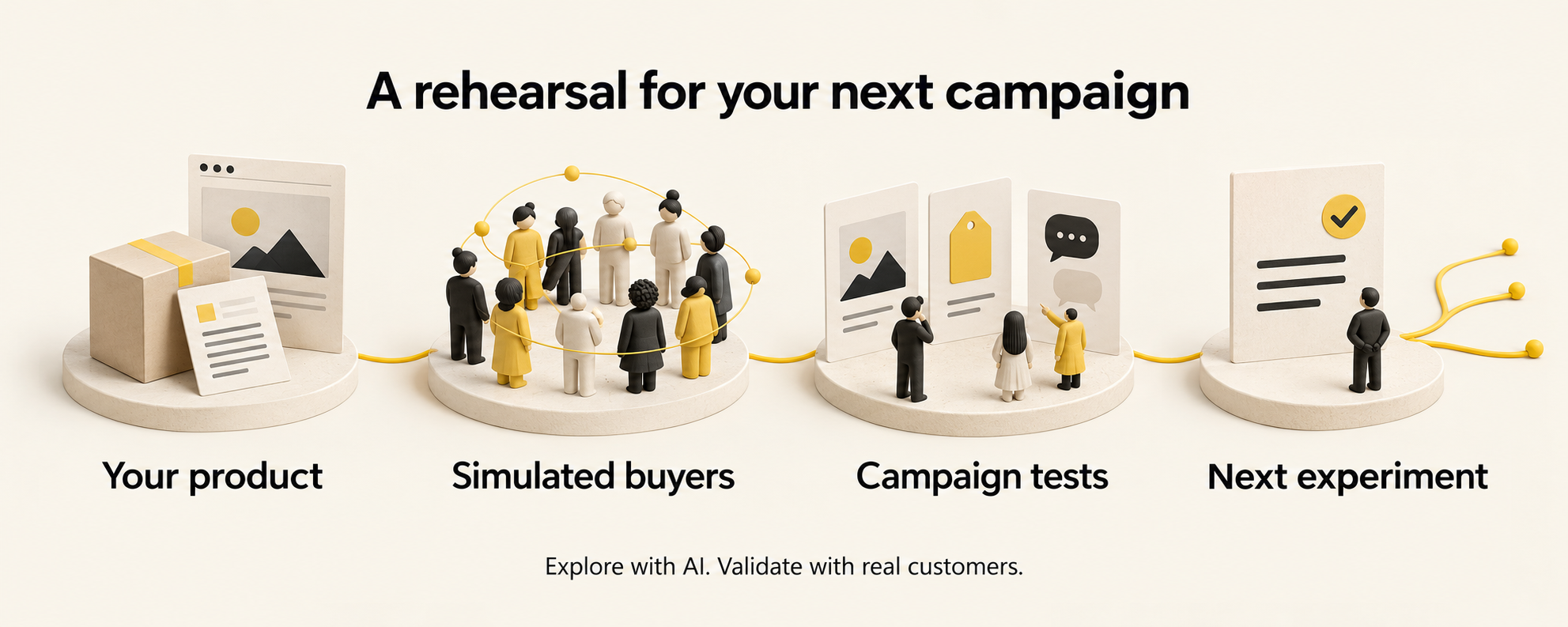
- Describe your product. Provide a brief, documents, or a website: what you sell, who it helps, what it costs, and what supports your claims. You can also bring linked public feedback or campaign exports.
- Choose your audience. Describe the groups and locations you want to explore. MarketMirror creates the simulated people. Review their profiles before continuing.
- Give them something to react to. Add your ads, messages, prices, emails, pitch, or website task. Choose the tests that answer your question.
- Read the recommendation. Explore the responses, concerns, comparisons, and suggested actions in the report and dashboard.
- Try a small real experiment. Use actual customer responses or campaign outcomes to check what held up. Import those outcomes for comparison when you have suitable data.
The written report puts one recommendation at the top:
| Recommendation | How to use it |
|---|---|
| Go | Take the promising idea into a small real test. |
| Iterate | Change the weak parts and test again. |
| No-go | Reconsider this version before putting money behind it. |
These recommendations summarize simulation signals. A “go” does not guarantee sales.
What you get
Actual product screenshot. Fitloop is an invented example app; all displayed buyer responses and performance figures are simulated. The illustrated banner and workflow above are conceptual artwork.
- A decision and next actions: what to keep, what to change, and what to test with real people.
- Buyer responses: who was simulated, what they said, and their main concerns.
- Comparisons: differences between ads, messages, offers, audiences, and AI providers when those tests were run.
- A shareable report: a saved HTML dashboard that opens without a server, works offline, and includes tables behind its charts.
- Downloadable results: report and data exports in Markdown, JSON, CSV, and PDF.
- A live view: watch progress, buyer activity, and social posts as a run happens.
The full screenshot gallery and detailed explanations follow below.
The dashboard
Each run produces one self-contained HTML dashboard: no server, no external requests, light and dark themes, and phone layouts. A sidebar groups its sections into overview, buyers, tests, evidence and the simulation itself; every chart has a table behind it, and the report exports to Markdown, JSON, CSV and PDF. In runs with more than 500 agents, the agents table lists the 500 most active and says so; everyone is still in the people cards and the CSV downloads. The screenshots below come from the 3,000-person Fitloop market (people written by Claude, Codex and Gemini), except the study page (the offer study) and the live control room (the 1,000-person run). scripts/readme_screenshots.py regenerates them from any run's dashboard.html with your installed Chrome.
Fitloop, its audiences and its pilot figures are invented; every number in these screenshots is simulated, not observed campaign performance. Report generation checks numbers against the run's fact sheet and falls back to a data-only report if the model fails. Those checks establish consistency with saved outputs, not real-world accuracy. The report JSON includes a number_guard list of removed sentences (or study-report table cells), each with text and unknown_numbers, so you can inspect what the guard dropped. These entries are unverified model output, not report evidence; logs record only the removal count.
How it works
| Stage | Input → output |
|---|---|
| Understand | Product brief, documents, or website → product profile and knowledge graph |
| Build | Audience segments and public feedback → simulated buyers with interviews and decision cards |
| Test | Ads, messages, prices, posts, or pitches → reactions, objections, and comparisons |
| Decide | Saved simulation outputs → recommendation, report, and dashboard |
| Validate | Observed campaign or survey outcomes → backtests, calibration, and the next experiment |
One command, market-test, runs the configured pipeline stages from a single config file. Individual tests can also run on their own. Everything a step produces is saved in the run folder, so a stopped run resumes where it stopped.
MarketMirror MCP questions
How do I add MarketMirror MCP to Claude Code?
Run claude mcp add market-mirror -- uvx marketmirror in your terminal. Add --scope user to make it available in every project.
How do I add MarketMirror MCP to Cursor?
Open ~/.cursor/mcp.json and add the server under mcpServers, using the Cursor config shown in the install section above.
What is MarketMirror used for?
It lets you test ads, prices, emails and sales pitches on simulated AI buyers before spending on a real campaign, then returns a go / iterate / no-go report.
Are the buyers real people?
No. The buyers are AI-generated personas, so results should be used to develop and compare ideas, then confirmed with real customers.
Which MCP clients work with MarketMirror?
Any MCP client works, including Claude Code, Codex, Gemini CLI and Cursor; you add the server with the command uvx and argument marketmirror.
Does MarketMirror send real emails or campaigns?
No. Emails are tested in simulated inboxes and nothing is actually sent.
Can it test my real website?
Yes, simulated visitors are sent through your website and their actions, such as hesitating, leaving or adding to cart, are recorded.