
Performs offline, rule-based security audits on repositories, dependencies, and AI agent configurations.
Also known as danoszz/penthera
- Stars
- 109
- Tools
- 6
- Downloads, 30 days
- —
- Latest version
- 2.4.0
- Last commit
- Nov 15, 2026
- License
- MIT
What is Penthera MCP?
Penthera performs offline, rule-based security audits on repositories, dependencies, and AI agent configurations. It exposes 6 tools, such as scan_repo, scan_url, check_dependencies.
Summary generated from the project's README
About Penthera MCP server
Performing offline security audits on repositories, dependencies, and AI agent configurations is what Penthera enables for developers. It functions as an open-source security agent that runs locally on your machine to check applications and coding tools without sending data to external servers. The system uses 132 readable rules to identify known classes of problems, ensuring that every finding is verifiable with specific file and line evidence.
Users can integrate Penthera with various coding environments including Claude Code, Cursor, Windsurf, and GitHub Copilot. The MCP server provides six read-only tools that allow an AI client to inspect a project. While an AI model can propose potential issues in AI mode, the underlying rules always make the final decision on findings and exit codes. This setup allows developers to audit their code and dependencies privately before publishing.
What you can do with it
- 1Audit repository securityAsk your coding agent to run a security scan on your current project to find vulnerabilities.
- 2Verify dependency safetyCheck your project dependencies for malicious packages in npm or PyPI environments.
- 3Generate security receiptsCreate a formal security summary of your repository to share with others.
- 4Automate vulnerability fixesUse your AI coding agent to propose and apply fixes for discovered security issues.
Written from the project's README. Every use case is checked against a quote from it.
How to install Penthera MCP
Formats verified 10 Nov 2026Add to CursorAdd to GooseInstall Penthera MCP in Claude Code
$ claude mcp add penthera -- npx -y penthera mcpInstall Penthera MCP in Cursor
~/.cursor/mcp.json
{
  "mcpServers": {
    "penthera": {
      "command": "npx",
      "args": [
        "-y",
        "penthera",
        "mcp"
      ]
    }
  }
}Install Penthera MCP in VS Code
.vscode/mcp.json
{
  "servers": {
    "penthera": {
      "type": "stdio",
      "command": "npx",
      "args": [
        "-y",
        "penthera",
        "mcp"
      ]
    }
  }
}Install Penthera MCP in VS Code CLI
$ code --add-mcp '{"name":"penthera","type":"stdio","command":"npx","args":["-y","penthera","mcp"]}'Install Penthera MCP in Claude Desktop
claude_desktop_config.json
{
  "mcpServers": {
    "penthera": {
      "command": "npx",
      "args": [
        "-y",
        "penthera",
        "mcp"
      ]
    }
  }
}Install Penthera MCP in Codex
$ codex mcp add penthera -- npx -y penthera mcpInstall Penthera MCP in Codex config.toml
~/.codex/config.toml
[mcp_servers.penthera]
command = "npx"
args = ["-y", "penthera", "mcp"]
Install Penthera MCP in Gemini CLI
$ gemini mcp add -s user penthera npx -- -y penthera mcpInstall Penthera MCP in Gemini settings.json
~/.gemini/settings.json
{
  "mcpServers": {
    "penthera": {
      "command": "npx",
      "args": [
        "-y",
        "penthera",
        "mcp"
      ]
    }
  }
}Started by HostedMCP on 16 Nov 2026
We ran this command for penthera 2.4.0 in an isolated container with no network and no keys. It answered and listed 6 tools.
Penthera MCP tools 6
Read from the server with tools/listscan_repoRead-onlyWhite-box scan of a local project folder: hardcoded secrets, code-execution sinks, API routes and trust boundaries, runtime versions with known advisories, and security headers, cookie flags, CORS and login rate limits as the code sets them. Offline and read-only. Returns findings with evidence at file:line and confidence labels.
scan_urlRead-onlyPassive black-box scan of a running web app the user is authorized to test: TLS, security headers, cookies, CORS, exposed files and docs, OpenAPI and auth checks. Sends no attack payloads: profile quick sends no login request, standard sends one POST /api/login with invalid credentials. Only loopback targets, or hosts the user listed with --allow-host when configuring this server, can be scanned, and a redirect off them is refused.
check_dependenciesRead-onlyWhat each npm or Python dependency can do (install scripts, shell, network, eval, credential access), known-malicious packages and typosquats, read offline from the lockfile and installed tree. Read-only.
audit_ai_toolingRead-onlyAudit the project's AI agent setup: skills, MCP servers, hooks, permissions, plugins and rule files, for hidden instructions, curl-pipe-shell, unpinned MCP packages, inline secrets and wildcard permissions. Grades A to F, or gives no grade when it finds no agent config. Offline, deterministic, read-only.
explain_findingRead-onlyExplain a finding's rule: what it checks, why it matters, how to fix it, effort, whether it is an owner action (rotate a key, change DNS), research references and OWASP MCP/Agentic ids. Pass the `rule` field of a finding as `id` (e.g. agents/mcp-unpinned, secrets, headers).
runtime_advisoriesRead-onlyIs the PHP, nginx, Apache, Node.js, Python or OpenSSL an app runs affected by a published advisory, or past end of life? Give a project path (reads Dockerfiles, compose files and version pins) or the response headers you already have (Server, X-Powered-By). Offline.
Automated checks
Ran Nov 16, 2026Full report →Passed our automated checks. That is not a security audit: read the code and give the server the narrowest access it needs. How checks work

- Source repository linked and reachabledanoszz/penthera is public and reachablegithub.com/danoszz/penthera ↗Pass
- Package names this repository as its sourcepenthera names danoszz/penthera as sourcenpmjs.com/package/penthera ↗Pass
- Build provenance (Sigstore attestation)Sigstore attestation for pentheranpmjs.com/package/penthera/v/2.4.0#provenance ↗Pass
- Open source license (OSI)MITspdx.org/licenses/MIT.html ↗Pass
- Commit or release in the last yearLast commit or release 2026-11-15github.com/danoszz/penthera ↗Pass
- OpenSSF ScorecardOpenSSF Scorecard 8.1 / 10; weakest: Code-Review 0, Signed-Releases 0, CII-Best-Practices 2scorecard.dev/viewer/?uri=github.com/danoszz/penthera ↗Pass
- Package name not close to a popular packageNo popular package one edit away from pentheraPass
- No critical advisory in the package or its dependencies1 resolved dependencies checked; no critical advisoryosv.dev ↗Pass
- No hidden instructions to the model6 tool descriptions and the README read; no override phrases, credential paths or hidden charactersPass
- Destructive tools are labelledNo tool named like delete, drop or execPass
- Remote endpoint answers the MCP handshakeNot checked
README
View on GitHubPenthera: your open-source cyber security agent
The security review you never had time for. Offline, rule-based, and you can verify every finding yourself.
penthera.org: check your live site in a few seconds. Passive, nothing stored.
Daily notes from Penthera: x.com/penthera_org
Who builds it: Daan van der Zwaag, part-time and in the open.
How it compares: next to Snyk, Socket, Semgrep, ZAP and GitHub.
New in 2.4: penthera --card makes a security receipt of your repo to post, every surface counts one set of problems with the same words, and 13 ways to hide a finding or stall a scan are closed (what changed).
From your coding agent: add Penthera (one line per agent), then say "Hey Claude, run Penthera on this repo."
132 readable rules · 6 read-only MCP tools · 0 runtime dependencies · 0 requests past loopback in the benchmark · MIT, no telemetry




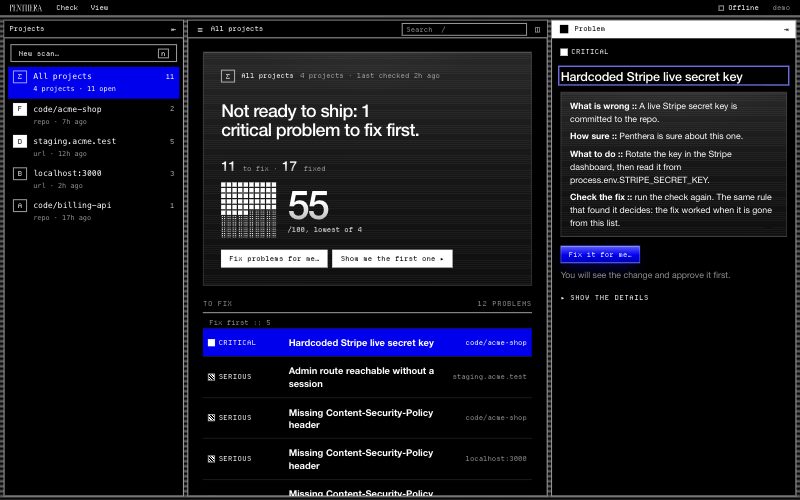
penthera ui, Simple, dark |
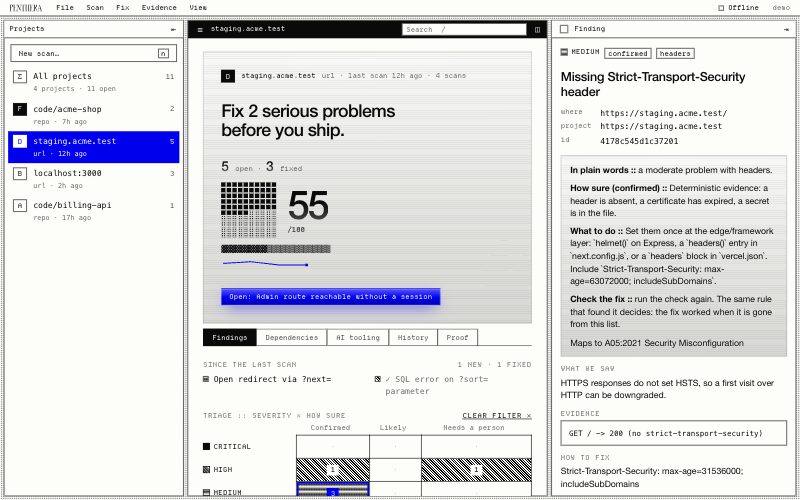
penthera ui, Advanced, light |
|---|---|
 |
 |
What it is
Penthera checks your app, its dependencies and your AI coding tools on your own
machine. It fixes what it can, with your approval. Every finding comes from a
rule you can read, with its evidence at file:line. A model may propose; a rule
decides.
It is also an open R&D project. We measure every check in public and publish the results, good or bad, so you can see how far to trust it.
It finds known classes of problems, not novel ones. It does not replace a human pentester.
Start in 30 seconds
You need Node.js 22 or later. No install, no account.
Building with Cursor, Claude Code, Codex, VS Code, Windsurf, Gemini CLI, Zed, JetBrains or Kiro, or an app builder such as Lovable, Bolt, Base44, Replit or v0? Penthera in your coding tool has the setup for each.
In your terminal. Run this in your project folder:
npx penthera
It detects your setup offline, asks what to check, and gives you a grade per area and the three things to fix first. It scans your running app only after you confirm the app is yours. Nothing is committed or pushed (guided start).
In your coding agent. Pick yours, then ask "scan my app for security issues". The MCP lines pin the version.
| Agent | Run this |
|---|---|
| Claude Code, plugin (skill only, runs the CLI) | claude plugin marketplace add danoszz/penthera, then claude plugin install penthera@penthera |
| Claude Code, MCP server only | claude mcp add penthera -- npx -y penthera@2.4.0 mcp |
| Codex | codex mcp add penthera -- npx -y penthera@2.4.0 mcp |
| GitHub Copilot CLI | copilot plugin marketplace add danoszz/penthera, then copilot plugin install penthera@penthera |
| GitHub Copilot in VS Code | the code --add-mcp line in mcp.md |
| Gemini CLI | gemini extensions install https://github.com/danoszz/penthera |
| Cursor, Windsurf | the JSON in mcp.md |
| Any agent that reads skills | npx skills add danoszz/penthera |
The skill tells your agent how to run Penthera; the MCP server gives it six read-only tools. More routes: skill.md, mcp.md.
Where AI fits. Rules decide every finding and every exit code. A model may only propose:
| Role | Who | How |
|---|---|---|
| Decides | Penthera's rules, always | Every finding, every exit code |
| Looks further (optional) | A model, with --ai |
Proposes problems no rule describes; the rules check each one, and unchecked ones are listed apart and never fail CI (AI mode) |
| Fixes | Your own coding agent | Through the MCP server, the skill or penthera fix --plan |
To run it in a container:
docker build -t penthera . && docker run --rm penthera https://your-app.example.
Public benchmarks
We test Penthera on public datasets that other people built, next to the free open-source tools that do the same job, scored the same way. Each dataset was split in half before we looked: we improved Penthera on one half and scored it once on the other, sealed half. The rules for scoring and ranking were written down before that run (protocol).
| Benchmark | Score | Penthera 1.9.0 | Penthera 2.0.0 | Rank among free tools | Best other free tool |
|---|---|---|---|---|---|
| Leaked secrets (Samsung CredData) | F1 | 0.18 | 0.74 | 2nd of 10 | deepsecrets 0.78 |
| Malicious npm packages (DataDog) | caught minus false alarms | 0.57 | 0.71 | 1st of 6, tied 1st to 3rd ⁴ | malcontent 0.63 |
| Malicious PyPI packages (DataDog) | caught minus false alarms | 0.74 | 0.82 | 1st of 8, tied 1st to 3rd ⁴ | GuardDog 0.74 |
| Injection bugs in JS libraries (SecBench.js) | found in the right file | 0.16 | 0.70 | 1st of 8, tied 1st to 4th ⁴ | odgen 0.68 |
⁴ A tied range is a rank interval: the range Penthera's rank fell in, in 95% of 10,000 bootstrap redraws of each tool's counts (on SecBench.js, of its 64 test bugs). Penthera alone came out first in 76% of the redraws on npm, 82% on PyPI and 60% on SecBench.js. Exploratory: computed after the registered ranking.
Leaked secrets: 2nd by F1, the registered score; 1st by F0.5, which weighs precision more (0.82 against deepsecrets 0.80); 2nd by F2, which weighs recall more (0.68 against deepsecrets 0.77).
Some ranked tools are barely in the contest. Other ranked tools scoring below 0.10: 1 of 9 on CredData (trufflehog); 3 of 5 on npm (clamav, yara, ossgadget); 4 of 7 on PyPI (clamav, ossgadget, bandit4mal, aura); 1 of 7 on SecBench.js (njsscan).
If 1 package in 1,000 were malicious, the share of Penthera's malware flags that would be right: npm, about 2.7% at the top of the false-alarm interval (it raised no false alarm on that sample); PyPI, about 1.6% at the measured false-alarm rate, 0.9% at the top of its interval. Exploratory, like the rank intervals.
Leaked secrets (Samsung CredData)
| Rank | Tool | Precision | Recall | F1 |
|---|---|---|---|---|
| 1 | deepsecrets 2.2.0 | 0.80 [0.79, 0.82] | 0.77 [0.75, 0.78] | 0.78 |
| 2 | Penthera 2.0.0 | 0.89 [0.87, 0.90] | 0.64 [0.62, 0.66] | 0.74 |
| 3 | noseyparker 0.24.0 | 0.76 [0.74, 0.78] | 0.62 [0.60, 0.64] | 0.69 |
| 4 | gitleaks 8.30.1 | 0.85 [0.84, 0.86] | 0.37 [0.35, 0.39] | 0.52 |
| 5 | ripsecrets 0.1.11 | 0.65 [0.64, 0.67] | 0.35 [0.33, 0.37] | 0.45 |
| 6 | kingfisher 2.14.0 | 0.96 [0.94, 0.97] | 0.29 [0.28, 0.31] | 0.45 |
| 7 | detect-secrets 1.5.0 | 0.30 [0.29, 0.31] | 0.53 [0.51, 0.56] | 0.38 |
| 8 | secretlint 13.0.7 | 0.92 [0.89, 0.94] | 0.19 [0.18, 0.21] | 0.32 |
| 9 | whispers 2.4.0 | 0.46 [0.43, 0.50] | 0.09 [0.08, 0.10] | 0.15 |
| 10 | trufflehog 3.99.3 | 0.40 [0.35, 0.45] | 0.05 [0.05, 0.07] | 0.10 |
| – | credsweeper 1.19.4 ¹ | 1.00 [1.00, 1.00] | 0.98 [0.98, 0.99] | 0.99 |
| – | Penthera 1.9.0 | 0.56 [0.51, 0.60] | 0.10 [0.09, 0.12] | 0.18 |
| Free tools, mean / median | 0.68 / 0.76 | 0.36 / 0.35 | 0.43 / 0.45 |
Malicious npm packages (DataDog)
| Rank | Tool | Caught | False alarms on benign packages | Caught minus false alarms |
|---|---|---|---|---|
| 1 | Penthera 2.0.0 | 0.71 [0.62, 0.78] (79/112) | 0.00 [0.00, 0.02] (0/150) | 0.71 |
| 2 | malcontent 1.27.1 (bf280ad6), yara-x 1.21.0 | 0.68 [0.59, 0.76] (76/112) | 0.05 [0.03, 0.10] (8/150) | 0.63 |
| 3 | GuardDog 3.2.0 ² | 0.62 [0.52, 0.70] (69/112) | 0.03 [0.01, 0.07] (4/150) | 0.59 |
| 4 | ossgadget 0.2.20 (414b6a59) | 0.94 [0.88, 0.97] (105/112) | 0.89 [0.83, 0.93] (133/150) | 0.05 |
| 5 | clamav 1.5.4 | 0.01 [0.00, 0.05] (1/112) | 0.00 [0.00, 0.02] (0/150) | 0.01 |
| 6 | yara yara-python 4.5.4 (YARA 4.5), YARA-Forge core 20261004 | 0.00 [0.00, 0.03] (0/112) | 0.00 [0.00, 0.02] (0/150) | 0.00 |
| – | osv-scanner 2.6.0 ³ | 0.90 [0.83, 0.94] (101/112) | 0.01 [0.00, 0.04] (1/150) | 0.90 |
| – | Penthera 1.9.0 | 0.57 [0.48, 0.66] (64/112) | 0.00 [0.00, 0.02] (0/150) | 0.57 |
Malicious PyPI packages (DataDog)
| Rank | Tool | Caught | False alarms on benign packages | Caught minus false alarms |
|---|---|---|---|---|
| 1 | Penthera 2.0.0 | 0.87 [0.81, 0.92] (131/150) | 0.05 [0.03, 0.10] (8/150) | 0.82 |
| 2 | GuardDog 3.2.0 ² | 0.85 [0.79, 0.90] (128/150) | 0.11 [0.07, 0.17] (16/147) | 0.74 |
| 3 | malcontent 1.27.1 (bf280ad6), yara-x 1.21.0 | 0.93 [0.87, 0.96] (139/150) | 0.22 [0.16, 0.29] (32/147) | 0.71 |
| 4 | yara yara-python 4.5.4 (YARA 4.5), YARA-Forge core 20261004 | 0.25 [0.18, 0.32] (37/150) | 0.00 [0.00, 0.03] (0/147) | 0.25 |
| 5 | clamav 1.5.4 | 0.00 [0.00, 0.02] (0/150) | 0.00 [0.00, 0.03] (0/147) | 0.00 |
| 6 | ossgadget 0.2.20 (414b6a59) | 0.77 [0.70, 0.83] (116/150) | 0.97 [0.93, 0.99] (143/147) | -0.20 |
| 7 | aura 2.1 (SourceCode-AI/aura b40e6dd2) | 0.59 [0.51, 0.67] (88/149) | 0.83 [0.75, 0.88] (100/121) | -0.24 |
| 8 | bandit4mal lyvd/bandit4mal 03ba95f3 (bandit 1.6.3 fork) | 0.59 [0.51, 0.67] (89/150) | 0.84 [0.78, 0.89] (124/147) | -0.25 |
| – | Penthera 1.9.0 | 0.83 [0.77, 0.88] (125/150) | 0.09 [0.06, 0.15] (14/150) | 0.74 |
| – | osv-scanner 2.6.0 ³ | 0.74 [0.66, 0.80] (110/149) | 0.00 [0.00, 0.03] (0/147) | 0.74 |
Injection bugs in JavaScript libraries (SecBench.js)
| Rank | Tool | Command injection | Code injection | Both |
|---|---|---|---|---|
| 1 | Penthera 2.0.0 | 35/47 | 10/17 | 0.70 [0.58, 0.80] |
| 2 | odgen c5157ee | 36/46 | 6/16 | 0.68 [0.55, 0.78] |
| 3 | codeql 2.27.2 (used under the GitHub CodeQL terms, for research on open-source code) | 37/47 | 4/17 | 0.64 [0.52, 0.75] |
| 4 | eslint-plugin-security 4.2.0 | 32/47 | 9/17 | 0.64 [0.52, 0.75] |
| 5 | semgrep 1.180.0 | 15/47 | 9/17 | 0.38 [0.27, 0.50] |
| 6 | graudit 849d7c7 | 12/47 | 10/17 | 0.34 [0.24, 0.47] |
| 7 | bearer 2.1.1 | 14/47 | 0/17 | 0.22 [0.14, 0.33] |
| 8 | njsscan 1.0.1 | 2/45 | 1/15 | 0.05 [0.02, 0.14] |
| – | semgrep, every file 1.180.0 (another setting of semgrep, not ranked) | 16/47 | 9/17 | 0.39 [0.28, 0.51] |
| – | Penthera 1.9.0 | 0/47 | 10/17 | 0.16 [0.09, 0.26] |
A rank is shown only where at least 5 other free tools were measured; otherwise "–". The rank column orders tools by score, and close scores can swap places. Penthera's 95% rank interval (bootstrap, exploratory): 2nd on CredData, 1st to 3rd on npm, 1st to 3rd on PyPI, 1st to 4th on SecBench.js.
Paid tools (GitGuardian, Socket, Snyk, Phylum, Semgrep Pro) publish no results on these benchmarks, so they are not in the tables.
Published elsewhere, on other datasets (context, not comparable):
- A comparative study of software secrets reporting by secret detection tools (2023): nine tools on SecretBench, ggshield included
- How effective are npm malicious package detectors? (2026): eleven detectors on their own benchmark
- Cutting the Gordian knot: detecting malicious PyPI packages (USENIX Security 2026): GuardDog, Bandit4Mal and OSSGadget on PyPI
- Study of JavaScript static analysis tools for vulnerability detection in Node.js packages (2023): nine tools incl. CodeQL, NodeJsScan, ODGen
¹ Not ranked: trained on this dataset by its authors. ² Found most samples in this dataset, so its rate is inflated by construction. ³ Not ranked: a lookup of already-reported packages, not detection.
What these numbers do not show: a benchmark is not your code. CredData replaces
real secrets with look-alikes, which favors pattern rules like ours over tools
that verify keys; the free tools ran on their defaults while Penthera was tuned
on the other half; GuardDog helped build the malware dataset. Accuracy on real
projects is experiment E1. To reproduce every table, get the sealed split with
npm run bench:public -- --fetch-split, then run
npm run bench:public -- --split test --final and
npm run bench:public -- --competitors --split test --final.
What it does
flowchart LR
    U["You or<br/>your agent"] --> P(("Penthera<br/>on your machine"))

    P --> APP["Your app<br/>live and code"]
    P --> DEP["Dependencies<br/>npm and Python"]
    P --> AI["AI tooling<br/>skills, MCP, hooks"]

    APP & DEP & AI --> F[["Findings<br/>rules decide"]]

    F --> FIX["Fix<br/>asks first"]
    F --> R["Reports<br/>SARIF, ui, MCP"]
    F --> E["Evidence<br/>signed bundle"]
    FIX -. "re-scan" .-> F

    classDef core fill:#0000ed,stroke:#0000ed,color:#ffffff
    classDef box fill:#ffffff,stroke:#000000,color:#000000
    class P core
    class U,APP,DEP,AI,F,FIX,R,E box
The default scan sends no attack payloads. --deep, --fuzz and --adaptive
start only after you confirm the hostname, or pass --confirm-target <host> in
CI. Limits are in METHODOLOGY.md.
%%{init: {"flowchart": {"nodeSpacing": 24, "rankSpacing": 40}}}%%
flowchart LR
    APP["Running app<br/>penthera URL"] --> DEF
    APP --> ACT

    subgraph DEF["Default: no attack payloads"]
        direction TB
        B1["TLS, headers<br/>cookies, CORS"]
        B2["Routes<br/>OpenAPI, files"]
        B3["Auth, JWT, OAuth<br/>IDOR: review"]
        B4["JS libraries<br/>bundle keys"]
    end

    subgraph ACT["Opt-in, gated"]
        direction TB
        A1["--deep<br/>SQLi, XSS, SSRF"]
        A2["--fuzz<br/>API bodies"]
        A3["--adaptive<br/>may send DELETE"]
    end

    DEF & ACT --> F[["Findings"]]

    classDef core fill:#0000ed,stroke:#0000ed,color:#ffffff
    classDef box fill:#ffffff,stroke:#000000,color:#000000
    class F core
    class APP,B1,B2,B3,B4,A1,A2,A3 box
    style DEF fill:none,stroke:#0000ed,stroke-width:2px
    style ACT fill:none,stroke:#0000ed,stroke-width:2px,stroke-dasharray:6 4
Code sinks use taint-lite within one file, with no call graph. Dependency capabilities are what code can do, not proof it is malicious.
%%{init: {"flowchart": {"nodeSpacing": 24, "rankSpacing": 40}}}%%
flowchart LR
    REPO["Code and config"] --> RS
    REPO --> OWN

    subgraph RS["penthera --repo ."]
        direction TB
        W1["Secrets<br/>key formats"]
        W2["Routes<br/>auth per route"]
        W3["Code sinks<br/>eval, vm, exec"]
        W4["CI, runtimes<br/>Actions, pins"]
    end

    subgraph OWN["Own commands"]
        direction TB
        W5["deps<br/>capabilities, IOCs"]
        W6["agents<br/>MCP, skills, hooks"]
        W7["install, hook<br/>before it lands"]
    end

    RS & OWN --> F[["Findings"]]

    classDef core fill:#0000ed,stroke:#0000ed,color:#ffffff
    classDef box fill:#ffffff,stroke:#000000,color:#000000
    class F core
    class REPO,W1,W2,W3,W4,W5,W6,W7 box
    style RS fill:none,stroke:#0000ed,stroke-width:2px
    style OWN fill:none,stroke:#0000ed,stroke-width:2px
Rules decide every finding. Exit code 0 means nothing critical or high, 1
critical or high, 2 an incomplete or refused scan. Under --ai a model only
proposes.
%%{init: {"flowchart": {"nodeSpacing": 30, "rankSpacing": 40}}}%%
flowchart LR
    subgraph IN["Inputs"]
        direction LR
        R["Signed rule packs"]
        GI["--giants, opt-in"]
        AI["--ai, opt-in"]
    end

    IN --> FD[["Finding<br/>severity, confidence"]]
    FD --> EX{"Exit<br/>0, 1 or 2"}
    EX --> OUT

    subgraph OUT["Outputs"]
        direction LR
        O1["Reports, SARIF"]
        O2["penthera ui, MCP"]
        O3["Action, Vercel check"]
        O4["Evidence bundle"]
    end

    classDef core fill:#0000ed,stroke:#0000ed,color:#ffffff
    classDef box fill:#ffffff,stroke:#000000,color:#000000
    class FD core
    class R,GI,AI,EX,O1,O2,O3,O4 box
    style IN fill:none,stroke:#0000ed,stroke-width:2px
    style OUT fill:none,stroke:#0000ed,stroke-width:2px
Before you deploy
| Job | What Penthera does | Command |
|---|---|---|
| Test the app | Scans your localhost or preview URL (TLS, headers, CORS, cookies, auth, JWT, IDOR, OAuth, OpenAPI; injection and fuzzing only when you ask, after a confirmation) and your repository (routes, trust boundaries, code-execution sinks, secrets including AI keys) | penthera <url> --repo . |
| Check your runtimes | Whether the PHP, nginx, Apache, Node.js, Python, OpenSSL or MongoDB version you run is affected by a known advisory, from the signed advisories pack | Runtime advisories |
| Fix and verify | Applies deterministic fix recipes on a local branch, re-scans to prove they worked, and remembers the result. Never pushes | penthera agent --loop |
| Block it at commit time | Stops secrets, risky agent config and dependency changes before they are committed | penthera hook install |
What you build with
| Job | What Penthera does | Command |
|---|---|---|
| Vet dependencies | Shows what every npm and Python package can do (install scripts, shell, network, env, obfuscation), what an upgrade added, lookalike names and licenses | penthera deps --base main |
| Guard installs | Shows what a new package brings before any install script runs, and stops it under your policy | penthera install <pkg> |
| Review pull requests | Comments the dependency capability diff on every PR that touches the lockfile | GitHub Action |
| Audit your AI tooling | Checks skills, MCP servers, hooks, plugins and rule files for hidden instructions, unpinned servers, over-broad permissions and silent updates | penthera agents --home |
| Work from your agent | Six read-only MCP tools: scan the repo, check dependencies, audit AI tooling, runtime advisories, explain a finding, a passive URL scan | penthera mcp |
After you ship
| Job | What Penthera does | Command |
|---|---|---|
| Report and prove | Writes reports for developers, owners and auditors; a hashed, signable evidence bundle; NIS2 and CRA readiness reports and drafts | penthera <url> --audience auditor --evidence out/ |
| See it all | A local dashboard on 127.0.0.1. Simple mode for non-programmers: a one-sentence verdict, problems in plain words, and a check-and-fix mode with Apply, Skip and Stop per change. Advanced adds dependencies, AI tooling, history and evidence | penthera ui |
| Keep watching | Scheduled checks of production for drift: certificates, headers, new endpoints, keys in bundles, new CVEs in your SBOM | on the roadmap |
Every finding carries a severity, a confidence label (confirmed, likely,
potential, needs-human-review), its evidence and the research behind it.
Reports come out as Markdown, JSON and SARIF for GitHub code scanning. Exit
code 1 means critical or high findings. Every command and flag is in
docs/commands/. Compliance output is readiness
tooling, not a certification and not legal advice.
AI mode (opt-in). penthera --repo . --ai lets a local model
propose problems no rule describes. Penthera checks each proposal with its
rules, and anything unconfirmed is labelled "model-proposed, unverified" and
never fails CI. Whether it finds more than the rules alone is not measured yet
(AI mode).
How far each part has been taken
| Part | Status |
|---|---|
| Scans: URL, repo, dependencies, AI tooling, installs, pre-commit hook | Stable: in every release since 1.x, covered by the tests and the release gate |
Fix loop and local dashboard (penthera ui) |
Stable; the dashboard was redesigned in 1.9.0 |
| MCP server, Agent Skill, Claude Code plugin | Stable, since 1.9.0 |
| Gemini CLI extension | Stable: it installs the newest release (2.4.0) |
| Evidence bundles, NIS2 and CRA drafts | Stable as readiness tooling, not a certification |
AI mode (--ai) |
Experimental: whether it finds more than the rules alone is not measured yet (AI mode) |
| Live check on penthera.org | Beta: passive only, terms |
Penthera MCP questions
How do I add Penthera MCP to Claude Code?
Run claude mcp add penthera -- npx -y penthera mcp in your terminal. Add --scope user to make it available in every project.
How do I add Penthera MCP to Cursor?
Open ~/.cursor/mcp.json and add the server under mcpServers, using the Cursor config shown in the install section above.
What tools does Penthera MCP provide?
It exposes 6 tools, including scan_repo, scan_url, check_dependencies, audit_ai_tooling, explain_finding.
Can Penthera fix security issues?
It can fix what it can with your approval, often through your coding agent.
What are the system requirements?
You need Node.js version 22 or later to run Penthera.