
Squadra MCP server
Commit Nov 12, 2026Coordinates multiple coding agents like Claude Code, Codex, and Cursor through shared tasks, independent reviews, and a local dashboard.
Also known as dagoSte/squadra
- Stars
- 1,279
- Tools
- —
- Downloads, 30 days
- —
- Latest version
- —
- Last commit
- Nov 12, 2026
- License
- MIT
What is Squadra MCP?
Squadra coordinates multiple coding agents like Claude Code, Codex, and Cursor through shared tasks, independent reviews, and a local dashboard.
Summary generated from the project's README
About Squadra MCP server
Coordinating multiple coding agents like Claude Code, Codex, and Cursor to work as a unified team is what Squadra enables. It allows developers to assign one agent as a coordinator while others act as builders, ensuring that code written by one window is reviewed by a different window. This setup maintains a shared registry on your local machine where all assignments, decisions, and review reports are stored, preventing information from being lost in individual chat memories.
Users manage the entire process through a local dashboard that displays progress and requests for human input. The system runs entirely on your machine using Python 3.12+ on macOS or POSIX environments, requiring no external accounts. It provides specific tools for tracking token usage per window and offers automatic model selection profiles to balance economy and quality based on the complexity of the task at hand.
What you can do with it
- 1Multi-agent code reviewAssign a separate agent window to verify the work produced by a builder agent.
- 2Track agent resource consumptionMonitor how many tokens each AI window is spending across different models and tasks.
- 3Manage complex agent workflowsCoordinate work that spans several different agent sessions using a shared registry.
- 4Automate model selectionConfigure the system to automatically choose between economy and quality profiles for tasks.
Written from the project's README. Every use case is checked against a quote from it.
Configuration
SQUADRA_ROOT
| Name | Description | |
|---|---|---|
| SQUADRA_ROOT | — |
Automated checks
Ran Nov 15, 2026Full report →Not verified yet. A server needs a score of 80, no serious finding, and enough data for us to check. How checks work · What to fix for more points

- Source repository linked and reachabledagoste/squadra is public and reachablegithub.com/dagoste/squadra ↗Pass
- Package names this repository as its sourceNot checked
- Build provenance (Sigstore attestation)Not checked
- Open source license (OSI)MITspdx.org/licenses/MIT.html ↗Pass
- Commit or release in the last yearLast commit or release 2026-11-12github.com/dagoste/squadra ↗Pass
- OpenSSF ScorecardNot checked
- Package name not close to a popular packageNot checked
- No critical advisory in the package or its dependenciesNot checked
- No hidden instructions to the model0 tool descriptions and the README read; no override phrases, credential paths or hidden charactersPass
- Destructive tools are labelledNot checked
- Remote endpoint answers the MCP handshakeNot checked
README
View on GitHubSquadra 3+
Your coding agents, one team — and proof for every step.
Coordinate Claude Code, Codex and Cursor with shared tasks, independent reviews and a local dashboard.
Free and open source — MIT licence, no account, everything runs on your machine.
Version 3.15.1 · Python 3.12+ · macOS / POSIX
Overview · Install · First steps · Prompts · Dashboard · Plugins · Commands · Guides · What's new · Community · Sponsor










What the security scan covers.
What Squadra does
Squadra helps several windows of coding agents work on one project as a team: one coordinates, others build, and a window that did not write the code reviews it. Assignments, decisions, executed checks and review reports stay in one shared registry on your computer.
Use it when work spans several agent sessions and you need to see who owns each task, which code was checked and what still needs a decision. Each window can work in its own checkout while sharing the same record.
| Part | What it does |
|---|---|
| Skill | Gives the agents the coordination workflow to follow. |
| CLI | Records tasks, messages, checks and decisions. |
| Dashboard | Shows progress, evidence and requests for your input. |
Team setup: start with a Claude coordinator, then join your Codex, Claude or interactive Cursor windows. The team rules explain the roles and limits.
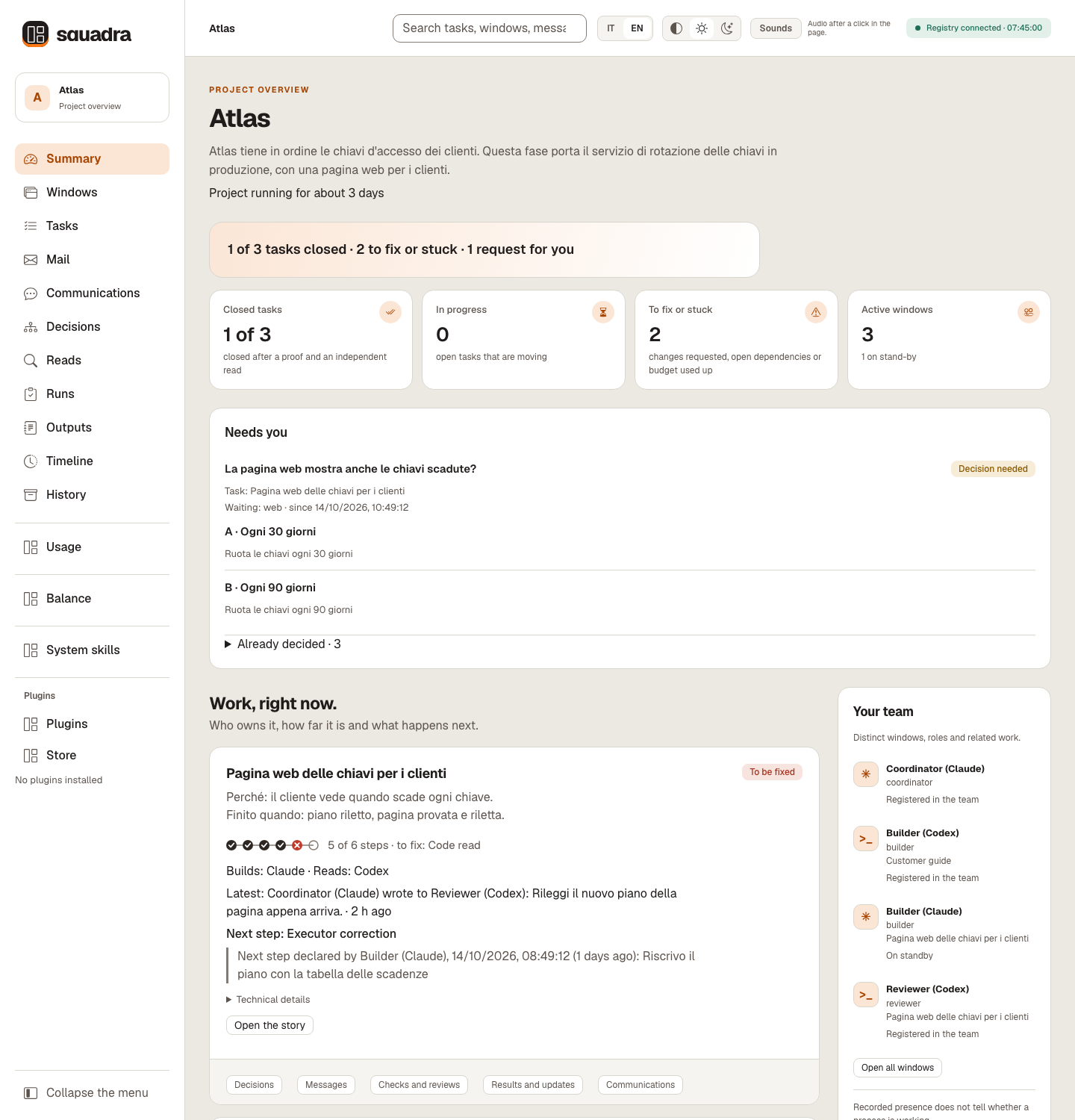
The Summary on a synthetic Atlas registry (Italian, dark theme). Recorded texts such as briefs, the owner's words and messages stay as written, here in Italian. The examples contain no customer data and do not measure model quality.
Watch the 80-second tour — turn the sound on in the player:
https://github.com/user-attachments/assets/69f512be-775c-40ae-95c2-e1e403b3f5d1
Why use Squadra
- One registry for every window. Assignments, proofs and decisions stay on your computer, not in a chat's memory.
- Whoever writes it does not review it. Every change is checked by a window that did not write it.
- Proof bound to the exact code. If the code changes after the proof, proof and review no longer count.
- Confirmed before work starts. A task starts only when its recipient confirms receiving it.
- Questions with the sentence ready. When a decision is yours, you get the options, a recommendation and the exact words to answer.
- A dashboard in plain words, in Italian or English, to follow everything live.
- Claude, Codex and Cursor together, and open to community plugins.
- One view of what every AI window spends. Tokens per window, model and task across Claude Code and Codex, with advice on which window or model should take the next task, computed on your computer.
Model and effort for each window
Each new window first asks whether to enable automatic model and effort selection. Turn it on or off from the CLI; role aliases share the choice and a replacement session asks again.
squadra models --actor builder
squadra models --actor builder --auto on
squadra models --actor builder --auto off
With automatic selection enabled, small work bounded by a valid light-route contract can use the economy profile; complex or uncertain work and independent reviews use the quality profile. Profiles are configurable. The CLI shows the requested model, effort and reason for the selection or fallback; existing proof, review, permission and budget rules still apply.
This applies to new turns managed by squadra run. An interactive session already running keeps its settings. The Windows, Usage and Balance views show observed client model/effort with source and time, separately from requested settings and token totals. These are client settings, not a measurement of cognitive work or model quality. Commands, profiles and limits.
Installation
Requirements: Python 3.12+, Git and a browser for the dashboard. The runtime uses the Python standard library; Node.js is required for selftest. macOS / POSIX is the tested environment. Full requirements and platform limits.
Recommended: install with one sentence
Install it with one sentence. Paste this into Claude Code, Codex or Cursor:
Install Squadra by following https://github.com/dagoSte/squadra/blob/main/SETUP.md: show me the plan first, wait for my yes, then install it and check that it works.
The agent checks what you already have, shows each command with what it changes and how to undo it, waits for your yes, installs and runs a one-second check.
One act stays with you: /reload-plugins in Claude Code, or a new session in Codex or Cursor.
With /plugin
In Claude Code:
/plugin marketplace add dagoSte/squadra
/plugin install squadra@squadra
In a terminal, for Codex:
codex plugin marketplace add dagoSte/squadra
codex plugin add squadra@squadra
The plugin brings the skill, its scripts, references and dashboard. It does not put the squadra shell command on your PATH: agents run python3 <skill folder>/scripts/squadra.py, also for the instructions Squadra prints, such as squadra ack …. To have the squadra command itself, use the standalone installer below instead of the plugin. Use either the plugin or the standalone installer, not both, so the skill is not registered twice.
Standalone installer (adds the squadra command)
git clone https://github.com/dagoSte/squadra.git
cd squadra
python3 -B scripts/install.py \
  --backup "$HOME/.local/state/squadra/install-backup-001"
export PATH="$HOME/.local/bin:$PATH"
squadra --version
Install from a clean, committed checkout with a new backup directory each time; the installer keeps your previous skills and launcher, so you can roll back: python3 -B scripts/install.py --undo <backup folder> restores the earlier skills and keeps the backup. The export PATH line lasts for that terminal only: add it to your shell profile (for example ~/.zshrc or ~/.bashrc) so new terminals find squadra. Without installing, run python3 -B scripts/squadra.py <command>. Details and rollback.
Updating
With /plugin. In Claude Code, run /plugin marketplace update squadra, then /plugin update squadra@squadra, then restart Claude Code. For Codex, run codex plugin marketplace upgrade, then codex plugin add squadra@squadra again.
With the standalone installer. From 3.6.1 on, releases keep their history: run git pull, then the installer again, with a new backup folder each time. A checkout of 3.6.0 or earlier needs git fetch origin and git reset --hard origin/main instead, which discards any local edit in that checkout.
git pull
python3 -B scripts/install.py \
  --backup "$HOME/.local/state/squadra/install-backup-002"
squadra --version
Every release raises the version number, except a refresh that adds to a release under the same number, as 3.10.2 did on 17 October 2026. Plugins installed from the Store keep their version until squadra plugin install <name> runs again from the new release (Plugins bundled in your release). Open windows keep the version they read until they restart, and a running squad keeps its protocol until you switch it explicitly.
Updating to 3.13.x: reclaim the space you already have. Nothing is compacted or deleted at update or at opening. After updating every window, tell the coordinator «Use squadra to compact the storage of the registry at /path/to/registry»: it previews storage adopt (checkpoints and saves made before 3.13), storage compact (shared bytes, legacy candidates sealed read-only, nothing deleted) and storage purge --dry-run, and applies each step only on your word. doctor --resume proposes the same sentence when there is space to reclaim.
Updating to 3.11.1: upgrade every window together and reinstall bundled plugins. replace, wait, access probe, ready and onboarding settings write journal format 4, which 3.11.0 and older clients refuse instead of ignoring it.
Updating to 3.11.0: upgrade every window and reinstall bundled plugins before creating new tasks or reassigning reads. New tasks use frozen delivery and journal format 3; older clients refuse it. Historical tasks retain their previous behavior. The installer also adds the migliora skill.
Updating from 3.10.3 or 3.10.2 to 3.10.4: the registry stays as it is.
- Windows can move one at a time. 3.10.2, 3.10.3 and 3.10.4 windows share the same registry; nothing is converted.
- Update the coordinator first. The rule that the other model reads binds the tasks a 3.10.4 window records, and an older window does not check it at
checkorclose. Tasks recorded before the update keep closing as before. - Plugins from the Store: run
squadra plugin install <name>again, as after every release.
Updating from 3.10.1 to 3.10.2: the registry stays as it is.
- Windows can move one at a time. 3.10.1 and 3.10.2 windows share the same registry while you update them; nothing is converted.
- Two things wait for the last window. A settings change made from a 3.10.1 window puts the two new wait thresholds (
to-forwardandplan) back to their defaults. And removing a leaked file with a recorded decision makes a 3.10.1 window's full audit and dashboard fail on the missing file, so update every window before you remove one. - Plugins from the Store: run
squadra plugin install <name>again, as after every release.
Updating from 3.10.0 or earlier to 3.10.1: less repeated history work, and every window must move together.
- Before you update, the coordinator saves the squad:
squadra save --actor <coordinator> --to <a new folder>. It is your way back. - Your registry is read as it is. Nothing is converted and the history already written is not touched. From the first command on 3.10.1, new events are written in the lighter format.
- Update every window at once, Claude Code and Codex. A window still on 3.10.0 stops at the first new event with
Event integrity failure at sequence N. That is on purpose: an old version stops rather than accept events it cannot read. Nothing is lost: update that window and it carries on. - No way back on the same registry. After the update, 3.10.0 cannot use that registry. To go back, restore the save you made before updating, with either version, then keep using the old version on the restored copy: the first command of 3.10.1 or later on it writes the newer format again.
- If in doubt, run
squadra doctoron 3.10.1: it says when a registry needs 3.10.1 or later. - Plugins from the Store: run
squadra plugin install <name>again, as after every release. - If you installed Squadra from the Claude directory, you get the version the directory lists until it moves to 3.10.1.
The first window to write an older or moved registry builds its cache; other windows wait. If a command says registry busy, retry, retry after that first write finishes.
Requirements: Python 3.12+, Git and the Python standard library. Node.js runs the dashboard's JavaScript checks in the test suite and in selftest: without it they fail, they are never skipped. A browser for the dashboard; the Codex or Claude CLI only for the native runners. macOS/POSIX is the tested process environment; Windows process controls and recovery with submodules, LFS or sparse checkouts are not qualified.
First steps
After installation, give instructions in plain words; the agents run the commands. A window is one working session. All windows in the squad use the same registry.
- Start the coordinator. Tell a Claude window: “Use squadra for this project. Use the registry at
/path/to/registry. Find the other windows and introduce yourself; describe the work in plain words.” A Codex window called first does not coordinate: it gives you the sentence to type in a Claude window. - Open the other windows on that registry. The Claude window coordinates; each window confirms its assignment before starting.
- Give the coordinator a first task. Describe the result you want and how to check it. The coordinator assigns the work and its independent review; the example prompts give you ready-to-copy instructions.
- Open the dashboard with
squadra dash --root /path/to/registry --open(with the plugin install, ask the agent to open it) and follow each task: confirmation → work → executed check → another window's review → coordinator closure.
When Needs you asks for your input, answer the coordinator; elapsed time is not an answer. Closed work is never published automatically.
New to Squadra? Try these twelve steps once, end to end, on a test project. A window is one working session: a Codex, Claude or Cursor agent, or a person. Every window uses the same registry.
- Install and set
export SQUADRA_ROOT=...in every window. - Create the registry and register each window with
initandagent. - Find the windows and introduce yourself:
censuslists them without writing;sendandtransportdeliver the introduction; each window answers withack. - Say what the project is in plain words with
brief --project. - Assign and explain the first task with
taskandbrief --task. - The builder confirms and starts:
ack, thenstart. - The builder proves and delivers:
proveruns the agreed check on the exact files;deliverhands them over. - Someone else reads: a reader who did not write the work records a verdict with
review. - The coordinator closes:
check, thenclose. - Check who still answers: the coordinator runs
ping --all;ping --sweepputs an unanswered window in stand-by, which stops nothing it runs. - Open the dashboard with
dash --open; «How to read this page» explains every term. - Record what the owner says with
decision,--owner-words,--channeland--task.
Each step in more detail: startup and presentation.
The twelve steps as commands
squadra census --project /path/to/project
squadra send --actor coord --to builder --id HELLO-builder --body-file /evidence/introduction.md
squadra transport --actor coord --message HELLO-builder --via manual
squadra ack --actor builder --message HELLO-builder
squadra brief --actor coord --project --file /evidence/project.md
squadra task --actor coord --id T1 --owner builder --reviewer reader \
  --title "Key rotation" --repo /path/to/builder-checkout \
  --scope-file /evidence/scope.md --proof-file /evidence/argv.json
squadra brief --actor coord --task T1 --file /evidence/t1.md
squadra ack --actor builder --message assign-T1
squadra start --actor builder --task T1
squadra prove --actor builder --task T1 -- python3 -B -m unittest discover -s tests -v
squadra deliver --actor builder --task T1
squadra ack --actor reader --message "review-ID-RETURNED-BY-DELIVER"
squadra review --actor reader --task T1 --verdict accepted --report /evidence/code-read.md
squadra check --actor coord --task T1
squadra close --actor coord --task T1
squadra ping --actor coord --all
squadra ack --actor builder --message "PING-ID-RETURNED-BY-PING"
squadra ping --actor coord --sweep
squadra decision --actor coord --reason "Owner instruction" --task T1 \
  --owner-words "Keep the old keys readable for a month" --channel typed-here
squadra dash --open
The same primitives can also be combined. assign includes the task brief and assignment checks; join forwards the presence call and introduction to the coordinator you name. Choose --via manual for a recorded manual handoff or --via codex-queue for a registered Codex recipient. pickup reads the resume checks and pending mail; resume --actor ... --reason ... retains the coordinator’s explicit state change. If a step fails, inspect its receipt and the recorded steps before retrying.
squadra assign --actor coord --id T2 --owner builder --reviewer reader \
  --title "Key rotation" --repo /path/to/builder-checkout \
  --scope-file /evidence/scope.md --proof-file /evidence/argv.json \
  --brief-file /evidence/t2.md --via manual
squadra join --id builder2 --identity ACTUAL-SESSION --session ACTUAL-SESSION \
  --role executor --client codex --repo /path/to/builder2-checkout \
  --coordinator coord --body-file /evidence/introduction.md --via manual
squadra pickup --actor builder2
Squadra MCP questions
What does Squadra do?
Squadra helps several windows of coding agents work on one project as a team by coordinating tasks, decisions, and reviews through a shared registry.
Does Squadra require an account?
No, Squadra is free and open source, requires no account, and everything runs locally on your machine.
What are the system requirements for Squadra?
You need Python 3.12+, Git, and a browser for the dashboard. It is tested on macOS and POSIX environments.