
llm-wiki-memory MCP server
Commit Sep 9, 2026Provides persistent, git-versioned local memory for AI coding agents using Markdown files and on-device embeddings.
Also known as ctxr-dev/llm-wiki-memory
- Stars
- 130
- Tools
- —
- Downloads, 30 days
- —
- Latest version
- —
- Last commit
- Sep 9, 2026
- License
- MIT
What is llm-wiki-memory MCP?
llm-wiki-memory provides persistent, git-versioned local memory for AI coding agents using Markdown files and on-device embeddings.
Summary generated from the project's README
About llm-wiki-memory MCP server
Developers using AI coding agents like Claude Code, Cursor, or Codex can provide their assistants with a persistent, local memory that survives session ends. Instead of relying on heavy RAG stacks, vector databases, or cloud services, this server stores project knowledge as plain Markdown files within a local directory. This approach ensures that your agent remembers past conversations, learns from mistakes, and tracks progress through versioned files that live entirely on your machine.
Users set up the system via a single prompt or a bootstrap script on macOS, Linux, or Windows. The server uses on-device transformer embeddings, such as embeddinggemma-300m-ONNX, to rank and recall context without sending data to the cloud. While Claude Code benefits from automatic session hooks, all other MCP clients can use the provided tools to manage knowledge. You maintain full control through a write-gate system where the agent must ask for permission before saving new lessons or decisions to your local wiki.
What you can do with it
- 1Preventing repetitive coding mistakesAn AI agent can recall specific lessons from previous sessions to ensure it does not repeat the same errors during a new task.
- 2Tracking long-term project progressYou can turn approved plans into tracked Markdown files with checkboxes to maintain continuity across different coding sessions.
- 3Maintaining a searchable local knowledge baseDevelopers can store architectural decisions and infrastructure knowledge in a structured Markdown tree that is searchable via local embeddings.
- 4Automating knowledge distillationThe system can automatically convert long conversation transcripts into organized daily notes and durable knowledge.
Written from the project's README. Every use case is checked against a quote from it.
README
View on GitHub
Persistent local memory for AI coding agents. Your agent remembers every session, learns from its mistakes, and gets smarter the longer you work with it.
Claude Code, Cursor, Codex, and every other MCP client forget everything when a session ends. LLM Wiki Memory fixes that: it captures your conversations, compiles them into durable project knowledge and lessons your agent applies next time, and recalls the right context through a local MCP server. Memory lives on your machine as plain Markdown in an LLM wiki versioned in git, searched with local embeddings, and consolidated offline while you sleep.
No RAG stack. No vector database. No Docker. No cloud. Install with one prompt and your agent never starts from zero again.







Install
Paste this one-liner into your AI coding agent — it covers both a fresh install and an update:
Set up llm-wiki-memory in this project: fetch https://raw.githubusercontent.com/ctxr-dev/llm-wiki-memory/main/AI-INSTALL-PROMPT.md and follow it EXACTLY (it covers fresh install and update; if already installed, the same file is local at @.llm-wiki-memory/src/AI-INSTALL-PROMPT.md).
Or run it yourself — macOS / Linux:
git clone https://github.com/ctxr-dev/llm-wiki-memory ./.llm-wiki-memory/src
./.llm-wiki-memory/src/bootstrap.sh                    # add --commit-memory to git-track the wiki (you commit it)
./.llm-wiki-memory/src/bootstrap.sh --schedule hourly  # recommended: hourly cron / launchd
The --schedule hourly job is recommended, not cosmetic: it is what runs the
gradual embedding warm in the background. Without it (and without a running
webapp daemon) nothing warms ahead of time — recall still self-heals, but each
cold note is embedded inside the first search that touches it.
Windows (PowerShell — the native installer, same flags): bootstrap.ps1 / -CommitMemory / -Schedule hourly.
The bootstrap is idempotent — re-running preserves your .env and rule files.
Full install guide — what bootstrap does (8 steps), Windows prerequisites, updating, non-Claude client registration, and shared team-wiki setup → docs/install.md.
What you get
Session to session, your assistant carries your context forward on its own, you stay in control of what gets saved, and everything lives on your machine. How each moment happens: Automatic = no action from you · Agent-led = in its normal flow · Asks first = saves only on your explicit yes · Background = offline housekeeping.
| When you… | What you get | How |
|---|---|---|
| Open a session | It opens already knowing where you left off — a short briefing with your recent notes, in-progress plans + checkbox progress, and the wiki leaves matching your git branch. | Automatic |
| Start a real task | Before working it recalls lessons from similar past work and applies them silently (applied lesson: <title>), so old mistakes don't repeat. |
Agent-led |
| Say "remember this" | Saved as a plain-Markdown leaf in your local wiki (e.g. knowledge/infra/decision/…md), versioned in git and shared with every AI tool on your machine — not a scratchpad that vanishes. |
Agent-led |
| Correct it / "save that as a lesson" | It proposes one lesson at a time and saves nothing until you say yes. One approval covers one lesson. | Asks first |
| Approve a plan | Captured as a tracked <slug>.plan.md with checkboxes and status, so progress survives across sessions. |
Automatic |
| End or compact a session | The conversation is distilled into dated daily/ notes; a later step folds those into durable knowledge and lessons. |
Automatic |
| Enable the optional schedule | Offline, it merges near-duplicate notes and archives stale ones — never a hard delete, always reversible. Off by default. | Background |
The Automatic rows are hooks in Claude Code; every other MCP client (Cursor, Codex, Claude Desktop) does the same steps by following the rules bundled at install, and gets the same MCP tools. The "asks first" consent holds on every client.
Why a wiki instead of RAG
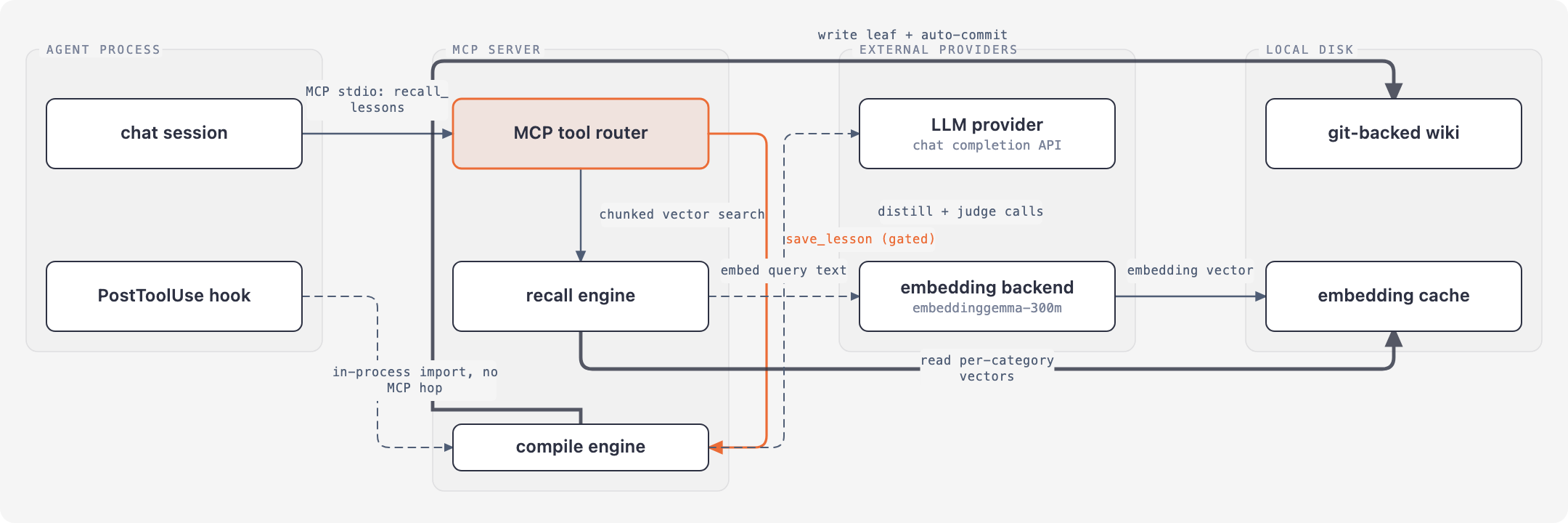
RAG memory stacks are powerful but heavy: a vector database, a container, an embedding service, ongoing ops. For small and medium projects that overhead is rarely worth it, yet you still want the agent to remember everything and improve across sessions. llm-wiki-memory gives you that loop with a local hosted wiki as the substrate: every category is a nested tree of plain-Markdown leaves (never a flat pile), git history and validation come free, the tree stays human-readable, and recall runs on local embeddings — nothing leaves your machine.
Highlights

.llm-wiki-memory/ folder — no vector DB, no container, no cloud.






onnx-community/embeddinggemma-300m-ONNX); nothing leaves your machine. → embeddings.md

P0 (guardrail) / P1 (default) / P2 (contextual). Relevance ranks first; priority only breaks near-ties.


Every diagram type, drawn by the engine itself — browse the live gallery (full screen, dark mode) or read the examples page. The renderer refuses a diagram whose labels collide, whose runs cut through unrelated boxes, or whose content falls outside the frame.
Works with your agent
| MCP client | Hooks (Claude Code only) | MCP tools | Write-gate |
|---|---|---|---|
| Claude Code | ✅ session-start / pre·post-compact / session-end / exit-plan-mode / pre-tool-use | ✅ | instructions + hook + server |
| Cursor · Codex · Claude Desktop · any MCP client | ✗ | ✅ | instructions + server |
Hook-driven auto-capture is Claude Code only; every other client gets the same MCP tools and the same discipline. Every tool takes a required scopes (the directories in play) and every write a target (which wiki to write into) — see docs/mcp-tools.md. The LLM provider used for capture / compile / consolidate is set in .env, independent of the client — claude / codex / cursor-agent CLIs, anthropic / openai / openai-compatible (ollama, vLLM, lm-studio, litellm) APIs, or mock. See docs/configuration.md.
Documentation
| Guide | What's in it |
|---|---|
| How it works | The write / read / offline flows, with diagrams. |
| MCP tools | The tool surface, required scopes + target, read-only CLI, cloud-sync caveat. |
| Memory write-gate | The three-layer read-freely / write-gated model + audit ledger. |
| Capture pipeline | Chunked, recoverable distillation; audit frontmatter; redistill. |
| Consolidate | The opt-in offline refinement pass — every pass, verdict, and knob. |
| Embeddings | On-device ranking, the vector cache, model choice. |
| Configuration | .env + settings.yaml reference; embedding-model guide. |
| Manual commands | The cli.mjs surface + architecture responsibility matrix. |
| Private brain & shared team wikis | The scope chain, shared install/adoption, ranking, team caveats. |
| Architecture | Per-concern split (this package vs the underlying engine). |
| Install (full) | Bootstrap steps, clients, shared setup, updating. |
Testing
npm test           # unit suite
npm run test:e2e   # full lifecycle against the real skill-llm-wiki CLI (LLM stubbed)
1961 tests (1797 unit + 164 e2e). The e2e suite builds a wiki from scratch in a temp directory and asserts genesis, daily capture, lesson / knowledge / plan / investigation absorption, compile promotion + dedup, recall, tree-growth integrity, and idempotency against the real skill-llm-wiki CLI with mocked LLM responses.
Requirements
Node 22.18 or newer (for import.meta.main), and git. No Docker, no Python. The embedding model downloads on first run (~219 MB across 5 files: 197 MB of q4 weights plus a 20 MB tokenizer), then runs fully offline. cli.mjs init prefetches it so the wait lands in setup rather than your first recall (set embed.backend: lexical in settings.yaml to skip it entirely).
Model (embed.model in settings.yaml) |
Dim | Window | Download | License |
|---|---|---|---|---|
onnx-community/embeddinggemma-300m-ONNX — default |
768 | 2048 | ~219 MB (q4 weights + tokenizer) | Gemma Terms of Use |
Xenova/bge-large-en-v1.5 — previous default |
1024 | 512 | ~340 MB (q8) | MIT |
Xenova/bge-base-en-v1.5 |
768 | 512 | ~110 MB | MIT |
Xenova/bge-small-en-v1.5 |
384 | 512 | ~35 MB | MIT |
A model change re-embeds the vector caches automatically — see docs/embeddings.md.
License
llm-wiki-memory MCP questions
Does this require a vector database or Docker?
No, it uses a local wiki of plain Markdown files and on-device embeddings without needing a vector database, Docker, or cloud services.
Can I control what the AI saves to my memory?
Yes, the system includes a write-gate where self-improvement lessons are only saved with your explicit consent.
Does the data leave my machine?
No, everything stays local, including the transformer embeddings used for ranking queries.