
datamining-skill MCP server
Commit Nov 12, 2026Extracts specific data like email addresses from large CSV, JSON, and log files using bounded memory and resumable checkpoints.
Also known as coreworkstr-art/datamining-skill
- Stars
- 0
- Tools
- —
- Downloads, 30 days
- —
- Latest version
- —
- Last commit
- Nov 12, 2026
- License
- MIT
What is datamining-skill MCP?
datamining-skill extracts specific data like email addresses from large CSV, JSON, and log files using bounded memory and resumable checkpoints.
Summary generated from the project's README
About datamining-skill MCP server
Extracting specific data like email addresses from massive text files is what this tool enables for developers and data analysts. It processes CSV, TSV, JSON, JSON Lines, and log files using a memory-bounded approach that prevents system crashes regardless of file size. Because it uses resumable checkpoints, a process can be interrupted and restarted from the last successful chunk without losing progress.
Users can connect this server to AI clients like Claude Desktop, Claude Code, or Cursor to perform complex data tasks via the Model Context Protocol. The server provides six specialized tools including profile_dataset for inspecting file structures, check_quality for identifying malformed records or schema drift, and mine_dataset for extracting information. It operates entirely on your local machine with no network telemetry, ensuring data privacy. Access is controlled by allowing specific directories through the --allow-dir argument, and sensitive information like API keys or email addresses is masked when previewed by the assistant.
What you can do with it
- 1Extracting unique email addressesA developer can request a clean, lower-cased list of distinct email addresses from a large log export.
- 2Auditing data qualityAn AI assistant can check a dataset for malformed rows, missing values, or unexpected type changes in columns.
- 3Profiling large datasetsYou can quickly inspect the encoding, format, and estimated record count of a massive file without loading it into memory.
- 4Managing background mining jobsUsers can start a long-running extraction task in the background and monitor its progress or cancel it if needed.
Written from the project's README. Every use case is checked against a quote from it.
README
View on GitHubDataMining Skill
DataMining Skill pulls data out of very large text files (CSV, TSV, JSON, JSON Lines, logs and plain text) on an ordinary computer. It is a command-line tool, a Python library and an MCP server in one.
The file is read in pieces, so memory use follows the settings and not the size of the file. Progress is saved as it goes: if a run is interrupted, the same command carries on from the last checkpoint.
It was written for one job: getting a clean list of e-mail addresses out of a big export or log. You can also give it a regular expression of your own. Use it from a terminal, call it from Python, or point an assistant that speaks the Model Context Protocol (Claude Code, Claude Desktop, Cursor and others) at the MCP server and the skill that come with it.





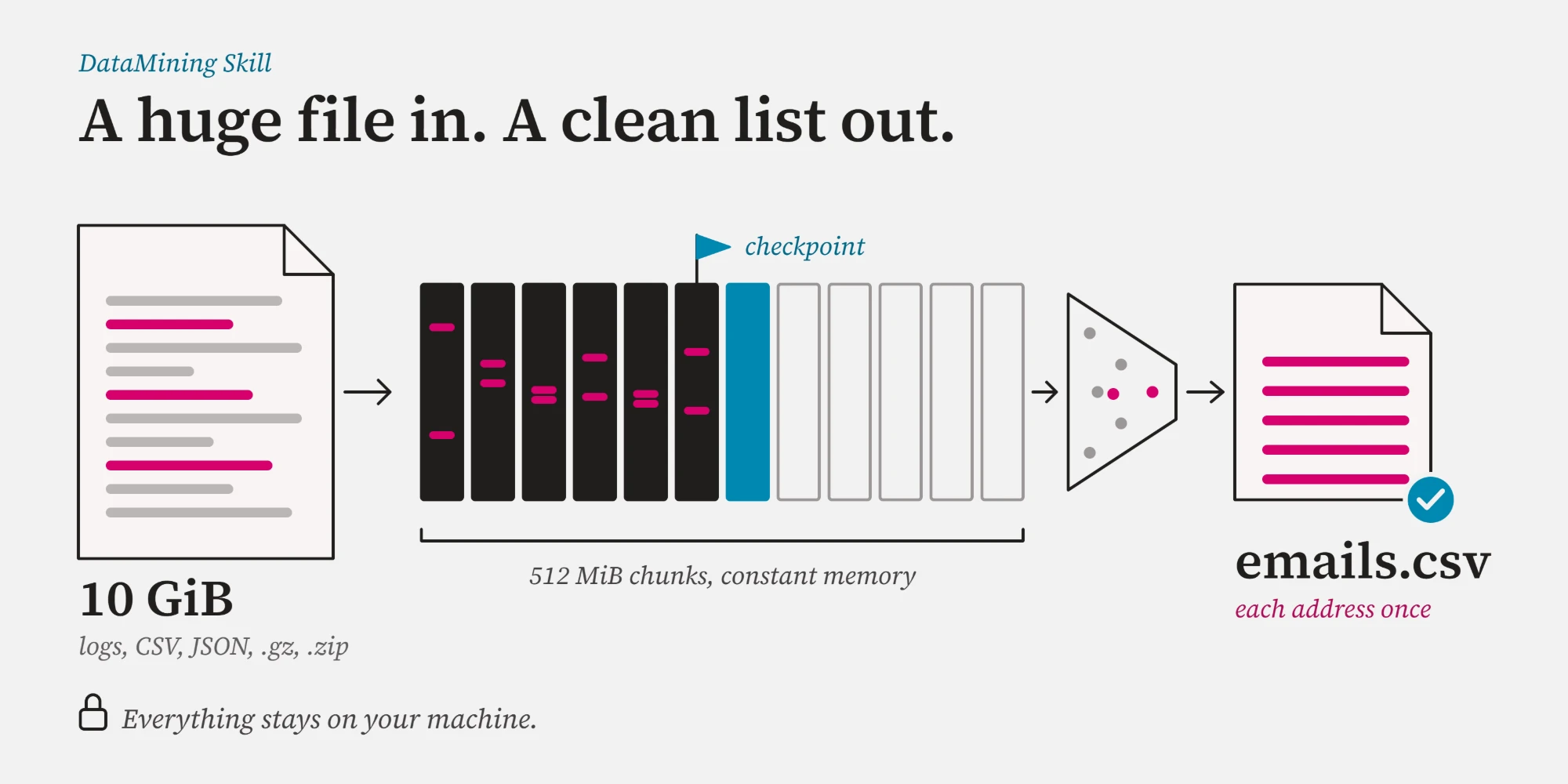
A few things worth knowing before you start:
- Everything stays on your machine. There is no network code, no telemetry and no third-party package, and your data is never sent anywhere.
- Memory use is set by the configuration, not by the file. The tests check it, and the Performance figures include a 10 GiB file.
- If a run is killed or the power goes, running the same command again gives the same records an uninterrupted run would have. Limitations has the details, such as the order of records after a retry.
- gzip, bzip2, xz and single-file zip archives are read directly, and so are Excel's "Unicode Text" (UTF-16) files. One command turns a messy export into a list of distinct, lower-case addresses.
- For assistants there are six MCP tools, a Claude Code plugin and a skill that says when to use them. File access is limited to the directories you list.
Contents
Install | Quick start | Use it from an AI assistant | Command line | Recipes | Python API | How it works | Performance | Guarantees | Limitations | Troubleshooting | Development | Contributing
Install
Python 3.11 or newer; nothing else is needed at runtime.
# with uv: the command gets its own isolated environment
uv tool install git+https://github.com/coreworkstr-art/datamining-skill

# or with pip
pip install git+https://github.com/coreworkstr-art/datamining-skill

# or from a clone, which also gives you the tests and the example data
git clone https://github.com/coreworkstr-art/datamining-skill && cd datamining-skill
pip install .
Check it works: datamining-skill --version. If the command is not found, see
Troubleshooting or run it as
python -m datamining_skill.
The examples below use a small sample file, examples/contacts.csv. A clone has it; otherwise
download it
or use any CSV, JSON, log or text file of your own.
Quick start
Inspect a file without reading it into memory, extract a clean address list, check the result:
# What is in this file? (milliseconds, constant memory)
datamining-skill profile examples/contacts.csv

# Is the file in good shape? Malformed rows, empty values, type changes (counts and line numbers only)
datamining-skill quality examples/contacts.csv

# Every distinct e-mail address, lower-cased, one per line (resumable, crash-safe)
datamining-skill mine examples/contacts.csv emails.csv --unique --lowercase

# Look at the first records of the result
datamining-skill preview emails.csv --rows 5
profile prints a JSON description: size, encoding, format, columns or keys, and the record
count with its unit (a quoted CSV value can span lines, so a CSV is counted in lines). mine
writes emails.csv and prints a JSON summary:
{
  "output_name": "emails.csv", "resumed": false, "chunks_total": 1, "chunks_processed": 1,
  "chunks_failed": 0, "records_written": 15, "duplicates_skipped": 3, "already_complete": false,
  "oversized_lines": 0, "source_transform": null, "first_error": null
}
quality reads a CSV, TSV or JSON Lines file once and reports what is wrong with it: records that
are malformed (a row with too few or too many columns, a broken quote, a line that is not JSON)
with the first line numbers, how many values of each field are empty or missing, the types found in
each field, and fields whose values change type (a column of numbers with a few words in it). Each
field also gets an approximate count of its distinct values and, if it is numeric with at least ten
values, its mean, spread and estimated quartiles. It keeps counts, line numbers and small summaries
of fixed size, never values, so its memory does not grow with the file. It checks up to 1,000,000
records by default (--max-records, and --max-seconds if you want a time limit) and says whether
it read the whole file. On a laptop it takes about 30 seconds for a million CSV rows with six
columns, and about 20 seconds for half a million JSON Lines records. The file's format is detected
first: text with no table in it (a list of addresses, a web page, or a table too broken to
recognise) has no columns to check, so quality says so; it can still be mined.
If mine is interrupted, run the same command again: it resumes where it stopped. Run it again
after it finished and it says already_complete instead of doing the work twice. Changing any
setting (the pattern, --unique, ...) starts a new job.
Use it from an AI assistant
datamining-skill mcp runs a Model Context Protocol server on
standard input/output, so an assistant can inspect and mine local files on your behalf.
| Tool | What it does |
|---|---|
profile_dataset |
Format, encoding, columns or keys, size and estimated record count of a CSV, TSV, JSON, JSONL, log or plain text file; also gzip, bzip2, xz and zip files. Read-only. |
check_quality |
Reads a CSV, TSV or JSON Lines file once and reports malformed records (by kind, with line numbers), empty or missing values per field, the value types found and schema drift, plus an approximate distinct count per field and, for numeric fields, the mean, spread and quartiles. Counts, line numbers and aggregates only, never values. Stops after max_records records or max_seconds seconds (default 20), whichever comes first, so a client that gives up after a minute still gets an answer. Read-only. |
mine_dataset |
Extracts data (e-mail addresses by default) into a .csv, .jsonl or .ndjson result in memory-bounded chunks with checkpoints. unique, lowercase, csv_formula_guard and overwrite options. With wait=false it runs in the background and returns a job id. |
mining_status |
Progress and result of a background run, or a list of the runs of this session. |
cancel_mining |
Stops a background run after its current chunk; calling mine_dataset again resumes it. |
preview_result |
The first records of a result file, or with sample a uniform sample from the whole file (repeatable with seed), so the assistant can verify the run. |
Every argument is described in docs/mcp-tools.md.
The assistant can only reach the directories you list. Every file argument is resolved (symlinks
and .. included) and must lie inside a directory given with --allow-dir; anything else is
refused. The first --allow-dir is the workspace for relative paths.
Claude Code
The repository is a Claude Code plugin: it starts the server for you through
uv (install it first; without it, register the server yourself, below),
restricted to the project directory, and adds the
datamining skill, which tells Claude when to use the tools and how
to choose their arguments.
claude plugin marketplace add coreworkstr-art/datamining-skill
claude plugin install datamining-skill@datamining-skill
Then ask, for example: "Profile events.csv, then give me a clean list of the distinct e-mail
addresses in it, lower-cased." Run /mcp to see that the server is connected.
Prefer to register the server yourself? After installing the command (see Install):
claude mcp add --scope project datamining-skill -- \
  datamining-skill mcp --allow-dir /absolute/path/to/your/data
or add the equivalent entry to .mcp.json at the project root:
{
  "mcpServers": {
    "datamining-skill": {
      "command": "datamining-skill",
      "args": ["mcp", "--allow-dir", "/absolute/path/to/your/data"]
    }
  }
}
Claude Desktop
Edit claude_desktop_config.json (macOS: ~/Library/Application Support/Claude/, Windows:
%APPDATA%\Claude\) and restart the app:
{
  "mcpServers": {
    "datamining-skill": {
      "command": "datamining-skill",
      "args": ["mcp", "--allow-dir", "/absolute/path/to/your/data"]
    }
  }
}
Cursor
Create .cursor/mcp.json in your project (or ~/.cursor/mcp.json for all projects):
{
  "mcpServers": {
    "datamining-skill": {
      "command": "datamining-skill",
      "args": ["mcp", "--allow-dir", "${workspaceFolder}"]
    }
  }
}
Configuration notes
- If the client can't find the command, give it the full path. This happens when you installed into
a virtual environment. Point at the console script (
/path/to/.venv/bin/datamining-skill, or...\.venv\Scripts\datamining-skill.exeon Windows) or at the interpreter:"command": "/path/to/.venv/bin/python", "args": ["-m", "datamining_skill", "mcp", "--allow-dir", "..."]. - In a JSON file, Windows paths need doubled backslashes (
"C:\\Users\\you\\data"). Forward slashes work too. - If Windows says an Application Control policy blocked the program (
os error 4551), start the server through Python instead of the command:"command": "python", "args": ["-m", "datamining_skill", "mcp", "--allow-dir", "..."]. The plugin already does. - You can repeat
--allow-dir, or setDATAMINING_SKILL_ALLOWED_DIRS(paths separated by;on Windows,:elsewhere). With neither, the server uses its working directory, and refuses to if that is the filesystem root. - Results, state and scratch files go to
<first allowed dir>/.scratch/and to the result path you name. Add.scratch/to your.gitignore. - Custom patterns (the
patternandfieldsarguments) are off by default. A regular expression written by a model can be made to backtrack until your machine stalls, so start the server with--allow-custom-patternsonly if you accept that. The built-in e-mail extraction is not affected: it uses bounded patterns, and the test suite runs it against hostile lines a megabyte long under a time limit. - What the assistant sees is masked. In
preview_resultrows and in the column names fromprofile_dataset, e-mail addresses, IPv4 and IPv6 addresses, card numbers, T.C. kimlik numbers, IBANs and secrets (tokens, API keys) become tags such as[EMAIL]. It is a best-effort safety net, not anonymisation (see docs/mcp-tools.md), and--unmasked-previewturns it off. - To keep a record of what the assistant did, pass
--audit-log /path/outside/your/data/audit.jsonl. It gets one line per tool call with the time, the tool, paths and counts, and never any contents. - To test an installation without a client, run
python scripts/mcp_smoke_test.py. It does a full handshake, profile and mine against the installed command and exits non-zero on any problem.
The server is written against the standard library only and speaks both generations of MCP: the
stateful initialize handshake (revisions 2024-11-05 to 2025-11-25) and the stateless
2026-07-28 revision (server/discover, per-request metadata). Nothing but protocol messages is
ever written to stdout. Because tool arguments come from a language model they are treated as
untrusted; see docs/privacy-and-security.md for the threat model.
Command line
datamining-skill profile PATH [--config FILE]
datamining-skill quality PATH [--max-records N] [--max-seconds N] [--workspace DIR] [--mask]
datamining-skill mine SOURCE OUTPUT [--workspace DIR] [--unique] [--lowercase]
                                    [--pattern REGEX [--fields a,b]] [--overwrite]
                                    [--csv-formula-guard] [--json-escapes {auto,on,off}]
                                    [--max-expanded-gib GIB] [--no-progress]
datamining-skill preview PATH [--rows N] [--mask] [--sample [--seed N]]
datamining-skill clean [--workspace DIR] [--all] [--dry-run]
datamining-skill mcp [--allow-dir DIR ...] [--allow-custom-patterns]
                     [--unmasked-preview] [--audit-log FILE]
| Option | Meaning |
|---|---|
--unique |
Write each record once, across the whole file and across resumed runs. |
--lowercase |
Lower-case every value. With --unique, addresses differing only in case count once (the Turkish dotted capital I counts as a plain i). |
--pattern, --fields |
Extract your own regular expression; each capture group becomes a column named by --fields. Repeat a group with (?:...), not (...). |
--overwrite |
Discard earlier progress and replace an existing output file. |
--csv-formula-guard |
Prefix CSV cells that start with = + - @ so a spreadsheet does not run them. |
--json-escapes |
Decode JSON string escapes such as \u0040 before searching: auto (JSON and JSON Lines sources with the built-in extraction), on or off. |
--max-expanded-gib |
Refuse a compressed source that expands beyond this size (default 64). |
--no-progress |
Hide the progress line, which appears only when stderr is a terminal. |
--workspace |
Where the .scratch/ folder with state and scratch files lives (default: the current directory). |
--rows |
How many records preview shows (1 to 200, default 20). |
--max-records |
quality stops after this many records (default 1,000,000) and says whether it read the whole file. |
--max-seconds |
quality also stops after this many seconds and says so (default: no limit; the MCP tool stops after 20). |
--sample |
preview draws its records from across the whole file (the first 64 MiB at most) instead of taking the first ones. |
--seed |
Makes preview --sample repeatable. |
--mask |
preview and quality replace e-mail, IP, card, T.C. kimlik and IBAN numbers and secrets by tags such as [EMAIL]. |
--unmasked-preview |
mcp returns preview rows and profile column names as they are. By default they are masked. |
--audit-log |
mcp appends one JSON line per tool call (never contents) to this file, which must lie outside the allowed directories. |
--all, --dry-run |
clean also removes unfinished jobs / only reports what it would remove. |
Every command also accepts --log-level {DEBUG,INFO,WARNING,ERROR} (structured JSON logs on
stderr, WARNING by default), --no-logs and --debug. Results go to stdout. A failure prints a
single error: line, never a Python traceback; add --debug to see the traceback as well.
| Exit code | Meaning |
|---|---|
| 0 | Success |
| 1 | Unexpected internal error (rerun with --debug for the traceback) |
| 2 | Unsupported or unrecognised format (empty, binary, an archive of several files, ...) |
| 3 | Unavailable source, invalid configuration, file-system error, low memory or disk, job already running, or another library error |
| 4 | mine finished but some chunks failed (the first reason is printed); run again to retry them |
| 130 | Interrupted (run the same command again to resume) |
| 141 | The reader of stdout closed the pipe (for example | head) |
A fresh run refuses to overwrite an existing output file that it did not create. State and
scratch files live in ./.scratch/; datamining-skill clean removes those of finished jobs and
never touches a result file or a running job.
Recipes
# A clean list of the distinct addresses in a big export
datamining-skill mine export.csv addresses.csv --unique --lowercase

# Straight from a compressed log, as JSON Lines
datamining-skill mine app.log.gz addresses.jsonl --unique --lowercase

# An Excel "Unicode Text" export (UTF-16) works like any other file
datamining-skill mine customers.txt addresses.csv --unique --lowercase

# A JSON export, including addresses spelled with \u0040 escapes
datamining-skill mine users.json addresses.csv --unique --lowercase

# Your own pattern: IPv4 addresses (note the non-capturing group), one column
datamining-skill mine access.log hosts.csv --pattern "(?:\d{1,3}\.){3}\d{1,3}" --fields ip

# A pattern with capture groups: each group becomes a column
datamining-skill mine app.log errors.csv --pattern "(\d{4}-\d\d-\d\d) ERROR (\w+)" --fields date,code

# Opening the result in a spreadsheet? Neutralise formula injection
datamining-skill mine export.csv addresses.csv --csv-formula-guard

# Start over, ignoring earlier progress
datamining-skill mine export.csv addresses.csv --overwrite
Typical gotchas are collected in docs/troubleshooting.md.
Python API
from datamining_skill import profile_source, run_mining

# Profile: size, encoding, format, structure, estimated record count (a plain dictionary)
profile = profile_source("events.jsonl")
print(profile["format"], profile["records"]["count"], profile["structure"]["fields"])

# Mine with managed state: resumes automatically if interrupted
summary = run_mining("events.csv", "emails.csv", unique=True, lowercase=True,
                     on_progress=lambda p: print(p))
print(summary.to_dict())
Each stage is also available on its own:
from datamining_skill import StateManager, create_chunking_engine, create_orchestrator, create_profiler

profile = create_profiler().profile("events.csv")

# 1. Plan: memory-aware, newline-aligned byte ranges (a lazy generator; nothing is read)
for chunk in create_chunking_engine().plan("events.csv", profile):
    print(chunk.chunk_id, chunk.start_byte, chunk.end_byte)

# 2. Mine with your own state database
with StateManager("data/run-001.sqlite3") as state:
    orchestrator = create_orchestrator(output_path="data/results.csv", state=state)
    summary = orchestrator.run("events.csv")      # safe to re-run after a crash
Write your own mining logic
An ExtractionStrategy turns one line into zero or more records. It performs no I/O; reading,
writing and checkpointing are handled for you.
from collections.abc import Iterator, Sequence
from datamining_skill import StateManager, create_orchestrator

class StatusCodes:
    fields = ("status",)

    def extract(self, line: str) -> Iterator[Sequence[str]]:
        if " 500 " in line:
            yield ("server-error",)

with StateManager("data/run-002.sqlite3") as state:
    create_orchestrator(
        output_path="data/errors.jsonl", state=state, strategy=StatusCodes()
    ).run("access.log")
A strategy may also take start and stop (def extract(self, line, start=0, stop=None)) and
report only the matches that begin in [start, stop). It is then searched exactly even in lines
longer than 1 MiB, which arrive in overlapping windows; one that takes only the line sees each
window's own span, so a match that straddles two windows can be missed.
How it works
flowchart LR
    F[("Huge file<br/>or .gz / .zip / UTF-16")] -->|"converted to a private<br/>UTF-8 copy if needed"| P["Data Profiler<br/>size, encoding, format,<br/>structure, record estimate"]
    P --> C["Chunking Engine<br/>newline-aligned byte ranges<br/>sized from free RAM"]
    C --> S[("State Manager<br/>SQLite, WAL")]
    S -->|"claim next PENDING chunk"| W["Miner Worker<br/>read blocks of lines,<br/>apply strategy, drop repeats"]
    W --> T["chunk_N.tmp"]
    T --> A["Result Aggregator<br/>truncate to last commit,<br/>append, fsync"]
    A --> O[("results.csv / .jsonl")]
    A -->|"COMPLETED + output length<br/>in one transaction"| S
| Stage | What it guarantees |
|---|---|
| Data Profiler | Reports size, encoding, format and structure from bounded samples; the record count is extrapolated from windows spread across the file. Memory is O(1). |
| Chunking Engine | Chunk size is min(15% of the RAM free now, 512 MiB). Boundaries are found by seeking, never by loading data, and always fall right after a newline. Refuses to run if free RAM is critically low. |
| State Manager | Every chunk is PENDING, IN_PROGRESS, COMPLETED or FAILED in a SQLite database (WAL mode). Chunks left IN_PROGRESS by a crash return to PENDING automatically. It also keeps the 16-byte keyed hashes behind --unique. |
| Miner Worker | Reads exactly [start_byte, end_byte) in constant memory and writes records to a private scratch file. A line longer than 1 MiB is searched in overlapping windows, never skipped or cut. |
| Result Aggregator | Appends a finished chunk to the output idempotently: the output's committed length is recorded in the same transaction as COMPLETED, and every append first truncates back to it. A crash at any point is repaired on restart. |
The code follows Clean Architecture; dependencies point inward only:
flowchart TB
    CLI["cli.py and bootstrap.py<br/>composition root and delivery"] --> I
    I["infrastructure (adapters)<br/>file streaming, SQLite state, source conversion,<br/>scratch and output stores, MCP server, JSON logging"] --> A
    A["application (use cases)<br/>profiler, chunking engine, worker and strategies,<br/>aggregator, orchestrator"] --> D
    D["domain<br/>models, ports (Protocols), exceptions"]
Design notes, diagrams and the crash-recovery analysis are in docs/architecture.md.
Performance
Measured on a Windows laptop with Python 3.14; speeds vary a lot between machines and moments, so treat them as orders of magnitude.
| Operation | Result |
|---|---|
| Profile a 10 GiB CSV | about 50 ms, under 1 MiB of memory growth |
| Plan chunks for 2 GiB of free RAM (34 chunks of 307 MiB) | about 26 ms |
| Mine a 512 MiB log with an address every few kilobytes | 2 to 3 seconds (200+ MiB/s) |
| Mine a 517 MiB CSV with an address on every row | roughly 20 to 40 seconds (15 to 25 MiB/s) |
The built-in extraction looks for each @ with a plain string search and runs the pattern only
around it, so sparse text is read at close to disk speed; text with an address on every line is
bound by the interpreter. Mining runs on one thread by default (Limitations);
docs/troubleshooting.md says what helps.
datamining-skill MCP questions
Does my data get sent to a third party?
No, everything stays on your machine with no network code, telemetry, or third-party packages.
Can I resume a data extraction if it gets interrupted?
Yes, the tool saves progress as it goes, allowing interrupted runs to carry on from the last checkpoint.
How does the tool handle very large files without crashing?
The file is read in pieces, ensuring memory usage follows your settings rather than the file size.
What file formats are supported?
It supports CSV, TSV, JSON, JSON Lines, logs, plain text, and compressed formats like gzip, bzip2, xz, and single-file zip archives.