
Posthouse MCP server
Commit Oct 28, 2026Provides shared, versioned memory workspaces that allow multiple AI agents to read and write to the same project files.
Also known as conscienceli/posthouse
- Stars
- 0
- Tools
- 5
- Downloads, 30 days
- —
- Latest version
- —
- Last commit
- Oct 28, 2026
- License
- MIT
What is Posthouse MCP?
Posthouse provides shared, versioned memory workspaces that allow multiple AI agents to read and write to the same project files. It exposes 5 tools, such as list_workspaces, create_workspace, start_session.
Summary generated from the project's README
About Posthouse MCP server
Developers working across multiple AI platforms can use Posthouse to maintain a shared, versioned memory for their projects. It provides a centralized workspace where different agents like Claude, ChatGPT, Gemini, and Claude Code can read and write to the same set of plain files. This allows a new conversation in any client to catch up on project progress with a single call to the start_session tool.
Users can connect via a remote MCP connector using OAuth 2.1 sign-in, or through a REST API and a bundled Python skill for CLI agents. The system manages workspaces as directories on a server, utilizing git for version control so every change is recorded as a commit. This enables users to view history, diff changes, and restore old versions through a dedicated Admin UI. The server is easy to deploy using Docker or a direct Python installation on Linux, requiring only a single process with SQLite.
What you can do with it
- 1Synchronize context between different AI agentsAn agent can pick up exactly where another left off by accessing the same project files and hand-off notes.
- 2Onboard new chat sessions quicklyA developer can use a single command to provide a new AI session with the current project status and recent decisions.
- 3Track and revert agent modificationsSince every change is a git commit, you can audit what an agent changed and restore previous versions if needed.
- 4Automate conversation logging for CLI toolsUsers can install hooks in Claude Code to automatically save chat history to the workspace while redacting secrets.
Written from the project's README. Every use case is checked against a quote from it.
Posthouse MCP tools 5
Detected from the READMElist_workspacescreate_workspacestart_sessionlog_progresshistory
| list_workspaces | — | |
| create_workspace | — | |
| start_session | — | |
| log_progress | — | |
| history | — |
Configuration
POSTHOUSE_URL
| Name | Description | |
|---|---|---|
| POSTHOUSE_URL | — |
Automated checks
Ran Nov 14, 2026Full report →Not verified yet. A server needs a score of 80, no serious finding, and enough data for us to check. How checks work · What to fix for more points

- Source repository linked and reachableconscienceli/posthouse is public and reachablegithub.com/conscienceli/posthouse ↗Pass
- Package names this repository as its sourceNot checked
- Build provenance (Sigstore attestation)Not checked
- Open source license (OSI)MITspdx.org/licenses/MIT.html ↗Pass
- Commit or release in the last yearLast commit or release 2026-10-28github.com/conscienceli/posthouse ↗Pass
- OpenSSF ScorecardNot checked
- Package name not close to a popular packageNot checked
- No critical advisory in the package or its dependenciesNot checked
- No hidden instructions to the model5 tool descriptions and the README read; no override phrases, credential paths or hidden charactersPass
- Destructive tools are labelledNo tool named like delete, drop or execPass
- Remote endpoint answers the MCP handshakeNot checked
README
View on GitHubPosthouse
Shared, versioned memory for all your AI agents. Claude, ChatGPT, Gemini, Claude Code, Codex, Gemini CLI, Cursor and others can all read and write the same project. When you open a new conversation with any of them, it can catch up on the project with a single call.
A posthouse (驿站) was a relay station where a courier handed over the mail and a fresh rider carried it on. Here every agent hands over at the workspace, and the next one picks it up.
More screenshots: change history · OAuth sign-in page
Why
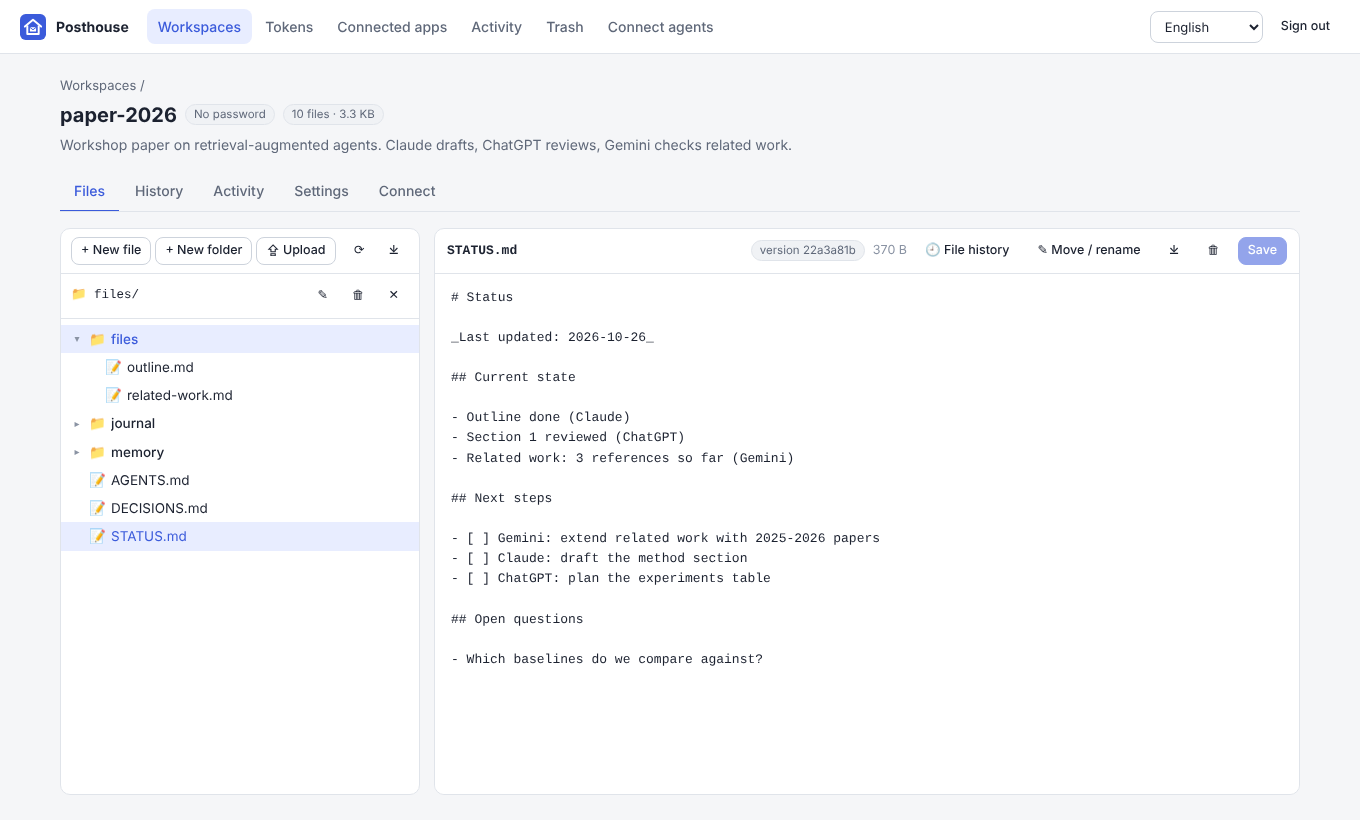
Web chat apps cannot mount a file share or log in to WebDAV, and each app keeps its own separate memory. Posthouse gives every project a workspace: a folder of plain files on your server. Agents reach it in three ways:
- MCP: Claude, ChatGPT, Gemini and the CLI agents add it as a remote MCP connector. The server has its own OAuth login page, where you sign in with a password.
- REST + Skill: agents that have a shell (Claude Cowork, Claude Code, Codex, …) use the
bundled skill,
posthouse.py, orcurl. - Admin UI: you browse, edit, upload, restore old versions and manage access in a browser.
 Claude.ai ─┐                    ┌──────────── Posthouse ─────────────┐
 ChatGPT  ──┤  MCP (OAuth)       │  /mcp     MCP server (Streamable HTTP)          │
 Gemini   ──┤ ─────────────────▶ │  /oauth   OAuth 2.1 (password sign-in page)     │──▶ data/workspaces/<name>/
 Claude Code┤                    │  /api     REST API (+ /api/docs)                │      AGENTS.md  STATUS.md
 Codex ─────┤  REST / Skill      │  /        Admin UI                              │      DECISIONS.md journal/
 you ───────┘ ─────────────────▶ │  git history · SQLite index · activity log      │      memory/ files/  (.git)
                                 └─────────────────────────────────────────────────┘
Features
- Plain files, full history. Each workspace is a directory on disk and its own git repository. Every change becomes a commit authored by the agent that made it, so you can view old versions, diff them and restore them. History is packed automatically every day to save disk space. Deleted workspaces go to a trash first.
- One-call onboarding.
start_sessionreturns the project guide, the current status, recent decisions, the latest hand-off notes, the file list and recent changes. - Hand-off protocol. Each workspace starts with
AGENTS.md,STATUS.md,DECISIONS.md,journal/,memory/andfiles/.log_progresswrites a dated hand-off note and can updateSTATUS.mdat the same time. - Conversation auto-save (Claude Code). One command installs hooks that save the conversation to the workspace before and after every turn, with secrets redacted. See docs/skill.md.
- Safe concurrent edits. Writes can be optimistic: they fail if the file changed since you read
it. Exact-text
edit_fileandappend_fileavoid rewriting whole files. - Works with today's MCP clients. The server speaks the stateless 2026-07-28 protocol
(
server/discover, per-request_meta) and the olderinitialize-based revisions (2024-11-05 … 2025-11-25) on the same endpoint. It is tested with the official MCP Python SDK v1 and v2. - Auth the web apps accept. A built-in OAuth 2.1 authorization server: discovery, dynamic client registration, client ID metadata documents, PKCE (S256) and rotating refresh tokens. CLIs and scripts can also use HTTP Basic, revocable access tokens, or a secret token URL.
- Three password levels. An admin password, an agent password, and an optional password per workspace (see below).
- Admin UI. Workspaces, file browser and editor, upload, history and restore, access tokens, connected apps (revoke OAuth grants), activity log, trash, connection instructions, and a Settings page (disk use, compact all workspaces, effective configuration). English by default, with a language dropdown (English, 简体中文). See Translations to add more languages.
- Easy to run. One Python process with SQLite and no external services. Run it with Docker, with optional automatic HTTPS through Caddy, or directly on any Linux server.
Quick start
With Docker (recommended)
git clone https://github.com/conscienceli/posthouse.git
cd posthouse

# Pick the line that matches your server (Claude/ChatGPT/Gemini on the web need public HTTPS):
./scripts/docker-start.sh --domain posthouse.example.com                # ports 80/443 free: built-in HTTPS
./scripts/docker-start.sh --behind-proxy https://posthouse.example.com  # nginx or Cloudflare already in front
./scripts/docker-start.sh --behind-proxy https://posthouse.example.com --tunnel-token <TOKEN>  # Cloudflare Tunnel
./scripts/docker-start.sh                                               # plain HTTP on :8080 for testing
The script creates .env with random admin and agent passwords, builds the image, starts the
container and prints the URLs and passwords. Other commands: logs, status, restart,
stop, update and passwords. Data lives in ./data. Step-by-step guides for an existing nginx
and for Cloudflare (Tunnel, Full (strict), Flexible) are in docs/deploy.md.
Without Docker
./scripts/install.sh                 # Python venv + dependencies + .env
./scripts/run.sh                     # run in the foreground
sudo ./scripts/install.sh --systemd --behind-proxy https://posthouse.example.com   # systemd service behind nginx
Requirements: Linux, Python 3.10+, and git (optional; it powers history). nginx examples:
deploy/nginx.conf.example and
deploy/nginx-cloudflare.conf.example.
Web apps need public HTTPS. Claude, ChatGPT and Gemini connect from their own cloud, so the server must be reachable at
https://…on port 443. See docs/deploy.md, which also has notes for servers in mainland China.
Access levels
| Level | Credential | Can do |
|---|---|---|
| Admin | POSTHOUSE_ADMIN_PASSWORD |
Everything: admin UI, delete/rename workspaces, set passwords, tokens, revoke apps |
| Agent | POSTHOUSE_AGENT_PASSWORD |
List and create workspaces; read/write files in all workspaces |
| Workspace | that workspace's own password (optional) | Read/write files in that workspace only |
Ways to present a credential:
- OAuth sign-in page. Web apps and most MCP clients open this page; you type a password there. Leave Workspace empty to grant the password's full level, or enter a workspace name to limit that connection to one workspace (this works with the admin or agent password too).
- HTTP Basic. User
agent,adminor a workspace name, plus the password (for the skill, curl, CLI agents and Claude request headers). - Access tokens (
ph_…). Created in the UI asAuthorization: Bearer ph_…, or as a secret URLhttps://…/mcp/t/ph_…for apps that only accept a URL. They are revocable and can be limited to one workspace.
Connect your agents
Your MCP URL is https://<your-domain>/mcp. The Connect agents page in the admin UI shows it
with copy buttons.
| Agent | How to connect |
|---|---|
| Claude (web, desktop, mobile, Cowork) | Settings → Connectors → Add custom connector → paste the URL → sign in with a password |
| ChatGPT (web) | Settings → Security → enable Developer mode, then Apps/Plugins → + → paste the URL → OAuth → password. Select the app in each new chat. Requires a paid plan; write support depends on the plan (beta). |
| Gemini (web) | Settings → Connected apps → Add a custom app (currently US-only, personal accounts) |
| Claude Code | claude mcp add --transport http posthouse https://posthouse.example.com/mcp, then /mcp to sign in. Or add --header "Authorization: Bearer ph_…" |
| Codex CLI | codex mcp add posthouse --url https://posthouse.example.com/mcp, then codex mcp login posthouse. Or set bearer_token_env_var in ~/.codex/config.toml |
| Gemini CLI | gemini mcp add --transport http posthouse https://posthouse.example.com/mcp, then /mcp auth posthouse. Or "httpUrl" + "headers" in settings.json |
| Anything with a shell | The skill / posthouse.py / curl with Basic auth or a token |
| Apps that only take a URL | Create a token in the UI and use https://…/mcp/t/ph_… |
Step-by-step guides and troubleshooting are in docs/mcp.md. A good first message in a new chat:
You can use the "Posthouse" connector. Our project lives in the workspace "my-project". First call start_session(workspace="my-project") and read AGENTS.md and STATUS.md. Keep STATUS.md current and call log_progress before you stop.
MCP tools
| Tool | Purpose |
|---|---|
list_workspaces |
Workspaces you can access |
create_workspace |
New workspace with the standard layout (agent/admin) |
start_session |
Load guide, status, decisions, journal, file list, recent changes |
list_files · read_file |
Browse and read (with offset/limit, or an older revision) |
write_file · edit_file · append_file |
Write (optionally with expected_version), exact-text edit, append |
move_file · delete_file |
Rename/move and delete (recoverable from history) |
search · fetch |
Full-text search; fetch by id (shape compatible with ChatGPT deep research) |
log_progress |
Hand-off note in journal/YYYY-MM-DD.md, optional new STATUS.md |
history |
Who changed what and when |
Skill and CLI
skills/posthouse holds a ready-made agent skill:
SKILL.md and scripts/posthouse.py, a CLI that uses only the
Python standard library.
export POSTHOUSE_URL=https://posthouse.example.com POSTHOUSE_USER=agent POSTHOUSE_PASSWORD=… POSTHOUSE_AGENT="Claude Code"
python3 posthouse.py start my-project
python3 posthouse.py read my-project STATUS.md
python3 posthouse.py log my-project --summary "Drafted section 2" --next "Review section 3"
The quickest way to start a new Cowork or Claude Code task on a workspace: click Setup message on the workspace in the admin UI and paste the copied message into the task. It contains the server address and a new token for that workspace only; Claude installs the skill from your server, signs in and turns on conversation auto-save.
To do the same by hand (before and after each turn, secrets redacted):
python3 posthouse.py login --url https://posthouse.example.com --token ph_…
python3 posthouse.py install-hooks --workspace my-project
./scripts/package-skill.sh builds dist/posthouse-skill.zip for upload to Claude.
To use the skill with Claude, Claude Code, Codex and Gemini CLI, see docs/skill.md.
REST API
Everything the UI and the skill do goes through /api. Interactive docs are at /api/docs, and a
summary is in docs/api.md. Curl-friendly raw endpoints:
curl -u agent:$PW https://posthouse.example.com/api/workspaces/my-project/raw/STATUS.md
curl -u agent:$PW -X PUT --data-binary @STATUS.md -H "If-Match: <version>" \
     https://posthouse.example.com/api/workspaces/my-project/raw/STATUS.md
Configuration
All settings come from environment variables or .env. See .env.example.
| Variable | Default | Meaning |
|---|---|---|
POSTHOUSE_ADMIN_PASSWORD |
generated | Admin password (saved to data/admin-password.txt if not set) |
POSTHOUSE_AGENT_PASSWORD |
empty (disabled) | Agent password |
POSTHOUSE_PUBLIC_URL |
from request | Public base URL, e.g. https://posthouse.example.com (set it behind a proxy) |
POSTHOUSE_DATA_DIR |
./data (/data in Docker) |
Workspaces, trash and the SQLite database |
POSTHOUSE_HOST / POSTHOUSE_PORT |
0.0.0.0 / 8080 |
Listen address (bare metal) |
POSTHOUSE_DOMAIN |
empty | Enables the bundled Caddy HTTPS profile (Docker) |
POSTHOUSE_HOST_PORT / POSTHOUSE_BIND |
8080 / 0.0.0.0 |
Published port and bind address (Docker) |
POSTHOUSE_MAX_FILE_MB |
10 |
Maximum file size |
POSTHOUSE_GIT |
true |
Version every change with git |
POSTHOUSE_GIT_GC_HOURS |
24 |
Compact each workspace's change history this often (git gc; 0 turns it off). Admins can also run it from Workspace → Settings |
POSTHOUSE_ACCESS_TOKEN_TTL |
3600 |
OAuth access token lifetime (seconds) |
POSTHOUSE_REFRESH_TOKEN_DAYS |
180 |
OAuth refresh token lifetime (days, rotated on use) |
POSTHOUSE_SESSION_HOURS |
12 |
Admin UI session lifetime |
POSTHOUSE_LOGIN_MAX_FAILURES / POSTHOUSE_LOGIN_WINDOW_SECONDS |
10 / 600 |
Password rate limit per client IP |
POSTHOUSE_TRUSTED_PROXIES |
127.0.0.1,::1 |
Proxies allowed to set X-Forwarded-* (set by --domain for the bundled Caddy) |
Security notes
- Always serve it over HTTPS. Use long random passwords; the start scripts generate them.
- Give agents the agent password, a workspace password, or a token, never the admin password. Revoke OAuth connections and tokens you no longer use in the UI.
- Content written by one agent is read by others. The bundled instructions tell agents to treat file contents as data, not instructions. Git history lets you undo anything.
- Failed password attempts are rate-limited per IP. The admin UI uses
HttpOnly/SameSite=Strictcookies plus a CSRF header. Files are never served as active HTML. - You can optionally restrict access at your firewall to the platforms' published egress ranges
(see docs/deploy.md). Back up the
data/directory.
Translations
UI strings live in posthouse/static/i18n/. To add a language, copy en.json to
<code>.json (for example ja.json or fr.json), translate the values, and add
{"code": "<code>", "name": "<native name>"} to languages.json. The admin UI dropdown and the
OAuth sign-in page (chosen from the browser's Accept-Language) use these files. Any missing keys
fall back to English.
Development
pip install -r requirements-dev.txt
pytest                      # unit + integration tests (REST, MCP, OAuth, CLI)
python -m posthouse --port 8080   # reads .env if present
Code layout: posthouse/storage.py (workspaces, files, git), posthouse/auth.py (passwords, tokens),
posthouse/oauth.py (authorization server), posthouse/mcp_server.py (MCP), posthouse/api.py (REST),
posthouse/static/ (admin UI, no build step).
License
Posthouse MCP questions
What tools does Posthouse MCP provide?
It exposes 5 tools, including list_workspaces, create_workspace, start_session, log_progress, history.
Does Posthouse support version control?
Yes, each workspace is a directory on disk and its own git repository, allowing you to view, diff, and restore old versions of files.